TidyMag PRO Documentation

Introduction

Thank you for purchasing the TidyMag PRO WordPress theme! This documentation will guide you through all aspects of the theme, from installation and setup to advanced customization.

TidyMag PRO is a clean, tidy, and modern magazine-style WordPress theme designed for blogs, news sites, and online magazines. It comes packed with customizable features including multiple layout options, custom widgets, social media integration, and extensive theme options via the WordPress Customizer.

Key Features

  • Multiple layout options (content + 1 or 2 sidebars, full-width)
  • 16 widget areas including header, sidebar, top/bottom, footer areas
  • 14 custom widgets for featured posts, social icons, tabs, and more
  • 23 custom page/post templates for various layouts
  • Extensive color customization options
  • Typography options with Google Fonts support
  • Social media profile links and share buttons
  • Sticky menu and sidebar support
  • Back to top button
  • RTL and translation ready

Theme Installation

After purchasing the TidyMag PRO WordPress Theme, you'll receive a download link via email. Check your email inbox (or spam folder) for the product delivery email. Click the provided download link to download the theme's .zip file to your computer. Follow one of a method given below to install the theme on your website.

Upgrading from the Free TidyMag Theme?

TidyMag PRO is a separate theme. Whether or not you're currently using the free TidyMag theme, you need to install TidyMag PRO using one of the methods below.

If you're upgrading from the free version, most of your existing WordPress Customizer settings will remain in place. So you don't need to reconfigure everything from scratch. However, you will need to reupload a few images and reapply specific color settings.

After activating TidyMag PRO, go to Appearance → Customize and reupload the following:

  • Site Logo
  • Site Icon (favicon)
  • Header Image
  • Background Image

If you changed below color options in the free version, reapply them in Appearance → Customize → Theme Options → Colors:

  • Header Text Color
  • Background Color

Tip: You can install PRO without deleting the free theme. Use Live Preview to confirm your layout, then click Activate & Publish.

Method 1: Install Using the WordPress Dashboard (Easiest and Fastest)

This is the easiest and fastest method to install this WordPress theme.

  1. Go to "WordPress Dashboard" → "Appearance" → "Themes" and click on "Add New" button.
  2. Click on "Upload Theme" button and choose the zip file you have downloaded.
  3. Click on "Install Now" button.
  4. Activate the theme.
  5. Now go to "Appearance" → "Customize" to configure theme options.

Method 2: Install using cPanel File Manager

In some cases, you may not be able to install a WordPress theme through the WordPress dashboard—especially if the theme's ZIP file exceeds the maximum upload size limit. When this happens, you can install the theme using cPanel's File Manager, which is often simpler than using FTP. Follow the steps below to install your theme via the File Manager in cPanel.

  1. Log in to your cPanel account. Your cPanel URL will be https://yourdomain.com/cpanel or a similar URL.
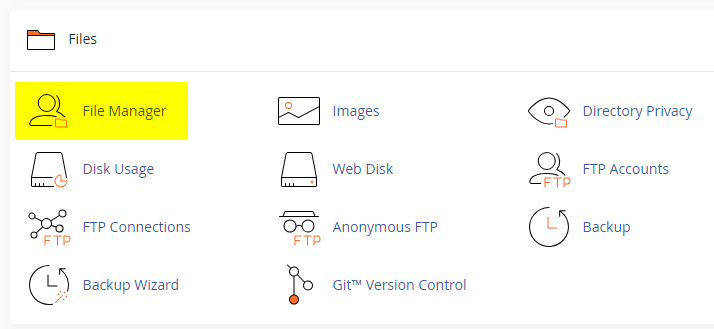
  2. Click on the "File Manager" icon. It's usually under the "Files" section.
  3. You are now in the "File Manager". Open the public_html folder, which is your website's root directory.
  4. Locate the wp-content folder inside "public_html," then open the themes folder inside of it.
  5. In the File Manager interface, click the "Upload" button and choose the theme's .zip file from your local drive.
  6. After it has been uploaded, right-click the .zip file and choose "Extract" or "Unzip".
  7. You can now delete the uploaded .zip file, but it's optional.
  8. Log in to your WordPress dashboard through your web browser.
  9. Go to Appearance → Themes. Now you will see the newly extracted theme.
  10. Make it your active theme by clicking the "Activate" button next to it.

Note: If your hosting provider doesn't offer cPanel, look for a File Manager option in your hosting dashboard (like DirectAdmin, Plesk, or CyberPanel). The process is usually very similar—just find the wp-content/themes folder and upload/extract the theme ZIP file there.

Method 3: Install using FTP

Installing a WordPress theme via FTP is straightforward, though it involves a few more steps compared to using the built-in theme uploader. Here's how to install a WordPress theme using FTP:

  1. Unzip the theme's .zip file you have downloaded.
  2. Connect to your hosting account using an FTP client such as "FileZilla" or "Core FTP".
  3. Navigate to the /wp-content/themes folder in the "Remote site" section.
  4. In the "Local site" section, locate the unzipped theme folder.
  5. Drag and drop the unzipped theme folder from the "Local site" section to the "Remote site" section.
  6. Be patient and let the transfer finish.
  7. Once the transfer is complete, log in to your WordPress dashboard and navigate to Appearance > Themes.
  8. Find the theme you just uploaded and click Activate.

Troubleshooting Tips

  • Didn't receive the download email? Wait 5–10 minutes or check your spam/junk folder. But if you still can not find this email or download link is broken, please inform us. we will send it ASAP.
  • "The uploaded file exceeds the upload_max_filesize directive in php.ini." - If you get this error when following the "Method 1", follow this tutorial: https://themesdna.com/blog/increase-maximum-file-upload-size-wordpress/
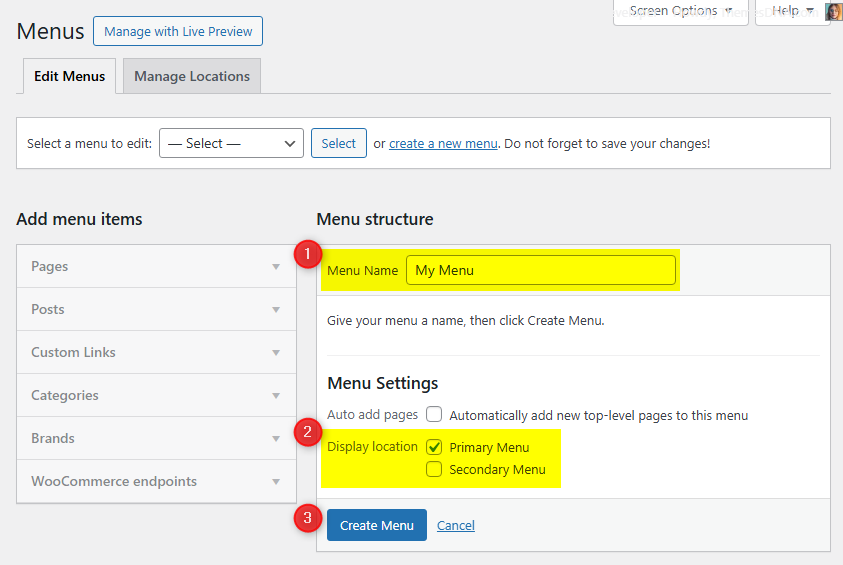
  • My menus disappeared or look different. Go to Appearance → Menus → Manage Locations and reassign your menus to the correct locations.
  • My header text or background color looks different after activating PRO. Reapply your colors in Appearance → Customize → Theme Options → Colors for Header Text Color and Background Color. Then publish.
  • Still can't install the theme? Contact us for help.

Import Demo Content

You can import the demo content, widgets, and Customizer settings shown in the TidyMag PRO theme demo.

Manual Demo Import

Step 1: Import Main Site Content

This includes: Posts, pages, menus, media, categories, tags, comments, and custom fields.

  1. Download: XML File
  2. Go to Tools → Import.
  3. Under "WordPress", click Install Now if not installed.
  4. Click Run Importer.
  5. Select the XML file and click Upload file and import.
  6. Check "Download and import file attachments", click Submit.

Step 2: Import Widgets

  1. Install the Widget Importer & Exporter plugin.
  2. Go to Tools → Widget Importer & Exporter.
  3. Copy content from: Widgets .wie File and paste into the box.
  4. Click Import Widgets.

Step 3: Import Customizer Settings

  1. Download: Customizer File
  2. Install the Customizer Export/Import plugin.
  3. Go to Appearance → Customize → Export/Import.
  4. Select the .dat file, check "Download and import image files?", click Import.

Regenerate Thumbnails

If your website already has existing posts with featured images, it's highly recommended to regenerate thumbnails after activating the TidyMag PRO theme. This ensures that all images match the new theme's layout and display sizes.

Regenerating thumbnails is optional if your site is completely new and doesn't have any uploaded images yet.

However, if you imported the demo content, regenerating thumbnails is essential to display images correctly across the site.

  1. Install and activate the Regenerate Thumbnails plugin.
  2. Go to Tools → Regenerate Thumbnails.
  3. Click the "Regenerate Thumbnails for All x Attachments" button to start the process.
  4. Wait until all images are regenerated. This may take a few minutes depending on your media library size.
  5. If you want, you can deactivate and delete the plugin once the process is complete.

This step ensures clean image alignment and sharp visuals throughout your website using the TidyMag PRO theme.

Header Image

TidyMag PRO supports a site-wide custom header image that displays at the top of your site.

How to Add a Header Image?

  1. Go to AppearanceCustomizeHeader Image.
  2. Click Add new image and select or upload your header image.
  3. Crop the image if needed and publish.

Custom Widgets

Quick Start Guide

To see available widgets and widget areas, navigate to WordPress DashboardAppearanceWidgets. You can drag and drop widgets into widget areas you like.

There are 14 custom widgets bundled with the TidyMag PRO theme:

  1. TidyMag Featured Posts - Style 1
  2. TidyMag Featured Posts - Style 2
  3. TidyMag Featured Posts - Style 3
  4. TidyMag Featured Posts - Style 4
  5. TidyMag Featured Posts - Style 5
  6. TidyMag Featured Posts - Style 6
  7. TidyMag Featured Posts - Style 7
  8. TidyMag Featured Posts - Style 8
  9. TidyMag Recent Posts Widget
  10. TidyMag Popular Posts Widget
  11. TidyMag Random Posts Widget
  12. TidyMag Tabbed Widget
  13. TidyMag Social Icons Widget
  14. TidyMag About Me Widget

TidyMag Tabbed Widget

The Tabbed Widget displays recent, popular, and random posts in a tabbed interface, allowing visitors to switch between different post lists within a single widget area. Each tab can be toggled on/off, renamed, and configured to show thumbnails, dates, comments, and an optional snippet length.

Option ID Option Name Description Control Type Accepted Value Default
titleTitleWidget heading text.TextAny stringTabbed Widget
show_popular_postsShow Popular TabDisplay Tab 1 (Popular Posts).Checkboxtrue/falsetrue
show_recent_postsShow Recent TabDisplay Tab 2 (Recent Posts).Checkboxtrue/falsetrue
show_random_postsShow Random TabDisplay Tab 3 (Random Posts).Checkboxtrue/falsetrue
tab_one_nameTab 1 NameLabel for Tab 1.TextAny stringPopular
tab_two_nameTab 2 NameLabel for Tab 2.TextAny stringRecent
tab_three_nameTab 3 NameLabel for Tab 3.TextAny stringRandom
numberNumber of PostsHow many posts to display per tab.NumberInteger3
show_thumbnailShow ThumbnailDisplay post featured image.Checkboxtrue/falsetrue
show_dateShow DateDisplay post date.Checkboxtrue/falsetrue
show_commentsShow CommentsDisplay comment count.Checkboxtrue/falsetrue
show_snippetShow SnippetDisplay excerpt snippet.Checkboxtrue/falsetrue
snippet_lengthSnippet LengthNumber of words in the snippet.NumberInteger20

TidyMag Social Icons Widget

This widget displays social media icons linked to your profiles. You can toggle rounded style and provide URLs/usernames for supported networks; only filled profiles are shown.

Option ID Option Name Description Control Type Accepted Value Default
titleTitleWidget heading text.TextAny stringSocial Buttons
round_buttonsRound ButtonsUse circular icon style instead of square.Checkboxtrue/falsefalse
facebookFacebook URLProfile/page URL.TextURLNone
twitterTwitter URLProfile URL.TextURLNone
googleplusGoogle Plus URLProfile URL.TextURLNone
pinterestPinterest URLProfile URL.TextURLNone
linkedinLinkedIn URLProfile URL.TextURLNone
instagramInstagram URLProfile URL.TextURLNone
flickrFlickr URLProfile URL.TextURLNone
youtubeYouTube URLChannel/profile URL.TextURLNone
vimeoVimeo URLProfile URL.TextURLNone
soundcloudSoundCloud URLProfile URL.TextURLNone
lastfmLast.fm URLProfile URL.TextURLNone
githubGitHub URLProfile URL.TextURLNone
bitbucketBitbucket URLProfile URL.TextURLNone
tumblrTumblr URLProfile URL.TextURLNone
diggDigg URLProfile URL.TextURLNone
deliciousDelicious URLProfile URL.TextURLNone
stumbleuponStumbleUpon URLProfile URL.TextURLNone
redditReddit URLProfile URL.TextURLNone
dribbbleDribbble URLProfile URL.TextURLNone
behanceBehance URLProfile URL.TextURLNone
vkVK URLProfile URL.TextURLNone
codepenCodePen URLProfile URL.TextURLNone
jsfiddleJSFiddle URLProfile URL.TextURLNone
stackoverflowStack Overflow URLProfile URL.TextURLNone
stackexchangeStack Exchange URLProfile URL.TextURLNone
buyselladsBuySellAds URLProfile URL.TextURLNone
slideshareSlideShare URLProfile URL.TextURLNone
skypeSkype IDUsername for skype: link.TextUsernameNone
envelopeEmail AddressEmail used for mailto link.TextEmailNone
rssRSS Feed URLRSS link.TextURLNone

TidyMag About Me Widget

The About Me widget shows a profile image, short description, and optional social icons. You can switch icon style (round/square) and supply links for supported networks—only filled profiles appear.

Option ID Option Name Description Control Type Accepted Value Default
titleTitleWidget heading text.TextAny stringAbout Me
imageProfile Image URLImage shown above the description.TextURLNone
descriptionDescriptionBio or intro text.TextareaHTML/textNone
round_buttonsRound Social ButtonsUse circular icons instead of square.Checkboxtrue/falsefalse
facebookFacebook URLProfile/page URL.TextURLNone
twitterTwitter URLProfile URL.TextURLNone
googleplusGoogle Plus URLProfile URL.TextURLNone
pinterestPinterest URLProfile URL.TextURLNone
linkedinLinkedIn URLProfile URL.TextURLNone
instagramInstagram URLProfile URL.TextURLNone
flickrFlickr URLProfile URL.TextURLNone
youtubeYouTube URLChannel/profile URL.TextURLNone
vimeoVimeo URLProfile URL.TextURLNone
soundcloudSoundCloud URLProfile URL.TextURLNone
lastfmLast.fm URLProfile URL.TextURLNone
githubGitHub URLProfile URL.TextURLNone
bitbucketBitbucket URLProfile URL.TextURLNone
tumblrTumblr URLProfile URL.TextURLNone
diggDigg URLProfile URL.TextURLNone
deliciousDelicious URLProfile URL.TextURLNone
stumbleuponStumbleUpon URLProfile URL.TextURLNone
redditReddit URLProfile URL.TextURLNone
dribbbleDribbble URLProfile URL.TextURLNone
behanceBehance URLProfile URL.TextURLNone
vkVK URLProfile URL.TextURLNone
codepenCodePen URLProfile URL.TextURLNone
jsfiddleJSFiddle URLProfile URL.TextURLNone
stackoverflowStack Overflow URLProfile URL.TextURLNone
stackexchangeStack Exchange URLProfile URL.TextURLNone
buyselladsBuySellAds URLProfile URL.TextURLNone
slideshareSlideShare URLProfile URL.TextURLNone
skypeSkype UsernameUsername for skype: link.TextUsernameNone
envelopeEmail AddressEmail used for mailto link.TextEmailNone
rssRSS Feed URLRSS link.TextURLNone

TidyMag Recent Posts Widget

Shows your latest posts with optional thumbnails, dates, comment counts, and excerpts.

Option ID Option Name Description Control Type Accepted Value Default
titleTitleWidget heading text.TextAny stringRecent Posts
numberNumber of PostsHow many posts to display.NumberInteger5
show_thumbnailShow ThumbnailDisplay post featured image.Checkboxtrue/falsetrue
show_dateShow DateDisplay post date.Checkboxtrue/falsetrue
show_commentsShow CommentsDisplay comment count.Checkboxtrue/falsetrue
show_snippetShow SnippetDisplay excerpt snippet.Checkboxtrue/falsetrue

TidyMag Random Posts Widget

Displays random posts with optional thumbnails, dates, comment counts, and excerpts.

Option ID Option Name Description Control Type Accepted Value Default
titleTitleWidget heading text.TextAny stringRandom Posts
numberNumber of PostsHow many posts to display.NumberInteger5
show_thumbnailShow ThumbnailDisplay post featured image.Checkboxtrue/falsetrue
show_dateShow DateDisplay post date.Checkboxtrue/falsetrue
show_commentsShow CommentsDisplay comment count.Checkboxtrue/falsetrue
show_snippetShow SnippetDisplay excerpt snippet.Checkboxtrue/falsetrue

Widget Areas

TidyMag PRO provides 16 widget areas across different parts of the site. You can manage them in Appearance → Widgets.

Widget Area Description
Header BannerLocated in the header area of the website.
Sidebar 1Left-hand sidebar.
Sidebar 2Right-hand sidebar.
Top Widgets (Home Page Only)Displayed at the top of the homepage only.
Top Widgets (Posts Only)Displayed at the top of single posts only.
Top Widgets (Posts/Pages Only)Displayed at the top of single posts and pages.
Top Widgets (Every Page)Displayed at the top of every page.
Bottom Widgets (Home Page Only)Displayed at the bottom of the homepage only.
Bottom Widgets (Posts Only)Displayed at the bottom of single posts only.
Bottom Widgets (Posts/Pages Only)Displayed at the bottom of single posts and pages.
Bottom Widgets (Every Page)Displayed at the bottom of every page.
Post Bottom WidgetsDisplayed at the bottom of single posts, before comments.
Footer 1First column in the footer area.
Footer 2Second column in the footer area.
Footer 3Third column in the footer area.
Footer 4Fourth column in the footer area.

Custom Page Templates

TidyMag PRO includes 23 custom page and post templates for different layout configurations:

Page Layout Templates:

  • Full Width Page - Content only, no sidebars
  • Content + Sidebar 1 Page - Content with left sidebar
  • Content + Sidebar 2 Page - Content with right sidebar
  • Content + Sidebar 1 + Sidebar 2 Page - Content with both sidebars on right
  • Content + Sidebar 2 + Sidebar 1 Page - Content with both sidebars on right (reversed)
  • Sidebar 1 + Content Page - Left sidebar with content
  • Sidebar 2 + Content Page - Right sidebar before content
  • Sidebar 1 + Content + Sidebar 2 Page - Content between two sidebars
  • Sidebar 2 + Content + Sidebar 1 Page - Content between two sidebars (reversed)
  • Sidebar 1 + Sidebar 2 + Content Page - Both sidebars on left
  • Sidebar 2 + Sidebar 1 + Content Page - Both sidebars on left (reversed)

Post Layout Templates:

The same 11 layout options are available for single posts as well.

Special Templates:

  • Sitemap - Displays a complete site map of your content

How to Create a Sitemap Page

  1. Go to PagesAdd New.
  2. Enter "Sitemap" as the page title.
  3. On the right side, find the Page Attributes section.
  4. From the Template dropdown, select Sitemap.
  5. Click Publish.

Customizer Theme Options

TidyMag PRO offers extensive customization through the WordPress Customizer. Navigate to Appearance → Customize → Theme Options to access all theme options.

Site Identity Options

Below is the complete list of Site Identity Options available:

Option ID Option Name Description Control Type Accepted Value Default
custom_logoLogoUpload and set the site logo image.Image UploadImage fileNone
blognameSite TitleSite name text shown in the header (when no logo) and browser contexts.TextAny stringCurrent site title
blogdescriptionTaglineShort site description shown beneath the title.TextAny stringCurrent site tagline
site_iconSite Icon (Favicon)Upload the site icon used in browser tabs and mobile.Image UploadSquare image (recommended 512×512px)None
display_header_textDisplay Site Title & TaglineShow or hide the text for the site title and tagline.Checkboxtrue/falsetrue

Colors Options

Below is the complete list of Colors Options available:

Option ID Option Name Description Control Type Accepted Value Default
body_text_colorMain Text ColorMain text color for the site body.Color PickerHex color#555555
link_colorMain Link ColorColor of links in the body text.Color PickerHex color#666666
link_hover_colorMain Link Hover ColorColor of links when hovered.Color PickerHex color#000000
headings_colorGeneral Headings ColorColor of general headings (h1-h6).Color PickerHex color#111111
header_bg_colorHeader Background ColorBackground color of the header area.Color PickerHex color#ffffff
menu_bg_colorMenu Background ColorBackground color of the navigation menu.Color PickerHex color#333333
menu_bd_colorMenu Border ColorBorder color of the navigation menu.Color PickerHex color#555555
menu_colorMenu Link ColorColor of menu links.Color PickerHex color#ffffff
menu_hover_colorMenu Link Hover ColorColor of menu links when hovered.Color PickerHex color#ffffff
menu_hover_bg_colorMenu Link Hover Background ColorBackground color of menu links on hover.Color PickerHex color#000000
submenu_one_bg_colorSubmenu Background ColorBackground color of dropdown submenus.Color PickerHex color#444444
submenu_one_bd_colorSubmenu Border ColorBorder color of dropdown submenus.Color PickerHex color#555555
menu_icon_colorResponsive Menu Icon ColorColor of the mobile menu toggle icon.Color PickerHex color#ffffff
header_social_colorHeader Social Icons ColorColor of social icons in the header.Color PickerHex color#ffffff
header_social_hover_colorHeader Social Icons Hover ColorColor of header social icons when hovered.Color PickerHex color#dddddd
content_bg_colorPosts/Widgets Background ColorBackground color of posts and widgets.Color PickerHex color#ffffff
content_bd_colorPosts/Widgets Border ColorBorder color of posts and widgets.Color PickerHex color#cccccc
post_title_colorPost Title ColorColor of post titles.Color PickerHex color#000000
post_title_hover_colorPost Title Hover ColorColor of post titles when hovered.Color PickerHex color#333333
post_body_link_colorPost Content Link ColorColor of links in post content.Color PickerHex color#409BD4
post_body_link_hover_colorPost Content Link Hover ColorColor of post content links when hovered.Color PickerHex color#08ACD5
postcats_colorPost Categories ColorText color of post categories.Color PickerHex color#ffffff
postcats_bg_colorPost Categories Background ColorBackground color of post categories.Color PickerHex color#8c2828
postcats_hover_colorPost Categories Hover ColorHover text color of post categories.Color PickerHex color#ffffff
postcats_bg_hover_colorPost Categories Hover Background ColorHover background color of post categories.Color PickerHex color#000000
post_meta_colorPost Meta ColorColor of post meta information.Color PickerHex color#666666
post_meta_hover_colorPost Meta Hover ColorColor of post meta links when hovered.Color PickerHex color#000000
rmore_colorRead More Button ColorText color of Read More buttons.Color PickerHex color#ffffff
rmore_bg_colorRead More Background ColorBackground color of Read More buttons.Color PickerHex color#333333
rmore_hover_colorRead More Hover ColorText color of Read More buttons on hover.Color PickerHex color#ffffff
rmore_bg_hover_colorRead More Hover Background ColorBackground of Read More buttons on hover.Color PickerHex color#000000
sidebar_title_colorSidebar Widget Titles ColorColor of sidebar widget titles.Color PickerHex color#000000
sidebar_title_bg_colorSidebar Widget Titles Background ColorBackground color of sidebar widget titles.Color PickerHex color#f2f2f2
sidebar_title_bd_colorSidebar Widget Titles Border ColorBorder color of sidebar widget titles.Color PickerHex color#dddddd
sidebar_text_colorSidebar Text ColorColor of text in sidebar widgets.Color PickerHex color#333333
sidebar_link_colorSidebar Link ColorColor of links in sidebar widgets.Color PickerHex color#333333
sidebar_link_hover_colorSidebar Link Hover ColorColor of sidebar links when hovered.Color PickerHex color#658db5
sidebar_list_bd_colorSidebar List Border ColorBorder color of sidebar list items.Color PickerHex color#dddddd
tag_cloud_colorTag Cloud Link ColorText color of tag cloud links.Color PickerHex color#ffffff
tag_cloud_bg_colorTag Cloud Link Background ColorBackground color of tag cloud links.Color PickerHex color#888888
tag_cloud_hover_colorTag Cloud Link Hover ColorHover text color of tag cloud links.Color PickerHex color#ffffff
tag_cloud_hover_bg_colorTag Cloud Link Hover Background ColorHover background color of tag cloud links.Color PickerHex color#000000
footer_bg_colorFooter Background ColorBackground color of the footer area.Color PickerHex color#333333
footer_bd_colorFooter Border ColorBorder color of the footer area.Color PickerHex color#222222
footer_title_colorFooter Widget Titles ColorColor of footer widget titles.Color PickerHex color#ffffff
footer_title_bg_one_colorFooter Title Border One ColorFirst border color of footer widget titles.Color PickerHex color#222222
footer_title_bg_two_colorFooter Title Border Two ColorSecond border color of footer widget titles.Color PickerHex color#444444
footer_text_colorFooter Text ColorColor of text in the footer area.Color PickerHex color#ffffff
footer_link_colorFooter Link ColorColor of links in the footer area.Color PickerHex color#ffffff
footer_link_hover_colorFooter Link Hover ColorColor of footer links when hovered.Color PickerHex color#dddddd
cp_bg_colorCopyrights Background ColorBackground color of the copyrights bar.Color PickerHex color#2e2e2e
cp_bd_colorCopyrights Border ColorBorder color of the copyrights bar.Color PickerHex color#444444
cp_colorCopyrights Text ColorText color of the copyrights bar.Color PickerHex color#ffffff
g2s2_title_colorGrid 2/Standard 2/Slide Post Titles ColorColor of post titles in grid/standard/slide layout.Color PickerHex color#ffffff
g2s2_title_hover_colorGrid 2/Standard 2/Slide Post Titles Hover ColorHover color of post titles in grid/standard/slide layout.Color PickerHex color#ffffff
g2s2_meta_colorGrid 2/Standard 2 Post Meta ColorColor of post meta in grid/standard/slide layout.Color PickerHex color#ffffff
g2s2_meta_hover_colorGrid 2/Standard 2 Post Meta Hover ColorHover color of post meta in grid/standard/slide layout.Color PickerHex color#ffffff

Font Options

Below is the complete list of Font Options available:

Option ID Option Name Description Control Type Accepted Value Default
font_subsetsFont SubsetsSelect subsets for Google Fonts.Multi Selectlatin, latin-ext, greek, greek-ext, cyrillic, cyrillic-ext, vietnameselatin
body_fontsBody Font-FamilyFont family for body text.DropdownFont listDomine
body_font_sizeBody Font-SizeSize of body text.Dropdown8px–72px13px
body_font_weightBody Font-WeightWeight of body text.Dropdown400/700400
body_font_styleBody Font-StyleStyle of body text.Dropdownnormal/italicnormal
body_line_heightBody Line-HeightLine height for body text.TextNumeric1.6
site_title_fontsSite Title Font-FamilyFont for the site title.DropdownFont listPlayfair Display
site_title_font_sizeSite Title Font-SizeSize of the site title.Dropdown8px–72px24px
site_title_font_weightSite Title Font-WeightWeight of the site title.Dropdown400/700700
site_title_font_styleSite Title Font-StyleStyle of the site title.Dropdownnormal/italicnormal
site_title_line_heightSite Title Line-HeightLine height for the site title.TextNumeric1
site_desc_fontsSite Description Font-FamilyFont for the tagline.DropdownFont listDomine
site_desc_font_sizeSite Description Font-SizeSize of the tagline.Dropdown8px–72px13px
site_desc_font_weightSite Description Font-WeightWeight of the tagline.Dropdown400/700400
site_desc_font_styleSite Description Font-StyleStyle of the tagline.Dropdownnormal/italicnormal
site_desc_line_heightSite Description Line-HeightLine height for the tagline.TextNumeric1
menu_fontsMenu Font-FamilyFont for navigation menu.DropdownFont listOswald
menu_font_sizeMenu Font-SizeSize of menu text.Dropdown8px–72px13px
menu_font_weightMenu Font-WeightWeight of menu text.Dropdown400/700400
menu_font_styleMenu Font-StyleStyle of menu text.Dropdownnormal/italicnormal
hpost_title_fontsHome/Featured Post Title Font-FamilyFont for featured post titles.DropdownFont listPoppins
hpost_title_font_sizeHome/Featured Post Title Font-SizeSize of featured post titles.Dropdown8px–72px20px
hpost_title_font_weightHome/Featured Post Title Font-WeightWeight of featured post titles.Dropdown400/700700
hpost_title_font_styleHome/Featured Post Title Font-StyleStyle of featured post titles.Dropdownnormal/italicnormal
hpost_title_line_heightHome/Featured Post Title Line-HeightLine height for featured post titles.TextNumeric1.2
hpost_title_sm_fontsHome/Featured Small Post Title Font-FamilyFont for small featured post titles.DropdownFont listPoppins
hpost_title_sm_font_sizeHome/Featured Small Post Title Font-SizeSize of small featured post titles.Dropdown8px–72px16px
hpost_title_sm_font_weightHome/Featured Small Post Title Font-WeightWeight of small featured post titles.Dropdown400/700700
hpost_title_sm_font_styleHome/Featured Small Post Title Font-StyleStyle of small featured post titles.Dropdownnormal/italicnormal
hpost_title_sm_line_heightHome/Featured Small Post Title Line-HeightLine height for small featured post titles.TextNumeric1.2
hpost_cats_fontsHome/Featured Post Categories Font-FamilyFont for featured post categories.DropdownFont listOswald
hpost_cats_font_sizeHome/Featured Post Categories Font-SizeSize of featured post category text.Dropdown8px–72px12px
hpost_cats_font_weightHome/Featured Post Categories Font-WeightWeight of featured post categories.Dropdown400/700400
hpost_cats_font_styleHome/Featured Post Categories Font-StyleStyle of featured post categories.Dropdownnormal/italicnormal
hpost_meta_fontsHome/Featured Post Meta Font-FamilyFont for featured post meta.DropdownFont listOswald
hpost_meta_font_sizeHome/Featured Post Meta Font-SizeSize of featured post meta text.Dropdown8px–72px12px
hpost_meta_font_weightHome/Featured Post Meta Font-WeightWeight of featured post meta.Dropdown400/700400
hpost_meta_font_styleHome/Featured Post Meta Font-StyleStyle of featured post meta.Dropdownnormal/italicnormal
read_more_fontsRead More Button Font-FamilyFont for read more buttons.DropdownFont listOswald
read_more_font_sizeRead More Button Font-SizeSize of read more button text.Dropdown8px–72px13px
read_more_font_weightRead More Button Font-WeightWeight of read more button text.Dropdown400/700400
read_more_font_styleRead More Button Font-StyleStyle of read more button text.Dropdownnormal/italicnormal
post_title_fontsPost Title Font-FamilyFont for post titles.DropdownFont listOswald
post_title_font_sizePost Title Font-SizeSize of post titles.Dropdown8px–72px28px
post_title_font_weightPost Title Font-WeightWeight of post titles.Dropdown400/700400
post_title_font_stylePost Title Font-StyleStyle of post titles.Dropdownnormal/italicnormal
post_title_line_heightPost Title Line-HeightLine height for post titles.TextNumeric1.2
widget_title_fontsMain/Sidebar Widget Title Font-FamilyFont for sidebar widget titles.DropdownFont listOswald
widget_title_font_sizeMain/Sidebar Title Font-SizeSize of sidebar widget titles.Dropdown8px–72px16px
widget_title_font_weightMain/Sidebar Title Font-WeightWeight of sidebar widget titles.Dropdown400/700400
widget_title_font_styleMain/Sidebar Title Font-StyleStyle of sidebar widget titles.Dropdownnormal/italicnormal
sidebar_title_line_heightMain/Sidebar Title Line-HeightLine height for sidebar widget titles.TextNumeric1
footer_title_fontsFooter Widget Title Font-FamilyFont for footer widget titles.DropdownFont listOswald
footer_title_font_sizeFooter Title Font-SizeSize of footer widget titles.Dropdown8px–72px15px
footer_title_font_weightFooter Title Font-WeightWeight of footer widget titles.Dropdown400/700400
footer_title_font_styleFooter Title Font-StyleStyle of footer widget titles.Dropdownnormal/italicnormal
footer_title_line_heightFooter Title Line-HeightLine height for footer widget titles.TextNumeric1
headings_fontsGeneral Headings Font-FamilyFont for headings (H1–H6).DropdownFont listPlayfair Display
headings_line_heightGeneral Headings Line-HeightLine height for headings.TextNumeric1
h1_font_sizeH1 Font-SizeSize of H1 headings.Dropdown8px–72px32px
h1_font_weightH1 Font-WeightWeight of H1 headings.Dropdown400/700700
h1_font_styleH1 Font-StyleStyle of H1 headings.Dropdownnormal/italicnormal
h2_font_sizeH2 Font-SizeSize of H2 headings.Dropdown8px–72px28px
h2_font_weightH2 Font-WeightWeight of H2 headings.Dropdown400/700700
h2_font_styleH2 Font-StyleStyle of H2 headings.Dropdownnormal/italicnormal
h3_font_sizeH3 Font-SizeSize of H3 headings.Dropdown8px–72px24px
h3_font_weightH3 Font-WeightWeight of H3 headings.Dropdown400/700700
h3_font_styleH3 Font-StyleStyle of H3 headings.Dropdownnormal/italicnormal
h4_font_sizeH4 Font-SizeSize of H4 headings.Dropdown8px–72px20px
h4_font_weightH4 Font-WeightWeight of H4 headings.Dropdown400/700700
h4_font_styleH4 Font-StyleStyle of H4 headings.Dropdownnormal/italicnormal
h5_font_sizeH5 Font-SizeSize of H5 headings.Dropdown8px–72px18px
h5_font_weightH5 Font-WeightWeight of H5 headings.Dropdown400/700700
h5_font_styleH5 Font-StyleStyle of H5 headings.Dropdownnormal/italicnormal
h6_font_sizeH6 Font-SizeSize of H6 headings.Dropdown8px–72px16px
h6_font_weightH6 Font-WeightWeight of H6 headings.Dropdown400/700700
h6_font_styleH6 Font-StyleStyle of H6 headings.Dropdownnormal/italicnormal

Header Image Options

Below is the complete list of Header Image Options available:

Option ID Option Name Description Control Type Accepted Value Default
header_imageHeader ImageUpload and set the site header image (displayed in the Header Image section).Image UploadImage file (recommended 1270×200)None

Header Options

Below is the complete list of Header Options available:

Option ID Option Name Description Control Type Accepted Value Default
enable_fullwidth_headerEnable Full Width HeaderStretch the header full width (hides the header banner widget area).Checkboxtrue/falsefalse
hide_header_contentHide Header ContentHide the entire header content (logo, description, header banner).Checkboxtrue/falsefalse

Layout Options

Below is the complete list of Layout Options available:

Option ID Option Name Description Control Type Accepted Value Default
layout_style Layout Style for Singular Pages Choose the default layout for single posts/pages. Radio c-s1 (Content + Sidebar 1), c-s1-s2 (Content + Sidebar 1 + Sidebar 2), c-s2 (Content + Sidebar 2), c-s2-s1 (Content + Sidebar 2 + Sidebar 1), s1-c (Sidebar 1 + Content), s1-c-s2 (Sidebar 1 + Content + Sidebar 2), s1-s2-c (Sidebar 1 + Sidebar 2 + Content), s2-c (Sidebar 2 + Content), s2-c-s1 (Sidebar 2 + Content + Sidebar 1), s2-s1-c (Sidebar 2 + Sidebar 1 + Content), c100 (Full Width) s1-c-s2

Post Options

Below is the complete list of Post Options available:

Option ID Option Name Description Control Type Accepted Value Default
posts_headingHomepage Posts HeadingText shown as the heading above posts on the homepage.TextAny stringRecent Posts
thumbnail_linkThumbnail LinkChoose whether single post thumbnail links to the post or image.Selectyes/noyes
post_styleNon-Singular Posts StyleDisplay style for archives/home/search pages.Selectstandard, standard-2, list, list-2, list-3, grid, grid-2, fullgrid-2
read_more_lengthAuto Post Summary LengthNumber of words in the automatic post summary.TextInteger25
read_more_textRead More TextLabel for the Read More link/button.TextAny stringContinue Reading...
hide_posted_dateHide Posted DateHide the posted date on posts.Checkboxtrue/falsefalse
hide_post_authorHide Post AuthorHide the author name on posts.Checkboxtrue/falsefalse
hide_post_categoriesHide Post CategoriesHide category links on posts.Checkboxtrue/falsefalse
hide_post_tagsHide Post TagsHide tag links on posts.Checkboxtrue/falsefalse
hide_comments_linkHide Comment LinkHide the comments link on posts.Checkboxtrue/falsefalse
hide_post_editHide Post Edit LinkHide the edit link (for logged-in users).Checkboxtrue/falsefalse
hide_thumbnailHide Thumbnails from Every PageRemove thumbnails from all listings.Checkboxtrue/falsefalse
hide_thumbnail_singleHide Thumbnails from Posts/PagesRemove thumbnails on single posts/pages.Checkboxtrue/falsefalse
hide_post_snippetHide Post SnippetHide the post excerpt/snippet.Checkboxtrue/falsefalse
hide_read_more_buttonHide Read More ButtonHide the Read More button on archives.Checkboxtrue/falsefalse
hide_share_buttonsHide Share ButtonsHide social share buttons on posts.Checkboxtrue/falsefalse
hide_author_bio_boxHide Author Bio BoxHide the author bio box on single posts.Checkboxtrue/falsefalse
hide_related_postsHide Related PostsHide the related posts section on single posts.Checkboxtrue/falsefalse
related_posts_numberNumber of Related PostsHow many related posts to show.Select4, 8, 12, 164

Social Links Options

Below is the complete list of Social Links Options available:

Option ID Option Name Description Control Type Accepted Value Default
hide_header_social_buttonsHide Header Social ButtonsHide social icons in the header area.Checkboxtrue/falsefalse
show_footer_social_buttonsShow Footer Social ButtonsDisplay social icons in the footer area.Checkboxtrue/falsefalse
twitterlinkTwitter URLLink to your Twitter profile.TextURLEmpty
facebooklinkFacebook URLLink to your Facebook page/profile.TextURLEmpty
googlelinkGoogle Plus URLLink to your Google Plus profile.TextURLEmpty
pinterestlinkPinterest URLLink to your Pinterest profile.TextURLEmpty
linkedinlinkLinkedIn URLLink to your LinkedIn profile.TextURLEmpty
instagramlinkInstagram URLLink to your Instagram profile.TextURLEmpty
flickrlinkFlickr URLLink to your Flickr profile.TextURLEmpty
youtubelinkYouTube URLLink to your YouTube channel.TextURLEmpty
vimeolinkVimeo URLLink to your Vimeo profile.TextURLEmpty
soundcloudlinkSoundCloud URLLink to your SoundCloud profile.TextURLEmpty
lastfmlinkLast.fm URLLink to your Last.fm profile.TextURLEmpty
githublinkGitHub URLLink to your GitHub profile.TextURLEmpty
bitbucketlinkBitbucket URLLink to your Bitbucket profile.TextURLEmpty
tumblrlinkTumblr URLLink to your Tumblr profile.TextURLEmpty
digglinkDigg URLLink to your Digg profile.TextURLEmpty
deliciouslinkDelicious URLLink to your Delicious profile.TextURLEmpty
stumblelinkStumbleUpon URLLink to your StumbleUpon profile.TextURLEmpty
redditlinkReddit URLLink to your Reddit profile.TextURLEmpty
dribbblelinkDribbble URLLink to your Dribbble profile.TextURLEmpty
behancelinkBehance URLLink to your Behance profile.TextURLEmpty
vklinkVK URLLink to your VK profile.TextURLEmpty
codepenlinkCodePen URLLink to your CodePen profile.TextURLEmpty
jsfiddlelinkJSFiddle URLLink to your JSFiddle profile.TextURLEmpty
stackoverflowlinkStack Overflow URLLink to your Stack Overflow profile.TextURLEmpty
stackexchangelinkStack Exchange URLLink to your Stack Exchange profile.TextURLEmpty
bsalinkBuySellAds URLLink to your BuySellAds profile.TextURLEmpty
slidesharelinkSlideShare URLLink to your SlideShare profile.TextURLEmpty
skypeusernameSkype UsernameYour Skype username.TextUsernameEmpty
emailaddressEmail AddressEmail address for contact.TextEmailEmpty
rsslinkRSS Feed URLCustom RSS feed link.TextURLEmpty

404 Page Options

Below is the complete list of 404 Page Options available:

Option ID Option Name Description Control Type Accepted Value Default
error_404_heading404 Error Page HeadingHeading text shown on the 404 page.TextareaAny textOops! That page can not be found.
error_404_messageError 404 MessageMessage displayed on the 404 error page.TextareaAny textIt looks like nothing was found at this location. Maybe try one of the links below or a search?

Other Options

Below is the complete list of Other Options available:

Option ID Option Name Description Control Type Accepted Value Default
disable_smenuDisable Sticky MenuPrevents the navigation menu from sticking to the top when scrolling.Checkboxtrue/falsefalse
disable_ssidebarDisable Sticky SidebarPrevents the sidebar from sticking when scrolling.Checkboxtrue/falsefalse
disable_backtotopDisable Back to Top ButtonRemoves the back-to-top button.Checkboxtrue/falsefalse
enable_widgets_block_editorEnable Gutenberg Widget Block EditorEnable the block-based widget editor instead of the classic widgets screen.Checkboxtrue/falsefalse

Reset Options

Below is the complete list of Reset Options available:

Option ID Option Name Description Control Type Accepted Value Default
reset_settingsReset SettingsReset all theme options to their default values.Buttontidymag-reset-button

Performance & SEO Tips

  • Use a caching plugin — Install a caching plugin like WP Super Cache, W3 Total Cache, or LiteSpeed Cache to speed up your site.
  • Optimize images — Use plugins like ShortPixel, Imagify, or Smush to compress images without losing quality.
  • Use a CDN — A Content Delivery Network like Cloudflare can significantly improve loading times for visitors worldwide.
  • Minimize plugins — Only use plugins you truly need. Each plugin adds overhead to your site.
  • Keep WordPress updated — Always run the latest version of WordPress, themes, and plugins for security and performance.
  • Install an SEO plugin — Use Yoast SEO or Rank Math to optimize your content for search engines.
  • Use quality hosting — Choose a reliable hosting provider with good server performance (e.g., SiteGround, Cloudways, A2 Hosting).
  • Enable GZIP compression — Most caching plugins can enable this, or add it manually via .htaccess.
  • Lazy load images — WordPress 5.5+ includes native lazy loading. Ensure it's not disabled.

Translation & RTL

TidyMag PRO is fully translation-ready and supports Right-to-Left (RTL) languages like Arabic, Hebrew, and Persian out of the box.

🌐 Translating the Theme

The theme includes a tidymag-pro.pot file located in the /languages folder inside the theme directory. You can use this file to create translations in your own language using any of the following tools:

After translating, save your files as:

  • tidymag-pro-[language_code].po
  • tidymag-pro-[language_code].mo

Place them inside the /languages folder in the theme.

↔️ RTL Language Support

TidyMag PRO includes built-in RTL support. If your WordPress site language is set to an RTL language, the theme will automatically adjust layout direction, alignment, and spacing accordingly. No extra setup required.

If you're customizing your site with RTL content, make sure your text widgets, menus, and custom styles are also RTL-compatible for best results.

FAQ

How do I update the theme?

Download the latest version from your purchase account, then either upload it via Appearance → Themes → Add New → Upload Theme or replace the files via FTP. Your customizer settings will be preserved.

How do I change the sidebar layout?

Go to Appearance → Customize → Theme Options → Layout Options to change the default layout. You can also use page/post templates for individual content.

How do I add social media icons?

Go to Appearance → Customize → Theme Options → Social Links and add your social profile URLs. Icons will appear automatically in the header (and optionally in the footer).

How do I hide the header banner area?

Enable the Full Width Header option under Theme Options → Header Options, which will hide the header banner widget area and make the logo area full-width.

Can I use a custom logo instead of the site title?

Yes, go to Appearance → Customize → Site Identity and upload your logo image. It will replace the text site title.

Troubleshooting

Theme looks different from the demo

Make sure you've imported the demo content, widgets, and customizer settings as described in the Import Demo Content section. Also run the Regenerate Thumbnails process.

Sidebar is not showing

Ensure you have widgets added to the sidebar widget areas in Appearance → Widgets. Also check that your page/post template is not set to "Full Width".

Menu is not displaying correctly

Go to Appearance → Menus and make sure you have assigned a menu to the correct display location. See the Navigation Menus section.

Images are cropped or the wrong size

Run the Regenerate Thumbnails process after installing the theme or importing demo content.

White screen or PHP errors

This usually indicates a PHP version incompatibility or plugin conflict. Try deactivating all plugins and switching to a default WordPress theme to isolate the issue. Ensure your server runs PHP 7.4 or higher.

Support & Licensing

All our WordPress themes, including TidyMag PRO, are released under the 100% GPL (General Public License). You can use the theme on unlimited websites and modify the code to suit your needs.

What’s included in free support:

  • Help with theme installation and setup
  • Bug fixes and troubleshooting related to the theme
  • Guidance on using built-in theme features

What’s not included in free support (but available as paid tasks):

  • Theme customization or resolving third-party plugin conflicts
  • Custom coding or feature implementation requests
  • Performance tuning, SEO setup, or server configuration assistance

If you need help or would like to request a paid customization, please contact us. We typically respond within 24–48 hours on working days.

Contact Support

Changelog & Versioning

Version 1.0.5

  • Fixed coding issues.

Version 1.0.4

  • Fixed coding issues.
  • Theme customizer updated.

Version 1.0.3

  • Fixed coding issues.
  • Theme customizer updated.

Version 1.0

  • Initial Release.

Date Formats

You can use the following date format values to control how dates appear in various places such as custom widgets, post metadata, news tickers, and more. These formats follow the standard PHP date formatting rules used by WordPress. Refer to the table below to choose a format that best fits your design and content style.

Format KeyExample Output
H:i00:50
g:i a12:50 am
g:i A12:50 AM
g:i:s a12:50:48 am
g:i:s A12:50:48 AM
d.m.y27.11.10
Y.m.d2010.11.27
Y-m-d2010-11-27
Y/m/d2010/11/27
m.d.Y11.27.2010
m-d-Y11-27-2010
m/d/Y11/27/2010
d.m.Y27.11.2010
d-m-Y27-11-2010
d/m/Y27/11/2010
m/d/Y g:i:s a11/27/2010 12:50:48 am
m/d/Y g:i:s A11/27/2010 12:50:48 AM
Y/m/d \a\t g:i a2010/11/27 at 12:50 am
Y/m/d \a\t g:i A2010/11/27 at 12:50 AM
d F27 November
F, YNovember, 2010
F j, YNovember 27, 2010
d M Y27 Nov 2010
M j, YNov 27, 2010
M j, Y @ H:iNov 27, 2010 @ 0:50
l, F j, YSaturday, November 27, 2010
l, F jS, YSaturday, November 27th, 2010