TextWP PRO Documentation

Introduction

TextWP PRO is a clean, minimal, fully responsive, and highly customizable WordPress blogging theme developed by ThemesDNA, designed specifically for writers, bloggers, and content creators. With options for compact or full post styles, multiple layout configurations, 5 distinct header styles, AJAX-powered featured posts widgets, a responsive slider widget, tabbed widget, 60+ social buttons, RTL support, WooCommerce compatibility, sticky sidebars, and 38+ widget areas, TextWP PRO is the ideal choice for a professional blogging WordPress theme.

Current Theme Version: 1.0.6

Theme Installation

After purchasing the TextWP PRO WordPress Theme, you'll receive a download link via email. Check your email inbox (or spam folder) for the product delivery email. Click the provided download link to download the theme's .zip file to your computer. Follow one of a method given below to install the theme on your website.

Upgrading from the Free TextWP Theme?

TextWP PRO is a separate theme. Whether or not you're currently using the free TextWP theme, you need to install TextWP PRO using one of the methods below.

If you're upgrading from the free version, most of your existing WordPress Customizer settings will remain in place. So you don't need to reconfigure everything from scratch. However, you will need to reupload a few images and reapply specific color settings.

After activating TextWP PRO, go to Appearance → Customize and reupload the following:

  • Site Logo
  • Site Icon (favicon)
  • Header Image
  • Background Image

If you changed below color options in the free version, reapply them in Appearance → Customize → Theme Options → Colors:

  • Header Text Color
  • Background Color

Tip: You can install PRO without deleting the free theme. Use Live Preview to confirm your layout, then click Activate & Publish.

Method 1: Install Using the WordPress Dashboard (Easiest and Fastest)

This is the easiest and fastest method to install this WordPress theme.

  1. Go to "WordPress Dashboard" → "Appearance" → "Themes" and click on "Add New" button.
  2. Click on "Upload Theme" button and choose the zip file you have downloaded.
  3. Click on "Install Now" button.
  4. Activate the theme.
  5. Now go to "Appearance" → "Customize" to configure theme options.

Method 2: Install using cPanel File Manager

In some cases, you may not be able to install a WordPress theme through the WordPress dashboard—especially if the theme's ZIP file exceeds the maximum upload size limit. When this happens, you can install the theme using cPanel's File Manager, which is often simpler than using FTP. Follow the steps below to install your theme via the File Manager in cPanel.

  1. Log in to your cPanel account. Your cPanel URL will be https://yourdomain.com/cpanel or a similar URL.
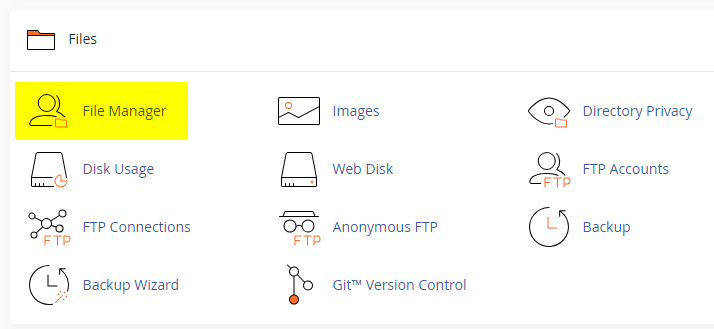
  2. Click on the "File Manager" icon. It's usually under the "Files" section.
  3. You are now in the "File Manager". Open the public_html folder, which is your website's root directory.
  4. Locate the wp-content folder inside "public_html," then open the themes folder inside of it.
  5. In the File Manager interface, click the "Upload" button and choose the theme's .zip file from your local drive.
  6. After it has been uploaded, right-click the .zip file and choose "Extract" or "Unzip".
  7. You can now delete the uploaded .zip file, but it's optional.
  8. Log in to your WordPress dashboard through your web browser.
  9. Go to Appearance → Themes. Now you will see the newly extracted theme.
  10. Make it your active theme by clicking the "Activate" button next to it.

Note: If your hosting provider doesn't offer cPanel, look for a File Manager option in your hosting dashboard (like DirectAdmin, Plesk, or CyberPanel). The process is usually very similar—just find the wp-content/themes folder and upload/extract the theme ZIP file there.

Method 3: Install using FTP

Installing a WordPress theme via FTP is straightforward, though it involves a few more steps compared to using the built-in theme uploader. Here's how to install a WordPress theme using FTP:

  1. Unzip the theme's .zip file you have downloaded.
  2. Connect to your hosting account using an FTP client such as "FileZilla" or "Core FTP".
  3. Navigate to the /wp-content/themes folder in the "Remote site" section.
  4. In the "Local site" section, locate the unzipped theme folder.
  5. Drag and drop the unzipped theme folder from the "Local site" section to the "Remote site" section.
  6. Be patient and let the transfer finish.
  7. Once the transfer is complete, log in to your WordPress dashboard and navigate to Appearance > Themes.
  8. Find the theme you just uploaded and click Activate.

Troubleshooting Tips

  • Didn't receive the download email? Wait 5–10 minutes or check your spam/junk folder. But if you still can not find this email or download link is broken, please inform us. we will send it ASAP.
  • "The uploaded file exceeds the upload_max_filesize directive in php.ini." - If you get this error when following the "Method 1", follow this tutorial: https://themesdna.com/blog/increase-maximum-file-upload-size-wordpress/
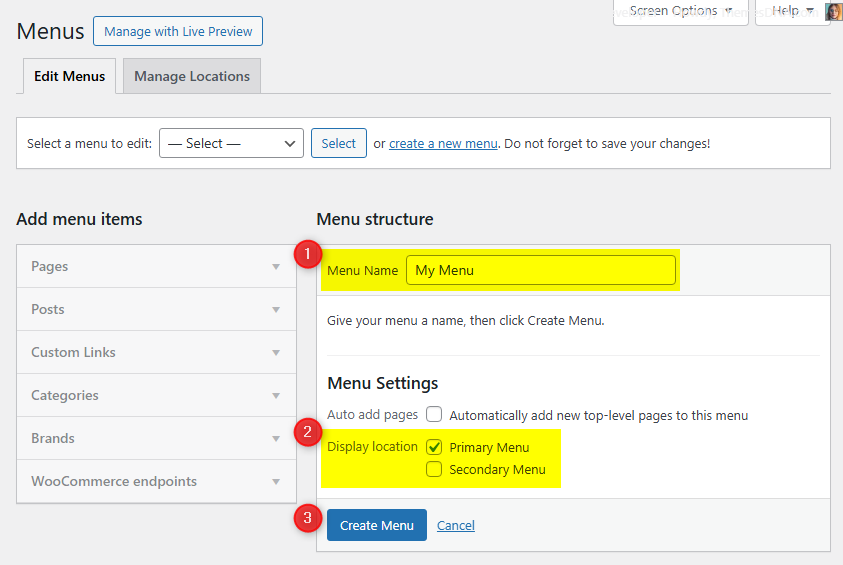
  • My menus disappeared or look different. Go to Appearance → Menus → Manage Locations and reassign your menus to the correct locations.
  • My header text or background color looks different after activating PRO. Reapply your colors in Appearance → Customize → Theme Options → Colors for Header Text Color and Background Color. Then publish.
  • Still can't install the theme? Contact us for help.

Import Demo Content

You can import the demo content, widgets, and Customizer settings shown in the TextWP PRO theme demo.

Manual Demo Import

Step 1: Import Main Site Content

This includes: Posts, pages, menus, media, categories, tags, comments, and custom fields.

  1. Download: XML File
  2. Go to Tools → Import.
  3. Under "WordPress", click Install Now if not installed.
  4. Click Run Importer.
  5. Select the XML file and click Upload file and import.
  6. Check "Download and import file attachments", click Submit.

Step 2: Import Widgets

  1. Install the Widget Importer & Exporter plugin.
  2. Go to Tools → Widget Importer & Exporter.
  3. Copy content from: Widgets .wie File and paste into the box.
  4. Click Import Widgets.

Step 3: Import Customizer Settings

  1. Download: Customizer File
  2. Install the Customizer Export/Import plugin.
  3. Go to Appearance → Customize → Export/Import.
  4. Select the .dat file, check "Download and import image files?", click Import.

Regenerate Thumbnails

If your website already has existing posts with featured images, it's highly recommended to regenerate thumbnails after activating the TextWP PRO theme. This ensures that all images match the new theme's layout and display sizes.

Regenerating thumbnails is optional if your site is completely new and doesn't have any uploaded images yet.

However, if you imported the demo content, regenerating thumbnails is essential to display images correctly across the site.

  1. Install and activate the Regenerate Thumbnails plugin.
  2. Go to Tools → Regenerate Thumbnails.
  3. Click the "Regenerate Thumbnails for All x Attachments" button to start the process.
  4. Wait until all images are regenerated. This may take a few minutes depending on your media library size.
  5. If you want, you can deactivate and delete the plugin once the process is complete.

This step ensures clean image alignment and sharp visuals throughout your website using the TextWP PRO theme.

Header Image

Quick Start Guide

TextWP PRO allows users to upload a site-wide custom header image with custom title and description. You can also upload a unique header image for each post/page replacing the site-wide header image.

There are header image options in: Theme Customizer, post edit screen, and page edit screen.

How to Add a Header Image?

There are 3 types of header images in this theme:

  1. Site-wide Header Image: Appearance → Customize → Theme Options → Header Image
  2. Header Images of Posts: Post Edit Screen → "Post Settings - TextWP PRO" Meta Box → Site Header Image
  3. Header Images of Pages: Page Edit Screen → "Page Settings - TextWP PRO" Meta Box → Site Header Image

How to Add a Site-wide Header Image?

Site-wide header image will be displayed everywhere on your website. But if you add a header image to a post/page, the site-wide header image will be replaced by that header image.

  1. Go to AppearanceCustomizeTheme OptionsHeader Image
  2. Upload your header image using the Add new image button.

How to Add a Header Image to a Post?

  1. Go to the edit screen of that post.
  2. Find the Post Settings - TextWP PRO meta box.
  3. Add your image URL or upload an image using Site Header Image option.

How to Add a Header Image to a Page?

  1. Go to the edit screen of that page.
  2. Find the Page Settings - TextWP PRO meta box.
  3. Add your image URL or upload an image using Site Header Image option.

How to Add a Custom Title/Description to Header Image?

By default, the theme displays your website's title as the header image title and the tagline as the header image description. You can replace both with custom values.

Add Custom Title/Description to Site-wide Header Image:

  1. Go to AppearanceCustomizeTheme OptionsHeader Image
  2. Add your custom title to Header Image Custom Title.
  3. Add your custom description to Header Image Custom Description.
  4. Save settings.

Add Custom Title/Description to the Header Image of a Post:

  1. Go to the edit screen of that post.
  2. Find the Post Settings - TextWP PRO meta box.
  3. Use Site Header Image Title and Site Header Image Description options.
  4. Update the post.

Add Custom Title/Description to the Header Image of a Page:

  1. Go to the edit screen of that page.
  2. Find the Page Settings - TextWP PRO meta box.
  3. Use Site Header Image Title and Site Header Image Description options.
  4. Update the page.

How to Hide Title/Description from Header Image?

  1. Go to AppearanceCustomizeTheme OptionsHeader Image.
  2. Check Hide both Title and Description from Header Image.
  3. Save settings.

Note: This hides both header image title and description sitewide.

Custom Widgets

Quick Start Guide

Navigate to WordPress DashboardAppearanceWidgets to see available widgets and widget areas. There are 5 custom widgets bundled with TextWP PRO:

  1. TextWP Featured Posts - Style 1
  2. TextWP Featured Posts - Style 2
  3. TextWP Slider Widget
  4. TextWP Tabbed Widget
  5. TextWP About and Social Widget

TextWP Slider Widget

Displays a responsive OwlCarousel2 slider of posts. You can choose posts by recent, category, tag, or specific IDs, control ordering, and toggle post meta, snippets, share buttons, and category labels. Slider behavior supports optional autoplay, loop, dots, arrows, auto height, custom speed, spacing, and responsive item counts.

Key Features

  • Post sources: recent posts, a category, a tag, or specific post IDs
  • Sort by published date, modified date, number of comments, or random; choose ASC/DESC order
  • Show/hide categories, title, author, date, comments, snippet (content/excerpt), and share buttons
  • Pick snippet type and length; set date format
  • Thumbnail size presets for multiple dimensions
  • Autoplay, loop, dots, and navigation arrows (all optional)
  • Responsive items per view for 4 breakpoints, margin spacing, and custom autoplay speed
Option IDOption NameDescriptionControl TypeAccepted ValueDefault
titleTitleWidget title displayed above the slider.TextPlain textFeatured Posts - Slider Widget
post_typeChoose the Post Type to displaySource of posts.SelectRecent Posts, Category Posts, Tag Posts, Posts by IDsRecent Posts
include_postsDisplay these posts (Posts by IDs)IDs to include when Post Type is Posts by IDs.TextComma-separated IDs (no spaces)(empty)
featured_catSelect a CategoryCategory when Post Type is Category Posts.SelectAny WordPress category(empty)
featured_tagSelect a TagTag when Post Type is Tag Posts.SelectAny WordPress tag(empty)
orderbyOrderbySorting criteria.SelectPublished Date, Modified Date, Number of Comments, RandomPublished Date
orderOrderSorting direction.SelectAscending, DescendingDescending
posts_per_pageNumber of posts to showHow many posts to display.TextPositive whole number5
dateformatPost Date FormatPHP date format string.Texte.g., Y-m-dY-m-d
exclude_postsExclude these postsPost IDs to exclude.TextComma-separated IDs(empty)
show_catsDisplay Post Categories?Toggle categories.Checkboxtrue / falsefalse
show_titleDisplay Post Titles?Toggle titles.Checkboxtrue / falsetrue
show_authorDisplay Post Authors?Toggle author meta.Checkboxtrue / falsetrue
show_dateDisplay Post Dates?Toggle date meta.Checkboxtrue / falsetrue
show_commentsDisplay Number of Comments?Toggle comment count.Checkboxtrue / falsetrue
show_sharebtnsDisplay Share Buttons?Show share buttons.Checkboxtrue / falsetrue
show_snippetDisplay Post Snippet?Show trimmed content/excerpt.Checkboxtrue / falsefalse
snippet_typePost Snippet TypeSource of snippet text.SelectPost Content, Post ExcerptPost Content
snippet_lengthPost snippet lengthWords shown in snippet (for Post Content).TextPositive whole number15
autoplayAutoplay sliderAutomatically cycle slides.Checkboxtrue / falsefalse
loopLoopDuplicate ends for loop effect.Checkboxtrue / falsefalse
dotsShow dots navigationToggle dot pagination.Checkboxtrue / falsetrue
navShow next/prev buttonsToggle navigation arrows.Checkboxtrue / falsefalse
autoheightAuto height slide itemsAdjust slide height automatically.Checkboxtrue / falsefalse
thumb_styleChoose the Thumbnail Size for SliderThumbnail dimensions preset.Select480:240, 480:288, 480:360, 480:480, 480:640, 760:450, 760:auto, 1130:565, 1130:auto480:360
autoplaytimeoutSlider SpeedAutoplay timeout in milliseconds.TextPositive whole number4000
marginMargin between slidesRight margin (px) on a slide item.TextPositive whole number10
itemsoneItems (≥1024px)Slides shown at 1024px and above.TextPositive whole number2
itemstwoItems (991–1023px)Slides shown between 991px and 1023px.TextPositive whole number2
itemsthreeItems (560–990px)Slides shown between 560px and 990px.TextPositive whole number2
itemsfourItems (1–559px)Slides shown between 1px and 559px.TextPositive whole number1

TextWP Tabbed Widget

Displays three separate tabs of posts in a tabbed interface. Each tab can be configured independently to display posts based on recent posts, a category, a tag, or specific post IDs with different sorting options.

Key Features

  • Three independently configurable tabs
  • AJAX-based pagination per tab (with optional page numbers)
  • Multiple sorting options: comments, dates, random
  • Customizable display: columns, thumbnails (with default fallback), titles, metadata, snippets, share buttons, read more link
  • Center tab names option
  • Responsive tabbed interface

Usage Notes

  • Each tab operates independently with its own post selection and sorting criteria
  • AJAX navigation provides smoother UX without page reloads
  • Post IDs should be entered as comma-separated values without spaces

The widget provides per-tab settings for: post type, category/tag, orderby, order, exclude posts, and posts per page. Shared settings include: title, show/hide each tab, tab names, date format, show thumbnail, show author/date/comments/snippet, snippet type/length, show share buttons, center tabs, AJAX navigation, and page numbers.

Option IDOption NameDescriptionControl TypeAccepted ValueDefault
titleTitleWidget title displayed above the tabs.TextPlain textTabbed Widget
post_columnChoose the Columns StyleLayout columns for posts.Select1 Column, 2 Columns, 3 Columns, 4 Columns1 Column
thumb_styleChoose the Thumbnail SizeThumbnail dimensions preset.Select100:100, 100:120, 480:240, 480:288, 480:360, 480:480, 480:640, 760:450, 1130:565100:100
show_taboneDisplay Tab 1Show/hide first tab.Checkboxtrue / falsetrue
show_tabtwoDisplay Tab 2Show/hide second tab.Checkboxtrue / falsetrue
show_tabthreeDisplay Tab 3Show/hide third tab.Checkboxtrue / falsetrue
tabone_nameTab 1 NameLabel for first tab.TextPlain textPopular
tabtwo_nameTab 2 NameLabel for second tab.TextPlain textRecent
tabthree_nameTab 3 NameLabel for third tab.TextPlain textRandom
posts_per_pageNumber of posts to showPosts displayed per tab.TextPositive whole number3
dateformatPost Date FormatPHP date format string.Texte.g., Y-m-dY-m-d
show_thumbnailDisplay Post Thumbnail?Toggle featured image output.Checkboxtrue / falsetrue
show_default_imageDisplay Default Image?Use fallback image if no thumbnail.Checkboxtrue / falsetrue
show_titleDisplay Post Title?Toggle title output.Checkboxtrue / falsetrue
show_authorDisplay Post Author?Toggle author meta.Checkboxtrue / falsefalse
show_dateDisplay Post Date?Toggle date meta.Checkboxtrue / falsetrue
show_commentsDisplay Number of Comments?Toggle comment count.Checkboxtrue / falsetrue
show_sharebtnsDisplay Share Buttons?Show share buttons under posts.Checkboxtrue / falsetrue
show_snippetDisplay Post Snippet?Show trimmed content/excerpt.Checkboxtrue / falsetrue
snippet_typePost Snippet TypeSource of snippet text.SelectPost Content, Post ExcerptPost Content
snippet_lengthPost snippet lengthWords shown in snippet (for Post Content).TextPositive whole number20
show_readmoreDisplay Read More Button?Toggle read more link.Checkboxtrue / falsefalse
readmore_textRead More TextLabel for read more button.TextPlain textContinue Reading
center_tabsCenter Tab Names?Center-align tab labels.Checkboxtrue / falsefalse
ajax_navigationShow AJAX Navigation?Enable AJAX pagination.Checkboxtrue / falsetrue
page_numbersShow Page Numbers?Display page numbers with AJAX navigation.Checkboxtrue / falsetrue
tabone_post_typeTab 1 Post TypeSource for first tab.SelectRecent Posts, Category Posts, Tag Posts, Posts by IDsRecent Posts
tabone_include_postsTab 1 Include PostsIDs when Tab 1 uses Posts by IDs.TextComma-separated IDs (no spaces)(empty)
tabone_featured_catTab 1 CategoryCategory when Tab 1 is Category Posts.SelectAny WordPress category(empty)
tabone_featured_tagTab 1 TagTag when Tab 1 is Tag Posts.SelectAny WordPress tag(empty)
tabone_orderbyTab 1 OrderbySorting criteria.SelectPublished Date, Modified Date, Number of Comments, RandomNumber of Comments
tabone_orderTab 1 OrderSorting direction.SelectAscending, DescendingDescending
tabone_exclude_postsTab 1 Exclude PostsIDs to omit from Tab 1.TextComma-separated IDs(empty)
tabtwo_post_typeTab 2 Post TypeSource for second tab.SelectRecent Posts, Category Posts, Tag Posts, Posts by IDsRecent Posts
tabtwo_include_postsTab 2 Include PostsIDs when Tab 2 uses Posts by IDs.TextComma-separated IDs (no spaces)(empty)
tabtwo_featured_catTab 2 CategoryCategory when Tab 2 is Category Posts.SelectAny WordPress category(empty)
tabtwo_featured_tagTab 2 TagTag when Tab 2 is Tag Posts.SelectAny WordPress tag(empty)
tabtwo_orderbyTab 2 OrderbySorting criteria.SelectPublished Date, Modified Date, Number of Comments, RandomPublished Date
tabtwo_orderTab 2 OrderSorting direction.SelectAscending, DescendingDescending
tabtwo_exclude_postsTab 2 Exclude PostsIDs to omit from Tab 2.TextComma-separated IDs(empty)
tabthree_post_typeTab 3 Post TypeSource for third tab.SelectRecent Posts, Category Posts, Tag Posts, Posts by IDsRecent Posts
tabthree_include_postsTab 3 Include PostsIDs when Tab 3 uses Posts by IDs.TextComma-separated IDs (no spaces)(empty)
tabthree_featured_catTab 3 CategoryCategory when Tab 3 is Category Posts.SelectAny WordPress category(empty)
tabthree_featured_tagTab 3 TagTag when Tab 3 is Tag Posts.SelectAny WordPress tag(empty)
tabthree_orderbyTab 3 OrderbySorting criteria.SelectPublished Date, Modified Date, Number of Comments, RandomRandom
tabthree_orderTab 3 OrderSorting direction.SelectAscending, DescendingDescending
tabthree_exclude_postsTab 3 Exclude PostsIDs to omit from Tab 3.TextComma-separated IDs(empty)

TextWP About and Social Widget

Displays a profile block with an optional image and description plus social buttons. Supports 70+ social platforms with normal or round button styles. All profile links open in a new tab with rel="nofollow" (email uses mailto:, Skype uses skype:).

Key Features

  • Profile image and customizable description
  • 70+ social profile URL fields (e.g., Facebook, Twitter/X, Instagram, YouTube, Vimeo, Pinterest, LinkedIn, Reddit, GitHub, CodePen, Stack Overflow, Twitch, Telegram, WhatsApp, Email, RSS, etc.)
  • Round or normal social button styles
  • Links open in new tabs with rel="nofollow" (Email/Skype use mailto/skype schemes)
  • Font Awesome icons for all networks
  • Responsive layout

Usage Notes

  • Provide a direct URL for the profile image.
  • Description accepts HTML and is balanced automatically.
  • Leave any social field empty to hide that button.
  • Use full URLs (e.g., https://facebook.com/username); Skype uses username only; Email uses an email address.
Option ID Option Name Description Control Type Accepted Value Default
titleTitleWidget title displayed above the profile block.TextPlain textAbout and Social Widget
imageProfile Image URLDirect URL of the profile image.TextFull image URL(empty)
descriptionDescriptionAbout text shown under the image. HTML allowed.TextareaHTML/text(empty)
round_buttonsDisplay round social buttons?Switch between round or square icons.Checkboxtrue / falsefalse
facebookFacebook URLLink to Facebook profile/page.TextURL(empty)
twitterTwitter URLLink to Twitter/X profile.TextURL(empty)
googleplusGoogle Plus URLLegacy Google Plus profile link.TextURL(empty)
pinterestPinterest URLLink to Pinterest profile.TextURL(empty)
linkedinLinkedIn URLLink to LinkedIn profile.TextURL(empty)
instagramInstagram URLLink to Instagram profile.TextURL(empty)
flickrFlickr URLLink to Flickr profile.TextURL(empty)
youtubeYouTube URLLink to YouTube channel/user.TextURL(empty)
vimeoVimeo URLLink to Vimeo profile.TextURL(empty)
soundcloudSoundCloud URLLink to SoundCloud profile.TextURL(empty)
messengerMessenger URLFacebook Messenger link.TextURL(empty)
whatsappWhatsApp URLWhatsApp chat link.TextURL(empty)
lastfmLast.fm URLLink to Last.fm profile.TextURL(empty)
mediumMedium URLLink to Medium profile/publication.TextURL(empty)
githubGitHub URLLink to GitHub profile.TextURL(empty)
bitbucketBitbucket URLLink to Bitbucket profile.TextURL(empty)
tumblrTumblr URLLink to Tumblr blog/profile.TextURL(empty)
diggDigg URLLink to Digg profile.TextURL(empty)
deliciousDelicious URLLink to Delicious profile.TextURL(empty)
stumbleuponStumbleUpon URLLink to StumbleUpon/Mix profile.TextURL(empty)
mixMix URLLink to Mix profile.TextURL(empty)
redditReddit URLLink to Reddit profile.TextURL(empty)
dribbbleDribbble URLLink to Dribbble profile.TextURL(empty)
flipboardFlipboard URLLink to Flipboard profile.TextURL(empty)
bloggerBlogger URLLink to Blogger site.TextURL(empty)
etsyEtsy URLLink to Etsy shop.TextURL(empty)
behanceBehance URLLink to Behance profile.TextURL(empty)
amazonAmazon URLLink to Amazon profile/author page.TextURL(empty)
meetupMeetup URLLink to Meetup profile/group.TextURL(empty)
mixcloudMixcloud URLLink to Mixcloud profile.TextURL(empty)
slackSlack URLSlack invite or workspace link.TextURL(empty)
snapchatSnapchat URLLink to Snapchat profile.TextURL(empty)
spotifySpotify URLLink to Spotify profile/artist.TextURL(empty)
vkVK URLLink to VK profile/page.TextURL(empty)
yelpYelp URLLink to Yelp profile/business.TextURL(empty)
wpWordPress URLLink to WordPress.com profile/site.TextURL(empty)
twitchTwitch URLLink to Twitch channel.TextURL(empty)
telegramTelegram URLLink to Telegram profile/channel.TextURL(empty)
bandcampBandcamp URLLink to Bandcamp profile.TextURL(empty)
quoraQuora URLLink to Quora profile.TextURL(empty)
foursquareFoursquare URLLink to Foursquare profile.TextURL(empty)
deviantartDeviantArt URLLink to DeviantArt profile.TextURL(empty)
imdbIMDB URLLink to IMDB profile/page.TextURL(empty)
codepenCodePen URLLink to CodePen profile.TextURL(empty)
jsfiddleJSFiddle URLLink to JSFiddle profile.TextURL(empty)
stackoverflowStack Overflow URLLink to Stack Overflow profile.TextURL(empty)
stackexchangeStack Exchange URLLink to Stack Exchange profile.TextURL(empty)
buyselladsBuySellAds URLLink to BuySellAds profile.TextURL(empty)
web500px500px URLLink to 500px profile.TextURL(empty)
elloEllo URLLink to Ello profile.TextURL(empty)
goodreadsGoodreads URLLink to Goodreads profile.TextURL(empty)
odnoklassnikiOdnoklassniki URLLink to Odnoklassniki profile.TextURL(empty)
houzzHouzz URLLink to Houzz profile.TextURL(empty)
pocketPocket URLLink to Pocket profile.TextURL(empty)
xingXING URLLink to XING profile.TextURL(empty)
googleplayGoogle Play URLLink to Google Play developer/app page.TextURL(empty)
slideshareSlideShare URLLink to SlideShare profile.TextURL(empty)
dropboxDropbox URLLink to Dropbox folder/page.TextURL(empty)
paypalPayPal URLLink to PayPal.me or profile.TextURL(empty)
viadeoViadeo URLLink to Viadeo profile.TextURL(empty)
wikipediaWikipedia URLLink to Wikipedia page.TextURL(empty)
skypeSkype UsernameSkype username used for skype: link.TextUsername(empty)
envelopeEmail AddressEmail address used for mailto link.TextEmail(empty)
rssRSS Feed URLLink to RSS feed.TextURL(empty)

Widget Areas

There are 41 widget areas in the TextWP PRO theme.


  1. Header Right Widgets

    Located on the right side of the header. You need to select a 2-column header layout to display this widget area.

  2. Sidebar Widgets (Everywhere)

    Located on the sidebar. Displayed on every page of your website.

  3. Sidebar Widgets (Default HomePage)

    Sidebar widgets displayed on the default homepage (latest posts).

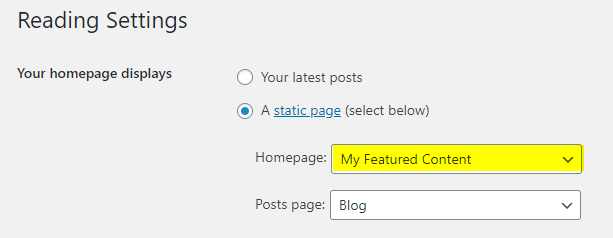
  4. Sidebar Widgets (Static HomePage)

    Sidebar widgets displayed on the static homepage.

  5. Sidebar Widgets (not Static HomePage)

    Displayed on every page except on the static homepage.

  6. Sidebar Widgets (Single Pages)

    Displayed on single post of any post type (except attachments and pages).

  7. Sidebar Widgets (Singular Pages)

    Displayed on single post of any post type (including attachments and pages).

  8. Above Content Widgets (Everywhere)

    Top of main content. Displayed on every page.

  9. Above Content Widgets (Default HomePage)

    Top of main content. Displayed on the default homepage.

  10. Above Content Widgets (Static HomePage)

    Top of main content. Displayed on the static homepage.

  11. Above Content Widgets (not Static HomePage)

    Top of main content. Displayed on every page except the static homepage.

  12. Above Content Widgets (Single Pages)

    Top of main content. Single post (except attachments and pages).

  13. Above Content Widgets (Singular Pages)

    Top of main content. Single post (including attachments and pages).

  14. Below Content Widgets (Everywhere)

    Bottom of main content. Displayed on every page.

  15. Below Content Widgets (Default HomePage)

    Bottom of main content. Displayed on the default homepage.

  16. Below Content Widgets (Static HomePage)

    Bottom of main content. Displayed on the static homepage.

  17. Below Content Widgets (non Static HomePage)

    Bottom of main content. Displayed on every page except the static homepage.

  18. Below Content Widgets (Single Pages)

    Bottom of main content. Single post (except attachments and pages).

  19. Below Content Widgets (Singular Pages)

    Bottom of main content. Single post (including attachments and pages).

  20. Top Full Width Widgets (Everywhere)

    Full-width area after the primary menu. Displayed on every page.

  21. Top Full Width Widgets (Default HomePage)

    Full-width area after the primary menu. Default homepage.

  22. Top Full Width Widgets (Static HomePage)

    Full-width area after the primary menu. Static homepage.

  23. Top Full Width Widgets (non Static HomePage)

    Full-width area after the primary menu. Every page except static homepage.

  24. Top Full Width Widgets (Single Pages)

    Full-width area after the primary menu. Single post (except attachments and pages).

  25. Top Full Width Widgets (Singular Pages)

    Full-width area after the primary menu. Single post (including attachments and pages).

  26. Bottom Full Width Widgets (Everywhere)

    Full-width area before the footer. Displayed on every page.

  27. Bottom Full Width Widgets (Default HomePage)

    Full-width area before the footer. Default homepage.

  28. Bottom Full Width Widgets (Static HomePage)

    Full-width area before the footer. Static homepage.

  29. Bottom Full Width Widgets (non Static HomePage)

    Full-width area before the footer. Every page except static homepage.

  30. Bottom Full Width Widgets (Single Pages)

    Full-width area before the footer. Single post (except attachments and pages).

  31. Bottom Full Width Widgets (Singular Pages)

    Full-width area before the footer. Single post (including attachments and pages).

  32. Single Post Bottom Widgets

    Bottom of single post (except attachments and pages).

  33. Footer Top Widgets

    Top of the footer.

  34. Footer 1 Widgets

    Footer column 1.

  35. Footer 2 Widgets

    Footer column 2.

  36. Footer 3 Widgets

    Footer column 3.

  37. Footer 4 Widgets

    Footer column 4.

  38. Footer 5 Widgets

    Footer column 5.

  39. Footer 6 Widgets

    Footer column 6.

  40. Footer Bottom Widgets

    Bottom of the footer.

  41. 404 Page Widgets

    Located on the 404 (not found) page.

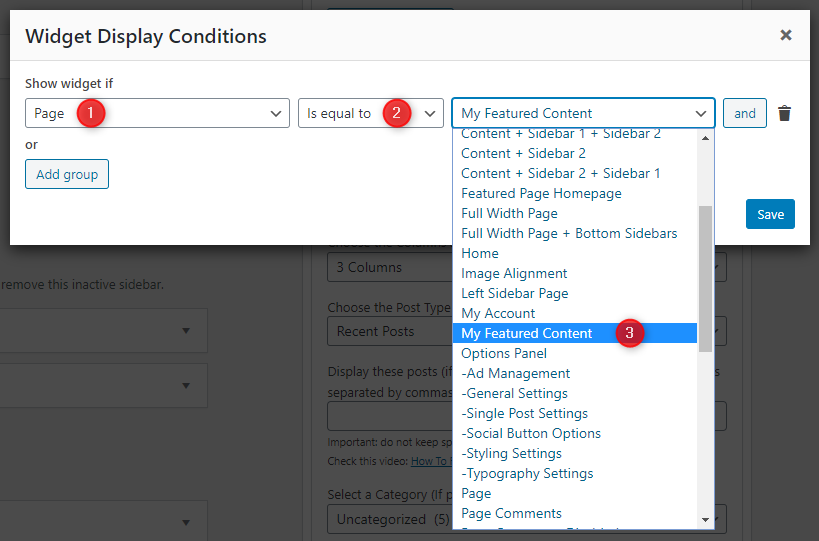
How to Control Widget Visibility by Location

1. Install and activate the Widget Display Conditions or Widget Context plugin.

2. Drag and drop your widget into any of the "Everywhere" widget areas such as:

  1. Header Right Widgets
  2. Sidebar Widgets (Everywhere)
  3. Top Full Width Widgets (Everywhere)
  4. Above Content Widgets (Everywhere)
  5. Below Content Widgets (Everywhere)
  6. Bottom Full Width Widgets (Everywhere)
  7. Footer Top / Footer 1-6 / Footer Bottom Widgets

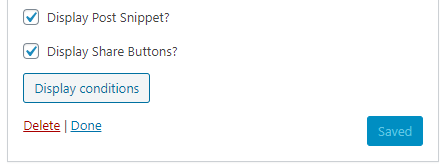
3. If using Widget Display Conditions plugin, click the Display conditions button at the bottom of widget settings.

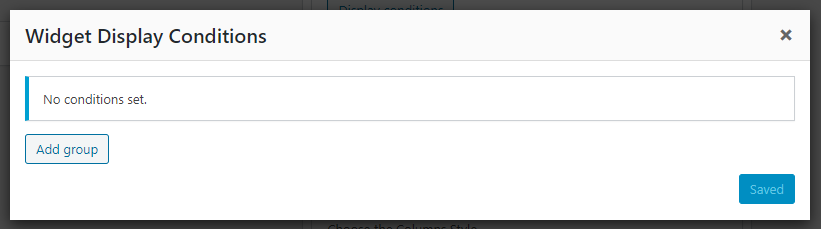
4. Click Add group.

5. Set your display conditions and click save.

Custom Page Templates

TextWP PRO includes custom page and post templates for unique layouts. You can assign templates when editing any page or post.

Special Function Templates

  • Featured Content: Displays featured post widgets instead of regular content.
  • Contact Form: Built-in contact form for visitors.
  • Sitemap: Structured list of pages, categories, and archives.
  • Authors: List of all authors with profiles and post counts.

Layout Templates

  • "Full Width, no sidebar" (Page/Post): Full width without sidebars.
  • "Full Width, bottom sidebar" (Page/Post): Full width with sidebar below.
  • "Content + Sidebar" (Page/Post): Content left, sidebar right.
  • "Sidebar + Content" (Page/Post): Sidebar left, content right.

How to Assign a Custom Template:

  1. Go to Pages or PostsAdd New or edit an existing one.
  2. Look for the Template option:
    • In Gutenberg: Click the Page/Post tab in the sidebar, scroll to Template.
    • In Classic Editor: Enable Page/Post Attributes via Screen Options, then use the Template dropdown.
  3. Select the desired template.
  4. Click Publish or Update.

How to Create a Contact Page

TextWP PRO includes a built-in Contact Form template.

Step 1: Create the Page

  1. Go to PagesAdd New.
  2. Title it "Contact Us".
  3. Select the Contact Form template.
  4. Click Publish.

Step 2: Configure Email Address

  1. Go to AppearanceCustomizeTheme OptionsPage Templates Options.
  2. Enter your email in Contact Form Email Address.
  3. Click Publish.

Note: If you do not set the Contact Form Email Address, the form will not send emails.

How to Create a Sitemap Page

  1. Go to PagesAdd New.
  2. Title it "Sitemap".
  3. Select the Sitemap template.
  4. Click Publish.

The sitemap page displays: list of all Pages, Categories, Tags, Monthly Archives, and Authors with links.

How to Create a Site Authors Page

  1. Go to PagesAdd New.
  2. Title it "Authors".
  3. Select the Authors template.
  4. Click Publish.

The authors page displays: author avatar, display name, bio, post count, and a link to view all posts by each author.

Customizer Theme Options

TextWP PRO theme provides extensive customization options through the WordPress Customizer. Navigate to AppearanceCustomizeTheme Options to access all theme settings.

Site Identity Options

Below is the complete list of Site Identity Options available:

Option ID Option Name Description Control Type Accepted Value Default
blognameSite TitleMain site title displayed in header and metadata.TextString(WordPress site title)
blogdescriptionTaglineShort description/tagline shown with the site title.TextStringJust another WordPress site
custom_logoSite LogoUpload/select a logo to display instead of the text title.ImageImage file (png/jpg/svg)(none)
display_header_textDisplay Site Title & TaglineShow or hide the text title/tagline over the logo/header.Checkboxtrue/falsetrue
site_iconSite Icon (Favicon)Icon shown in browser tabs, bookmarks, and WordPress mobile apps.Image512×512+ image(none)

Colors Options

Below is the complete list of Colors Options available:

Option ID Option Name Description Control Type Accepted Value Default
body_text_colorMain Text ColorBody text color.ColorHex/RGBA#555555
link_colorMain Link ColorDefault link color.ColorHex/RGBA#666666
link_hover_colorMain Link Hover ColorHover state for links.ColorHex/RGBA#000000
headings_colorGeneral Headings ColorColor for all headings.ColorHex/RGBA#111111
header_bg_colorHeader Background ColorBackground for site header.ColorHex/RGBA#262626
header_bsh_colorHeader Box-ShadowShadow value for header.TextCSS shadow0 2px 5px rgba(0,0,0,0.5)
header_image_title_colorHeader Image Title ColorTitle text on header image.ColorHex/RGBA#ffffff
header_image_title_hover_colorHeader Image Title HoverHover color for header image title.ColorHex/RGBA#ffffff
header_image_desc_colorHeader Image Description ColorDescription text on header image.ColorHex/RGBA#ffffff
header_image_bg_colorHeader Image BackgroundBackdrop behind header image text.TextCSS colorrgba(0,0,0,0.6)
primary_menu_bg_colorPrimary Menu BackgroundMenu bar background.ColorHex/RGBA#b8b8b8
primary_menu_bd_colorPrimary Menu BorderBorder color for menu bar.ColorHex/RGBA#969696
primary_menu_bsh_colorPrimary Menu Box-ShadowShadow for menu bar.TextCSS shadow0 1px 4px rgba(0,0,0,.3), 0 0 40px rgba(0,0,0,.1) inset
primary_menu_colorPrimary Menu LinkMenu link color.ColorHex/RGBA#000000
primary_menu_shadow_colorPrimary Menu Link ShadowShadow for menu links.ColorHex/RGBA#ffffff
primary_menu_hover_colorPrimary Menu Link HoverHover color for menu links.ColorHex/RGBA#222222
primary_menu_hover_bg_colorPrimary Menu Hover BackgroundHover background for menu links.ColorHex/RGBA#dfdfdf
primary_submenu_one_bg_colorPrimary Submenu BackgroundFirst-level submenu background.ColorHex/RGBA#c2c2c2
primary_submenu_one_bd_colorPrimary Submenu Border 1First submenu border.ColorHex/RGBA#888888
primary_submenu_two_bd_colorPrimary Submenu Border 2Second submenu border.ColorHex/RGBA#eeeeee
primary_submenu_three_bd_colorPrimary Submenu Border 3Third submenu border.ColorHex/RGBA#aaaaaa
primary_menu_icon_colorResponsive Menu IconColor for mobile menu icon.ColorHex/RGBA#000000
box_bg_colorWidgets & Posts BackgroundCard background for widgets/posts.ColorHex/RGBA#ffffff
box_bd_one_colorWidgets & Posts Border 1Primary border color.ColorHex/RGBA#ffffff
box_bd_two_colorWidgets & Posts Border 2Secondary border color.ColorHex/RGBA#efefef
box_bs_colorWidgets & Posts Box-ShadowShadow value for cards.TextCSS shadow0 1px 4px rgba(0,0,0,.3), 0 0 40px rgba(0,0,0,.1) inset
compact_post_title_colorHome Compact Post TitleTitle color for compact posts.ColorHex/RGBA#000000
compact_post_title_hover_colorHome Compact Title HoverHover color for compact titles.ColorHex/RGBA#333333
slider_post_title_colorSlider Widget TitleTitle color in slider widget.ColorHex/RGBA#ffffff
slider_post_title_hover_colorSlider Widget Title HoverHover color for slider titles.ColorHex/RGBA#ffffff
slider_post_snippet_colorSlider Snippet ColorSnippet text color in slider.ColorHex/RGBA#ffffff
slider_post_snippet_hover_colorSlider Snippet HoverHover color for slider snippet.ColorHex/RGBA#ffffff
post_title_colorSingle Post TitleSingle post title color.ColorHex/RGBA#000000
post_title_hover_colorSingle Post Title HoverHover color for single titles.ColorHex/RGBA#333333
post_title_shadow_colorSingle Post Title ShadowShadow color for single titles.ColorHex/RGBA#ffffff
post_body_link_colorPost Content LinkLinks inside post content.ColorHex/RGBA#409BD4
post_body_link_hover_colorPost Content Link HoverHover color for content links.ColorHex/RGBA#08ACD5
postcats_colorSlider Categories ColorCategory text in slider.ColorHex/RGBA#ffffff
postcats_bg_colorSlider Categories BackgroundCategory background in slider.ColorHex/RGBA#67080b
postcats_hover_colorSlider Categories HoverHover color for slider categories.ColorHex/RGBA#ffffff
postcats_bg_hover_colorSlider Categories Hover BackgroundHover background for slider categories.ColorHex/RGBA#000000
compact_post_meta_colorHome Compact Post MetaMeta text on compact posts.ColorHex/RGBA#666666
compact_post_meta_hover_colorHome Compact Meta HoverHover color for compact meta.ColorHex/RGBA#000000
slider_post_meta_colorSlider Post MetaMeta text in slider widget.ColorHex/RGBA#ffffff
slider_post_meta_hover_colorSlider Post Meta HoverHover color for slider meta.ColorHex/RGBA#ffffff
post_meta_colorSingle Post MetaMeta text on single posts.ColorHex/RGBA#666666
post_meta_hover_colorSingle Post Meta HoverHover color for single meta.ColorHex/RGBA#000000
rmore_colorRead More ButtonText color for read more.ColorHex/RGBA#ffffff
rmore_bg_colorRead More BackgroundBackground for read more button.ColorHex/RGBA#333333
rmore_hover_colorRead More HoverHover text color for read more.ColorHex/RGBA#ffffff
rmore_bg_hover_colorRead More Hover BackgroundHover background for read more.ColorHex/RGBA#000000
author_bio_bg_colorAuthor Bio BackgroundBackground for author box.ColorHex/RGBA#f6f6f6
author_bio_bd_colorAuthor Bio BorderBorder color for author box.ColorHex/RGBA#eeeeee
author_bio_colorAuthor Bio TextText color inside author box.ColorHex/RGBA#555555
author_bio_link_colorAuthor Bio LinkLink color in author box.ColorHex/RGBA#555555
author_bio_link_hover_colorAuthor Bio Link HoverHover color for author links.ColorHex/RGBA#67080b
pagination_colorPagination Link ColorPagination text color.ColorHex/RGBA#444444
pagination_bg_colorPagination BackgroundPagination link background.ColorHex/RGBA#eeeeee
pagination_bd_colorPagination BorderPagination border color.ColorHex/RGBA#bbbbbb
pagination_hover_colorPagination Hover ColorHover text color for pagination.ColorHex/RGBA#000000
pagination_bg_hover_colorPagination Hover BackgroundHover background for pagination.ColorHex/RGBA#dddddd
pagination_bd_hover_colorPagination Hover BorderHover border for pagination.ColorHex/RGBA#aaaaaa
loadmore_colorLoad More / Nav Link ColorText color for AJAX load more/nav.ColorHex/RGBA#ffffff
loadmore_bg_colorLoad More BackgroundBackground for load more/nav.ColorHex/RGBA#333333
loadmore_bd_colorLoad More BorderBorder color for load more/nav.ColorHex/RGBA#000000
loadmore_hover_colorLoad More Hover ColorHover text for load more/nav.ColorHex/RGBA#ffffff
loadmore_bg_hover_colorLoad More Hover BackgroundHover background for load more/nav.ColorHex/RGBA#67080b
loadmore_bd_hover_colorLoad More Hover BorderHover border for load more/nav.ColorHex/RGBA#000000
loading_bg_colorAJAX Loading BackgroundLoader background color.ColorHex/RGBA#67080b
sidebar_title_colorSidebar Title ColorWidget title in sidebar.ColorHex/RGBA#000000
sidebar_title_shadow_colorSidebar Title ShadowShadow for sidebar titles.ColorHex/RGBA#ffffff
sidebar_link_colorSidebar Link ColorLinks inside sidebar.ColorHex/RGBA#444444
sidebar_link_hover_colorSidebar Link HoverHover color for sidebar links.ColorHex/RGBA#666666
tag_cloud_colorTag Cloud LinkTag cloud link color.ColorHex/RGBA#ffffff
tag_cloud_bg_colorTag Cloud BackgroundBackground for tag cloud items.ColorHex/RGBA#888888
tag_cloud_hover_colorTag Cloud HoverHover color for tag cloud links.ColorHex/RGBA#ffffff
tag_cloud_hover_bg_colorTag Cloud Hover BackgroundHover background for tag cloud.ColorHex/RGBA#000000
tabnames_colorTabbed Widget NamesTab label color.ColorHex/RGBA#ffffff
tabnames_bg_colorTabbed Widget Names BackgroundTab label background.ColorHex/RGBA#000000
tabnames_hover_colorTabbed Widget Names HoverHover color for tab labels.ColorHex/RGBA#ffffff
tabnames_bg_hover_colorTabbed Widget Names Hover BackgroundHover background for tab labels.ColorHex/RGBA#67080b
footer_bg_colorFooter BackgroundFooter area background.ColorHex/RGBA#333333
footer_bd_colorFooter BorderFooter border color.ColorHex/RGBA#444444
footer_title_colorFooter TitleFooter widget title color.ColorHex/RGBA#ffffff
footer_title_bd_one_colorFooter Title Border 1First title border.ColorHex/RGBA#444444
footer_title_bd_two_colorFooter Title Border 2Second title border.ColorHex/RGBA#222222
footer_text_colorFooter TextFooter text color.ColorHex/RGBA#dddddd
footer_link_colorFooter LinkLinks in footer.ColorHex/RGBA#cccccc
footer_link_hover_colorFooter Link HoverHover color for footer links.ColorHex/RGBA#ffffff
footer_list_bd_one_colorFooter List Border 1List border color 1.ColorHex/RGBA#444444
footer_list_bd_two_colorFooter List Border 2List border color 2.ColorHex/RGBA#222222
cp_bg_colorCopyright BackgroundBackground for copyright bar.ColorHex/RGBA#2e2e2e
cp_bd_colorCopyright BorderBorder color for copyright bar.ColorHex/RGBA#444444
cp_colorCopyright TextText color in copyright bar.ColorHex/RGBA#ecfff1
comment_bd_color_oneComments BorderBorder color for comments.ColorHex/RGBA#eaeaea
comment_bg_color_oneComments Background 1Primary comment background.ColorHex/RGBA#f5f5f5
comment_bg_color_twoComments Background 2Alternate comment background.ColorHex/RGBA#fbfbfb
comment_meta_colorComments MetaMeta text color in comments.ColorHex/RGBA#888888
table_header_bg_colorTable Header BackgroundBackground for table headers.ColorHex/RGBA#000000
table_header_bd_colorTable Header BorderBorder for table headers.ColorHex/RGBA#444444
table_header_text_colorTable Header TextHeader text color.ColorHex/RGBA#ffffff
table_header_link_colorTable Header LinkLinks in table headers.ColorHex/RGBA#ffffff
table_header_link_hover_colorTable Header Link HoverHover color for header links.ColorHex/RGBA#409BD4
table_border_colorTable BorderBorder color for tables.ColorHex/RGBA#dddddd
table_odd_bg_colorTable Odd Row BackgroundBackground for odd rows.ColorHex/RGBA#ffffff
table_even_bg_colorTable Even Row BackgroundBackground for even rows.ColorHex/RGBA#f8f8f8
table_raw_hover_bg_colorTable Row Hover BackgroundHover background for table rows.ColorHex/RGBA#eeeeee
table_text_colorTable Text ColorBody text inside tables.ColorHex/RGBA#555555
table_link_colorTable Link ColorLinks inside tables.ColorHex/RGBA#409BD4
table_link_hover_colorTable Link HoverHover color for table links.ColorHex/RGBA#08ACD5
disable_table_colorsDisable Table ColorsTurn off theme table color styles.Checkboxtrue/falsefalse
button_text_colorButton TextText color for buttons.ColorHex/RGBA#ffffff
button_bg_colorButton BackgroundBackground for buttons.ColorHex/RGBA#333333
button_bd_colorButton BorderBorder color for buttons.ColorHex/RGBA#e6e6e6
button_hover_bg_colorButton Hover BackgroundHover background for buttons.ColorHex/RGBA#67080b
input_text_colorInput Text ColorText color inside inputs.ColorHex/RGBA#666666
input_bd_colorInput Border ColorBorder color for inputs.ColorHex/RGBA#dddddd
input_hover_text_colorInput Hover Text ColorText color on input hover.ColorHex/RGBA#111111
selected_text_colorSelected Text ColorForeground color for highlighted text.ColorHex/RGBA#ffffff
selected_text_bg_colorSelected Text BackgroundBackground for highlighted text.ColorHex/RGBA#333333
hr_bg_colorhr BackgroundHorizontal rule background.ColorHex/RGBA#ffffff
hr_bd_top_colorhr Top BorderTop border for hr.ColorHex/RGBA#e6e6e6
hr_bd_bottom_colorhr Bottom BorderBottom border for hr.ColorHex/RGBA#f6f6f6
hr_shadow_colorhr Box ShadowShadow color for hr.ColorHex/RGBA#f2f2f2
pre_bg_colorpre BackgroundBackground for preformatted text.ColorHex/RGBA#1d1f21
pre_colorpre Text ColorText color for pre tags.ColorHex/RGBA#ffffff
code_bg_colorcode BackgroundBackground for inline code.ColorHex/RGBA#ffffe0
code_colorcode Text ColorText color for inline code.ColorHex/RGBA#222222
disable_shadow_colorDisable Shadow ColorRemove default shadow styling.Checkboxtrue/falsefalse
disable_color_optionsDisable All Color OptionsTurn off all custom color overrides.Checkboxtrue/falsefalse

Font Options

Below is the complete list of Font Options available:

Option ID Option Name Description Control Type Accepted Value Default
font_subsetsFont SubsetsSelect supported font subsets.Multi SelectCyrillic, Cyrillic Extended, Greek, Greek Extended, Latin, Latin Extended, VietnameseLatin
body_fontsBody Font-FamilyFont family for body text.Select170+ Google/System fontsDomine
body_font_sizeBody Font-SizeSize of body text.Select8px–72px13px
body_font_weightBody Font-WeightWeight of body text.Select400, 700400
body_font_styleBody Font-StyleStyle of body text.SelectNormal, ItalicNormal
body_line_heightBody Line-HeightLine height for body text.TextNumeric1.6
site_title_fontsSite Title Font-FamilyFont for site title.Select170+ Google/System fontsFrank Ruhl Libre
site_title_font_sizeSite Title Font-SizeSize of site title.Select8px–72px22px
site_title_font_weightSite Title Font-WeightWeight of site title.Select400, 700700
site_title_font_styleSite Title Font-StyleStyle of site title.SelectNormal, ItalicNormal
site_title_line_heightSite Title Line-HeightLine height for site title.TextNumeric1
site_title_text_transformSite Title Text TransformText transform for site title.SelectNone, Capitalize, Uppercase, Lowercase, Initial, InheritNone
site_desc_fontsSite Description Font-FamilyFont for site tagline.Select170+ Google/System fontsDomine
site_desc_font_sizeSite Description Font-SizeSize of site tagline.Select8px–72px13px
site_desc_font_weightSite Description Font-WeightWeight of site tagline.Select400, 700400
site_desc_font_styleSite Description Font-StyleStyle of site tagline.SelectNormal, ItalicNormal
site_desc_line_heightSite Description Line-HeightLine height for site tagline.TextNumeric1
site_desc_text_transformSite Description Text TransformTransform for site tagline.SelectNone, Capitalize, Uppercase, Lowercase, Initial, InheritNone
header_image_title_fontsHeader Image Title Font-FamilyFont for header image title.Select170+ Google/System fontsFrank Ruhl Libre
header_image_title_font_sizeHeader Image Title Font-SizeSize of header image title.Select8px–72px24px
header_image_title_font_weightHeader Image Title Font-WeightWeight of header image title.Select400, 700400
header_image_title_font_styleHeader Image Title Font-StyleStyle of header image title.SelectNormal, ItalicNormal
header_image_title_line_heightHeader Image Title Line-HeightLine height for header image title.TextNumeric1
header_image_title_text_transformHeader Image Title Text TransformTransform for header image title.SelectNone, Capitalize, Uppercase, Lowercase, Initial, InheritNone
header_image_desc_fontsHeader Image Description Font-FamilyFont for header image description.Select170+ Google/System fontsDomine
header_image_desc_font_sizeHeader Image Description Font-SizeSize of header image description.Select8px–72px13px
header_image_desc_font_weightHeader Image Description Font-WeightWeight of header image description.Select400, 700400
header_image_desc_font_styleHeader Image Description Font-StyleStyle of header image description.SelectNormal, ItalicNormal
header_image_desc_line_heightHeader Image Description Line-HeightLine height for header description.TextNumeric1
header_image_desc_text_transformHeader Image Description Text TransformTransform for header description.SelectNone, Capitalize, Uppercase, Lowercase, Initial, InheritNone
primary_menu_fontsPrimary Menu Font-FamilyFont for primary menu.Select170+ Google/System fontsPatua One
primary_menu_font_sizePrimary Menu Font-SizeSize of primary menu text.Select8px–72px13px
primary_menu_font_weightPrimary Menu Font-WeightWeight of primary menu text.Select400, 700400
primary_menu_font_stylePrimary Menu Font-StyleStyle of primary menu text.SelectNormal, ItalicNormal
primary_menu_text_transformPrimary Menu Text TransformTransform for primary menu.SelectNone, Capitalize, Uppercase, Lowercase, Initial, InheritUppercase
compact_post_title_fontsHome Compact Post Title Font-FamilyFont for home compact/style 1 titles.Select170+ Google/System fontsFrank Ruhl Libre
compact_post_title_font_sizeHome Compact Post Title Font-SizeSize for compact titles.Select8px–72px18px
compact_post_title_mobile_font_sizeHome Compact Post Title Font-Size (Small Screen)Mobile size for compact titles.Select8px–72px16px
compact_post_title_font_weightHome Compact Post Title Font-WeightWeight for compact titles.Select400, 700700
compact_post_title_font_styleHome Compact Post Title Font-StyleStyle for compact titles.SelectNormal, ItalicNormal
compact_post_title_line_heightHome Compact Post Title Line-HeightLine height for compact titles.TextNumeric1.2
compact_post_title_text_transformHome Compact Post Title Text TransformTransform for compact titles.SelectNone, Capitalize, Uppercase, Lowercase, Initial, InheritNone
slider_cats_fontsSlider Categories Font-FamilyFont for slider widget categories.Select170+ Google/System fontsOswald
slider_cats_font_sizeSlider Categories Font-SizeSize for slider categories.Select8px–72px12px
slider_cats_font_weightSlider Categories Font-WeightWeight for slider categories.Select400, 700400
slider_cats_font_styleSlider Categories Font-StyleStyle for slider categories.SelectNormal, ItalicNormal
slider_cats_text_transformSlider Categories Text TransformTransform for slider categories.SelectNone, Capitalize, Uppercase, Lowercase, Initial, InheritUppercase
post_meta_fontsPost Meta Font-FamilyFont for post meta.Select170+ Google/System fontsOswald
post_meta_font_sizePost Meta Font-SizeSize for post meta.Select8px–72px12px
post_meta_font_weightPost Meta Font-WeightWeight for post meta.Select400, 700400
post_meta_font_stylePost Meta Font-StyleStyle for post meta.SelectNormal, ItalicNormal
post_meta_text_transformPost Meta Text TransformTransform for post meta.SelectNone, Capitalize, Uppercase, Lowercase, Initial, InheritUppercase
read_more_fontsRead More Button Font-FamilyFont for read more buttons.Select170+ Google/System fontsOswald
read_more_font_sizeRead More Button Font-SizeSize for read more buttons.Select8px–72px13px
read_more_font_weightRead More Button Font-WeightWeight for read more buttons.Select400, 700400
read_more_font_styleRead More Button Font-StyleStyle for read more buttons.SelectNormal, ItalicNormal
read_more_text_transformRead More Button Text TransformTransform for read more buttons.SelectNone, Capitalize, Uppercase, Lowercase, Initial, InheritUppercase
post_title_fontsSingle Post Title Font-FamilyFont for single post titles.Select170+ Google/System fontsFrank Ruhl Libre
post_title_font_sizeSingle Post Title Font-SizeSize for single post titles.Select8px–72px24px
post_title_font_weightSingle Post Title Font-WeightWeight for single post titles.Select400, 700700
post_title_font_styleSingle Post Title Font-StyleStyle for single post titles.SelectNormal, ItalicNormal
post_title_line_heightSingle Post Title Line-HeightLine height for single titles.TextNumeric1.1
post_title_text_transformSingle Post Title Text TransformTransform for single titles.SelectNone, Capitalize, Uppercase, Lowercase, Initial, InheritNone
widget_title_fontsWidget Title Font-FamilyFont for sidebar widget titles.Select170+ Google/System fontsFrank Ruhl Libre
widget_title_font_sizeWidget Title Font-SizeSize for widget titles.Select8px–72px18px
widget_title_font_weightWidget Title Font-WeightWeight for widget titles.Select400, 700700
widget_title_font_styleWidget Title Font-StyleStyle for widget titles.SelectNormal, ItalicNormal
widget_title_line_heightWidget Title Line-HeightLine height for widget titles.TextNumeric1
widget_title_text_transformWidget Title Text TransformTransform for widget titles.SelectNone, Capitalize, Uppercase, Lowercase, Initial, InheritNone
footer_title_fontsFooter Widget Title Font-FamilyFont for footer widget titles.Select170+ Google/System fontsFrank Ruhl Libre
footer_title_font_sizeFooter Title Font-SizeSize for footer titles.Select8px–72px18px
footer_title_font_weightFooter Title Font-WeightWeight for footer titles.Select400, 700700
footer_title_font_styleFooter Title Font-StyleStyle for footer titles.SelectNormal, ItalicNormal
footer_title_line_heightFooter Title Line-HeightLine height for footer titles.TextNumeric1
footer_title_text_transformFooter Title Text TransformTransform for footer titles.SelectNone, Capitalize, Uppercase, Lowercase, Initial, InheritNone
tag_cloud_fontsTag Cloud Font-FamilyFont for tag cloud widget.Select170+ Google/System fontsOswald
tag_cloud_font_sizeTag Cloud Font-SizeSize for tag cloud.Select8px–72px13px
tag_cloud_font_weightTag Cloud Font-WeightWeight for tag cloud.Select400, 700400
tag_cloud_font_styleTag Cloud Font-StyleStyle for tag cloud.SelectNormal, ItalicNormal
tag_cloud_text_transformTag Cloud Text TransformTransform for tag cloud.SelectNone, Capitalize, Uppercase, Lowercase, Initial, InheritUppercase
rpost_title_fontsRelated Posts Heading Font-FamilyFont for related posts heading.Select170+ Google/System fontsFrank Ruhl Libre
hpost_title_font_sizeRelated Posts Heading Font-SizeSize for related posts heading.Select8px–72px20px
hpost_title_font_weightRelated Posts Heading Font-WeightWeight for related posts heading.Select400, 700700
hpost_title_font_styleRelated Posts Heading Font-StyleStyle for related posts heading.SelectNormal, ItalicNormal
hpost_title_line_heightRelated Posts Heading Line-HeightLine height for related heading.TextNumeric1.2
hpost_title_text_transformRelated Posts Heading Text TransformTransform for related heading.SelectNone, Capitalize, Uppercase, Lowercase, Initial, InheritNone
navigation_fontsPosts Navigation Font-FamilyFont for posts navigation.Select170+ Google/System fontsOswald
navigation_font_sizePosts Navigation Font-SizeSize for posts navigation.Select8px–72px15px
navigation_font_weightPosts Navigation Font-WeightWeight for posts navigation.Select400, 700400
navigation_font_stylePosts Navigation Font-StyleStyle for posts navigation.SelectNormal, ItalicNormal
navigation_text_transformPosts Navigation Text TransformTransform for posts navigation.SelectNone, Capitalize, Uppercase, Lowercase, Initial, InheritUppercase
tabbed_widget_title_fontsTabbed Widget Titles Font-FamilyFont for tabbed widget titles.Select170+ Google/System fontsOswald
tabbed_widget_title_font_sizeTabbed Widget Titles Font-SizeSize for tabbed widget titles.Select8px–72px15px
tabbed_widget_title_font_weightTabbed Widget Titles Font-WeightWeight for tabbed widget titles.Select400, 700400
tabbed_widget_title_font_styleTabbed Widget Titles Font-StyleStyle for tabbed widget titles.SelectNormal, ItalicNormal
tabbed_widget_title_text_transformTabbed Widget Titles Text TransformTransform for tabbed widget titles.SelectNone, Capitalize, Uppercase, Lowercase, Initial, InheritUppercase
headings_fontsGeneral Headings Font-FamilyFont for H1–H6.Select170+ Google/System fontsFrank Ruhl Libre
headings_line_heightGeneral Headings Line-HeightLine height for headings.TextNumeric1
h1_font_sizeH1 Font-SizeSize of H1 headings.Select8px–72px32px
h1_font_weightH1 Font-WeightWeight of H1 headings.Select400, 700700
h1_font_styleH1 Font-StyleStyle of H1 headings.SelectNormal, ItalicNormal
h2_font_sizeH2 Font-SizeSize of H2 headings.Select8px–72px28px
h2_font_weightH2 Font-WeightWeight of H2 headings.Select400, 700700
h2_font_styleH2 Font-StyleStyle of H2 headings.SelectNormal, ItalicNormal
h3_font_sizeH3 Font-SizeSize of H3 headings.Select8px–72px24px
h3_font_weightH3 Font-WeightWeight of H3 headings.Select400, 700700
h3_font_styleH3 Font-StyleStyle of H3 headings.SelectNormal, ItalicNormal
h4_font_sizeH4 Font-SizeSize of H4 headings.Select8px–72px20px
h4_font_weightH4 Font-WeightWeight of H4 headings.Select400, 700700
h4_font_styleH4 Font-StyleStyle of H4 headings.SelectNormal, ItalicNormal
h5_font_sizeH5 Font-SizeSize of H5 headings.Select8px–72px18px
h5_font_weightH5 Font-WeightWeight of H5 headings.Select400, 700700
h5_font_styleH5 Font-StyleStyle of H5 headings.SelectNormal, ItalicNormal
h6_font_sizeH6 Font-SizeSize of H6 headings.Select8px–72px16px
h6_font_weightH6 Font-WeightWeight of H6 headings.Select400, 700700
h6_font_styleH6 Font-StyleStyle of H6 headings.SelectNormal, ItalicNormal
button_fontsButtons Font-FamilyFont for buttons.Select170+ Google/System fontsOswald
button_font_sizeButtons Font-SizeSize for button text.Select8px–72px13px
button_font_weightButtons Font-WeightWeight for button text.Select400, 700400
button_font_styleButtons Font-StyleStyle for button text.SelectNormal, ItalicNormal
button_text_transformButtons Text TransformTransform for button text.SelectNone, Capitalize, Uppercase, Lowercase, Initial, InheritUppercase
pre_fontspre/code Font-FamilyFont for pre/code tags.Select170+ Google/System fontsConsolas
pre_font_sizepre/code Font-SizeSize for pre/code text.Select8px–72px15px
pre_font_weightpre/code Font-WeightWeight for pre/code text.Select400, 700400
pre_font_stylepre/code Font-StyleStyle for pre/code text.SelectNormal, ItalicNormal
disable_google_fontsDisable Google FontsStop loading Google fonts.Checkboxtrue/falsefalse
disable_font_optionsDisable All Font OptionsUse default theme fonts; ignore custom settings.Checkboxtrue/falsefalse

Header Image Options

Below is the complete list of Header Image Options available:

Option ID Option Name Description Control Type Accepted Value Default
header_imageHeader ImageThe image ID (or URL in older installs) chosen via "Add Image". If left empty the theme falls back to its default header or none at all.Media UploaderInteger attachment ID (or URL string)0 (none)
hide_header_imageHide Header Image from EverywhereCompletely hide the header image across the site.Checkboxtrue/falsefalse
remove_header_image_linkRemove Link from Header ImageDisable the header image link.Checkboxtrue/falsefalse
hide_header_image_detailsHide Title & Description from Header ImageHide both title and description overlay on the header image.Checkboxtrue/falsefalse
header_image_details_mobileShow Header Title on Smaller ScreensForce header image title to display on mobile.Checkboxtrue/falsefalse
hide_header_image_descriptionHide Description from Header ImageHide only the description text on the header image.Checkboxtrue/falsefalse
header_image_custom_titleHeader Image Custom TitleCustom title text for the header image.TextString(empty)
header_image_custom_descriptionHeader Image Custom DescriptionCustom description text for the header image.TextString(empty)
header_image_destinationHeader Image Destination URLURL to open when the header image is clicked.TextURL(empty)

Header Options

Below is the complete list of Header Options available:

Option ID Option Name Description Control Type Accepted Value Default
hide_taglineHide TaglineHide the site tagline from the header.Checkboxtrue/falsefalse
hide_header_contentHide Header ContentHide the entire header content area.Checkboxtrue/falsefalse
site_header_styleHeader StyleSelect header layout style.RadioLogo + Social Buttons, Logo + Banner, Logo + Social Buttons (full width), Logo + Banner (full width), Full Width LogoLogo + Social Buttons
header_left_widthHeader Left Width (%)Width of the left column for 2-column header.TextNumber (percent)50
header_right_widthHeader Right Width (%)Width of the right column for 2-column header.TextNumber (percent)48

Layout Options

Below is the complete list of Layout Options available:

Option ID Option Name Description Control Type Accepted Value Default
main_container_widthWebsite Width (non-singular pages)Max width on large screens for archive/home/search pages.Textpx value1150px
main_container_singular_widthWebsite Width (singular pages)Max width on large screens for single posts/pages.Textpx value1150px
singular_layoutSingular Layout StyleLayout for single posts/pages.RadioSidebar + Content, Content + Sidebar, One Column, One Column + Bottom SidebarContent + Sidebar
plural_layoutNon-Singular Layout StyleLayout for archive/home/search pages.RadioSidebar + Content, Content + Sidebar, One Column, One Column + Bottom SidebarContent + Sidebar
main_content_widthMain Content Width (2 Columns Layout)Width of main content when using 2-column layout.TextNumber (percent)69
sidebar_one_widthSidebar Width (2 Columns Layout)Width of sidebar when using 2-column layout.TextNumber (percent)30.5
woocommerce_full_widthForce One Column Layout for WooCommerceMake all WooCommerce pages full-width.Checkboxtrue/falsefalse

Menu Options

Below is the complete list of Menu Options available:

Option ID Option Name Description Control Type Accepted Value Default
disable_primary_menuDisable Primary MenuCompletely hide the primary navigation menu.Checkboxtrue/falsefalse
disable_sticky_menuDisable Sticky Feature from Primary MenuPrevent the menu from sticking on scroll.Checkboxtrue/falsefalse
enable_sticky_mobile_menuEnable Sticky Feature for Primary Menu on Small ScreenMake the primary menu sticky on mobile.Checkboxtrue/falsefalse
disable_responsive_primary_menuDisable Responsiveness from Primary MenuTurn off the responsive/mobile menu.Checkboxtrue/falsefalse
center_primary_menuCenter Primary MenuCenter-align primary menu links.Checkboxtrue/falsefalse

Posts Summaries Options

Below is the complete list of Posts Summaries Options available:

Option ID Option Name Description Control Type Accepted Value Default
hide_posts_homeHide Recent Blog Posts from Home PageHide default blog posts on the homepage.Checkboxtrue/falsefalse
hide_posts_headingHide HomePage Posts HeadingHide the heading above blog posts.Checkboxtrue/falsefalse
posts_headingHomePage Posts HeadingCustom heading text for homepage posts.TextStringRecent Posts
post_stylePosts StyleSelect compact or full post style.SelectCompact, FullCompact
read_more_lengthAuto Post Summary LengthWord count for automatic excerpts.TextNumber (words)20
read_more_textRead More TextLabel for the read more link/button.TextStringContinue Reading
hide_thumbnail_homeHide Featured Images from Posts SummariesHide thumbnails in summaries.Checkboxtrue/falsefalse
hide_default_thumbnail_homeHide Default Images from Posts SummariesHide fallback thumbnails.Checkboxtrue/falsefalse
hide_post_title_homeHide Post Titles from Posts SummariesHide titles in summaries.Checkboxtrue/falsefalse
hide_post_author_homeHide Post Authors from Posts SummariesHide author meta in summaries.Checkboxtrue/falsefalse
hide_posted_date_homeHide Posted Dates from Posts SummariesHide dates in summaries.Checkboxtrue/falsefalse
hide_comments_link_homeHide Comment Links from Posts SummariesHide comment links/counts.Checkboxtrue/falsefalse
hide_post_categories_homeHide Post Categories from Posts SummariesHide categories (Full style only).Checkboxtrue/falsefalse
hide_post_tags_homeHide Post Tags from Posts SummariesHide tags (Full style only).Checkboxtrue/falsefalse
hide_post_snippetHide Post Snippets from Posts SummariesHide excerpt text.Checkboxtrue/falsefalse
show_read_more_buttonShow Read More Buttons on Posts SummariesAlways show a read more button.Checkboxtrue/falsefalse
compact_post_columnCompact Posts Style Columns NumberColumns for compact style.Select1 Column, 2 Columns, 3 Columns, 4 Columns1 Column
compact_thumb_styleCompact Posts Style Thumbnail SizeThumbnail size for compact style.Select100:100, 100:120, 480:240, 480:288, 480:360, 480:480, 480:640, 760:450, 1130:565100:100
fullview_thumb_styleFullview Posts Style Thumbnail SizeThumbnail size for fullview style.Select480:240, 480:288, 480:360, 480:480, 480:640, 760:450, 760:auto, 1130:565, 1130:auto760:450
display_full_post_contentDisplay Full Post Content with Fullview Posts StyleShow entire post in fullview summaries.Checkboxtrue/falsefalse

Singular Post Options

Below is the complete list of Singular Post Options available:

Option ID Option Name Description Control Type Accepted Value Default
thumbnail_linkFeatured Image LinkLink featured image in single posts.SelectYes, NoYes
hide_thumbnail_singleHide Featured Image from Full PostsHide featured images on single posts.Checkboxtrue/falsefalse
full_thumbnail_singleActivate Full Width Featured Image for Full PostsForce featured image to span content width.Checkboxtrue/falsefalse
hide_post_breadcrumbsHide Breadcrumbs from Full PostsHide breadcrumbs on single posts.Checkboxtrue/falsefalse
hide_post_titleHide Post Header from Full PostsHide entire post header/title area.Checkboxtrue/falsefalse
remove_post_title_linkRemove Link from Full Post TitlesMake single post titles non-clickable.Checkboxtrue/falsefalse
hide_posted_dateHide Posted Date from Full PostsHide dates on single posts.Checkboxtrue/falsefalse
hide_post_authorHide Post Author from Full PostsHide author meta on single posts.Checkboxtrue/falsefalse
hide_post_categoriesHide Post Categories from Full PostsHide categories on single posts.Checkboxtrue/falsefalse
hide_post_tagsHide Post Tags from Full PostsHide tags on single posts.Checkboxtrue/falsefalse
hide_comments_linkHide Comment Link from Full PostsHide comment link on single posts.Checkboxtrue/falsefalse
hide_comment_formHide Comments/Comment Form from Full PostsHide comments area and form.Checkboxtrue/falsefalse
hide_post_editHide Post Edit Link from Full PostsHide the edit link for logged-in users.Checkboxtrue/falsefalse
hide_author_bio_boxHide Author Bio Box from Full PostsHide the author bio section.Checkboxtrue/falsefalse
post_ad_one_codePost Ad 1 CodeAd code displayed under post title.TextareaText/HTML(empty)
hide_post_ad_oneHide Post Ad 1Hide the first ad slot.Checkboxtrue/falsefalse
post_ad_two_codePost Ad 2 CodeAd code displayed under post content.TextareaText/HTML(empty)
hide_post_ad_twoHide Post Ad 2Hide the second ad slot.Checkboxtrue/falsefalse

Posts Navigation Options

Below is the complete list of Posts Navigation Options available:

Option ID Option Name Description Control Type Accepted Value Default
hide_post_navigationHide Post Navigation from Full PostsHide previous/next navigation on single posts.Checkboxtrue/falsefalse
hide_post_navigation_thumbnailHide Thumbnails from Advanced Post NavigationHide thumbnails in single post navigation.Checkboxtrue/falsefalse
post_navigation_typePost Navigation TypeChoose navigation style for single posts.SelectNavigation with Thumbnails, Navigation without ThumbnailsNavigation without Thumbnails
hide_posts_navigationHide Posts Navigation from Home/Archive/Search PagesHide pagination/navigation on listing pages.Checkboxtrue/falsefalse
posts_navigation_typePosts Navigation TypeSelect pagination style for listings.SelectLink Navigation, Numbered Navigation, Load More Button, Infinite ScrollNumbered Navigation
loadmore_textLoadMore Button Normal TextLabel on the load more button.TextStringLoad More
loading_textLoadMore Button Loading TextText while posts are loading.TextStringLoading...
loadfailed_textLoadMore Button Load Failed TextText when loading fails.TextStringFailed to load posts.

Page Options

Below is the complete list of Page Options available:

Option ID Option Name Description Control Type Accepted Value Default
thumbnail_link_pageFeatured Image LinkLink the featured image to the page itself.SelectYes, NoYes
hide_thumbnail_pageHide Featured Image from Single PagesHide the featured image on single pages.Checkboxtrue/falsefalse
hide_page_titleHide Page Header from Single PagesHide the page title/header area.Checkboxtrue/falsefalse
remove_page_title_linkRemove Link from Single Page TitlesMake page titles non-clickable on single pages.Checkboxtrue/falsefalse
hide_page_dateHide Posted Date from Single PagesHide the published date on single pages.Checkboxtrue/falsefalse
hide_page_authorHide Page Author from Single PagesHide the author meta on single pages.Checkboxtrue/falsefalse
hide_page_commentsHide Comment Link from Single PagesHide the comment link/meta on single pages.Checkboxtrue/falsefalse
hide_page_comment_formHide Comments/Comment Form from Single PagesHide the comments area and form.Checkboxtrue/falsefalse
hide_page_editHide Edit Link from Single PagesHide the edit link for logged-in users.Checkboxtrue/falsefalse

Share Buttons Options

Below is the complete list of Share Buttons Options available:

Option ID Option Name Description Control Type Accepted Value Default
hide_share_buttons_homeHide Share Buttons from Posts SummariesRemove all share buttons on home/archive/search listings.Checkboxtrue/falsefalse
hide_share_twitter_homeHide Twitter Share Button from Posts SummariesRemove Twitter button on listing pages.Checkboxtrue/falsefalse
hide_share_facebook_homeHide Facebook Share Button from Posts SummariesRemove Facebook button on listing pages.Checkboxtrue/falsefalse
hide_share_pinterest_homeHide Pinterest Share Button from Posts SummariesRemove Pinterest button on listing pages.Checkboxtrue/falsefalse
hide_share_linkedin_homeHide LinkedIn Share Button from Posts SummariesRemove LinkedIn button on listing pages.Checkboxtrue/falsefalse
hide_share_buttonsHide Share Buttons from Single PostsRemove all share buttons on single posts.Checkboxtrue/falsefalse
hide_share_textHide Share Text from Single PostsHide the "Share:" label before buttons.Checkboxtrue/falsefalse
share_textShare TextLabel displayed before share buttons.TextStringShare:
hide_share_twitterHide Twitter Share Button from Single PostsRemove Twitter button on single posts.Checkboxtrue/falsefalse
hide_share_facebookHide Facebook Share Button from Single PostsRemove Facebook button on single posts.Checkboxtrue/falsefalse
hide_share_pinterestHide Pinterest Share Button from Single PostsRemove Pinterest button on single posts.Checkboxtrue/falsefalse
hide_share_linkedinHide LinkedIn Share Button from Single PostsRemove LinkedIn button on single posts.Checkboxtrue/falsefalse
hide_share_mixHide Mix Share Button from Single PostsRemove Mix button on single posts.Checkboxtrue/falsefalse
hide_share_redditHide Reddit Share Button from Single PostsRemove Reddit button on single posts.Checkboxtrue/falsefalse
hide_share_diggHide Digg Share Button from Single PostsRemove Digg button on single posts.Checkboxtrue/falsefalse
hide_share_vkHide VK Share Button from Single PostsRemove VK button on single posts.Checkboxtrue/falsefalse
show_share_lineShow LINE Share Button in Single PostsAdd LINE share button on single posts.Checkboxtrue/falsefalse
show_share_flipboardShow Flipboard Share Button in Single PostsAdd Flipboard share button on single posts.Checkboxtrue/falsefalse
show_share_telegramShow Telegram Share Button in Single PostsAdd Telegram share button on single posts.Checkboxtrue/falsefalse
show_share_pocketShow Pocket Share Button in Single PostsAdd Pocket share button on single posts.Checkboxtrue/falsefalse
show_share_odnoklassnikiShow OK.RU Share Button in Single PostsAdd Odnoklassniki (OK.RU) share button on single posts.Checkboxtrue/falsefalse
show_share_whatsappShow WhatsApp Share Button in Single PostsAdd WhatsApp share button on single posts.Checkboxtrue/falsefalse
show_share_tumblrShow Tumblr Share Button in Single PostsAdd Tumblr share button on single posts.Checkboxtrue/falsefalse
show_share_evernoteShow Evernote Share Button in Single PostsAdd Evernote share button on single posts.Checkboxtrue/falsefalse
show_share_wordpressShow WordPress Share Button in Single PostsAdd WordPress share button on single posts.Checkboxtrue/falsefalse
show_share_bloggerShow Blogger Share Button in Single PostsAdd Blogger share button on single posts.Checkboxtrue/falsefalse
show_share_xingShow XING Share Button in Single PostsAdd XING share button on single posts.Checkboxtrue/falsefalse
show_share_skypeShow Skype Share Button in Single PostsAdd Skype share button on single posts.Checkboxtrue/falsefalse
show_share_gmailShow Gmail Share Button in Single PostsAdd Gmail share button on single posts.Checkboxtrue/falsefalse
show_share_yahoomailShow Yahoo! Mail Share Button in Single PostsAdd Yahoo! Mail share button on single posts.Checkboxtrue/falsefalse
show_share_emailShow Email Share Button in Single PostsAdd Email share button on single posts.Checkboxtrue/falsefalse
show_share_bufferShow Add to Buffer Button in Single PostsAdd Buffer share button on single posts.Checkboxtrue/falsefalse
show_share_googlebookmarkShow Google Bookmark Button in Single PostsAdd Google Bookmark button on single posts.Checkboxtrue/falsefalse

Social Links Options

Below is the complete list of Social Links Options available:

Option ID Option Name Description Control Type Accepted Value Default
hide_header_social_buttonsHide Header Social + Search + Login/Logout + Random Article ButtonsRemove all header social/search/login/random buttons at once.Checkboxtrue/falsefalse
hide_header_search_buttonHide Search Button from HeaderHide the search icon in the header (ignored if all header buttons are hidden).Checkboxtrue/falsefalse
show_header_login_buttonShow Login/Logout Button in HeaderDisplay a login/logout toggle in the header (ignored if all header buttons are hidden).Checkboxtrue/falsefalse
show_header_rp_buttonShow Random Post Button in HeaderDisplay a random post button in the header (ignored if all header buttons are hidden).Checkboxtrue/falsefalse
twitter_buttonTwitter URLLink for the Twitter social icon.TextURL(empty)
facebook_buttonFacebook URLLink for the Facebook social icon.TextURL(empty)
gplus_buttonGoogle Plus URLLink for the Google+ social icon.TextURL(empty)
pinterest_buttonPinterest URLLink for the Pinterest social icon.TextURL(empty)
linkedin_buttonLinkedIn URLLink for the LinkedIn social icon.TextURL(empty)
instagram_buttonInstagram URLLink for the Instagram social icon.TextURL(empty)
vk_buttonVK URLLink for the VK social icon.TextURL(empty)
flickr_buttonFlickr URLLink for the Flickr social icon.TextURL(empty)
youtube_buttonYouTube URLLink for the YouTube social icon.TextURL(empty)
vimeo_buttonVimeo URLLink for the Vimeo social icon.TextURL(empty)
soundcloud_buttonSoundCloud URLLink for the SoundCloud social icon.TextURL(empty)
messenger_buttonMessenger URLLink for the Facebook Messenger icon.TextURL(empty)
whatsapp_buttonWhatsApp URLLink for the WhatsApp icon.TextURL(empty)
lastfm_buttonLast.fm URLLink for the Last.fm icon.TextURL(empty)
medium_buttonMedium URLLink for the Medium icon.TextURL(empty)
github_buttonGitHub URLLink for the GitHub icon.TextURL(empty)
bitbucket_buttonBitbucket URLLink for the Bitbucket icon.TextURL(empty)
tumblr_buttonTumblr URLLink for the Tumblr icon.TextURL(empty)
digg_buttonDigg URLLink for the Digg icon.TextURL(empty)
delicious_buttonDelicious URLLink for the Delicious icon.TextURL(empty)
stumble_buttonStumbleUpon URLLink for the StumbleUpon icon.TextURL(empty)
mix_buttonMix URLLink for the Mix icon.TextURL(empty)
reddit_buttonReddit URLLink for the Reddit icon.TextURL(empty)
dribbble_buttonDribbble URLLink for the Dribbble icon.TextURL(empty)
flipboard_buttonFlipboard URLLink for the Flipboard icon.TextURL(empty)
blogger_buttonBlogger URLLink for the Blogger icon.TextURL(empty)
etsy_buttonEtsy URLLink for the Etsy icon.TextURL(empty)
behance_buttonBehance URLLink for the Behance icon.TextURL(empty)
amazon_buttonAmazon URLLink for the Amazon icon.TextURL(empty)
meetup_buttonMeetup URLLink for the Meetup icon.TextURL(empty)
mixcloud_buttonMixcloud URLLink for the Mixcloud icon.TextURL(empty)
slack_buttonSlack URLLink for the Slack icon.TextURL(empty)
snapchat_buttonSnapchat URLLink for the Snapchat icon.TextURL(empty)
spotify_buttonSpotify URLLink for the Spotify icon.TextURL(empty)
yelp_buttonYelp URLLink for the Yelp icon.TextURL(empty)
wordpress_buttonWordPress URLLink for the WordPress icon.TextURL(empty)
twitch_buttonTwitch URLLink for the Twitch icon.TextURL(empty)
telegram_buttonTelegram URLLink for the Telegram icon.TextURL(empty)
bandcamp_buttonBandcamp URLLink for the Bandcamp icon.TextURL(empty)
quora_buttonQuora URLLink for the Quora icon.TextURL(empty)
foursquare_buttonFoursquare URLLink for the Foursquare icon.TextURL(empty)
deviantart_buttonDeviantArt URLLink for the DeviantArt icon.TextURL(empty)
imdb_buttonIMDB URLLink for the IMDB icon.TextURL(empty)
codepen_buttonCodePen URLLink for the CodePen icon.TextURL(empty)
jsfiddle_buttonJSFiddle URLLink for the JSFiddle icon.TextURL(empty)
stackoverflow_buttonStack Overflow URLLink for the Stack Overflow icon.TextURL(empty)
stackexchange_buttonStack Exchange URLLink for the Stack Exchange icon.TextURL(empty)
bsa_buttonBuySellAds URLLink for the BuySellAds icon.TextURL(empty)
web500px_button500px URLLink for the 500px icon.TextURL(empty)
ello_buttonEllo URLLink for the Ello icon.TextURL(empty)
goodreads_buttonGoodreads URLLink for the Goodreads icon.TextURL(empty)
odnoklassniki_buttonOdnoklassniki URLLink for the Odnoklassniki icon.TextURL(empty)
houzz_buttonHouzz URLLink for the Houzz icon.TextURL(empty)
pocket_buttonPocket URLLink for the Pocket icon.TextURL(empty)
xing_buttonXING URLLink for the XING icon.TextURL(empty)
googleplay_buttonGoogle Play URLLink for the Google Play icon.TextURL(empty)
slideshare_buttonSlideShare URLLink for the SlideShare icon.TextURL(empty)
dropbox_buttonDropbox URLLink for the Dropbox icon.TextURL(empty)
paypal_buttonPayPal URLLink for the PayPal icon.TextURL(empty)
viadeo_buttonViadeo URLLink for the Viadeo icon.TextURL(empty)
wikipedia_buttonWikipedia URLLink for the Wikipedia icon.TextURL(empty)
skype_buttonSkype UsernameSkype username for the Skype icon.TextUsername(empty)
email_buttonEmail AddressEmail address used by the email icon.TextEmail(empty)
rss_buttonRSS Feed URLFeed URL used by the RSS icon.TextURL(empty)

Page Templates Options

Below is the complete list of Page Templates Options available:

Option ID Option Name Description Control Type Accepted Value Default
contact_form_emailContact Form Email AddressEmail that receives submissions from the built-in contact form template.TextEmail(empty)
hide_admin_authors_pageHide Site Administrators from Authors PageExclude administrator users from the Authors template listing.Checkboxtrue/falsefalse
hide_noposts_authors_pageHide Authors with Zero Posts from Authors PageExclude authors who have no published posts.Checkboxtrue/falsefalse

Archive Pages Options

Below is the complete list of Archive Pages Options available:

Option ID Option Name Description Control Type Accepted Value Default
hide_cats_titleHide Category Title + Category Description from Category Archive PagesRemove category title and description on category archives.Checkboxtrue/falsefalse
hide_cats_descriptionHide Category Description from Category Archive PagesHide only the category description on category archives.Checkboxtrue/falsefalse
hide_category_wordRemove Word "Category:" from Category Archive Pages TitlesStrip the "Category:" prefix from category archive titles.Checkboxtrue/falsefalse
hide_tags_titleHide Tag Title + Tag Description from Tag Archive PagesRemove tag title and description on tag archives.Checkboxtrue/falsefalse
hide_tags_descriptionHide Tag Description from Tag Archive PagesHide only the tag description on tag archives.Checkboxtrue/falsefalse
hide_tag_wordRemove Word "Tag:" from Tag Archive Pages TitlesStrip the "Tag:" prefix from tag archive titles.Checkboxtrue/falsefalse
hide_author_titleHide Author Title + Author Description from Author Archive PagesRemove author title and bio on author archives.Checkboxtrue/falsefalse
hide_author_descriptionHide Author Description from Author Archive PagesHide only the author description on author archives.Checkboxtrue/falsefalse
hide_author_wordRemove Word "Author:" from Author Archive Pages TitlesStrip the "Author:" prefix from author archive titles.Checkboxtrue/falsefalse
hide_date_titleHide Title from Year/Month/Day Archive PagesHide archive titles on date-based archives.Checkboxtrue/falsefalse
hide_date_wordRemove Words "Year:"/"Month:"/"Day:" from Year/Month/Day Archive Pages TitlesStrip date prefixes from date archive titles.Checkboxtrue/falsefalse

Search and 404 Pages Options

Below is the complete list of Search and 404 Pages Options available:

Option ID Option Name Description Control Type Accepted Value Default
hide_search_results_headingHide Search Results HeadingHide the heading above search results.Checkboxtrue/falsefalse
search_results_headingSearch Results HeadingText shown before the search query on results pages.TextareaText/HTMLSearch Results for:
no_search_headingNo Search Results HeadingHeading displayed when no search results are found.TextareaText/HTMLNothing Found
no_search_resultsNo Search Results MessageMessage shown when a search returns no results.TextareaText/HTMLSorry, but nothing matched your search terms. Please try again with some different keywords.
error_404_heading404 Error Page HeadingHeading displayed on the 404 error page.TextareaText/HTMLOops! That page can not be found.
error_404_messageError 404 MessageMessage shown on the 404 error page.TextareaText/HTMLIt looks like nothing was found at this location. Maybe try one of the links below or a search?
hide_404_searchHide Search Box from 404 PageRemove the search box from the 404 page.Checkboxtrue/falsefalse

Other Options

Below is the complete list of Other Options available:

Option ID Option Name Description Control Type Accepted Value Default
enable_widgets_block_editorEnable Gutenberg Widget Block EditorSwitch widgets to use the block-based editor.Checkboxtrue/falsefalse
disable_sticky_sidebarDisable Sticky SidebarTurn off the sticky sidebar behavior site-wide.Checkboxtrue/falsefalse
disable_fitvidsDisable FitVids.JSDisable responsive video handling script.Checkboxtrue/falsefalse
disable_backtotopDisable Back to Top ButtonHide the back-to-top button.Checkboxtrue/falsefalse
reset_settingsReset Theme OptionsReset all theme options to defaults via the reset button.Custom submitn/a(button)

Post Settings

Each post in TextWP PRO has its own settings panel via the "Post Settings - TextWP PRO" metabox (powered by CMB2). These settings override global Customizer options for individual posts.

To access: Go to the edit screen of any post and find the Post Settings - TextWP PRO metabox below the editor.

Option ID Option Name Description Control Type Accepted Value Default
_themesdna_options_main_container_singular_widthWebsite WidthWidth for this post on screens > 1277px.Textpx value(empty)
_themesdna_options_singular_layoutLayout StyleSelect layout for this post.SelectSidebar + Content, Content + Sidebar, One Column, One Column + Bottom Sidebar, No selectionNo selection
_themesdna_options_site_header_styleHeader StyleChoose header layout.SelectLogo + Social Buttons, Logo + Banner, Logo + Social Buttons (full width), Logo + Banner (full width), Full Width Logo, No selectionNo selection
_themesdna_options_footer_grid_colsFooter ColumnsNumber of footer columns (desktop).Select1–6 Columns, No selectionNo selection
_themesdna_options_disable_primary_menuDisable Primary MenuHide primary menu on this post.Checkboxtrue/falsefalse
_themesdna_options_hide_header_contentHide Header ContentHide header content area.Checkboxtrue/falsefalse
_themesdna_options_disable_sticky_sidebarDisable Sticky SidebarTurn off sticky sidebar.Checkboxtrue/falsefalse
_themesdna_options_disable_sticky_menuDisable Sticky Primary MenuTurn off sticky primary menu.Checkboxtrue/falsefalse
_themesdna_options_disable_sticky_mobile_menuDisable Sticky Primary Menu on Small ScreenTurn off sticky menu on mobile.Checkboxtrue/falsefalse
_themesdna_options_disable_responsive_primary_menuDisable Responsive Primary MenuDisable mobile view for primary menu.Checkboxtrue/falsefalse
_themesdna_options_hide_footer_widgetsHide Footer WidgetsHide footer widget areas.Checkboxtrue/falsefalse
_themesdna_options_hide_header_social_buttonsHide Header Social + Search + Login/Logout ButtonsHide social/search/login buttons in header.Checkboxtrue/falsefalse
_themesdna_options_hide_copyright_creditHide Copyright + Theme Designer CreditsHide footer copyright/credits.Checkboxtrue/falsefalse
_themesdna_options_disable_fitvidsDisable FitVids.JSTurn off fluid video script.Checkboxtrue/falsefalse
_themesdna_options_disable_backtotopDisable Back to Top ButtonHide back-to-top button.Checkboxtrue/falsefalse
_themesdna_options_hide_header_imageHide Header ImageHide header image for this post.Checkboxtrue/falsefalse
_themesdna_options_header_imageSite Header ImageUpload/select header image.FileImage (gif/jpg/png)(empty)
_themesdna_options_header_image_destinationSite Header Image Destination URLLink for header image.URLURL(empty)
_themesdna_options_remove_single_header_image_destinationRemove Destination URL from Site Header ImageRemove link from header image.Checkboxtrue/falsefalse
_themesdna_options_header_image_destination_targetOpen Header Image Destination in New TabOpen header image link in new tab/window.Checkboxtrue/falsefalse
_themesdna_options_header_image_destination_relAdd rel="nofollow" to Header Image DestinationAdd nofollow to header image link.Checkboxtrue/falsefalse
_themesdna_options_header_image_titleSite Header Image TitleCustom header image title (HTML allowed).TextareaText/HTML(empty)
_themesdna_options_header_image_descriptionSite Header Image DescriptionCustom header image description (HTML allowed).TextareaText/HTML(empty)
_themesdna_options_hide_thumbnail_singleHide Featured Image from Full Post ViewHide featured image on single post.Checkboxtrue/falsefalse
_themesdna_options_hide_post_breadcrumbsHide Breadcrumbs from Full PostHide breadcrumbs (requires Yoast SEO for breadcrumbs).Checkboxtrue/falsefalse
_themesdna_options_hide_post_categoriesHide Post Categories (Full Post)Hide categories on single post.Checkboxtrue/falsefalse
_themesdna_options_hide_post_titleHide Post Header (Full Post)Hide post title on single post.Checkboxtrue/falsefalse
_themesdna_options_remove_post_title_linkRemove Link from Post Title (Full Post)Unlink title on single post.Checkboxtrue/falsefalse
_themesdna_options_hide_post_authorHide Post Author (Full Post)Hide author meta on single post.Checkboxtrue/falsefalse
_themesdna_options_hide_posted_dateHide Posted Date (Full Post)Hide date meta on single post.Checkboxtrue/falsefalse
_themesdna_options_hide_comments_linkHide Comment Link (Full Post)Hide comments link meta on single post.Checkboxtrue/falsefalse
_themesdna_options_hide_comment_formHide Comments/Comment Form (Full Post)Hide comments area on single post.Checkboxtrue/falsefalse
_themesdna_options_hide_post_tagsHide Post Tags (Full Post)Hide tags on single post.Checkboxtrue/falsefalse
_themesdna_options_hide_share_buttonsHide Share Buttons (Full Post)Hide share buttons on single post.Checkboxtrue/falsefalse
_themesdna_options_hide_author_bio_boxHide Author Bio Box (Full Post)Hide author bio box.Checkboxtrue/falsefalse
_themesdna_options_hide_post_editHide Post Edit Link (Full Post)Hide edit link.Checkboxtrue/falsefalse
_themesdna_options_hide_post_navigationHide Post Navigation (Full Post)Hide next/previous post nav.Checkboxtrue/falsefalse
_themesdna_options_hide_related_postsHide Related Posts (Full Post)Hide related posts block.Checkboxtrue/falsefalse
_themesdna_options_related_posts_headingRelated Posts HeadingCustom heading text for related posts.TextText(empty)
_themesdna_options_related_posts_idsPosts Ids of Related PostsComma-separated post IDs to force as related.TextIDs (no spaces)(empty)
_themesdna_options_related_posts_numberNumber of Related PostsHow many related posts to show.Select1–28, No selection0 (No selection)
_themesdna_options_related_posts_taxonomyTaxonomy for Related PostsTaxonomy used for related query (ignored if IDs set).SelectCategories, Tags, Tags and Categories, Same Author, No selectionNo selection
_themesdna_options_related_posts_orderbyOrderby Value for Related PostsSort field for related posts.SelectPublished Date, Modified Date, Number of Comments, Random, No selectionNo selection
_themesdna_options_related_posts_orderOrder Value for Related PostsAscending or descending order.SelectASC, DESC, No selectionNo selection
_themesdna_options_hide_share_buttons_relatedHide Share Buttons from Related PostsHide share buttons inside related posts area.Checkboxtrue/falsefalse
_themesdna_options_post_ad_one_codePost Ad 1 CodeAd code under post title.TextareaHTML/JS(empty)
_themesdna_options_hide_post_ad_oneHide Post Ad 1Hide ad under title.Checkboxtrue/falsefalse
_themesdna_options_post_ad_two_codePost Ad 2 CodeAd code under post content.TextareaHTML/JS(empty)
_themesdna_options_hide_post_ad_twoHide Post Ad 2Hide ad under content.Checkboxtrue/falsefalse
_themesdna_options_hide_post_bottom_widgetsHide Post Bottom WidgetsHide single-post bottom widgets.Checkboxtrue/falsefalse
_themesdna_options_hide_post_categories_homeHide Post Categories (Summary)Hide categories in post summaries.Checkboxtrue/falsefalse
_themesdna_options_hide_post_snippetHide Post Snippet (Summary)Hide excerpt/content snippet in summaries.Checkboxtrue/falsefalse
_themesdna_options_hide_post_author_homeHide Post Author (Summary)Hide author meta in summaries.Checkboxtrue/falsefalse
_themesdna_options_hide_posted_date_homeHide Posted Date (Summary)Hide date meta in summaries.Checkboxtrue/falsefalse
_themesdna_options_hide_comments_link_homeHide Comment Link (Summary)Hide comment link in summaries.Checkboxtrue/falsefalse
_themesdna_options_hide_post_tags_homeHide Post Tags (Summary)Hide tags in summaries.Checkboxtrue/falsefalse
_themesdna_options_hide_share_buttons_homeHide Share Buttons (Summary)Hide share buttons in summaries.Checkboxtrue/falsefalse
_themesdna_options_hide_related_posts_homeHide Related Posts (Summary)Hide related posts in summaries.Checkboxtrue/falsefalse

Note: When "No Selection" is chosen, the theme uses the global setting from the Customizer.

Page Settings

Each page in TextWP PRO has its own settings panel via the "Page Settings - TextWP PRO" metabox. These settings override global Customizer options for individual pages.

To access: Go to the edit screen of any page and find the Page Settings - TextWP PRO metabox below the editor.

Option ID Option Name Description Control Type Accepted Value Default
_themesdna_options_main_container_singular_widthWebsite WidthWidth for this page on screens > 1277px.Textpx value(empty)
_themesdna_options_singular_layoutLayout StyleSelect layout for this page.SelectSidebar + Content, Content + Sidebar, One Column, One Column + Bottom Sidebar, No selectionNo selection
_themesdna_options_site_header_styleHeader StyleChoose header layout.SelectLogo + Social Buttons, Logo + Banner, Logo + Social Buttons (full width), Logo + Banner (full width), Full Width Logo, No selectionNo selection
_themesdna_options_footer_grid_colsFooter ColumnsNumber of footer columns (desktop).Select1–6 Columns, No selectionNo selection
_themesdna_options_disable_primary_menuDisable Primary MenuHide primary menu on this page.Checkboxtrue/falsefalse
_themesdna_options_hide_header_contentHide Header ContentHide header content area.Checkboxtrue/falsefalse
_themesdna_options_disable_sticky_sidebarDisable Sticky SidebarTurn off sticky sidebar.Checkboxtrue/falsefalse
_themesdna_options_disable_sticky_menuDisable Sticky Primary MenuTurn off sticky primary menu.Checkboxtrue/falsefalse
_themesdna_options_disable_sticky_mobile_menuDisable Sticky Primary Menu on Small ScreenTurn off sticky menu on mobile.Checkboxtrue/falsefalse
_themesdna_options_disable_responsive_primary_menuDisable Responsive Primary MenuDisable mobile view for primary menu.Checkboxtrue/falsefalse
_themesdna_options_hide_footer_widgetsHide Footer WidgetsHide footer widget areas.Checkboxtrue/falsefalse
_themesdna_options_hide_header_social_buttonsHide Header Social + Search + Login/Logout ButtonsHide social/search/login buttons in header.Checkboxtrue/falsefalse
_themesdna_options_hide_copyright_creditHide Copyright + Theme Designer CreditsHide footer copyright/credits.Checkboxtrue/falsefalse
_themesdna_options_disable_fitvidsDisable FitVids.JSTurn off fluid video script.Checkboxtrue/falsefalse
_themesdna_options_disable_backtotopDisable Back to Top ButtonHide back-to-top button.Checkboxtrue/falsefalse
_themesdna_options_hide_header_imageHide Header ImageHide header image for this page.Checkboxtrue/falsefalse
_themesdna_options_header_imageSite Header ImageUpload/select header image.FileImage (gif/jpg/png)(empty)
_themesdna_options_header_image_destinationSite Header Image Destination URLLink for header image.URLURL(empty)
_themesdna_options_remove_page_header_image_destinationRemove Destination URL from Site Header ImageRemove link from header image.Checkboxtrue/falsefalse
_themesdna_options_header_image_destination_targetOpen Header Image Destination in New TabOpen header image link in new tab/window.Checkboxtrue/falsefalse
_themesdna_options_header_image_destination_relAdd rel="nofollow" to Header Image DestinationAdd nofollow to header image link.Checkboxtrue/falsefalse
_themesdna_options_header_image_titleSite Header Image TitleCustom header image title (HTML allowed).TextareaText/HTML(empty)
_themesdna_options_header_image_descriptionSite Header Image DescriptionCustom header image description (HTML allowed).TextareaText/HTML(empty)
_themesdna_options_hide_thumbnail_pageHide Featured ImageHide featured image on this page.Checkboxtrue/falsefalse
_themesdna_options_hide_page_titleHide Page HeaderHide page title/header area.Checkboxtrue/falsefalse
_themesdna_options_remove_page_title_linkRemove Link from Page TitleUnlink page title.Checkboxtrue/falsefalse
_themesdna_options_hide_page_dateHide Posted DateHide posted date on this page.Checkboxtrue/falsefalse
_themesdna_options_hide_page_authorHide Page AuthorHide author meta on this page.Checkboxtrue/falsefalse
_themesdna_options_hide_page_commentsHide Comment LinkHide comment link meta on this page.Checkboxtrue/falsefalse
_themesdna_options_hide_page_comment_formHide Comments/Comment FormHide comments area on this page.Checkboxtrue/falsefalse
_themesdna_options_hide_page_editHide Edit LinkHide page edit link.Checkboxtrue/falsefalse

Performance & SEO Tips

  • Use a Caching Plugin: Install W3 Total Cache, WP Super Cache, or LiteSpeed Cache to dramatically speed up your site.
  • Optimize Images: Use EWWW Image Optimizer or Imagify to compress images without losing quality.
  • Use a CDN: Services like Cloudflare, BunnyCDN, or StackPath serve static assets from servers closer to your visitors.
  • Install an SEO Plugin: Use Yoast SEO or Rank Math for meta titles, descriptions, Open Graph tags, XML sitemaps, and breadcrumbs.
  • Use Good Hosting: A reliable hosting provider with SSD storage, PHP 8+, and adequate resources makes a big difference.
  • Minimize Plugins: Only keep plugins you actually need. Deactivate and delete unused ones.
  • Set Featured Images: Always set a featured image for every post to ensure proper thumbnails in social shares and search results.
  • Enable Lazy Loading: Most modern browsers support native lazy loading. Use a plugin if needed for older browsers.

Translation & RTL

TextWP PRO is fully translation-ready and supports Right-to-Left (RTL) languages like Arabic, Hebrew, and Persian out of the box.

🌐 Translating the Theme

The theme includes a textwp-pro.pot file located in the /languages folder inside the theme directory. You can use this file to create translations in your own language using any of the following tools:

After translating, save your files as:

  • textwp-pro-[language_code].po
  • textwp-pro-[language_code].mo

Place them inside the /languages folder in the theme.

↔️ RTL Language Support

TextWP PRO includes built-in RTL support. If your WordPress site language is set to an RTL language, the theme will automatically adjust layout direction, alignment, and spacing accordingly. No extra setup required.

If you're customizing your site with RTL content, make sure your text widgets, menus, and custom styles are also RTL-compatible for best results.

FAQ

Quick answers to frequently asked questions. If you can't find your answer here, contact our support team.

Why is my logo/site icon/header image/background image missing after upgrading to PRO?

When switching from the free to PRO version, you need to manually reupload your Site Logo, Header Image, Site Icon, and Background Image via Appearance → Customize.

My menus disappeared after theme activation. What should I do?

Go to Appearance → Menus → Manage Locations and reassign your existing menus to the correct theme locations.

How to activate the "Load More" navigation for posts?

  1. Go to AppearanceCustomizeTheme OptionsPost/Posts Navigation Options.
  2. Under Posts Navigation Type, select Load More Button.
  3. Save your changes.

Note: Deactivate the "WP-PageNavi plugin" if you are using it.

How to activate the "Infinite Scroll" navigation for posts?

  1. Go to AppearanceCustomizeTheme OptionsPost/Posts Navigation Options.
  2. Under Posts Navigation Type, select Infinite Scroll.
  3. Save your changes.

Note: Deactivate the "WP-PageNavi plugin" if you are using it.

How do I reset Customizer settings to default?

Go to AppearanceCustomizeTheme OptionsOther Options, then click the Reset Theme Options button.

Troubleshooting

Common technical problems and their solutions. If your issue isn't listed, reach out to our support team.

Post thumbnails are missing when sharing on social media

Install an SEO plugin like Yoast SEO or Rank Math and enable Open Graph tags. Always set a featured image for each post.

I get "The uploaded file exceeds the upload_max_filesize directive" error.

Your hosting has a small file upload limit. Follow this guide to increase it or use cPanel/File Manager to upload the theme.

Support & Licensing

All our WordPress themes, including TextWP PRO, are released under the 100% GPL (General Public License). You can use the theme on unlimited websites and modify the code to suit your needs.

What’s included in free support:

  • Help with theme installation and setup
  • Bug fixes and troubleshooting related to the theme
  • Guidance on using built-in theme features

What’s not included in free support (but available as paid tasks):

  • Theme customization or resolving third-party plugin conflicts
  • Custom coding or feature implementation requests
  • Performance tuning, SEO setup, or server configuration assistance

If you need help or would like to request a paid customization, please contact us. We typically respond within 24–48 hours on working days.

Contact Support

Changelog & Versioning

The following is a log of all updates and changes made to TextWP PRO. We recommend always using the latest version.

= Version 1.0.6 =

  • Fixed coding issues.

= Version 1.0.5 =

  • Fixed coding issues.
  • Many improvements.

= Version 1.0.4 =

  • Fixed coding issues.
  • Many improvements.

= Version 1.0.3 =

  • Fixed coding issues.
  • Theme Customizer updated.

= Version 1.0.2 =

  • New options added.
  • Fixed coding issues.

= Version 1.0.1 =

  • Fixed coding issues.

= Version 1.0.0 =

  • Initial Release.

Date Formats

You can use the following date format values to control how dates appear in various places such as custom widgets, post metadata, news tickers, and more. These formats follow the standard PHP date formatting rules used by WordPress. Refer to the table below to choose a format that best fits your design and content style.

Format KeyExample Output
H:i00:50
g:i a12:50 am
g:i A12:50 AM
g:i:s a12:50:48 am
g:i:s A12:50:48 AM
d.m.y27.11.10
Y.m.d2010.11.27
Y-m-d2010-11-27
Y/m/d2010/11/27
m.d.Y11.27.2010
m-d-Y11-27-2010
m/d/Y11/27/2010
d.m.Y27.11.2010
d-m-Y27-11-2010
d/m/Y27/11/2010
m/d/Y g:i:s a11/27/2010 12:50:48 am
m/d/Y g:i:s A11/27/2010 12:50:48 AM
Y/m/d \a\t g:i a2010/11/27 at 12:50 am
Y/m/d \a\t g:i A2010/11/27 at 12:50 AM
d F27 November
F, YNovember, 2010
F j, YNovember 27, 2010
d M Y27 Nov 2010
M j, YNov 27, 2010
M j, Y @ H:iNov 27, 2010 @ 0:50
l, F j, YSaturday, November 27, 2010
l, F jS, YSaturday, November 27th, 2010