PrimeWP PRO Documentation

Introduction

PrimeWP PRO is a fully responsive, RTL-supported WordPress theme developed by ThemesDNA, designed specifically for blogging and news websites. With 12 post styles, 10+ layout options for singular and non-singular pages with customizable width settings, and support for 2 header styles with width options, this theme accommodates a wide spectrum of content display needs.

The theme comes equipped with dynamic elements such as a slider widget, news ticker, and 18 featured posts widgets with many options, along with an about and social widget and a tabbed widget. It offers broad social integration through an extensive set of social link icons and 25+ share buttons, plus RTL language readiness to cater to global audiences. PrimeWP PRO also offers granular control with individual settings panels for posts and pages, separate layout/header image/header style/footer style options for each post/page, footer layout options (1/2/3/4/5 columns), and customizable color and font schemes.

Additional features include a sticky header, sticky sidebars, infinite scroll or load more pagination, post likes and views tracking, related posts, WooCommerce support, Yoast SEO breadcrumbs support, and a multitude of widget areas. The theme supports both Classic and Gutenberg editors while offering 10+ custom page templates and 10+ custom post templates for specialized content types.

Current Theme Version: 1.1.5

Theme Installation

After purchasing the PrimeWP PRO WordPress Theme, you'll receive a download link via email. Check your email inbox (or spam folder) for the product delivery email. Click the provided download link to download the theme's .zip file to your computer. Follow one of a method given below to install the theme on your website.

Upgrading from the Free PrimeWP Theme?

PrimeWP PRO is a separate theme. Whether or not you're currently using the free PrimeWP theme, you need to install PrimeWP PRO using one of the methods below.

If you're upgrading from the free version, most of your existing WordPress Customizer settings will remain in place. So you don't need to reconfigure everything from scratch. However, you will need to reupload a few images and reapply specific color settings.

After activating PrimeWP PRO, go to Appearance → Customize and reupload the following:

  • Site Logo
  • Site Icon (favicon)
  • Header Image
  • Background Image

If you changed below color options in the free version, reapply them in Appearance → Customize → Theme Options → Colors:

  • Header Text Color
  • Background Color

Tip: You can install PRO without deleting the free theme. Use Live Preview to confirm your layout, then click Activate & Publish.

Method 1: Install Using the WordPress Dashboard (Easiest and Fastest)

This is the easiest and fastest method to install this WordPress theme.

  1. Go to "WordPress Dashboard" → "Appearance" → "Themes" and click on "Add New" button.
  2. Click on "Upload Theme" button and choose the zip file you have downloaded.
  3. Click on "Install Now" button.
  4. Activate the theme.
  5. Now go to "Appearance" → "Customize" to configure theme options.

Method 2: Install using cPanel File Manager

In some cases, you may not be able to install a WordPress theme through the WordPress dashboard—especially if the theme's ZIP file exceeds the maximum upload size limit. When this happens, you can install the theme using cPanel's File Manager, which is often simpler than using FTP. Follow the steps below to install your theme via the File Manager in cPanel.

  1. Log in to your cPanel account. Your cPanel URL will be https://yourdomain.com/cpanel or a similar URL.
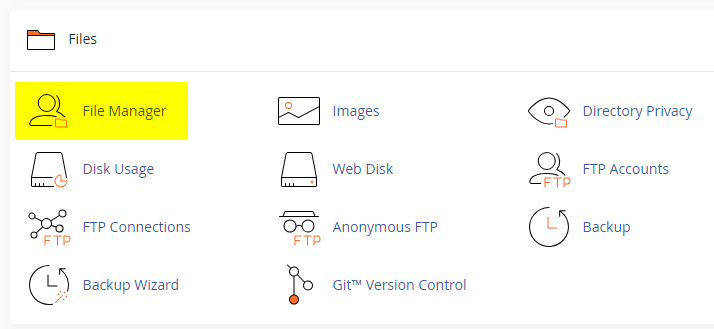
  2. Click on the "File Manager" icon. It's usually under the "Files" section.
  3. You are now in the "File Manager". Open the public_html folder, which is your website's root directory.
  4. Locate the wp-content folder inside "public_html," then open the themes folder inside of it.
  5. In the File Manager interface, click the "Upload" button and choose the theme's .zip file from your local drive.
  6. After it has been uploaded, right-click the .zip file and choose "Extract" or "Unzip".
  7. You can now delete the uploaded .zip file, but it's optional.
  8. Log in to your WordPress dashboard through your web browser.
  9. Go to Appearance → Themes. Now you will see the newly extracted theme.
  10. Make it your active theme by clicking the "Activate" button next to it.

Note: If your hosting provider doesn't offer cPanel, look for a File Manager option in your hosting dashboard (like DirectAdmin, Plesk, or CyberPanel). The process is usually very similar—just find the wp-content/themes folder and upload/extract the theme ZIP file there.

Method 3: Install using FTP

Installing a WordPress theme via FTP is straightforward, though it involves a few more steps compared to using the built-in theme uploader. Here's how to install a WordPress theme using FTP:

  1. Unzip the theme's .zip file you have downloaded.
  2. Connect to your hosting account using an FTP client such as "FileZilla" or "Core FTP".
  3. Navigate to the /wp-content/themes folder in the "Remote site" section.
  4. In the "Local site" section, locate the unzipped theme folder.
  5. Drag and drop the unzipped theme folder from the "Local site" section to the "Remote site" section.
  6. Be patient and let the transfer finish.
  7. Once the transfer is complete, log in to your WordPress dashboard and navigate to Appearance > Themes.
  8. Find the theme you just uploaded and click Activate.

Troubleshooting Tips

  • Didn't receive the download email? Wait 5–10 minutes or check your spam/junk folder. But if you still can not find this email or download link is broken, please inform us. we will send it ASAP.
  • "The uploaded file exceeds the upload_max_filesize directive in php.ini." - If you get this error when following the "Method 1", follow this tutorial: https://themesdna.com/blog/increase-maximum-file-upload-size-wordpress/
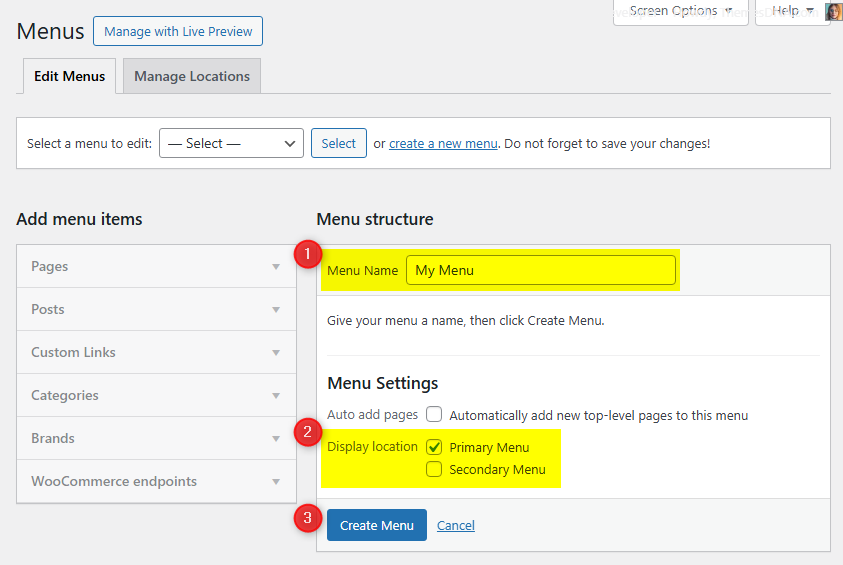
  • My menus disappeared or look different. Go to Appearance → Menus → Manage Locations and reassign your menus to the correct locations.
  • My header text or background color looks different after activating PRO. Reapply your colors in Appearance → Customize → Theme Options → Colors for Header Text Color and Background Color. Then publish.
  • Still can't install the theme? Contact us for help.

Import Demo Content

You can import the demo content, widgets, and Customizer settings shown in the PrimeWP PRO theme demo.

Manual Demo Import

Step 1: Import Main Site Content

This includes: Posts, pages, menus, media, categories, tags, comments, and custom fields.

  1. Download: XML File
  2. Go to Tools → Import.
  3. Under "WordPress", click Install Now if not installed.
  4. Click Run Importer.
  5. Select the XML file and click Upload file and import.
  6. Check "Download and import file attachments", click Submit.

Step 2: Import Widgets

  1. Install the Widget Importer & Exporter plugin.
  2. Go to Tools → Widget Importer & Exporter.
  3. Copy content from: Widgets .wie File and paste into the box.
  4. Click Import Widgets.

Step 3: Import Customizer Settings

  1. Download: Customizer File
  2. Install the Customizer Export/Import plugin.
  3. Go to Appearance → Customize → Export/Import.
  4. Select the .dat file, check "Download and import image files?", click Import.

Regenerate Thumbnails

If your website already has existing posts with featured images, it's highly recommended to regenerate thumbnails after activating the PrimeWP PRO theme. This ensures that all images match the new theme's layout and display sizes.

Regenerating thumbnails is optional if your site is completely new and doesn't have any uploaded images yet.

However, if you imported the demo content, regenerating thumbnails is essential to display images correctly across the site.

  1. Install and activate the Regenerate Thumbnails plugin.
  2. Go to Tools → Regenerate Thumbnails.
  3. Click the "Regenerate Thumbnails for All x Attachments" button to start the process.
  4. Wait until all images are regenerated. This may take a few minutes depending on your media library size.
  5. If you want, you can deactivate and delete the plugin once the process is complete.

This step ensures clean image alignment and sharp visuals throughout your website using the PrimeWP PRO theme.

Header Image

Quick Start Guide

PrimeWP PRO allows users to upload a site-wide custom header image with custom title and description. You can also upload a unique header image for each post/page replacing the site-wide header image.

There are header image options in:

  1. Header image options in Theme Customizer
  2. Header image options in post edit screen
  3. Header image options in page edit screen

How to Add a Header Image?

There are 3 types of header images:

  1. Site-wide Header Image: Appearance → Customize → Theme Options → Header Image
  2. Header Images of Posts: Post Edit Screen → "Post Settings - PrimeWP PRO" Meta Box → Site Header Image
  3. Header Images of Pages: Page Edit Screen → "Page Settings - PrimeWP PRO" Meta Box → Site Header Image

How to Add a Site-wide Header Image?

Site-wide header image will be displayed everywhere on your website. If you add a header image to a post/page using its settings, the site-wide header image will be replaced.

  1. Go to AppearanceCustomizeTheme OptionsHeader Image
  2. Upload your header image using Add new image button.

How to Add a Header Image to a Post?

  1. Go to edit screen of that post.
  2. Find the Post Settings - PrimeWP PRO meta box.
  3. Add your image URL or upload an image using Site Header Image option.

How to Add a Header Image to a Page?

  1. Go to edit screen of that page.
  2. Find the Page Settings - PrimeWP PRO meta box.
  3. Add your image URL or upload an image using Site Header Image option.

How to Add a Custom Title/Description to Header Image?

By default, the theme displays your website's title as the header image title and the tagline as the header image description. You can replace both with custom text.

Go to AppearanceCustomizeTheme OptionsHeader Image and use the Header Image Custom Title and Header Image Custom Description fields.

Add a Custom Title/Description to Site-wide Header Image:

  1. Go to AppearanceCustomizeTheme OptionsHeader Image
  2. Add your custom title to Header Image Custom Title field.
  3. Add your custom description to Header Image Custom Description field.
  4. Save settings.

How to Add a Custom Title/Description to the Header Image of a Post?

  1. Go to the edit screen of that post.
  2. Find the Post Settings - PrimeWP PRO meta box.
  3. Use Site Header Image Title and Site Header Image Description options.
  4. Update the post.

How to Add a Custom Title/Description to the Header Image of a Page?

  1. Go to the edit screen of that page.
  2. Find the Page Settings - PrimeWP PRO meta box.
  3. Use Site Header Image Title and Site Header Image Description options.
  4. Update the page.

How to Hide Title/Description from Header Image?

  1. Go to AppearanceCustomizeTheme OptionsHeader Image.
  2. Check the option Hide both Title and Description from Header Image and save settings.

Note: This option will hide both header image title and description sitewide.

News Ticker

The News Ticker displays posts in a smooth, horizontal scrolling format at the top of your site. It's perfect for highlighting breaking news, trending updates, or featured content. Fully customizable via the WordPress Theme Customizer, you can enable/disable the ticker, set a custom label, define the number of posts, and filter content by recent posts, category, tag, or specific post IDs.

Step 1: Access the News Ticker Options

  1. Go to your WordPress Dashboard.
  2. Navigate to Appearance → Customize.
  3. Click on Theme Options → News Ticker Options.

Step 2: Enable the News Ticker

Find the option Enable News Ticker and toggle it to Yes.

Step 3: Configure Ticker Options

Check the complete list of "News Ticker Options" available

Step 4: Save Changes

Click the Publish button at the top of the Customizer.

Tips

  • Use Posts by IDs to curate exactly which headlines appear.
  • Use Tag Posts or Category Posts for automated updates within a topic.
  • Adjust duration and width values for responsiveness and readability.

Custom Widgets

Quick Start Guide

To see available widgets and widget areas, navigate to WordPress DashboardAppearanceWidgets. There are 21 custom widgets bundled with PrimeWP PRO. Each widget must be enabled from the Customizer before it appears in the Widgets screen.

  1. PrimeWP Featured Posts Widget 1 through 18 (18 styles)
  2. PrimeWP Slider Widget
  3. PrimeWP Tabbed Widget
  4. PrimeWP About and Social Widget

To enable a widget, go to Appearance → Customize → Theme Options → Custom Widgets Options and check the widget you want to activate.

PrimeWP Slider Widget

This widget displays a responsive carousel slider of posts using the OwlCarousel2 library. It supports multiple post sources and provides a visually engaging way to highlight featured content.

Key Features

  • Responsive carousel slider with touch support
  • Multiple post sources: Recent, Category, Tag, or specific Post IDs
  • Advanced sorting options including post likes and views
  • Customizable display elements (titles, dates, categories)
  • Autoplay toggle plus loop, dots, nav, auto-height, margin, and responsive item counts
  • Navigation arrows and dot indicators

Usage Notes

  • Enable from Appearance → Customize → Theme Options → Custom Widgets Options
  • Best used in full-width widget areas for maximum visual impact
  • Post IDs should be entered as comma-separated values without spaces
Option ID Option Name Description Control Type Accepted Value Default
titleTitleWidget heading text.TextAny textFeatured Posts - Slider Widget
post_typePost TypeSelect source of posts.Selectrecentposts | catposts | tagposts | postsbyidsrecentposts
include_postsInclude PostsComma-separated IDs when Post Type is Posts by IDs.TextComma-separated IDs(empty)
featured_catCategoryCategory ID when Post Type is Category Posts.SelectCategory ID(empty)
featured_tagTagTag ID when Post Type is Tag Posts.SelectTag ID(empty)
orderbyOrder BySorting field.Selectdate | modified | comment_count | rand | post_likes | post_viewsdate
orderOrderSorting direction.SelectASC | DESCDESC
numberNumber of PostsHow many posts to show.Text (integer)Integer5
dateformatDate FormatPHP date format string.TextDate formatY-m-d
exclude_postsExclude PostsComma-separated IDs to skip.TextComma-separated IDs(empty)
show_catsShow CategoriesDisplay post categories.Checkboxtrue | falsefalse
show_authorShow AuthorDisplay post author.Checkboxtrue | falsetrue
show_dateShow DateDisplay post date.Checkboxtrue | falsetrue
show_commentsShow Comments CountDisplay number of comments.Checkboxtrue | falsetrue
show_likesShow LikesDisplay post likes.Checkboxtrue | falsetrue
show_viewsShow ViewsDisplay post views.Checkboxtrue | falsetrue
show_sharebtnsShow Share ButtonsDisplay sharing buttons.Checkboxtrue | falsetrue
autoplayAutoplayAuto-play slider items.Checkboxtrue | falsefalse
loopLoopEnable loop illusion by duplicating ends.Checkboxtrue | falsefalse
dotsDots NavigationShow pagination dots.Checkboxtrue | falsetrue
navNav ArrowsShow next/prev buttons.Checkboxtrue | falsefalse
autoheightAuto HeightAdjust slide height automatically.Checkboxtrue | falsefalse
thumb_styleThumbnail SizeSelect image size/aspect.Selectprimewp-480w-240h-image | primewp-480w-360h-image | primewp-480w-480h-image | primewp-675w-360h-image | primewp-851w-autoh-image | primewp-1226w-autoh-imageprimewp-480w-360h-image
marginSlide Item MarginRight margin in pixels.Text (integer)Integer10
itemsoneItems ≥1024pxSlides visible on screens ≥1024px.Text (integer)Integer2
itemstwoItems 991–1023pxSlides visible on screens 991–1023px.Text (integer)Integer2
itemsthreeItems 560–990pxSlides visible on screens 560–990px.Text (integer)Integer2
itemsfourItems ≤559pxSlides visible on small screens.Text (integer)Integer1

PrimeWP Tabbed Widget

This widget displays three separate tabs of posts in a tabbed interface. Each tab can be configured independently with different content sources and sorting options.

Key Features

  • Three independently configurable tabs with different content sources
  • Multiple sorting options including likes, views, and comments
  • Customizable display elements (thumbnails, titles, metadata, snippets)
  • Share buttons integration
  • Responsive tabbed interface

Usage Notes

  • Enable from Appearance → Customize → Theme Options → Custom Widgets Options
  • Each tab operates independently with its own post selection and sorting criteria
  • Post IDs should be entered as comma-separated values without spaces
Option ID Option Name Description Control Type Accepted Value Default
titleTitleWidget heading text.TextAny textTabbed Widget
show_taboneShow Tab 1Display first tab.Checkboxtrue | falsetrue
show_tabtwoShow Tab 2Display second tab.Checkboxtrue | falsetrue
show_tabthreeShow Tab 3Display third tab.Checkboxtrue | falsetrue
tabone_nameTab 1 NameLabel for tab one.TextAny textPopular
tabtwo_nameTab 2 NameLabel for tab two.TextAny textRecent
tabthree_nameTab 3 NameLabel for tab three.TextAny textRandom
tabone_post_typeTab 1 Post TypeSelect source for tab one.Selectrecentposts | catposts | tagposts | postsbyidsrecentposts
tabone_include_postsTab 1 Include PostsComma-separated IDs when Post Type is Posts by IDs.TextComma-separated IDs(empty)
tabone_featured_catTab 1 CategoryCategory ID when Post Type is Category Posts.SelectCategory ID(empty)
tabone_featured_tagTab 1 TagTag ID when Post Type is Tag Posts.SelectTag ID(empty)
tabone_orderbyTab 1 Order BySorting field.Selectdate | modified | comment_count | rand | post_likes | post_viewscomment_count
tabone_orderTab 1 OrderSorting direction.SelectASC | DESCDESC
tabone_exclude_postsTab 1 Exclude PostsComma-separated IDs to skip.TextComma-separated IDs(empty)
tabtwo_post_typeTab 2 Post TypeSelect source for tab two.Selectrecentposts | catposts | tagposts | postsbyidsrecentposts
tabtwo_include_postsTab 2 Include PostsComma-separated IDs when Post Type is Posts by IDs.TextComma-separated IDs(empty)
tabtwo_featured_catTab 2 CategoryCategory ID when Post Type is Category Posts.SelectCategory ID(empty)
tabtwo_featured_tagTab 2 TagTag ID when Post Type is Tag Posts.SelectTag ID(empty)
tabtwo_orderbyTab 2 Order BySorting field.Selectdate | modified | comment_count | rand | post_likes | post_viewsdate
tabtwo_orderTab 2 OrderSorting direction.SelectASC | DESCDESC
tabtwo_exclude_postsTab 2 Exclude PostsComma-separated IDs to skip.TextComma-separated IDs(empty)
tabthree_post_typeTab 3 Post TypeSelect source for tab three.Selectrecentposts | catposts | tagposts | postsbyidsrecentposts
tabthree_include_postsTab 3 Include PostsComma-separated IDs when Post Type is Posts by IDs.TextComma-separated IDs(empty)
tabthree_featured_catTab 3 CategoryCategory ID when Post Type is Category Posts.SelectCategory ID(empty)
tabthree_featured_tagTab 3 TagTag ID when Post Type is Tag Posts.SelectTag ID(empty)
tabthree_orderbyTab 3 Order BySorting field.Selectdate | modified | comment_count | rand | post_likes | post_viewsrand
tabthree_orderTab 3 OrderSorting direction.SelectASC | DESCDESC
tabthree_exclude_postsTab 3 Exclude PostsComma-separated IDs to skip.TextComma-separated IDs(empty)
dateformatDate FormatPHP date format string.TextDate formatY-m-d
numberNumber of PostsPosts per tab.Text (integer)Integer3
show_thumbnailShow ThumbnailDisplay post thumbnail.Checkboxtrue | falsetrue
show_authorShow AuthorDisplay post author.Checkboxtrue | falsefalse
show_dateShow DateDisplay post date.Checkboxtrue | falsetrue
show_commentsShow Comments CountDisplay number of comments.Checkboxtrue | falsetrue
show_likesShow LikesDisplay post likes.Checkboxtrue | falsetrue
show_viewsShow ViewsDisplay post views.Checkboxtrue | falsetrue
show_snippetShow SnippetDisplay post snippet.Checkboxtrue | falsetrue
snippet_typeSnippet TypeUse content or excerpt.Selectpostcontent | postexcerptpostcontent
snippet_lengthSnippet LengthNumber of words in snippet.Text (integer)Integer20
show_sharebtnsShow Share ButtonsDisplay sharing buttons.Checkboxtrue | falsetrue

PrimeWP About and Social Widget

This widget displays a profile section with an image, description, and extensive social media links. It supports over 70 different social platforms with customizable button styles (round or normal).

Key Features

  • Displays a profile image and customizable description
  • Supports over 70 different social media platforms
  • Option to display round or normal social buttons
  • All social links open in new tabs with nofollow attribute
  • Uses Font Awesome icons for social media buttons
  • Accessibility-friendly with proper ARIA labels

Usage Notes

  • Enable from Appearance → Customize → Theme Options → Custom Widgets Options
  • For the profile image, provide a direct URL to the image file
  • The description field supports HTML formatting
  • Leave any social media field empty to hide that particular button
  • All social media URLs should be complete links (e.g., https://facebook.com/username)
Option ID Option Name Description Control Type Accepted Value Default
titleTitleWidget heading text.TextAny textAbout and Social Widget
imageProfile Image URLProfile/author image URL.TextURL(empty)
descriptionDescriptionAbout text/biography.TextareaHTML/text(empty)
round_buttonsRound ButtonsUse round social buttons.Checkboxtrue | falsefalse
facebookFacebook URLFacebook profile/page link.TextURL(empty)
threadsThreads URLThreads profile link.TextURL(empty)
twitterX URLX (Twitter) profile link.TextURL(empty)
pinterestPinterest URLPinterest profile/board link.TextURL(empty)
linkedinLinkedIn URLLinkedIn profile/company link.TextURL(empty)
instagramInstagram URLInstagram profile link.TextURL(empty)
flickrFlickr URLFlickr profile link.TextURL(empty)
youtubeYouTube URLYouTube channel/profile link.TextURL(empty)
vimeoVimeo URLVimeo profile link.TextURL(empty)
soundcloudSoundCloud URLSoundCloud profile link.TextURL(empty)
messengerMessenger URLFacebook Messenger link.TextURL(empty)
whatsappWhatsApp URLWhatsApp contact link.TextURL(empty)
tiktokTikTok URLTikTok profile link.TextURL(empty)
lastfmLast.fm URLLast.fm profile link.TextURL(empty)
mediumMedium URLMedium profile link.TextURL(empty)
githubGitHub URLGitHub profile/org link.TextURL(empty)
bitbucketBitbucket URLBitbucket profile link.TextURL(empty)
tumblrTumblr URLTumblr blog link.TextURL(empty)
diggDigg URLDigg profile link.TextURL(empty)
deliciousDelicious URLDelicious profile link.TextURL(empty)
stumbleuponStumbleUpon URLStumbleUpon profile link.TextURL(empty)
mixMix URLMix profile link.TextURL(empty)
redditReddit URLReddit profile/subreddit link.TextURL(empty)
dribbbleDribbble URLDribbble profile link.TextURL(empty)
flipboardFlipboard URLFlipboard profile/magazine link.TextURL(empty)
bloggerBlogger URLBlogger site link.TextURL(empty)
etsyEtsy URLEtsy shop/profile link.TextURL(empty)
behanceBehance URLBehance profile link.TextURL(empty)
amazonAmazon URLAmazon author/shop link.TextURL(empty)
meetupMeetup URLMeetup group/profile link.TextURL(empty)
mixcloudMixcloud URLMixcloud profile link.TextURL(empty)
slackSlack URLSlack workspace invite link.TextURL(empty)
snapchatSnapchat URLSnapchat profile link.TextURL(empty)
spotifySpotify URLSpotify artist/profile link.TextURL(empty)
vkVK URLVK profile/group link.TextURL(empty)
yelpYelp URLYelp business/profile link.TextURL(empty)
wpWordPress URLWordPress.com profile/site link.TextURL(empty)
twitchTwitch URLTwitch channel link.TextURL(empty)
telegramTelegram URLTelegram profile/channel link.TextURL(empty)
bandcampBandcamp URLBandcamp profile/album link.TextURL(empty)
quoraQuora URLQuora profile link.TextURL(empty)
foursquareFoursquare URLFoursquare profile link.TextURL(empty)
deviantartDeviantArt URLDeviantArt profile link.TextURL(empty)
imdbIMDB URLIMDB profile/title link.TextURL(empty)
codepenCodePen URLCodePen profile link.TextURL(empty)
jsfiddleJSFiddle URLJSFiddle profile link.TextURL(empty)
stackoverflowStack Overflow URLStack Overflow profile link.TextURL(empty)
stackexchangeStack Exchange URLStack Exchange profile link.TextURL(empty)
buyselladsBuySellAds URLBuySellAds profile link.TextURL(empty)
web500px500px URL500px profile link.TextURL(empty)
elloEllo URLEllo profile link.TextURL(empty)
discordDiscord URLDiscord invite/profile link.TextURL(empty)
goodreadsGoodreads URLGoodreads profile link.TextURL(empty)
odnoklassnikiOdnoklassniki URLOK.ru profile link.TextURL(empty)
houzzHouzz URLHouzz profile link.TextURL(empty)
pocketPocket URLPocket profile link.TextURL(empty)
xingXING URLXING profile link.TextURL(empty)
mastodonMastodon URLMastodon profile link.TextURL(empty)
googleplayGoogle Play URLGoogle Play author/app link.TextURL(empty)
slideshareSlideShare URLSlideShare profile link.TextURL(empty)
dropboxDropbox URLDropbox link.TextURL(empty)
paypalPayPal URLPayPal.me or payment link.TextURL(empty)
viadeoViadeo URLViadeo profile link.TextURL(empty)
wikipediaWikipedia URLWikipedia page link.TextURL(empty)
skypeSkype UsernameSkype username.TextUsername(empty)
envelopeEmailEmail address (mailto: link).TextEmail/URL(empty)
rssRSS Feed URLRSS feed link.TextURL(empty)

Widget Areas

There are 26 widget areas in PrimeWP PRO.


  1. Sidebar 1

    Normally located on the left-hand side of the page.

  2. Sidebar 2

    Normally located on the right-hand side of the page.

  3. Top Full Width Widgets (Default HomePage)

    Full-width area after the header, displayed on the default homepage (latest posts).

  4. Top Full Width Widgets (Static HomePage)

    Full-width area after the header, displayed on the static homepage.

  5. Top Full Width Widgets (Single Pages)

    Full-width area after the header, displayed on single posts (except attachments and pages).

  6. Top Full Width Widgets (Singular Pages)

    Full-width area after the header, displayed on single posts (including attachments and pages).

  7. Top Full Width Widgets (Everywhere)

    Full-width area after the header, displayed on every page.

  8. Top Widgets (Default HomePage)

    At the top of main content, displayed on the default homepage.

  9. Top Widgets (Static HomePage)

    At the top of main content, displayed on the static homepage.

  10. Top Widgets (Single Pages)

    At the top of main content, displayed on single posts (except attachments and pages).

  11. Top Widgets (Singular Pages)

    At the top of main content, displayed on single posts (including attachments and pages).

  12. Top Widgets (Everywhere)

    At the top of main content, displayed on every page.

  13. Bottom Widgets (Default HomePage)

    At the bottom of main content, displayed on the default homepage.

  14. Bottom Widgets (Static HomePage)

    At the bottom of main content, displayed on the static homepage.

  15. Bottom Widgets (Single Pages)

    At the bottom of main content, displayed on single posts (except attachments and pages).

  16. Bottom Widgets (Singular Pages)

    At the bottom of main content, displayed on single posts (including attachments and pages).

  17. Bottom Widgets (Everywhere)

    At the bottom of main content, displayed on every page.

  18. Post Bottom Widgets

    At the bottom of a single post, before the comments.

  19. Footer Top

    On the top of the footer.

  20. Footer 1

    Left bottom footer column.

  21. Footer 2

    Middle bottom footer column.

  22. Footer 3

    Middle bottom footer column.

  23. Footer 4

    Right bottom footer column.

  24. Footer 5

    Right bottom footer column.

  25. Footer Bottom

    On the bottom of the footer.

  26. 404 Page Widgets

    On the 404 (not found) page.

How to Control Widget Visibility by Location

1. Install and activate the Widget Display Conditions or Widget Context plugin.

2. Drag and drop your widget into any of these widget areas:

  1. Sidebar 1 / Sidebar 2
  2. Top Full Width Widgets (Everywhere)
  3. Top Widgets (Everywhere)
  4. Bottom Widgets (Everywhere)
  5. Footer Top / Footer 1–5 / Footer Bottom

3. If using Widget Display Conditions plugin, click the Display conditions button at the bottom of your widget settings.

4. Click Add group button.

5. Set your widget display conditions and click save.

Custom Page Templates

PrimeWP PRO includes 28 custom page and post templates that let you create pages and posts with unique layouts. You can assign these templates when editing any page or post.

Special Function Templates

  • Featured Content: Displays featured post widgets instead of regular content.
  • Contact Form: Creates a contact page with a built-in contact form.
  • Sitemap: Displays a structured list of your site's pages, categories, and archives.
  • Authors: Shows a list of all authors on your site with their profiles and post counts.

Layout Templates

These templates control how content and sidebars are arranged:

  • "Full Width, no sidebar" (Page/Post): Content in full width without any sidebars.
  • "Full Width, bottom sidebar" (Page/Post): Content in full width with a sidebar below.
  • "Content + Sidebar 1" (Page/Post): Content on the left, sidebar on the right.
  • "Sidebar 1 + Content" (Page/Post): Sidebar on the left, content on the right.
  • "Content + Sidebar 2" (Page/Post): Content on the left, different sidebar on the right.
  • "Sidebar 2 + Content" (Page/Post): Sidebar on the left, content on the right.
  • "Content + Sidebar 1 + Sidebar 2" (Page/Post): Content, then two sidebars.
  • "Sidebar 1 + Content + Sidebar 2" (Page/Post): Sidebar, content, sidebar.
  • "Sidebar 1 + Sidebar 2 + Content" (Page/Post): Two sidebars, then content.
  • "Content + Sidebar 2 + Sidebar 1" (Page/Post): Content, sidebar2, sidebar1.
  • "Sidebar 2 + Content + Sidebar 1" (Page/Post): Sidebar2, content, sidebar1.
  • "Sidebar 2 + Sidebar 1 + Content" (Page/Post): Two sidebars, content.

How to Assign a Custom Template:

  1. Go to Pages or PostsAdd New or edit an existing page/post.
  2. Look for the Template option:
    • In Gutenberg: Click the Page or Post tab in the right sidebar and scroll to find Template.
    • In Classic Editor: Enable Page Attributes or Post Attributes via Screen Options, then use the Template dropdown.
  3. Select the desired template from the list.
  4. Click Publish or Update.

How to Create a Contact Page

PrimeWP PRO includes a built-in Contact Form template.

Step 1: Create the Contact Page

  1. Go to PagesAdd New.
  2. Give your page a title like Contact Us.
  3. Select the Contact Form template.
  4. Click Publish.

Step 2: Configure the Contact Form Email Address

  1. Go to AppearanceCustomize.
  2. Open Theme OptionsPage Templates Options.
  3. Enter your email in the Contact Form Email Address field.
  4. Click Publish.

Note: If you do not set the Contact Form Email Address, the form will not send emails.

How the Form Works

  • The form includes fields for Name, Email, Subject, and Message.
  • Messages are sent to the email address set in Page Templates Options.

How to Create a Sitemap Page

PrimeWP PRO includes a built-in Sitemap template that displays a structured list of your site's content.

  1. Go to PagesAdd New.
  2. Enter a title like Sitemap.
  3. Select the Sitemap template.
  4. Click Publish.

What's Included

  • List of all Pages
  • List of all Categories and Tags
  • Monthly Archives
  • List of all Authors

How to Create a Site Authors Page

PrimeWP PRO includes a built-in Authors template that displays all users with the Author role or higher.

Step 1: Create the Authors Page

  1. Go to PagesAdd New.
  2. Enter a title like Our Authors.
  3. Select the Authors template.
  4. Click Publish.

Step 2: Customize Author Display (Optional)

  1. Go to AppearanceCustomizeTheme OptionsPage Templates Options.
  2. Toggle: Hide site administrators / Hide authors with zero posts.
  3. Click Publish.

Author Details Displayed

  • Each listed user must have the role of Author, Editor, or Administrator.
  • Shows each author's display name, avatar, bio, and social profiles.
  • Set bios under UsersProfileBiographical Info.
  • Set social links under UsersProfileContact Info.

Customizer Theme Options

To access all customizer theme options:

  1. Go to your WordPress Dashboard.
  2. Navigate to Appearance → Customize.
  3. Click on Theme Options.

The PrimeWP PRO theme provides the following customizer option sections:

Site Identity Options

Below is the complete list of Site Identity Options available:

Option ID Option Name Description Control Type Accepted Value Default
custom_logoLogoUpload/select a site logo image.Image UploadImage file(empty)
blognameSite TitlePrimary site name displayed in header and metadata.TextAny textWordPress site title
blogdescriptionTaglineShort description shown with the site title.TextAny textJust another WordPress site
display_header_textDisplay Header TextShow or hide the site title and tagline.Checkboxtrue | falsetrue
site_iconSite IconFavicon/browser and app icon (512×512 recommended).Image UploadImage file(empty)

Colors Options

Below is the complete list of Colors Options available:

Option ID Option Name Description Control Type Accepted Value Default
primewp_options[header_image_title_color]Header Image Site Title ColorColor for site title in header image area.Color PickerHex color#ffffff
primewp_options[body_text_color]Main Text ColorBody text color.Color PickerHex color#555555
primewp_options[link_color]Main Link ColorDefault link color.Color PickerHex color#666666
primewp_options[link_hover_color]Main Link Hover ColorHover state for links.Color PickerHex color#000000
primewp_options[headings_color]General Headings ColorColor for headings.Color PickerHex color#111111
primewp_options[header_bg_color]Header Background ColorBackground of site header.Color PickerHex color#333333
primewp_options[header_image_title_color]Header Image Area Title ColorTitle color on header image area.Color PickerHex color#ffffff
primewp_options[header_image_title_hover_color]Header Image Area Title Hover ColorHover color for header image title.Color PickerHex color#ffffff
primewp_options[header_image_desc_color]Header Image Area Description ColorDescription color on header image area.Color PickerHex color#ffffff
primewp_options[header_image_bg_color]Header Image Area Background ColorBackground overlay for header image area.TextRGBA color stringrgba(0,0,0,0.6)
primewp_options[primary_menu_color]Primary Menu Link ColorLink color in primary menu.Color PickerHex color#ffffff
primewp_options[primary_menu_shadow_color]Primary Menu Link Shadow ColorShadow color for primary menu links.Color PickerHex color#000000
primewp_options[primary_menu_hover_color]Primary Menu Link Hover ColorHover color for primary menu links.Color PickerHex color#ffffff
primewp_options[primary_menu_hover_bg_color]Primary Menu Link Hover BackgroundHover background for primary menu links.Color PickerHex color#000000
primewp_options[primary_submenu_one_bg_color]Primary Sub Menu BackgroundBackground for primary submenu.Color PickerHex color#444444
primewp_options[primary_submenu_bd_color]Primary Sub Menu Border ColorBorder color for primary submenu.Color PickerHex color#666666
primewp_options[primary_menu_icon_color]Primary Responsive Menu Icon ColorIcon color for primary responsive menu.Color PickerHex color#ffffff
primewp_options[secondary_menu_bg_color]Secondary Menu Background ColorBackground of secondary menu.Color PickerHex color#222222
primewp_options[secondary_menu_bd_color]Secondary Menu Border ColorBorder color of secondary menu.Color PickerHex color#444444
primewp_options[secondary_menu_color]Secondary Menu Link ColorLink color in secondary menu.Color PickerHex color#ffffff
primewp_options[secondary_menu_shadow_color]Secondary Menu Link Shadow ColorShadow color for secondary menu links.Color PickerHex color#000000
primewp_options[secondary_menu_hover_color]Secondary Menu Link Hover ColorHover color for secondary menu links.Color PickerHex color#dddddd
primewp_options[secondary_menu_hover_bg_color]Secondary Menu Link Hover BackgroundHover background for secondary menu links.Color PickerHex color#000000
primewp_options[secondary_submenu_one_bg_color]Secondary Sub Menu BackgroundBackground for secondary submenu.Color PickerHex color#333333
primewp_options[secondary_submenu_one_bd_color]Secondary Sub Menu BorderBorder color for secondary submenu.Color PickerHex color#444444
primewp_options[secondary_menu_icon_color]Secondary Responsive Menu Icon ColorIcon color for secondary responsive menu.Color PickerHex color#ffffff
primewp_options[header_social_bg_color]Header Social Bar BackgroundBackground for header social bar.Color PickerHex color#444444
primewp_options[header_social_bd_color]Header Social Bar BorderBorder color for header social bar.Color PickerHex color#555555
primewp_options[news_ticker_bg_color]News Ticker BackgroundBackground color for news ticker.Color PickerHex color#cccccc
primewp_options[news_ticker_heading_color]News Ticker Heading ColorHeading text color for news ticker.Color PickerHex color#ffffff
primewp_options[news_ticker_heading_bg_color]News Ticker Heading BackgroundHeading background color for news ticker.Color PickerHex color#7f181b
primewp_options[news_ticker_date_color]News Ticker Dates Text ColorDate text color for news ticker.Color PickerHex color#ffffff
primewp_options[news_ticker_date_bg_color]News Ticker Dates BackgroundDate background color for news ticker.Color PickerHex color#666666
primewp_options[news_ticker_text_color]News Ticker Text ColorNews ticker item text color.Color PickerHex color#000000
primewp_options[news_ticker_hover_text_color]News Ticker Hover Text ColorHover color for news ticker items.Color PickerHex color#555555
primewp_options[widget_content_bg_color]Widgets and Content BackgroundBackground for widget/content areas.Color PickerHex color#ffffff
primewp_options[widget_content_bd_one_color]Widgets and Content Border 1Primary border color for widgets/content.Color PickerHex color#dddddd
primewp_options[widget_content_bd_two_color]Widgets and Content Border 2Secondary border color for widgets/content.Color PickerHex color#ffffff
primewp_options[mini_post_title_color]Home/Featured Post Title ColorTitle color for featured/home posts.Color PickerHex color#000000
primewp_options[post_title_color]Single Post Title ColorTitle color on single posts.Color PickerHex color#000000
primewp_options[post_title_shadow_color]Single Post Title Shadow ColorShadow color for single post titles.Color PickerHex color#ffffff
primewp_options[post_title_bg_color]Single Post Title BackgroundBackground for single post title area.Color PickerHex color#ececec
primewp_options[post_title_bd_one_color]Single Post Title Border Color 1Primary border color for single post title.Color PickerHex color#eeeeee
primewp_options[post_title_bd_two_color]Single Post Title Border Color 2Secondary border color for single post title.Color PickerHex color#ffffff
primewp_options[mini_post_title_hover_color]Home/Featured Post Title Hover ColorHover color for featured/home post titles.Color PickerHex color#333333
primewp_options[post_title_hover_color]Single Post Title Hover ColorHover color for single post titles.Color PickerHex color#333333
primewp_options[mini_post_title_two_color]Home/Featured Post Title Color 2Alternate title color for featured/home posts.Color PickerHex color#ffffff
primewp_options[mini_post_title_two_hover_color]Home/Featured Post Title Hover Color 2Alternate hover color for featured/home post titles.Color PickerHex color#ffffff
primewp_options[post_body_link_color]Post Content Link ColorLink color in post content.Color PickerHex color#409BD4
primewp_options[post_body_link_hover_color]Post Content Link Hover ColorHover color for post content links.Color PickerHex color#08ACD5
primewp_options[postcats_color]Post Categories ColorText color for post category labels.Color PickerHex color#ffffff
primewp_options[postcats_bg_color]Post Categories BackgroundBackground color for category labels.Color PickerHex color#7f181b
primewp_options[postcats_hover_color]Post Categories Hover ColorHover text color for category labels.Color PickerHex color#ffffff
primewp_options[postcats_bg_hover_color]Post Categories Hover BackgroundHover background for category labels.Color PickerHex color#000000
primewp_options[mini_post_meta_color]Home/Featured Post Meta ColorMeta text color for featured/home posts.Color PickerHex color#666666
primewp_options[post_meta_color]Single Post Meta ColorMeta text color on single posts.Color PickerHex color#666666
primewp_options[mini_post_meta_hover_color]Home/Featured Post Meta Hover ColorHover color for featured/home post meta.Color PickerHex color#000000
primewp_options[post_meta_hover_color]Single Post Meta Hover ColorHover color for single post meta.Color PickerHex color#000000
primewp_options[mini_post_meta_two_color]Home/Featured Post Meta Color 2Alternate meta color for featured/home posts.Color PickerHex color#ffffff
primewp_options[mini_post_meta_two_hover_color]Home/Featured Post Meta Hover Color 2Alternate hover meta color for featured/home posts.Color PickerHex color#ffffff
primewp_options[rmore_color]Read More Button ColorText color for Read More button.Color PickerHex color#ffffff
primewp_options[rmore_bg_color]Read More Button BackgroundBackground for Read More button.Color PickerHex color#333333
primewp_options[rmore_hover_color]Read More Button Hover ColorHover text color for Read More button.Color PickerHex color#ffffff
primewp_options[rmore_bg_hover_color]Read More Button Hover BackgroundHover background for Read More button.Color PickerHex color#000000
primewp_options[author_bio_bg_color]Author Bio Box BackgroundBackground color for author bio box.Color PickerHex color#f6f6f6
primewp_options[author_bio_bd_color]Author Bio Box BorderBorder color for author bio box.Color PickerHex color#e0e0e0
primewp_options[sidebar_title_color]Sidebar Title ColorColor for sidebar widget titles.Color PickerHex color#000000
primewp_options[sidebar_title_shadow_color]Sidebar Title Shadow ColorShadow color for sidebar titles.Color PickerHex color#ffffff
primewp_options[sidebar_title_bg_color]Sidebar Title BackgroundBackground for sidebar titles.Color PickerHex color#ececec
primewp_options[sidebar_title_bd_color]Sidebar Title Border ColorBorder color for sidebar titles.Color PickerHex color#dddddd
primewp_options[sidebar_link_color]Sidebar Link ColorLink color in sidebar.Color PickerHex color#444444
primewp_options[sidebar_link_hover_color]Sidebar Link Hover ColorHover link color in sidebar.Color PickerHex color#666666
primewp_options[tag_cloud_color]Tag Cloud Link ColorLink color for tag cloud.Color PickerHex color#ffffff
primewp_options[tag_cloud_bg_color]Tag Cloud Link BackgroundBackground for tag cloud links.Color PickerHex color#888888
primewp_options[tag_cloud_hover_color]Tag Cloud Link Hover ColorHover color for tag cloud links.Color PickerHex color#ffffff
primewp_options[tag_cloud_hover_bg_color]Tag Cloud Link Hover BackgroundHover background for tag cloud links.Color PickerHex color#000000
primewp_options[footer_bg_color]Footer Background ColorFooter background color.Color PickerHex color#333333
primewp_options[footer_title_color]Footer Title ColorTitle color in footer widgets.Color PickerHex color#ffffff
primewp_options[footer_title_bd_one_color]Footer Title Border 1 ColorPrimary border color for footer titles.Color PickerHex color#444444
primewp_options[footer_title_bd_two_color]Footer Title Border 2 ColorSecondary border color for footer titles.Color PickerHex color#222222
primewp_options[footer_text_color]Footer Text ColorFooter text color.Color PickerHex color#dddddd
primewp_options[footer_link_color]Footer Link ColorFooter link color.Color PickerHex color#cccccc
primewp_options[footer_link_hover_color]Footer Link Hover ColorHover color for footer links.Color PickerHex color#ffffff
primewp_options[footer_list_bd_one_color]Footer List Border 1 ColorPrimary border color for footer lists.Color PickerHex color#444444
primewp_options[footer_list_bd_two_color]Footer List Border 2 ColorSecondary border color for footer lists.Color PickerHex color#222222
primewp_options[cp_bg_color]Copyrights Background ColorBackground color for copyright bar.Color PickerHex color#2e2e2e
primewp_options[cp_bd_color]Copyrights Border ColorBorder color for copyright bar.Color PickerHex color#444444
primewp_options[cp_color]Copyrights Text ColorText color for copyright bar.Color PickerHex color#ECFFF1
primewp_options[loadmore_color]Ajax Load More Button ColorText color for load more button.Color PickerHex color#ffffff
primewp_options[loadmore_bg_color]Ajax Load More Button BackgroundBackground color for load more button.Color PickerHex color#333333
primewp_options[loadmore_bd_color]Ajax Load More Button BorderBorder color for load more button.Color PickerHex color#000000
primewp_options[loadmore_hover_color]Ajax Load More Button Hover ColorHover text color for load more button.Color PickerHex color#ffffff
primewp_options[loadmore_bg_hover_color]Ajax Load More Button Hover BackgroundHover background for load more button.Color PickerHex color#67080b
primewp_options[loadmore_bd_hover_color]Ajax Load More Button Hover BorderHover border color for load more button.Color PickerHex color#000000
primewp_options[button_text_color]Button Text ColorGlobal button text color.Color PickerHex color#ffffff
primewp_options[button_bg_color]Button Background ColorGlobal button background color.Color PickerHex color#333333
primewp_options[button_bd_color]Button Border ColorGlobal button border color.Color PickerHex color#e6e6e6
primewp_options[button_hover_bg_color]Button Hover Background ColorHover background for buttons.Color PickerHex color#7f181b
primewp_options[input_text_color]Input Text ColorText color for form inputs.Color PickerHex color#666666
primewp_options[input_hover_text_color]Input Hover Text ColorHover text color for inputs.Color PickerHex color#111111
primewp_options[input_bd_color]Input Border ColorBorder color for inputs.Color PickerHex color#dddddd
primewp_options[selected_text_color]Selected Text ColorColor of highlighted text selection.Color PickerHex color#ffffff
primewp_options[selected_text_bg_color]Selected Text BackgroundBackground for highlighted text selection.Color PickerHex color#333333
primewp_options[disable_shadow_color]Disable Shadow ColorDisable shadow color usage.Checkboxtrue | falsefalse
primewp_options[disable_color_options]Disable All Color OptionsDisable all color overrides and use defaults.Checkboxtrue | falsefalse

Font Options

Below is the complete list of Font Options available:

Option ID Option Name Description Control Type Accepted Value Default
primewp_options[font_subsets]Font SubsetsSelect font subsets to load.Multi-selectlatin | latin-ext | cyrillic | cyrillic-ext | greek | greek-ext | vietnameselatin
primewp_options[body_fonts]Body Font-FamilyFont family for body text.SelectFont family choices//fonts.googleapis.com/css?family=Domine:400,700
primewp_options[body_font_size]Body Font-SizeSize for body text.Select8px–72px13px
primewp_options[body_font_weight]Body Font-WeightWeight for body text.Select400 | 700400
primewp_options[body_font_style]Body Font-StyleStyle for body text.Selectnormal | italicnormal
primewp_options[body_line_height]Body Line-HeightLine height for body text.TextNumeric1.6
primewp_options[site_title_fonts]Site Title Font-FamilyFont for site title.SelectFont family choices//fonts.googleapis.com/css?family=Oswald:400,700
primewp_options[site_title_font_size]Site Title Font-SizeSize for site title.Select8px–72px24px
primewp_options[site_title_font_weight]Site Title Font-WeightWeight for site title.Select400 | 700400
primewp_options[site_title_font_style]Site Title Font-StyleStyle for site title.Selectnormal | italicnormal
primewp_options[site_title_line_height]Site Title Line-HeightLine height for site title.TextNumeric1
primewp_options[site_desc_fonts]Site Description Font-FamilyFont for site description/tagline.SelectFont family choices//fonts.googleapis.com/css?family=Oswald:400,700
primewp_options[site_desc_font_size]Site Description Font-SizeSize for site description.Select8px–72px12px
primewp_options[site_desc_font_weight]Site Description Font-WeightWeight for site description.Select400 | 700400
primewp_options[site_desc_font_style]Site Description Font-StyleStyle for site description.Selectnormal | italicnormal
primewp_options[site_desc_line_height]Site Description Line-HeightLine height for site description.TextNumeric1
primewp_options[header_image_title_fonts]Header Image Title Font-FamilyFont for header image title.SelectFont family choices//fonts.googleapis.com/css?family=Playfair+Display:400,400i,700,700i
primewp_options[header_image_title_font_size]Header Image Title Font-SizeSize for header image title.Select8px–72px24px
primewp_options[header_image_title_font_weight]Header Image Title Font-WeightWeight for header image title.Select400 | 700400
primewp_options[header_image_title_font_style]Header Image Title Font-StyleStyle for header image title.Selectnormal | italicnormal
primewp_options[header_image_title_line_height]Header Image Title Line-HeightLine height for header image title.TextNumeric1
primewp_options[header_image_desc_fonts]Header Image Description Font-FamilyFont for header image description.SelectFont family choices//fonts.googleapis.com/css?family=Domine:400,700
primewp_options[header_image_desc_font_size]Header Image Description Font-SizeSize for header image description.Select8px–72px13px
primewp_options[header_image_desc_font_weight]Header Image Description Font-WeightWeight for header image description.Select400 | 700400
primewp_options[header_image_desc_font_style]Header Image Description Font-StyleStyle for header image description.Selectnormal | italicnormal
primewp_options[header_image_desc_line_height]Header Image Description Line-HeightLine height for header image description.TextNumeric1
primewp_options[primary_menu_fonts]Primary Menu Font-FamilyFont for primary menu links.SelectFont family choices//fonts.googleapis.com/css?family=Oswald:400,700
primewp_options[primary_menu_font_size]Primary Menu Font-SizeSize for primary menu.Select8px–72px13px
primewp_options[primary_menu_font_weight]Primary Menu Font-WeightWeight for primary menu.Select400 | 700400
primewp_options[primary_menu_font_style]Primary Menu Font-StyleStyle for primary menu.Selectnormal | italicnormal
primewp_options[secondary_menu_fonts]Secondary Menu Font-FamilyFont for secondary menu links.SelectFont family choices//fonts.googleapis.com/css?family=Oswald:400,700
primewp_options[secondary_menu_font_size]Secondary Menu Font-SizeSize for secondary menu.Select8px–72px13px
primewp_options[secondary_menu_font_weight]Secondary Menu Font-WeightWeight for secondary menu.Select400 | 700400
primewp_options[secondary_menu_font_style]Secondary Menu Font-StyleStyle for secondary menu.Selectnormal | italicnormal
primewp_options[news_ticker_fonts]News Ticker Font-FamilyFont for news ticker.SelectFont family choices//fonts.googleapis.com/css?family=Patua+One
primewp_options[news_ticker_font_size]News Ticker Font-SizeSize for news ticker.Select8px–72px13px
primewp_options[news_ticker_font_weight]News Ticker Font-WeightWeight for news ticker.Select400 | 700400
primewp_options[news_ticker_font_style]News Ticker Font-StyleStyle for news ticker.Selectnormal | italicnormal
primewp_options[hpost_title_fonts]Home/Featured Post Title Font-FamilyFont for featured/home post titles.SelectFont family choices//fonts.googleapis.com/css?family=Roboto+Condensed:400,400i,700,700i
primewp_options[hpost_title_font_size]Home/Featured Post Title Font-SizeSize for featured/home post titles.Select8px–72px20px
primewp_options[hpost_title_font_weight]Home/Featured Post Title Font-WeightWeight for featured/home post titles.Select400 | 700700
primewp_options[hpost_title_font_style]Home/Featured Post Title Font-StyleStyle for featured/home post titles.Selectnormal | italicnormal
primewp_options[hpost_title_line_height]Home/Featured Post Title Line-HeightLine height for featured/home post titles.TextNumeric1.2
primewp_options[hpost_title_sm_fonts]Home/Featured Small Post Title Font-FamilyFont for small featured/home titles.SelectFont family choices//fonts.googleapis.com/css?family=Roboto+Condensed:400,400i,700,700i
primewp_options[hpost_title_sm_font_size]Home/Featured Small Post Title Font-SizeSize for small featured/home titles.Select8px–72px18px
primewp_options[hpost_title_sm_font_weight]Home/Featured Small Post Title Font-WeightWeight for small featured/home titles.Select400 | 700700
primewp_options[hpost_title_sm_font_style]Home/Featured Small Post Title Font-StyleStyle for small featured/home titles.Selectnormal | italicnormal
primewp_options[hpost_title_sm_line_height]Home/Featured Small Post Title Line-HeightLine height for small featured/home titles.TextNumeric1.2
primewp_options[hpost_cats_fonts]Home/Featured Post Categories Font-FamilyFont for featured/home categories.SelectFont family choices//fonts.googleapis.com/css?family=Oswald:400,700
primewp_options[hpost_cats_font_size]Home/Featured Post Categories Font-SizeSize for featured/home categories.Select8px–72px12px
primewp_options[hpost_cats_font_weight]Home/Featured Post Categories Font-WeightWeight for featured/home categories.Select400 | 700400
primewp_options[hpost_cats_font_style]Home/Featured Post Categories Font-StyleStyle for featured/home categories.Selectnormal | italicnormal
primewp_options[hpost_meta_fonts]Home/Featured Post Meta Font-FamilyFont for featured/home meta.SelectFont family choices//fonts.googleapis.com/css?family=Oswald:400,700
primewp_options[hpost_meta_font_size]Home/Featured Post Meta Font-SizeSize for featured/home meta.Select8px–72px12px
primewp_options[hpost_meta_font_weight]Home/Featured Post Meta Font-WeightWeight for featured/home meta.Select400 | 700400
primewp_options[hpost_meta_font_style]Home/Featured Post Meta Font-StyleStyle for featured/home meta.Selectnormal | italicnormal
primewp_options[read_more_fonts]Read More Button Font-FamilyFont for Read More buttons.SelectFont family choices//fonts.googleapis.com/css?family=Oswald:400,700
primewp_options[read_more_font_size]Read More Button Font-SizeSize for Read More buttons.Select8px–72px13px
primewp_options[read_more_font_weight]Read More Button Font-WeightWeight for Read More buttons.Select400 | 700400
primewp_options[read_more_font_style]Read More Button Font-StyleStyle for Read More buttons.Selectnormal | italicnormal
primewp_options[post_title_fonts]Post Title Font-FamilyFont for single post titles.SelectFont family choices//fonts.googleapis.com/css?family=Playfair+Display:400,400i,700,700i
primewp_options[post_title_font_size]Post Title Font-SizeSize for single post titles.Select8px–72px24px
primewp_options[post_title_font_weight]Post Title Font-WeightWeight for single post titles.Select400 | 700700
primewp_options[post_title_font_style]Post Title Font-StyleStyle for single post titles.Selectnormal | italicnormal
primewp_options[post_title_line_height]Post Title Line-HeightLine height for single post titles.TextNumeric1.2
primewp_options[widget_title_fonts]Main/Sidebars Widget Title Font-FamilyFont for sidebar widget titles.SelectFont family choices//fonts.googleapis.com/css?family=Oswald:400,700
primewp_options[widget_title_font_size]Main/Sidebars Title Font-SizeSize for sidebar widget titles.Select8px–72px15px
primewp_options[widget_title_font_weight]Main/Sidebars Title Font-WeightWeight for sidebar widget titles.Select400 | 700400
primewp_options[widget_title_font_style]Main/Sidebars Title Font-StyleStyle for sidebar widget titles.Selectnormal | italicnormal
primewp_options[sidebar_title_line_height]Main/Sidebars Title Line-HeightLine height for sidebar widget titles.TextNumeric1
primewp_options[footer_title_fonts]Footer Widget Title Font-FamilyFont for footer widget titles.SelectFont family choices//fonts.googleapis.com/css?family=Oswald:400,700
primewp_options[footer_title_font_size]Footer Title Font-SizeSize for footer titles.Select8px–72px14px
primewp_options[footer_title_font_weight]Footer Title Font-WeightWeight for footer titles.Select400 | 700400
primewp_options[footer_title_font_style]Footer Title Font-StyleStyle for footer titles.Selectnormal | italicnormal
primewp_options[footer_title_line_height]Footer Title Line-HeightLine height for footer titles.TextNumeric1
primewp_options[tag_cloud_fonts]Tag Cloud Widget Font-FamilyFont for tag cloud widget.SelectFont family choices//fonts.googleapis.com/css?family=Oswald:400,700
primewp_options[tag_cloud_font_size]Tag Cloud Widget Font-SizeSize for tag cloud widget.Select8px–72px13px
primewp_options[tag_cloud_font_weight]Tag Cloud Widget Font-WeightWeight for tag cloud widget.Select400 | 700400
primewp_options[tag_cloud_font_style]Tag Cloud Widget Font-StyleStyle for tag cloud widget.Selectnormal | italicnormal
primewp_options[headings_fonts]General Headings Font-FamilyFont for headings.SelectFont family choices//fonts.googleapis.com/css?family=Playfair+Display:400,400i,700,700i
primewp_options[headings_line_height]General Headings Line-HeightLine height for headings.TextNumeric1
primewp_options[h1_font_size]H1 Font-SizeSize for H1 headings.Select8px–72px32px
primewp_options[h1_font_weight]H1 Font-WeightWeight for H1 headings.Select400 | 700700
primewp_options[h1_font_style]H1 Font-StyleStyle for H1 headings.Selectnormal | italicnormal
primewp_options[h2_font_size]H2 Font-SizeSize for H2 headings.Select8px–72px28px
primewp_options[h2_font_weight]H2 Font-WeightWeight for H2 headings.Select400 | 700700
primewp_options[h2_font_style]H2 Font-StyleStyle for H2 headings.Selectnormal | italicnormal
primewp_options[h3_font_size]H3 Font-SizeSize for H3 headings.Select8px–72px24px
primewp_options[h3_font_weight]H3 Font-WeightWeight for H3 headings.Select400 | 700700
primewp_options[h3_font_style]H3 Font-StyleStyle for H3 headings.Selectnormal | italicnormal
primewp_options[h4_font_size]H4 Font-SizeSize for H4 headings.Select8px–72px20px
primewp_options[h4_font_weight]H4 Font-WeightWeight for H4 headings.Select400 | 700700
primewp_options[h4_font_style]H4 Font-StyleStyle for H4 headings.Selectnormal | italicnormal
primewp_options[h5_font_size]H5 Font-SizeSize for H5 headings.Select8px–72px18px
primewp_options[h5_font_weight]H5 Font-WeightWeight for H5 headings.Select400 | 700700
primewp_options[h5_font_style]H5 Font-StyleStyle for H5 headings.Selectnormal | italicnormal
primewp_options[h6_font_size]H6 Font-SizeSize for H6 headings.Select8px–72px16px
primewp_options[h6_font_weight]H6 Font-WeightWeight for H6 headings.Select400 | 700700
primewp_options[h6_font_style]H6 Font-StyleStyle for H6 headings.Selectnormal | italicnormal
primewp_options[disable_google_fonts]Disable Google FontsStop loading Google Fonts (use system fonts).Checkboxtrue | falsefalse
primewp_options[disable_font_options]Disable All Font OptionsDisable all font overrides and use defaults.Checkboxtrue | falsefalse

Header Image Options

Below is the complete list of Header Image Options available:

Option ID Option Name Description Control Type Accepted Value Default
header_imageHeader ImageThe image ID (or URL in older installs) chosen via "Add Image". If left empty the theme falls back to its default header or none at all.Media UploaderInteger attachment ID (or URL string)0 (none)
primewp_options[hide_header_image]Hide Header Image from EverywhereCompletely hide header image sitewide.Checkboxtrue | falsefalse
primewp_options[hide_header_image_mobile]Hide Header Image from Smaller ScreensHide header image on mobile devices.Checkboxtrue | falsefalse
primewp_options[full_width_header_image]Activate Full Width Header ImageMake header image span full width.Checkboxtrue | falsefalse
primewp_options[header_image_singular_width]Header Image Width (singular pages)Width for header image on singular pages (>1277px screens).TextText (e.g., 1250px)1250px
primewp_options[header_image_width]Header Image Width (non-singular pages)Width for header image on non-singular pages (>1277px screens).TextText (e.g., 1250px)1250px
primewp_options[remove_header_image_link]Remove Link from Header ImageRemove default link from header image.Checkboxtrue | falsefalse
primewp_options[hide_header_image_details]Hide both Title and Description from Header ImageHide title and description overlay.Checkboxtrue | falsefalse
primewp_options[header_image_details_mobile]Show Header Title on Smaller ScreensShow header title on mobile.Checkboxtrue | falsefalse
primewp_options[hide_header_image_description]Hide Description from Header ImageHide description text overlay.Checkboxtrue | falsefalse
primewp_options[header_image_custom_title]Header Image Custom TitleCustom title text for header image.TextAny text(empty)
primewp_options[header_image_custom_description]Header Image Custom DescriptionCustom description text for header image.TextAny text(empty)
primewp_options[header_image_destination]Header Image Destination URLURL opened when header image is clicked.Text (URL)URL(empty)

Header Options

Below is the complete list of Header Options available:

Option ID Option Name Description Control Type Accepted Value Default
primewp_options[header_singular_width]Header Width (singular pages)Header width on singular pages (>1277px screens).TextText (e.g., 1250px)1250px
primewp_options[header_width]Header Width (non-singular pages)Header width on non-singular pages (>1277px screens).TextText (e.g., 1250px)1250px
primewp_options[hide_tagline]Hide TaglineHide site tagline/description.Checkboxtrue | falsefalse
primewp_options[disable_sticky_header]Disable Sticky HeaderTurn off sticky header.Checkboxtrue | falsefalse
primewp_options[enable_sticky_mobile_header]Enable Sticky Header on Small ScreenEnable sticky header on mobile.Checkboxtrue | falsefalse
primewp_options[hide_header_content]Hide Header ContentHide header content area.Checkboxtrue | falsefalse
primewp_options[hide_header_search_button]Hide Header Search ButtonHide search button in header.Checkboxtrue | falsefalse
primewp_options[hide_header_social_buttons]Hide Header Social ButtonsHide social buttons in header.Checkboxtrue | falsefalse
primewp_options[hide_header_login_button]Hide Header Login ButtonHide login/register button in header.Checkboxtrue | falsefalse
primewp_options[hide_header_rp_button]Hide Header Random Article ButtonHide random article button in header.Checkboxtrue | falsefalse
primewp_options[header_layout]Header LayoutSelect header layout style.Selectheader-menu | header-fullheader-menu
primewp_options[header_left_width]Header Left WidthLeft column width (percent) for 2-column header.TextNumeric percent28
primewp_options[header_right_width]Header Right WidthRight column width (percent) for 2-column header.TextNumeric percent71

Layout Options

Below is the complete list of Layout Options available:

Option ID Option Name Description Control Type Accepted Value Default
primewp_options[main_container_singular_width]Content Width (singular pages)Main content width on singular pages (>1277px).TextText (e.g., 1250px)1250px
primewp_options[main_container_width]Content Width (non-singular pages)Main content width on non-singular pages (>1277px).TextText (e.g., 1250px)1250px
primewp_options[singular_layout]Singular Layout StyleLayout for single posts/pages.Radios1-c-s2 | s2-c-s1 | c-s1-s2 | c-s2-s1 | s1-s2-c | s2-s1-c | s1-c | c-s1 | c-s2 | s2-c | one-column | one-column-sidebarss1-c-s2
primewp_options[plural_layout]Non-Singular Layout StyleLayout for archives/home/search pages.Radios1-c-s2 | s2-c-s1 | c-s1-s2 | c-s2-s1 | s1-s2-c | s2-s1-c | s1-c | c-s1 | c-s2 | s2-c | one-column | one-column-sidebarss1-c-s2
primewp_options[three_columns_widths_text]3 Columns Layout NoteGuidance for 3-column widths (non-editable).Static Textn/a(n/a)
primewp_options[main_content_width_3]Main Content Width (3 Columns Layout)Percent width of main content in 3-column layout.TextNumeric percent54
primewp_options[sidebar_one_width_3]Sidebar 1 Width (3 Columns Layout)Percent width of sidebar 1 in 3-column layout.TextNumeric percent22.8
primewp_options[sidebar_two_width_3]Sidebar 2 Width (3 Columns Layout)Percent width of sidebar 2 in 3-column layout.TextNumeric percent22.8
primewp_options[two_columns_widths_text]2 Columns Layout NoteGuidance for 2-column widths (non-editable).Static Textn/a(n/a)
primewp_options[main_content_width_2]Main Content Width (2 Columns Layout)Percent width of main content in 2-column layout.TextNumeric percent70
primewp_options[sidebar_one_width_2]Sidebar 1 Width (2 Columns Layout)Percent width of sidebar 1 in 2-column layout.TextNumeric percent29.6
primewp_options[sidebar_two_width_2]Sidebar 2 Width (2 Columns Layout)Percent width of sidebar 2 in 2-column layout.TextNumeric percent29.6

Menu Options

Below is the complete list of Menu Options available:

Option ID Option Name Description Control Type Accepted Value Default
primewp_options[primary_menu_text]Primary Menu Mobile TextLabel text for primary menu on mobile.TextAny textMenu
primewp_options[disable_primary_menu]Disable Primary MenuHide primary menu.Checkboxtrue | falsefalse
primewp_options[secondary_menu_text]Secondary Menu Mobile TextLabel text for secondary menu on mobile.TextAny textMenu
primewp_options[disable_secondary_menu]Disable Secondary MenuHide secondary menu.Checkboxtrue | falsefalse
primewp_options[secondary_menu_singular_width]Secondary Menu Width (singular pages)Width for secondary menu on singular pages (>1277px).TextText (e.g., 1250px)1250px
primewp_options[secondary_menu_width]Secondary Menu Width (non-singular pages)Width for secondary menu on non-singular pages (>1277px).TextText (e.g., 1250px)1250px
primewp_options[secondary_menu_location]Select Secondary Menu LocationPosition for secondary menu.Selectbefore-header | after-header | before-footer | after-footerbefore-footer
primewp_options[no_center_secondary_menu]Do not Center Secondary MenuPrevent centering the secondary menu.Checkboxtrue | falsefalse

News Ticker Options

Below is the complete list of News Ticker Options available:

Option ID Option Name Description Control Type Accepted Value Default
primewp_options[enable_news_ticker]Enable News TickerTurn the news ticker on or off.Checkboxtrue | falsefalse
primewp_options[news_ticker_singular_width]News Ticker Width (singular pages)Width of news ticker on singular pages (>1277px).TextText (e.g., 1250px)1250px
primewp_options[news_ticker_width]News Ticker Width (non-singular pages)Width of news ticker on non-singular pages (>1277px).TextText (e.g., 1250px)1250px
primewp_options[news_ticker_location]Select News Ticker LocationWhere to display the news ticker.Selectbefore-header | after-header | before-footer | after-footerbefore-header
primewp_options[news_ticker_heading]News Ticker HeadingHeading text label.TextAny textBreaking News
primewp_options[news_ticker_length]Number of News Ticker PostsHow many posts to display.TextInteger5
primewp_options[news_ticker_post_type]News Ticker Posts TypeSource for ticker posts.Selectrecentposts | catposts | tagposts | postsbyidsrecentposts
primewp_options[news_ticker_include_posts]News Ticker Posts IDsComma-separated post IDs when using Posts by IDs.TextComma-separated IDs(empty)
primewp_options[news_ticker_post_orderby]News Ticker OrderbySort field for ticker posts.Selectdate | modified | comment_count | rand | post_likes | post_viewsdate
primewp_options[news_ticker_post_order]News Ticker OrderSort direction.SelectASC | DESCDESC
primewp_options[news_ticker_cat]News Ticker Posts CategoryCategory to use when Posts Type is Category Posts.Category SelectCategory ID0
primewp_options[news_ticker_tag]News Ticker Posts TagTag to use when Posts Type is Tag Posts.Tag SelectTag ID0
primewp_options[news_ticker_duration]News Ticker DurationRotation duration in milliseconds.TextInteger60000
primewp_options[news_ticker_exclude_posts]Exclude Posts from News TickerComma-separated post IDs to exclude.TextComma-separated IDs(empty)
primewp_options[hide_date_news_ticker]Hide Dates from News TickerHide dates in ticker items.Checkboxtrue | falsefalse

Post Options

Below is the complete list of Post Options available:

Option ID Option Name Description Control Type Accepted Value Default
primewp_options[hide_posts_home]Hide Blog Posts from Home PageRemove blog posts listing from homepage.Checkboxtrue | falsefalse
primewp_options[hide_posts_heading]Hide HomePage Posts HeadingHide the posts heading on homepage.Checkboxtrue | falsefalse
primewp_options[posts_heading]HomePage Posts HeadingHeading text for homepage posts.TextAny textRecent Posts
posts_per_pageNumber of Posts per PageMaximum posts displayed per blog page.TextIntegerWordPress setting (10 default)
primewp_options[thumbnail_link]Thumbnail LinkLink thumbnails to their posts.Selectyes | noyes
primewp_options[post_style]Non-Singular Posts StyleStyle for home/category/tag/archive/search pages.Selectstyle-1 | style-2 | style-3 | style-4 | style-5 | style-6 | style-8 | style-9 | style-12 | style-13 | style-16 | style-17style-4
primewp_options[read_more_length]Auto Post Summary LengthWords to show in post summaries.TextInteger25
primewp_options[read_more_text]Read More TextButton text for read more links.TextAny textContinue Reading
primewp_options[hide_thumbnail]Hide Featured Images from Posts SummariesHide thumbnails on summaries.Checkboxtrue | falsefalse
primewp_options[hide_thumbnail_single]Hide Featured Image from Single PostsHide thumbnail on single posts.Checkboxtrue | falsefalse
primewp_options[hide_post_breadcrumbs]Hide Breadcrumbs from Single PostsHide breadcrumbs (Yoast required).Checkboxtrue | falsefalse
primewp_options[hide_post_title_home]Hide Post Title from Posts SummariesHide titles on summaries.Checkboxtrue | falsefalse
primewp_options[hide_post_title]Hide Post Header from Full PostHide title/header on single posts.Checkboxtrue | falsefalse
primewp_options[remove_post_title_link]Remove Link from Full Post TitleRemove link from single post title.Checkboxtrue | falsefalse
primewp_options[hide_posted_date_home]Hide Posted Date from Posts SummariesHide dates on summaries.Checkboxtrue | falsefalse
primewp_options[hide_posted_date]Hide Posted Date from Single PostsHide dates on single posts.Checkboxtrue | falsefalse
primewp_options[hide_post_author_home]Hide Post Author from Posts SummariesHide author on summaries.Checkboxtrue | falsefalse
primewp_options[hide_post_author]Hide Post Author from Single PostsHide author on single posts.Checkboxtrue | falsefalse
primewp_options[hide_post_categories_home]Hide Post Categories from Posts SummariesHide categories on summaries.Checkboxtrue | falsefalse
primewp_options[hide_post_categories]Hide Post Categories from Single PostsHide categories on single posts.Checkboxtrue | falsefalse
primewp_options[hide_post_tags_home]Hide Post Tags from Posts SummariesHide tags on summaries.Checkboxtrue | falsefalse
primewp_options[hide_post_tags]Hide Post Tags from Single PostsHide tags on single posts.Checkboxtrue | falsefalse
primewp_options[hide_comments_link_home]Hide Comment Link from Posts SummariesHide comment link on summaries.Checkboxtrue | falsefalse
primewp_options[hide_comments_link]Hide Comment Link from Single PostsHide comment link on single posts.Checkboxtrue | falsefalse
primewp_options[hide_comment_form]Hide Comments/Comment Form from Single PostsHide comments and form.Checkboxtrue | falsefalse
primewp_options[hide_post_edit]Hide Post Edit LinkHide edit link for logged-in users.Checkboxtrue | falsefalse
primewp_options[remove_thumbnail_bg]Remove Background Images from ThumbnailsRemove background images on thumbnails.Checkboxtrue | falsefalse
primewp_options[disable_thumbnail_opacity]Disable Hover Animation from ThumbnailsDisable hover opacity animation.Checkboxtrue | falsefalse
primewp_options[hide_post_snippet]Hide Post Snippet from Posts SummariesHide snippet/excerpt on summaries.Checkboxtrue | falsefalse
primewp_options[hide_read_more_button]Hide Read More ButtonHide read more button on summaries.Checkboxtrue | falsefalse
primewp_options[hide_author_bio_box]Hide Author Bio BoxHide author bio box on single posts.Checkboxtrue | falsefalse
primewp_options[post_ad_one_code]Post Ad 1 CodeAd code displayed under post title.TextareaHTML(empty)
primewp_options[hide_post_ad_one]Hide Post Ad 1Hide ad under post title.Checkboxtrue | falsefalse
primewp_options[post_ad_two_code]Post Ad 2 CodeAd code displayed under post content.TextareaHTML(empty)
primewp_options[hide_post_ad_two]Hide Post Ad 2Hide ad under post content.Checkboxtrue | falsefalse

Posts Navigation Options

Below is the complete list of Posts Navigation Options available:

Option ID Option Name Description Control Type Accepted Value Default
primewp_options[hide_post_navigation]Hide Post Navigation from Single PostsHide previous/next navigation on single posts.Checkboxtrue | falsefalse
primewp_options[post_navigation_type]Post Navigation TypeSelect post navigation style for single posts.Selectwiththumb | withoutthumbwithoutthumb
primewp_options[newer_post_text]Newer Post TextLabel for newer post link.TextAny text← Newer
primewp_options[older_post_text]Older Post TextLabel for older post link.TextAny textOlder →
primewp_options[hide_posts_navigation]Hide Posts Navigation from Home/Archive/SearchHide navigation on listing pages.Checkboxtrue | falsefalse
primewp_options[posts_navigation_type]Posts Navigation TypeSelect navigation style for listings.Selectnormalnavi | numberednavi | loadmoreclick | loadmorescrollnumberednavi
primewp_options[newer_posts_text]Newer Posts TextLabel for newer posts link.TextAny text← Newer posts
primewp_options[older_posts_text]Older Posts TextLabel for older posts link.TextAny textOlder posts →
primewp_options[loadmore_button_text]Load More Button (info)Static control header for Load More button settings.Static Textn/a(n/a)
primewp_options[loadmore_text]Load More Button Normal TextText shown on Load More button.TextAny textLoad More
primewp_options[loading_text]Load More Button Loading TextText while loading posts.TextAny textLoading...
primewp_options[loadfailed_text]Load More Button Load Failed TextText if loading fails.TextAny textFailed to load posts.

Page Options

Below is the complete list of Page Options available:

Option ID Option Name Description Control Type Accepted Value Default
primewp_options[thumbnail_link_page]Featured Image LinkLink page featured image to the page.Selectyes | noyes
primewp_options[hide_thumbnail_page]Hide Featured Image from Single PagesHide featured image on pages.Checkboxtrue | falsefalse
primewp_options[hide_page_title]Hide Page Header from Single PagesHide page title/header.Checkboxtrue | falsefalse
primewp_options[remove_page_title_link]Remove Link from Single Page TitlesRemove link from page titles.Checkboxtrue | falsefalse
primewp_options[hide_page_date]Hide Posted Date from Single PagesHide date on pages.Checkboxtrue | falsefalse
primewp_options[hide_page_author]Hide Page Author from Single PagesHide author on pages.Checkboxtrue | falsefalse
primewp_options[hide_page_comments]Hide Comment Link from Single PagesHide comment link on pages.Checkboxtrue | falsefalse
primewp_options[hide_page_comment_form]Hide Comments/Comment Form from Single PagesHide comments and form on pages.Checkboxtrue | falsefalse
primewp_options[hide_page_edit]Hide Edit Link from Single PagesHide edit link for pages.Checkboxtrue | falsefalse
primewp_options[hide_static_page_title]Hide Page Header from Static HomepageHide title on static homepage.Checkboxtrue | falsefalse
primewp_options[hide_static_page_meta]Hide Page Meta Data from Static HomepageHide date/author/comment link on static homepage.Checkboxtrue | falsefalse

Share Buttons Options

Below is the complete list of Share Buttons Options available:

Option ID Option Name Description Control Type Accepted Value Default
primewp_options[share_buttons_home_text]Share Buttons on Posts Summaries (info)Section header for summary share buttons.Static Textn/a(n/a)
primewp_options[hide_share_buttons_home]Hide Share Buttons from Posts SummariesHide all share buttons on summaries.Checkboxtrue | falsefalse
primewp_options[hide_share_twitter_home]Hide X Share Button from Posts SummariesHide X/Twitter button on summaries.Checkboxtrue | falsefalse
primewp_options[hide_share_facebook_home]Hide Facebook Share Button from Posts SummariesHide Facebook button on summaries.Checkboxtrue | falsefalse
primewp_options[hide_share_pinterest_home]Hide Pinterest Share Button from Posts SummariesHide Pinterest button on summaries.Checkboxtrue | falsefalse
primewp_options[hide_share_linkedin_home]Hide LinkedIn Share Button from Posts SummariesHide LinkedIn button on summaries.Checkboxtrue | falsefalse
primewp_options[share_buttons_text]Share Buttons on Single Posts (info)Section header for single post share buttons.Static Textn/a(n/a)
primewp_options[hide_share_buttons]Hide Share Buttons from Single PostsHide all share buttons on single posts.Checkboxtrue | falsefalse
primewp_options[hide_share_text]Hide Share Text from Single PostsHide the share label text.Checkboxtrue | falsefalse
primewp_options[share_text]Share TextLabel shown before share icons.TextAny textShare:
primewp_options[hide_share_twitter]Hide X Share Button from Single PostsHide X/Twitter button on single posts.Checkboxtrue | falsefalse
primewp_options[hide_share_facebook]Hide Facebook Share Button from Single PostsHide Facebook button on single posts.Checkboxtrue | falsefalse
primewp_options[hide_share_pinterest]Hide Pinterest Share Button from Single PostsHide Pinterest button on single posts.Checkboxtrue | falsefalse
primewp_options[hide_share_linkedin]Hide LinkedIn Share Button from Single PostsHide LinkedIn button on single posts.Checkboxtrue | falsefalse
primewp_options[hide_share_mix]Hide Mix Share Button from Single PostsHide Mix button on single posts.Checkboxtrue | falsefalse
primewp_options[hide_share_reddit]Hide Reddit Share Button from Single PostsHide Reddit button on single posts.Checkboxtrue | falsefalse
primewp_options[hide_share_digg]Hide Digg Share Button from Single PostsHide Digg button on single posts.Checkboxtrue | falsefalse
primewp_options[hide_share_vk]Hide VK Share Button from Single PostsHide VK button on single posts.Checkboxtrue | falsefalse
primewp_options[show_share_line]Show LINE Share Button in Single PostsShow LINE button on single posts.Checkboxtrue | falsefalse
primewp_options[show_share_flipboard]Show Flipboard Share Button in Single PostsShow Flipboard button on single posts.Checkboxtrue | falsefalse
primewp_options[show_share_telegram]Show Telegram Share Button in Single PostsShow Telegram button on single posts.Checkboxtrue | falsefalse
primewp_options[show_share_pocket]Show Pocket Share Button in Single PostsShow Pocket button on single posts.Checkboxtrue | falsefalse
primewp_options[show_share_odnoklassniki]Show OK.RU Share Button in Single PostsShow OK.RU button on single posts.Checkboxtrue | falsefalse
primewp_options[show_share_whatsapp]Show WhatsApp Share Button in Single PostsShow WhatsApp button on single posts.Checkboxtrue | falsefalse
primewp_options[show_share_tumblr]Show Tumblr Share Button in Single PostsShow Tumblr button on single posts.Checkboxtrue | falsefalse
primewp_options[show_share_evernote]Show Evernote Share Button in Single PostsShow Evernote button on single posts.Checkboxtrue | falsefalse
primewp_options[show_share_wordpress]Show WordPress Share Button in Single PostsShow WordPress button on single posts.Checkboxtrue | falsefalse
primewp_options[show_share_blogger]Show Blogger Share Button in Single PostsShow Blogger button on single posts.Checkboxtrue | falsefalse
primewp_options[show_share_xing]Show XING Share Button in Single PostsShow XING button on single posts.Checkboxtrue | falsefalse
primewp_options[show_share_skype]Show Skype Share Button in Single PostsShow Skype button on single posts.Checkboxtrue | falsefalse
primewp_options[show_share_gmail]Show Gmail This Button in Single PostsShow Gmail share button on single posts.Checkboxtrue | falsefalse
primewp_options[show_share_yahoomail]Show Yahoo! Mail This Button in Single PostsShow Yahoo! Mail button on single posts.Checkboxtrue | falsefalse
primewp_options[show_share_email]Show Email This Button in Single PostsShow email share button on single posts.Checkboxtrue | falsefalse
primewp_options[show_share_buffer]Show Add to Buffer Button in Single PostsShow Buffer button on single posts.Checkboxtrue | falsefalse
primewp_options[show_share_googlebookmark]Show Google Bookmark Button in Single PostsShow Google Bookmark button on single posts.Checkboxtrue | falsefalse

Social Links Options

Below is the complete list of Social Links Options available:

Option ID Option Name Description Control Type Accepted Value Default
primewp_options[twitterlink]X URLProfile URL for X/Twitter.Text (URL)URL(empty)
primewp_options[facebooklink]Facebook URLProfile URL for Facebook.Text (URL)URL(empty)
primewp_options[threadslink]Threads URLProfile URL for Threads.Text (URL)URL(empty)
primewp_options[pinterestlink]Pinterest URLProfile URL for Pinterest.Text (URL)URL(empty)
primewp_options[linkedinlink]LinkedIn URLProfile URL for LinkedIn.Text (URL)URL(empty)
primewp_options[instagramlink]Instagram URLProfile URL for Instagram.Text (URL)URL(empty)
primewp_options[vklink]VK URLProfile URL for VK.Text (URL)URL(empty)
primewp_options[flickrlink]Flickr URLProfile URL for Flickr.Text (URL)URL(empty)
primewp_options[youtubelink]YouTube URLChannel URL for YouTube.Text (URL)URL(empty)
primewp_options[vimeolink]Vimeo URLProfile URL for Vimeo.Text (URL)URL(empty)
primewp_options[soundcloudlink]SoundCloud URLProfile URL for SoundCloud.Text (URL)URL(empty)
primewp_options[messengerlink]Messenger URLProfile/contact URL for Messenger.Text (URL)URL(empty)
primewp_options[whatsapplink]WhatsApp URLContact link for WhatsApp.Text (URL)URL(empty)
primewp_options[tiktoklink]TikTok URLProfile URL for TikTok.Text (URL)URL(empty)
primewp_options[lastfmlink]Last.fm URLProfile URL for Last.fm.Text (URL)URL(empty)
primewp_options[mediumlink]Medium URLProfile URL for Medium.Text (URL)URL(empty)
primewp_options[githublink]GitHub URLProfile URL for GitHub.Text (URL)URL(empty)
primewp_options[bitbucketlink]Bitbucket URLProfile URL for Bitbucket.Text (URL)URL(empty)
primewp_options[tumblrlink]Tumblr URLProfile URL for Tumblr.Text (URL)URL(empty)
primewp_options[digglink]Digg URLProfile URL for Digg.Text (URL)URL(empty)
primewp_options[deliciouslink]Delicious URLProfile URL for Delicious.Text (URL)URL(empty)
primewp_options[stumblelink]StumbleUpon URLProfile URL for StumbleUpon.Text (URL)URL(empty)
primewp_options[mixlink]Mix URLProfile URL for Mix.Text (URL)URL(empty)
primewp_options[redditlink]Reddit URLProfile URL for Reddit.Text (URL)URL(empty)
primewp_options[dribbblelink]Dribbble URLProfile URL for Dribbble.Text (URL)URL(empty)
primewp_options[flipboardlink]Flipboard URLProfile URL for Flipboard.Text (URL)URL(empty)
primewp_options[bloggerlink]Blogger URLProfile URL for Blogger.Text (URL)URL(empty)
primewp_options[etsylink]Etsy URLProfile URL for Etsy.Text (URL)URL(empty)
primewp_options[behancelink]Behance URLProfile URL for Behance.Text (URL)URL(empty)
primewp_options[amazonlink]Amazon URLProfile URL for Amazon.Text (URL)URL(empty)
primewp_options[meetuplink]Meetup URLProfile URL for Meetup.Text (URL)URL(empty)
primewp_options[mixcloudlink]Mixcloud URLProfile URL for Mixcloud.Text (URL)URL(empty)
primewp_options[slacklink]Slack URLWorkspace/invite link for Slack.Text (URL)URL(empty)
primewp_options[snapchatlink]Snapchat URLProfile URL for Snapchat.Text (URL)URL(empty)
primewp_options[spotifylink]Spotify URLProfile URL for Spotify.Text (URL)URL(empty)
primewp_options[yelplink]Yelp URLProfile URL for Yelp.Text (URL)URL(empty)
primewp_options[wordpresslink]WordPress URLProfile URL for WordPress.com.Text (URL)URL(empty)
primewp_options[twitchlink]Twitch URLProfile URL for Twitch.Text (URL)URL(empty)
primewp_options[telegramlink]Telegram URLProfile/channel URL for Telegram.Text (URL)URL(empty)
primewp_options[bandcamplink]Bandcamp URLProfile URL for Bandcamp.Text (URL)URL(empty)
primewp_options[quoralink]Quora URLProfile URL for Quora.Text (URL)URL(empty)
primewp_options[foursquarelink]Foursquare URLProfile URL for Foursquare.Text (URL)URL(empty)
primewp_options[deviantartlink]DeviantArt URLProfile URL for DeviantArt.Text (URL)URL(empty)
primewp_options[imdblink]IMDB URLProfile URL for IMDB.Text (URL)URL(empty)
primewp_options[codepenlink]CodePen URLProfile URL for CodePen.Text (URL)URL(empty)
primewp_options[jsfiddlelink]JSFiddle URLProfile URL for JSFiddle.Text (URL)URL(empty)
primewp_options[stackoverflowlink]Stack Overflow URLProfile URL for Stack Overflow.Text (URL)URL(empty)
primewp_options[stackexchangelink]Stack Exchange URLProfile URL for Stack Exchange.Text (URL)URL(empty)
primewp_options[bsalink]BuySellAds URLProfile URL for BuySellAds.Text (URL)URL(empty)
primewp_options[web500pxlink]500px URLProfile URL for 500px.Text (URL)URL(empty)
primewp_options[ellolink]Ello URLProfile URL for Ello.Text (URL)URL(empty)
primewp_options[discordlink]Discord URLProfile/invite URL for Discord.Text (URL)URL(empty)
primewp_options[goodreadslink]Goodreads URLProfile URL for Goodreads.Text (URL)URL(empty)
primewp_options[odnoklassnikilink]Odnoklassniki URLProfile URL for OK.ru.Text (URL)URL(empty)
primewp_options[houzzlink]Houzz URLProfile URL for Houzz.Text (URL)URL(empty)
primewp_options[pocketlink]Pocket URLProfile URL for Pocket.Text (URL)URL(empty)
primewp_options[xinglink]XING URLProfile URL for XING.Text (URL)URL(empty)
primewp_options[mastodonlink]Mastodon URLProfile URL for Mastodon.Text (URL)URL(empty)
primewp_options[googleplaylink]Google Play URLProfile URL for Google Play.Text (URL)URL(empty)
primewp_options[slidesharelink]SlideShare URLProfile URL for SlideShare.Text (URL)URL(empty)
primewp_options[dropboxlink]Dropbox URLProfile URL for Dropbox.Text (URL)URL(empty)
primewp_options[paypallink]PayPal URLLink for PayPal.Text (URL)URL(empty)
primewp_options[viadeolink]Viadeo URLProfile URL for Viadeo.Text (URL)URL(empty)
primewp_options[wikipedialink]Wikipedia URLProfile URL for Wikipedia.Text (URL)URL(empty)
primewp_options[skypeusername]Skype UsernameSkype username.TextAny text(empty)
primewp_options[emailaddress]Email AddressEmail used for contact.TextEmail(empty)
primewp_options[rsslink]RSS Feed URLRSS feed link.Text (URL)URL(empty)

Likes and Views Options

Below is the complete list of Likes and Views Options available:

Option ID Option Name Description Control Type Accepted Value Default
primewp_options[hide_post_likes_home]Hide Post Likes from Posts SummariesHide like counts on summaries.Checkboxtrue | falsefalse
primewp_options[hide_post_likes]Hide Post Likes from Single PostsHide like counts on single posts.Checkboxtrue | falsefalse
primewp_options[post_likes_cookie_length]Post Likes Cookie LengthSeconds before a user can like the same post again.TextInteger (seconds)86400
primewp_options[reset_post_likes]Reset Post LikesSubmit control to delete all post likes.Submit Buttonn/a(n/a)
primewp_options[hide_post_views_home]Hide Post Views from Posts SummariesHide view counts on summaries.Checkboxtrue | falsefalse
primewp_options[hide_post_views]Hide Post Views from Single PostsHide view counts on single posts.Checkboxtrue | falsefalse
primewp_options[post_views_cookie_length]Post Views Cookie LengthSeconds before a revisit counts as a new view.TextInteger (seconds)3600
primewp_options[reset_post_views]Reset Post ViewsSubmit control to delete all post views.Submit Buttonn/a(n/a)

Page Templates Options

Below is the complete list of Page Templates Options available:

Option ID Option Name Description Control Type Accepted Value Default
primewp_options[contact_page_text]Contact Page Configuration (info)Guidance for using the Contact Form template.Static Textn/a(n/a)
primewp_options[contact_form_email]Contact Form Email AddressEmail to receive built-in contact form submissions.TextEmail(empty)
primewp_options[authors_page_text]Authors Page Configuration (info)Guidance for using the Authors template.Static Textn/a(n/a)
primewp_options[hide_admin_authors_page]Hide site administrators from Authors pageExclude admin users on Authors page.Checkboxtrue | falsefalse
primewp_options[hide_noposts_authors_page]Hide authors with zero posts from Authors pageExclude authors with no posts.Checkboxtrue | falsefalse

Archive Pages Options

Below is the complete list of Archive Pages Options available:

Option ID Option Name Description Control Type Accepted Value Default
primewp_options[hide_cats_title]Hide Category Title & DescriptionHide the category archive title and description block.Checkboxtrue | falsefalse
primewp_options[hide_cats_description]Hide Category DescriptionHide only the category description on category archives.Checkboxtrue | falsefalse
primewp_options[hide_category_word]Remove "Category:" PrefixRemove the word "Category:" from category archive titles.Checkboxtrue | falsefalse
primewp_options[hide_tags_title]Hide Tag Title & DescriptionHide the tag archive title and description block.Checkboxtrue | falsefalse
primewp_options[hide_tags_description]Hide Tag DescriptionHide only the tag description on tag archives.Checkboxtrue | falsefalse
primewp_options[hide_tag_word]Remove "Tag:" PrefixRemove the word "Tag:" from tag archive titles.Checkboxtrue | falsefalse
primewp_options[hide_author_title]Hide Author Title & DescriptionHide the author archive title and description block.Checkboxtrue | falsefalse
primewp_options[hide_author_description]Hide Author DescriptionHide only the author description on author archives.Checkboxtrue | falsefalse
primewp_options[hide_author_word]Remove "Author:" PrefixRemove the word "Author:" from author archive titles.Checkboxtrue | falsefalse
primewp_options[hide_date_title]Hide Date Archive TitleHide titles on year, month, and day archive pages.Checkboxtrue | falsefalse
primewp_options[hide_date_word]Remove Date PrefixRemove "Year:"/"Month:"/"Day:" from date archive titles.Checkboxtrue | falsefalse

Search and 404 Pages Options

Below is the complete list of Search and 404 Pages Options available:

Option ID Option Name Description Control Type Accepted Value Default
primewp_options[hide_search_results_heading]Hide Search Results HeadingHide the heading above search results.Checkboxtrue | falsefalse
primewp_options[search_results_heading]Search Results HeadingSentence displayed before the search query.TextareaText/HTML"Search Results for:"
primewp_options[no_search_heading]No Search Results HeadingHeading shown when a search returns no results.TextareaText/HTML"Nothing Found"
primewp_options[no_search_results]No Search Results MessageMessage displayed when no results match the search.TextareaText/HTML"Sorry, but nothing matched your search terms. Please try again with some different keywords."
primewp_options[error_404_heading]404 Error Page HeadingHeading text for the 404 page.TextareaText/HTML"Oops! That page can not be found."
primewp_options[error_404_message]Error 404 MessageMessage displayed on the 404 page.TextareaText/HTML"It looks like nothing was found at this location. Maybe try one of the links below or a search?"
primewp_options[hide_404_search]Hide Search Box from 404 PageRemove the search form from the 404 page.Checkboxtrue | falsefalse

Other Options

Below is the complete list of Other Options available:

Option ID Option Name Description Control Type Accepted Value Default
primewp_options[fullwidthwidgets_singular_width]Full Width Widgets Area Width (singular pages)Set full-width widgets area width on singular pages (screens > 1277px).TextLength (e.g., 1250px)1250px
primewp_options[fullwidthwidgets_width]Full Width Widgets Area Width (non-singular pages)Set full-width widgets area width on non-singular pages (screens > 1277px).TextLength (e.g., 1250px)1250px
primewp_options[enable_widgets_block_editor]Enable Gutenberg Widget Block EditorTurn on the block-based widgets editor.Checkboxtrue | falsefalse
primewp_options[disable_lazy_load]Disable WP Lazy Load FeatureDisable WordPress native image lazy loading.Checkboxtrue | falsefalse
primewp_options[disable_loading_animation]Disable Site Loading AnimationTurn off the site loading animation.Checkboxtrue | falsefalse
primewp_options[disable_sticky_sidebar]Disable Sticky SidebarDisable the sticky sidebar behavior.Checkboxtrue | falsefalse
primewp_options[disable_fitvids]Disable FitVids.JSDisable FitVids script for responsive videos.Checkboxtrue | falsefalse
primewp_options[disable_backtotop]Disable Back to Top ButtonHide the Back to Top button.Checkboxtrue | falsefalse

Reset Settings Options

Below is the complete list of Reset Settings Options available:

Option ID Option Name Description Control Type Accepted Value Default
primewp_options[reset_settings]Reset Theme OptionsButton to reset all PrimeWP theme options to defaults.Submit Buttonn/a(n/a)

Post Settings

Each post in PrimeWP PRO has its own settings panel called "Post Settings - PrimeWP PRO". This meta box appears on the post edit screen and allows you to override the global Customizer settings for individual posts.

How to Access Post Settings

  1. Go to PostsEdit (or create a new post).
  2. Scroll down below the post editor to find the "Post Settings - PrimeWP PRO" meta box.
  3. If you don't see it, click Screen Options at the top right and make sure the meta box is checked.

Available Post Settings

  • Layout Style: Override the global layout for this specific post (e.g., Full Width, Content + Sidebar, etc.)
  • Content Width: Set a custom content area width for this post
  • Header Style: Override the global header style (Style 1 or Style 2)
  • Header Width: Set a custom header width for this post
  • Footer Columns: Override the number of footer columns
  • Footer Width: Set a custom footer width for this post
  • Hide Footer Widgets: Hide footer widgets on this specific post
  • News Ticker Width: Set a custom width for the news ticker
  • Secondary Menu Width: Set a custom width for the secondary menu
  • Full-Width Widgets Area Width: Set a custom width for full-width widget areas
  • Site Header Image: Upload a unique header image for this post
  • Hide Header Image: Hide the header image on this specific post
  • Full Width Header Image: Make the header image span full width
  • Header Image Width: Set a custom header image width
  • Site Header Image Title: Custom title for the header image
  • Site Header Image Description: Custom description for the header image
  • Site Header Image Destination URL: Custom link for the header image

Note: If a post setting is left at its default value (e.g., "Default"), the global Customizer setting will be used instead. This allows you to override only the specific settings you need for each post.

Option ID Option Name Description Control Type Accepted Value Default
_tdna_options_post_layout_titleLayout OptionsSection heading for layout-related settings.Titlen/a(n/a)
_tdna_options_singular_layoutLayout StyleSelect sidebar/content layout for this post.Selects1-c-s2 | s2-c-s1 | c-s1-s2 | c-s2-s1 | s1-s2-c | s2-s1-c | s1-c | c-s1 | c-s2 | s2-c | one-column | one-column-sidebars | no-selectionno-selection
_tdna_options_main_container_singular_widthContent WidthOverride main content width (px) for screens > 1277px.TextInteger (px)(empty)
_tdna_options_single_header_layoutHeader StyleChoose site header layout for this post.Selectheader-menu | header-full | no-selectionno-selection
_tdna_options_header_singular_widthHeader WidthOverride header width (px) for screens > 1277px.TextInteger (px)(empty)
_tdna_options_single_footer_grid_colsFooter ColumnsSelect number of footer columns on desktop.Selectprimewp-footer-1-col | primewp-footer-2-col | primewp-footer-3-col | primewp-footer-4-col | primewp-footer-5-col | no-selectionno-selection
_tdna_options_footer_singular_widthFooter WidthOverride footer width (px) for screens > 1277px.TextInteger (px)(empty)
_tdna_options_single_hide_footer_widgetsHide Footer WidgetsRemove footer widgets for this post.Checkboxtrue | falsefalse
_tdna_options_news_ticker_widthNews Ticker WidthOverride news ticker width (px) for screens > 1277px.TextInteger (px)(empty)
_tdna_options_secondary_menu_widthSecondary Menu WidthOverride secondary menu width (px) for screens > 1277px.TextInteger (px)(empty)
_tdna_options_fullwidthwidgets_widthFull Width Widgets Area WidthOverride full-width widgets area width (px) for screens > 1277px.TextInteger (px)(empty)
_tdna_options_single_header_image_headerHeader ImageSection heading for header image options.Titlen/a(n/a)
_tdna_options_single_hide_header_imageHide Header ImageHide header image for this post.Checkboxtrue | falsefalse
_tdna_options_full_width_header_imageActivate Full Width Header ImageEnable full-width header image.Checkboxtrue | falsefalse
_tdna_options_header_image_widthHeader Image WidthOverride header image area width (px) for screens > 1277px.TextInteger (px)(empty)
_tdna_options_single_header_imageSite Header ImageUpload or set header image.FileImage URL(empty)
_tdna_options_single_header_image_destinationHeader Image Destination URLLink to open when header image is clicked.Text (URL)URL(empty)
_tdna_options_remove_single_header_image_destinationRemove Destination URLRemove link from header image.Checkboxtrue | falsefalse
_tdna_options_single_header_image_destination_targetOpen Header Image Link in New TabOpen header image link in new window/tab.Checkboxtrue | falsefalse
_tdna_options_single_header_image_destination_relAdd rel="nofollow" to Header Image LinkAdd nofollow attribute to header image link.Checkboxtrue | falsefalse
_tdna_options_single_header_image_titleSite Header Image TitleOptional title text for header image.TextareaHTML/text(empty)
_tdna_options_single_header_image_descriptionSite Header Image DescriptionOptional description text for header image.TextareaHTML/text(empty)
_tdna_options_post_other_titleOther Post View OptionsSection heading for post view options.Titlen/a(n/a)
_tdna_options_hide_thumbnail_singleHide Featured Image (Post)Hide featured image on full post view.Checkboxtrue | falsefalse
_tdna_options_hide_post_likesHide Post Likes (Full)Hide likes on full post view.Checkboxtrue | falsefalse
_tdna_options_hide_post_likes_homeHide Post Likes (Summary)Hide likes on post summary/home.Checkboxtrue | falsefalse
_tdna_options_hide_post_viewsHide Post Views (Full)Hide views on full post view.Checkboxtrue | falsefalse
_tdna_options_hide_post_views_homeHide Post Views (Summary)Hide views on post summary/home.Checkboxtrue | falsefalse
_tdna_options_hide_post_breadcrumbsHide BreadcrumbsHide breadcrumbs on full post view.Checkboxtrue | falsefalse
_tdna_options_hide_post_categoriesHide Post Categories (Full)Hide categories on full post view.Checkboxtrue | falsefalse
_tdna_options_hide_post_categories_homeHide Post Categories (Summary)Hide categories on post summary/home.Checkboxtrue | falsefalse
_tdna_options_hide_post_titleHide Post Header (Full)Hide post header/title on full post view.Checkboxtrue | falsefalse
_tdna_options_hide_post_title_homeHide Post Title (Summary)Hide post title on post summary/home.Checkboxtrue | falsefalse
_tdna_options_remove_post_title_linkRemove Link from Post Title (Full)Remove link from post title on full view.Checkboxtrue | falsefalse
_tdna_options_hide_post_authorHide Post Author (Full)Hide author on full post view.Checkboxtrue | falsefalse
_tdna_options_hide_post_author_homeHide Post Author (Summary)Hide author on post summary/home.Checkboxtrue | falsefalse
_tdna_options_hide_posted_dateHide Posted Date (Full)Hide date on full post view.Checkboxtrue | falsefalse
_tdna_options_hide_posted_date_homeHide Posted Date (Summary)Hide date on post summary/home.Checkboxtrue | falsefalse
_tdna_options_hide_comments_linkHide Comment Link (Full)Hide comments link on full post view.Checkboxtrue | falsefalse
_tdna_options_hide_comments_link_homeHide Comment Link (Summary)Hide comments link on post summary/home.Checkboxtrue | falsefalse
_tdna_options_hide_comment_formHide Comments/Comment FormHide comments and comment form on full post view.Checkboxtrue | falsefalse
_tdna_options_hide_post_tagsHide Post Tags (Full)Hide tags on full post view.Checkboxtrue | falsefalse
_tdna_options_hide_post_tags_homeHide Post Tags (Summary)Hide tags on post summary/home.Checkboxtrue | falsefalse
_tdna_options_hide_share_buttonsHide Share Buttons (Full)Hide share buttons on full post view.Checkboxtrue | falsefalse
_tdna_options_hide_share_buttons_homeHide Share Buttons (Summary)Hide share buttons on post summary/home.Checkboxtrue | falsefalse
_tdna_options_hide_post_snippetHide Post Snippet (Summary)Hide snippet/excerpt on post summary/home.Checkboxtrue | falsefalse
_tdna_options_hide_author_bio_boxHide Author Bio BoxHide author bio box on full post view.Checkboxtrue | falsefalse
_tdna_options_hide_post_editHide Post Edit LinkHide edit link on full post view.Checkboxtrue | falsefalse
_tdna_options_hide_post_navigationHide Post NavigationHide prev/next post navigation.Checkboxtrue | falsefalse
_tdna_options_hide_related_postsHide Related Posts (Full)Hide related posts area on full post view.Checkboxtrue | falsefalse
_tdna_options_hide_related_posts_homeHide Related Posts (Summary)Hide related posts on post summary/home.Checkboxtrue | falsefalse
_tdna_options_related_posts_headingRelated Posts HeadingCustom heading text for related posts.TextAny text(empty)
_tdna_options_related_posts_idsPosts IDs of Related PostsComma-separated post IDs to force related posts.TextComma-separated IDs(empty)
_tdna_options_related_posts_numberNumber of Related PostsSelect how many related posts to show.Select1–28 | 0 (No selection)0
_tdna_options_related_posts_taxonomyTaxonomy for Related PostsSelect taxonomy/author for related posts.Selectcats | tags | both | author | 0 (No selection)0
_tdna_options_related_posts_orderbyOrderby for Related PostsSort field for related posts.Selectdate | modified | comment_count | rand | post_likes | post_views | 0 (No selection)0
_tdna_options_related_posts_orderOrder for Related PostsSort direction for related posts.SelectASC | DESC | 0 (No selection)0
_tdna_options_hide_post_likes_relatedHide Post Likes (Related)Hide likes inside related posts.Checkboxtrue | falsefalse
_tdna_options_hide_post_views_relatedHide Post Views (Related)Hide views inside related posts.Checkboxtrue | falsefalse
_tdna_options_hide_share_buttons_relatedHide Share Buttons (Related)Hide share buttons inside related posts.Checkboxtrue | falsefalse
_tdna_options_post_ad_one_codePost Ad 1 CodeAd code under post title.TextareaHTML/script(empty)
_tdna_options_hide_post_ad_oneHide Post Ad 1Hide ad under post title.Checkboxtrue | falsefalse
_tdna_options_post_ad_two_codePost Ad 2 CodeAd code under post content.TextareaHTML/script(empty)
_tdna_options_hide_post_ad_twoHide Post Ad 2Hide ad under post content.Checkboxtrue | falsefalse
_tdna_options_hide_post_bottom_widgetsHide Post Bottom WidgetsHide post bottom widgets area for this post.Checkboxtrue | falsefalse

Page Settings

Each page in PrimeWP PRO has its own settings panel called "Page Settings - PrimeWP PRO". This meta box appears on the page edit screen and allows you to override the global Customizer settings for individual pages.

How to Access Page Settings

  1. Go to PagesEdit (or create a new page).
  2. Scroll down below the page editor to find the "Page Settings - PrimeWP PRO" meta box.
  3. If you don't see it, click Screen Options at the top right and make sure the meta box is checked.

Available Page Settings

The page settings are identical to the post settings described above, including:

  • Layout Style, Content Width, Header Style, Header Width
  • Footer Columns, Footer Width, Hide Footer Widgets
  • News Ticker Width, Secondary Menu Width, Full-Width Widgets Area Width
  • Site Header Image (upload, hide, full width, width, title, description, destination URL)

Note: Page settings work exactly like post settings. If left at default, the global Customizer settings are used.

Option ID Option Name Description Control Type Accepted Value Default
_tdna_options_page_layout_titleLayout OptionsSection heading for page layout settings.Titlen/a(n/a)
_tdna_options_singular_layoutLayout StyleSelect sidebar/content layout for this page.Selects1-c-s2 | s2-c-s1 | c-s1-s2 | c-s2-s1 | s1-s2-c | s2-s1-c | s1-c | c-s1 | c-s2 | s2-c | one-column | one-column-sidebars | no-selectionno-selection
_tdna_options_main_container_singular_widthContent WidthOverride main content width (px) for screens > 1277px.TextInteger (px)(empty)
_tdna_options_page_header_layoutHeader StyleChoose site header layout for this page.Selectheader-menu | header-full | no-selectionno-selection
_tdna_options_header_singular_widthHeader WidthOverride header width (px) for screens > 1277px.TextInteger (px)(empty)
_tdna_options_page_footer_grid_colsFooter ColumnsSelect number of footer columns on desktop.Selectprimewp-footer-1-col | primewp-footer-2-col | primewp-footer-3-col | primewp-footer-4-col | primewp-footer-5-col | no-selectionno-selection
_tdna_options_footer_singular_widthFooter WidthOverride footer width (px) for screens > 1277px.TextInteger (px)(empty)
_tdna_options_page_hide_footer_widgetsHide Footer WidgetsRemove footer widgets for this page.Checkboxtrue | falsefalse
_tdna_options_news_ticker_widthNews Ticker WidthOverride news ticker width (px) for screens > 1277px.TextInteger (px)(empty)
_tdna_options_secondary_menu_widthSecondary Menu WidthOverride secondary menu width (px) for screens > 1277px.TextInteger (px)(empty)
_tdna_options_fullwidthwidgets_widthFull Width Widgets Area WidthOverride full-width widgets area width (px) for screens > 1277px.TextInteger (px)(empty)
_tdna_options_page_header_image_headerHeader ImageSection heading for header image options.Titlen/a(n/a)
_tdna_options_page_hide_header_imageHide Header ImageHide header image for this page.Checkboxtrue | falsefalse
_tdna_options_full_width_header_imageActivate Full Width Header ImageEnable full-width header image.Checkboxtrue | falsefalse
_tdna_options_header_image_widthHeader Image WidthOverride header image area width (px) for screens > 1277px.TextInteger (px)(empty)
_tdna_options_page_header_imageSite Header ImageUpload or set header image.FileImage URL(empty)
_tdna_options_page_header_image_destinationHeader Image Destination URLLink to open when header image is clicked.Text (URL)URL(empty)
_tdna_options_remove_page_header_image_destinationRemove Destination URLRemove link from header image.Checkboxtrue | falsefalse
_tdna_options_page_header_image_destination_targetOpen Header Image Link in New TabOpen header image link in new window/tab.Checkboxtrue | falsefalse
_tdna_options_page_header_image_destination_relAdd rel="nofollow" to Header Image LinkAdd nofollow attribute to header image link.Checkboxtrue | falsefalse
_tdna_options_page_header_image_titleSite Header Image TitleOptional title text for header image.TextareaHTML/text(empty)
_tdna_options_page_header_image_descriptionSite Header Image DescriptionOptional description text for header image.TextareaHTML/text(empty)
_tdna_options_page_full_titleOther Page OptionsSection heading for other page view options.Titlen/a(n/a)
_tdna_options_hide_thumbnail_pageHide Featured ImageHide featured image on page view.Checkboxtrue | falsefalse
_tdna_options_hide_page_titleHide Page HeaderHide page header/title.Checkboxtrue | falsefalse
_tdna_options_remove_page_title_linkRemove Link from Page TitleRemove link from page title.Checkboxtrue | falsefalse
_tdna_options_hide_page_dateHide Posted DateHide date on page view.Checkboxtrue | falsefalse
_tdna_options_hide_page_authorHide Page AuthorHide author on page view.Checkboxtrue | falsefalse
_tdna_options_hide_page_commentsHide Comment LinkHide comments link on page view.Checkboxtrue | falsefalse
_tdna_options_hide_page_comment_formHide Comments/Comment FormHide comments and comment form on page view.Checkboxtrue | falsefalse
_tdna_options_hide_page_editHide Edit LinkHide edit link on page view.Checkboxtrue | falsefalse

Performance & SEO Tips

Here are some tips to help you optimize your PrimeWP PRO-powered site for speed and search engine visibility:

  • Use a Caching Plugin: Install a caching plugin like W3 Total Cache, WP Super Cache, or LiteSpeed Cache to dramatically improve page load times.
  • Optimize Images: Use Imagify, Smush, or ShortPixel to compress images without visible quality loss.
  • Use a CDN: Content Delivery Networks like Cloudflare or BunnyCDN serve your assets from servers closer to your visitors.
  • Install an SEO Plugin: Yoast SEO or All in One SEO help optimize your site for search engines. PrimeWP PRO supports Yoast SEO breadcrumbs natively.
  • Minimize Plugins: Only keep plugins you actually use. Each plugin adds overhead.
  • Use Fast Hosting: A quality hosting provider makes a big difference. Consider managed WordPress hosting for best performance.
  • Keep WordPress Updated: Always use the latest version of WordPress, your theme, and plugins for security and performance improvements.
  • Enable Lazy Loading: Modern browsers support native lazy loading for images, which WordPress enables by default.
  • Regenerate Thumbnails: After theme changes, use the Regenerate Thumbnails plugin to ensure optimal image sizes.

Translation & RTL

PrimeWP PRO is fully translation-ready and supports Right-to-Left (RTL) languages like Arabic, Hebrew, and Persian out of the box.

🌐 Translating the Theme

The theme includes a primewp-pro.pot file located in the /languages folder inside the theme directory. You can use this file to create translations in your own language using any of the following tools:

After translating, save your files as:

  • primewp-pro-[language_code].po
  • primewp-pro-[language_code].mo

Place them inside the /languages folder in the theme.

↔️ RTL Language Support

PrimeWP PRO includes built-in RTL support. If your WordPress site language is set to an RTL language, the theme will automatically adjust layout direction, alignment, and spacing accordingly. No extra setup required.

If you're customizing your site with RTL content, make sure your text widgets, menus, and custom styles are also RTL-compatible for best results.

FAQ

Will I lose my settings when I update?

No. All your Customizer settings, widgets, menus, and content are stored in the WordPress database. Theme updates only replace theme files and won't affect your settings.

Can I use this theme with WooCommerce?

Yes, PrimeWP PRO is compatible with WooCommerce. Install and activate the WooCommerce plugin, and the theme will automatically adapt to display your shop pages.

How do I add numbered post navigation (pagination)?

Go to Appearance → Customize → Theme Options → Post/Posts Navigation Options and select Numbered Navigation as the Posts Navigation Type. Alternatively, you can select Load More Button or Infinite Scroll.

How do I show breadcrumbs on posts?

Install and activate the Yoast SEO plugin. PrimeWP PRO natively supports Yoast SEO breadcrumbs. Enable breadcrumbs in Yoast SEO settings, and they'll appear on single posts automatically.

How do I change the number of footer columns?

Go to Appearance → Customize → Theme Options → Footer Options and select the desired number of columns (1 through 5).

How do I disable the sticky header?

Go to Appearance → Customize → Theme Options → Header Options and enable the Disable Sticky Header option. You can also control whether the sticky header appears on mobile devices.

How do I change the post layout style?

Go to Appearance → Customize → Theme Options → Post Options and select from 12 available Non-Singular Posts Styles.

Can I use a different layout for each post/page?

Yes! Use the Post Settings or Page Settings meta box on each post/page edit screen to override the global layout. Alternatively, use the custom page/post templates for predefined layouts.

Troubleshooting

Theme looks different from the demo

Make sure you've imported the demo content, widgets, and Customizer settings as described in the Import Demo Content section. Also, regenerate thumbnails after importing.

Featured images look blurry or cropped incorrectly

Use the Regenerate Thumbnails plugin to recreate all image sizes. This ensures images match the theme's required dimensions.

Widgets are not showing up

Make sure the custom widgets are enabled in Appearance → Customize → Theme Options → Custom Widgets Options. Also check that you've placed widgets in the correct widget area for the page type you're viewing.

News ticker is not appearing

Verify that the news ticker is enabled in Appearance → Customize → Theme Options → News Ticker Options. Also ensure there are published posts matching your selected criteria (category, tag, or IDs).

Contact form is not sending emails

Make sure you've set the Contact Form Email Address in Appearance → Customize → Theme Options → Page Templates Options. If emails are still not arriving, your hosting may be blocking the PHP mail() function. Consider using an SMTP plugin like WP Mail SMTP.

Layout is broken or columns overlap

Check your layout width settings in Appearance → Customize → Theme Options → Layout Options. Ensure the combined percentage of all columns is less than 100%. Also check individual post/page settings that may be overriding global settings.

Theme is loading slowly

See the Performance & SEO Tips section for optimization suggestions. Common culprits include unoptimized images, too many plugins, and lack of caching.

Still having issues?

Please contact our support team with a detailed description of your issue, screenshots if possible, and your site URL.

Support & Licensing

All our WordPress themes, including PrimeWP PRO, are released under the 100% GPL (General Public License). You can use the theme on unlimited websites and modify the code to suit your needs.

What’s included in free support:

  • Help with theme installation and setup
  • Bug fixes and troubleshooting related to the theme
  • Guidance on using built-in theme features

What’s not included in free support (but available as paid tasks):

  • Theme customization or resolving third-party plugin conflicts
  • Custom coding or feature implementation requests
  • Performance tuning, SEO setup, or server configuration assistance

If you need help or would like to request a paid customization, please contact us. We typically respond within 24–48 hours on working days.

Contact Support

Changelog

Version 1.1.5

  • Fixed coding issues.

Version 1.1.4

  • Fixed coding issues
  • Theme Customizer updated
  • Many improvements

Version 1.1.3

  • Fixed coding issues
  • Many improvements

Version 1.1.2

  • Fixed coding issues.
  • Customizer updated.

Version 1.1.1

  • New options added
  • Many improvements
  • Fixed coding issues

Version 1.1.0

  • Fixed coding issues

Version 1.0.9

  • Fixed coding issues

Version 1.0.8

  • New options added
  • Many improvements
  • Fixed coding issues

Version 1.0

  • Initial Release

Date Formats

You can use the following date format values to control how dates appear in various places such as custom widgets, post metadata, news tickers, and more. These formats follow the standard PHP date formatting rules used by WordPress. Refer to the table below to choose a format that best fits your design and content style.

Format KeyExample Output
H:i00:50
g:i a12:50 am
g:i A12:50 AM
g:i:s a12:50:48 am
g:i:s A12:50:48 AM
d.m.y27.11.10
Y.m.d2010.11.27
Y-m-d2010-11-27
Y/m/d2010/11/27
m.d.Y11.27.2010
m-d-Y11-27-2010
m/d/Y11/27/2010
d.m.Y27.11.2010
d-m-Y27-11-2010
d/m/Y27/11/2010
m/d/Y g:i:s a11/27/2010 12:50:48 am
m/d/Y g:i:s A11/27/2010 12:50:48 AM
Y/m/d \a\t g:i a2010/11/27 at 12:50 am
Y/m/d \a\t g:i A2010/11/27 at 12:50 AM
d F27 November
F, YNovember, 2010
F j, YNovember 27, 2010
d M Y27 Nov 2010
M j, YNov 27, 2010
M j, Y @ H:iNov 27, 2010 @ 0:50
l, F j, YSaturday, November 27, 2010
l, F jS, YSaturday, November 27th, 2010