NeatBlog PRO Documentation

Introduction

Thank you for choosing NeatBlog PRO WordPress Theme.

NeatBlog PRO is a clean and simple WordPress theme for personal websites, blogs, and writers. It features a responsive one-column layout, Customizer theme options, primary and secondary menus, sticky header, full and wide image alignments, RTL language support, 60+ social buttons, and much more.

Theme Features

  • Color and font customization options
  • Full or boxed layout types with width controls
  • 3 header styles (Logo + Primary Menu, Logo + Header Banner, Full Width Header)
  • News ticker with multiple post source options
  • 1-6 columns footer
  • Featured list posts widget, tabbed widget, about and social widget, banner/ad widget
  • Width/layout type/header style/footer style options for every post/page
  • Settings panel for each post/page (CMB2 metaboxes)
  • Unique header images for each post/page
  • Post likes and post views
  • Infinite scroll / load more feature
  • 40+ widget areas with conditional display
  • 25+ share buttons, related posts with options
  • Custom page templates (Featured Content, Contact, Sitemap, Authors)
  • WooCommerce support

Theme Version: 1.0.5

Theme Installation

After purchasing the NeatBlog PRO WordPress Theme, you'll receive a download link via email. Check your email inbox (or spam folder) for the product delivery email. Click the provided download link to download the theme's .zip file to your computer. Follow one of a method given below to install the theme on your website.

Upgrading from the Free NeatBlog Theme?

NeatBlog PRO is a separate theme. Whether or not you're currently using the free NeatBlog theme, you need to install NeatBlog PRO using one of the methods below.

If you're upgrading from the free version, most of your existing WordPress Customizer settings will remain in place. So you don't need to reconfigure everything from scratch. However, you will need to reupload a few images and reapply specific color settings.

After activating NeatBlog PRO, go to Appearance → Customize and reupload the following:

  • Site Logo
  • Site Icon (favicon)
  • Header Image
  • Background Image

If you changed below color options in the free version, reapply them in Appearance → Customize → Theme Options → Colors:

  • Header Text Color
  • Background Color

Tip: You can install PRO without deleting the free theme. Use Live Preview to confirm your layout, then click Activate & Publish.

Method 1: Install Using the WordPress Dashboard (Easiest and Fastest)

This is the easiest and fastest method to install this WordPress theme.

  1. Go to "WordPress Dashboard" → "Appearance" → "Themes" and click on "Add New" button.
  2. Click on "Upload Theme" button and choose the zip file you have downloaded.
  3. Click on "Install Now" button.
  4. Activate the theme.
  5. Now go to "Appearance" → "Customize" to configure theme options.

Method 2: Install using cPanel File Manager

In some cases, you may not be able to install a WordPress theme through the WordPress dashboard—especially if the theme's ZIP file exceeds the maximum upload size limit. When this happens, you can install the theme using cPanel's File Manager, which is often simpler than using FTP. Follow the steps below to install your theme via the File Manager in cPanel.

  1. Log in to your cPanel account. Your cPanel URL will be https://yourdomain.com/cpanel or a similar URL.
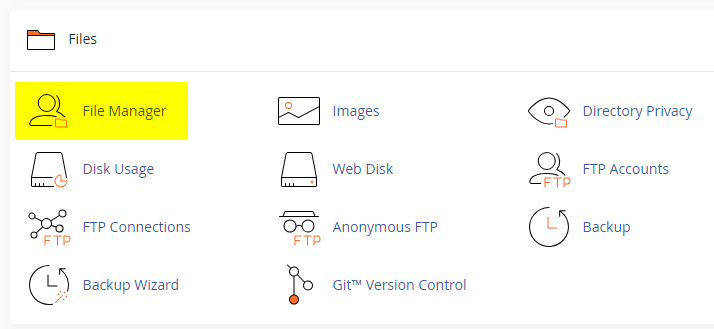
  2. Click on the "File Manager" icon. It's usually under the "Files" section.
  3. You are now in the "File Manager". Open the public_html folder, which is your website's root directory.
  4. Locate the wp-content folder inside "public_html," then open the themes folder inside of it.
  5. In the File Manager interface, click the "Upload" button and choose the theme's .zip file from your local drive.
  6. After it has been uploaded, right-click the .zip file and choose "Extract" or "Unzip".
  7. You can now delete the uploaded .zip file, but it's optional.
  8. Log in to your WordPress dashboard through your web browser.
  9. Go to Appearance → Themes. Now you will see the newly extracted theme.
  10. Make it your active theme by clicking the "Activate" button next to it.

Note: If your hosting provider doesn't offer cPanel, look for a File Manager option in your hosting dashboard (like DirectAdmin, Plesk, or CyberPanel). The process is usually very similar—just find the wp-content/themes folder and upload/extract the theme ZIP file there.

Method 3: Install using FTP

Installing a WordPress theme via FTP is straightforward, though it involves a few more steps compared to using the built-in theme uploader. Here's how to install a WordPress theme using FTP:

  1. Unzip the theme's .zip file you have downloaded.
  2. Connect to your hosting account using an FTP client such as "FileZilla" or "Core FTP".
  3. Navigate to the /wp-content/themes folder in the "Remote site" section.
  4. In the "Local site" section, locate the unzipped theme folder.
  5. Drag and drop the unzipped theme folder from the "Local site" section to the "Remote site" section.
  6. Be patient and let the transfer finish.
  7. Once the transfer is complete, log in to your WordPress dashboard and navigate to Appearance > Themes.
  8. Find the theme you just uploaded and click Activate.

Troubleshooting Tips

  • Didn't receive the download email? Wait 5–10 minutes or check your spam/junk folder. But if you still can not find this email or download link is broken, please inform us. we will send it ASAP.
  • "The uploaded file exceeds the upload_max_filesize directive in php.ini." - If you get this error when following the "Method 1", follow this tutorial: https://themesdna.com/blog/increase-maximum-file-upload-size-wordpress/
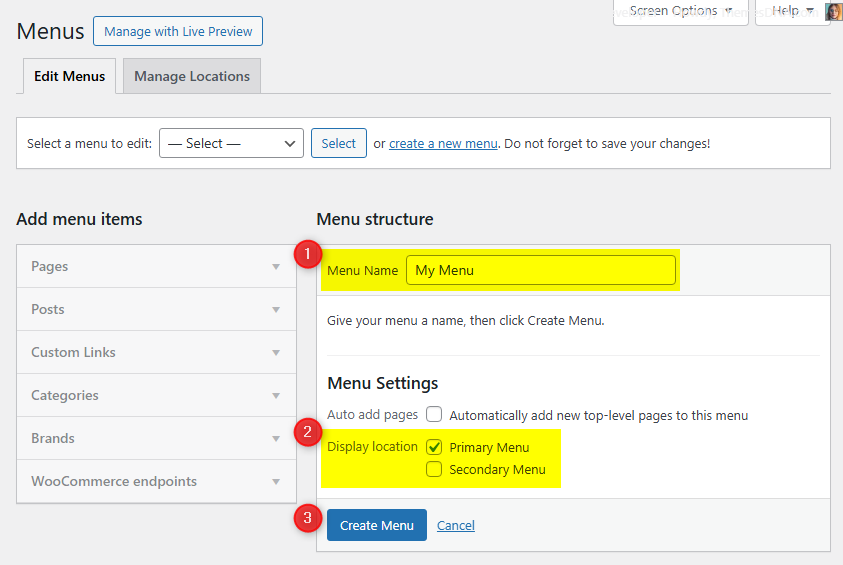
  • My menus disappeared or look different. Go to Appearance → Menus → Manage Locations and reassign your menus to the correct locations.
  • My header text or background color looks different after activating PRO. Reapply your colors in Appearance → Customize → Theme Options → Colors for Header Text Color and Background Color. Then publish.
  • Still can't install the theme? Contact us for help.

Import Demo Content

You can import the demo content, widgets, and Customizer settings shown in the NeatBlog PRO theme demo.

Manual Demo Import

Step 1: Import Main Site Content

This includes: Posts, pages, menus, media, categories, tags, comments, and custom fields.

  1. Download: XML File
  2. Go to Tools → Import.
  3. Under "WordPress", click Install Now if not installed.
  4. Click Run Importer.
  5. Select the XML file and click Upload file and import.
  6. Check "Download and import file attachments", click Submit.

Step 2: Import Widgets

  1. Install the Widget Importer & Exporter plugin.
  2. Go to Tools → Widget Importer & Exporter.
  3. Copy content from: Widgets .wie File and paste into the box.
  4. Click Import Widgets.

Step 3: Import Customizer Settings

  1. Download: Customizer File
  2. Install the Customizer Export/Import plugin.
  3. Go to Appearance → Customize → Export/Import.
  4. Select the .dat file, check "Download and import image files?", click Import.

Regenerate Thumbnails

If your website already has existing posts with featured images, it's highly recommended to regenerate thumbnails after activating the NeatBlog PRO theme. This ensures that all images match the new theme's layout and display sizes.

Regenerating thumbnails is optional if your site is completely new and doesn't have any uploaded images yet.

However, if you imported the demo content, regenerating thumbnails is essential to display images correctly across the site.

  1. Install and activate the Regenerate Thumbnails plugin.
  2. Go to Tools → Regenerate Thumbnails.
  3. Click the "Regenerate Thumbnails for All x Attachments" button to start the process.
  4. Wait until all images are regenerated. This may take a few minutes depending on your media library size.
  5. If you want, you can deactivate and delete the plugin once the process is complete.

This step ensures clean image alignment and sharp visuals throughout your website using the NeatBlog PRO theme.

Header Image

Quick Start Guide

NeatBlog PRO theme allows users to upload their very own site-wide custom header image. You can optionally show a custom title and description (sitewide or per post/page) after enabling the Customizer option Add Custom Title/Custom Description to Header Image. You can also upload a unique header image for each post/page to replace the site-wide header image.

There are many header image options in NeatBlog PRO:

  1. Header image options in Theme Customizer
  2. Header image options in post edit screen
  3. Header image options in page edit screen

How to Add a Header Image?

There are 3 types of header images in this theme:

  1. Site-wide Header Image : Appearance → Customize → Theme Options → Header Image
  2. Header Images of Posts : Post’s Edit Screen → “Post Settings – NeatBlog PRO” Meta Box → Site Header Image
  3. Header Images of Pages : Page’s Edit Screen → “Page Settings – NeatBlog PRO” Meta Box → Site Header Image

How to Add a Site-wide Header Image?

Site-wide header image will be displayed everywhere on your website. But if you add a header image to a post/page using settings of that post/page, site-wide header image will be replaced by that header image.

  1. Go to AppearanceCustomizeTheme OptionsHeader Image
  2. Upload your header image using Add new image button.

How to Add a Header Image to a Post?

You can set a different header image for each post.

  1. To set a header image to a post, go to edit screen of that post.
  2. Find the Post Settings - NeatBlog PRO meta box.
  3. Add your image URL or upload an image using Site Header Image option.

How to Add a Header Image to a Page?

You can set a different header image for each page. To set a header image to a page, go to edit screen of that page. Find the Page Settings - NeatBlog PRO meta box.
Add your image URL or upload an image using Site Header Image option.

How to Add a Custom Title/Description to Header Image?

By default, the theme displays your website's title as the header image title and the tagline as the header image description. However, you can replace both with custom title and description.

First, you need to enable the display of custom header image title and description sitewide. To do this, go to AppearanceCustomizeTheme OptionsHeader Image and check the option Add Custom Title/Custom Description to Header Image and save settings.

Add a Custom Title/Description to Site-wide Header Image:

  1. Go to AppearanceCustomizeTheme OptionsHeader Image
  2. Add your custom header image title to Header Image Custom Title text field.
  3. Add your custom header image description title to Header Image Custom Description text field.
  4. Save settings.

How to Add a Custom Title/Description to the Header Image of a Post?

You can assign a unique title and description to the header image of each post. These will override the sitewide header image title and description when Add Custom Title/Custom Description to Header Image is enabled in the Customizer.

  1. Go to the edit screen of that post.
  2. Find the Post Settings - NeatBlog PRO meta box.
  3. Use Site Header Image Title and Site Header Image Description options for adding a title and a description.
  4. Update the post.

How to Add a Custom Title and Description to the Header Image of a Page?

You can assign a unique title and description to the header image of each page. These will override the sitewide header image title and description when Add Custom Title/Custom Description to Header Image is enabled in the Customizer.

  1. Go to the edit screen of that page.
  2. Find the Page Settings - NeatBlog PRO meta box.
  3. Use Site Header Image Title and Site Header Image Description options for adding a title and a description.
  4. Update the page.

How to Hide Title/Description from Header Image?

  1. Go to AppearanceCustomizeTheme OptionsHeader Image.
  2. Check the option Hide both Title and Description from Header Image and save settings.
  3. Save settings.

Note: This option will hide both header image title and header image description sitewide.

News Ticker

A marquee-style news ticker that scrolls post titles. You can place it before header, after header, before footer, or after footer.

Quick Start

  1. Go to CustomizeTheme OptionsNews Ticker Options.
  2. Check Enable News Ticker.
  3. Choose location, post source, number of posts, order.
  4. Click Publish.

Options

  • Location: Before Header, After Header, Before Footer, After Footer
  • Heading: Custom text (default: "Breaking News")
  • Post Source: Recent Posts, Category Posts, Tag Posts, Posts by IDs
  • Order By: Published Date, Modified Date, Comments, Random, Post Likes, Post Views
  • Order: Ascending or Descending
  • Number of posts, date format (choose format), hide dates, include/exclude post IDs
  • Duration: Adjust marquee duration (ms)

Per-post/page control: Each post/page has a Disable News Ticker checkbox in its NeatBlog PRO settings.

Can be disabled per-post/page via the settings meta box.

Custom Widgets

NeatBlog PRO includes 3 custom widgets to enhance your site's content display.

NeatBlog List Posts Widget

Displays posts in a vertical list layout with thumbnails and metadata. Perfect for featured, popular, or recent posts.

Key Features

  • Post sources: Recent Posts, Category Posts, Tag Posts, or specific Post IDs
  • Sort by published date, modified date, comments, random, post likes, or post views
  • Toggle thumbnails, title links, author, date, comments, likes, views, snippets, share buttons
  • Customizable font sizes for titles, meta, and snippets
  • Include or exclude specific post IDs

Quick Start

  1. Go to AppearanceWidgets.
  2. Find NeatBlog Featured List Posts and drag into a widget area.
  3. Configure title, post source, display options, and save.

Below is the complete list of options:

Option ID Option Name Description Control Type Accepted Value Default
titleTitleWidget title text.TextPlain textNeatBlog List Posts Widget
post_typePost SourceChoose which posts to list.SelectRecent Posts / Category Posts / Tag Posts / Posts by IDsRecent Posts
include_postsPosts by IDsComma-separated IDs when using Posts by IDs.TextDigits, comma-separated(empty)
featured_catCategoryCategory to pull posts from (for Category Posts).SelectAny category(empty)
featured_tagTagTag to pull posts from (for Tag Posts).SelectAny tag(empty)
orderbyOrder BySorting field.SelectPublished Date / Modified Date / Number of Comments / Random / Post Likes / Post ViewsPublished Date
orderOrderSorting direction.SelectAscending / DescendingDescending
exclude_postsExclude PostsComma-separated IDs to skip.TextDigits, comma-separated(empty)
numberNumber of PostsPosts to display.TextPositive integer5
dateformatDate FormatPHP date format string.Texte.g., Y-m-dY-m-d
show_thumbnailDisplay Thumbnails?Show featured images.Checkboxtrue / falsetrue
thumbnail_linkLink Thumbnails?Make thumbnails clickable.Checkboxtrue / falsetrue
title_linkLink Titles?Make titles clickable.Checkboxtrue / falsetrue
show_authorDisplay Author?Show author name.Checkboxtrue / falsefalse
show_dateDisplay Date?Show post date.Checkboxtrue / falsetrue
show_commentsDisplay Comments?Show comment count.Checkboxtrue / falsetrue
show_likesDisplay Likes?Show likes count.Checkboxtrue / falsetrue
show_viewsDisplay Views?Show views count.Checkboxtrue / falsetrue
show_snippetDisplay Snippet?Show post snippet.Checkboxtrue / falsetrue
snippet_typeSnippet SourceContent source for snippet.SelectPost Content / Post ExcerptPost Content
snippet_lengthSnippet Length (words)Words to show when using Post Content.TextPositive integer20
show_sharebtnsDisplay Share Buttons?Show inline share buttons.Checkboxtrue / falsetrue
post_title_font_sizeTitle Font SizeFont size for titles.Select8px–72px15px
post_meta_font_sizeMeta Font SizeFont size for meta.Select8px–72px12px
post_snippet_font_sizeSnippet Font SizeFont size for snippets.Select8px–72px13px

NeatBlog Tabbed Widget

Displays posts across three independent tabs, each with its own post source and settings.

Key Features

  • Three tabs with independent post source, sorting, and display settings
  • Custom tab names (defaults: Popular, Recent, Random)
  • Display options similar to Featured List Posts (thumbnails, meta, snippets, share buttons, font sizes)

Quick Start

  1. Go to AppearanceWidgets.
  2. Find NeatBlog Tabbed Widget and drag into a widget area.
  3. Set tab names and configure each tab's post source and display options.
  4. Click Save.

Each tab has its own: post type, category/tag, include/exclude posts, orderby, order, and posts per page. Display options (thumbnails, meta, snippets, share buttons, font sizes) are shared across all tabs.

Option ID Option Name Description Control Type Accepted Value Default
titleTitleWidget title text.TextPlain textTabbed Widget
show_taboneShow Tab 1?Toggle Popular tab visibility.Checkboxtrue / falsetrue
show_tabtwoShow Tab 2?Toggle Recent tab visibility.Checkboxtrue / falsetrue
show_tabthreeShow Tab 3?Toggle Random tab visibility.Checkboxtrue / falsetrue
tabone_nameTab 1 NameLabel for Tab 1.TextPlain textPopular
tabtwo_nameTab 2 NameLabel for Tab 2.TextPlain textRecent
tabthree_nameTab 3 NameLabel for Tab 3.TextPlain textRandom
tabone_post_typeTab 1 Post SourceSource of posts for Tab 1.SelectRecent Posts / Category Posts / Tag Posts / Posts by IDsRecent Posts
tabone_include_postsTab 1 Posts by IDsIDs when using Posts by IDs.TextDigits, comma-separated(empty)
tabone_featured_catTab 1 CategoryCategory for Category Posts.SelectAny category(empty)
tabone_featured_tagTab 1 TagTag for Tag Posts.SelectAny tag(empty)
tabone_orderbyTab 1 Order BySorting field.SelectPublished Date / Modified Date / Number of Comments / Random / Post Likes / Post ViewsNumber of Comments
tabone_orderTab 1 OrderSorting direction.SelectAscending / DescendingDescending
tabone_exclude_postsTab 1 Exclude PostsIDs to skip.TextDigits, comma-separated(empty)
tabone_numberTab 1 Number of PostsPosts to display.TextPositive integer3
tabtwo_post_typeTab 2 Post SourceSource of posts for Tab 2.SelectRecent Posts / Category Posts / Tag Posts / Posts by IDsRecent Posts
tabtwo_include_postsTab 2 Posts by IDsIDs when using Posts by IDs.TextDigits, comma-separated(empty)
tabtwo_featured_catTab 2 CategoryCategory for Category Posts.SelectAny category(empty)
tabtwo_featured_tagTab 2 TagTag for Tag Posts.SelectAny tag(empty)
tabtwo_orderbyTab 2 Order BySorting field.SelectPublished Date / Modified Date / Number of Comments / Random / Post Likes / Post ViewsPublished Date
tabtwo_orderTab 2 OrderSorting direction.SelectAscending / DescendingDescending
tabtwo_exclude_postsTab 2 Exclude PostsIDs to skip.TextDigits, comma-separated(empty)
tabtwo_numberTab 2 Number of PostsPosts to display.TextPositive integer3
tabthree_post_typeTab 3 Post SourceSource of posts for Tab 3.SelectRecent Posts / Category Posts / Tag Posts / Posts by IDsRecent Posts
tabthree_include_postsTab 3 Posts by IDsIDs when using Posts by IDs.TextDigits, comma-separated(empty)
tabthree_featured_catTab 3 CategoryCategory for Category Posts.SelectAny category(empty)
tabthree_featured_tagTab 3 TagTag for Tag Posts.SelectAny tag(empty)
tabthree_orderbyTab 3 Order BySorting field.SelectPublished Date / Modified Date / Number of Comments / Random / Post Likes / Post ViewsRandom
tabthree_orderTab 3 OrderSorting direction.SelectAscending / DescendingDescending
tabthree_exclude_postsTab 3 Exclude PostsIDs to skip.TextDigits, comma-separated(empty)
tabthree_numberTab 3 Number of PostsPosts to display.TextPositive integer3
title_linkLink Titles?Make titles clickable.Checkboxtrue / falsetrue
show_thumbnailDisplay Thumbnails?Show featured images.Checkboxtrue / falsetrue
thumbnail_linkLink Thumbnails?Make thumbnails clickable.Checkboxtrue / falsetrue
show_authorDisplay Author?Show author name.Checkboxtrue / falsefalse
show_dateDisplay Date?Show post date.Checkboxtrue / falsetrue
show_commentsDisplay Comments?Show comment count.Checkboxtrue / falsetrue
show_likesDisplay Likes?Show likes count.Checkboxtrue / falsetrue
show_viewsDisplay Views?Show views count.Checkboxtrue / falsetrue
show_snippetDisplay Snippet?Show post snippet.Checkboxtrue / falsetrue
snippet_typeSnippet SourceContent source for snippet.SelectPost Content / Post ExcerptPost Content
snippet_lengthSnippet Length (words)Words to show when using Post Content.TextPositive integer20
show_sharebtnsDisplay Share Buttons?Show inline share buttons.Checkboxtrue / falsetrue
post_title_font_sizeTitle Font SizeFont size for titles.Select8px–72px15px
post_meta_font_sizeMeta Font SizeFont size for meta.Select8px–72px12px
post_snippet_font_sizeSnippet Font SizeFont size for snippets.Select8px–72px13px
dateformatDate FormatPHP date format string.Texte.g., Y-m-dY-m-d

NeatBlog About and Social Widget

Displays a profile section with image, description, and 70+ social media links.

Key Features

  • Profile image and HTML-formatted description
  • 70+ social platforms with Font Awesome icons
  • Round or normal button styles
  • Links open in new tabs with nofollow

Usage Notes

  • Image field accepts a direct URL to the image file
  • Leave any social field empty to hide that button
  • Social URLs should be complete (e.g., https://facebook.com/username)
  • Skype field: username only; Email field: email address only
Option ID Option Name Description Control Type Accepted Value Default
titleTitleWidget title.TextPlain textAbout and Social Widget
imageProfile Image URLDirect image URL.TextURL(empty)
descriptionDescriptionAbout text/HTML.TextareaText/HTML(empty)
round_buttonsRound Social Buttons?Use round icon style.Checkboxtrue / falsefalse
facebookFacebook URLProfile/page URL.TextURL(empty)
twitterX URLX/Twitter profile URL.TextURL(empty)
pinterestPinterest URLProfile URL.TextURL(empty)
linkedinLinkedIn URLProfile URL.TextURL(empty)
instagramInstagram URLProfile URL.TextURL(empty)
flickrFlickr URLProfile URL.TextURL(empty)
youtubeYouTube URLChannel/profile URL.TextURL(empty)
vimeoVimeo URLProfile URL.TextURL(empty)
soundcloudSoundCloud URLProfile URL.TextURL(empty)
messengerMessenger URLMessenger link.TextURL(empty)
whatsappWhatsApp URLwa.me or full link.TextURL(empty)
tiktokTikTok URLProfile URL.TextURL(empty)
lastfmLast.fm URLProfile URL.TextURL(empty)
mediumMedium URLProfile URL.TextURL(empty)
githubGitHub URLProfile URL.TextURL(empty)
bitbucketBitbucket URLProfile URL.TextURL(empty)
tumblrTumblr URLProfile/blog URL.TextURL(empty)
diggDigg URLProfile URL.TextURL(empty)
deliciousDelicious URLProfile URL.TextURL(empty)
stumbleuponStumbleUpon URLProfile URL.TextURL(empty)
mixMix URLProfile URL.TextURL(empty)
redditReddit URLProfile URL.TextURL(empty)
dribbbleDribbble URLProfile URL.TextURL(empty)
flipboardFlipboard URLProfile URL.TextURL(empty)
bloggerBlogger URLBlog/profile URL.TextURL(empty)
etsyEtsy URLShop URL.TextURL(empty)
behanceBehance URLProfile URL.TextURL(empty)
amazonAmazon URLStore/profile URL.TextURL(empty)
meetupMeetup URLProfile/group URL.TextURL(empty)
mixcloudMixcloud URLProfile URL.TextURL(empty)
slackSlack URLWorkspace invite URL.TextURL(empty)
snapchatSnapchat URLProfile URL.TextURL(empty)
spotifySpotify URLProfile/artist URL.TextURL(empty)
vkVK URLProfile URL.TextURL(empty)
yelpYelp URLProfile/business URL.TextURL(empty)
wpWordPress URLWP.com profile URL.TextURL(empty)
twitchTwitch URLChannel URL.TextURL(empty)
telegramTelegram URLProfile/channel URL.TextURL(empty)
bandcampBandcamp URLProfile URL.TextURL(empty)
quoraQuora URLProfile URL.TextURL(empty)
foursquareFoursquare URLProfile URL.TextURL(empty)
deviantartDeviantArt URLProfile URL.TextURL(empty)
imdbIMDb URLProfile URL.TextURL(empty)
codepenCodePen URLProfile URL.TextURL(empty)
jsfiddleJSFiddle URLProfile URL.TextURL(empty)
stackoverflowStack Overflow URLProfile URL.TextURL(empty)
stackexchangeStack Exchange URLProfile URL.TextURL(empty)
buyselladsBuySellAds URLProfile URL.TextURL(empty)
web500px500px URLProfile URL.TextURL(empty)
elloEllo URLProfile URL.TextURL(empty)
goodreadsGoodreads URLProfile URL.TextURL(empty)
odnoklassnikiOdnoklassniki URLProfile URL.TextURL(empty)
houzzHouzz URLProfile URL.TextURL(empty)
pocketPocket URLProfile URL.TextURL(empty)
xingXING URLProfile URL.TextURL(empty)
googleplayGoogle Play URLStore/profile URL.TextURL(empty)
slideshareSlideShare URLProfile URL.TextURL(empty)
dropboxDropbox URLShare/profile URL.TextURL(empty)
paypalPayPal URLDonation/profile link.TextURL(empty)
viadeoViadeo URLProfile URL.TextURL(empty)
wikipediaWikipedia URLUser page URL.TextURL(empty)
skypeSkype UsernameUsername only.TextString(empty)
envelopeEmailEmail address for mailto.TextEmail(empty)
rssRSS URLFeed URL.TextURL(empty)

Widget Areas

NeatBlog PRO has 40+ widget areas organized by location and page context:


  1. Header Right Widgets

    Right side of the header. Add a "Custom HTML" widget with 728×90 banner. Requires "Logo + Header Banner" header layout.

  2. Top Full Width Widgets (Default HomePage)

    Full-width after header, on the default homepage (latest posts).

  3. Top Full Width Widgets (Static HomePage)

    Full-width after header, on the static homepage.

  4. Top Full Width Widgets (not Static HomePage)

    Full-width after header, everywhere except static homepage.

  5. Top Full Width Widgets (Single Pages)

    Full-width after header, on single posts.

  6. Top Full Width Widgets (Singular Pages)

    Full-width after header, on singular pages (posts + pages).

  7. Top Full Width Widgets (Everywhere)

    Full-width after header, on every page.

  8. Above Content Widgets (Default/Static/not Static/Single/Singular/Everywhere)

    Above main content area, with the same 6 conditional variants as above.

  9. Top Left Widgets (Default/Static/not Static/Single/Singular/Everywhere)

    Left top area, 6 conditional variants.

  10. Top Right Widgets (Default/Static/not Static/Single/Singular/Everywhere)

    Right top area, 6 conditional variants.

  11. Below Content Widgets (Default/Static/not Static/Single/Singular/Everywhere)

    Below main content, 6 conditional variants.

  12. Bottom Full Width Widgets (Default/Static/not Static/Single/Singular/Everywhere)

    Full-width before footer, 6 conditional variants.

  13. Single Post Bottom Widgets

    Bottom of single posts only.

  14. Footer Top Widgets

    Top of footer area.

  15. Footer 1-6 Widgets

    Footer columns 1 through 6 (number of columns controlled by theme options).

  16. Footer Bottom Widgets

    Bottom of footer area.

  17. 404 Page Widgets

    On the 404 error page.

How to Control Widget Visibility by Location

Install Widget Display Conditions or Widget Context plugin. Add widgets to "Everywhere" areas and set display conditions to control on which pages they appear.

Custom Page Templates

NeatBlog PRO includes 4 custom page templates:

  • Featured Content: Displays featured post widgets instead of regular content.
  • Contact Form: Built-in contact form page.
  • Sitemap: Structured list of pages, categories, archives.
  • Authors: List of all authors with profiles.

How to Assign a Template

  1. Go to PagesAdd New (or edit existing).
  2. In Gutenberg: Page tab → Template dropdown. In Classic Editor: Page Attributes → Template dropdown.
  3. Select the template and Publish.

How to Create a Contact Page

Step 1: Create the Page

  1. Go to PagesAdd New, title "Contact Us", select Contact Form template, Publish.

Step 2: Configure Email

  1. Go to CustomizeTheme OptionsPage Templates Options. Enter your email in Contact Form Email Address. Publish.

Note: The form will not send emails without the Contact Form Email Address configured.

Form includes Name, Email, Subject, and Message fields. For advanced features (spam protection, file uploads), use Contact Form 7.

How to Create a Sitemap Page

  1. Go to PagesAdd New, title "Sitemap", select Sitemap template, Publish.

Includes: all Pages, Categories, Tags, Monthly Archives, and Authors. Updates automatically.

How to Create a Site Authors Page

Step 1: Create the Page

  1. Go to PagesAdd New, title "Our Authors", select Authors template, Publish.

Step 2: Customize (Optional)

  1. Go to CustomizeTheme OptionsPage Templates Options. Toggle "Hide administrators" or "Hide authors with zero posts".

Displays: display name, avatar, bio, and social profiles. Set bios under UsersProfile.

Customizer Theme Options

Go to WordPress DashboardAppearanceCustomizeTheme Options.

Site Identity Options

Below is the complete list of Site Identity Options available:

Option ID Option Name Description Control Type Accepted Value Default
custom_logoSite LogoUpload/select a logo image.ImageImage IDNone
neatblog_options[logo_location]Logo LocationDisplay logo beside or above site title/tagline.SelectBefore Site Title and Tagline / Above Site Title and TaglineAbove Site Title and Tagline
blognameSite TitleText shown as the site title.TextAny textCurrent site title
blogdescriptionTaglineShort description shown as site tagline.TextAny textCurrent site tagline
display_header_textDisplay Site Title & TaglineToggles whether the title/tagline are printed on the front-end.Toggle Switchtrue / falsetrue
site_iconSite Icon (Favicon)Upload/select a site icon (512×512px recommended).ImageImage IDNone

Colors Options

Below is the complete list of Colors Options available:

Option ID Option Name Description Control Type Accepted Value Default
neatblog_options[header_text_hover_color]Header Hover Text ColorColor for hovered header text.ColorHex color code#a8a8a8
neatblog_options[body_text_color]Main Text ColorColor for body text.ColorHex color code#555555
neatblog_options[link_color]Main Link ColorColor for links.ColorHex color code#666666
neatblog_options[link_hover_color]Main Link Hover ColorColor for hovered links.ColorHex color code#000000
neatblog_options[headings_color]General Headings ColorColor for headings.ColorHex color code#111111
neatblog_options[header_bg_color]Header Background ColorBackground color of the header.ColorHex color code#262626
neatblog_options[header_bsh_color]Header Box-Shadow ColorCSS box-shadow value for header shadow.TextAny CSS shadow value0 2px 5px rgba(0,0,0,0.5)
neatblog_options[header_image_title_color]Header Image Area Title ColorColor of header image title.ColorHex color code#ffffff
neatblog_options[header_image_title_hover_color]Header Image Area Title Hover ColorHover color of header image title.ColorHex color code#ffffff
neatblog_options[header_image_desc_color]Header Image Area Description ColorColor of header image description.ColorHex color code#ffffff
neatblog_options[primary_menu_color]Primary Menu Link ColorColor of primary menu links.ColorHex color code#ffffff
neatblog_options[disable_primary_menu_shadow]Disable Primary Menu Link Text-ShadowDisable text-shadow on primary menu links.Checkboxtrue / falsefalse
neatblog_options[primary_menu_shadow_color]Primary Menu Link Text-Shadow ColorText-shadow color for primary menu links.ColorHex color code#000000
neatblog_options[primary_menu_hover_color]Primary Menu Link Hover ColorHover color for primary menu links.ColorHex color code#dddddd
neatblog_options[primary_menu_hover_bg_color]Primary Menu Link Hover Background ColorBackground color on hover for primary menu links.ColorHex color code#000000
neatblog_options[primary_submenu_one_bg_color]Primary Sub Menu Background ColorBackground for first-level primary submenus.ColorHex color code#333333
neatblog_options[primary_submenu_bd_color]Primary Sub Menu Border ColorBorder color for primary submenus.ColorHex color code#555555
neatblog_options[primary_menu_icon_color]Primary Responsive Menu Icon ColorColor for the primary mobile menu icon.ColorHex color code#ffffff
neatblog_options[secondary_menu_bg_color]Secondary Menu Background ColorBackground color of the secondary menu.ColorHex color code#000000
neatblog_options[secondary_menu_bd_color]Secondary Menu Border ColorBorder color of the secondary menu.ColorHex color code#444444
neatblog_options[secondary_menu_color]Secondary Menu Link ColorColor of secondary menu links.ColorHex color code#ffffff
neatblog_options[disable_secondary_menu_shadow]Disable Secondary Menu Link Text-ShadowDisable text-shadow on secondary menu links.Checkboxtrue / falsefalse
neatblog_options[secondary_menu_shadow_color]Secondary Menu Link Text-Shadow ColorText-shadow color for secondary menu links.ColorHex color code#000000
neatblog_options[secondary_menu_hover_color]Secondary Menu Link Hover ColorHover color for secondary menu links.ColorHex color code#dddddd
neatblog_options[secondary_menu_hover_bg_color]Secondary Menu Link Hover Background ColorBackground color on hover for secondary menu links.ColorHex color code#222222
neatblog_options[secondary_submenu_one_bg_color]Secondary Sub Menu Background ColorBackground for first-level secondary submenus.ColorHex color code#111111
neatblog_options[secondary_submenu_one_bd_color]Secondary Sub Menu Border ColorBorder color for secondary submenus.ColorHex color code#444444
neatblog_options[secondary_menu_icon_color]Secondary Responsive Menu Icon ColorColor for the secondary mobile menu icon.ColorHex color code#ffffff
neatblog_options[news_ticker_bg_color]News Ticker Background ColorBackground color of the news ticker.ColorHex color code#dddddd
neatblog_options[news_ticker_heading_color]News Ticker Heading ColorText color of the news ticker heading.ColorHex color code#000000
neatblog_options[news_ticker_heading_bg_color]News Ticker Heading Background ColorBackground for the news ticker heading.ColorHex color code#ffeb3b
neatblog_options[news_ticker_date_color]News Ticker Dates Text ColorText color for dates in the news ticker.ColorHex color code#ffffff
neatblog_options[news_ticker_date_bg_color]News Ticker Dates Background ColorBackground for dates in the news ticker.ColorHex color code#222222
neatblog_options[news_ticker_text_color]News Ticker Text ColorText color of news ticker items.ColorHex color code#000000
neatblog_options[news_ticker_hover_text_color]News Ticker Hover Text ColorHover text color for news ticker items.ColorHex color code#222222
neatblog_options[social_icons_color]Social Icons ColorColor of social icons.ColorHex color code#ffffff
neatblog_options[disable_social_icons_shadow]Disable Social Icons Text-ShadowDisable text-shadow on social icons.Checkboxtrue / falsefalse
neatblog_options[social_icons_shadow_color]Social Icons Text-Shadow ColorText-shadow color for social icons.ColorHex color code#000000
neatblog_options[post_title_color]Single Post Title ColorColor of single post titles.ColorHex color code#000000
neatblog_options[disable_post_title_shadow]Disable Single Post Title Text-ShadowDisable text-shadow on single post titles.Checkboxtrue / falsefalse
neatblog_options[post_title_shadow_color]Single Post Title Text-Shadow ColorText-shadow color for single post titles.ColorHex color code#ffffff
neatblog_options[post_title_hover_color]Single Post Title Hover ColorHover color for single post titles.ColorHex color code#333333
neatblog_options[post_body_link_color]Post Content Link ColorColor for links inside post content.ColorHex color code#008ad0
neatblog_options[post_body_link_hover_color]Post Content Link Hover ColorHover color for links inside post content.ColorHex color code#0883c1
neatblog_options[post_meta_color]Single Post Meta ColorColor for single post meta text.ColorHex color code#666666
neatblog_options[post_meta_hover_color]Single Post Meta Hover ColorHover color for single post meta text.ColorHex color code#000000
neatblog_options[author_bio_bg_color]Author Bio Box Background ColorBackground color of author bio boxes.ColorHex color code#f6f6f6
neatblog_options[author_bio_bd_color]Author Bio Box Border ColorBorder color of author bio boxes.ColorHex color code#dddddd
neatblog_options[author_bio_color]Author Bio Box Text ColorText color inside author bio boxes.ColorHex color code#555555
neatblog_options[author_bio_link_color]Author Bio Box Link ColorLink color inside author bio boxes.ColorHex color code#111111
neatblog_options[author_bio_link_hover_color]Author Bio Box Link Hover ColorHover color for links in author bio boxes.ColorHex color code#008ad0
neatblog_options[list_post_title_color]List Post Title ColorTitle color for posts in lists.ColorHex color code#000000
neatblog_options[list_post_title_hover_color]List Post Title Hover ColorHover color for titles in post lists.ColorHex color code#333333
neatblog_options[list_post_meta_color]List Post Meta ColorMeta text color for posts in lists.ColorHex color code#666666
neatblog_options[list_post_meta_hover_color]List Post Meta Hover ColorHover color for meta text in post lists.ColorHex color code#000000
neatblog_options[loadmore_color]Load More / Navigation Links ColorText color for load more button or nav links.ColorHex color code#ffffff
neatblog_options[loadmore_bg_color]Load More / Navigation Links Background ColorBackground color for load more button or nav links.ColorHex color code#333333
neatblog_options[loadmore_hover_color]Load More / Navigation Links Hover ColorHover text color for load more button or nav links.ColorHex color code#ffffff
neatblog_options[loadmore_bg_hover_color]Load More / Navigation Links Hover Background ColorHover background color for load more button or nav links.ColorHex color code#1745c5
neatblog_options[pagination_color]Posts Pagination Links ColorText color for pagination links.ColorHex color code#444444
neatblog_options[pagination_bg_color]Posts Pagination Links Background ColorBackground for pagination links.ColorHex color code#eeeeee
neatblog_options[pagination_bd_color]Posts Pagination Links Border ColorBorder color for pagination links.ColorHex color code#cccccc
neatblog_options[pagination_hover_color]Posts Pagination Links Hover ColorHover text color for pagination links.ColorHex color code#000000
neatblog_options[pagination_bg_hover_color]Posts Pagination Links Hover Background ColorHover background color for pagination links.ColorHex color code#dddddd
neatblog_options[pagination_bd_hover_color]Posts Pagination Links Hover Border ColorHover border color for pagination links.ColorHex color code#bbbbbb
neatblog_options[likes_views_color]Post Likes/Views ColorColor for likes/views display.ColorHex color code#ffffff
neatblog_options[likes_hover_color]Post Likes Button Hover ColorHover color for the likes button.ColorHex color code#ff0000
neatblog_options[sidebar_title_color]Widgets Titles ColorTitle color for widgets.ColorHex color code#000000
neatblog_options[disable_sidebar_title_shadow]Disable Widgets Titles Text-ShadowDisable text-shadow on widget titles.Checkboxtrue / falsefalse
neatblog_options[sidebar_title_shadow_color]Widgets Titles Text-Shadow ColorText-shadow color for widget titles.ColorHex color code#ffffff
neatblog_options[archive_title_color]Archive Page Titles ColorColor for archive page titles.ColorHex color code#000000
neatblog_options[disable_archive_title_shadow]Disable Archive Page Titles Text-ShadowDisable text-shadow on archive titles.Checkboxtrue / falsefalse
neatblog_options[archive_title_shadow_color]Archive Page Titles Text-Shadow ColorText-shadow color for archive titles.ColorHex color code#ffffff
neatblog_options[comments_title_color]Comments Titles ColorColor for comments section titles.ColorHex color code#000000
neatblog_options[disable_comments_title_shadow]Disable Comments Titles Text-ShadowDisable text-shadow on comments titles.Checkboxtrue / falsefalse
neatblog_options[comments_title_shadow_color]Comments Titles Text-Shadow ColorText-shadow color for comments titles.ColorHex color code#ffffff
neatblog_options[tag_cloud_color]Tag Cloud Link ColorText color for tag cloud links.ColorHex color code#ffffff
neatblog_options[tag_cloud_bg_color]Tag Cloud Link BackgroundBackground color for tag cloud links.ColorHex color code#5f5d5d
neatblog_options[tag_cloud_hover_color]Tag Cloud Link Hover ColorHover text color for tag cloud links.ColorHex color code#ffffff
neatblog_options[tag_cloud_hover_bg_color]Tag Cloud Link Hover BackgroundHover background color for tag cloud links.ColorHex color code#000000
neatblog_options[tabnames_color]Tabbed Widget Names ColorText color for tabbed widget names.ColorHex color code#ffffff
neatblog_options[tabnames_bg_color]Tabbed Widget Names Background ColorBackground color for tabbed widget names.ColorHex color code#000000
neatblog_options[tabnames_hover_color]Tabbed Widget Names Hover ColorHover text color for tabbed widget names.ColorHex color code#000000
neatblog_options[tabnames_bg_hover_color]Tabbed Widget Names Hover Background ColorHover background color for tabbed widget names.ColorHex color code#ffeb3b
neatblog_options[footer_bg_color]Footer Background ColorBackground color of the footer.ColorHex color code#2b2b2b
neatblog_options[footer_text_color]Footer Text ColorText color in the footer.ColorHex color code#eeeeee
neatblog_options[footer_link_color]Footer Link ColorLink color in the footer.ColorHex color code#dddddd
neatblog_options[footer_link_hover_color]Footer Link Hover ColorHover color for footer links.ColorHex color code#ffffff
neatblog_options[footer_title_color]Footer Title ColorColor for footer widget titles.ColorHex color code#ffffff
neatblog_options[footer_title_bd_one_color]Footer Title Border 1 ColorFirst border color for footer titles.ColorHex color code#3c3a3a
neatblog_options[footer_title_bd_two_color]Footer Title Border 2 ColorSecond border color for footer titles.ColorHex color code#222222
neatblog_options[cp_bg_color]Copyrights Background ColorBackground color of the copyrights area.ColorHex color code#444444
neatblog_options[cp_bd_color]Copyrights Border ColorBorder color of the copyrights area.ColorHex color code#656565
neatblog_options[cp_color]Copyrights Text ColorText color in the copyrights area.ColorHex color code#eeeeee
neatblog_options[cp_hover_color]Copyrights Hover Text ColorHover text color in the copyrights area.ColorHex color code#ffffff
neatblog_options[comment_bd_color_one]Comments Border ColorBorder color for comments area.ColorHex color code#eaeaea
neatblog_options[comment_bg_color_one]Comments Background Color 1Primary background for comments.ColorHex color code#f5f5f5
neatblog_options[comment_bg_color_two]Comments Background Color 2Alternate background for comments.ColorHex color code#fbfbfb
neatblog_options[comment_meta_color]Comments Meta ColorMeta text color in comments.ColorHex color code#888888
neatblog_options[button_text_color]Button Text ColorText color for buttons.ColorHex color code#ffffff
neatblog_options[button_bg_color]Button Background ColorBackground color for buttons.ColorHex color code#333333
neatblog_options[button_bd_color]Button Border ColorBorder color for buttons.ColorHex color code#e6e6e6
neatblog_options[button_hover_bg_color]Button Hover Background ColorHover background for buttons.ColorHex color code#1745c5
neatblog_options[input_text_color]Input Text ColorText color inside inputs.ColorHex color code#666666
neatblog_options[input_bd_color]Input Border ColorBorder color for inputs.ColorHex color code#dddddd
neatblog_options[input_hover_text_color]Input Hover Text ColorText color when inputs are hovered.ColorHex color code#111111
neatblog_options[selected_text_color]Selected Text ColorColor of highlighted text selection.ColorHex color code#ffffff
neatblog_options[selected_text_bg_color]Selected Text Background ColorBackground for highlighted text selection.ColorHex color code#333333
neatblog_options[hr_bg_color]hr Tag Background ColorBackground color for horizontal rules.ColorHex color code#ffffff
neatblog_options[hr_bd_top_color]hr Tag Top Border ColorTop border color for horizontal rules.ColorHex color code#e6e6e6
neatblog_options[hr_bd_bottom_color]hr Tag Bottom Border ColorBottom border color for horizontal rules.ColorHex color code#f6f6f6
neatblog_options[hr_shadow_color]hr Tag Box Shadow ColorShadow color for horizontal rules.ColorHex color code#f2f2f2
neatblog_options[pre_bg_color]pre Tag Background ColorBackground color for preformatted text.ColorHex color code#1d1f21
neatblog_options[pre_color]pre Tag Text ColorText color for preformatted text.ColorHex color code#ffffff
neatblog_options[code_bg_color]code Tag Background ColorBackground color for code blocks.ColorHex color code#ffffe0
neatblog_options[code_color]code Tag Text ColorText color for code blocks.ColorHex color code#222222
neatblog_options[disable_color_options]Disable All Color OptionsTurn off all color customizations and use theme defaults.Checkboxtrue / falsefalse

Font Options

Below is the complete list of Font Options available:

Option ID Option Name Description Control Type Accepted Value Default
neatblog_options[font_subsets]Font SubsetsSelect font subsets to load.Multi Selectcyrillic / cyrillic-ext / greek / greek-ext / latin / latin-ext / vietnameselatin
neatblog_options[body_fonts]Body Font-FamilyFont family for body text.SelectAvailable font listPoppins
neatblog_options[body_font_size]Body Font-SizeFont size for body text.Select8px – 72px14px
neatblog_options[post_content_font_size]Post Content Font-SizeFont size for single post content.Select8px – 72px14px
neatblog_options[body_font_weight]Body Font-WeightFont weight for body text.Select400 / 500 / 700400
neatblog_options[body_font_style]Body Font-StyleFont style for body text.Selectnormal / italicnormal
neatblog_options[body_line_height]Body Line-HeightLine height for body text.TextNumeric1.6
neatblog_options[post_content_line_height]Post Content Line-HeightLine height for single post content.TextNumeric1.7
neatblog_options[site_title_fonts]Site Title Font-FamilyFont family for site title.SelectAvailable font listPoppins
neatblog_options[site_title_font_size]Site Title Font-SizeFont size for site title.Select8px – 72px20px
neatblog_options[site_title_font_weight]Site Title Font-WeightFont weight for site title.Select400 / 500 / 700700
neatblog_options[site_title_font_style]Site Title Font-StyleFont style for site title.Selectnormal / italicnormal
neatblog_options[site_title_line_height]Site Title Line-HeightLine height for site title.TextNumeric1
neatblog_options[site_title_text_transform]Site Title Text TransformText transform for site title.Selectnone / capitalize / uppercase / lowercase / initial / inheritnone
neatblog_options[site_desc_fonts]Site Description Font-FamilyFont family for site description.SelectAvailable font listPoppins
neatblog_options[site_desc_font_size]Site Description Font-SizeFont size for site description.Select8px – 72px13px
neatblog_options[site_desc_font_weight]Site Description Font-WeightFont weight for site description.Select400 / 500 / 700400
neatblog_options[site_desc_font_style]Site Description Font-StyleFont style for site description.Selectnormal / italicnormal
neatblog_options[site_desc_line_height]Site Description Line-HeightLine height for site description.TextNumeric1
neatblog_options[site_desc_text_transform]Site Description Text TransformText transform for site description.Selectnone / capitalize / uppercase / lowercase / initial / inheritnone
neatblog_options[header_image_title_fonts]Header Image Title Font-FamilyFont family for header image title.SelectAvailable font listPoppins
neatblog_options[header_image_title_font_size]Header Image Title Font-SizeFont size for header image title.Select8px – 72px24px
neatblog_options[header_image_title_font_weight]Header Image Title Font-WeightFont weight for header image title.Select400 / 500 / 700400
neatblog_options[header_image_title_font_style]Header Image Title Font-StyleFont style for header image title.Selectnormal / italicnormal
neatblog_options[header_image_title_line_height]Header Image Title Line-HeightLine height for header image title.TextNumeric1
neatblog_options[header_image_title_text_transform]Header Image Title Text TransformText transform for header image title.Selectnone / capitalize / uppercase / lowercase / initial / inheritnone
neatblog_options[header_image_desc_fonts]Header Image Description Font-FamilyFont family for header image description.SelectAvailable font listPoppins
neatblog_options[header_image_desc_font_size]Header Image Description Font-SizeFont size for header image description.Select8px – 72px13px
neatblog_options[header_image_desc_font_weight]Header Image Description Font-WeightFont weight for header image description.Select400 / 500 / 700400
neatblog_options[header_image_desc_font_style]Header Image Description Font-StyleFont style for header image description.Selectnormal / italicnormal
neatblog_options[header_image_desc_line_height]Header Image Description Line-HeightLine height for header image description.TextNumeric1
neatblog_options[header_image_desc_text_transform]Header Image Description Text TransformText transform for header image description.Selectnone / capitalize / uppercase / lowercase / initial / inheritnone
neatblog_options[primary_menu_fonts]Primary Menu Font-FamilyFont family for primary menu.SelectAvailable font listPoppins
neatblog_options[primary_menu_font_size]Primary Menu Font-SizeFont size for primary menu.Select8px – 72px13px
neatblog_options[primary_menu_font_weight]Primary Menu Font-WeightFont weight for primary menu.Select400 / 500 / 700400
neatblog_options[primary_menu_font_style]Primary Menu Font-StyleFont style for primary menu.Selectnormal / italicnormal
neatblog_options[primary_menu_text_transform]Primary Menu Text TransformText transform for primary menu.Selectnone / capitalize / uppercase / lowercase / initial / inheritnone
neatblog_options[secondary_menu_fonts]Secondary Menu Font-FamilyFont family for secondary menu.SelectAvailable font listPoppins
neatblog_options[secondary_menu_font_size]Secondary Menu Font-SizeFont size for secondary menu.Select8px – 72px13px
neatblog_options[secondary_menu_font_weight]Secondary Menu Font-WeightFont weight for secondary menu.Select400 / 500 / 700400
neatblog_options[secondary_menu_font_style]Secondary Menu Font-StyleFont style for secondary menu.Selectnormal / italicnormal
neatblog_options[secondary_menu_text_transform]Secondary Menu Text TransformText transform for secondary menu.Selectnone / capitalize / uppercase / lowercase / initial / inheritnone
neatblog_options[news_ticker_fonts]News Ticker Font-FamilyFont family for news ticker.SelectAvailable font listPoppins
neatblog_options[news_ticker_font_size]News Ticker Font-SizeFont size for news ticker.Select8px – 72px12px
neatblog_options[news_ticker_font_weight]News Ticker Font-WeightFont weight for news ticker.Select400 / 500 / 700400
neatblog_options[news_ticker_font_style]News Ticker Font-StyleFont style for news ticker.Selectnormal / italicnormal
neatblog_options[news_ticker_text_transform]News Ticker Text TransformText transform for news ticker.Selectnone / capitalize / uppercase / lowercase / initial / inheritnone
neatblog_options[list_post_title_fonts]List Post Titles Font-FamilyFont family for post titles in lists.SelectAvailable font listPoppins
neatblog_options[list_post_title_font_size]List Post Titles Font-SizeFont size for list post titles.Select8px – 72px15px
neatblog_options[list_post_title_font_weight]List Post Titles Font-WeightFont weight for list post titles.Select400 / 500 / 700700
neatblog_options[list_post_title_font_style]List Post Titles Font-StyleFont style for list post titles.Selectnormal / italicnormal
neatblog_options[list_post_title_line_height]List Post Titles Line-HeightLine height for list post titles.TextNumeric1.2
neatblog_options[list_post_title_text_transform]List Post Titles Text TransformText transform for list post titles.Selectnone / capitalize / uppercase / lowercase / initial / inheritnone
neatblog_options[list_post_meta_fonts]List Post Meta Font-FamilyFont family for list post meta.SelectAvailable font listPoppins
neatblog_options[list_post_meta_font_size]List Post Meta Font-SizeFont size for list post meta.Select8px – 72px12px
neatblog_options[list_post_meta_font_weight]List Post Meta Font-WeightFont weight for list post meta.Select400 / 500 / 700400
neatblog_options[list_post_meta_font_style]List Post Meta Font-StyleFont style for list post meta.Selectnormal / italicnormal
neatblog_options[list_post_meta_text_transform]List Post Meta Text TransformText transform for list post meta.Selectnone / capitalize / uppercase / lowercase / initial / inheritnone
neatblog_options[post_title_fonts]Single Post Titles Font-FamilyFont family for single post titles.SelectAvailable font listPoppins
neatblog_options[post_title_font_size]Single Post Titles Font-SizeFont size for single post titles.Select8px – 72px24px
neatblog_options[post_title_tablet_font_size]Single Post Titles Font-Size (Small Screen)Font size for single post titles on small screens.Select8px – 72px22px
neatblog_options[post_title_mobile_font_size]Single Post Titles Font-Size (Smaller Screen)Font size for single post titles on smaller screens.Select8px – 72px22px
neatblog_options[post_title_font_weight]Single Post Titles Font-WeightFont weight for single post titles.Select400 / 500 / 700700
neatblog_options[post_title_font_style]Single Post Titles Font-StyleFont style for single post titles.Selectnormal / italicnormal
neatblog_options[post_title_line_height]Single Post Titles Line-HeightLine height for single post titles.TextNumeric1.2
neatblog_options[post_title_text_transform]Single Post Titles Text TransformText transform for single post titles.Selectnone / capitalize / uppercase / lowercase / initial / inheritnone
neatblog_options[post_meta_fonts]Single Post Meta Font-FamilyFont family for single post meta.SelectAvailable font listPoppins
neatblog_options[post_meta_font_size]Single Post Meta Font-SizeFont size for single post meta.Select8px – 72px13px
neatblog_options[post_meta_font_weight]Single Post Meta Font-WeightFont weight for single post meta.Select400 / 500 / 700400
neatblog_options[post_meta_font_style]Single Post Meta Font-StyleFont style for single post meta.Selectnormal / italicnormal
neatblog_options[post_meta_text_transform]Single Post Meta Text TransformText transform for single post meta.Selectnone / capitalize / uppercase / lowercase / initial / inheritnone
neatblog_options[widget_title_fonts]Main/Sidebars Widget Titles Font-FamilyFont family for widget titles.SelectAvailable font listPoppins
neatblog_options[widget_title_font_size]Main/Sidebars Titles Font-SizeFont size for widget titles.Select8px – 72px20px
neatblog_options[widget_title_font_weight]Main/Sidebars Titles Font-WeightFont weight for widget titles.Select400 / 500 / 700700
neatblog_options[widget_title_font_style]Main/Sidebars Titles Font-StyleFont style for widget titles.Selectnormal / italicnormal
neatblog_options[sidebar_title_line_height]Main/Sidebars Titles Line-HeightLine height for widget titles.TextNumeric1
neatblog_options[widget_title_text_transform]Main/Sidebars Titles Text TransformText transform for widget titles.Selectnone / capitalize / uppercase / lowercase / initial / inheritnone
neatblog_options[footer_title_fonts]Footer Widget Title Font-FamilyFont family for footer widget titles.SelectAvailable font listPoppins
neatblog_options[footer_title_font_size]Footer Title Font-SizeFont size for footer titles.Select8px – 72px15px
neatblog_options[footer_title_font_weight]Footer Title Font-WeightFont weight for footer titles.Select400 / 500 / 700400
neatblog_options[footer_title_font_style]Footer Title Font-StyleFont style for footer titles.Selectnormal / italicnormal
neatblog_options[footer_title_line_height]Footer Title Line-HeightLine height for footer titles.TextNumeric1
neatblog_options[footer_title_text_transform]Footer Title Text TransformText transform for footer titles.Selectnone / capitalize / uppercase / lowercase / initial / inheritnone
neatblog_options[archive_title_fonts]Archive Page Titles Font-FamilyFont family for archive titles.SelectAvailable font listPoppins
neatblog_options[archive_title_font_size]Archive Page Titles Font-SizeFont size for archive titles.Select8px – 72px24px
neatblog_options[archive_title_font_weight]Archive Page Titles Font-WeightFont weight for archive titles.Select400 / 500 / 700700
neatblog_options[archive_title_font_style]Archive Page Titles Font-StyleFont style for archive titles.Selectnormal / italicnormal
neatblog_options[archive_title_line_height]Archive Page Titles Line-HeightLine height for archive titles.TextNumeric1
neatblog_options[archive_title_text_transform]Archive Page Titles Text TransformText transform for archive titles.Selectnone / capitalize / uppercase / lowercase / initial / inheritnone
neatblog_options[comments_title_fonts]Comments/Related/Author Headings Font-FamilyFont family for comments/related posts/author bio headings.SelectAvailable font listPoppins
neatblog_options[comments_title_font_size]Comments/Related/Author Headings Font-SizeFont size for comments/related/author headings.Select8px – 72px18px
neatblog_options[comments_title_font_weight]Comments/Related/Author Headings Font-WeightFont weight for comments/related/author headings.Select400 / 500 / 700700
neatblog_options[comments_title_font_style]Comments/Related/Author Headings Font-StyleFont style for comments/related/author headings.Selectnormal / italicnormal
neatblog_options[comments_title_line_height]Comments/Related/Author Headings Line-HeightLine height for comments/related/author headings.TextNumeric1.1
neatblog_options[comments_title_text_transform]Comments/Related/Author Headings Text TransformText transform for comments/related/author headings.Selectnone / capitalize / uppercase / lowercase / initial / inheritnone
neatblog_options[navigation_fonts]Posts Navigation Font-FamilyFont family for posts navigation.SelectAvailable font listPoppins
neatblog_options[navigation_font_size]Posts Navigation Font-SizeFont size for posts navigation.Select8px – 72px15px
neatblog_options[navigation_font_weight]Posts Navigation Font-WeightFont weight for posts navigation.Select400 / 500 / 700400
neatblog_options[navigation_font_style]Posts Navigation Font-StyleFont style for posts navigation.Selectnormal / italicnormal
neatblog_options[navigation_text_transform]Posts Navigation Text TransformText transform for posts navigation.Selectnone / capitalize / uppercase / lowercase / initial / inheritnone
neatblog_options[tag_cloud_fonts]Tag Cloud Widget Font-FamilyFont family for tag cloud widget.SelectAvailable font listPoppins
neatblog_options[tag_cloud_font_size]Tag Cloud Widget Font-SizeFont size for tag cloud widget.Select8px – 72px13px
neatblog_options[tag_cloud_font_weight]Tag Cloud Widget Font-WeightFont weight for tag cloud widget.Select400 / 500 / 700400
neatblog_options[tag_cloud_font_style]Tag Cloud Widget Font-StyleFont style for tag cloud widget.Selectnormal / italicnormal
neatblog_options[tag_cloud_text_transform]Tag Cloud Widget Text TransformText transform for tag cloud widget.Selectnone / capitalize / uppercase / lowercase / initial / inheritnone
neatblog_options[share_buttons_fonts]Grid Post Meta Font-FamilyFont family for grid post meta.SelectAvailable font listPoppins
neatblog_options[share_buttons_font_size]Grid Post Meta Font-SizeFont size for grid post meta.Select8px – 72px12px
neatblog_options[share_buttons_font_weight]Grid Post Meta Font-WeightFont weight for grid post meta.Select400 / 500 / 700400
neatblog_options[share_buttons_font_style]Grid Post Meta Font-StyleFont style for grid post meta.Selectnormal / italicnormal
neatblog_options[share_buttons_text_transform]Grid Post Meta Text TransformText transform for grid post meta.Selectnone / capitalize / uppercase / lowercase / initial / inheritnone
neatblog_options[headings_fonts]General Headings Font-FamilyFont family for general headings.SelectAvailable font listPoppins
neatblog_options[headings_line_height]General Headings Line-HeightLine height for general headings.TextNumeric1
neatblog_options[headings_text_transform]General Headings Text TransformText transform for general headings.Selectnone / capitalize / uppercase / lowercase / initial / inheritnone
neatblog_options[h1_font_size]H1 Font-SizeFont size for H1 headings.Select8px – 72px32px
neatblog_options[h1_font_weight]H1 Font-WeightFont weight for H1 headings.Select400 / 500 / 700700
neatblog_options[h1_font_style]H1 Font-StyleFont style for H1 headings.Selectnormal / italicnormal
neatblog_options[h2_font_size]H2 Font-SizeFont size for H2 headings.Select8px – 72px28px
neatblog_options[h2_font_weight]H2 Font-WeightFont weight for H2 headings.Select400 / 500 / 700700
neatblog_options[h2_font_style]H2 Font-StyleFont style for H2 headings.Selectnormal / italicnormal
neatblog_options[h3_font_size]H3 Font-SizeFont size for H3 headings.Select8px – 72px24px
neatblog_options[h3_font_weight]H3 Font-WeightFont weight for H3 headings.Select400 / 500 / 700700
neatblog_options[h3_font_style]H3 Font-StyleFont style for H3 headings.Selectnormal / italicnormal
neatblog_options[h4_font_size]H4 Font-SizeFont size for H4 headings.Select8px – 72px20px
neatblog_options[h4_font_weight]H4 Font-WeightFont weight for H4 headings.Select400 / 500 / 700700
neatblog_options[h4_font_style]H4 Font-StyleFont style for H4 headings.Selectnormal / italicnormal
neatblog_options[h5_font_size]H5 Font-SizeFont size for H5 headings.Select8px – 72px18px
neatblog_options[h5_font_weight]H5 Font-WeightFont weight for H5 headings.Select400 / 500 / 700700
neatblog_options[h5_font_style]H5 Font-StyleFont style for H5 headings.Selectnormal / italicnormal
neatblog_options[h6_font_size]H6 Font-SizeFont size for H6 headings.Select8px – 72px16px
neatblog_options[h6_font_weight]H6 Font-WeightFont weight for H6 headings.Select400 / 500 / 700700
neatblog_options[h6_font_style]H6 Font-StyleFont style for H6 headings.Selectnormal / italicnormal
neatblog_options[button_fonts]Buttons Font-FamilyFont family for buttons.SelectAvailable font listPoppins
neatblog_options[button_font_size]Buttons Font-SizeFont size for buttons.Select8px – 72px13px
neatblog_options[button_font_weight]Buttons Font-WeightFont weight for buttons.Select400 / 500 / 700400
neatblog_options[button_font_style]Buttons Font-StyleFont style for buttons.Selectnormal / italicnormal
neatblog_options[button_text_transform]Buttons Text TransformText transform for buttons.Selectnone / capitalize / uppercase / lowercase / initial / inheritnone
neatblog_options[pre_fonts]pre/code Tags Font-FamilyFont family for pre/code tags.SelectAvailable font listConsolas
neatblog_options[pre_font_size]pre/code Tags Font-SizeFont size for pre/code tags.Select8px – 72px15px
neatblog_options[pre_font_weight]pre/code Tags Font-WeightFont weight for pre/code tags.Select400 / 500 / 700400
neatblog_options[pre_font_style]pre/code Tags Font-StyleFont style for pre/code tags.Selectnormal / italicnormal
neatblog_options[disable_google_fonts]Disable Google FontsStop loading Google Fonts and use non-Google fonts.Checkboxtrue / falsefalse
neatblog_options[disable_font_options]Disable All Font OptionsUse theme default fonts and ignore font options.Checkboxtrue / falsefalse

Header Image Options

Below is the complete list of Header Image Options available:

Option ID Option Name Description Control Type Accepted Value Default
header_imageHeader ImageThe image ID (or URL in older installs) chosen via "Add Image". If left empty the theme falls back to its default header or none at all.Media UploaderInteger attachment ID (or URL string)0 (none)
neatblog_options[hide_header_image]Hide Header Image from EverywhereHide the header image on all screens.Checkboxtrue / falsefalse
neatblog_options[remove_header_image_link]Remove Link from Header ImageRemove hyperlink from header image.Checkboxtrue / falsefalse
neatblog_options[hide_header_image_details]Hide Title and Description from Header ImageHide both title and description on the header image.Checkboxtrue / falsefalse
neatblog_options[hide_header_image_title]Hide Title from Header ImageHide the header image title (unless both title and description are hidden).Checkboxtrue / falsefalse
neatblog_options[hide_header_image_description]Hide Description from Header ImageHide the header image description (unless both title and description are hidden).Checkboxtrue / falsefalse
neatblog_options[header_image_title_mobile]Show Header Image Title on Smaller ScreensShow header image title on small screens (unless hidden above).Checkboxtrue / falsefalse
neatblog_options[header_image_description_mobile]Show Header Image Description on Smaller ScreensShow header image description on small screens (unless hidden above).Checkboxtrue / falsefalse
neatblog_options[header_image_custom_text]Add Custom Title/Description to Header ImageEnable custom title/description fields for header image.Checkboxtrue / falsefalse
neatblog_options[header_image_custom_title]Header Image Custom TitleCustom title displayed on header image.TextAny text(empty)
neatblog_options[header_image_custom_description]Header Image Custom DescriptionCustom description displayed on header image.TextAny text(empty)
neatblog_options[header_image_destination]Header Image Destination URLLink target for header image (defaults to homepage if empty).TextURL(empty)
neatblog_options[header_image_cover]Add Minimum Height to Header Image on Smaller ScreensEnable minimum height for header image on small screens.Checkboxtrue / falsefalse
neatblog_options[header_image_height_mobile]Header Image Minimum Height on Smaller ScreensMinimum height value for header image when cover is enabled.TextCSS size200px
neatblog_options[header_image_alt_text]Header Image Alt TextAlt text for header image.TextAny textSite Title

Header Options

Below is the complete list of Header Options available:

Option ID Option Name Description Control Type Accepted Value Default
neatblog_options[hide_tagline]Hide TaglineHide the site tagline in header.Checkboxtrue / falsefalse
neatblog_options[enable_sticky_header]Enable Sticky Feature on HeaderMake the header stick to the top on scroll.Checkboxtrue / falsefalse
neatblog_options[enable_sticky_mobile_header]Enable Sticky Feature on Header for Small ScreensMake the header sticky on small screens (requires sticky header enabled).Checkboxtrue / falsefalse
neatblog_options[hide_header_content]Hide Header ContentHide logo/title/tagline area.Checkboxtrue / falsefalse
neatblog_options[header_padding]Header PaddingPadding value for header content.TextCSS size10px
neatblog_options[header_layout]Header LayoutSelect the header layout style.Selectheader-menu / header-banner / header-fullheader-menu
neatblog_options[logo_menu_width]Logo Width (Logo + Primary Menu)Width of logo/title area when using Logo + Primary Menu layout.TextNumber (percent)26
neatblog_options[primary_menu_width]Primary Menu Width (Logo + Primary Menu)Width of primary menu area when using Logo + Primary Menu layout.TextNumber (percent)72
neatblog_options[logo_widget_width]Logo Width (Logo + Header Banner)Width of logo/title area when using Logo + Header Banner layout.TextNumber (percent)40
neatblog_options[banner_width]Header Banner Width (Logo + Header Banner)Width of banner area when using Logo + Header Banner layout.TextNumber (percent)58.4

Layout Options

Below is the complete list of Layout Options available:

Option ID Option Name Description Control Type Accepted Value Default
neatblog_options[layout_type]Layout TypeSelect boxed or full width layout for the site.Selectboxed / fullfull
neatblog_options[header_width]Site Header Width of Non-Singular PagesMaximum header width on non-singular pages (screens > 1277px).TextCSS size1250px
neatblog_options[header_width_singular]Header Width of Singular PagesMaximum header width on singular pages (screens > 1277px).TextCSS size1250px
neatblog_options[main_content_wrapper_width]Main Content Wrapper Width of Non-Singular PagesMaximum wrapper width on non-singular pages (screens > 1277px).TextCSS size1070px
neatblog_options[main_content_wrapper_width_singular]Main Content Wrapper Width of Singular PagesMaximum wrapper width on singular pages (screens > 1277px).TextCSS size1070px
neatblog_options[main_content_width]Main Content Width of Non-Singular PagesMaximum content width on non-singular pages.TextCSS size770px
neatblog_options[main_content_width_singular]Main Content Width of Singular PagesMaximum content width on singular pages.TextCSS size770px
neatblog_options[footer_width]Site Footer Width of Non-Singular PagesMaximum footer width on non-singular pages (screens > 1277px).TextCSS size1250px
neatblog_options[footer_width_singular]Footer Width of Singular PagesMaximum footer width on singular pages (screens > 1277px).TextCSS size1250px

Menu Options

Below is the complete list of Menu Options available:

Option ID Option Name Description Control Type Accepted Value Default
neatblog_options[primary_menu_text]Primary Menu Mobile TextLabel text for the primary menu toggle on mobile.TextAny textMenu
neatblog_options[disable_primary_menu]Disable Primary MenuHide the primary menu.Checkboxtrue / falsefalse
neatblog_options[disable_responsive_primary_menu]Disable Responsiveness from Primary MenuDisable mobile view for primary menu.Checkboxtrue / falsefalse
neatblog_options[show_header_search_button]Show Search Button on Primary MenuDisplay search button on primary menu (ignored if primary menu disabled).Checkboxtrue / falsefalse
neatblog_options[disable_underline_primary_menu]Disable Links Underline from Primary MenuRemove underline styling from primary menu links.Checkboxtrue / falsefalse
neatblog_options[secondary_menu_text]Secondary Menu Mobile TextLabel text for the secondary menu toggle on mobile.TextAny textMenu
neatblog_options[disable_menu_social_bar]Disable Secondary Menu + Social AreaHide secondary menu and social/search/login/random buttons.Checkboxtrue / falsefalse
neatblog_options[disable_secondary_menu]Disable Secondary MenuHide the secondary menu (no effect if entire bar disabled).Checkboxtrue / falsefalse
neatblog_options[disable_responsive_secondary_menu]Disable Responsiveness from Secondary MenuDisable mobile view for secondary menu.Checkboxtrue / falsefalse
neatblog_options[secondary_menu_location]Select Secondary Menu LocationChoose where to display the secondary menu.Selectbefore-header / after-header / before-footer / after-footerbefore-header
neatblog_options[center_secondary_menu]Center Secondary MenuCenter-align secondary menu items.Checkboxtrue / falsefalse

News Ticker Options

Below is the complete list of News Ticker Options available:

Option ID Option Name Description Control Type Accepted Value Default
neatblog_options[enable_news_ticker]Enable News TickerTurn on the news ticker bar.Checkboxtrue / falsefalse
neatblog_options[news_ticker_location]Select News Ticker LocationChoose where to display the news ticker.Selectbefore-header / after-header / before-footer / after-footerbefore-header
neatblog_options[news_ticker_heading]News Ticker HeadingHeading text shown before ticker items.TextAny textBreaking News
neatblog_options[news_ticker_length]Number of News Ticker PostsHow many posts to show in the ticker.TextInteger5
neatblog_options[news_ticker_post_type]News Ticker Posts TypeSelect which posts to display in ticker.Selectrecentposts / catposts / tagposts / postsbyidsrecentposts
neatblog_options[news_ticker_include_posts]Display these Posts on News TickerComma-separated post IDs when using Posts by IDs.TextCSV post IDs(empty)
neatblog_options[news_ticker_post_orderby]News Ticker Posts OrderbyOrder criterion for ticker posts.Selectdate / modified / comment_count / rand / post_likes / post_viewsdate
neatblog_options[news_ticker_post_order]News Ticker Posts OrderAscending or descending order.SelectASC / DESCDESC
neatblog_options[news_ticker_cat]News Ticker Posts CategoryCategory to use when Posts Type is Category Posts.SelectCategory ID0
neatblog_options[news_ticker_tag]News Ticker Posts TagTag to use when Posts Type is Tag Posts.SelectTag ID0
neatblog_options[news_ticker_duration]News Ticker DurationDuration for ticker rotation in milliseconds.TextInteger60000
neatblog_options[news_ticker_exclude_posts]Exclude these posts from News TickerComma-separated post IDs to exclude.TextCSV post IDs(empty)
neatblog_options[news_ticker_dateformat]News Ticker Date FormatPHP date format for ticker dates.TextDate format stringY-m-d
neatblog_options[hide_date_news_ticker]Hide Dates from News TickerHide the date display for ticker items.Checkboxtrue / falsefalse

Posts Summaries Options

Below is the complete list of Posts Summaries Options available:

Option ID Option Name Description Control Type Accepted Value Default
neatblog_options[hide_posts_home]Hide Blog Posts from Home PageHide latest posts on the homepage.Checkboxtrue / falsefalse
neatblog_options[hide_posts_heading]Hide HomePage Posts HeadingHide the heading above homepage posts.Checkboxtrue / falsefalse
neatblog_options[posts_heading]HomePage Posts HeadingCustom heading text for homepage posts.TextAny textRecent Posts
posts_per_pageNumber of Posts per PageMaximum posts shown on each blog page.TextIntegerWordPress setting (default 10)
neatblog_options[hide_thumbnail_home]Hide Featured Images from Posts SummariesHide featured images in post summaries.Checkboxtrue / falsefalse
neatblog_options[thumbnail_link_home]Featured Images LinksLink featured images to their posts.Selectyes / noyes
neatblog_options[hide_post_title_home]Hide Post Headers from Posts SummariesHide post titles in summaries.Checkboxtrue / falsefalse
neatblog_options[post_title_link_home]Posts Titles LinksLink post titles to their posts.Selectyes / noyes
neatblog_options[hide_post_author_home]Hide Post Author Names from Posts SummariesHide author names in summaries.Checkboxtrue / falsefalse
neatblog_options[hide_posted_date_home]Hide Posted Dates from Posts SummariesHide post dates in summaries.Checkboxtrue / falsefalse
neatblog_options[hide_comments_link_home]Hide Comment Links from Posts SummariesHide comment links in summaries.Checkboxtrue / falsefalse
neatblog_options[post_snippet_type]Snippet Type for Posts SummariesChoose postcontent, excerpt, or full display.Selectpostcontent / postexcerpt / fullpostexcerpt
neatblog_options[hide_post_snippet]Hide Post Content from Posts SummariesHide the snippet content.Checkboxtrue / falsefalse
neatblog_options[read_more_length]Post Snippet LengthNumber of words in snippet (when using content/excerpt).TextInteger40
neatblog_options[hide_post_categories_home]Hide Post Categories from Posts SummariesHide category list in summaries.Checkboxtrue / falsefalse
neatblog_options[hide_post_tags_home]Hide Post Tags from Posts SummariesHide tags in summaries.Checkboxtrue / falsefalse
neatblog_options[summaries_thumb_style]Featured Images Size of Posts SummariesSelect thumbnail size for summaries.Selectneatblog-770w-420h-image / neatblog-770w-autoh-image / neatblog-1070w-575h-image / neatblog-1070w-autoh-image / full / neatblog-custom-imageneatblog-1070w-autoh-image
neatblog_options[custom_image_width]Width of Custom Size ThumbnailWidth for custom thumbnail size (when custom selected).TextInteger (px)1070
neatblog_options[custom_image_height]Height of Custom Size ThumbnailHeight for custom thumbnail size (when custom selected).TextInteger (px)460
neatblog_options[thumbnail_alignment_post_summaries]Featured Images Alignment of Posts SummariesAlign featured images in summaries.SelectCenter / Wide / FullWide
neatblog_options[featured_summaries_media_above_post_title]Move Featured Images to the Top of Post Summaries TitlesPlace featured media above post titles in summaries.Checkboxtrue / falsefalse

Post Options

Below is the complete list of Post Options available:

Option ID Option Name Description Control Type Accepted Value Default
neatblog_options[single_thumb_style]Featured Image SizeSelect featured image size for single posts.Selectneatblog-770w-420h-image / neatblog-770w-autoh-image / neatblog-1070w-575h-image / neatblog-1070w-autoh-image / full / neatblog-custom-imageneatblog-1070w-autoh-image
neatblog_options[thumbnail_alignment_single]Featured Image AlignmentAlignment of featured image in full post.SelectCenter / Wide / FullWide
neatblog_options[thumbnail_link]Featured Image LinkLink featured image to the post.Selectyes / noyes
neatblog_options[hide_thumbnail]Hide Featured Image from Full PostHide featured image on single posts.Checkboxtrue / falsefalse
neatblog_options[featured_media_above_post_title]Move Featured Image to the Top of Full Post TitlePlace featured media above post title.Checkboxtrue / falsefalse
neatblog_options[hide_post_breadcrumbs]Hide Breadcrumbs from Full PostHide breadcrumbs on single posts.Checkboxtrue / falsefalse
neatblog_options[hide_post_title]Hide Post Header from Full PostHide post title on single posts.Checkboxtrue / falsefalse
neatblog_options[remove_post_title_link]Remove Link from Full Post TitleRemove link from post title.Checkboxtrue / falsefalse
neatblog_options[hide_post_categories]Hide Post Categories from Full PostHide category list on single posts.Checkboxtrue / falsefalse
neatblog_options[hide_post_author]Hide Post Author from Full PostHide author name on single posts.Checkboxtrue / falsefalse
neatblog_options[hide_posted_date]Hide Posted Date from Full PostHide post date on single posts.Checkboxtrue / falsefalse
neatblog_options[hide_comments_link]Hide Comment Link from Full PostHide comments link on single posts.Checkboxtrue / falsefalse
neatblog_options[show_post_edit]Show Post Edit LinkDisplay edit link on single posts.Checkboxtrue / falsefalse
neatblog_options[hide_post_tags]Hide Post Tags from Full PostHide tags on single posts.Checkboxtrue / falsefalse
neatblog_options[hide_author_bio_box]Hide Author Bio BoxHide author bio box on single posts.Checkboxtrue / falsefalse
neatblog_options[post_ad_one_code]Post Ad 1 CodeAd code displayed under post title.TextareaHTML(empty)
neatblog_options[hide_post_ad_one]Hide Post Ad 1Hide the first post ad block.Checkboxtrue / falsefalse
neatblog_options[post_ad_two_code]Post Ad 2 CodeAd code displayed under post content.TextareaHTML(empty)
neatblog_options[hide_post_ad_two]Hide Post Ad 2Hide the second post ad block.Checkboxtrue / falsefalse

Posts Navigation Options

Below is the complete list of Posts Navigation Options available:

Option ID Option Name Description Control Type Accepted Value Default
neatblog_options[hide_post_navigation]Hide Post Navigation from Full PostsHide previous/next navigation on single posts.Checkboxtrue / falsefalse
neatblog_options[hide_post_navigation_thumbnail]Hide Featured Images from Advanced Post NavigationHide thumbnails in advanced post navigation.Checkboxtrue / falsefalse
neatblog_options[post_navigation_type]Post Navigation TypeSelect advanced (with thumb) or normal navigation.Selectwiththumb / withoutthumbwithoutthumb
neatblog_options[hide_posts_navigation]Hide Posts Navigation from Home/Archive/Search PagesHide pagination/navigation on lists.Checkboxtrue / falsefalse
neatblog_options[posts_navigation_type]Posts Navigation TypeSelect pagination style for post lists.Selectnormalnavi / numberednavi / loadmoreclick / loadmorescrollnumberednavi
neatblog_options[loadmore_text]LoadMore Button Normal TextText shown on Load More button.TextAny textLoad More
neatblog_options[loading_text]LoadMore Button Loading TextText shown while posts are loading.TextAny textLoading...
neatblog_options[loadfailed_text]LoadMore Button Load Failed TextText shown if posts fail to load.TextAny textFailed to load posts.

Page Options

Below is the complete list of Page Options available:

Option ID Option Name Description Control Type Accepted Value Default
neatblog_options[page_thumb_style]Featured Image SizeSelect featured image size for single pages.Selectneatblog-770w-420h-image / neatblog-770w-autoh-image / neatblog-1070w-575h-image / neatblog-1070w-autoh-image / full / neatblog-custom-imageneatblog-1070w-autoh-image
neatblog_options[thumbnail_alignment_page]Featured Image AlignmentAlignment of featured image in single page.SelectCenter / Wide / FullWide
neatblog_options[thumbnail_link_page]Featured Image LinkLink featured image to the page.Selectyes / noyes
neatblog_options[hide_page_thumbnail]Hide Featured Image from Single PageHide featured image on pages.Checkboxtrue / falsefalse
neatblog_options[featured_media_above_page_title]Move Featured Image to the Top of Page TitlePlace featured media above page title.Checkboxtrue / falsefalse
neatblog_options[hide_page_title]Hide Page Header from Single PageHide page title on single pages.Checkboxtrue / falsefalse
neatblog_options[remove_page_title_link]Remove Link from Single Page TitleRemove link from page title.Checkboxtrue / falsefalse
neatblog_options[hide_page_date]Hide Posted Date from Single PageHide page published date.Checkboxtrue / falsefalse
neatblog_options[hide_page_author]Hide Page Author from Single PageHide author name on pages.Checkboxtrue / falsefalse
neatblog_options[hide_page_comments]Hide Comment Link from Single PageHide comments link on pages.Checkboxtrue / falsefalse
neatblog_options[show_page_edit]Show Edit Link on Single PageShow edit link on pages.Checkboxtrue / falsefalse
neatblog_options[hide_static_page_title]Hide Page Header from Static HomepageHide page title when a static homepage is used.Checkboxtrue / falsefalse
neatblog_options[hide_static_page_meta]Hide Page Meta Data from Static HomepageHide date/author/comment link on static homepage.Checkboxtrue / falsefalse

Likes and Views Options

Below is the complete list of Likes and Views Options available:

Option ID Option Name Description Control Type Accepted Value Default
neatblog_options[hide_post_likes_home]Hide Post Likes from Posts SummariesHide like counts on post summaries.Checkboxtrue / falsefalse
neatblog_options[hide_post_likes]Hide Post Likes from Single PostsHide like counts on single posts.Checkboxtrue / falsefalse
neatblog_options[likes_text]Likes TextText label displayed with likes count.TextAny textLikes
neatblog_options[post_likes_cookie_length]Post Likes Cookie LengthSeconds before a user can like the same post again.TextInteger (seconds)86400
neatblog_options[reset_post_likes]Reset Post LikesSubmit control to delete all stored post likes.Submit Buttonn/a(empty)
neatblog_options[hide_post_views_home]Hide Post Views from Posts SummariesHide view counts on post summaries.Checkboxtrue / falsefalse
neatblog_options[hide_post_views]Hide Post Views from Single PostsHide view counts on single posts.Checkboxtrue / falsefalse
neatblog_options[views_text]Views TextText label displayed with views count.TextAny textViews
neatblog_options[post_views_cookie_length]Post Views Cookie LengthSeconds before another visit counts as a new view.TextInteger (seconds)3600
neatblog_options[reset_post_views]Reset Post ViewsSubmit control to delete all stored post views.Submit Buttonn/a(empty)

Share Buttons Options

Below is the complete list of Share Buttons Options available:

Option ID Option Name Description Control Type Accepted Value Default
neatblog_options[hide_share_buttons_home]Hide Share Buttons from Posts SummariesHide share buttons on post summaries.Checkboxtrue / falsefalse
neatblog_options[hide_share_buttons]Hide Share Buttons from Single PostsHide share buttons on single posts.Checkboxtrue / falsefalse
neatblog_options[hide_share_text]Hide Share TextHide the label text before share buttons.Checkboxtrue / falsefalse
neatblog_options[share_text]Share TextLabel text shown before share buttons.TextAny textShare:
neatblog_options[hide_share_twitter]Hide X Share ButtonHide X (Twitter) share button.Checkboxtrue / falsefalse
neatblog_options[hide_share_facebook]Hide Facebook Share ButtonHide Facebook share button.Checkboxtrue / falsefalse
neatblog_options[hide_share_pinterest]Hide Pinterest Share ButtonHide Pinterest share button.Checkboxtrue / falsefalse
neatblog_options[hide_share_linkedin]Hide Linkedin Share ButtonHide LinkedIn share button.Checkboxtrue / falsefalse
neatblog_options[hide_share_mix]Hide Mix Share ButtonHide Mix share button.Checkboxtrue / falsefalse
neatblog_options[hide_share_reddit]Hide Reddit Share ButtonHide Reddit share button.Checkboxtrue / falsefalse
neatblog_options[hide_share_digg]Hide Digg Share ButtonHide Digg share button.Checkboxtrue / falsefalse
neatblog_options[hide_share_vk]Hide VK Share ButtonHide VK share button.Checkboxtrue / falsefalse
neatblog_options[show_share_line]Show LINE Share ButtonDisplay LINE share button.Checkboxtrue / falsefalse
neatblog_options[show_share_flipboard]Show Flipboard Share ButtonDisplay Flipboard share button.Checkboxtrue / falsefalse
neatblog_options[show_share_telegram]Show Telegram Share ButtonDisplay Telegram share button.Checkboxtrue / falsefalse
neatblog_options[show_share_pocket]Show Pocket Share ButtonDisplay Pocket share button.Checkboxtrue / falsefalse
neatblog_options[show_share_odnoklassniki]Show OK.RU Share ButtonDisplay Odnoklassniki share button.Checkboxtrue / falsefalse
neatblog_options[show_share_whatsapp]Show WhatsApp Share ButtonDisplay WhatsApp share button.Checkboxtrue / falsefalse
neatblog_options[show_share_tumblr]Show Tumblr Share ButtonDisplay Tumblr share button.Checkboxtrue / falsefalse
neatblog_options[show_share_evernote]Show Evernote Share ButtonDisplay Evernote share button.Checkboxtrue / falsefalse
neatblog_options[show_share_wordpress]Show WordPress Share ButtonDisplay WordPress share button.Checkboxtrue / falsefalse
neatblog_options[show_share_blogger]Show Blogger Share ButtonDisplay Blogger share button.Checkboxtrue / falsefalse
neatblog_options[show_share_xing]Show XING Share ButtonDisplay XING share button.Checkboxtrue / falsefalse
neatblog_options[show_share_skype]Show Skype Share ButtonDisplay Skype share button.Checkboxtrue / falsefalse
neatblog_options[show_share_gmail]Show Gmail This ButtonDisplay Gmail share button.Checkboxtrue / falsefalse
neatblog_options[show_share_yahoomail]Show Yahoo! Mail This ButtonDisplay Yahoo! Mail share button.Checkboxtrue / falsefalse
neatblog_options[show_share_email]Show Email This ButtonDisplay email share button.Checkboxtrue / falsefalse
neatblog_options[show_share_buffer]Show Add to Buffer ButtonDisplay Buffer share button.Checkboxtrue / falsefalse
neatblog_options[show_share_googlebookmark]Show Google Bookmark ButtonDisplay Google Bookmark button.Checkboxtrue / falsefalse

Page Templates Options

Below is the complete list of Page Templates Options available:

Option ID Option Name Description Control Type Accepted Value Default
neatblog_options[contact_page_text]Contact Page ConfigurationStatic instructions for creating the Contact Form template page.Static Textn/a(info)
neatblog_options[contact_form_email]Contact Form Email AddressEmail address to receive contact form submissions.TextEmail(empty)
neatblog_options[authors_page_text]Authors Page ConfigurationStatic instructions for creating the Authors template page.Static Textn/a(info)
neatblog_options[hide_admin_authors_page]Hide site administrators from Authors pageExclude administrators on Authors page.Checkboxtrue / falsefalse
neatblog_options[hide_noposts_authors_page]Hide authors with zero posts from Authors pageExclude authors with no posts on Authors page.Checkboxtrue / falsefalse

Archive Pages Options

Below is the complete list of Archive Pages Options available:

Option ID Option Name Description Control Type Accepted Value Default
neatblog_options[hide_cats_title]Hide Category Title + DescriptionHide category title and description on category archives.Checkboxtrue / falsefalse
neatblog_options[hide_cats_description]Hide Category DescriptionHide description on category archives.Checkboxtrue / falsefalse
neatblog_options[hide_category_word]Remove Word "Category:" from TitlesRemove "Category:" prefix from category archive titles.Checkboxtrue / falsefalse
neatblog_options[hide_tags_title]Hide Tag Title + DescriptionHide tag title and description on tag archives.Checkboxtrue / falsefalse
neatblog_options[hide_tags_description]Hide Tag DescriptionHide description on tag archives.Checkboxtrue / falsefalse
neatblog_options[hide_tag_word]Remove Word "Tag:" from TitlesRemove "Tag:" prefix from tag archive titles.Checkboxtrue / falsefalse
neatblog_options[hide_author_title]Hide Author Title + DescriptionHide author title and description on author archives.Checkboxtrue / falsefalse
neatblog_options[hide_author_description]Hide Author DescriptionHide description on author archives.Checkboxtrue / falsefalse
neatblog_options[hide_author_word]Remove Word "Author:" from TitlesRemove "Author:" prefix from author archive titles.Checkboxtrue / falsefalse
neatblog_options[hide_date_title]Hide Title from Year/Month/Day Archive PagesHide archive titles on date archives.Checkboxtrue / falsefalse
neatblog_options[hide_date_word]Remove Words "Year:"/"Month:"/"Day:" from TitlesRemove date prefixes on date archive titles.Checkboxtrue / falsefalse

Search and 404 Pages Options

Below is the complete list of Search and 404 Pages Options available:

Option ID Option Name Description Control Type Accepted Value Default
neatblog_options[no_search_heading]No Search Results HeadingHeading shown when no search results are found.TextAny text/HTMLNothing Found
neatblog_options[no_search_results]No Search Results MessageMessage shown when no search results are found.TextareaText/HTMLSorry, but nothing matched your search terms. Please try again with some different keywords.
neatblog_options[error_404_heading]404 Error Page HeadingHeading text on the 404 page.TextAny text/HTMLOops! That page can not be found.
neatblog_options[error_404_message]Error 404 MessageMessage displayed on the 404 page.TextareaText/HTMLIt looks like nothing was found at this location. Maybe try one of the links below or a search?
neatblog_options[hide_404_search]Hide Search Box from 404 PageHide the search form on 404 page.Checkboxtrue / falsefalse

Other Options

Below is the complete list of Other Options available:

Option ID Option Name Description Control Type Accepted Value Default
neatblog_options[enable_widgets_block_editor]Enable Gutenberg Widget Block EditorUse the block-based widgets editor.Checkboxtrue / falsefalse
neatblog_options[disable_lazy_load]Disable WP Lazy Load FeatureTurn off WordPress lazy loading.Checkboxtrue / falsefalse
neatblog_options[disable_loading_animation]Disable Site Loading AnimationDisable the page loading animation.Checkboxtrue / falsefalse
neatblog_options[enable_fitvids]Enable FitVids.JSEnable fluid width videos in content.Checkboxtrue / falsefalse
neatblog_options[reset_settings]Reset Theme OptionsSubmit control to reset all theme options to defaults.Submit Buttonn/a(empty)
neatblog_options[disable_thumbnail_sizes_text]Disable Thumbnail Sizes (Info)Static instructions about disabling thumbnail sizes.Static Textn/a(info)
neatblog_options[disable_1070w_575h_image]Disable 1070:575 ThumbnailDisable generation of 1070x575 thumbnail size.Checkboxtrue / falsefalse
neatblog_options[disable_770w_420h_image]Disable 770:420 ThumbnailDisable generation of 770x420 thumbnail size.Checkboxtrue / falsefalse

Post Settings (Per-Post Meta Box)

Each post has a "Post Settings - NeatBlog PRO" meta box (CMB2) that overrides global theme settings per-post.

Option ID Option Name Description Control Type Accepted Value Default
_themesdna_options_header_width_singularSite Header WidthMax width for header (px).TextNumber(empty)
_themesdna_options_main_content_wrapper_width_singularMain Content Wrapper WidthMax width for wrapper (px).TextNumber(empty)
_themesdna_options_main_content_width_singularMain Content WidthMax width for main content (px).TextNumber(empty)
_themesdna_options_footer_width_singularSite Footer WidthMax width for footer (px).TextNumber(empty)
_themesdna_options_layout_typeLayout TypeBoxed or Full.SelectBoxed / Full / No selectionNo selection
_themesdna_options_header_layoutHeader StyleHeader layout selection.SelectLogo + Primary Menu / Logo + Header Banner / Full Width Header / No selectionNo selection
_themesdna_options_footer_grid_colsFooter ColumnsNumber of footer columns.Select1–6 Columns / No selectionNo selection
_themesdna_options_disable_news_tickerDisable News TickerTurn off ticker on this post.Checkboxtrue / falsefalse
_themesdna_options_hide_header_contentHide Header ContentHide header content block.Checkboxtrue / falsefalse
_themesdna_options_disable_primary_menuDisable Primary MenuHide primary menu.Checkboxtrue / falsefalse
_themesdna_options_disable_menu_social_barDisable Secondary Menu + Social AreaHide secondary menu + social bar.Checkboxtrue / falsefalse
_themesdna_options_disable_secondary_menuDisable Secondary MenuHide secondary menu.Checkboxtrue / falsefalse
_themesdna_options_disable_responsive_primary_menuDisable Responsive Primary MenuDisable mobile view for primary menu.Checkboxtrue / falsefalse
_themesdna_options_disable_responsive_secondary_menuDisable Responsive Secondary MenuDisable mobile view for secondary menu.Checkboxtrue / falsefalse
_themesdna_options_disable_sticky_headerDisable Sticky HeaderTurn off sticky header.Checkboxtrue / falsefalse
_themesdna_options_disable_sticky_mobile_headerDisable Sticky Header on Small ScreenTurn off sticky on mobile.Checkboxtrue / falsefalse
_themesdna_options_hide_footer_widgetsHide Footer WidgetsHide footer widget areas.Checkboxtrue / falsefalse
_themesdna_options_hide_header_social_buttonsHide Social + Random + Login/Logout ButtonsHide header social/random/auth buttons.Checkboxtrue / falsefalse
_themesdna_options_hide_copyright_creditHide Copyright + CreditsHide footer copyright/credit line.Checkboxtrue / falsefalse
_themesdna_options_disable_fitvidsDisable FitVids.JSDisable fluid video script.Checkboxtrue / falsefalse
_themesdna_options_disable_backtotopDisable Back to TopHide back-to-top button.Checkboxtrue / falsefalse
_themesdna_options_title_header_imageHeader Image TitleSection heading (no input).Title
_themesdna_options_hide_header_imageHide Header ImageHide header image for this post.Checkboxtrue / falsefalse
_themesdna_options_header_imageSite Header ImageUpload/select header image.FileImage(empty)
_themesdna_options_header_image_destinationHeader Image Destination URLLink for header image.Text URLURL(empty)
_themesdna_options_remove_header_image_destinationRemove Destination URLRemove link from header image.Checkboxtrue / falsefalse
_themesdna_options_header_image_destination_targetOpen Link in New TabOpen destination in new tab.Checkboxtrue / falsefalse
_themesdna_options_header_image_destination_relAdd rel="nofollow"Add nofollow to link.Checkboxtrue / falsefalse
_themesdna_options_header_image_titleHeader Image TitleCustom title text.TextareaHTML text(empty)
_themesdna_options_header_image_descriptionHeader Image DescriptionCustom description text.TextareaHTML text(empty)
_themesdna_options_header_image_alt_textHeader Image Alt TextAlt text.TextPlain text(empty)
_themesdna_options_singular_thumb_styleFeatured Image SizeSize for featured image.Select770x420 / 770xAuto / 1070x575 / 1070xAuto / Full / No selectionNo selection
_themesdna_options_thumbnail_alignmentFeatured Image AlignmentAlignment in post.SelectCenter / Wide / Full / No selectionNo selection
_themesdna_options_hide_thumbnailHide Featured Image (Full Post)Hide featured image in full post.Checkboxtrue / falsefalse
_themesdna_options_featured_media_above_post_titleMove Featured Image Above TitlePlace featured image above title.Checkboxtrue / falsefalse
_themesdna_options_hide_post_likesHide Likes (Full Post)Hide like count.Checkboxtrue / falsefalse
_themesdna_options_hide_post_viewsHide Views (Full Post)Hide view count.Checkboxtrue / falsefalse
_themesdna_options_hide_post_categoriesHide Categories (Full Post)Hide categories.Checkboxtrue / falsefalse
_themesdna_options_hide_post_breadcrumbsHide BreadcrumbsHide breadcrumbs.Checkboxtrue / falsefalse
_themesdna_options_hide_post_titleHide Post HeaderHide post title header.Checkboxtrue / falsefalse
_themesdna_options_remove_post_title_linkRemove Title LinkRemove link from title.Checkboxtrue / falsefalse
_themesdna_options_hide_post_authorHide AuthorHide author name.Checkboxtrue / falsefalse
_themesdna_options_hide_posted_dateHide Posted DateHide post date.Checkboxtrue / falsefalse
_themesdna_options_hide_comments_linkHide Comment LinkHide comment count/link.Checkboxtrue / falsefalse
_themesdna_options_hide_post_tagsHide TagsHide tags list.Checkboxtrue / falsefalse
_themesdna_options_hide_share_buttonsHide Share ButtonsHide share buttons.Checkboxtrue / falsefalse
_themesdna_options_hide_author_bio_boxHide Author Bio BoxHide author bio.Checkboxtrue / falsefalse
_themesdna_options_hide_post_editHide Post Edit LinkHide edit link.Checkboxtrue / falsefalse
_themesdna_options_hide_post_navigationHide Post NavigationHide next/prev navigation.Checkboxtrue / falsefalse
_themesdna_options_hide_related_postsHide Related Posts (Full)Hide related posts on full post.Checkboxtrue / falsefalse
_themesdna_options_hide_related_posts_homeHide Related Posts (Summaries)Hide related posts on summaries.Checkboxtrue / falsefalse
_themesdna_options_related_post_alignmentRelated Posts AlignmentAlignment of related posts block.SelectCenter / Wide / Full / No selectionNo selection
_themesdna_options_related_posts_headingRelated Posts HeadingCustom heading text.TextPlain text(empty)
_themesdna_options_related_posts_idsPosts IDs for RelatedComma-separated IDs to force related posts.TextDigits, comma-separated(empty)
_themesdna_options_related_posts_numberNumber of Related PostsHow many related posts.Select1–28 / No selectionNo selection
_themesdna_options_related_posts_taxonomyTaxonomy for Related PostsMatch by Categories/Tags/Both/Same Author.SelectCategories / Tags / Both / Same Author / No selectionNo selection
_themesdna_options_related_posts_orderbyOrderby for Related PostsSort field.SelectDate / Modified / Comments / Random / Post Likes / Post Views / No selectionNo selection
_themesdna_options_related_posts_orderOrder for Related PostsASC or DESC.SelectAscending / Descending / No selectionNo selection
_themesdna_options_hide_posts_thumbnails_relatedHide Related ThumbnailsHide thumbnails in related posts.Checkboxtrue / falsefalse
_themesdna_options_hide_posts_titles_relatedHide Related TitlesHide titles in related posts.Checkboxtrue / falsefalse
_themesdna_options_hide_posts_authors_relatedHide Related AuthorsHide authors in related posts.Checkboxtrue / falsefalse
_themesdna_options_hide_posts_dates_relatedHide Related DatesHide dates in related posts.Checkboxtrue / falsefalse
_themesdna_options_hide_posts_comments_relatedHide Related CommentsHide comment counts.Checkboxtrue / falsefalse
_themesdna_options_hide_post_likes_relatedHide Related LikesHide like counts.Checkboxtrue / falsefalse
_themesdna_options_hide_post_views_relatedHide Related ViewsHide view counts.Checkboxtrue / falsefalse
_themesdna_options_hide_share_buttons_relatedHide Related Share ButtonsHide share buttons.Checkboxtrue / falsefalse
_themesdna_options_hide_posts_snippets_relatedHide Related SnippetsHide excerpts in related posts.Checkboxtrue / falsefalse
_themesdna_options_post_ad_one_codePost Ad 1 CodeAd code under title.TextareaHTML/JS(empty)
_themesdna_options_hide_post_ad_oneHide Post Ad 1Hide ad under title.Checkboxtrue / falsefalse
_themesdna_options_post_ad_two_codePost Ad 2 CodeAd code under content.TextareaHTML/JS(empty)
_themesdna_options_hide_post_ad_twoHide Post Ad 2Hide ad under content.Checkboxtrue / falsefalse
_themesdna_options_hide_post_bottom_widgetsHide Post Bottom WidgetsHide single post bottom widgets.Checkboxtrue / falsefalse
_themesdna_options_title_post_summaryPost Summary OptionsSection heading (no input).Title
_themesdna_options_hide_thumbnail_homeHide Featured Image (Summary)Hide featured image in summary.Checkboxtrue / falsefalse
_themesdna_options_hide_post_likes_homeHide Likes (Summary)Hide like count in summary.Checkboxtrue / falsefalse
_themesdna_options_hide_post_views_homeHide Views (Summary)Hide view count in summary.Checkboxtrue / falsefalse
_themesdna_options_hide_post_categories_homeHide Categories (Summary)Hide categories.Checkboxtrue / falsefalse
_themesdna_options_hide_post_tags_homeHide Tags (Summary)Hide tags.Checkboxtrue / falsefalse
_themesdna_options_hide_post_title_homeHide Post Header (Summary)Hide title/header.Checkboxtrue / falsefalse
_themesdna_options_hide_post_snippetHide Post Content (Summary)Hide content/snippet.Checkboxtrue / falsefalse
_themesdna_options_hide_post_author_homeHide Author (Summary)Hide author.Checkboxtrue / falsefalse
_themesdna_options_hide_posted_date_homeHide Posted Date (Summary)Hide date.Checkboxtrue / falsefalse
_themesdna_options_hide_comments_link_homeHide Comment Link (Summary)Hide comment link/count.Checkboxtrue / falsefalse
_themesdna_options_hide_share_buttons_homeHide Share Buttons (Summary)Hide share buttons.Checkboxtrue / falsefalse

Page Settings (Per-Page Meta Box)

Each page has a "Page Settings - NeatBlog PRO" meta box with similar overrides:

Option ID Option Name Description Control Type Accepted Value Default
_themesdna_options_header_width_singularSite Header WidthMax width for header (px).TextNumber(empty)
_themesdna_options_main_content_wrapper_width_singularMain Content Wrapper WidthMax width for wrapper (px).TextNumber(empty)
_themesdna_options_main_content_width_singularMain Content WidthMax width for main content (px).TextNumber(empty)
_themesdna_options_footer_width_singularSite Footer WidthMax width for footer (px).TextNumber(empty)
_themesdna_options_layout_typeLayout TypeBoxed or Full.SelectBoxed / Full / No selectionNo selection
_themesdna_options_header_layoutHeader StyleHeader layout selection.SelectLogo + Primary Menu / Logo + Header Banner / Full Width Header / No selectionNo selection
_themesdna_options_footer_grid_colsFooter ColumnsNumber of footer columns.Select1–6 Columns / No selectionNo selection
_themesdna_options_disable_news_tickerDisable News TickerTurn off ticker on this page.Checkboxtrue / falsefalse
_themesdna_options_hide_header_contentHide Header ContentHide header content block.Checkboxtrue / falsefalse
_themesdna_options_disable_primary_menuDisable Primary MenuHide primary menu.Checkboxtrue / falsefalse
_themesdna_options_disable_menu_social_barDisable Secondary Menu + Social AreaHide secondary menu + social bar.Checkboxtrue / falsefalse
_themesdna_options_disable_secondary_menuDisable Secondary MenuHide secondary menu.Checkboxtrue / falsefalse
_themesdna_options_disable_responsive_primary_menuDisable Responsive Primary MenuDisable mobile view for primary menu.Checkboxtrue / falsefalse
_themesdna_options_disable_responsive_secondary_menuDisable Responsive Secondary MenuDisable mobile view for secondary menu.Checkboxtrue / falsefalse
_themesdna_options_disable_sticky_headerDisable Sticky HeaderTurn off sticky header.Checkboxtrue / falsefalse
_themesdna_options_disable_sticky_mobile_headerDisable Sticky Header on Small ScreenTurn off sticky on mobile.Checkboxtrue / falsefalse
_themesdna_options_hide_footer_widgetsHide Footer WidgetsHide footer widget areas.Checkboxtrue / falsefalse
_themesdna_options_hide_header_social_buttonsHide Social + Random + Login/Logout ButtonsHide header social/random/auth buttons.Checkboxtrue / falsefalse
_themesdna_options_hide_copyright_creditHide Copyright + CreditsHide footer copyright/credit line.Checkboxtrue / falsefalse
_themesdna_options_disable_fitvidsDisable FitVids.JSDisable fluid video script.Checkboxtrue / falsefalse
_themesdna_options_disable_backtotopDisable Back to TopHide back-to-top button.Checkboxtrue / falsefalse
_themesdna_options_hide_header_imageHide Header ImageHide header image.Checkboxtrue / falsefalse
_themesdna_options_header_imageSite Header ImageUpload/select header image.FileImage(empty)
_themesdna_options_header_image_destinationHeader Image Destination URLLink for header image.Text URLURL(empty)
_themesdna_options_remove_header_image_destinationRemove Destination URLRemove link from header image.Checkboxtrue / falsefalse
_themesdna_options_header_image_destination_targetOpen Link in New TabOpen destination in new tab.Checkboxtrue / falsefalse
_themesdna_options_header_image_destination_relAdd rel="nofollow"Add nofollow to link.Checkboxtrue / falsefalse
_themesdna_options_header_image_titleHeader Image TitleCustom title text.TextareaHTML text(empty)
_themesdna_options_header_image_descriptionHeader Image DescriptionCustom description text.TextareaHTML text(empty)
_themesdna_options_header_image_alt_textHeader Image Alt TextAlt text.TextPlain text(empty)
_themesdna_options_hide_thumbnailHide Featured ImageHide featured image on page.Checkboxtrue / falsefalse
_themesdna_options_hide_header_contentHide Page TitleHide page title header.Checkboxtrue / falsefalse
_themesdna_options_hide_share_buttonsHide Share ButtonsHide share buttons.Checkboxtrue / falsefalse
_themesdna_options_hide_post_breadcrumbsHide BreadcrumbsHide breadcrumbs.Checkboxtrue / falsefalse
_themesdna_options_hide_comments_linkHide CommentsHide comments section.Checkboxtrue / falsefalse
_themesdna_options_hide_post_editHide Edit LinkHide edit link.Checkboxtrue / falsefalse
_themesdna_options_featured_media_above_post_titleMove Featured Image Above TitlePlace featured image above title.Checkboxtrue / falsefalse

Performance & SEO Tips

Translation & RTL

NeatBlog PRO is fully translation-ready and supports Right-to-Left (RTL) languages like Arabic, Hebrew, and Persian out of the box.

🌐 Translating the Theme

The theme includes a neatblog-pro.pot file located in the /languages folder inside the theme directory. You can use this file to create translations in your own language using any of the following tools:

After translating, save your files as:

  • neatblog-pro-[language_code].po
  • neatblog-pro-[language_code].mo

Place them inside the /languages folder in the theme.

↔️ RTL Language Support

NeatBlog PRO includes built-in RTL support. If your WordPress site language is set to an RTL language, the theme will automatically adjust layout direction, alignment, and spacing accordingly. No extra setup required.

If you're customizing your site with RTL content, make sure your text widgets, menus, and custom styles are also RTL-compatible for best results.

FAQ

Quick answers to common questions. Contact support if not covered here.

Why are my images missing after upgrading to PRO?

Re-upload your Site Logo, Header Image, Site Icon, and Background Image via Appearance → Customize.

My menus disappeared after activation.

Go to Appearance → Menus → Manage Locations and reassign menus.

How to activate "Load More" navigation?

  1. CustomizeTheme OptionsPost/Posts Navigation Options.
  2. Select Load More Button. Save.

Note: Deactivate WP-PageNavi if installed.

How to activate "Infinite Scroll"?

  1. CustomizeTheme OptionsPost/Posts Navigation Options.
  2. Select Infinite Scroll. Save.

Note: Deactivate WP-PageNavi if installed.

How to add numbered navigation?

Install WP-PageNavi. The theme auto-detects it.

How to reset Customizer settings?

CustomizeTheme OptionsOther OptionsReset Theme Options.

Troubleshooting

Common issues and solutions. Contact support if not listed here.

Post thumbnails missing on social media

Install an SEO plugin (Yoast SEO or Rank Math) and enable Open Graph tags. Always set a featured image for each post.

"upload_max_filesize" error during installation

Your hosting has a small upload limit. Use FTP/File Manager to upload, or follow this guide to increase it.

Widget not showing on expected page

Ensure you've added the widget to the correct conditional widget area (e.g., "Default HomePage" vs "Static HomePage" vs "Everywhere"). Use the Widget Display Conditions plugin for finer control.

Contact form not sending emails

Set the Contact Form Email Address in CustomizeTheme OptionsPage Templates Options. If still not working, install an SMTP plugin like WP Mail SMTP.

Support & Licensing

All our WordPress themes, including NeatBlog PRO, are released under the 100% GPL (General Public License). You can use the theme on unlimited websites and modify the code to suit your needs.

What’s included in free support:

  • Help with theme installation and setup
  • Bug fixes and troubleshooting related to the theme
  • Guidance on using built-in theme features

What’s not included in free support (but available as paid tasks):

  • Theme customization or resolving third-party plugin conflicts
  • Custom coding or feature implementation requests
  • Performance tuning, SEO setup, or server configuration assistance

If you need help or would like to request a paid customization, please contact us. We typically respond within 24–48 hours on working days.

Contact Support

Changelog & Versioning

Always use the latest version for improvements and new features.

= Version 1.0.5 =

  • Fixed coding issues.

= Version 1.0.4 =

  • Fixed coding issues.
  • Theme Customizer updated.
  • Many improvements.

= Version 1.0.3 =

  • New options added.
  • Many improvements.
  • Fixed coding issues.

= Version 1.0.0 =

  • Initial Release.

Date Formats

Use these format values in widgets, news ticker, post metadata, etc. These follow standard PHP/WordPress date formatting rules.

Format KeyExample Output
H:i00:50
g:i a12:50 am
g:i A12:50 AM
d.m.y27.11.10
Y.m.d2010.11.27
Y-m-d2010-11-27
Y/m/d2010/11/27
m.d.Y11.27.2010
m-d-Y11-27-2010
m/d/Y11/27/2010
d.m.Y27.11.2010
d-m-Y27-11-2010
d/m/Y27/11/2010
d F27 November
F, YNovember, 2010
F j, YNovember 27, 2010
d M Y27 Nov 2010
M j, YNov 27, 2010
M j, Y @ H:iNov 27, 2010 @ 0:50
l, F j, YSaturday, November 27, 2010
l, F jS, YSaturday, November 27th, 2010