GridView PRO Documentation

Introduction

Thank you for choosing GridView PRO! This documentation will guide you through setting up and customizing your theme to get the most out of all its features.

GridView PRO is a clean and modern, mobile responsive, Masonry style grid WordPress theme designed for blogs, news sites, and magazines. It features a powerful Customizer with extensive options, multiple navigation menus, full-width templates, sticky elements, various column layouts, thumbnail sizes, ad placement, boxed/full layout, custom page/post templates, header styles, footer columns, featured posts widgets, individual post/page settings, unique header images, news ticker, post likes/views, infinite scroll, custom widgets, share buttons, and much more.

Quick Start Guide

  1. Upload and activate the theme via Appearance → Themes.
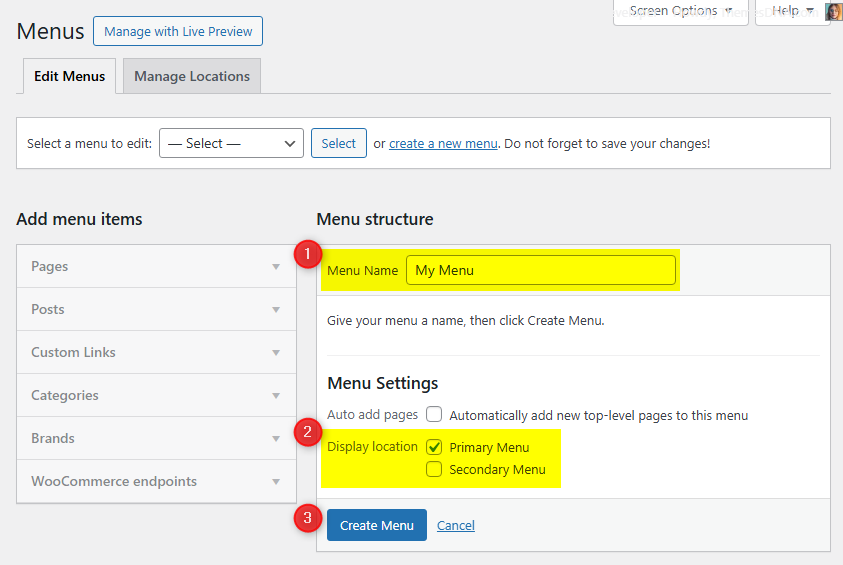
  2. Set up your menus under Appearance → Menus.
  3. Customize the theme via Appearance → Customize → Theme Options.

Theme Installation

After purchasing the GridView PRO WordPress Theme, you'll receive a download link via email. Check your email inbox (or spam folder) for the product delivery email. Click the provided download link to download the theme's .zip file to your computer. Follow one of a method given below to install the theme on your website.

Upgrading from the Free GridView Theme?

GridView PRO is a separate theme. Whether or not you're currently using the free GridView theme, you need to install GridView PRO using one of the methods below.

If you're upgrading from the free version, most of your existing WordPress Customizer settings will remain in place. So you don't need to reconfigure everything from scratch. However, you will need to reupload a few images and reapply specific color settings.

After activating GridView PRO, go to Appearance → Customize and reupload the following:

  • Site Logo
  • Site Icon (favicon)
  • Header Image
  • Background Image

If you changed below color options in the free version, reapply them in Appearance → Customize → Theme Options → Colors:

  • Header Text Color
  • Background Color

Tip: You can install PRO without deleting the free theme. Use Live Preview to confirm your layout, then click Activate & Publish.

Method 1: Install Using the WordPress Dashboard (Easiest and Fastest)

This is the easiest and fastest method to install this WordPress theme.

  1. Go to "WordPress Dashboard" → "Appearance" → "Themes" and click on "Add New" button.
  2. Click on "Upload Theme" button and choose the zip file you have downloaded.
  3. Click on "Install Now" button.
  4. Activate the theme.
  5. Now go to "Appearance" → "Customize" to configure theme options.

Method 2: Install using cPanel File Manager

In some cases, you may not be able to install a WordPress theme through the WordPress dashboard—especially if the theme's ZIP file exceeds the maximum upload size limit. When this happens, you can install the theme using cPanel's File Manager, which is often simpler than using FTP. Follow the steps below to install your theme via the File Manager in cPanel.

  1. Log in to your cPanel account. Your cPanel URL will be https://yourdomain.com/cpanel or a similar URL.
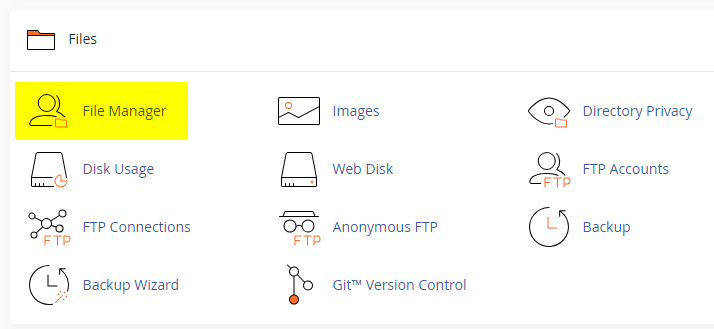
  2. Click on the "File Manager" icon. It's usually under the "Files" section.
  3. You are now in the "File Manager". Open the public_html folder, which is your website's root directory.
  4. Locate the wp-content folder inside "public_html," then open the themes folder inside of it.
  5. In the File Manager interface, click the "Upload" button and choose the theme's .zip file from your local drive.
  6. After it has been uploaded, right-click the .zip file and choose "Extract" or "Unzip".
  7. You can now delete the uploaded .zip file, but it's optional.
  8. Log in to your WordPress dashboard through your web browser.
  9. Go to Appearance → Themes. Now you will see the newly extracted theme.
  10. Make it your active theme by clicking the "Activate" button next to it.

Note: If your hosting provider doesn't offer cPanel, look for a File Manager option in your hosting dashboard (like DirectAdmin, Plesk, or CyberPanel). The process is usually very similar—just find the wp-content/themes folder and upload/extract the theme ZIP file there.

Method 3: Install using FTP

Installing a WordPress theme via FTP is straightforward, though it involves a few more steps compared to using the built-in theme uploader. Here's how to install a WordPress theme using FTP:

  1. Unzip the theme's .zip file you have downloaded.
  2. Connect to your hosting account using an FTP client such as "FileZilla" or "Core FTP".
  3. Navigate to the /wp-content/themes folder in the "Remote site" section.
  4. In the "Local site" section, locate the unzipped theme folder.
  5. Drag and drop the unzipped theme folder from the "Local site" section to the "Remote site" section.
  6. Be patient and let the transfer finish.
  7. Once the transfer is complete, log in to your WordPress dashboard and navigate to Appearance > Themes.
  8. Find the theme you just uploaded and click Activate.

Troubleshooting Tips

  • Didn't receive the download email? Wait 5–10 minutes or check your spam/junk folder. But if you still can not find this email or download link is broken, please inform us. we will send it ASAP.
  • "The uploaded file exceeds the upload_max_filesize directive in php.ini." - If you get this error when following the "Method 1", follow this tutorial: https://themesdna.com/blog/increase-maximum-file-upload-size-wordpress/
  • My menus disappeared or look different. Go to Appearance → Menus → Manage Locations and reassign your menus to the correct locations.
  • My header text or background color looks different after activating PRO. Reapply your colors in Appearance → Customize → Theme Options → Colors for Header Text Color and Background Color. Then publish.
  • Still can't install the theme? Contact us for help.

Import Demo Content

You can import the demo content, widgets, and Customizer settings shown in the GridView PRO theme demo.

Manual Demo Import

Step 1: Import Main Site Content

This includes: Posts, pages, menus, media, categories, tags, comments, and custom fields.

  1. Download: XML File
  2. Go to Tools → Import.
  3. Under "WordPress", click Install Now if not installed.
  4. Click Run Importer.
  5. Select the XML file and click Upload file and import.
  6. Check "Download and import file attachments", click Submit.

Step 2: Import Widgets

  1. Install the Widget Importer & Exporter plugin.
  2. Go to Tools → Widget Importer & Exporter.
  3. Copy content from: Widgets .wie File and paste into the box.
  4. Click Import Widgets.

Step 3: Import Customizer Settings

  1. Download: Customizer File
  2. Install the Customizer Export/Import plugin.
  3. Go to Appearance → Customize → Export/Import.
  4. Select the .dat file, check "Download and import image files?", click Import.

Regenerate Thumbnails

If your website already has existing posts with featured images, it's highly recommended to regenerate thumbnails after activating the GridView PRO theme. This ensures that all images match the new theme's layout and display sizes.

Regenerating thumbnails is optional if your site is completely new and doesn't have any uploaded images yet.

However, if you imported the demo content, regenerating thumbnails is essential to display images correctly across the site.

  1. Install and activate the Regenerate Thumbnails plugin.
  2. Go to Tools → Regenerate Thumbnails.
  3. Click the "Regenerate Thumbnails for All x Attachments" button to start the process.
  4. Wait until all images are regenerated. This may take a few minutes depending on your media library size.
  5. If you want, you can deactivate and delete the plugin once the process is complete.

This step ensures clean image alignment and sharp visuals throughout your website using the GridView PRO theme.

Header Image

Quick Start Guide

GridView PRO theme allows users to upload their very own site-wide custom header image with custom title and description to obtain a much more personalized look and feel. Also they can upload an unique header image for each post/page with unique title and description replacing the site-wide header image and its title/description.

There are many header image options in GridView PRO:

  1. Header image options in Theme Customizer
  2. Header image options in post edit screen
  3. Header image options in page edit screen

How to Add a Header Image?

There are 3 types of header images in this theme:

  1. Site-wide Header Image : Appearance → Customize → Theme Options → Header Image
  2. Header Images of Posts : Post’s Edit Screen → “Post Settings – GridView PRO” Meta Box → Site Header Image
  3. Header Images of Pages : Page’s Edit Screen → “Page Settings – GridView PRO” Meta Box → Site Header Image

How to Add a Site-wide Header Image?

Site-wide header image will be displayed everywhere on your website. But if you add a header image to a post/page using settings of that post/page, site-wide header image will be replaced by that header image.

  1. Go to AppearanceCustomizeTheme OptionsHeader Image
  2. Upload your header image using Add Image button.

How to Add a Header Image to a Post?

You can set a different header image for each post.

  1. To set a header image to a post, go to edit screen of that post.
  2. Find the Post Settings - GridView PRO meta box.
  3. Add your image URL or upload an image using Site Header Image option.

How to Add a Header Image to a Page?

You can set a different header image for each page. To set a header image to a page, go to edit screen of that page. Find the Page Settings - GridView PRO meta box.
Add your image URL or upload an image using Site Header Image option.

How to Add a Custom Title/Description to Header Image?

By default, the theme displays your website's title as the header image title and the tagline as the header image description. However, you can replace both with custom title and description.

First, you need to enable the display of custom header image title and description sitewide. To do this, go to AppearanceCustomizeTheme OptionsHeader Image and check the option Add Custom Title/Custom Description to Header Image and save settings.

Add a Custom Title/Description to Site-wide Header Image:

  1. Go to AppearanceCustomizeTheme OptionsHeader Image
  2. Add your custom header image title to Header Image Custom Title text field.
  3. Add your custom header image description title to Header Image Custom Description text field.
  4. Save settings.

How to Add a Custom Title/Description to the Header Image of a Post?

You can assign a unique title and description to the header image of each post. These will override the sitewide header image title and description.

  1. Go to the edit screen of that post.
  2. Find the Post Settings - GridView PRO meta box.
  3. Use Site Header Image Title and Site Header Image Description options for adding a title and a description.
  4. Update the post.

How to Add a Custom Title and Description to the Header Image of a Page?

You can assign a unique title and description to the header image of each page. These will override the sitewide header image title and description.

  1. Go to the edit screen of that page.
  2. Find the Page Settings - GridView PRO meta box.
  3. Use Site Header Image Title and Site Header Image Description options for adding a title and a description.
  4. Update the page.

How to Hide Title/Description from Header Image?

  1. Go to AppearanceCustomizeTheme OptionsHeader Image.
  2. Check the option Hide both Title and Description from Header Image and save settings.
  3. Save settings.

Note: This option will hide both header image title and header image description sitewide.

Post Formats

GridView PRO WordPress Theme is supporting to all these 9 post formats available currently on WordPress: 'aside', 'image', 'video', 'quote', 'link', 'gallery', 'status', 'audio', 'chat'

Quick reference: Use the links below to jump to the instructions for each format.


What are Post Formats?

According to WordPress Developer Resources, a Post Format is a "piece of meta information that can be used by a theme to customize its presentation of a post".


How to Apply a Post Format to a Post?

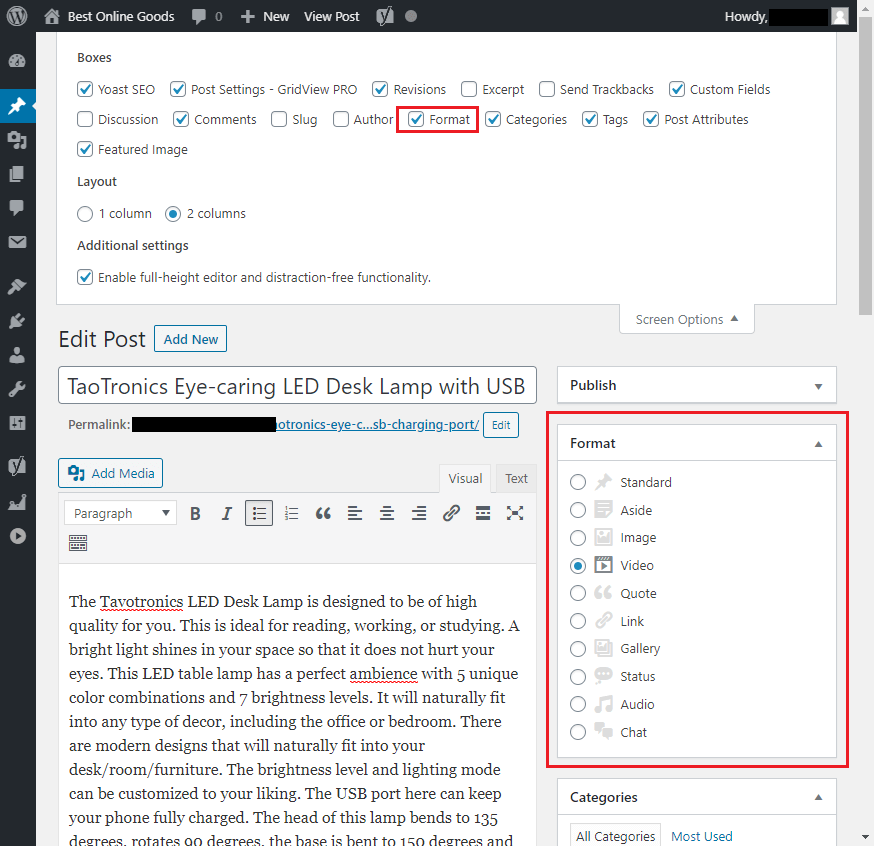
If you are using "Classic Editor":

  • On the editing screen of that post, click on "Screen Options".
  • Click on "Format" check box. Now you will see the "Format" meta box.
  • Select a post format for your post from this section.

Post Formats Meta Box WordPress Classic Editor


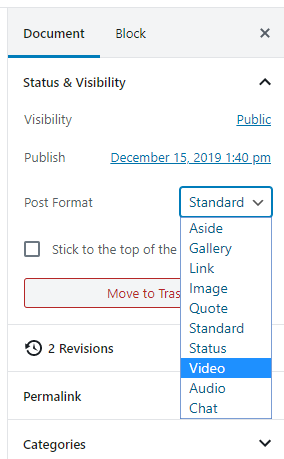
If you are using "Block Editor":

  • Go to the editing screen of that post.
  • Under "Document" settings on the right, open the "Status & Visibility" menu.
  • Select an option from the drop down in "Post Format".

Post Formats WordPress Block Editor


How to Enable "Post Settings - GridView PRO" Meta Box

Each post edit screen has "Post Settings - GridView PRO" meta box to control various options in that post including post formats settings. If you can not see it, please follow the steps below to enable it.

If you are using "Classic Editor":

  • On the editing screen of the post, click on "Screen Options".
  • Click on "Post Settings - GridView PRO" check box. Now you will see the "Post Settings - GridView PRO" meta box.

If you are using "Block Editor":

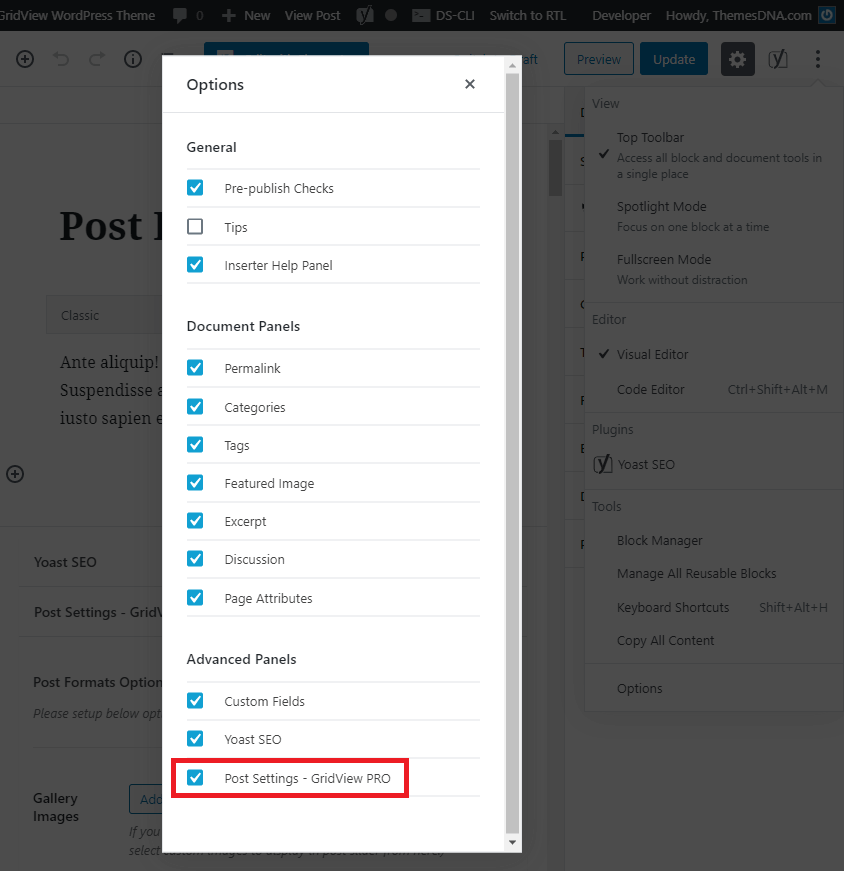
  • On the editing screen of the post, click on "More tools & options" icon (ellipsis icon).
  • Click on "Options" from "More tools & options" panel.
  • From "Advanced Panels" section, enable "Post Settings - GridView PRO".

Block Editor Options


How to Add Video Format Post

Video post format is used for posts with videos. First select the post format as "Video" from editing screen. When you select "Video" format, theme has ability to display a featured video for that post in below 3 ways:

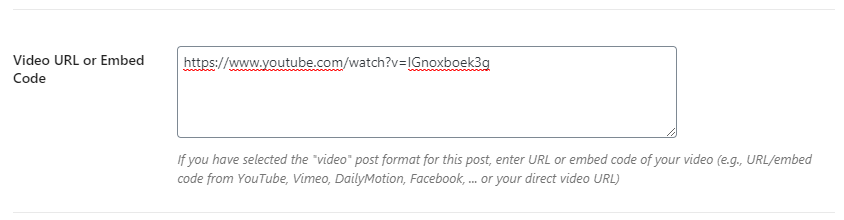
  1. At first, theme will check for "Video URL or Embed Code" setting for that post. This setting is located inside "Post Settings - GridView PRO" panel. If theme can get a video using the value you have given to this setting, then it will be used as the featured video.

Video URL or Embed Code Setting

  1. If video URL or embed code has been not given, theme will check post content for videos. If videos are found inside the post content, then first video inside the post content will be used as the featured video.
  2. If there is no video inside the post content, then theme will check attached videos into that post. If there are videos attached to the post, then first attached video will be used as the featured video.

How to Add Audio Format Post

Audio post format is used for posts with audios. First select the post format as "Audio" from editing screen. When you select "Audio" format, theme has ability to display a featured audio for that post in below 3 ways:

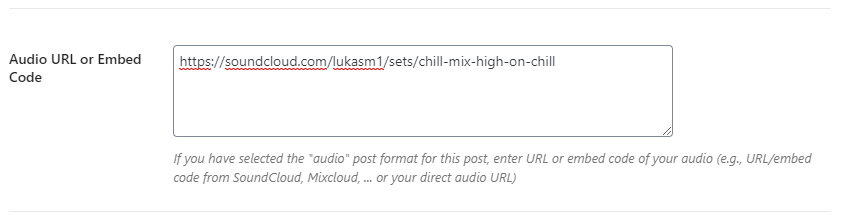
  1. At first, theme will check for "Audio URL or Embed Code" setting for that post. This setting is located inside "Post Settings - GridView PRO" panel. If theme can get a audio using the value you have given to this setting, then it will be used as the featured audio.

Audio URL or Embed Code Setting

  1. If audio URL or embed code has been not given, theme will check post content for audios. If audios are found inside the post content, then first audio inside the post content will be used as the featured audio.
  2. If there is no audio inside the post content, then theme will check attached audios into that post. If there are audios attached to the post, then first attached audio will be used as the featured audio.

Gallery post format is used for posts with more images. First select the post format as "Gallery" from editing screen. When you select "Gallery" format, theme has ability to display a featured images slider in below 3 ways:

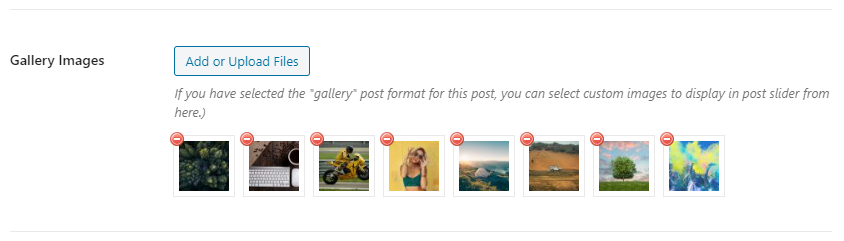
  1. At first, theme will check for "Gallery Images" setting for that post. This setting is located inside "Post Settings - GridView PRO" panel. If you have added images to this setting, then theme will be display a slider using that images.

Gallery Images Setting

  1. If "Gallery Images" setting is not used, theme will check post content for galleries. If galleries are found inside the post content, then theme will be display a slider using images of first gallery of post content.
  2. If there is no gallery inside the post content, then theme will check attached images into that post. If there are images attached to the post, then theme will be display a slider using that images.

How to Add Image Format Post

Image post format is used for posts with a special image. First select the post format as "Image" from editing screen. When you select "Image" format, theme has ability to display a featured image for that post in below 4 ways:

  1. At first, theme will check for "Image URL" setting for that post. This setting is located inside "Post Settings - GridView PRO" panel. If theme can get a image using the value you have given to this setting, then it will be used as the featured image.

Image URL Setting

  1. If "Image URL" setting is not used, theme will check for "Featured Image" option for that post. If there is a "Featured Image" for that post, then it will be used as the featured image.
  2. If there is no "Featured Image", then theme will check attached images into that post. If there are images attached to the post, then first attached image will be used as the featured image.
  3. If there is no attached image, theme will check post content for images. If images are found inside the post content, then first image inside the post content will be used as the featured image.

How to Add Status Format Post

Status post format is used for a short status update, similar to a Twitter status update. First select the post format as "Status" from editing screen.

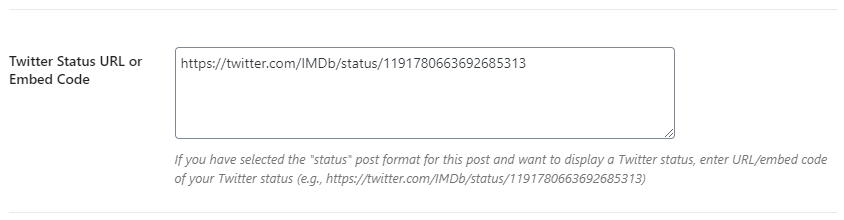
To display a Twitter status, locate to "Twitter Status URL or Embed Code" setting in "Post Settings - GridView PRO" panel. Enter your Twitter Status URL or Twitter Status embed code into textarea of that setting.

Twitter Status URL or Embed Code Setting

If you only want to display a simple message as your status, enter it into the post editor.


Link post format is used when we want to add a post as a link to another site. First select the post format as "Link" from editing screen. When you select "Link" format, post's title will be linked to an external site URL. Theme will get this external site URL using one of the way below:

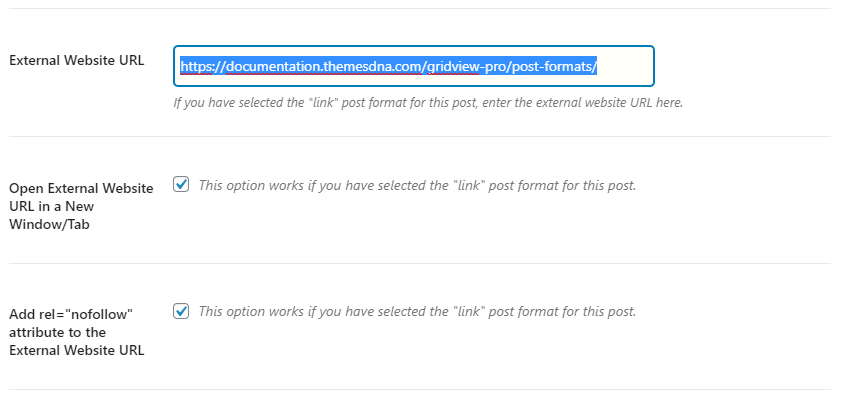
  1. At first, theme will check for "External Website URL" setting for that post. This setting is located inside "Post Settings - GridView PRO" panel. If theme can get a link using the value you have given to this setting, then it will be used as the external URL.

Link Post Format Settings

  1. If "External Website URL" setting is not used, theme will check post content for links. If links are found inside the post content, then first link inside the post content will be used as the external URL.

Note:

  • To open external website URL in new window, check the setting "Open External Website URL in a New Window/Tab".
  • To add nofollow attribute to the external website URL, check the setting "Add rel="nofollow" attribute to the External Website URL".

How to Add Quote Format Post

Quote post format is used to display a quotation. First select the post format as "Quote" from editing screen.

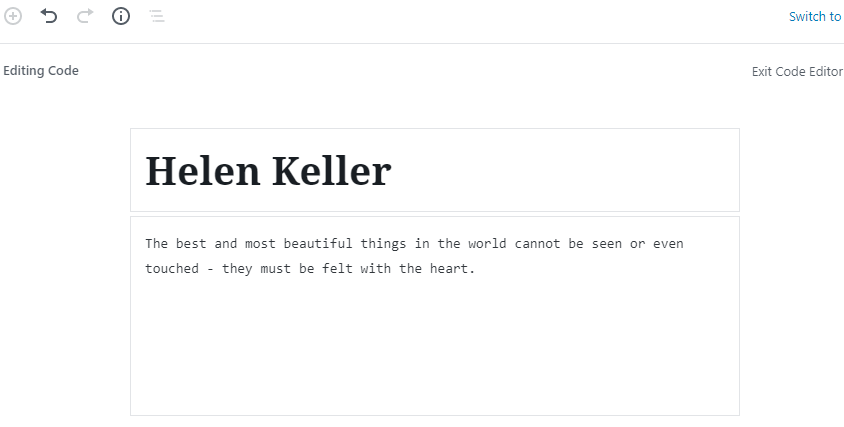
Now enter the quote into the post editor. Enter the quote's source/author name to the post title field. Check this image for example:

How to Write Quote Format Post


How to Add Aside Format Post

Aside post format is used to emphasize short ideas that don't require a title or long reader engagement. First select the post format as "Aside" from editing screen. Now simply enter your short content into the post editor.


How to Add Chat Format Post

Chat post format is used to display a chat transcript. First select the post format as "Chat" from editing screen.

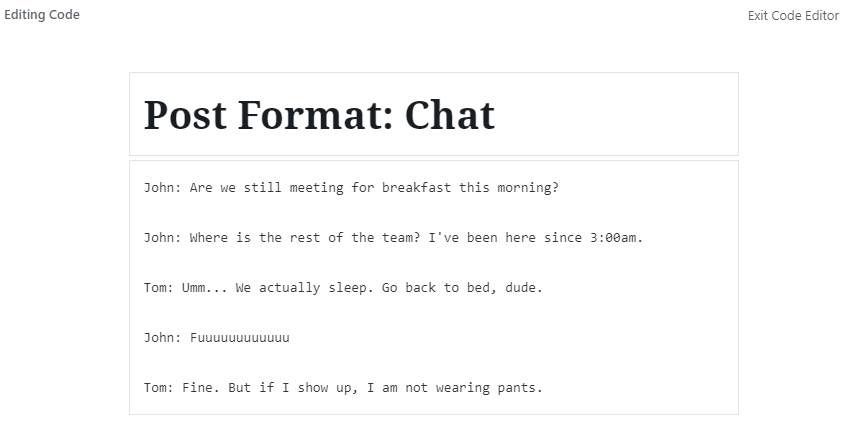
Now enter the chat content into the post editor like this:

How to Write Chat Format Post


Read more about WordPress post formats: https://developer.wordpress.org/themes/classic-themes/functionality/post-formats/

News Ticker

How to Configure the News Ticker

You can activate and customize it via the WordPress Theme Customizer.

Step 1: Access the News Ticker Options

  1. Go to your WordPress Dashboard.
  2. Navigate to Appearance → Customize.
  3. Click on Theme Options → News Ticker Options.

Step 2: Enable the News Ticker

Find the option Enable News Ticker and toggle the switch to Yes to activate the news ticker on your site.

Step 3: Configure Ticker Options

👉 Check the complete list of "News Ticker Options" available

Step 4: Save Changes

Once you've configured the settings, click the Publish button at the top of the Customizer to apply the changes.

Tips

  • Use Posts by IDs to curate exactly which headlines appear.
  • Use Tag Posts or Category Posts for automated updates within a topic.
  • Adjust duration and width values for responsiveness and readability.

Custom Widgets

GridView PRO includes 6 custom widgets:

  1. GridView Grid Posts Widget – Displays posts in a customizable grid layout.
  2. GridView List Posts Widget – Displays posts in a vertical list format.
  3. GridView Tabbed Widget – Combines multiple content types in a tabbed interface.
  4. GridView About and Social Widget – Displays an about section with profile image and social links.
  5. GridView Grid Ads Widget – Inserts ads within the posts grid.
  6. GridView Banner Widget – Displays ad code or custom HTML without widget styling.

All widgets can be found under Appearance → Widgets.

GridView Grid Posts Widget

Displays posts in a responsive grid layout with full control over content sources, display options, and styling.

Option IDOption NameDescriptionControl TypeAccepted ValueDefault
titleTitleWidget title displayed above the grid.TextA stringGridView Grid Posts Widget
post_columnPosts Columns StyleNumber of columns in the grid.Select
  • 1 Column
  • 2 Columns
  • 3 Columns
  • 4 Columns
  • 5 Columns
  • 6 Columns
  • 7 Columns
  • 8 Columns
  • 9 Columns
  • 10 Columns
4 Columns
thumb_styleThumbnails StyleFeatured image size for grid items.Select
  • 100:100 Thumbnails
  • 480:240 Thumbnails
  • 480:288 Thumbnails
  • 480:360 Thumbnails
  • 480:480 Thumbnails
  • 480:640 Thumbnails
  • 480:Auto Thumbnails
  • 675:Auto Thumbnails
  • 946:Auto Thumbnails
  • 1246:Auto Thumbnails
480:360 Thumbnails
post_typePost TypeSource of posts to display.Select
  • Recent Posts
  • Category Posts
  • Tag Posts
  • Posts by IDs
Recent Posts
include_postsDisplay these PostsPost IDs (comma-separated) for "Posts by IDs".TextComma-separated IDs(empty)
featured_catCategoryCategory for "Category Posts".DropdownCategory ID(none)
featured_tagTagTag for "Tag Posts".DropdownTag ID(none)
orderbyOrderbyHow posts are sorted.Select
  • Published Date
  • Modified Date
  • Number of Comments
  • Random
  • Post Likes
  • Post Views
Published Date
orderOrderSort direction.Select
  • Ascending order
  • Descending order
Descending order
numberNumber of PostsNumber of posts to display.NumberA positive integer4
exclude_postsExclude PostsPost IDs to exclude (comma-separated).TextComma-separated IDs(empty)
show_titleShow Post TitlesDisplay post titles.Checkboxtrue / falsetrue
show_thumbnailShow ThumbnailsDisplay featured images.Checkboxtrue / falsetrue
show_catsShow CategoriesDisplay post categories.Checkboxtrue / falsetrue
show_authorShow AuthorDisplay post author.Checkboxtrue / falsetrue
show_dateShow DateDisplay post date.Checkboxtrue / falsetrue
show_commentsShow CommentsDisplay comments count.Checkboxtrue / falsetrue
show_likesShow LikesDisplay post likes.Checkboxtrue / falsetrue
show_viewsShow ViewsDisplay post views.Checkboxtrue / falsetrue
show_snippetShow SnippetDisplay post excerpt/snippet.Checkboxtrue / falsefalse
snippet_typeSnippet TypeSource for post snippet.Select
  • Post Content
  • Post Excerpt
Post Content
snippet_lengthSnippet LengthNumber of words in snippet.NumberA positive integer20
show_shareShow Share ButtonsDisplay social share buttons.Checkboxtrue / falsetrue
share_styleShare StyleStyle for share buttons.Select
  • Style 1
  • Style 2
Style 1
show_relatedShow Related PostsDisplay related posts within widget.Checkboxtrue / falsefalse
related_numberRelated Posts NumberNumber of related posts.NumberA positive integer3
related_taxRelated Posts TaxonomyHow related posts are determined.Select
  • Categories
  • Tags
  • Tags and Categories
  • Same Author
Categories
title_heightTitle HeightCSS value for title height.TextCSS value(empty)
dateformatDate FormatPHP date format string.TextPHP date formatY-m-d
related_orderbyRelated Posts OrderbyHow related posts are sorted.Select
  • Published Date
  • Modified Date
  • Number of Comments
  • Random
  • Post Likes
  • Post Views
Random
related_orderRelated Posts OrderSort direction for related posts.Select
  • Ascending order
  • Descending order
Descending order

GridView List Posts Widget

Displays posts in a vertical list format with thumbnails on the left and post details on the right. Ideal for sidebars.

Option ID Option Name Description Control Type Accepted Value Default
titleTitleWidget title displayed above the list.TextA stringGridView List Posts Widget
post_typePost TypeSource of posts to display.Select
  • Recent Posts
  • Category Posts
  • Tag Posts
  • Posts by IDs
Recent Posts
include_postsDisplay these PostsPost IDs (comma-separated) for "Posts by IDs".TextComma-separated IDs(empty)
featured_catCategoryCategory for "Category Posts".DropdownCategory ID(none)
featured_tagTagTag for "Tag Posts".DropdownTag ID(none)
orderbyOrderbyHow posts are sorted.Select
  • Published Date
  • Modified Date
  • Number of Comments
  • Random
  • Post Likes
  • Post Views
Published Date
orderOrderSort direction.Select
  • Ascending order
  • Descending order
Descending order
numberNumber of PostsNumber of posts to display.NumberA positive integer5
exclude_postsExclude PostsPost IDs to exclude (comma-separated).TextComma-separated IDs(empty)
snippet_typeSnippet TypeSource for post snippet.Select
  • Post Content
  • Post Excerpt
Post Content
snippet_lengthSnippet LengthNumber of words in snippet.NumberA positive integer20
dateformatDate FormatPHP date format string.TextPHP date formatY-m-d
show_thumbnailShow ThumbnailDisplay post thumbnail.Checkboxtrue / falsetrue
show_authorShow AuthorDisplay post author.Checkboxtrue / falsefalse
show_dateShow DateDisplay post date.Checkboxtrue / falsetrue
show_commentsShow CommentsDisplay comments count.Checkboxtrue / falsetrue
show_likesShow LikesDisplay post likes.Checkboxtrue / falsetrue
show_viewsShow ViewsDisplay post views.Checkboxtrue / falsetrue
show_snippetShow SnippetDisplay post excerpt/snippet.Checkboxtrue / falsetrue
show_sharebtnsShow Share ButtonsDisplay social share buttons.Checkboxtrue / falsetrue

GridView Tabbed Widget

Displays posts organized into multiple tabs (e.g., Recent, Popular, Comments). Each tab can show a different set of posts.

Option ID Option Name Description Control Type Accepted Value Default
titleTitleWidget heading displayed above the tabs.TextA stringTabbed Widget
show_taboneDisplay Tab 1Toggle visibility for Tab 1 (Popular).Checkboxtrue / falsetrue
show_tabtwoDisplay Tab 2Toggle visibility for Tab 2 (Recent).Checkboxtrue / falsetrue
show_tabthreeDisplay Tab 3Toggle visibility for Tab 3 (Random).Checkboxtrue / falsetrue
tabone_nameTab 1 NameLabel shown on Tab 1.TextA stringPopular
tabtwo_nameTab 2 NameLabel shown on Tab 2.TextA stringRecent
tabthree_nameTab 3 NameLabel shown on Tab 3.TextA stringRandom
tabone_post_typeTab 1 Post TypeSelect the post source for Tab 1.Select
  • Recent Posts
  • Category Posts
  • Tag Posts
  • Posts by IDs
Recent Posts
tabone_include_postsTab 1: Display These PostsComma-separated IDs when using "Posts by IDs".TextComma-separated IDs(empty)
tabone_featured_catTab 1 CategoryCategory to query when "Category Posts" is selected.DropdownCategory ID(none)
tabone_featured_tagTab 1 TagTag to query when "Tag Posts" is selected.DropdownTag ID(none)
tabone_orderbyTab 1 OrderbySorting field for Tab 1 posts.Select
  • Published Date
  • Modified Date
  • Number of Comments
  • Random
  • Post Likes
  • Post Views
Number of Comments
tabone_orderTab 1 OrderSorting direction for Tab 1.Select
  • Ascending order
  • Descending order
Descending order
tabone_exclude_postsTab 1: Exclude PostsComma-separated post IDs to omit.TextComma-separated IDs(empty)
tabone_numberTab 1: Number of PostsTotal posts displayed in Tab 1.NumberA positive integer3
tabtwo_post_typeTab 2 Post TypeSelect the post source for Tab 2.Select
  • Recent Posts
  • Category Posts
  • Tag Posts
  • Posts by IDs
Recent Posts
tabtwo_include_postsTab 2: Display These PostsComma-separated IDs when using "Posts by IDs".TextComma-separated IDs(empty)
tabtwo_featured_catTab 2 CategoryCategory to query when "Category Posts" is selected.DropdownCategory ID(none)
tabtwo_featured_tagTab 2 TagTag to query when "Tag Posts" is selected.DropdownTag ID(none)
tabtwo_orderbyTab 2 OrderbySorting field for Tab 2 posts.Select
  • Published Date
  • Modified Date
  • Number of Comments
  • Random
  • Post Likes
  • Post Views
Published Date
tabtwo_orderTab 2 OrderSorting direction for Tab 2.Select
  • Ascending order
  • Descending order
Descending order
tabtwo_exclude_postsTab 2: Exclude PostsComma-separated post IDs to omit.TextComma-separated IDs(empty)
tabtwo_numberTab 2: Number of PostsTotal posts displayed in Tab 2.NumberA positive integer3
tabthree_post_typeTab 3 Post TypeSelect the post source for Tab 3.Select
  • Recent Posts
  • Category Posts
  • Tag Posts
  • Posts by IDs
Recent Posts
tabthree_include_postsTab 3: Display These PostsComma-separated IDs when using "Posts by IDs".TextComma-separated IDs(empty)
tabthree_featured_catTab 3 CategoryCategory to query when "Category Posts" is selected.DropdownCategory ID(none)
tabthree_featured_tagTab 3 TagTag to query when "Tag Posts" is selected.DropdownTag ID(none)
tabthree_orderbyTab 3 OrderbySorting field for Tab 3 posts.Select
  • Published Date
  • Modified Date
  • Number of Comments
  • Random
  • Post Likes
  • Post Views
Random
tabthree_orderTab 3 OrderSorting direction for Tab 3.Select
  • Ascending order
  • Descending order
Descending order
tabthree_exclude_postsTab 3: Exclude PostsComma-separated post IDs to omit.TextComma-separated IDs(empty)
tabthree_numberTab 3: Number of PostsTotal posts displayed in Tab 3.NumberA positive integer3
show_thumbnailShow ThumbnailDisplay post thumbnails inside each tab.Checkboxtrue / falsetrue
show_authorShow AuthorDisplay post author names.Checkboxtrue / falsefalse
show_dateShow DateDisplay post publish dates.Checkboxtrue / falsetrue
show_commentsShow CommentsDisplay comment counts.Checkboxtrue / falsetrue
show_likesShow LikesDisplay post like counts.Checkboxtrue / falsetrue
show_viewsShow ViewsDisplay post view counts.Checkboxtrue / falsetrue
show_snippetShow SnippetDisplay post excerpts.Checkboxtrue / falsetrue
snippet_typeSnippet TypeChoose whether the snippet comes from content or excerpt.Select
  • Post Content
  • Post Excerpt
Post Content
snippet_lengthSnippet LengthNumber of words included in the snippet.NumberA positive integer20
show_sharebtnsShow Share ButtonsDisplay social share buttons below each entry.Checkboxtrue / falsetrue
dateformatDate FormatPHP date format used for post dates.TextPHP date format stringY-m-d

GridView About and Social Widget

Displays an about section with a profile image, description text, and links to 50+ social media profiles.

Option ID Option Name Description Control Type Accepted Value Default
titleTitleWidget heading.TextA stringAbout and Social Widget
imageProfile Image URLURL to the author/profile image.TextImage URL(empty)
descriptionDescriptionShort bio or description text.TextareaHTML/Text(empty)
round_buttonsRound ButtonsDisplay round social icons.Checkboxtrue / falsefalse
facebookFacebook URLLink to Facebook profile/page.TextURL(empty)
threadsThreads URLLink to Threads profile.TextURL(empty)
twitterX URLLink to X (Twitter) profile.TextURL(empty)
pinterestPinterest URLLink to Pinterest profile.TextURL(empty)
linkedinLinkedIn URLLink to LinkedIn profile.TextURL(empty)
instagramInstagram URLLink to Instagram profile.TextURL(empty)
flickrFlickr URLLink to Flickr profile.TextURL(empty)
youtubeYouTube URLLink to YouTube channel.TextURL(empty)
vimeoVimeo URLLink to Vimeo profile.TextURL(empty)
soundcloudSoundCloud URLLink to SoundCloud profile.TextURL(empty)
messengerMessenger URLLink to Facebook Messenger.TextURL(empty)
whatsappWhatsApp URLLink to WhatsApp contact.TextURL(empty)
tiktokTikTok URLLink to TikTok profile.TextURL(empty)
lastfmLast.fm URLLink to Last.fm profile.TextURL(empty)
mediumMedium URLLink to Medium profile.TextURL(empty)
githubGitHub URLLink to GitHub profile.TextURL(empty)
bitbucketBitbucket URLLink to Bitbucket profile.TextURL(empty)
tumblrTumblr URLLink to Tumblr blog.TextURL(empty)
diggDigg URLLink to Digg profile.TextURL(empty)
deliciousDelicious URLLink to Delicious profile.TextURL(empty)
stumbleuponStumbleUpon URLLink to StumbleUpon profile.TextURL(empty)
mixMix URLLink to Mix profile.TextURL(empty)
redditReddit URLLink to Reddit profile.TextURL(empty)
dribbbleDribbble URLLink to Dribbble profile.TextURL(empty)
flipboardFlipboard URLLink to Flipboard profile.TextURL(empty)
bloggerBlogger URLLink to Blogger site.TextURL(empty)
etsyEtsy URLLink to Etsy shop.TextURL(empty)
behanceBehance URLLink to Behance portfolio.TextURL(empty)
amazonAmazon URLLink to Amazon storefront/profile.TextURL(empty)
meetupMeetup URLLink to Meetup profile/group.TextURL(empty)
mixcloudMixcloud URLLink to Mixcloud profile.TextURL(empty)
slackSlack URLInvite or workspace link.TextURL(empty)
snapchatSnapchat URLLink to Snapchat profile.TextURL(empty)
spotifySpotify URLLink to Spotify profile.TextURL(empty)
vkVK URLLink to VK profile.TextURL(empty)
yelpYelp URLLink to Yelp profile.TextURL(empty)
wpWordPress URLLink to WordPress.com site.TextURL(empty)
twitchTwitch URLLink to Twitch channel.TextURL(empty)
telegramTelegram URLLink to Telegram channel/group.TextURL(empty)
bandcampBandcamp URLLink to Bandcamp profile.TextURL(empty)
quoraQuora URLLink to Quora profile.TextURL(empty)
foursquareFoursquare URLLink to Foursquare profile.TextURL(empty)
deviantartDeviantArt URLLink to DeviantArt profile.TextURL(empty)
imdbIMDb URLLink to IMDb profile.TextURL(empty)
codepenCodePen URLLink to CodePen profile.TextURL(empty)
jsfiddleJSFiddle URLLink to JSFiddle profile.TextURL(empty)
stackoverflowStack Overflow URLLink to Stack Overflow profile.TextURL(empty)
stackexchangeStack Exchange URLLink to Stack Exchange profile.TextURL(empty)
buyselladsBuySellAds URLLink to BuySellAds profile.TextURL(empty)
web500px500px URLLink to 500px profile.TextURL(empty)
elloEllo URLLink to Ello profile.TextURL(empty)
discordDiscord URLLink to Discord server/user.TextURL(empty)
goodreadsGoodreads URLLink to Goodreads profile.TextURL(empty)
odnoklassnikiOdnoklassniki URLLink to Odnoklassniki profile.TextURL(empty)
houzzHouzz URLLink to Houzz profile.TextURL(empty)
pocketPocket URLLink to Pocket profile/share page.TextURL(empty)
xingXING URLLink to XING profile.TextURL(empty)
mastodonMastodon URLLink to Mastodon profile.TextURL(empty)
blueskyBluesky URLLink to Bluesky profile.TextURL(empty)
googleplayGoogle Play URLLink to Google Play listing.TextURL(empty)
slideshareSlideShare URLLink to SlideShare profile.TextURL(empty)
dropboxDropbox URLLink to Dropbox file/folder.TextURL(empty)
paypalPayPal URLPayPal.Me or donation link.TextURL(empty)
viadeoViadeo URLLink to Viadeo profile.TextURL(empty)
wikipediaWikipedia URLLink to Wikipedia page.TextURL(empty)
skypeSkype UsernameSkype username for contact.TextUsername(empty)
envelopeEmail AddressEmail used for contact link.TextEmail(empty)
rssRSS Feed URLLink to RSS feed.TextURL(empty)

GridView Grid Ads Widget

Inserts advertisements or custom content between posts in the grid layout.

Important: Only add this widget to the "Grid Ads Widgets" widget area.

Option IDOption NameDescriptionControl TypeAccepted ValueDefault
hideadHide AdToggle to hide the ad without removing the widget.Checkboxtrue / falsefalse
adcodeResponsive Ad codeHTML/JavaScript code for your advertisement.TextareaHTML/JavaScript code(empty)
adlocationAd locationPosition where the ad appears in the post sequence.TextA positive whole number3
displayDisplay ads onSelect which page types display this ad.Select
  • Home Page Only
  • Home Page and Next Pages
  • Category Pages
  • Tag Pages
  • Author Pages
  • All Archive Pages
  • Search Pages
  • Every Posts Page
Every Posts Page

Widget Areas

There are multiple widget areas in the GridView PRO theme.


  1. Featured Homepage Widgets

    Displayed inside the "Featured Homepage" page template. Apply that template to any page, then drop widgets here to build a custom featured layout.

  2. Header Right Widgets

    Located on the right side of the header. Add a "Custom HTML" widget with your 728x90 banner ad code and select the "Logo + Header Banner" header layout to display it.

  3. Sidebar 1 Widgets

    Main sidebar on the left-hand side of the layout.

  4. Sidebar 2 Widgets

    Secondary sidebar on the right-hand side.

  5. Top Full Width Widgets (Default HomePage)

    Full-width strip after the header, shown only on the default homepage (latest posts).

  6. Top Full Width Widgets (Static HomePage)

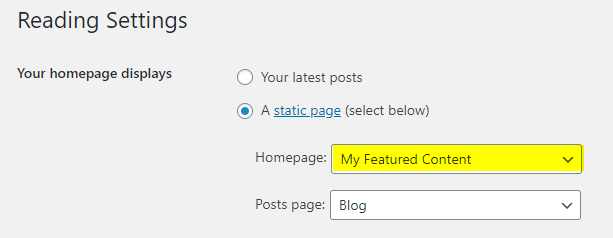
    Full-width strip after the header, shown on the static page you set as the homepage.

  7. Top Full Width Widgets (Single Pages)

    Full-width strip after the header, shown on single posts of any post type except attachments and pages.

  8. Top Full Width Widgets (Singular Pages)

    Full-width strip after the header, shown on all singular content (including pages and attachments).

  9. Top Full Width Widgets (Everywhere)

    Full-width strip after the header on every page of the site.

  10. Top Widgets (Default HomePage)

    Located at the top of the main content area on the default homepage.

  11. Top Widgets (Static HomePage)

    Located at the top of the main content area on the static homepage.

  12. Top Widgets (Single Pages)

    At the top of main content on single posts (except attachments and pages).

  13. Top Widgets (Singular Pages)

    At the top of main content on any singular view (including pages and attachments).

  14. Top Widgets (Everywhere)

    At the top of main content on every page.

  15. Bottom Widgets (Default HomePage)

    Located at the bottom of the main content area on the default homepage.

  16. Bottom Widgets (Static HomePage)

    Located at the bottom of the main content area on the static homepage.

  17. Bottom Widgets (Single Pages)

    Bottom of the main content on single posts (except attachments and pages).

  18. Bottom Widgets (Singular Pages)

    Bottom of the main content on any singular view (including pages and attachments).

  19. Bottom Widgets (Everywhere)

    Bottom of the main content for every page.

  20. Post Bottom Widgets

    Appears below the content of single posts (except attachments and pages).

  21. Footer Top Widgets

    Widget row placed above the footer columns.

  22. Footer 1 Widgets

    Footer column 1.

  23. Footer 2 Widgets

    Footer column 2.

  24. Footer 3 Widgets

    Footer column 3.

  25. Footer 4 Widgets

    Footer column 4.

  26. Footer 5 Widgets

    Footer column 5.

  27. Footer Bottom Widgets

    Widget row at the very bottom of the footer.

  28. 404 Page Widgets

    Displayed on the 404 (not found) page.

  29. Grid Ads Widgets

    Injects content/ads between posts inside grid loops. Important: Only add the "GridView Grid Ads Widget" here.

How to Control Widget Visibility by Location

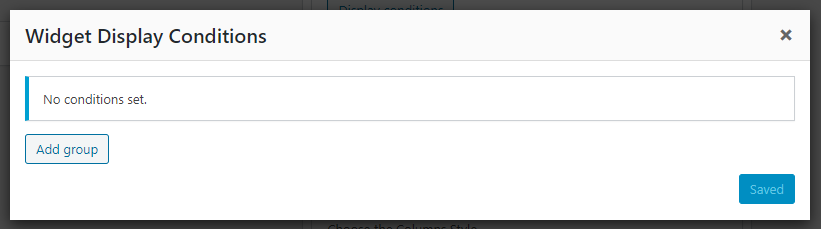
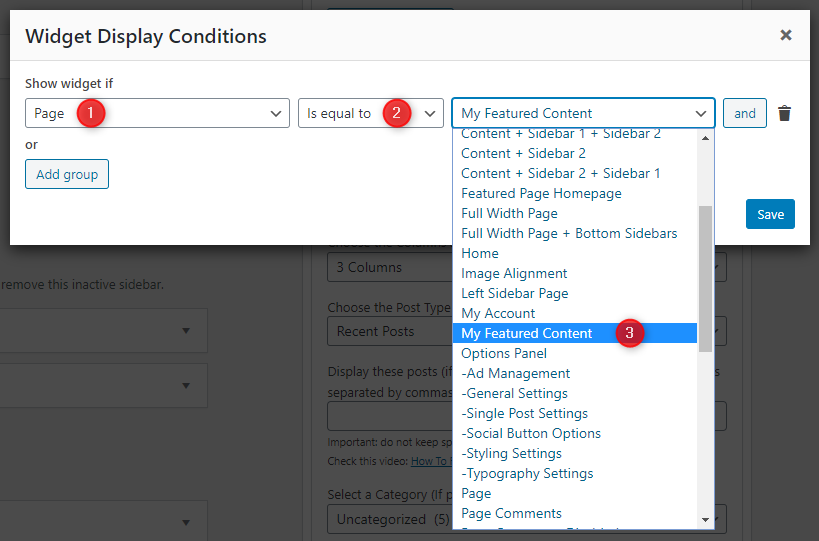
Install and activate the Widget Display Conditions or Widget Context plugin to control which widgets appear on specific pages.

Custom Page Templates

GridView PRO ships with 29 custom templates: 17 page templates plus 12 post templates for flexible layouts.

Special Function Templates

  • Featured Content: Displays widgets (instead of standard content) from the Top/Bottom widget areas.
  • Featured Homepage: Outputs only the Featured Homepage Widgets area—ideal for fully widgetized landing pages.
  • Contact Form: Creates a contact page with a built-in contact form.
  • Sitemap: Displays a structured list of pages, categories, and archives.
  • Authors: Shows a list of all authors with profiles and post counts.

Layout Templates

Page templates cover every arrangement (Full Width, Full Width + bottom sidebar, Content flanked by Sidebars 1/2, Sidebar-first layouts, and all 3-column combinations). Matching post templates provide the same 12 layout variations for posts.

How to Assign a Custom Template:

  1. Go to Pages or PostsAdd New or edit an existing page/post.
  2. Look for the Template option in the sidebar.
  3. Select the desired template from the list.
  4. Click Publish or Update.

How to Create a Contact Page

  1. Go to Pages → Add New.
  2. Title it Contact Us and select the Contact Form template.
  3. Click Publish.
  4. Go to Appearance → Customize → Theme Options → Page Templates Options and enter your email address in Contact Form Email Address.

How to Create a Sitemap Page

  1. Go to Pages → Add New.
  2. Title it Sitemap and select the Sitemap template.
  3. Click Publish.

How to Create a Site Authors Page

  1. Go to Pages → Add New.
  2. Title it Our Authors and select the Authors template.
  3. Click Publish.

Customizer Theme Options

Navigate to Appearance → Customize → Theme Options to access all customization settings.

Site Identity Options

Below is the complete list of Site Identity Options available:

Option ID Option Name Description Control Type Accepted Value Default
custom_logoSite LogoUpload an image to replace the text-based site title.Media UploaderImage file / Attachment IDNone
blognameSite TitleThe primary title of your website displayed in the header.TextString (up to 64 characters recommended)My WordPress Site
blogdescriptionTaglineShort descriptive sentence shown under the site title.TextStringJust another WordPress site
display_header_textDisplay Site Title & TaglineToggles visibility of the textual branding even when a logo exists.Checkboxtrue / falsetrue
site_iconSite Icon (Favicon)Icon shown in browser tabs and device shortcuts (512×512 px recommended).Media UploaderImage file / Attachment IDNone

Colors Options

Below is the complete list of Colors Options available:

Option ID Option Name Description Control Type Accepted Value Default
WordPress Core Colors
header_textcolor Header Text Color Color of the site title and tagline text in the header. Color Picker Hex color code (theme default)
background_color Background Color Site-wide background color. To change it, remove the background image first (Appearance → Customize → Background Image). Color Picker Hex color code (theme default)
General Colors
body_text_color Main Text Color Default text color used across the site body. Color Picker Hex color code #555555
link_color Main Link Color Default color for hyperlinks in the body. Color Picker Hex color code #666666
link_hover_color Main Link Hover Color Color for hyperlinks on hover. Color Picker Hex color code #000000
headings_color General Headings Color Color for general heading elements (h1–h6). Color Picker Hex color code #111111
Header Colors
header_bg_color Header Background Color Background color for the header area. Color Picker Hex color code #262626
header_image_title_color Header Image Area Title Color Color for the title displayed over the header image. Color Picker Hex color code #ffffff
header_image_title_hover_color Header Image Area Title Hover Color Hover color for the header image title. Color Picker Hex color code #ffffff
header_image_desc_color Header Image Area Description Color Color for the description text over the header image. Color Picker Hex color code #ffffff
Primary Menu Colors
primary_menu_color Primary Menu Link Color Text color of primary menu links. Color Picker Hex color code #ffffff
primary_menu_shadow_color Primary Menu Link Shadow Color Text shadow color for primary menu links. Color Picker Hex color code #000000
primary_menu_hover_color Primary Menu Link Hover Color Text color of primary menu links on hover. Color Picker Hex color code #ffffff
primary_menu_hover_bg_color Primary Menu Link Hover Background Color Background color of primary menu links on hover. Color Picker Hex color code #000000
primary_submenu_one_bg_color Primary Sub Menu Background Color Background color of the primary dropdown sub menu. Color Picker Hex color code #444444
primary_submenu_bd_color Primary Sub Menu Border Color Border color of the primary dropdown sub menu. Color Picker Hex color code #666666
primary_menu_icon_color Primary Responsive Menu Icon Color Color of the hamburger/toggle icon for the primary responsive menu. Color Picker Hex color code #ffffff
Secondary Menu Colors
secondary_menu_bg_color Secondary Menu Background Color Background color of the secondary menu bar. Color Picker Hex color code #222222
secondary_menu_bd_color Secondary Menu Border Color Border color of the secondary menu bar. Color Picker Hex color code #444444
secondary_menu_color Secondary Menu Link Color Text color of secondary menu links. Color Picker Hex color code #ffffff
secondary_menu_shadow_color Secondary Menu Link Shadow Color Text shadow color for secondary menu links. Color Picker Hex color code #000000
secondary_menu_hover_color Secondary Menu Link Hover Color Text color of secondary menu links on hover. Color Picker Hex color code #dddddd
secondary_menu_hover_bg_color Secondary Menu Link Hover Background Color Background color of secondary menu links on hover. Color Picker Hex color code #000000
secondary_submenu_one_bg_color Secondary Sub Menu Background Color Background color of the secondary dropdown sub menu. Color Picker Hex color code #333333
secondary_submenu_one_bd_color Secondary Sub Menu Border Color Border color of the secondary dropdown sub menu. Color Picker Hex color code #444444
secondary_menu_icon_color Secondary Responsive Menu Icon Color Color of the hamburger/toggle icon for the secondary responsive menu. Color Picker Hex color code #ffffff
Header Social Icons Colors
header_social_color Header Social Buttons Color Default color of social icons in the header. Color Picker Hex color code #ffffff
header_social_hover_color Header Social Buttons Hover Color Color of social icons in the header on hover. Color Picker Hex color code #ffffff
header_social_hover_bg_color Header Social Buttons Hover Background Color Background color of social icons in the header on hover. Color Picker Hex color code #000000
header_social_hover_bd_color Header Social Buttons Hover Border Color Border color of social icons in the header on hover. Color Picker Hex color code #444444
News Ticker Colors
news_ticker_bg_color News Ticker Background Color Background color of the news ticker bar. Color Picker Hex color code #dddddd
news_ticker_heading_color News Ticker Heading Color Text color of the news ticker heading/label. Color Picker Hex color code #ffffff
news_ticker_heading_bg_color News Ticker Heading Background Color Background color of the news ticker heading/label. Color Picker Hex color code #409BD4
news_ticker_date_color News Ticker Dates Text Color Text color of dates shown in the news ticker. Color Picker Hex color code #ffffff
news_ticker_date_bg_color News Ticker Dates Background Color Background color behind the dates in the news ticker. Color Picker Hex color code #222222
news_ticker_text_color News Ticker Text Color Text color of the news ticker headlines. Color Picker Hex color code #000000
news_ticker_hover_text_color News Ticker Hover Text Color Text color of news ticker headlines on hover. Color Picker Hex color code #555555
Single Posts Colors
content_bg_color Single Posts Background Color Background color of the single post content area. Color Picker Hex color code #ffffff
content_bd_one_color Single Posts Border 1 Color Primary border color around the single post area. Color Picker Hex color code #dddddd
content_bd_two_color Single Posts Border 2 Color Secondary border color around the single post area. Color Picker Hex color code #ffffff
post_title_bg_color Single Post Title Background Color Background color behind the single post title. Color Picker Hex color code #ececec
post_title_bd_one_color Single Post Title Border Color 1 Primary border color of the single post title area. Color Picker Hex color code #dddddd
post_title_bd_two_color Single Post Title Border Color 2 Secondary border color of the single post title area. Color Picker Hex color code #ffffff
post_title_color Single Post Title Color Text color of the single post title. Color Picker Hex color code #000000
post_title_shadow_color Single Post Title Shadow Color Text shadow color of the single post title. Color Picker Hex color code #ffffff
post_title_hover_color Single Post Title Hover Color Text color of the single post title on hover. Color Picker Hex color code #333333
post_body_link_color Post Content Link Color Color of hyperlinks inside the post body content. Color Picker Hex color code #409BD4
post_body_link_hover_color Post Content Link Hover Color Hover color of hyperlinks inside the post body content. Color Picker Hex color code #08ACD5
post_meta_color Single Post Meta Color Text color for post meta info (date, author, etc.) on single posts. Color Picker Hex color code #666666
post_meta_hover_color Single Post Meta Hover Color Hover color for post meta links on single posts. Color Picker Hex color code #000000
Author Bio Box Colors
author_bio_bg_color Author Bio Box Background Color Background color of the author bio box. Color Picker Hex color code #ececec
author_bio_bd_color Author Bio Box Border 1 Color Primary border color of the author bio box. Color Picker Hex color code #dddddd
author_bio_bd_two_color Author Bio Box Border 2 Color Secondary border color of the author bio box. Color Picker Hex color code #ffffff
author_bio_color Author Bio Box Text Color Text color inside the author bio box. Color Picker Hex color code #555555
author_bio_link_color Author Bio Box Link Color Link color inside the author bio box. Color Picker Hex color code #555555
author_bio_link_hover_color Author Bio Box Link Hover Color Link hover color inside the author bio box. Color Picker Hex color code #409BD4
List Posts Colors
list_post_title_color List Post Title Color Title color for posts displayed in list format. Color Picker Hex color code #000000
list_post_title_hover_color List Post Title Hover Color Title hover color for posts in list format. Color Picker Hex color code #333333
list_post_meta_color List Post Meta Color Meta text color for posts in list format. Color Picker Hex color code #666666
list_post_meta_hover_color List Post Meta Hover Color Meta hover color for posts in list format. Color Picker Hex color code #000000
Grid Posts Colors
grid_post_bg_color Grid Post Background Color Background color for grid post items. Color Picker Hex color code #ffffff
grid_post_bd_one_color Grid Post Border 1 Color Primary border color for grid post items. Color Picker Hex color code #dddddd
grid_post_bd_two_color Grid Post Border 2 Color Secondary border color for grid post items. Color Picker Hex color code #ffffff
grid_post_title_bg_color Grid Post Title Background Color Background color of the title area in grid posts. Color Picker Hex color code #eeeeee
grid_post_title_color Grid Post Title Color Text color of grid post titles. Color Picker Hex color code #000000
grid_post_title_shadow_color Grid Post Title Shadow Color Text shadow color of grid post titles. Color Picker Hex color code #ffffff
grid_post_title_hover_color Grid Post Title Hover Color Text hover color of grid post titles. Color Picker Hex color code #409BD4
grid_post_meta_bg_color Grid Post Meta Background Color Background color of the meta area in grid posts. Color Picker Hex color code #eeeeee
grid_post_meta_color Grid Post Meta Color Text color of meta info in grid posts. Color Picker Hex color code #555555
grid_post_meta_hover_color Grid Post Meta Hover Color Hover text color of meta info in grid posts. Color Picker Hex color code #000000
grid_postcats_color Grid Post Categories Color Text color of category labels on grid posts. Color Picker Hex color code #ffffff
grid_postcats_bg_color Grid Post Categories Background Color Background color of category labels on grid posts. Color Picker Hex color code #333333
grid_postcats_hover_color Grid Post Categories Hover Color Hover text color of category labels on grid posts. Color Picker Hex color code #ffffff
grid_postcats_bg_hover_color Grid Post Categories Hover Background Color Hover background color of category labels on grid posts. Color Picker Hex color code #000000
Read More Button Colors
rmore_color Read More Button Color Text color of the "Read More" button. Color Picker Hex color code #ffffff
rmore_bg_color Read More Button Background Color Background color of the "Read More" button. Color Picker Hex color code #98250e
rmore_hover_color Read More Button Hover Color Text color of the "Read More" button on hover. Color Picker Hex color code #ffffff
rmore_bg_hover_color Read More Button Hover Background Color Background color of the "Read More" button on hover. Color Picker Hex color code #333333
Load More / Navigation Links Colors
loadmore_color Load More Button / Navigation Links Color Text color of the load more button and navigation links. Color Picker Hex color code #ffffff
loadmore_bg_color Load More Button / Navigation Links Background Color Background color of the load more button and navigation links. Color Picker Hex color code #333333
loadmore_hover_color Load More Button / Navigation Links Hover Color Text color of the load more button and navigation links on hover. Color Picker Hex color code #ffffff
loadmore_bg_hover_color Load More Button / Navigation Links Hover Background Color Background color of the load more button and navigation links on hover. Color Picker Hex color code #409BD4
Mini Related Posts Colors
rposts_color Mini Related Posts Title Color Title color for mini related posts. Color Picker Hex color code #000000
rposts_shadow_color Mini Related Posts Title Shadow Color Title text-shadow for mini related posts. Color Picker Hex color code #ffffff
rposts_bg_color Mini Related Posts Background Color Background color for the mini related posts block. Color Picker Hex color code #f9f9f9
rposts_bd_one_color Mini Related Posts Border 1 Color Primary border color for the mini related posts block. Color Picker Hex color code #ffffff
rposts_bd_two_color Mini Related Posts Border 2 Color Secondary border color for the mini related posts block. Color Picker Hex color code #eeeeee
rposts_hover_color Mini Related Posts Title Hover Color Title hover color for mini related posts. Color Picker Hex color code #409BD4
rposts_bg_hover_color Mini Related Posts Hover Background Color Background hover color for mini related post items. Color Picker Hex color code #f2f2f2
Quote Post Colors
quote_post_bg_color Quote Post Background Color Background color for quote format posts. Color Picker Hex color code #000000
quote_post_color Quote Post Text Color Text color for quote format posts. Color Picker Hex color code #ffffff
quote_post_shadow_color Quote Post Text Shadow Color Text shadow color for quote format posts. Color Picker Hex color code #000000
Posts Pagination Colors
pagination_color Posts Pagination Links Color Text color of pagination links. Color Picker Hex color code #444444
pagination_bg_color Posts Pagination Links Background Color Background color of pagination links. Color Picker Hex color code #eeeeee
pagination_bd_color Posts Pagination Links Border Color Border color of pagination links. Color Picker Hex color code #dddddd
pagination_hover_color Posts Pagination Links Hover Color Text color of pagination links on hover. Color Picker Hex color code #000000
pagination_bg_hover_color Posts Pagination Links Hover Background Color Background color of pagination links on hover. Color Picker Hex color code #dddddd
pagination_bd_hover_color Posts Pagination Links Hover Border Color Border color of pagination links on hover. Color Picker Hex color code #cccccc
Gallery Slider Colors
slider_post_title_color Gallery Slider Post Title Color Title color for posts within the gallery slider. Color Picker Hex color code #ffffff
slider_dots_bg_color Gallery Slider Dots Background Color Background color of slider navigation dots. Color Picker Hex color code #eeeeee
slider_dots_bg_hover_color Gallery Slider Dots Background Hover Color Hover/active background color of slider navigation dots. Color Picker Hex color code #409BD4
Post Likes / Views Colors
likes_color Post Likes Button / Post Views Color Color of the post likes button and post views count. Color Picker Hex color code #ffffff
likes_hover_color Post Likes Button Hover Color Hover color of the post likes button. Color Picker Hex color code #ff0000
Sidebar Colors
widgets_bg_color Sidebar Widgets Background Color Background color of sidebar widgets. Color Picker Hex color code #ffffff
widgets_bd_one_color Sidebar Widgets Border 1 Color Primary border color of sidebar widgets. Color Picker Hex color code #dddddd
widgets_bd_two_color Sidebar Widgets Border 2 Color Secondary border color of sidebar widgets. Color Picker Hex color code #ffffff
hide_sidebar_title_image Hide Background Image from Sidebar Title Toggle to hide the background image from the sidebar widget title bar. Checkbox true / false false
sidebar_title_color Sidebar Title Color Text color of sidebar widget titles. Color Picker Hex color code #000000
sidebar_title_shadow_color Sidebar Title Shadow Color Text shadow color of sidebar widget titles. Color Picker Hex color code #ffffff
sidebar_title_bg_color Sidebar Title Background Color Background color of sidebar widget titles. Color Picker Hex color code #ececec
sidebar_title_bd_color Sidebar Title Border Color Border color of sidebar widget titles. Color Picker Hex color code #dddddd
sidebar_title_bs_color Sidebar Title Box Shadow Color Box shadow color of sidebar widget titles. Color Picker Hex color code #ffffff
sidebar_link_color Sidebar Link Color Link color inside sidebar widgets. Color Picker Hex color code #444444
sidebar_link_hover_color Sidebar Link Hover Color Hover color for links inside sidebar widgets. Color Picker Hex color code #666666
Tag Cloud Colors
tag_cloud_color Tag Cloud Link Color Text color of tag cloud links. Color Picker Hex color code #ffffff
tag_cloud_bg_color Tag Cloud Link Background Background color of tag cloud links. Color Picker Hex color code #888888
tag_cloud_hover_color Tag Cloud Link Hover Color Hover text color of tag cloud links. Color Picker Hex color code #ffffff
tag_cloud_hover_bg_color Tag Cloud Link Hover Background Hover background color of tag cloud links. Color Picker Hex color code #000000
Tabbed Widget Colors
tabnames_color Tabbed Widget Names Color Text color of tab names in the tabbed widget. Color Picker Hex color code #ffffff
tabnames_bg_color Tabbed Widget Names Background Color Background color of tab names in the tabbed widget. Color Picker Hex color code #000000
tabnames_hover_color Tabbed Widget Names Hover Color Hover text color of tab names. Color Picker Hex color code #ffffff
tabnames_bg_hover_color Tabbed Widget Names Hover Background Color Hover background color of tab names. Color Picker Hex color code #409BD4
Footer Colors
footer_bg_color Footer Background Color Background color of the footer area. Color Picker Hex color code #333333
footer_text_color Footer Text Color General text color in the footer area. Color Picker Hex color code #dddddd
footer_link_color Footer Link Color Link color in the footer area. Color Picker Hex color code #cccccc
footer_link_hover_color Footer Link Hover Color Link hover color in the footer area. Color Picker Hex color code #ffffff
footer_title_color Footer Title Color Color of footer widget titles. Color Picker Hex color code #ffffff
footer_title_bd_one_color Footer Title Border 1 Color Primary border color of footer widget titles. Color Picker Hex color code #444444
footer_title_bd_two_color Footer Title Border 2 Color Secondary border color of footer widget titles. Color Picker Hex color code #222222
Copyrights Colors
cp_bg_color Copyrights Background Color Background color of the copyright bar. Color Picker Hex color code #2e2e2e
cp_bd_color Copyrights Border Color Border color of the copyright bar. Color Picker Hex color code #444444
cp_color Copyrights Text Color Text color of the copyright bar content. Color Picker Hex color code #ecfff1
cp_hover_color Copyrights Hover Text Color Hover text color of links in the copyright bar. Color Picker Hex color code #ffffff
Comments Colors
comment_bd_color_one Comments Border Color Border color of the comments area. Color Picker Hex color code #eaeaea
comment_bg_color_one Comments Background Color 1 Background color for even-numbered comments. Color Picker Hex color code #f5f5f5
comment_bg_color_two Comments Background Color 2 Background color for odd-numbered comments. Color Picker Hex color code #fbfbfb
comment_meta_color Comments Meta Color Color for comment meta information (author name, date). Color Picker Hex color code #888888
Input Elements Colors
button_text_color Button Text Color Text color for buttons (submit, search, etc.). Color Picker Hex color code #ffffff
button_bg_color Button Background Color Background color for buttons. Color Picker Hex color code #333333
button_bd_color Button Border Color Border color for buttons. Color Picker Hex color code #e6e6e6
button_hover_bg_color Button Hover Background Color Background color for buttons on hover. Color Picker Hex color code #409BD4
input_text_color Input Text Color Text color for input fields (text, textarea, search). Color Picker Hex color code #666666
input_bd_color Input Border Color Border color for input fields. Color Picker Hex color code #dddddd
input_hover_text_color Input Hover Text Color Text color for input fields on focus/hover. Color Picker Hex color code #111111
Selected Text Colors
selected_text_color Selected Text Color Text color when content is highlighted/selected. Color Picker Hex color code #ffffff
selected_text_bg_color Selected Text Background Color Background color when content is highlighted/selected. Color Picker Hex color code #333333
hr Tag Colors
hr_bg_color hr Tag Background Color Background color of horizontal rule (<hr>) elements. Color Picker Hex color code #ffffff
hr_bd_top_color hr Tag Top Border Color Top border color of horizontal rule elements. Color Picker Hex color code #e6e6e6
hr_bd_bottom_color hr Tag Bottom Border Color Bottom border color of horizontal rule elements. Color Picker Hex color code #f6f6f6
hr_shadow_color hr Tag Box Shadow Color Box shadow color of horizontal rule elements. Color Picker Hex color code #f2f2f2
pre Tag Colors
pre_bg_color pre Tag Background Color Background color of <pre> (preformatted text) elements. Color Picker Hex color code #1d1f21
pre_color pre Tag Text Color Text color of <pre> elements. Color Picker Hex color code #ffffff
code Tag Colors
code_bg_color code Tag Background Color Background color of inline <code> elements. Color Picker Hex color code #ffffe0
code_color code Tag Text Color Text color of inline <code> elements. Color Picker Hex color code #222222
Box Shadows
custom_header_shadow Header Box Shadow Custom CSS box-shadow value for the header area. Text CSS box-shadow value 0 2px 5px rgba(0,0,0,0.5)
disable_header_shadow Disable Header Box Shadow Toggle to remove the header box shadow entirely. Checkbox true / false false
custom_post_summaries_shadow Post Summaries Box Shadow Custom CSS box-shadow value for post summary cards. Text CSS box-shadow value 0 0 40px rgba(0,0,0,.1) inset
disable_post_summaries_shadow Disable Post Summaries Box Shadow Toggle to remove the post summaries box shadow. Checkbox true / false false
custom_content_shadow Full Posts and Widgets Box Shadow Custom CSS box-shadow value for full posts and widget areas. Text CSS box-shadow value 0 0 40px rgba(0,0,0,.05) inset
disable_content_shadow Disable Full Posts and Widgets Box Shadow Toggle to remove the full posts/widgets box shadow. Checkbox true / false false
custom_secondary_menu_shadow Secondary Menu Box Shadow Custom CSS box-shadow value for the secondary menu. Text CSS box-shadow value 0 0 40px rgba(0,0,0,.1) inset
disable_secondary_menu_shadow Disable Secondary Menu Box Shadow Toggle to remove the secondary menu box shadow. Checkbox true / false false
custom_copyright_shadow Copyright Area Box Shadow Custom CSS box-shadow value for the copyright area. Text CSS box-shadow value 0 0 40px rgba(0,0,0,.1) inset
disable_copyright_shadow Disable Copyright Area Box Shadow Toggle to remove the copyright area box shadow. Checkbox true / false false
Master Toggle
disable_color_options Disable All Color Options If checked, all color options above will have no effect and the theme’s default colors will be used. This may help improve site performance. You can still override colors via “Additional CSS” in the Customizer. Checkbox true / false false

Font Options

Below is the complete list of Font Options available:

Option ID Option Name Description Control Type Accepted Value Default
gridview_options[font_subsets]Font SubsetsSelect font subsets to load.Multiple Selectcyrillic / cyrillic-ext / greek / greek-ext / latin / latin-ext / vietnameselatin
gridview_options[body_fonts]Body Font-FamilyFont family for body text.SelectAny listed fonthttps://fonts.googleapis.com/css?family=Domine:400,700
gridview_options[body_font_size]Body Font-SizeFont size for body text.Select8px–72px13px
gridview_options[body_font_weight]Body Font-WeightFont weight for body text.Select400 / 700400
gridview_options[body_font_style]Body Font-StyleFont style for body text.Selectnormal / italicnormal
gridview_options[body_line_height]Body Line-HeightLine height for body text.TextNumber1.6
gridview_options[site_title_fonts]Site Title Font-FamilyFont family for site title.SelectAny listed fonthttps://fonts.googleapis.com/css?family=Oswald:400,700
gridview_options[site_title_font_size]Site Title Font-SizeFont size for site title.Select8px–72px24px
gridview_options[site_title_font_weight]Site Title Font-WeightFont weight for site title.Select400 / 700400
gridview_options[site_title_font_style]Site Title Font-StyleFont style for site title.Selectnormal / italicnormal
gridview_options[site_title_line_height]Site Title Line-HeightLine height for site title.TextNumber1
gridview_options[site_title_text_transform]Site Title Text TransformText transform for site title.Selectnone / capitalize / uppercase / lowercase / initial / inherituppercase
gridview_options[site_desc_fonts]Site Description Font-FamilyFont family for site description.SelectAny listed fonthttps://fonts.googleapis.com/css?family=Oswald:400,700
gridview_options[site_desc_font_size]Site Description Font-SizeFont size for site description.Select8px–72px12px
gridview_options[site_desc_font_weight]Site Description Font-WeightFont weight for site description.Select400 / 700400
gridview_options[site_desc_font_style]Site Description Font-StyleFont style for site description.Selectnormal / italicnormal
gridview_options[site_desc_line_height]Site Description Line-HeightLine height for site description.TextNumber1
gridview_options[site_desc_text_transform]Site Description Text TransformText transform for site description.Selectnone / capitalize / uppercase / lowercase / initial / inherituppercase
gridview_options[header_image_title_fonts]Header Image Title Font-FamilyFont family for header image title.SelectAny listed fonthttps://fonts.googleapis.com/css?family=Playfair+Display:400,400i,700,700i
gridview_options[header_image_title_font_size]Header Image Title Font-SizeFont size for header image title.Select8px–72px24px
gridview_options[header_image_title_font_weight]Header Image Title Font-WeightFont weight for header image title.Select400 / 700400
gridview_options[header_image_title_font_style]Header Image Title Font-StyleFont style for header image title.Selectnormal / italicnormal
gridview_options[header_image_title_line_height]Header Image Title Line-HeightLine height for header image title.TextNumber1
gridview_options[header_image_title_text_transform]Header Image Title Text TransformText transform for header image title.Selectnone / capitalize / uppercase / lowercase / initial / inheritnone
gridview_options[header_image_desc_fonts]Header Image Description Font-FamilyFont family for header image description.SelectAny listed fonthttps://fonts.googleapis.com/css?family=Domine:400,700
gridview_options[header_image_desc_font_size]Header Image Description Font-SizeFont size for header image description.Select8px–72px13px
gridview_options[header_image_desc_font_weight]Header Image Description Font-WeightFont weight for header image description.Select400 / 700400
gridview_options[header_image_desc_font_style]Header Image Description Font-StyleFont style for header image description.Selectnormal / italicnormal
gridview_options[header_image_desc_line_height]Header Image Description Line-HeightLine height for header image description.TextNumber1
gridview_options[header_image_desc_text_transform]Header Image Description Text TransformText transform for header image description.Selectnone / capitalize / uppercase / lowercase / initial / inheritnone
gridview_options[primary_menu_fonts]Primary Menu Font-FamilyFont family for primary menu.SelectAny listed fonthttps://fonts.googleapis.com/css?family=Oswald:400,700
gridview_options[primary_menu_font_size]Primary Menu Font-SizeFont size for primary menu.Select8px–72px13px
gridview_options[primary_menu_font_weight]Primary Menu Font-WeightFont weight for primary menu.Select400 / 700400
gridview_options[primary_menu_font_style]Primary Menu Font-StyleFont style for primary menu.Selectnormal / italicnormal
gridview_options[primary_menu_text_transform]Primary Menu Text TransformText transform for primary menu.Selectnone / capitalize / uppercase / lowercase / initial / inherituppercase
gridview_options[secondary_menu_fonts]Secondary Menu Font-FamilyFont family for secondary menu.SelectAny listed fonthttps://fonts.googleapis.com/css?family=Oswald:400,700
gridview_options[secondary_menu_font_size]Secondary Menu Font-SizeFont size for secondary menu.Select8px–72px13px
gridview_options[secondary_menu_font_weight]Secondary Menu Font-WeightFont weight for secondary menu.Select400 / 700400
gridview_options[secondary_menu_font_style]Secondary Menu Font-StyleFont style for secondary menu.Selectnormal / italicnormal
gridview_options[secondary_menu_text_transform]Secondary Menu Text TransformText transform for secondary menu.Selectnone / capitalize / uppercase / lowercase / initial / inherituppercase
gridview_options[news_ticker_fonts]News Ticker Font-FamilyFont family for news ticker.SelectAny listed fonthttps://fonts.googleapis.com/css?family=Patua+One
gridview_options[news_ticker_font_size]News Ticker Font-SizeFont size for news ticker.Select8px–72px13px
gridview_options[news_ticker_font_weight]News Ticker Font-WeightFont weight for news ticker.Select400 / 700400
gridview_options[news_ticker_font_style]News Ticker Font-StyleFont style for news ticker.Selectnormal / italicnormal
gridview_options[news_ticker_text_transform]News Ticker Text TransformText transform for news ticker.Selectnone / capitalize / uppercase / lowercase / initial / inherituppercase
gridview_options[grid_post_title_fonts]Grid Post Titles Font-FamilyFont for grid post titles.SelectAny listed fonthttps://fonts.googleapis.com/css?family=Roboto+Condensed:400,400i,700,700i
gridview_options[grid_post_title_font_size]Grid Post Titles Font-SizeFont size for grid post titles.Select8px–72px18px
gridview_options[grid_post_title_font_weight]Grid Post Titles Font-WeightFont weight for grid post titles.Select400 / 700700
gridview_options[grid_post_title_font_style]Grid Post Titles Font-StyleFont style for grid post titles.Selectnormal / italicnormal
gridview_options[grid_post_title_line_height]Grid Post Titles Line-HeightLine height for grid post titles.TextNumber1
gridview_options[grid_post_title_text_transform]Grid Post Titles Text TransformText transform for grid post titles.Selectnone / capitalize / uppercase / lowercase / initial / inheritnone
gridview_options[related_post_title_fonts]Related Post Titles Font-FamilyFont for related post titles.SelectAny listed fonthttps://fonts.googleapis.com/css?family=Roboto+Condensed:400,400i,700,700i
gridview_options[related_post_title_font_size]Related Post Titles Font-SizeFont size for related post titles.Select8px–72px16px
gridview_options[related_post_title_font_weight]Related Post Titles Font-WeightFont weight for related post titles.Select400 / 700700
gridview_options[related_post_title_font_style]Related Post Titles Font-StyleFont style for related post titles.Selectnormal / italicnormal
gridview_options[related_post_title_line_height]Related Post Titles Line-HeightLine height for related post titles.TextNumber1.2
gridview_options[related_post_title_text_transform]Related Post Titles Text TransformText transform for related post titles.Selectnone / capitalize / uppercase / lowercase / initial / inheritnone
gridview_options[list_post_title_fonts]List Post Titles Font-FamilyFont for list post titles.SelectAny listed fonthttps://fonts.googleapis.com/css?family=Roboto+Condensed:400,400i,700,700i
gridview_options[list_post_title_font_size]List Post Titles Font-SizeFont size for list post titles.Select8px–72px18px
gridview_options[list_post_title_font_weight]List Post Titles Font-WeightFont weight for list post titles.Select400 / 700700
gridview_options[list_post_title_font_style]List Post Titles Font-StyleFont style for list post titles.Selectnormal / italicnormal
gridview_options[list_post_title_line_height]List Post Titles Line-HeightLine height for list post titles.TextNumber1.2
gridview_options[list_post_title_text_transform]List Post Titles Text TransformText transform for list post titles.Selectnone / capitalize / uppercase / lowercase / initial / inheritnone
gridview_options[grid_post_cats_fonts]Grid Post Categories Font-FamilyFont for grid post categories.SelectAny listed fonthttps://fonts.googleapis.com/css?family=Oswald:400,700
gridview_options[grid_post_cats_font_size]Grid Post Categories Font-SizeFont size for grid post categories.Select8px–72px12px
gridview_options[grid_post_cats_font_weight]Grid Post Categories Font-WeightFont weight for grid post categories.Select400 / 700400
gridview_options[grid_post_cats_font_style]Grid Post Categories Font-StyleFont style for grid post categories.Selectnormal / italicnormal
gridview_options[grid_post_cats_text_transform]Grid Post Categories Text TransformText transform for grid post categories.Selectnone / capitalize / uppercase / lowercase / initial / inherituppercase
gridview_options[grid_post_meta_fonts]Grid Post Meta Font-FamilyFont for grid post meta (dates/author/etc).SelectAny listed fonthttps://fonts.googleapis.com/css?family=Oswald:400,700
gridview_options[grid_post_meta_font_size]Grid Post Meta Font-SizeFont size for grid post meta.Select8px–72px12px
gridview_options[grid_post_meta_font_weight]Grid Post Meta Font-WeightFont weight for grid post meta.Select400 / 700400
gridview_options[grid_post_meta_font_style]Grid Post Meta Font-StyleFont style for grid post meta.Selectnormal / italicnormal
gridview_options[grid_post_meta_text_transform]Grid Post Meta Text TransformText transform for grid post meta.Selectnone / capitalize / uppercase / lowercase / initial / inherituppercase
gridview_options[read_more_fonts]Read More Button Font-FamilyFont for read more buttons.SelectAny listed fonthttps://fonts.googleapis.com/css?family=Oswald:400,700
gridview_options[read_more_font_size]Read More Button Font-SizeFont size for read more buttons.Select8px–72px13px
gridview_options[read_more_font_weight]Read More Button Font-WeightFont weight for read more buttons.Select400 / 700400
gridview_options[read_more_font_style]Read More Button Font-StyleFont style for read more buttons.Selectnormal / italicnormal
gridview_options[read_more_text_transform]Read More Button Text TransformText transform for read more buttons.Selectnone / capitalize / uppercase / lowercase / initial / inheritnone
gridview_options[post_title_fonts]Post Titles Font-FamilyFont for single post titles.SelectAny listed fonthttps://fonts.googleapis.com/css?family=Playfair+Display:400,400i,700,700i
gridview_options[post_title_font_size]Post Titles Font-SizeFont size for single post titles.Select8px–72px24px
gridview_options[post_title_font_weight]Post Titles Font-WeightFont weight for single post titles.Select400 / 700700
gridview_options[post_title_font_style]Post Titles Font-StyleFont style for single post titles.Selectnormal / italicnormal
gridview_options[post_title_line_height]Post Titles Line-HeightLine height for single post titles.TextNumber1.2
gridview_options[post_title_text_transform]Post Titles Text TransformText transform for single post titles.Selectnone / capitalize / uppercase / lowercase / initial / inheritnone
gridview_options[widget_title_fonts]Main/Sidebars Widget Titles Font-FamilyFont for sidebar widget titles.SelectAny listed fonthttps://fonts.googleapis.com/css?family=Oswald:400,700
gridview_options[widget_title_font_size]Main/Sidebars Titles Font-SizeFont size for sidebar widget titles.Select8px–72px15px
gridview_options[widget_title_font_weight]Main/Sidebars Titles Font-WeightFont weight for sidebar widget titles.Select400 / 700400
gridview_options[widget_title_font_style]Main/Sidebars Titles Font-StyleFont style for sidebar widget titles.Selectnormal / italicnormal
gridview_options[sidebar_title_line_height]Main/Sidebars Titles Line-HeightLine height for sidebar widget titles.TextNumber1
gridview_options[widget_title_text_transform]Main/Sidebars Titles Text TransformText transform for sidebar widget titles.Selectnone / capitalize / uppercase / lowercase / initial / inherituppercase
gridview_options[footer_title_fonts]Footer Widget Title Font-FamilyFont for footer widget titles.SelectAny listed fonthttps://fonts.googleapis.com/css?family=Oswald:400,700
gridview_options[footer_title_font_size]Footer Title Font-SizeFont size for footer widget titles.Select8px–72px14px
gridview_options[footer_title_font_weight]Footer Title Font-WeightFont weight for footer widget titles.Select400 / 700400
gridview_options[footer_title_font_style]Footer Title Font-StyleFont style for footer widget titles.Selectnormal / italicnormal
gridview_options[footer_title_line_height]Footer Title Line-HeightLine height for footer widget titles.TextNumber1
gridview_options[footer_title_text_transform]Footer Title Text TransformText transform for footer widget titles.Selectnone / capitalize / uppercase / lowercase / initial / inherituppercase
gridview_options[tag_cloud_fonts]Tag Cloud Widget Font-FamilyFont for tag cloud widget.SelectAny listed fonthttps://fonts.googleapis.com/css?family=Oswald:400,700
gridview_options[tag_cloud_font_size]Tag Cloud Widget Font-SizeFont size for tag cloud widget.Select8px–72px13px
gridview_options[tag_cloud_font_weight]Tag Cloud Widget Font-WeightFont weight for tag cloud widget.Select400 / 700400
gridview_options[tag_cloud_font_style]Tag Cloud Widget Font-StyleFont style for tag cloud widget.Selectnormal / italicnormal
gridview_options[tag_cloud_text_transform]Tag Cloud Widget Text TransformText transform for tag cloud widget.Selectnone / capitalize / uppercase / lowercase / initial / inherituppercase
gridview_options[headings_fonts]General Headings Font-FamilyFont family for general headings.SelectAny listed fonthttps://fonts.googleapis.com/css?family=Playfair+Display:400,400i,700,700i
gridview_options[headings_line_height]General Headings Line-HeightLine height for general headings.TextNumber1
gridview_options[headings_text_transform]General Headings Text TransformText transform for general headings.Selectnone / capitalize / uppercase / lowercase / initial / inheritnone
gridview_options[h1_font_size]H1 Font-SizeFont size for H1 headings.Select8px–72px32px
gridview_options[h1_font_weight]H1 Font-WeightFont weight for H1 headings.Select400 / 700700
gridview_options[h1_font_style]H1 Font-StyleFont style for H1 headings.Selectnormal / italicnormal
gridview_options[h2_font_size]H2 Font-SizeFont size for H2 headings.Select8px–72px28px
gridview_options[h2_font_weight]H2 Font-WeightFont weight for H2 headings.Select400 / 700700
gridview_options[h2_font_style]H2 Font-StyleFont style for H2 headings.Selectnormal / italicnormal
gridview_options[h3_font_size]H3 Font-SizeFont size for H3 headings.Select8px–72px24px
gridview_options[h3_font_weight]H3 Font-WeightFont weight for H3 headings.Select400 / 700700
gridview_options[h3_font_style]H3 Font-StyleFont style for H3 headings.Selectnormal / italicnormal
gridview_options[h4_font_size]H4 Font-SizeFont size for H4 headings.Select8px–72px20px
gridview_options[h4_font_weight]H4 Font-WeightFont weight for H4 headings.Select400 / 700700
gridview_options[h4_font_style]H4 Font-StyleFont style for H4 headings.Selectnormal / italicnormal
gridview_options[h5_font_size]H5 Font-SizeFont size for H5 headings.Select8px–72px18px
gridview_options[h5_font_weight]H5 Font-WeightFont weight for H5 headings.Select400 / 700700
gridview_options[h5_font_style]H5 Font-StyleFont style for H5 headings.Selectnormal / italicnormal
gridview_options[h6_font_size]H6 Font-SizeFont size for H6 headings.Select8px–72px16px
gridview_options[h6_font_weight]H6 Font-WeightFont weight for H6 headings.Select400 / 700700
gridview_options[h6_font_style]H6 Font-StyleFont style for H6 headings.Selectnormal / italicnormal
gridview_options[button_fonts]Buttons Font-FamilyFont for buttons.SelectAny listed fonthttps://fonts.googleapis.com/css?family=Oswald:400,700
gridview_options[button_font_size]Buttons Font-SizeFont size for buttons.Select8px–72px13px
gridview_options[button_font_weight]Buttons Font-WeightFont weight for buttons.Select400 / 700400
gridview_options[button_font_style]Buttons Font-StyleFont style for buttons.Selectnormal / italicnormal
gridview_options[button_text_transform]Buttons Text TransformText transform for buttons.Selectnone / capitalize / uppercase / lowercase / initial / inherituppercase
gridview_options[pre_fonts]pre/code Tags Font-FamilyFont for pre/code tags.SelectAny listed fontConsolas, "Andale Mono WT", "Andale Mono", "Lucida Console", "Lucida Sans Typewriter", "DejaVu Sans Mono", "Bitstream Vera Sans Mono", "Liberation Mono", "Nimbus Mono L", Monaco, "Courier New", Courier, monospace
gridview_options[pre_font_size]pre/code Tags Font-SizeFont size for pre/code tags.Select8px–72px15px
gridview_options[pre_font_weight]pre/code Tags Font-WeightFont weight for pre/code tags.Select400 / 700400
gridview_options[pre_font_style]pre/code Tags Font-StyleFont style for pre/code tags.Selectnormal / italicnormal
gridview_options[disable_google_fonts]Disable Google FontsStop loading Google Fonts; use system fonts only.Checkboxtrue / falsefalse
gridview_options[disable_font_options]Disable All Font OptionsIgnore all font settings and use theme defaults.Checkboxtrue / falsefalse

Header Image Options

Below is the complete list of Header Image Options available:

Option ID Option Name Description Control Type Accepted Value Default
gridview_options[hide_header_image]Hide Header Image from EverywhereRemove header image from all locations.Checkboxtrue / falsefalse
gridview_options[remove_header_image_link]Remove Link from Header ImageUnlink header image so it is not clickable.Checkboxtrue / falsefalse
gridview_options[hide_header_image_details]Hide both Title and Description from Header ImageHide the header image title and description overlay.Checkboxtrue / falsefalse
gridview_options[header_image_details_mobile]Show Header Title on Smaller ScreensShow header image title on small screens.Checkboxtrue / falsefalse
gridview_options[hide_header_image_description]Hide Description from Header ImageHide only the header image description text.Checkboxtrue / falsefalse
gridview_options[header_image_custom_text]Add Custom Title/Custom Description to Header ImageEnable custom header image title/description fields.Checkboxtrue / falsefalse
gridview_options[header_image_custom_title]Header Image Custom TitleCustom title text to display on header image.TextAny text(empty)
gridview_options[header_image_custom_description]Header Image Custom DescriptionCustom description text to display on header image.TextAny text(empty)
gridview_options[header_image_destination]Header Image Destination URLURL to open when header image is clicked; defaults to homepage if empty.TextURL(empty)
gridview_options[header_image_alt_text]Header Image Alt TextAlt text for header image.TextAny textSite Title

Header Options

Below is the complete list of Header Options available:

Option ID Option Name Description Control Type Accepted Value Default
Header Visibility & Behavior
gridview_options[hide_tagline]Hide TaglineHide the site tagline from the header.Checkboxtrue / falsefalse
gridview_options[disable_sticky_header]Disable Sticky HeaderDisable sticky header on large screens.Checkboxtrue / falsefalse
gridview_options[enable_sticky_mobile_header]Enable Sticky Header on Small ScreenMake the header sticky on mobile devices.Checkboxtrue / falsefalse
gridview_options[hide_header_content]Hide Header ContentHide all header content area.Checkboxtrue / falsefalse
Header Buttons & Utilities
gridview_options[hide_header_social_buttons]Hide Header Social + Search + Login/Logout ButtonsHide all header social, search, and login/logout buttons.Checkboxtrue / falsefalse
gridview_options[hide_header_search_button]Hide Header Search ButtonHide the search button in the header.Checkboxtrue / falsefalse
gridview_options[show_header_login_button]Show Login/Logout Button in HeaderDisplay login/logout button in header.Checkboxtrue / falsefalse
gridview_options[show_header_rp_button]Show Random Post Button in HeaderDisplay random post button in header.Checkboxtrue / falsefalse
Sizing & Layout
gridview_options[header_padding]Header PaddingPadding value applied to header content.TextCSS length10px
gridview_options[header_layout]Header LayoutSelect header layout style.Selectheader-menu-social / header-banner / header-fullheader-menu-social
gridview_options[logo_width]Logo Width (Default Header)Logo/title area width (%) for "Logo + Primary Menu + Social Buttons" layout.TextPositive number23
gridview_options[primary_menu_width]Primary Menu WidthPrimary menu width (%) for "Logo + Primary Menu + Social Buttons" layout.TextPositive number60
gridview_options[social_buttons_width]Social Buttons WidthSocial buttons area width (%) for "Logo + Primary Menu + Social Buttons" layout.TextPositive number15
gridview_options[logo_2_width]Logo Width (Logo + Header Banner)Logo/title area width (%) for "Logo + Header Banner" layout.TextPositive number40
gridview_options[banner_width]Header Banner WidthBanner area width (%) for "Logo + Header Banner" layout.TextPositive number58.4

Layout Options

Below is the complete list of Layout Options available:

Option ID Option Name Description Control Type Accepted Value Default
Global Layout
gridview_options[layout_type]Layout TypeChoose overall site layout style.Selectboxed / fullboxed
gridview_options[site_width]Website Width of Non-Singular PagesWidth for archive/home/search pages on screens >1277px.TextCSS length1250px
gridview_options[site_width_singular]Website Width of Singular PagesWidth for single posts/pages on screens >1277px.TextCSS length1250px
Singular / Non-Singular Layout Styles
gridview_options[singular_layout]Singular Layout StyleLayout for single posts/pages (sidebars/content arrangement).Radios1-c-s2 / s2-c-s1 / c-s1-s2 / c-s2-s1 / s1-s2-c / s2-s1-c / s1-c / c-s1 / c-s2 / s2-c / one-column / one-column-sidebarss1-c-s2
gridview_options[plural_layout]Non-Singular Layout StyleLayout for archives, home, search, etc.Radios1-c-s2 / s2-c-s1 / c-s1-s2 / c-s2-s1 / s1-s2-c / s2-s1-c / s1-c / c-s1 / c-s2 / s2-c / one-column / one-column-sidebarsone-column
Widths for 3 Columns Layout
gridview_options[main_content_width_3]Main Content Width (3 Columns Layout)Main content width (%) when using 3-column layout.TextPositive number54
gridview_options[sidebar_one_width_3]Sidebar 1 Width (3 Columns Layout)Sidebar 1 width (%) in 3-column layout.TextPositive number22.8
gridview_options[sidebar_two_width_3]Sidebar 2 Width (3 Columns Layout)Sidebar 2 width (%) in 3-column layout.TextPositive number22.8
Widths for 2 Columns Layout
gridview_options[main_content_width_2]Main Content Width (2 Columns Layout)Main content width (%) when using 2-column layout.TextPositive number76
gridview_options[sidebar_one_width_2]Sidebar 1 Width (2 Columns Layout)Sidebar 1 width (%) in 2-column layout.TextPositive number23
gridview_options[sidebar_two_width_2]Sidebar 2 Width (2 Columns Layout)Sidebar 2 width (%) in 2-column layout.TextPositive number23

Menu Options

Below is the complete list of Menu Options available:

Option ID Option Name Description Control Type Accepted Value Default
gridview_options[primary_menu_text]Primary Menu Mobile TextLabel shown for the primary menu in mobile view.TextA stringMenu
gridview_options[disable_primary_menu]Disable Primary MenuHide the primary menu entirely.Checkboxtrue / falsefalse
gridview_options[disable_responsive_primary_menu]Disable Responsiveness (Mobile View) from Primary MenuTurn off mobile responsive behavior for the primary menu.Checkboxtrue / falsefalse
gridview_options[secondary_menu_text]Secondary Menu Mobile TextLabel shown for the secondary menu in mobile view.TextA stringMenu
gridview_options[disable_secondary_menu]Disable Secondary MenuHide the secondary menu entirely.Checkboxtrue / falsefalse
gridview_options[disable_responsive_secondary_menu]Disable Responsiveness (Mobile View) from Secondary MenuTurn off mobile responsive behavior for the secondary menu.Checkboxtrue / falsefalse
gridview_options[secondary_menu_location]Select Secondary Menu LocationChoose where the secondary menu is displayed.Selectbefore-header / after-header / before-footer / after-footerbefore-footer
gridview_options[no_center_secondary_menu]Do not Center Secondary MenuPrevent centering of the secondary menu.Checkboxtrue / falsefalse

News Ticker Options

Below is the complete list of News Ticker Options available:

Option ID Option Name Description Control Type Accepted Value Default
gridview_options[enable_news_ticker]Enable News TickerTurn on the news ticker bar.Checkboxtrue / falsefalse
gridview_options[news_ticker_location]Select News Ticker LocationChoose where the news ticker appears.Selectbefore-header / after-header / before-footer / after-footerbefore-header
gridview_options[news_ticker_heading]News Ticker HeadingHeading label displayed before ticker items.TextA stringBreaking News
gridview_options[news_ticker_length]Number of News Ticker PostsTotal posts to show in the ticker.TextPositive integer5
gridview_options[news_ticker_post_type]News Ticker Posts TypeSource of posts for the ticker.Selectrecentposts / catposts / tagposts / postsbyidsrecentposts
gridview_options[news_ticker_include_posts]Display these Posts on News TickerComma-separated IDs when using Posts by IDs.TextComma-separated IDs(empty)
gridview_options[news_ticker_post_orderby]News Ticker Posts OrderbyField to sort ticker posts by.Selectdate / modified / comment_count / rand / post_likes / post_viewsdate
gridview_options[news_ticker_post_order]News Ticker Posts OrderSort direction for ticker posts.SelectASC / DESCDESC
gridview_options[news_ticker_cat]News Ticker Posts CategoryCategory to pull posts from when type is Category Posts.Category DropdownCategory ID0
gridview_options[news_ticker_tag]News Ticker Posts TagTag to pull posts from when type is Tag Posts.Tag DropdownTag ID0
gridview_options[news_ticker_duration]News Ticker DurationDuration (ms) each ticker item stays visible.TextPositive integer60000
gridview_options[news_ticker_exclude_posts]Exclude these posts from News TickerComma-separated post IDs to omit from ticker.TextComma-separated IDs(empty)
gridview_options[hide_date_news_ticker]Hide Dates from News TickerHide date stamps from ticker items.Checkboxtrue / falsefalse

Posts Summaries Options

Below is the complete list of Posts Summaries Options available:

Option ID Option Name Description Control Type Accepted Value Default
gridview_options[disable_masonry]Disable Masonry GridTurn off JS-powered masonry; fallback to CSS grid.Checkboxtrue / falsefalse
gridview_options[hide_posts_home]Hide Blog Posts from Home PageHide posts listing on the homepage.Checkboxtrue / falsefalse
gridview_options[hide_posts_heading]Hide HomePage Posts HeadingHide the heading above homepage posts.Checkboxtrue / falsefalse
gridview_options[posts_heading]HomePage Posts HeadingCustom heading text for homepage posts.TextA stringRecent Posts
posts_per_pageNumber of Posts per PageMaximum posts displayed per blog page.TextPositive integer(WordPress setting)
gridview_options[grid_thumb_style]Posts Grid Thumbnails SizeSelect thumbnail size for post grid.Selectgridview-100w-100h-image / gridview-480w-240h-image / gridview-480w-288h-image / gridview-480w-360h-image / gridview-480w-480h-image / gridview-480w-640h-image / gridview-480w-autoh-image / gridview-675w-autoh-image / gridview-946w-autoh-image / gridview-1246w-autoh-imagegridview-480w-autoh-image
gridview_options[post_grid_cols]Grid Style on HomePageNumber of columns in homepage post grid (desktop).Selectgridview-1-col / gridview-2-col / gridview-3-col / gridview-4-col / gridview-5-col / gridview-6-col / gridview-7-col / gridview-8-col / gridview-9-col / gridview-10-colgridview-4-col
gridview_options[read_more_length]Auto Post Summary LengthWord count for auto-generated post summaries.TextPositive integer20
gridview_options[read_more_text]Read More TextText for the read more button/link.TextA stringread more
gridview_options[minheight_post_title_home]Minimum Height for Post TitlesMinimum height for post titles to align grid items.TextCSS length(empty)
gridview_options[hide_post_title_home]Hide Post Titles from Posts GridHide titles in post grid items.Checkboxtrue / falsefalse
gridview_options[hide_posted_date_home]Hide Posted Dates from Posts GridHide date meta in post grid.Checkboxtrue / falsefalse
gridview_options[hide_post_author_home]Hide Post Authors from Posts GridHide author meta in post grid.Checkboxtrue / falsefalse
gridview_options[hide_post_categories_home]Hide Post Categories from Posts GridHide category labels in post grid.Checkboxtrue / falsefalse
gridview_options[hide_comments_link_home]Hide Comment Links from Posts GridHide comment count/link in post grid.Checkboxtrue / falsefalse
gridview_options[hide_thumbnail_home]Hide Featured Images from Posts GridHide featured images in post grid items.Checkboxtrue / falsefalse
gridview_options[hide_featured_media_home]Hide Featured Medias from Posts GridHide all featured media types in post grid.Checkboxtrue / falsefalse
gridview_options[hide_default_thumbnail]Hide Default ImageHide fallback default image when no featured image exists.Checkboxtrue / falsefalse
gridview_options[hide_post_snippet]Hide Post Snippets from Posts GridHide excerpt/snippet text in post grid.Checkboxtrue / falsefalse
gridview_options[hide_read_more_button]Hide Read More Buttons from Posts GridHide read more buttons in post grid.Checkboxtrue / falsefalse

Singular Post Options

Below is the complete list of Singular Post Options available:

Option ID Option Name Description Control Type Accepted Value Default
gridview_options[thumbnail_link]Featured Image LinkLink featured image to the post on single view.Selectyes / noyes
gridview_options[hide_thumbnail]Hide Featured Image from Full PostHide featured image on single posts.Checkboxtrue / falsefalse
gridview_options[hide_featured_media]Hide Featured Media from Full PostHide featured image/video/audio/gallery on single posts.Checkboxtrue / falsefalse
gridview_options[featured_media_under_post_title]Move Featured Media to Bottom of Full Post TitleShow featured media below the post title.Checkboxtrue / falsefalse
gridview_options[hide_post_breadcrumbs]Hide Breadcrumbs from Full PostHide breadcrumbs on single posts.Checkboxtrue / falsefalse
gridview_options[hide_post_title]Hide Post Header from Full PostHide post title header area.Checkboxtrue / falsefalse
gridview_options[remove_post_title_link]Remove Link from Full Post TitleMake post title non-clickable in single view.Checkboxtrue / falsefalse
gridview_options[hide_post_categories]Hide Post Categories from Full PostHide category meta on single posts.Checkboxtrue / falsefalse
gridview_options[hide_post_author]Hide Post Author from Full PostHide author meta on single posts.Checkboxtrue / falsefalse
gridview_options[hide_posted_date]Hide Posted Date from Full PostHide published date on single posts.Checkboxtrue / falsefalse
gridview_options[hide_comments_link]Hide Comment Link from Full PostHide comments link count on single posts.Checkboxtrue / falsefalse
gridview_options[hide_comment_form]Hide Comments/Comment Form from Full PostHide both comments list and form.Checkboxtrue / falsefalse
gridview_options[hide_post_edit]Hide Post Edit LinkHide the edit post link.Checkboxtrue / falsefalse
gridview_options[hide_post_tags]Hide Post Tags from Full PostHide tag list on single posts.Checkboxtrue / falsefalse
gridview_options[hide_author_bio_box]Hide Author Bio BoxHide the author bio box below posts.Checkboxtrue / falsefalse
gridview_options[post_ad_one_code]Post Ad 1 CodeAd code displayed under post title.TextareaHTML(empty)
gridview_options[hide_post_ad_one]Hide Post Ad 1Hide the first ad block.Checkboxtrue / falsefalse
gridview_options[post_ad_two_code]Post Ad 2 CodeAd code displayed under post content.TextareaHTML(empty)
gridview_options[hide_post_ad_two]Hide Post Ad 2Hide the second ad block.Checkboxtrue / falsefalse

Post Formats Options

Below is the complete list of Post Formats Options available:

Option ID Option Name Description Control Type Accepted Value Default
gridview_options[disable_lightbox]Disable LightboxDisable lightbox for gallery and image post formats.Checkboxtrue / falsefalse
gridview_options[hide_post_format_icon]Hide Post Formats Icons from Posts GridHide post format icons in posts grid.Checkboxtrue / falsefalse
gridview_options[disable_post_format_home]Disable Post Format Views from Posts GridUse standard grid previews instead of format-specific ones; improves speed.Checkboxtrue / falsefalse
gridview_options[gallery_thumb_style]Slider Thumbnails Size for Posts Grid (Gallery Post Format)Thumbnail size for gallery slider in posts grid.Selectgridview-480w-240h-image / gridview-480w-288h-image / gridview-480w-360h-image / gridview-480w-480h-image / gridview-480w-640h-imagegridview-480w-360h-image
gridview_options[slider_autoplaytimeout_home]Slider Speed for Posts Grid (Gallery Post Format)Slider autoplay speed in milliseconds for gallery sliders in posts grid.TextPositive integer (ms)4000
gridview_options[hide_slider_title_home]Hide Slider Titles from Posts Grid (Gallery Post Format)Hide titles in gallery sliders within posts grid.Checkboxtrue / falsefalse
gridview_options[show_slider_description_home]Show Slider Descriptions on Posts Grid (Gallery Post Format)Show descriptions in gallery sliders within posts grid.Checkboxtrue / falsefalse
gridview_options[disable_post_format]Disable Post Format Views from Full PostUse standard single-post view instead of format-specific views; improves speed.Checkboxtrue / falsefalse
gridview_options[slider_autoplaytimeout]Slider Speed for Full Post (Gallery Post Format)Slider autoplay speed in milliseconds for gallery sliders on single posts.TextPositive integer (ms)4000
gridview_options[hide_slider_title]Hide Slider Titles from Full Post (Gallery Post Format)Hide titles in gallery sliders on single posts.Checkboxtrue / falsefalse
gridview_options[hide_slider_description]Hide Slider Descriptions from Full Post (Gallery Post Format)Hide descriptions in gallery sliders on single posts.Checkboxtrue / falsefalse

Post/Posts Navigation Options

Below is the complete list of Post/Posts Navigation Options available:

Option ID Option Name Description Control Type Accepted Value Default
gridview_options[hide_post_navigation]Hide Post Navigation from Full PostsHide previous/next navigation on single posts.Checkboxtrue / falsefalse
gridview_options[hide_post_navigation_thumbnail]Hide Thumbnails from Advanced Post NavigationHide thumbnail images in advanced post navigation.Checkboxtrue / falsefalse
gridview_options[post_navigation_type]Post Navigation TypeSelect post navigation style.Selectwiththumb / withoutthumbwithoutthumb
gridview_options[hide_posts_navigation]Hide Posts Navigation from Home/Archive/Search PagesHide pagination/navigation on listing pages.Checkboxtrue / falsefalse
gridview_options[posts_navigation_type]Posts Navigation TypeSelect navigation type for archives/home/search.Selectnormalnavi / numberednavi / loadmoreclick / loadmorescrollnumberednavi
gridview_options[loadmore_text]LoadMore Button Normal TextButton label when idle.TextA stringLoad More
gridview_options[loading_text]LoadMore Button Loading TextButton label while loading posts.TextA stringLoading...
gridview_options[loadfailed_text]LoadMore Button Load Failed TextButton label when loading fails.TextA stringFailed to load posts.

Singular Page Options

Below is the complete list of Singular Page Options available:

Option ID Option Name Description Control Type Accepted Value Default
gridview_options[thumbnail_link_page]Featured Image LinkLink featured image to the page on single view.Selectyes / noyes
gridview_options[hide_page_thumbnail]Hide Featured Image from Single PageHide featured image on pages.Checkboxtrue / falsefalse
gridview_options[featured_media_under_page_title]Move Featured Image to Bottom of Page TitleShow featured media below page title.Checkboxtrue / falsefalse
gridview_options[hide_page_title]Hide Page Header from Single PageHide page title header area.Checkboxtrue / falsefalse
gridview_options[remove_page_title_link]Remove Link from Single Page TitleMake page title non-clickable in single view.Checkboxtrue / falsefalse
gridview_options[hide_page_date]Hide Posted Date from Single PageHide published date on pages.Checkboxtrue / falsefalse
gridview_options[hide_page_author]Hide Page Author from Single PageHide author meta on pages.Checkboxtrue / falsefalse
gridview_options[hide_page_comments]Hide Comment Link from Single PageHide comments link/count on pages.Checkboxtrue / falsefalse
gridview_options[hide_page_comment_form]Hide Comments/Comment Form from Single PageHide comments section and form.Checkboxtrue / falsefalse
gridview_options[hide_page_edit]Hide Edit Link from Single PageHide the edit page link.Checkboxtrue / falsefalse
gridview_options[hide_static_page_title]Hide Page Header from Static HomepageHide title header when page used as static homepage.Checkboxtrue / falsefalse
gridview_options[hide_static_page_meta]Hide Page Meta Data from Static HomepageHide date, author, comment link on static homepage.Checkboxtrue / falsefalse

Likes and Views Options Options

Below is the complete list of Likes and Views Options Options available:

Option ID Option Name Description Control Type Accepted Value Default
gridview_options[hide_post_likes_home]Hide Post Likes from Posts SummariesHide likes on post summaries (archives/home/search).Checkboxtrue / falsefalse
gridview_options[hide_post_likes]Hide Post Likes from Single PostsHide likes on single posts.Checkboxtrue / falsefalse
gridview_options[post_likes_cookie_length]Post Likes Cookie LengthSeconds before the same user can like the same post again.TextPositive integer (seconds)86400
gridview_options[reset_post_likes]Reset Post LikesButton to delete all stored post likes.ButtonClick to reset(empty)
gridview_options[hide_post_views_home]Hide Post Views from Posts SummariesHide view counts on post summaries (archives/home/search).Checkboxtrue / falsefalse
gridview_options[hide_post_views]Hide Post Views from Single PostsHide view counts on single posts.Checkboxtrue / falsefalse
gridview_options[post_views_cookie_length]Post Views Cookie LengthSeconds before a repeat visit counts as a new view.TextPositive integer (seconds)3600
gridview_options[reset_post_views]Reset Post ViewsButton to delete all stored post views.ButtonClick to reset(empty)

Social Profiles

Below is the complete list of Social Profiles available:

Option ID Option Name Description Control Type Accepted Value Default
twitterlinkX URLURL to your X (formerly Twitter) profile.TextURL(empty)
facebooklinkFacebook URLURL to your Facebook profile.TextURL(empty)
threadslinkThreads URLURL to your Threads profile.TextURL(empty)
pinterestlinkPinterest URLURL to your Pinterest profile.TextURL(empty)
linkedinlinkLinkedin LinkURL to your LinkedIn profile.TextURL(empty)
instagramlinkInstagram LinkURL to your Instagram profile.TextURL(empty)
vklinkVK LinkURL to your VK (VKontakte) profile.TextURL(empty)
flickrlinkFlickr LinkURL to your Flickr profile.TextURL(empty)
youtubelinkYoutube URLURL to your YouTube channel.TextURL(empty)
vimeolinkVimeo URLURL to your Vimeo profile.TextURL(empty)
soundcloudlinkSoundcloud URLURL to your Soundcloud profile.TextURL(empty)
messengerlinkMessenger URLURL to your Facebook Messenger profile.TextURL(empty)
whatsapplinkWhatsApp URLURL or phone number for WhatsApp contact.TextURL(empty)
tiktoklinkTikTok URLURL to your TikTok profile.TextURL(empty)
lastfmlinkLastfm URLURL to your Last.fm profile.TextURL(empty)
mediumlinkMedium URLURL to your Medium profile.TextURL(empty)
githublinkGithub URLURL to your GitHub profile.TextURL(empty)
bitbucketlinkBitbucket URLURL to your Bitbucket profile.TextURL(empty)
tumblrlinkTumblr URLURL to your Tumblr blog.TextURL(empty)
digglinkDigg URLURL to your Digg profile.TextURL(empty)
deliciouslinkDelicious URLURL to your Delicious profile.TextURL(empty)
stumblelinkStumbleupon URLURL to your StumbleUpon profile.TextURL(empty)
mixlinkMix URLURL to your Mix profile.TextURL(empty)
redditlinkReddit URLURL to your Reddit profile.TextURL(empty)
dribbblelinkDribbble URLURL to your Dribbble profile.TextURL(empty)
flipboardlinkFlipboard URLURL to your Flipboard profile.TextURL(empty)
bloggerlinkBlogger URLURL to your Blogger blog.TextURL(empty)
etsylinkEtsy URLURL to your Etsy shop.TextURL(empty)
behancelinkBehance URLURL to your Behance portfolio.TextURL(empty)
amazonlinkAmazon URLURL to your Amazon profile or store.TextURL(empty)
meetuplinkMeetup URLURL to your Meetup profile.TextURL(empty)
mixcloudlinkMixcloud URLURL to your Mixcloud profile.TextURL(empty)
slacklinkSlack URLURL to your Slack workspace or profile.TextURL(empty)
snapchatlinkSnapchat URLURL to your Snapchat profile.TextURL(empty)
spotifylinkSpotify URLURL to your Spotify profile.TextURL(empty)
yelplinkYelp URLURL to your Yelp business or profile.TextURL(empty)
wordpresslinkWordPress URLURL to your WordPress.com profile or blog.TextURL(empty)
twitchlinkTwitch URLURL to your Twitch channel.TextURL(empty)
telegramlinkTelegram URLURL or username for Telegram contact.TextURL(empty)
bandcamplinkBandcamp URLURL to your Bandcamp profile.TextURL(empty)
quoralinkQuora URLURL to your Quora profile.TextURL(empty)
foursquarelinkFoursquare URLURL to your Foursquare profile.TextURL(empty)
deviantartlinkDeviantArt URLURL to your DeviantArt profile.TextURL(empty)
imdblinkIMDB URLURL to your IMDb profile.TextURL(empty)
codepenlinkCodepen URLURL to your CodePen profile.TextURL(empty)
jsfiddlelinkJSFiddle URLURL to your JSFiddle profile.TextURL(empty)
stackoverflowlinkStack Overflow URLURL to your Stack Overflow profile.TextURL(empty)
stackexchangelinkStack Exchange URLURL to your Stack Exchange profile.TextURL(empty)
bsalinkBuySellAds URLURL to your BuySellAds profile.TextURL(empty)
web500pxlink500px URLURL to your 500px photography profile.TextURL(empty)
ellolinkEllo URLURL to your Ello profile.TextURL(empty)
discordlinkDiscord URLURL to your Discord server or profile.TextURL(empty)
goodreadslinkGoodreads URLURL to your Goodreads profile.TextURL(empty)
odnoklassnikilinkOdnoklassniki URLURL to your Odnoklassniki profile.TextURL(empty)
houzzlinkHouzz URLURL to your Houzz profile.TextURL(empty)
pocketlinkPocket URLURL to your Pocket profile.TextURL(empty)
xinglinkXING URLURL to your XING profile.TextURL(empty)
mastodonlinkMastodon URLURL to your Mastodon profile.TextURL(empty)
blueskylinkBluesky URLURL to your Bluesky profile.TextURL(empty)
googleplaylinkGoogle Play URLURL to your Google Play app or profile.TextURL(empty)
slidesharelinkSlideShare URLURL to your SlideShare profile.TextURL(empty)
dropboxlinkDropbox URLURL to your Dropbox profile or shared folder.TextURL(empty)
paypallinkPayPal URLURL to your PayPal profile or donation link.TextURL(empty)
viadeolinkViadeo URLURL to your Viadeo profile.TextURL(empty)
wikipedialinkWikipedia URLURL to your Wikipedia profile or page.TextURL(empty)
skypeusernameSkype UsernameYour Skype username for contact.TextA string(empty)
emailaddressEmail AddressYour email address for contact.TextValid email(empty)
rsslinkRSS Feed URLURL to your RSS feed.TextURL(empty)

Share Buttons Options

Below is the complete list of Share Buttons Options available:

Option ID Option Name Description Control Type Accepted Value Default
Share Buttons on Posts Summaries
share_buttons_style_homeShare Buttons Style on Posts SummariesSelect the visual style for share buttons on post summaries.Selectstyle-1 / style-2style-1
hide_share_buttons_homeHide Share Buttons from Posts SummariesToggle to hide all share buttons from post summaries.Checkboxtrue / falsefalse
hide_share_twitter_homeHide X Share Button from Posts SummariesToggle to hide X (Twitter) share button from post summaries.Checkboxtrue / falsefalse
hide_share_facebook_homeHide Facebook Share Button from Posts SummariesToggle to hide Facebook share button from post summaries.Checkboxtrue / falsefalse
hide_share_pinterest_homeHide Pinterest Share Button from Posts SummariesToggle to hide Pinterest share button from post summaries.Checkboxtrue / falsefalse
hide_share_linkedin_homeHide Linkedin Share Button from Posts SummariesToggle to hide LinkedIn share button from post summaries.Checkboxtrue / falsefalse
Share Buttons on Single Posts
hide_share_buttonsHide Share Buttons from Single PostsToggle to hide all share buttons from single post pages.Checkboxtrue / falsefalse
hide_share_textHide Share Text from Single PostsToggle to hide the "Share:" label from single posts.Checkboxtrue / falsefalse
share_textShare TextText label displayed before share buttons on single posts.TextA stringShare:
hide_share_twitterHide X Share Button from Single PostsToggle to hide X (Twitter) share button from single posts.Checkboxtrue / falsefalse
hide_share_facebookHide Facebook Share Button from Single PostsToggle to hide Facebook share button from single posts.Checkboxtrue / falsefalse
hide_share_pinterestHide Pinterest Share Button from Single PostsToggle to hide Pinterest share button from single posts.Checkboxtrue / falsefalse
hide_share_linkedinHide Linkedin Share Button from Single PostsToggle to hide LinkedIn share button from single posts.Checkboxtrue / falsefalse
hide_share_mixHide Mix Share Button from Single PostsToggle to hide Mix share button from single posts.Checkboxtrue / falsefalse
hide_share_redditHide Reddit Share Button from Single PostsToggle to hide Reddit share button from single posts.Checkboxtrue / falsefalse
hide_share_diggHide Digg Share Button from Single PostsToggle to hide Digg share button from single posts.Checkboxtrue / falsefalse
hide_share_vkHide VK Share Button from Single PostsToggle to hide VK share button from single posts.Checkboxtrue / falsefalse
Optional Share Buttons (Single Posts)
show_share_lineShow LINE Share Button in Single PostsToggle to show LINE share button on single posts.Checkboxtrue / falsefalse
show_share_flipboardShow Flipboard Share Button in Single PostsToggle to show Flipboard share button on single posts.Checkboxtrue / falsefalse
show_share_telegramShow Telegram Share Button in Single PostsToggle to show Telegram share button on single posts.Checkboxtrue / falsefalse
show_share_pocketShow Pocket Share Button in Single PostsToggle to show Pocket share button on single posts.Checkboxtrue / falsefalse
show_share_odnoklassnikiShow OK.RU Share Button in Single PostsToggle to show Odnoklassniki (OK.RU) share button on single posts.Checkboxtrue / falsefalse
show_share_whatsappShow WhatsApp Share Button in Single PostsToggle to show WhatsApp share button on single posts.Checkboxtrue / falsefalse
show_share_tumblrShow Tumblr Share Button in Single PostsToggle to show Tumblr share button on single posts.Checkboxtrue / falsefalse
show_share_evernoteShow Evernote Share Button in Single PostsToggle to show Evernote share button on single posts.Checkboxtrue / falsefalse
show_share_wordpressShow WordPress Share Button in Single PostsToggle to show WordPress share button on single posts.Checkboxtrue / falsefalse
show_share_bloggerShow Blogger Share Button in Single PostsToggle to show Blogger share button on single posts.Checkboxtrue / falsefalse
show_share_xingShow XING Share Button in Single PostsToggle to show XING share button on single posts.Checkboxtrue / falsefalse
show_share_skypeShow Skype Share Button in Single PostsToggle to show Skype share button on single posts.Checkboxtrue / falsefalse
show_share_gmailShow Gmail This Button in Single PostsToggle to show Gmail This share button on single posts.Checkboxtrue / falsefalse
show_share_yahoomailShow Yahoo! Mail This Button in Single PostsToggle to show Yahoo! Mail This share button on single posts.Checkboxtrue / falsefalse
show_share_emailShow Email This Button in Single PostsToggle to show Email This share button on single posts.Checkboxtrue / falsefalse
show_share_bufferShow Add to Buffer Button in Single PostsToggle to show Buffer share button on single posts.Checkboxtrue / falsefalse
show_share_googlebookmarkShow Google Bookmark Button in Single PostsToggle to show Google Bookmark share button on single posts.Checkboxtrue / falsefalse

Page Templates Options

Below is the complete list of Page Templates Options available:

Option ID Option Name Description Control Type Accepted Value Default
gridview_options[contact_page_text]Contact Page ConfigurationInstructions for using the Contact Form page template.Static Textn/a(informational)
gridview_options[contact_form_email]Contact Form Email AddressEmail to receive messages from the built-in contact form.TextEmail(empty)
gridview_options[authors_page_text]Authors Page ConfigurationInstructions for using the Authors page template.Static Textn/a(informational)
gridview_options[hide_admin_authors_page]Hide site administrators from Authors pageExclude administrators from the Authors page list.Checkboxtrue / falsefalse
gridview_options[hide_noposts_authors_page]Hide authors with zero posts from Authors pageExclude authors with no posts from the Authors page list.Checkboxtrue / falsefalse

Archive Pages Options

Below is the complete list of Archive Pages Options available:

Option ID Option Name Description Control Type Accepted Value Default
gridview_options[hide_cats_title]Hide Category Title + Category Description from Category Archive PagesHide title and description on category archives.Checkboxtrue / falsefalse
gridview_options[hide_cats_description]Hide Category Description from Category Archive PagesHide only description on category archives.Checkboxtrue / falsefalse
gridview_options[hide_category_word]Remove Word "Category:" from Category Archive Pages TitlesOmit "Category:" prefix in category archive titles.Checkboxtrue / falsefalse
gridview_options[hide_tags_title]Hide Tag Title + Tag Description from Tag Archive PagesHide title and description on tag archives.Checkboxtrue / falsefalse
gridview_options[hide_tags_description]Hide Tag Description from Tag Archive PagesHide only description on tag archives.Checkboxtrue / falsefalse
gridview_options[hide_tag_word]Remove Word "Tag:" from Tag Archive Pages TitlesOmit "Tag:" prefix in tag archive titles.Checkboxtrue / falsefalse
gridview_options[hide_author_title]Hide Author Title + Author Description from Author Archive PagesHide title and description on author archives.Checkboxtrue / falsefalse
gridview_options[hide_author_description]Hide Author Description from Author Archive PagesHide only description on author archives.Checkboxtrue / falsefalse
gridview_options[hide_author_word]Remove Word "Author:" from Author Archive Pages TitlesOmit "Author:" prefix in author archive titles.Checkboxtrue / falsefalse
gridview_options[hide_date_title]Hide Title from Year/Month/Day Archive PagesHide archive titles on date archives.Checkboxtrue / falsefalse
gridview_options[hide_date_word]Remove Words "Year:"/"Month:"/"Day:" from Year/Month/Day Archive Pages TitlesOmit date prefixes in date archive titles.Checkboxtrue / falsefalse

Search and 404 Pages Options

Below is the complete list of Search and 404 Pages Options available:

Option ID Option Name Description Control Type Accepted Value Default
gridview_options[no_search_heading]No Search Results HeadingHeading shown when no search results are found.TextareaAny text/HTML (sanitized)Nothing Found
gridview_options[no_search_results]No Search Results MessageMessage shown when no search results are found.TextareaAny text/HTML (sanitized)Sorry, but nothing matched your search terms. Please try again with some different keywords.
gridview_options[error_404_heading]404 Error Page HeadingHeading text for the 404 page.TextareaAny text/HTML (sanitized)Oops! That page can not be found.
gridview_options[error_404_message]Error 404 MessageMessage body for the 404 page.TextareaAny text/HTML (sanitized)It looks like nothing was found at this location. Maybe try one of the links below or a search?
gridview_options[hide_404_search]Hide Search Box from 404 PageRemove the search box from the 404 page.Checkboxtrue / falsefalse

Other Options

Below is the complete list of Other Options available:

Option ID Option Name Description Control Type Accepted Value Default
General Settings
enable_widgets_block_editorEnable Gutenberg Widget Block EditorToggle to enable the WordPress block editor (Gutenberg) for widgets.Checkboxtrue / falsefalse
disable_lazy_loadDisable WP Lazy Load FeatureToggle to disable WordPress native lazy loading feature for images.Checkboxtrue / falsefalse
disable_loading_animationDisable Site Loading AnimationToggle to disable the site loading animation that appears when pages load.Checkboxtrue / falsefalse
disable_sticky_sidebarDisable Sticky SidebarToggle to disable the sticky sidebar feature that keeps the sidebar visible while scrolling.Checkboxtrue / falsefalse
disable_fitvidsDisable FitVids.JSToggle to disable the FitVids.JS script for fluid width videos. Disable if not using videos.Checkboxtrue / falsefalse
search_box_placeholder_textSearch Box Placeholder TextText displayed as placeholder in the search box.TextA stringSearch ...
reset_settingsReset Theme OptionsButton to reset all theme customizer options to their default values.ButtonN/AN/A
Disable Thumbnail Sizes
disable_480w_640h_imageDisable 480:640 ThumbnailToggle to disable the 480x640 pixel thumbnail size generation.Checkboxtrue / falsefalse
disable_480w_480h_imageDisable 480:480 ThumbnailToggle to disable the 480x480 pixel thumbnail size generation.Checkboxtrue / falsefalse
disable_480w_288h_imageDisable 480:288 ThumbnailToggle to disable the 480x288 pixel thumbnail size generation.Checkboxtrue / falsefalse
disable_480w_240h_imageDisable 480:240 ThumbnailToggle to disable the 480x240 pixel thumbnail size generation.Checkboxtrue / falsefalse

Post Settings (Metabox)

When you have the CMB2 plugin installed, each post gets a "Post Settings - GridView PRO" metabox below the editor. These settings override the global Customizer options for that specific post.

Option ID Option Name Description Control Type Accepted Value Default
Layout Options
_themesdna_options_site_width_singularWebsite WidthWidth on screens larger than 1277px.TextCSS length (e.g., 1250px)(empty)
_themesdna_options_layout_typeLayout TypeBoxed or full-width canvas.Selectboxed / full / no selectionno selection
_themesdna_options_singular_layoutLayout StyleSidebar/content ordering.Selects1-c-s2 / s2-c-s1 / c-s1-s2 / c-s2-s1 / s1-s2-c / s2-s1-c / s1-c / c-s1 / c-s2 / s2-c / one-column / one-column-sidebars / no selectionno selection
_themesdna_options_single_header_layoutHeader StyleOverride site header layout.Selectheader-menu-social / header-banner / header-full / no selectionno selection
_themesdna_options_single_footer_grid_colsFooter ColumnsFooter widget columns (desktop).Select1–5 columns / no selectionno selection
Post Format Options
themesdna_post_gallery_imagesGallery ImagesCustom images for gallery-format slider.File ListImage attachments(empty)
themesdna_post_imageImage URLUpload or link image for Image format.File.gif / .jpg / .png(empty)
themesdna_post_videoVideo URL or Embed CodeVideo URL or embed for Video format.Textarea (small)URL or embed HTML(empty)
themesdna_post_audioAudio URL or Embed CodeAudio URL or embed for Audio format.Textarea (small)URL or embed HTML(empty)
themesdna_post_statusX Status URL or Embed CodeEmbed an X/Twitter status for Status format.Textarea (small)Status URL or embed HTML(empty)
themesdna_post_linkExternal Website URLTarget URL for Link format.Text URLValid URL(empty)
_themesdna_options_post_link_targetOpen External Website URL in a New TabOpen link-format URL in new window/tab.Checkboxtrue / falsefalse
_themesdna_options_post_link_relAdd rel="nofollow" to External URLAdd nofollow attribute to link-format URL.Checkboxtrue / falsefalse
Header Image Options
_themesdna_options_single_hide_header_imageHide Header ImageRemove header image on this post.Checkboxtrue / falsefalse
_themesdna_options_single_header_imageSite Header ImageUpload/select custom header image.File.gif / .jpg / .png(empty)
_themesdna_options_single_header_image_destinationHeader Image Destination URLURL opened when clicking header image.Text URLValid URL(empty)
_themesdna_options_remove_single_header_image_destinationRemove Destination URLDisable link on header image.Checkboxtrue / falsefalse
_themesdna_options_single_header_image_destination_targetOpen Header Image Link in New TabOpen header image link in new window/tab.Checkboxtrue / falsefalse
_themesdna_options_single_header_image_destination_relAdd rel="nofollow" to Header LinkAdd nofollow to header image link.Checkboxtrue / falsefalse
_themesdna_options_single_header_image_titleHeader Image TitleCustom title text over header image.TextareaHTML/text(empty)
_themesdna_options_single_header_image_descriptionHeader Image DescriptionCustom description text.TextareaHTML/text(empty)
_themesdna_options_header_image_alt_textHeader Image Alt TextAlt attribute override.TextPlain text(empty)
Full Post Options
_themesdna_options_hide_thumbnailHide Featured ImageHide featured image on single post.Checkboxtrue / falsefalse
_themesdna_options_hide_featured_mediaHide Featured MediaHide featured media on single post.Checkboxtrue / falsefalse
_themesdna_options_featured_media_under_post_titleMove Featured Media to Bottom of Full Post TitlePlace featured media below title.Checkboxtrue / falsefalse
_themesdna_options_hide_post_likesHide Post LikesHide like counter on single post.Checkboxtrue / falsefalse
_themesdna_options_hide_post_viewsHide Post ViewsHide view counter on single post.Checkboxtrue / falsefalse
_themesdna_options_hide_post_categoriesHide Post CategoriesHide categories on single post.Checkboxtrue / falsefalse
_themesdna_options_hide_post_breadcrumbsHide BreadcrumbsHide breadcrumb trail.Checkboxtrue / falsefalse
_themesdna_options_hide_post_titleHide Post HeaderHide post title/header area.Checkboxtrue / falsefalse
_themesdna_options_remove_post_title_linkRemove Link from TitleShow title without permalink.Checkboxtrue / falsefalse
_themesdna_options_hide_post_authorHide Post AuthorHide author name.Checkboxtrue / falsefalse
_themesdna_options_hide_posted_dateHide Posted DateHide publish date.Checkboxtrue / falsefalse
_themesdna_options_hide_comments_linkHide Comment LinkHide comment count link.Checkboxtrue / falsefalse
_themesdna_options_hide_comment_formHide Comments/Comment FormDisable comments UI.Checkboxtrue / falsefalse
_themesdna_options_hide_post_tagsHide Post TagsHide tag list.Checkboxtrue / falsefalse
_themesdna_options_hide_share_buttonsHide Share ButtonsHide share buttons.Checkboxtrue / falsefalse
_themesdna_options_hide_author_bio_boxHide Author Bio BoxHide author box.Checkboxtrue / falsefalse
_themesdna_options_hide_post_editHide Post Edit LinkHide “Edit” link.Checkboxtrue / falsefalse
_themesdna_options_hide_post_navigationHide Post NavigationHide next/previous post links.Checkboxtrue / falsefalse
_themesdna_options_hide_related_postsHide Related PostsHide related posts block.Checkboxtrue / falsefalse
_themesdna_options_related_posts_headingRelated Posts HeadingCustom heading text.TextPlain text(empty)
_themesdna_options_related_posts_idsPosts IDs of Related PostsComma-separated post IDs for related posts.TextIDs like 582,1016,...(empty)
_themesdna_options_related_posts_numberNumber of Related PostsCount of related posts to show.Select1–28 / No selectionNo selection
_themesdna_options_related_posts_taxonomyTaxonomy for Related PostsTaxonomy used for related posts.Selectcats / tags / both / author / No selectionNo selection
_themesdna_options_related_posts_orderbyOrderby Value for Related PostsSort key for related posts.Selectdate / modified / comment_count / rand / post_likes / post_views / No selectionNo selection
_themesdna_options_related_posts_orderOrder Value for Related PostsAscending or descending.SelectASC / DESC / No selectionNo selection
_themesdna_options_hide_post_likes_relatedHide Likes in Related PostsHide likes within related items.Checkboxtrue / falsefalse
_themesdna_options_hide_post_views_relatedHide Views in Related PostsHide views within related items.Checkboxtrue / falsefalse
_themesdna_options_hide_share_buttons_relatedHide Share Buttons in Related PostsHide share buttons within related items.Checkboxtrue / falsefalse
_themesdna_options_post_ad_one_codePost Ad 1 CodeAd/content under post title.TextareaHTML/JS/shortcode(empty)
_themesdna_options_hide_post_ad_oneHide Post Ad 1Disable ad under title.Checkboxtrue / falsefalse
_themesdna_options_post_ad_two_codePost Ad 2 CodeAd/content under post content.TextareaHTML/JS/shortcode(empty)
_themesdna_options_hide_post_ad_twoHide Post Ad 2Disable ad under content.Checkboxtrue / falsefalse
_themesdna_options_hide_post_bottom_widgetsHide Post Bottom WidgetsHide post bottom widget area.Checkboxtrue / falsefalse
Post Summary Options
_themesdna_options_hide_thumbnail_homeHide Featured Image (Summary)Hide featured image on summaries.Checkboxtrue / falsefalse
_themesdna_options_hide_featured_media_homeHide Featured Media (Summary)Hide featured media on summaries.Checkboxtrue / falsefalse
_themesdna_options_hide_post_likes_homeHide Likes (Summary)Hide likes on summaries.Checkboxtrue / falsefalse
_themesdna_options_hide_post_views_homeHide Views (Summary)Hide views on summaries.Checkboxtrue / falsefalse
_themesdna_options_hide_post_categories_homeHide Categories (Summary)Hide categories on summaries.Checkboxtrue / falsefalse
_themesdna_options_hide_post_title_homeHide Post Title (Summary)Hide title on summaries.Checkboxtrue / falsefalse
_themesdna_options_hide_post_snippetHide Post SnippetHide excerpt/snippet.Checkboxtrue / falsefalse
_themesdna_options_hide_post_author_homeHide Author (Summary)Hide author name on summaries.Checkboxtrue / falsefalse
_themesdna_options_hide_posted_date_homeHide Posted Date (Summary)Hide date on summaries.Checkboxtrue / falsefalse
_themesdna_options_hide_comments_link_homeHide Comment Link (Summary)Hide comment count link on summaries.Checkboxtrue / falsefalse
_themesdna_options_hide_share_buttons_homeHide Share Buttons (Summary)Hide share buttons on summaries.Checkboxtrue / falsefalse
_themesdna_options_hide_related_posts_homeHide Related Posts (Summary)Hide related posts on summaries.Checkboxtrue / falsefalse
_themesdna_options_related_posts_number_homeNumber of Related Posts (Summary)Related-post count for summaries.Select1–28 / No selectionNo selection
_themesdna_options_related_posts_taxonomy_homeTaxonomy for Related Posts (Summary)Taxonomy used for summary related posts.Selectcats / tags / both / author / No selectionNo selection
_themesdna_options_related_posts_home_orderbyOrderby Value (Summary)Sort key for summary related posts.Selectdate / modified / comment_count / rand / post_likes / post_views / No selectionNo selection
_themesdna_options_related_posts_home_orderOrder Value (Summary)Ascending or descending for summary related posts.SelectASC / DESC / No selectionNo selection

Page Settings (Metabox)

When you have the CMB2 plugin installed, each page gets a "Page Settings - GridView PRO" metabox. These settings are similar to Post Settings and include:

Option ID Option Name Description Control Type Accepted Value Default
Layout Options
_themesdna_options_site_width_singularWebsite WidthWidth on screens larger than 1277px.TextCSS length (e.g., 1250px)(empty)
_themesdna_options_layout_typeLayout TypeBoxed or full-width canvas.Selectboxed / full / no selectionno selection
_themesdna_options_singular_layoutLayout StyleSidebar/content ordering.Selects1-c-s2 / s2-c-s1 / c-s1-s2 / c-s2-s1 / s1-s2-c / s2-s1-c / s1-c / c-s1 / c-s2 / s2-c / one-column / one-column-sidebars / no selectionno selection
_themesdna_options_page_header_layoutHeader StyleOverride site header layout.Selectheader-menu-social / header-banner / header-full / no selectionno selection
_themesdna_options_page_footer_grid_colsFooter ColumnsFooter widget columns (desktop).Select1–5 columns / no selectionno selection
Header Image Options
_themesdna_options_page_hide_header_imageHide Header ImageRemove header image on this page.Checkboxtrue / falsefalse
_themesdna_options_page_header_imageSite Header ImageUpload/select custom header image.File.gif / .jpg / .png(empty)
_themesdna_options_page_header_image_destinationHeader Image Destination URLURL opened when clicking header image.Text URLValid URL(empty)
_themesdna_options_remove_page_header_image_destinationRemove Destination URLDisable link on header image.Checkboxtrue / falsefalse
_themesdna_options_page_header_image_destination_targetOpen Header Image Link in New TabOpen header image link in new window/tab.Checkboxtrue / falsefalse
_themesdna_options_page_header_image_destination_relAdd rel="nofollow" to Header LinkAdd nofollow to header image link.Checkboxtrue / falsefalse
_themesdna_options_page_header_image_titleHeader Image TitleCustom title text over header image.TextareaHTML/text(empty)
_themesdna_options_page_header_image_descriptionHeader Image DescriptionCustom description text.TextareaHTML/text(empty)
_themesdna_options_header_image_alt_textHeader Image Alt TextAlt attribute override.TextPlain text(empty)
Page Content Options
_themesdna_options_hide_page_thumbnailHide Featured ImageHide featured image on this page.Checkboxtrue / falsefalse
_themesdna_options_featured_media_under_page_titleMove Featured Image to Bottom of Page TitlePlace featured image below title.Checkboxtrue / falsefalse
_themesdna_options_hide_page_titleHide Page HeaderHide page title/header area.Checkboxtrue / falsefalse
_themesdna_options_remove_page_title_linkRemove Link from Page TitleShow page title without permalink.Checkboxtrue / falsefalse
_themesdna_options_hide_page_dateHide Posted DateHide publish date.Checkboxtrue / falsefalse
_themesdna_options_hide_page_authorHide Page AuthorHide author name.Checkboxtrue / falsefalse
_themesdna_options_hide_page_commentsHide Comment LinkHide comment count link.Checkboxtrue / falsefalse
_themesdna_options_hide_page_comment_formHide Comments/Comment FormDisable comments UI.Checkboxtrue / falsefalse
_themesdna_options_hide_page_editHide Edit LinkHide “Edit Page” link.Checkboxtrue / falsefalse

Performance & SEO Tips

To get the best out of GridView PRO, optimize your website for both performance and search engines:

  • Use Optimized & WebP Images: Compress images using TinyPNG and convert to WebP format.
  • Enable Caching: Use WP Super Cache or WP Rocket.
  • Use a CDN: Cloudflare or BunnyCDN for faster global delivery.
  • Minify CSS & JavaScript: Use Autoptimize.
  • Optimize Fonts: Load Google Fonts asynchronously or host them locally.
  • Avoid Unnecessary Plugins: Only install essential plugins.
  • Set SEO Titles & Meta Descriptions: Use Yoast SEO or Rank Math.
  • Display Correct Thumbnails on Social Media: Enable Open Graph and Twitter Card meta tags via an SEO plugin.
  • Enable Lazy Loading: Use WordPress's built-in lazy loading or a3 Lazy Load.
  • Clean the Database: Use WP-Optimize.
  • Add Structured Data: Enhance search visibility with schema markup.

Translation & RTL

GridView PRO is fully translation-ready and supports Right-to-Left (RTL) languages like Arabic, Hebrew, and Persian out of the box.

🌐 Translating the Theme

The theme includes a gridview-pro.pot file located in the /languages folder inside the theme directory. You can use this file to create translations in your own language using any of the following tools:

After translating, save your files as:

  • gridview-pro-[language_code].po
  • gridview-pro-[language_code].mo

Place them inside the /languages folder in the theme.

↔️ RTL Language Support

GridView PRO includes built-in RTL support. If your WordPress site language is set to an RTL language, the theme will automatically adjust layout direction, alignment, and spacing accordingly. No extra setup required.

If you're customizing your site with RTL content, make sure your text widgets, menus, and custom styles are also RTL-compatible for best results.

FAQ

Quick answers to the most frequently asked questions about using the GridView PRO theme. If you can't find your answer here, contact our support team.

Why is my logo/site icon/header image/background image missing after upgrading to PRO?

When switching from the free to PRO version, you need to manually reupload your Site Logo, Header Image, Site Icon, and Background Image via Appearance → Customize.

My menus disappeared after theme activation. What should I do?

Go to Appearance → Menus → Manage Locations and reassign your existing menus to the correct theme locations.

How to activate the "Load More" navigation for posts?

  1. Go to Appearance → Customize → Theme Options → Post/Posts Navigation Options.
  2. Under Posts Navigation Type, select Load More Button.
  3. Save your changes.

Note: Deactivate the WP-PageNavi plugin if you are using it.

How to activate the "Infinite Scroll" navigation for posts?

  1. Go to Appearance → Customize → Theme Options → Post/Posts Navigation Options.
  2. Under Posts Navigation Type, select Infinite Scroll.
  3. Save your changes.

Note: Deactivate the WP-PageNavi plugin if you are using it.

How do I reset Customizer settings to default?

Go to Appearance → Customize → Theme Options → Other Options, then click the Reset Theme Options button.

Troubleshooting

Common technical problems and their solutions. If your issue isn't listed, reach out to our support team.

Post thumbnails are missing when sharing on social media

Install an SEO plugin like Yoast SEO or Rank Math and enable Open Graph tags. Always set a featured image for each post.

I get "The uploaded file exceeds the upload_max_filesize directive" error.

Your hosting has a small file upload limit. Follow this guide to increase it or use cPanel/File Manager to upload the theme.

Support & Licensing

All our WordPress themes, including GridView PRO, are released under the 100% GPL (General Public License). You can use the theme on unlimited websites and modify the code to suit your needs.

What’s included in free support:

  • Help with theme installation and setup
  • Bug fixes and troubleshooting related to the theme
  • Guidance on using built-in theme features

What’s not included in free support (but available as paid tasks):

  • Theme customization or resolving third-party plugin conflicts
  • Custom coding or feature implementation requests
  • Performance tuning, SEO setup, or server configuration assistance

If you need help or would like to request a paid customization, please contact us. We typically respond within 24–48 hours on working days.

Contact Support

Changelog & Versioning

The following is a log of all updates and changes made to GridView. We recommend always using the latest version.

= Version 1.1.8 =

  • Fixed coding issues
  • Theme Customizer updated
  • Many improvements

= Version 1.1.7 =

  • Fixed coding issues

= Version 1.1.6 =

  • Fixed coding issues
  • Theme Customizer updated
  • Many improvements

= Version 1.1.5 =

  • Fixed coding issues.
  • Customizer updated.

= Version 1.1.4 =

  • Fixed coding issues.
  • Customizer updated.

= Version 1.1.3 =

  • New options added
  • Many improvements
  • Fixed coding issues

= Version 1.1.2 =

  • New options added
  • Many improvements
  • Fixed coding issues

= Version 1.0.0 =

  • Initial Release

Date Formats

You can use the following date format values to control how dates appear in various places such as custom widgets, post metadata, news tickers, and more. These formats follow the standard PHP date formatting rules used by WordPress. Refer to the table below to choose a format that best fits your design and content style.

Format KeyExample Output
H:i00:50
g:i a12:50 am
g:i A12:50 AM
g:i:s a12:50:48 am
g:i:s A12:50:48 AM
d.m.y27.11.10
Y.m.d2010.11.27
Y-m-d2010-11-27
Y/m/d2010/11/27
m.d.Y11.27.2010
m-d-Y11-27-2010
m/d/Y11/27/2010
d.m.Y27.11.2010
d-m-Y27-11-2010
d/m/Y27/11/2010
m/d/Y g:i:s a11/27/2010 12:50:48 am
m/d/Y g:i:s A11/27/2010 12:50:48 AM
Y/m/d \a\t g:i a2010/11/27 at 12:50 am
Y/m/d \a\t g:i A2010/11/27 at 12:50 AM
d F27 November
F, YNovember, 2010
F j, YNovember 27, 2010
d M Y27 Nov 2010
M j, YNov 27, 2010
M j, Y @ H:iNov 27, 2010 @ 0:50
l, F j, YSaturday, November 27, 2010
l, F jS, YSaturday, November 27th, 2010