GridMini PRO Documentation

Introduction

GridMini PRO is a minimal, elegant, and visually appealing grid WordPress theme developed by ThemesDNA, designed specifically for creating responsive gallery, photographic portfolio, and creative blog websites. Building on the clean foundation of its free counterpart, GridMini PRO introduces an extensive range of advanced features that enhance both the aesthetic appeal and functional versatility of your site.

With options for 1 to 10 columns in post grids, multiple grid types including CSS and masonry, and support for 10+ thumbnail sizes with custom sizing, this theme accommodates a wide spectrum of content display needs. The theme comes equipped with dynamic elements such as a news ticker, and Ajax-powered widgets for featured post styles—grid, list, and tabbed—enabling engaging and interactive front-end presentations.

It supports an impressive array of social sharing integrations with 25+ share buttons, plus RTL language readiness to cater to global audiences. GridMini PRO also offers granular control with individual settings panels for posts and pages, multiple header and footer layout options, and customizable color and font schemes. Whether you prefer a full-width or boxed layout, or want to embed custom content between grid posts, the theme ensures design flexibility without compromising on user experience.

Additional professional-grade features include sticky header and sticky sidebars, infinite scroll or load more pagination, post likes and post views tracking, related posts, WooCommerce support, Yoast SEO breadcrumbs, and a multitude of widget areas that enhance widget organization and placement. The theme supports both Classic and Gutenberg editors seamlessly while offering a rich assortment of custom page templates for specialized content types.

Current Theme Version: 1.0.4

Theme Installation

After purchasing the GridMini PRO WordPress Theme, you'll receive a download link via email. Check your email inbox (or spam folder) for the product delivery email. Click the provided download link to download the theme's .zip file to your computer. Follow one of a method given below to install the theme on your website.

Upgrading from the Free GridMini Theme?

GridMini PRO is a separate theme. Whether or not you're currently using the free GridMini theme, you need to install GridMini PRO using one of the methods below.

If you're upgrading from the free version, most of your existing WordPress Customizer settings will remain in place. So you don't need to reconfigure everything from scratch. However, you will need to reupload a few images and reapply specific color settings.

After activating GridMini PRO, go to Appearance → Customize and reupload the following:

  • Site Logo
  • Site Icon (favicon)
  • Header Image
  • Background Image

If you changed below color options in the free version, reapply them in Appearance → Customize → Colors:

  • Header Text Color
  • Background Color

Tip: You can install PRO without deleting the free theme. Use Live Preview to confirm your layout, then click Activate & Publish.

Method 1: Install Using the WordPress Dashboard (Easiest and Fastest)

This is the easiest and fastest method to install this WordPress theme.

  1. Go to "WordPress Dashboard" → "Appearance" → "Themes" and click on "Add New" button.
  2. Click on "Upload Theme" button and choose the zip file you have downloaded.
  3. Click on "Install Now" button.
  4. Activate the theme.
  5. Now go to "Appearance" → "Customize" to configure theme options.

Method 2: Install using cPanel File Manager

In some cases, you may not be able to install a WordPress theme through the WordPress dashboard—especially if the theme's ZIP file exceeds the maximum upload size limit. When this happens, you can install the theme using cPanel's File Manager, which is often simpler than using FTP. Follow the steps below to install your theme via the File Manager in cPanel.

  1. Log in to your cPanel account. Your cPanel URL will be https://yourdomain.com/cpanel or a similar URL.
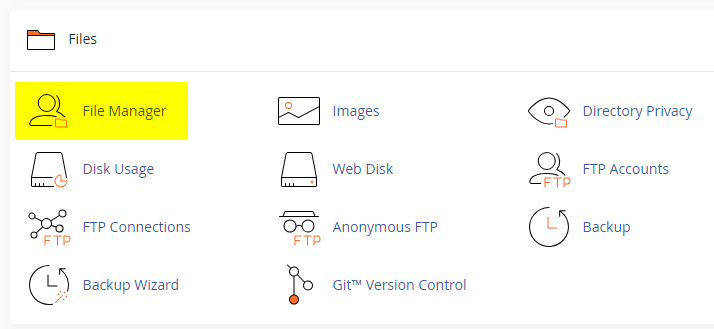
  2. Click on the "File Manager" icon. It's usually under the "Files" section.
  3. You are now in the "File Manager". Open the public_html folder, which is your website's root directory.
  4. Locate the wp-content folder inside "public_html," then open the themes folder inside of it.
  5. In the File Manager interface, click the "Upload" button and choose the theme's .zip file from your local drive.
  6. After it has been uploaded, right-click the .zip file and choose "Extract" or "Unzip".
  7. You can now delete the uploaded .zip file, but it's optional.
  8. Log in to your WordPress dashboard through your web browser.
  9. Go to Appearance → Themes. Now you will see the newly extracted theme.
  10. Make it your active theme by clicking the "Activate" button next to it.

Note: If your hosting provider doesn't offer cPanel, look for a File Manager option in your hosting dashboard (like DirectAdmin, Plesk, or CyberPanel). The process is usually very similar—just find the wp-content/themes folder and upload/extract the theme ZIP file there.

Method 3: Install using FTP

Installing a WordPress theme via FTP is straightforward, though it involves a few more steps compared to using the built-in theme uploader. Here's how to install a WordPress theme using FTP:

  1. Unzip the theme's .zip file you have downloaded.
  2. Connect to your hosting account using an FTP client such as "FileZilla" or "Core FTP".
  3. Navigate to the /wp-content/themes folder in the "Remote site" section.
  4. In the "Local site" section, locate the unzipped theme folder.
  5. Drag and drop the unzipped theme folder from the "Local site" section to the "Remote site" section.
  6. Be patient and let the transfer finish.
  7. Once the transfer is complete, log in to your WordPress dashboard and navigate to Appearance > Themes.
  8. Find the theme you just uploaded and click Activate.

Troubleshooting Tips

  • Didn't receive the download email? Wait 5–10 minutes or check your spam/junk folder. But if you still can not find this email or download link is broken, please inform us. we will send it ASAP.
  • "The uploaded file exceeds the upload_max_filesize directive in php.ini." - If you get this error when following the "Method 1", follow this tutorial: https://themesdna.com/blog/increase-maximum-file-upload-size-wordpress/
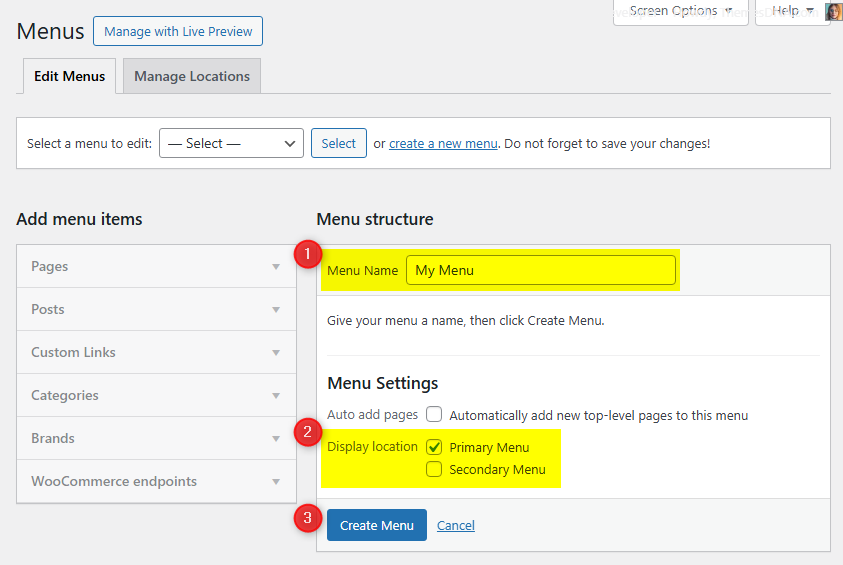
  • My menus disappeared or look different. Go to Appearance → Menus → Manage Locations and reassign your menus to the correct locations.
  • My header text or background color looks different after activating PRO. Reapply your colors in Appearance → Customize → Theme Options → Colors for Header Text Color and Background Color. Then publish.
  • Still can't install the theme? Contact us for help.

Import Demo Content

You can import the demo content, widgets, and Customizer settings shown in the GridMini PRO theme demo.

Manual Demo Import

Step 1: Import Main Site Content

This includes: Posts, pages, menus, media, categories, tags, comments, and custom fields.

  1. Download: XML File
  2. Go to Tools → Import.
  3. Under "WordPress", click Install Now if not installed.
  4. Click Run Importer.
  5. Select the XML file and click Upload file and import.
  6. Check "Download and import file attachments", click Submit.

Step 2: Import Widgets

  1. Install the Widget Importer & Exporter plugin.
  2. Go to Tools → Widget Importer & Exporter.
  3. Copy content from: Widgets .wie File and paste into the box.
  4. Click Import Widgets.

Step 3: Import Customizer Settings

  1. Download: Customizer File
  2. Install the Customizer Export/Import plugin.
  3. Go to Appearance → Customize → Export/Import.
  4. Select the .dat file, check "Download and import image files?", click Import.

Regenerate Thumbnails

If your website already has existing posts with featured images, it's highly recommended to regenerate thumbnails after activating the GridMini PRO theme. This ensures that all images match the new theme's layout and display sizes.

Regenerating thumbnails is optional if your site is completely new and doesn't have any uploaded images yet.

However, if you imported the demo content, regenerating thumbnails is essential to display images correctly across the site.

  1. Install and activate the Regenerate Thumbnails plugin.
  2. Go to Tools → Regenerate Thumbnails.
  3. Click the "Regenerate Thumbnails for All x Attachments" button to start the process.
  4. Wait until all images are regenerated. This may take a few minutes depending on your media library size.
  5. If you want, you can deactivate and delete the plugin once the process is complete.

This step ensures clean image alignment and sharp visuals throughout your website using the GridMini PRO theme.

Header Image

Quick Start Guide

GridMini PRO allows users to upload a site-wide custom header image with custom title and description. You can also upload a unique header image for each post/page replacing the site-wide header image.

There are header image options in: Theme Customizer, Post edit screen, and Page edit screen.

How to Add a Header Image?

There are 3 types of header images:

  1. Site-wide Header Image: Appearance → Customize → Theme Options → Header Image
  2. Header Images of Posts: Post Edit Screen → "Post Settings – GridMini PRO" Meta Box → Site Header Image
  3. Header Images of Pages: Page Edit Screen → "Page Settings – GridMini PRO" Meta Box → Site Header Image

How to Add a Site-wide Header Image?

  1. Go to Appearance → Customize → Theme Options → Header Image
  2. Upload your header image using Add new image button.

How to Add a Header Image to a Post?

  1. Go to edit screen of that post.
  2. Find the Post Settings - GridMini PRO meta box.
  3. Add your image URL using Site Header Image option.

How to Add a Header Image to a Page?

  1. Go to edit screen of that page.
  2. Find the Page Settings - GridMini PRO meta box.
  3. Add your image URL using Site Header Image option.

How to Add a Custom Title/Description to Header Image?

By default, the theme displays your website's title as the header image title and the tagline as the header image description. You can replace both with custom text.

First, enable the display of custom header image title and description: go to Appearance → Customize → Theme Options → Header Image and check Add Custom Title/Custom Description to Header Image.

Add Custom Title/Description to Site-wide Header Image:

  1. Go to Appearance → Customize → Theme Options → Header Image
  2. Add your custom title to Header Image Custom Title.
  3. Add your custom description to Header Image Custom Description.
  4. Save settings.

Add Custom Title/Description to Post Header Image:

  1. Go to the edit screen of that post.
  2. Find the Post Settings - GridMini PRO meta box.
  3. Use Site Header Image Title and Site Header Image Description options.
  4. Update the post.

Add Custom Title/Description to Page Header Image:

  1. Go to the edit screen of that page.
  2. Find the Page Settings - GridMini PRO meta box.
  3. Use Site Header Image Title and Site Header Image Description options.
  4. Update the page.

How to Hide Title/Description from Header Image?

  1. Go to Appearance → Customize → Theme Options → Header Image.
  2. Check Hide both Title and Description from Header Image.
  3. Save settings.

News Ticker

The News Ticker in GridMini PRO displays your posts in a smooth, horizontal scrolling format at the top of your site. It's perfect for highlighting breaking news, trending updates, or featured content. Fully customizable via the WordPress Theme Customizer, you can enable or disable the ticker, set a custom label, define the number of posts, and filter content by recent posts, a specific category, tag, or manually entered post IDs.

How to Configure the News Ticker

  1. Go to WordPress Dashboard → Appearance → Customize.
  2. Click on Theme Options → News Ticker Options.
  3. Enable Enable News Ticker to activate it.
  4. Configure ticker options (heading text, post source, number of posts, ordering, date format, layout style).
  5. Click Publish to save changes.

See the complete list of News Ticker Options

Tips

  • Use Posts by IDs to curate exactly which headlines appear.
  • Use Tag Posts or Category Posts for automated updates.
  • Adjust duration and width values for readability.

Custom Widgets

Quick Start Guide

To see available widgets and widget areas navigate to WordPress Dashboard → Appearance → Widgets. Drag and drop widgets into widget areas.

There are 6 custom widgets bundled with GridMini PRO:

  1. GridMini Grid Posts Widget
  2. GridMini List Posts Widget
  3. GridMini Tabbed Widget
  4. GridMini About and Social Widget
  5. GridMini Grid Ads Widget
  6. GridMini Banner Widget

GridMini Grid Posts Widget

Displays a grid of posts based on recent posts, a selected category, a selected tag, or specific post IDs. Posts can be sorted by likes, views, comments, published date, modified date, or randomly.

Key Features

  • 1-10 column grid layout options
  • Multiple post sources: Recent, Category, Tag, or specific Post IDs
  • Advanced sorting including post likes and views
  • Multiple thumbnail aspect ratios and custom sizes
  • Comprehensive display controls for all post elements
  • Customizable typography with responsive font sizes
  • Social sharing buttons with multiple styles
  • Masonry grid layout support

Usage Notes

  • Custom Thumbnail Size: Configure dimensions in "Appearance → Customize → Theme Options → Posts Summaries Options", then regenerate thumbnails.
  • Post IDs: Enter as comma-separated values without spaces (e.g., 225,346,410).
  • Equal Height Items: Use "Minimum Height for Post Titles" for uniform grid items.

Below is the complete list of options available in the "GridMini Grid Posts Widget":

Option IDOption NameDescriptionControl TypeAccepted ValueDefault
titleTitleWidget title displayed above the post grid.TextPlain textGridMini Grid Posts Widget
numberNumber of posts to showTotal posts displayed in the grid.TextPositive integer4
post_columnPosts Columns StyleNumber of columns in the grid layout.Select1 to 10 columns4 Columns
thumb_styleFeatured Images SizeThumbnail size and aspect ratio.Select

Multiple aspect ratios:

  • Square (100:100, 360:360)
  • Landscape (360:180, 360:216, 360:270, 360:300, 360:480, 360:540, 685:360, 872:475, 1200:660)
  • Auto height variants (360w, 685w, 872w, 1200w)
360:360 (gridmini-360w-360h-image)
post_typePost Type to displaySource of posts.SelectRecent Posts / Category Posts / Tag Posts / Posts by IDsRecent Posts
include_postsDisplay these postsSpecific post IDs (used when Post Type is Posts by IDs).TextComma-separated post IDs (no spaces)(empty)
featured_catSelect a CategoryCategory for category-based posts.SelectAny category(empty)
featured_tagSelect a TagTag for tag-based posts.SelectAny tag(empty)
orderbyOrderbySorting criteria.SelectPublished Date / Modified Date / Number of Comments / Random / Post Likes / Post ViewsPublished Date
orderOrderSort direction.SelectAscending / DescendingDescending
exclude_postsExclude these postsPost IDs to exclude.TextComma-separated post IDs (no spaces)(empty)
show_thumbnailDisplay Post Thumbnails?Show or hide featured images.Checkboxtrue / falsetrue
thumbnail_linkLink Post Thumbnails?Make thumbnails clickable.Checkboxtrue / falsetrue
show_titleDisplay Post Headers?Show post titles and author images.Checkboxtrue / falsetrue
title_linkLink Post Titles?Make titles clickable.Checkboxtrue / falsetrue
show_authorDisplay Post Authors?Show author names.Checkboxtrue / falsetrue
show_dateDisplay Post Dates?Show publication date.Checkboxtrue / falsetrue
dateformatPost Date FormatPHP date format string.TextAny valid PHP date formatF j, Y
show_commentsDisplay Number of Comments?Show comment count.Checkboxtrue / falsetrue
show_catsDisplay Post Categories?Show categories under posts.Checkboxtrue / falsetrue
show_likesDisplay Post Likes?Show like count.Checkboxtrue / falsetrue
show_viewsDisplay Post Views?Show view count.Checkboxtrue / falsetrue
show_shareDisplay Share Buttons?Show social sharing buttons.Checkboxtrue / falsefalse
post_title_font_sizePost Titles Font-SizeFont size for titles.Select8px to 72px13px
post_meta_font_sizePost Meta Font-SizeFont size for metadata.Select8px to 72px10px
post_cats_font_sizePost Categories Font-SizeFont size for categories.Select8px to 72px10px

GridMini List Posts Widget

Displays a list of posts based on recent posts, a selected category, a selected tag, or specific post IDs. Posts can be sorted by likes, views, comments, published date, modified date, or randomly.

Key Features

  • Multiple post sources: Recent, Category, Tag, or Post IDs
  • Flexible sorting by likes, views, comments, dates, or random
  • Customizable display of thumbnails, titles, metadata, snippets, and share buttons
  • Typography control for titles, metadata, and snippets
Option ID Option Name Description Control Type Accepted Value Default
titleTitleWidget title displayed above the list.TextPlain textGridMini List Posts Widget
numberNumber of posts to showTotal posts displayed.TextPositive integer5
post_typePost Type to displaySource of posts.SelectRecent Posts / Category Posts / Tag Posts / Posts by IDsRecent Posts
include_postsDisplay these postsSpecific post IDs (when using Posts by IDs).TextComma-separated post IDs (no spaces)(empty)
featured_catSelect a CategoryCategory for category-based posts.SelectAny category(empty)
featured_tagSelect a TagTag for tag-based posts.SelectAny tag(empty)
orderbyOrderbySorting criteria.SelectPublished Date / Modified Date / Number of Comments / Random / Post Likes / Post ViewsPublished Date
orderOrderSort direction.SelectAscending / DescendingDescending
dateformatPost Date FormatPHP date format string.TextAny valid PHP date formatY-m-d
exclude_postsExclude these postsPost IDs to exclude.TextComma-separated post IDs (no spaces)(empty)
title_linkLink Post Titles?Make titles clickable.Checkboxtrue / falsetrue
show_thumbnailDisplay Post Thumbnail?Show or hide featured images.Checkboxtrue / falsetrue
thumbnail_linkLink Post Thumbnails?Make thumbnails clickable.Checkboxtrue / falsetrue
show_authorDisplay Post Author?Show author names.Checkboxtrue / falsefalse
show_dateDisplay Post Date?Show publication date.Checkboxtrue / falsetrue
show_commentsDisplay Number of Comments?Show comment count.Checkboxtrue / falsetrue
show_likesDisplay Post Likes?Show like count.Checkboxtrue / falsetrue
show_viewsDisplay Post Views?Show view count.Checkboxtrue / falsetrue
show_snippetDisplay Post Snippet?Show excerpt or trimmed content.Checkboxtrue / falsetrue
snippet_typePost Snippet TypeChoose snippet source.SelectPost Content / Post ExcerptPost Content
snippet_lengthPost snippet lengthNumber of words in snippet.TextPositive integer20
show_sharebtnsDisplay Share Buttons?Show social sharing buttons.Checkboxtrue / falsetrue
post_title_font_sizePost Titles Font-SizeFont size for titles.Select8px to 72px15px
post_meta_font_sizePost Meta Font-SizeFont size for metadata.Select8px to 72px12px
post_snippet_font_sizePost Snippets Font-SizeFont size for snippets.Select8px to 72px13px

GridMini Tabbed Widget

Displays three separate tabs of posts in a tabbed interface. Each tab can be configured independently with different content sources and sorting criteria.

Key Features

  • Three independently configurable tabs
  • Multiple sorting options including likes, views, and comments
  • Customizable display elements (thumbnails, titles, metadata, snippets)
  • Font size controls for different text elements
  • Share buttons integration
Option ID Option Name Description Control Type Accepted Value Default
titleTitleWidget title displayed above the tabs.TextPlain textTabbed Widget
show_taboneDisplay Tab 1Enable the first tab.Checkboxtrue / falsetrue
show_tabtwoDisplay Tab 2Enable the second tab.Checkboxtrue / falsetrue
show_tabthreeDisplay Tab 3Enable the third tab.Checkboxtrue / falsetrue
tabone_nameTab 1 NameLabel for the first tab.TextPlain textPopular
tabtwo_nameTab 2 NameLabel for the second tab.TextPlain textRecent
tabthree_nameTab 3 NameLabel for the third tab.TextPlain textRandom
tabone_post_typeTab 1 Post TypeSource of posts for Tab 1.SelectRecent Posts / Category Posts / Tag Posts / Posts by IDsRecent Posts
tabone_include_postsTab 1 Include PostsSpecific IDs when Tab 1 uses Posts by IDs.TextComma-separated post IDs (no spaces)(empty)
tabone_featured_catTab 1 CategoryCategory for Tab 1 when using Category Posts.SelectAny category(empty)
tabone_featured_tagTab 1 TagTag for Tab 1 when using Tag Posts.SelectAny tag(empty)
tabone_orderbyTab 1 OrderbySorting for Tab 1.SelectPublished Date / Modified Date / Number of Comments / Random / Post Likes / Post ViewsNumber of Comments
tabone_orderTab 1 OrderSort direction for Tab 1.SelectAscending / DescendingDescending
tabone_exclude_postsTab 1 Exclude PostsIDs to skip in Tab 1.TextComma-separated post IDs (no spaces)(empty)
tabone_numberTab 1 Number of postsItems shown in Tab 1.TextPositive integer3
tabtwo_post_typeTab 2 Post TypeSource of posts for Tab 2.SelectRecent Posts / Category Posts / Tag Posts / Posts by IDsRecent Posts
tabtwo_include_postsTab 2 Include PostsSpecific IDs when Tab 2 uses Posts by IDs.TextComma-separated post IDs (no spaces)(empty)
tabtwo_featured_catTab 2 CategoryCategory for Tab 2 when using Category Posts.SelectAny category(empty)
tabtwo_featured_tagTab 2 TagTag for Tab 2 when using Tag Posts.SelectAny tag(empty)
tabtwo_orderbyTab 2 OrderbySorting for Tab 2.SelectPublished Date / Modified Date / Number of Comments / Random / Post Likes / Post ViewsPublished Date
tabtwo_orderTab 2 OrderSort direction for Tab 2.SelectAscending / DescendingDescending
tabtwo_exclude_postsTab 2 Exclude PostsIDs to skip in Tab 2.TextComma-separated post IDs (no spaces)(empty)
tabtwo_numberTab 2 Number of postsItems shown in Tab 2.TextPositive integer3
tabthree_post_typeTab 3 Post TypeSource of posts for Tab 3.SelectRecent Posts / Category Posts / Tag Posts / Posts by IDsRecent Posts
tabthree_include_postsTab 3 Include PostsSpecific IDs when Tab 3 uses Posts by IDs.TextComma-separated post IDs (no spaces)(empty)
tabthree_featured_catTab 3 CategoryCategory for Tab 3 when using Category Posts.SelectAny category(empty)
tabthree_featured_tagTab 3 TagTag for Tab 3 when using Tag Posts.SelectAny tag(empty)
tabthree_orderbyTab 3 OrderbySorting for Tab 3.SelectPublished Date / Modified Date / Number of Comments / Random / Post Likes / Post ViewsRandom
tabthree_orderTab 3 OrderSort direction for Tab 3.SelectAscending / DescendingDescending
tabthree_exclude_postsTab 3 Exclude PostsIDs to skip in Tab 3.TextComma-separated post IDs (no spaces)(empty)
tabthree_numberTab 3 Number of postsItems shown in Tab 3.TextPositive integer3
dateformatPost Date FormatPHP date format string.TextAny valid PHP date formatY-m-d
post_title_font_sizePost Titles Font-SizeFont size for titles.Select8px to 72px15px
post_meta_font_sizePost Meta Font-SizeFont size for metadata.Select8px to 72px12px
post_snippet_font_sizePost Snippets Font-SizeFont size for snippets.Select8px to 72px13px
title_linkLink Post Titles?Make post titles clickable.Checkboxtrue / falsetrue
show_thumbnailDisplay Post Thumbnail?Show featured images.Checkboxtrue / falsetrue
thumbnail_linkLink Post Thumbnails?Make thumbnails clickable.Checkboxtrue / falsetrue
show_authorDisplay Post Author?Show author names.Checkboxtrue / falsefalse
show_dateDisplay Post Date?Show publication date.Checkboxtrue / falsetrue
show_commentsDisplay Number of Comments?Show comment count.Checkboxtrue / falsetrue
show_likesDisplay Post Likes?Show like count.Checkboxtrue / falsetrue
show_viewsDisplay Post Views?Show view count.Checkboxtrue / falsetrue
show_snippetDisplay Post Snippet?Show excerpt or trimmed content.Checkboxtrue / falsetrue
snippet_typePost Snippet TypeChoose snippet source.SelectPost Content / Post ExcerptPost Content
snippet_lengthPost snippet lengthNumber of words in snippet.TextPositive integer20
show_sharebtnsDisplay Share Buttons?Show social sharing buttons.Checkboxtrue / falsetrue

GridMini About and Social Widget

Displays a profile section with an image, description, and extensive social media links. Supports over 70 different social platforms with customizable button styles (round or normal).

Key Features

  • Profile image and customizable description
  • Over 70 social media platforms supported
  • Round or normal social button styles
  • All links open in new tabs with nofollow
  • Font Awesome icons for social buttons

Usage Notes

  • Provide a direct URL for the profile image
  • Description field supports HTML formatting
  • Leave any social field empty to hide that button
  • Skype field requires just the username, not a URL
  • Email field requires a valid email address
Option ID Option Name Description Control Type Accepted Value Default
titleTitleWidget title displayed above the profile.TextPlain textAbout and Social Widget
imageProfile Image URLURL to profile image.TextImage URL(empty)
descriptionDescriptionBio/description text.TextareaPlain text/HTML(empty)
round_buttonsDisplay round social buttonsUse circular button style.Checkboxtrue / falsefalse
facebookFacebook URLLink to Facebook profile/page.TextURL(empty)
twitterX URLLink to X (Twitter) profile.TextURL(empty)
threadsThreads URLLink to Threads profile.TextURL(empty)
pinterestPinterest URLLink to Pinterest profile.TextURL(empty)
linkedinLinkedIn URLLink to LinkedIn profile.TextURL(empty)
instagramInstagram URLLink to Instagram profile.TextURL(empty)
flickrFlickr URLLink to Flickr profile.TextURL(empty)
youtubeYouTube URLLink to YouTube channel.TextURL(empty)
vimeoVimeo URLLink to Vimeo profile.TextURL(empty)
soundcloudSoundCloud URLLink to SoundCloud profile.TextURL(empty)
messengerMessenger URLLink to Messenger chat.TextURL(empty)
whatsappWhatsApp URLLink to WhatsApp chat.TextURL(empty)
tiktokTikTok URLLink to TikTok profile.TextURL(empty)
lastfmLast.fm URLLink to Last.fm profile.TextURL(empty)
mediumMedium URLLink to Medium profile.TextURL(empty)
githubGitHub URLLink to GitHub profile.TextURL(empty)
bitbucketBitbucket URLLink to Bitbucket profile.TextURL(empty)
tumblrTumblr URLLink to Tumblr blog.TextURL(empty)
diggDigg URLLink to Digg profile.TextURL(empty)
deliciousDelicious URLLink to Delicious profile.TextURL(empty)
stumbleuponStumbleUpon URLLink to StumbleUpon profile.TextURL(empty)
mixMix URLLink to Mix profile.TextURL(empty)
redditReddit URLLink to Reddit profile.TextURL(empty)
dribbbleDribbble URLLink to Dribbble profile.TextURL(empty)
flipboardFlipboard URLLink to Flipboard profile.TextURL(empty)
bloggerBlogger URLLink to Blogger site.TextURL(empty)
etsyEtsy URLLink to Etsy shop/profile.TextURL(empty)
behanceBehance URLLink to Behance profile.TextURL(empty)
amazonAmazon URLLink to Amazon profile/storefront.TextURL(empty)
meetupMeetup URLLink to Meetup profile/group.TextURL(empty)
mixcloudMixcloud URLLink to Mixcloud profile.TextURL(empty)
slackSlack URLLink to Slack workspace invite.TextURL(empty)
snapchatSnapchat URLLink to Snapchat profile.TextURL(empty)
spotifySpotify URLLink to Spotify profile.TextURL(empty)
vkVK URLLink to VK profile.TextURL(empty)
yelpYelp URLLink to Yelp profile/page.TextURL(empty)
wpWordPress URLLink to WordPress.org/WordPress.com profile.TextURL(empty)
twitchTwitch URLLink to Twitch channel.TextURL(empty)
telegramTelegram URLLink to Telegram channel/profile.TextURL(empty)
bandcampBandcamp URLLink to Bandcamp page.TextURL(empty)
quoraQuora URLLink to Quora profile.TextURL(empty)
foursquareFoursquare URLLink to Foursquare profile.TextURL(empty)
deviantartDeviantArt URLLink to DeviantArt profile.TextURL(empty)
imdbIMDB URLLink to IMDB profile.TextURL(empty)
codepenCodePen URLLink to CodePen profile.TextURL(empty)
jsfiddleJSFiddle URLLink to JSFiddle profile.TextURL(empty)
stackoverflowStack Overflow URLLink to Stack Overflow profile.TextURL(empty)
stackexchangeStack Exchange URLLink to Stack Exchange network profile.TextURL(empty)
buyselladsBuySellAds URLLink to BuySellAds profile.TextURL(empty)
web500px500px URLLink to 500px profile.TextURL(empty)
elloEllo URLLink to Ello profile.TextURL(empty)
discordDiscord URLLink to Discord invite/profile.TextURL(empty)
goodreadsGoodreads URLLink to Goodreads profile.TextURL(empty)
odnoklassnikiOdnoklassniki URLLink to Odnoklassniki profile.TextURL(empty)
houzzHouzz URLLink to Houzz profile.TextURL(empty)
pocketPocket URLLink to Pocket profile.TextURL(empty)
xingXING URLLink to XING profile.TextURL(empty)
mastodonMastodon URLLink to Mastodon profile.TextURL(empty)
googleplayGoogle Play URLLink to Google Play listing.TextURL(empty)
slideshareSlideShare URLLink to SlideShare profile.TextURL(empty)
dropboxDropbox URLLink to Dropbox profile/folder.TextURL(empty)
paypalPayPal URLLink to PayPal.me or donation page.TextURL(empty)
viadeoViadeo URLLink to Viadeo profile.TextURL(empty)
wikipediaWikipedia URLLink to Wikipedia page.TextURL(empty)
skypeSkype UsernameSkype username (not a URL).TextUsername(empty)
envelopeEmail AddressEmail for contact.TextValid email(empty)
rssRSS Feed URLLink to RSS feed.TextURL(empty)

GridMini Grid Ads Widget

Designed to display advertisements or custom content between posts in the posts grid layout. Allows precise control over where and when the ad appears.

Usage Notes

  • Important: Only add this widget to the "Grid Ads Widgets" widget area.
  • The widget displays when the current post position matches your specified ad location.
  • Use responsive ad codes for proper display across screen sizes.
Option IDOption NameDescriptionControl TypeAccepted ValueDefault
hideadHide AdToggle to hide the ad without removing the widget.Checkboxtrue / falsefalse
adcodeResponsive Ad codeHTML/JavaScript code for your advertisement.TextareaHTML/JavaScript code(empty)
adlocationAd locationPosition in the post sequence.TextA positive whole number3
displayDisplay ads onWhich page types display this ad.Select

One of:

  • Home Page Only
  • Home Page and Next Pages
  • Category Pages
  • Tag Pages
  • Author Pages
  • All Archive Pages
  • Search Pages
  • Every Posts Page
Every Posts Page

Widget Areas

There are 50 widget areas in the GridMini PRO theme.


  1. Header Right Widgets

    This widget area is located on the right side of the header. You can add a "Custom HTML" widget with your 728×90 banner ad code. Select "Header Layout" as "Logo + Header Banner" from theme options to display this widget area.

  2. Sidebar 1 Widgets

    This widget area is located on the left-hand side of your web page.

  3. Sidebar 2 Widgets

    This widget area is located on the right-hand side of your web page.

  4. Top Full Width Widgets (Default HomePage)

    This full-width widget area is located after the header. Displayed on the default homepage (latest posts).

  5. Top Full Width Widgets (Static HomePage)

    This full-width widget area is located after the header. Displayed on the static homepage.

  6. Top Full Width Widgets (not Static HomePage)

    This full-width widget area is located after the header. Displayed on every page except static homepage.

  7. Top Full Width Widgets (Single Pages)

    This full-width widget area is located after the header. Displayed on single posts (except attachments and pages).

  8. Top Full Width Widgets (Singular Pages)

    This full-width widget area is located after the header. Displayed on single posts (including attachments and pages).

  9. Top Full Width Widgets (Everywhere)

    This full-width widget area is located after the header. Displayed on every page.

  10. Above Content Widgets (Default HomePage)

    Located at the top of the main content (above posts). Displayed on the default homepage.

  11. Above Content Widgets (Static HomePage)

    Located at the top of the main content. Displayed on the static homepage.

  12. Above Content Widgets (not Static HomePage)

    Located at the top of the main content. Displayed on every page except static homepage.

  13. Above Content Widgets (Single Pages)

    Located at the top of the main content. Displayed on single posts (except attachments and pages).

  14. Above Content Widgets (Singular Pages)

    Located at the top of the main content. Displayed on single posts (including attachments and pages).

  15. Above Content Widgets (Everywhere)

    Located at the top of the main content. Displayed on every page.

  16. Top Left Widgets (Default HomePage)

    Located at the left top of your website. Displayed on the default homepage.

  17. Top Left Widgets (Static HomePage)

    Located at the left top. Displayed on the static homepage.

  18. Top Left Widgets (not Static HomePage)

    Located at the left top. Displayed on every page except static homepage.

  19. Top Left Widgets (Single Pages)

    Located at the left top. Displayed on single posts (except attachments and pages).

  20. Top Left Widgets (Singular Pages)

    Located at the left top. Displayed on single posts (including attachments and pages).

  21. Top Left Widgets (Everywhere)

    Located at the left top. Displayed on every page.

  22. Top Right Widgets (Default HomePage)

    Located at the right top. Displayed on the default homepage.

  23. Top Right Widgets (Static HomePage)

    Located at the right top. Displayed on the static homepage.

  24. Top Right Widgets (not Static HomePage)

    Located at the right top. Displayed on every page except static homepage.

  25. Top Right Widgets (Single Pages)

    Located at the right top. Displayed on single posts (except attachments and pages).

  26. Top Right Widgets (Singular Pages)

    Located at the right top. Displayed on single posts (including attachments and pages).

  27. Top Right Widgets (Everywhere)

    Located at the right top. Displayed on every page.

  28. Below Content Widgets (Default HomePage)

    Located at the bottom of the main content (below posts). Displayed on the default homepage.

  29. Below Content Widgets (Static HomePage)

    Located at the bottom of the main content. Displayed on the static homepage.

  30. Below Content Widgets (not Static HomePage)

    Located at the bottom of the main content. Displayed on every page except static homepage.

  31. Below Content Widgets (Single Pages)

    Located at the bottom of the main content. Displayed on single posts (except attachments and pages).

  32. Below Content Widgets (Singular Pages)

    Located at the bottom of the main content. Displayed on single posts (including attachments and pages).

  33. Below Content Widgets (Everywhere)

    Located at the bottom of the main content. Displayed on every page.

  34. Bottom Full Width Widgets (Default HomePage)

    This full-width widget area is located before the footer. Displayed on the default homepage.

  35. Bottom Full Width Widgets (Static HomePage)

    Located before the footer. Displayed on the static homepage.

  36. Bottom Full Width Widgets (not Static HomePage)

    Located before the footer. Displayed on every page except static homepage.

  37. Bottom Full Width Widgets (Single Pages)

    Located before the footer. Displayed on single posts (except attachments and pages).

  38. Bottom Full Width Widgets (Singular Pages)

    Located before the footer. Displayed on single posts (including attachments and pages).

  39. Bottom Full Width Widgets (Everywhere)

    Located before the footer. Displayed on every page.

  40. Single Post Bottom Widgets

    Located at the bottom of single posts (except attachments and pages).

  41. Footer Top Widgets

    Located on the top of the footer.

  42. Footer 1 Widgets

    Column 1 of the footer.

  43. Footer 2 Widgets

    Column 2 of the footer.

  44. Footer 3 Widgets

    Column 3 of the footer.

  45. Footer 4 Widgets

    Column 4 of the footer.

  46. Footer 5 Widgets

    Column 5 of the footer.

  47. Footer 6 Widgets

    Column 6 of the footer.

  48. Footer Bottom Widgets

    Located on the bottom of the footer.

  49. 404 Page Widgets

    Located on the 404 (not found) page.

  50. Grid Ads Widgets

    Used to display content/ads between posts in the grid. Important: Only add "GridMini Grid Ads Widget" into this widget area.

How to Control Widget Visibility by Location

1. Install and activate the Widget Display Conditions or Widget Context plugin.

2. Drag and drop your widget into any of the "Everywhere" widget areas or footer widget areas.

3. Click the Display conditions button at the bottom of your widget settings.

4. Click the Add group button.

5. Set your widget display conditions and click Save.

Custom Page Templates

GridMini PRO includes 28 custom page and post templates that let you create pages and posts with unique layouts beyond the default design.

Special Function Templates

  • Featured Content: Displays featured post widgets instead of regular content.
  • Contact Form: Creates a contact page with a built-in contact form.
  • Sitemap: Displays a structured list of your site's pages, categories, and archives.
  • Authors: Shows a list of all authors with profiles and post counts.

Layout Templates

These templates control how content and sidebars are arranged:

  • "Full Width, no sidebar" (Page/Post): Full width without any sidebars.
  • "Full Width, bottom sidebar" (Page/Post): Full width with a sidebar below.
  • "Content + Sidebar 1" (Page/Post): Content on the left, sidebar on the right.
  • "Sidebar 1 + Content" (Page/Post): Sidebar on the left, content on the right.
  • "Content + Sidebar 2" (Page/Post): Content with different sidebar on the right.
  • "Sidebar 2 + Content" (Page/Post): Different sidebar on the left, content on the right.
  • "Content + Sidebar 1 + Sidebar 2" (Page/Post): Content, then two sidebars.
  • "Sidebar 1 + Content + Sidebar 2" (Page/Post): Sidebar, content, sidebar.
  • "Sidebar 1 + Sidebar 2 + Content" (Page/Post): Two sidebars, then content.
  • "Content + Sidebar 2 + Sidebar 1" (Page/Post): Content, sidebar2, sidebar1.
  • "Sidebar 2 + Content + Sidebar 1" (Page/Post): Sidebar2, content, sidebar1.
  • "Sidebar 2 + Sidebar 1 + Content" (Page/Post): Two sidebars, then content.

How to Assign a Custom Template:

  1. Go to Pages or Posts → Add New or edit an existing page/post.
  2. Look for the Template option:
    • In Gutenberg: Click the Page/Post tab in the right sidebar and find the Template dropdown.
    • In Classic Editor: Enable Page/Post Attributes via Screen Options, then use the Template dropdown.
  3. Select the desired template.
  4. Click Publish or Update.

How to Create a Contact Page

GridMini PRO includes a built-in Contact Form template.

Step 1: Create the Page

  1. Go to Pages → Add New.
  2. Give it a title like Contact Us.
  3. Select the Contact Form template.
  4. Click Publish.

Step 2: Configure Email Address

  1. Go to Appearance → Customize.
  2. Open Theme Options → Page Templates Options.
  3. Enter your email in Contact Form Email Address.
  4. Click Publish.

Note: If you do not set the Contact Form Email Address, the form will not send emails.

How the Form Works

  • Fields include Name, Email, Subject, and Message.
  • Messages are sent to the email set in Page Templates Options.

How to Create a Sitemap Page

GridMini PRO includes a built-in Sitemap template that displays pages, posts, categories, tags, archives, and authors.

  1. Go to Pages → Add New.
  2. Enter a title like Sitemap.
  3. Select the Sitemap template.
  4. Click Publish.

The sitemap updates automatically as new content is added.

How to Create a Site Authors Page

GridMini PRO includes an Authors template that displays all users with Author role or higher.

Step 1: Create the Page

  1. Go to Pages → Add New.
  2. Enter a title like Our Authors.
  3. Select the Authors template.
  4. Click Publish.

Step 2: Customize Display (Optional)

  1. Go to Appearance → Customize → Theme Options → Page Templates Options.
  2. Toggle: Hide site administrators or Hide authors with zero posts.
  3. Click Publish.

The template shows each author's display name, avatar, bio, and social profiles.

Customizer Theme Options

To see available WordPress Customizer theme options:

  1. Go to your WordPress Dashboard.
  2. Navigate to Appearance → Customize.
  3. Click on Theme Options.

GridMini PRO provides extensive customizer options organized into the following sections:

Site Identity Options

Below is the complete list of Site Identity Options available:

Option ID Option Name Description Control Type Accepted Value Default
custom_logoLogoImage ID of the custom logo uploaded through the Customizer.Media UploaderInteger (attachment ID)0 (none)
gridmini_options[logo_location]Logo LocationPosition logo relative to title/tagline.SelectBefore Site Title and Tagline / Above Site Title and TaglineAbove Site Title and Tagline
blognameSite TitleMain site title text.TextPlain textWordPress default
blogdescriptionTaglineSite tagline/description.TextPlain textWordPress default
display_header_textDisplay Site Title & TaglineShow or hide title and tagline.Checkboxtrue / falsetrue
site_iconSite Icon (Favicon)Upload site icon for browsers and apps.ImageSquare image ≥512px(empty)

Colors Options

Below is the complete list of Colors Options available:

Option ID Option Name Description Control Type Accepted Value Default
gridmini_options[header_text_hover_color]Header Hover Text ColorHover color for site title/tagline.ColorHex color#ffd24b
gridmini_options[body_text_color]Main Text ColorBody text color.ColorHex color#dddddd
gridmini_options[link_color]Main Link ColorDefault link color.ColorHex color#dddddd
gridmini_options[link_hover_color]Main Link Hover ColorLink hover color.ColorHex color#ffffff
gridmini_options[headings_color]General Headings ColorHeadings color (h1-h6).ColorHex color#ffffff
gridmini_options[header_bg_color]Header Background ColorHeader background.ColorHex color#2f3031
gridmini_options[header_bd_color]Header Border ColorHeader border.ColorHex color#4a4e53
gridmini_options[header_image_title_color]Header Image Title ColorTitle color on header image area.ColorHex color#ffffff
gridmini_options[header_image_title_hover_color]Header Image Title Hover ColorTitle hover color on header image.ColorHex color#ffffff
gridmini_options[header_image_desc_color]Header Image Description ColorDescription color on header image.ColorHex color#ffffff
gridmini_options[primary_menu_color]Primary Menu Link ColorText color for primary menu links.ColorHex color#ffffff
gridmini_options[disable_primary_menu_shadow]Disable Primary Menu Link Text-ShadowDisable text-shadow on primary menu links.Checkboxtrue / falsefalse
gridmini_options[primary_menu_shadow_color]Primary Menu Link Text-Shadow ColorShadow color for primary menu links.ColorHex color#000000
gridmini_options[primary_menu_hover_color]Primary Menu Link Hover ColorHover text color for primary menu.ColorHex color#ffd24b
gridmini_options[primary_menu_hover_bg_color]Primary Menu Link Hover Background ColorHover background for primary menu links.ColorHex color#000000
gridmini_options[primary_submenu_one_bg_color]Primary Sub Menu Background ColorBackground of primary submenu.ColorHex color#333333
gridmini_options[primary_submenu_bd_color]Primary Sub Menu Border ColorBorder color of primary submenu.ColorHex color#555555
gridmini_options[primary_menu_icon_color]Primary Responsive Menu Icon ColorColor for mobile primary menu icon.ColorHex color#ffffff
gridmini_options[secondary_menu_bg_color]Secondary Menu Background ColorBackground of secondary menu.ColorHex color#000000
gridmini_options[secondary_menu_bd_color]Secondary Menu Border ColorBorder color of secondary menu.ColorHex color#444444
gridmini_options[secondary_menu_color]Secondary Menu Link ColorText color of secondary menu links.ColorHex color#ffffff
gridmini_options[disable_secondary_menu_shadow]Disable Secondary Menu Link Text-ShadowDisable text-shadow on secondary links.Checkboxtrue / falsefalse
gridmini_options[secondary_menu_shadow_color]Secondary Menu Link Text-Shadow ColorShadow color for secondary links.ColorHex color#000000
gridmini_options[secondary_menu_hover_color]Secondary Menu Link Hover ColorHover text color for secondary menu.ColorHex color#dddddd
gridmini_options[secondary_menu_hover_bg_color]Secondary Menu Link Hover Background ColorHover background for secondary menu.ColorHex color#222222
gridmini_options[secondary_submenu_one_bg_color]Secondary Sub Menu Background ColorBackground of secondary submenu.ColorHex color#111111
gridmini_options[secondary_submenu_one_bd_color]Secondary Sub Menu Border ColorBorder color of secondary submenu.ColorHex color#444444
gridmini_options[secondary_menu_icon_color]Secondary Responsive Menu Icon ColorColor for mobile secondary menu icon.ColorHex color#ffffff
gridmini_options[news_ticker_bg_color]News Ticker Background ColorTicker background.ColorHex color#8d8d8d
gridmini_options[news_ticker_heading_color]News Ticker Heading ColorHeading text color.ColorHex color#ffffff
gridmini_options[news_ticker_heading_bg_color]News Ticker Heading Background ColorHeading background.ColorHex color#8c2828
gridmini_options[news_ticker_date_color]News Ticker Dates Text ColorDate text color.ColorHex color#ffffff
gridmini_options[news_ticker_date_bg_color]News Ticker Dates Background ColorDate background.ColorHex color#222222
gridmini_options[news_ticker_text_color]News Ticker Text ColorItem text color.ColorHex color#000000
gridmini_options[news_ticker_hover_text_color]News Ticker Hover Text ColorItem hover text color.ColorHex color#222222
gridmini_options[social_icons_color]Social Icons ColorSocial icon color.ColorHex color#ffffff
gridmini_options[disable_social_icons_shadow]Disable Social Icons Text-ShadowDisable text-shadow on social icons.Checkboxtrue / falsefalse
gridmini_options[social_icons_shadow_color]Social Icons Text-Shadow ColorShadow color for social icons.ColorHex color#000000
gridmini_options[content_bg_color]Single Posts Background ColorSingle post content background.ColorHex color#212121
gridmini_options[content_bd_one_color]Single Posts Border 1 ColorPrimary border color for posts.ColorHex color#090909
gridmini_options[content_bd_two_color]Single Posts Border 2 ColorSecondary border color for posts.ColorHex color#444444
gridmini_options[post_title_color]Single Post Title ColorTitle color on single posts.ColorHex color#ffffff
gridmini_options[disable_post_title_shadow]Disable Single Post Title Text-ShadowDisable title shadow on single posts.Checkboxtrue / falsefalse
gridmini_options[post_title_shadow_color]Single Post Title Text-Shadow ColorShadow color for single post title.ColorHex color#000000
gridmini_options[post_title_hover_color]Single Post Title Hover ColorHover color for single post title.ColorHex color#eeeeee
gridmini_options[post_body_link_color]Post Content Link ColorLinks inside post content.ColorHex color#64caff
gridmini_options[post_body_link_hover_color]Post Content Link Hover ColorHover links inside post content.ColorHex color#91d9ff
gridmini_options[post_meta_color]Single Post Meta ColorMeta text color on single posts.ColorHex color#ada8a8
gridmini_options[post_meta_hover_color]Single Post Meta Hover ColorMeta hover color on single posts.ColorHex color#dddddd
gridmini_options[author_bio_bg_color]Author Bio Background ColorAuthor bio box background.ColorHex color#101010
gridmini_options[author_bio_bd_color]Author Bio Border 1 ColorFirst border color for author bio.ColorHex color#090909
gridmini_options[author_bio_bd_two_color]Author Bio Border 2 ColorSecond border color for author bio.ColorHex color#444444
gridmini_options[author_bio_color]Author Bio Text ColorText color in author bio.ColorHex color#ffffff
gridmini_options[author_bio_link_color]Author Bio Link ColorLink color in author bio.ColorHex color#64caff
gridmini_options[author_bio_link_hover_color]Author Bio Link Hover ColorLink hover color in author bio.ColorHex color#91d9ff
gridmini_options[list_post_title_color]List Post Title ColorTitle color in list posts.ColorHex color#ffffff
gridmini_options[list_post_title_hover_color]List Post Title Hover ColorTitle hover color in list posts.ColorHex color#ffd24b
gridmini_options[list_post_meta_color]List Post Meta ColorMeta color in list posts.ColorHex color#ada8a8
gridmini_options[list_post_meta_hover_color]List Post Meta Hover ColorMeta hover color in list posts.ColorHex color#dddddd
gridmini_options[grid_post_bg_color]Grid Post Background ColorGrid item background.ColorHex color#212121
gridmini_options[grid_post_bg_hover_color]Grid Post Hover Background ColorGrid item hover background.ColorHex color#111111
gridmini_options[grid_post_bd_one_color]Grid Post Border 1 ColorFirst border color for grid items.ColorHex color#090909
gridmini_options[grid_post_bd_two_color]Grid Post Border 2 ColorSecond border color for grid items.ColorHex color#444444
gridmini_options[grid_post_title_color]Grid Post Title ColorTitle color on grid items.ColorHex color#ffffff
gridmini_options[disable_grid_post_title_shadow]Disable Grid Post Title Text-ShadowDisable title shadow on grid items.Checkboxtrue / falsefalse
gridmini_options[grid_post_title_shadow_color]Grid Post Title Text-Shadow ColorShadow color for grid item titles.ColorHex color#000000
gridmini_options[grid_post_title_hover_color]Grid Post Title Hover ColorHover color for grid item titles.ColorHex color#ffd24b
gridmini_options[grid_post_media_data_bg_color]Grid Post Likes/Views BackgroundBackground for likes/views overlay.TextRGBA stringrgba(0, 0, 0, 0.4)
gridmini_options[grid_post_overlay_bg_color]Grid Post Overlay Content BackgroundOverlay background color.TextRGBA stringrgba(0, 0, 0, 0.6)
gridmini_options[grid_post_meta_color]Grid Post Meta ColorMeta color on grid items.ColorHex color#eeeeee
gridmini_options[grid_post_meta_hover_color]Grid Post Meta Hover ColorMeta hover color on grid items.ColorHex color#ffffff
gridmini_options[grid_postcats_color]Grid Post Categories ColorCategory text color in grid.ColorHex color#ffffff
gridmini_options[grid_postcats_bg_color]Grid Post Categories Background ColorCategory background in grid.ColorHex color#8c2828
gridmini_options[grid_postcats_hover_color]Grid Post Categories Hover ColorCategory hover text color.ColorHex color#ffffff
gridmini_options[grid_postcats_bg_hover_color]Grid Post Categories Hover Background ColorCategory hover background.ColorHex color#000000
gridmini_options[loadmore_color]Load More / Navigation Links ColorPagination button/link color.ColorHex color#ffffff
gridmini_options[loadmore_bg_color]Load More / Navigation Links BackgroundBackground for pagination buttons/links.ColorHex color#333333
gridmini_options[loadmore_hover_color]Load More / Navigation Links Hover ColorHover color for pagination buttons/links.ColorHex color#ffffff
gridmini_options[loadmore_bg_hover_color]Load More / Navigation Links Hover BackgroundHover background for pagination buttons/links.ColorHex color#7f181b
gridmini_options[rposts_color]Related Posts Title ColorTitle color for related posts area.ColorHex color#ffffff
gridmini_options[disable_rposts_shadow]Disable Related Posts Title Text-ShadowDisable shadow on related posts title.Checkboxtrue / falsefalse
gridmini_options[rposts_shadow_color]Related Posts Title Text-Shadow ColorShadow color for related posts title.ColorHex color#000000
gridmini_options[rposts_hover_color]Related Posts Title Hover ColorHover color for related posts title.ColorHex color#64caff
gridmini_options[pagination_color]Posts Pagination Links ColorColor for numbered pagination links.ColorHex color#ffffff
gridmini_options[pagination_bg_color]Posts Pagination Links BackgroundBackground for pagination links.ColorHex color#212121
gridmini_options[pagination_bd_color]Posts Pagination Links Border ColorBorder for pagination links.ColorHex color#444444
gridmini_options[pagination_hover_color]Posts Pagination Links Hover ColorHover color for pagination links.ColorHex color#ffffff
gridmini_options[pagination_bg_hover_color]Posts Pagination Links Hover BackgroundHover background for pagination links.ColorHex color#000000
gridmini_options[pagination_bd_hover_color]Posts Pagination Links Hover BorderHover border for pagination links.ColorHex color#444444
gridmini_options[likes_color]Post Likes Button / Views ColorLikes/views text color.ColorHex color#ffffff
gridmini_options[likes_hover_color]Post Likes Button Hover ColorHover color for likes button.ColorHex color#ff0000
gridmini_options[widgets_bg_color]Widgets Background ColorSidebar widget background.ColorHex color#212121
gridmini_options[widgets_bd_one_color]Widgets Border 1 ColorFirst border color for widgets.ColorHex color#090909
gridmini_options[widgets_bd_two_color]Widgets Border 2 ColorSecond border color for widgets.ColorHex color#444444
gridmini_options[sidebar_title_color]Widgets Titles ColorWidget title color.ColorHex color#ffffff
gridmini_options[disable_sidebar_title_shadow]Disable Widgets Titles Text-ShadowDisable widget title shadow.Checkboxtrue / falsefalse
gridmini_options[sidebar_title_shadow_color]Widgets Titles Text-Shadow ColorShadow color for widget titles.ColorHex color#000000
gridmini_options[sidebar_link_color]Widgets Link ColorWidget link color.ColorHex color#dddddd
gridmini_options[sidebar_link_hover_color]Widgets Link Hover ColorWidget link hover color.ColorHex color#ffffff
gridmini_options[archive_title_color]Archive Page Titles ColorArchive page title color.ColorHex color#ffffff
gridmini_options[disable_archive_title_shadow]Disable Archive Page Titles Text-ShadowDisable archive title shadow.Checkboxtrue / falsefalse
gridmini_options[archive_title_shadow_color]Archive Page Titles Text-Shadow ColorShadow color for archive titles.ColorHex color#000000
gridmini_options[comments_title_color]Comments Titles ColorComments heading color.ColorHex color#ffffff
gridmini_options[disable_comments_title_shadow]Disable Comments Titles Text-ShadowDisable comments title shadow.Checkboxtrue / falsefalse
gridmini_options[comments_title_shadow_color]Comments Titles Text-Shadow ColorShadow color for comments title.ColorHex color#000000
gridmini_options[tag_cloud_color]Tag Cloud Link ColorTag cloud link color.ColorHex color#ffffff
gridmini_options[tag_cloud_bg_color]Tag Cloud Link BackgroundTag cloud background.ColorHex color#444444
gridmini_options[tag_cloud_bd_color]Tag Cloud Link BorderTag cloud border color.ColorHex color#666666
gridmini_options[tag_cloud_hover_color]Tag Cloud Link Hover ColorHover color for tag cloud links.ColorHex color#ffffff
gridmini_options[tag_cloud_hover_bg_color]Tag Cloud Link Hover BackgroundHover background for tag cloud.ColorHex color#000000
gridmini_options[tag_cloud_hover_bd_color]Tag Cloud Link Hover BorderHover border for tag cloud links.ColorHex color#666666
gridmini_options[tabnames_color]Tabbed Widget Names ColorTab label color.ColorHex color#ffffff
gridmini_options[tabnames_bg_color]Tabbed Widget Names Background ColorTab label background.ColorHex color#666666
gridmini_options[tabnames_hover_color]Tabbed Widget Names Hover ColorTab label hover color.ColorHex color#ffffff
gridmini_options[tabnames_bg_hover_color]Tabbed Widget Names Hover Background ColorTab label hover background.ColorHex color#8c2828
gridmini_options[footer_bg_color]Footer Background ColorFooter background.ColorHex color#2f3031
gridmini_options[footer_bd_color]Footer Border ColorFooter border color.ColorHex color#4a4e53
gridmini_options[footer_text_color]Footer Text ColorFooter text color.ColorHex color#eeeeee
gridmini_options[footer_link_color]Footer Link ColorFooter link color.ColorHex color#dddddd
gridmini_options[footer_link_hover_color]Footer Link Hover ColorFooter link hover color.ColorHex color#ffffff
gridmini_options[footer_title_color]Footer Title ColorFooter widget title color.ColorHex color#ffffff
gridmini_options[footer_title_bd_one_color]Footer Title Border 1 ColorFirst border color for footer titles.ColorHex color#444444
gridmini_options[footer_title_bd_two_color]Footer Title Border 2 ColorSecond border color for footer titles.ColorHex color#222222
gridmini_options[cp_bg_color]Copyrights Background ColorBackground for copyrights bar.ColorHex color#212121
gridmini_options[cp_bd_color]Copyrights Border ColorBorder for copyrights bar.ColorHex color#444444
gridmini_options[cp_color]Copyrights Text ColorText color for copyrights.ColorHex color#eeeeee
gridmini_options[cp_hover_color]Copyrights Hover Text ColorHover text color for copyrights.ColorHex color#ffffff
gridmini_options[comment_bd_color_one]Comments Border ColorComments border color.ColorHex color#4e4949
gridmini_options[comment_bg_color_one]Comments Background Color 1Primary background for comments.ColorHex color#111111
gridmini_options[comment_bg_color_two]Comments Background Color 2Secondary background for comments.ColorHex color#212121
gridmini_options[comment_meta_color]Comments Meta ColorMeta text color in comments.ColorHex color#888888
gridmini_options[table_caption_bg_color]Table Caption Background ColorCaption background color.ColorHex color#555555
gridmini_options[table_header_bg_color]Table Header Background ColorHeader background for tables.ColorHex color#000000
gridmini_options[table_header_bd_color]Table Header Border ColorHeader border for tables.ColorHex color#444444
gridmini_options[table_header_text_color]Table Header Text ColorHeader text color.ColorHex color#ffffff
gridmini_options[table_header_link_color]Table Header Link ColorHeader link color.ColorHex color#ffffff
gridmini_options[table_header_link_hover_color]Table Header Link Hover ColorHeader link hover color.ColorHex color#409BD4
gridmini_options[table_border_color]Table Border ColorTable border color.ColorHex color#444444
gridmini_options[table_odd_bg_color]Table Odd Rows Background ColorBackground for odd rows.ColorHex color#333333
gridmini_options[table_even_bg_color]Table Even Rows Background ColorBackground for even rows.ColorHex color#222222
gridmini_options[table_raw_hover_bg_color]Table Rows Hover Background ColorHover background for rows.ColorHex color#111111
gridmini_options[table_text_color]Table Text ColorTable text color.ColorHex color#ffffff
gridmini_options[table_link_color]Table Link ColorTable link color.ColorHex color#409BD4
gridmini_options[table_link_hover_color]Table Link Hover ColorTable link hover color.ColorHex color#08ACD5
gridmini_options[disable_table_colors]Disable Color Styles from HTML TablesDisable theme table colors.Checkboxtrue / falsefalse
gridmini_options[button_text_color]Button Text ColorText color for buttons.ColorHex color#ffffff
gridmini_options[button_bg_color]Button Background ColorButton background color.ColorHex color#333333
gridmini_options[button_bd_color]Button Border ColorBorder color for buttons.ColorHex color#6f6f6f
gridmini_options[button_hover_bg_color]Button Hover Background ColorHover background for buttons.ColorHex color#7f181b
gridmini_options[input_text_color]Input Text ColorText color for inputs.ColorHex color#666666
gridmini_options[input_bd_color]Input Border ColorBorder color for inputs.ColorHex color#dddddd
gridmini_options[input_hover_text_color]Input Hover Text ColorHover text color for inputs.ColorHex color#111111
gridmini_options[fieldset_bd_color]Fieldset Border ColorBorder color for fieldsets.ColorHex color#444444
gridmini_options[select_text_color]Drop-Down List Text ColorSelect text color.ColorHex color#666666
gridmini_options[placeholder_text_color]Placeholder Text ColorPlaceholder text color.ColorHex color#888888
gridmini_options[selected_text_color]Selected Text ColorSelection foreground color.ColorHex color#ffffff
gridmini_options[selected_text_bg_color]Selected Text Background ColorSelection background color.ColorHex color#05689a
gridmini_options[hr_bg_color]hr Tag Background ColorBackground color for hr.ColorHex color#333333
gridmini_options[hr_bd_top_color]hr Tag Top Border ColorTop border color for hr.ColorHex color#090909
gridmini_options[hr_bd_bottom_color]hr Tag Bottom Border ColorBottom border color for hr.ColorHex color#252525
gridmini_options[pre_bg_color]pre Tag Background ColorBackground for preformatted text.ColorHex color#1d1f21
gridmini_options[pre_color]pre Tag Text ColorText color for preformatted text.ColorHex color#ffffff
gridmini_options[code_bg_color]code Tag Background ColorBackground for code tags.ColorHex color#ffff6c
gridmini_options[code_color]code Tag Text ColorText color for code tags.ColorHex color#222222
gridmini_options[mark_bg_color]mark/ins Background ColorBackground for mark/ins tags.ColorHex color#efef00
gridmini_options[mark_color]mark/ins Text ColorText color for mark/ins tags.ColorHex color#222222
gridmini_options[captions_bg_color]Image Captions Background ColorCaption background for images.ColorHex color#000000
gridmini_options[disable_color_options]Disable All Color OptionsTurn off all custom color settings.Checkboxtrue / falsefalse

Font Options

Below is the complete list of Font Options available:

Option ID Option Name Description Control Type Accepted Value Default
gridmini_options[body_fonts]Body Font-FamilyFont family for body text.SelectTheme font listPridi
gridmini_options[body_font_size]Body Font-SizeBody font size.Select8px–72px13px
gridmini_options[post_snippets_font_size]Post Snippets Font-SizeFont size for post snippets.Select8px–72px13px
gridmini_options[post_content_font_size]Post Content Font-SizeFont size for single post content.Select8px–72px14px
gridmini_options[body_font_weight]Body Font-WeightFont weight for body text.Select400 / 700400
gridmini_options[body_font_style]Body Font-StyleFont style for body text.Selectnormal / italicnormal
gridmini_options[body_line_height]Body Line-HeightLine height for body text.TextNumber1.6
gridmini_options[post_snippets_line_height]Post Snippets Line-HeightLine height for snippets.TextNumber1.6
gridmini_options[post_content_line_height]Post Content Line-HeightLine height for post content.TextNumber1.7
gridmini_options[site_title_fonts]Site Title Font-FamilyFont for site title.SelectTheme font listFrank Ruhl Libre
gridmini_options[site_title_font_size]Site Title Font-SizeFont size for site title.Select8px–72px20px
gridmini_options[site_title_font_weight]Site Title Font-WeightFont weight for site title.Select400 / 700700
gridmini_options[site_title_font_style]Site Title Font-StyleFont style for site title.Selectnormal / italicnormal
gridmini_options[site_title_line_height]Site Title Line-HeightLine height for site title.TextNumber1
gridmini_options[site_title_text_transform]Site Title Text TransformText transform for site title.Selectnone / capitalize / uppercase / lowercase / initial / inheritnone
gridmini_options[site_desc_fonts]Site Description Font-FamilyFont for site description/tagline.SelectTheme font listPridi
gridmini_options[site_desc_font_size]Site Description Font-SizeFont size for site description.Select8px–72px13px
gridmini_options[site_desc_font_weight]Site Description Font-WeightFont weight for site description.Select400 / 700400
gridmini_options[site_desc_font_style]Site Description Font-StyleFont style for site description.Selectnormal / italicnormal
gridmini_options[site_desc_line_height]Site Description Line-HeightLine height for site description.TextNumber1
gridmini_options[site_desc_text_transform]Site Description Text TransformText transform for description.Selectnone / capitalize / uppercase / lowercase / initial / inheritnone
gridmini_options[header_image_title_fonts]Header Image Title Font-FamilyFont for header image title.SelectTheme font listFrank Ruhl Libre
gridmini_options[header_image_title_font_size]Header Image Title Font-SizeFont size for header image title.Select8px–72px24px
gridmini_options[header_image_title_font_weight]Header Image Title Font-WeightFont weight for header image title.Select400 / 700400
gridmini_options[header_image_title_font_style]Header Image Title Font-StyleFont style for header image title.Selectnormal / italicnormal
gridmini_options[header_image_title_line_height]Header Image Title Line-HeightLine height for header image title.TextNumber1
gridmini_options[header_image_title_text_transform]Header Image Title Text TransformText transform for header image title.Selectnone / capitalize / uppercase / lowercase / initial / inheritnone
gridmini_options[header_image_desc_fonts]Header Image Description Font-FamilyFont for header image description.SelectTheme font listPridi
gridmini_options[header_image_desc_font_size]Header Image Description Font-SizeFont size for header image description.Select8px–72px13px
gridmini_options[header_image_desc_font_weight]Header Image Description Font-WeightFont weight for header image description.Select400 / 700400
gridmini_options[header_image_desc_font_style]Header Image Description Font-StyleFont style for header image description.Selectnormal / italicnormal
gridmini_options[header_image_desc_line_height]Header Image Description Line-HeightLine height for header image description.TextNumber1
gridmini_options[header_image_desc_text_transform]Header Image Description Text TransformText transform for header image description.Selectnone / capitalize / uppercase / lowercase / initial / inheritnone
gridmini_options[primary_menu_fonts]Primary Menu Font-FamilyFont for primary menu.SelectTheme font listOswald
gridmini_options[primary_menu_font_size]Primary Menu Font-SizeFont size for primary menu.Select8px–72px13px
gridmini_options[primary_menu_font_weight]Primary Menu Font-WeightFont weight for primary menu.Select400 / 700400
gridmini_options[primary_menu_font_style]Primary Menu Font-StyleFont style for primary menu.Selectnormal / italicnormal
gridmini_options[primary_menu_text_transform]Primary Menu Text TransformText transform for primary menu.Selectnone / capitalize / uppercase / lowercase / initial / inherituppercase
gridmini_options[secondary_menu_fonts]Secondary Menu Font-FamilyFont for secondary menu.SelectTheme font listOswald
gridmini_options[secondary_menu_font_size]Secondary Menu Font-SizeFont size for secondary menu.Select8px–72px12px
gridmini_options[secondary_menu_font_weight]Secondary Menu Font-WeightFont weight for secondary menu.Select400 / 700400
gridmini_options[secondary_menu_font_style]Secondary Menu Font-StyleFont style for secondary menu.Selectnormal / italicnormal
gridmini_options[secondary_menu_text_transform]Secondary Menu Text TransformText transform for secondary menu.Selectnone / capitalize / uppercase / lowercase / initial / inherituppercase
gridmini_options[news_ticker_fonts]News Ticker Font-FamilyFont for news ticker.SelectTheme font listOswald
gridmini_options[news_ticker_font_size]News Ticker Font-SizeFont size for news ticker.Select8px–72px12px
gridmini_options[news_ticker_font_weight]News Ticker Font-WeightFont weight for news ticker.Select400 / 700400
gridmini_options[news_ticker_font_style]News Ticker Font-StyleFont style for news ticker.Selectnormal / italicnormal
gridmini_options[news_ticker_text_transform]News Ticker Text TransformText transform for news ticker.Selectnone / capitalize / uppercase / lowercase / initial / inherituppercase
gridmini_options[grid_post_title_fonts]Grid Post Titles Font-FamilyFont for grid post titles.SelectTheme font listFrank Ruhl Libre
gridmini_options[grid_post_title_font_size]Grid Post Titles Font-SizeFont size for grid titles.Select8px–72px13px
gridmini_options[grid_post_title_font_weight]Grid Post Titles Font-WeightFont weight for grid titles.Select400 / 700700
gridmini_options[grid_post_title_font_style]Grid Post Titles Font-StyleFont style for grid titles.Selectnormal / italicnormal
gridmini_options[grid_post_title_line_height]Grid Post Titles Line-HeightLine height for grid titles.TextNumber1.3
gridmini_options[grid_post_title_text_transform]Grid Post Titles Text TransformText transform for grid titles.Selectnone / capitalize / uppercase / lowercase / initial / inheritnone
gridmini_options[grid_post_meta_fonts]Grid Post Meta Font-FamilyFont for grid post meta.SelectTheme font listOswald
gridmini_options[grid_post_meta_font_size]Grid Post Meta Font-SizeFont size for grid meta.Select8px–72px10px
gridmini_options[grid_post_meta_font_weight]Grid Post Meta Font-WeightFont weight for grid meta.Select400 / 700400
gridmini_options[grid_post_meta_font_style]Grid Post Meta Font-StyleFont style for grid meta.Selectnormal / italicnormal
gridmini_options[grid_post_meta_text_transform]Grid Post Meta Text TransformText transform for grid meta.Selectnone / capitalize / uppercase / lowercase / initial / inherituppercase
gridmini_options[grid_post_cats_fonts]Grid Post Categories Font-FamilyFont for grid post categories.SelectTheme font listOswald
gridmini_options[grid_post_cats_font_size]Grid Post Categories Font-SizeFont size for grid categories.Select8px–72px10px
gridmini_options[grid_post_cats_font_weight]Grid Post Categories Font-WeightFont weight for grid categories.Select400 / 700400
gridmini_options[grid_post_cats_font_style]Grid Post Categories Font-StyleFont style for grid categories.Selectnormal / italicnormal
gridmini_options[grid_post_cats_text_transform]Grid Post Categories Text TransformText transform for grid categories.Selectnone / capitalize / uppercase / lowercase / initial / inherituppercase
gridmini_options[list_post_title_fonts]List Post Titles Font-FamilyFont for list post titles.SelectTheme font listFrank Ruhl Libre
gridmini_options[list_post_title_font_size]List Post Titles Font-SizeFont size for list titles.Select8px–72px15px
gridmini_options[list_post_title_font_weight]List Post Titles Font-WeightFont weight for list titles.Select400 / 700700
gridmini_options[list_post_title_font_style]List Post Titles Font-StyleFont style for list titles.Selectnormal / italicnormal
gridmini_options[list_post_title_line_height]List Post Titles Line-HeightLine height for list titles.TextNumber1.2
gridmini_options[list_post_title_text_transform]List Post Titles Text TransformText transform for list titles.Selectnone / capitalize / uppercase / lowercase / initial / inheritnone
gridmini_options[list_post_meta_fonts]List Post Meta Font-FamilyFont for list post meta.SelectTheme font listOswald
gridmini_options[list_post_meta_font_size]List Post Meta Font-SizeFont size for list meta.Select8px–72px12px
gridmini_options[list_post_meta_font_weight]List Post Meta Font-WeightFont weight for list meta.Select400 / 700400
gridmini_options[list_post_meta_font_style]List Post Meta Font-StyleFont style for list meta.Selectnormal / italicnormal
gridmini_options[list_post_meta_text_transform]List Post Meta Text TransformText transform for list meta.Selectnone / capitalize / uppercase / lowercase / initial / inherituppercase
gridmini_options[post_title_fonts]Single Post Titles Font-FamilyFont for single post titles.SelectTheme font listFrank Ruhl Libre
gridmini_options[post_title_font_size]Single Post Titles Font-SizeFont size for single post titles.Select8px–72px24px
gridmini_options[post_title_tablet_font_size]Single Post Titles Font-Size (Small Screen)Font size for post titles on small screens.Select8px–72px22px
gridmini_options[post_title_mobile_font_size]Single Post Titles Font-Size (Smaller Screen)Font size for post titles on smaller screens.Select8px–72px22px
gridmini_options[post_title_font_weight]Single Post Titles Font-WeightFont weight for single post titles.Select400 / 700700
gridmini_options[post_title_font_style]Single Post Titles Font-StyleFont style for single post titles.Selectnormal / italicnormal
gridmini_options[post_title_line_height]Single Post Titles Line-HeightLine height for single post titles.TextNumber1.2
gridmini_options[post_title_text_transform]Single Post Titles Text TransformText transform for single post titles.Selectnone / capitalize / uppercase / lowercase / initial / inheritnone
gridmini_options[post_meta_fonts]Single Post Meta Font-FamilyFont for single post meta.SelectTheme font listOswald
gridmini_options[post_meta_font_size]Single Post Meta Font-SizeFont size for single post meta.Select8px–72px12px
gridmini_options[post_meta_font_weight]Single Post Meta Font-WeightFont weight for single post meta.Select400 / 700400
gridmini_options[post_meta_font_style]Single Post Meta Font-StyleFont style for single post meta.Selectnormal / italicnormal
gridmini_options[post_meta_text_transform]Single Post Meta Text TransformText transform for single post meta.Selectnone / capitalize / uppercase / lowercase / initial / inherituppercase
gridmini_options[related_post_title_fonts]Related Post Titles Font-FamilyFont for related post titles.SelectTheme font listFrank Ruhl Libre
gridmini_options[related_post_title_font_size]Related Post Titles Font-SizeFont size for related post titles.Select8px–72px14px
gridmini_options[related_post_title_font_weight]Related Post Titles Font-WeightFont weight for related post titles.Select400 / 700700
gridmini_options[related_post_title_font_style]Related Post Titles Font-StyleFont style for related post titles.Selectnormal / italicnormal
gridmini_options[related_post_title_line_height]Related Post Titles Line-HeightLine height for related post titles.TextNumber1.2
gridmini_options[related_post_title_text_transform]Related Post Titles Text TransformText transform for related post titles.Selectnone / capitalize / uppercase / lowercase / initial / inheritnone
gridmini_options[widget_title_fonts]Main/Sidebars Widget Titles Font-FamilyFont for sidebar widget titles.SelectTheme font listOswald
gridmini_options[widget_title_font_size]Main/Sidebars Titles Font-SizeFont size for widget titles.Select8px–72px14px
gridmini_options[widget_title_font_weight]Main/Sidebars Titles Font-WeightFont weight for widget titles.Select400 / 700400
gridmini_options[widget_title_font_style]Main/Sidebars Titles Font-StyleFont style for widget titles.Selectnormal / italicnormal
gridmini_options[sidebar_title_line_height]Main/Sidebars Titles Line-HeightLine height for widget titles.TextNumber1
gridmini_options[widget_title_text_transform]Main/Sidebars Titles Text TransformText transform for widget titles.Selectnone / capitalize / uppercase / lowercase / initial / inherituppercase
gridmini_options[footer_title_fonts]Footer Widget Title Font-FamilyFont for footer widget titles.SelectTheme font listOswald
gridmini_options[footer_title_font_size]Footer Title Font-SizeFont size for footer titles.Select8px–72px14px
gridmini_options[footer_title_font_weight]Footer Title Font-WeightFont weight for footer titles.Select400 / 700400
gridmini_options[footer_title_font_style]Footer Title Font-StyleFont style for footer titles.Selectnormal / italicnormal
gridmini_options[footer_title_line_height]Footer Title Line-HeightLine height for footer titles.TextNumber1
gridmini_options[footer_title_text_transform]Footer Title Text TransformText transform for footer titles.Selectnone / capitalize / uppercase / lowercase / initial / inherituppercase
gridmini_options[archive_title_fonts]Archive Page Titles Font-FamilyFont for archive titles.SelectTheme font listFrank Ruhl Libre
gridmini_options[archive_title_font_size]Archive Page Titles Font-SizeFont size for archive titles.Select8px–72px24px
gridmini_options[archive_title_font_weight]Archive Page Titles Font-WeightFont weight for archive titles.Select400 / 700700
gridmini_options[archive_title_font_style]Archive Page Titles Font-StyleFont style for archive titles.Selectnormal / italicnormal
gridmini_options[archive_title_line_height]Archive Page Titles Line-HeightLine height for archive titles.TextNumber1
gridmini_options[archive_title_text_transform]Archive Page Titles Text TransformText transform for archive titles.Selectnone / capitalize / uppercase / lowercase / initial / inheritnone
gridmini_options[comments_title_fonts]Comments/Related Posts/Author Bio Headings Font-FamilyFont for comments/related/bio headings.SelectTheme font listFrank Ruhl Libre
gridmini_options[comments_title_font_size]Comments/Related Posts/Author Bio Headings Font-SizeFont size for these headings.Select8px–72px18px
gridmini_options[comments_title_font_weight]Comments/Related Posts/Author Bio Headings Font-WeightFont weight for these headings.Select400 / 700700
gridmini_options[comments_title_font_style]Comments/Related Posts/Author Bio Headings Font-StyleFont style for these headings.Selectnormal / italicnormal
gridmini_options[comments_title_line_height]Comments/Related Posts/Author Bio Headings Line-HeightLine height for these headings.TextNumber1.1
gridmini_options[comments_title_text_transform]Comments/Related Posts/Author Bio Headings Text TransformText transform for these headings.Selectnone / capitalize / uppercase / lowercase / initial / inheritnone
gridmini_options[navigation_fonts]Posts Navigation Font-FamilyFont for posts navigation.SelectTheme font listOswald
gridmini_options[navigation_font_size]Posts Navigation Font-SizeFont size for posts navigation.Select8px–72px15px
gridmini_options[navigation_font_weight]Posts Navigation Font-WeightFont weight for posts navigation.Select400 / 700400
gridmini_options[navigation_font_style]Posts Navigation Font-StyleFont style for posts navigation.Selectnormal / italicnormal
gridmini_options[navigation_text_transform]Posts Navigation Text TransformText transform for posts navigation.Selectnone / capitalize / uppercase / lowercase / initial / inherituppercase
gridmini_options[tag_cloud_fonts]Tag Cloud Widget Font-FamilyFont for tag cloud widget.SelectTheme font listOswald
gridmini_options[tag_cloud_font_size]Tag Cloud Widget Font-SizeFont size for tag cloud widget.Select8px–72px13px
gridmini_options[tag_cloud_font_weight]Tag Cloud Widget Font-WeightFont weight for tag cloud widget.Select400 / 700400
gridmini_options[tag_cloud_font_style]Tag Cloud Widget Font-StyleFont style for tag cloud widget.Selectnormal / italicnormal
gridmini_options[tag_cloud_text_transform]Tag Cloud Widget Text TransformText transform for tag cloud widget.Selectnone / capitalize / uppercase / lowercase / initial / inherituppercase
gridmini_options[headings_fonts]General Headings Font-FamilyFont for general headings.SelectTheme font listFrank Ruhl Libre
gridmini_options[headings_line_height]General Headings Line-HeightLine height for general headings.TextNumber1
gridmini_options[headings_text_transform]General Headings Text TransformText transform for general headings.Selectnone / capitalize / uppercase / lowercase / initial / inheritnone
gridmini_options[h1_font_size]H1 Font-SizeFont size for H1.Select8px–72px32px
gridmini_options[h1_font_weight]H1 Font-WeightFont weight for H1.Select400 / 700700
gridmini_options[h1_font_style]H1 Font-StyleFont style for H1.Selectnormal / italicnormal
gridmini_options[h2_font_size]H2 Font-SizeFont size for H2.Select8px–72px28px
gridmini_options[h2_font_weight]H2 Font-WeightFont weight for H2.Select400 / 700700
gridmini_options[h2_font_style]H2 Font-StyleFont style for H2.Selectnormal / italicnormal
gridmini_options[h3_font_size]H3 Font-SizeFont size for H3.Select8px–72px24px
gridmini_options[h3_font_weight]H3 Font-WeightFont weight for H3.Select400 / 700700
gridmini_options[h3_font_style]H3 Font-StyleFont style for H3.Selectnormal / italicnormal
gridmini_options[h4_font_size]H4 Font-SizeFont size for H4.Select8px–72px20px
gridmini_options[h4_font_weight]H4 Font-WeightFont weight for H4.Select400 / 700700
gridmini_options[h4_font_style]H4 Font-StyleFont style for H4.Selectnormal / italicnormal
gridmini_options[h5_font_size]H5 Font-SizeFont size for H5.Select8px–72px18px
gridmini_options[h5_font_weight]H5 Font-WeightFont weight for H5.Select400 / 700700
gridmini_options[h5_font_style]H5 Font-StyleFont style for H5.Selectnormal / italicnormal
gridmini_options[h6_font_size]H6 Font-SizeFont size for H6.Select8px–72px16px
gridmini_options[h6_font_weight]H6 Font-WeightFont weight for H6.Select400 / 700700
gridmini_options[h6_font_style]H6 Font-StyleFont style for H6.Selectnormal / italicnormal
gridmini_options[button_fonts]Buttons Font-FamilyFont for buttons.SelectTheme font listOswald
gridmini_options[button_font_size]Buttons Font-SizeFont size for buttons.Select8px–72px13px
gridmini_options[button_font_weight]Buttons Font-WeightFont weight for buttons.Select400 / 700400
gridmini_options[button_font_style]Buttons Font-StyleFont style for buttons.Selectnormal / italicnormal
gridmini_options[button_text_transform]Buttons Text TransformText transform for buttons.Selectnone / capitalize / uppercase / lowercase / initial / inherituppercase
gridmini_options[pre_fonts]pre/code Tags Font-FamilyFont for pre/code tags.SelectTheme font list + system monospaceConsolas
gridmini_options[pre_font_size]pre/code Tags Font-SizeFont size for pre/code tags.Select8px–72px15px
gridmini_options[pre_font_weight]pre/code Tags Font-WeightFont weight for pre/code tags.Select400 / 700400
gridmini_options[pre_font_style]pre/code Tags Font-StyleFont style for pre/code tags.Selectnormal / italicnormal
gridmini_options[disable_google_fonts]Disable Google FontsStop loading Google Fonts.Checkboxtrue / falsefalse
gridmini_options[disable_font_options]Disable All Font OptionsTurn off all custom font settings.Checkboxtrue / falsefalse

Header Image Options

Below is the complete list of Header Image Options available:

Option ID Option Name Description Control Type Accepted Value Default
header_imageHeader ImageUpload/select the main header image.ImageImage file(empty)
gridmini_options[hide_header_image]Hide Header Image from EverywhereHide the header image sitewide.Checkboxtrue / falsefalse
gridmini_options[remove_header_image_link]Remove Link from Header ImageDisable link on header image.Checkboxtrue / falsefalse
gridmini_options[hide_header_image_details]Hide Title and Description from Header ImageHide both title and description overlays.Checkboxtrue / falsefalse
gridmini_options[hide_header_image_title]Hide Title from Header ImageHide header image title only.Checkboxtrue / falsefalse
gridmini_options[hide_header_image_description]Hide Description from Header ImageHide header image description only.Checkboxtrue / falsefalse
gridmini_options[header_image_title_mobile]Show Header Image Title on Smaller ScreensShow title overlay on small screens.Checkboxtrue / falsefalse
gridmini_options[header_image_description_mobile]Show Header Image Description on Smaller ScreensShow description overlay on small screens.Checkboxtrue / falsefalse
gridmini_options[header_image_custom_text]Add Custom Title/Description to Header ImageEnable custom header image title/description fields.Checkboxtrue / falsefalse
gridmini_options[header_image_custom_title]Header Image Custom TitleCustom title text for header image.TextPlain text(empty)
gridmini_options[header_image_custom_description]Header Image Custom DescriptionCustom description text for header image.TextPlain text(empty)
gridmini_options[header_image_destination]Header Image Destination URLLink applied to header image.TextURL(empty)
gridmini_options[header_image_cover]Add Minimum Height on Smaller ScreensApply min height to header image on mobile.Checkboxtrue / falsefalse
gridmini_options[header_image_height_mobile]Header Image Minimum Height on Smaller ScreensMinimum height value for header image when cover is enabled.TextCSS length (px)200px

Header Options

Below is the complete list of Header Options available:

Option ID Option Name Description Control Type Accepted Value Default
gridmini_options[hide_tagline]Hide TaglineHide the site tagline text.Checkboxtrue / falsefalse
gridmini_options[disable_sticky_header]Disable Sticky Feature from HeaderTurn off sticky header.Checkboxtrue / falsefalse
gridmini_options[enable_sticky_mobile_header]Enable Sticky Header on Small ScreensEnable sticky header on mobile (ignored if sticky header disabled).Checkboxtrue / falsefalse
gridmini_options[hide_header_content]Hide Header ContentHide header content area.Checkboxtrue / falsefalse
gridmini_options[header_padding]Header PaddingCustom padding for header content.TextCSS padding value15px 10px
gridmini_options[header_layout]Header LayoutSelect header layout style.SelectLogo + Primary Menu / Logo + Header Banner / Full Width HeaderLogo + Primary Menu
gridmini_options[header_menu_social_widths]Logo + Primary Menu Widths InfoInstructional text for adjusting logo/menu widths.Static Text(informational)(empty)
gridmini_options[logo_width]Logo WidthWidth (%) of logo/title area (Logo + Primary Menu).TextNumber (percent)31
gridmini_options[primary_menu_width]Primary Menu WidthWidth (%) of primary menu area (Logo + Primary Menu).TextNumber (percent)68
gridmini_options[header_banner_widths]Logo + Header Banner Widths InfoInstructional text for adjusting logo/banner widths.Static Text(informational)(empty)
gridmini_options[logo_2_width]Logo Width (Header Banner layout)Width (%) of logo area when using Logo + Header Banner.TextNumber (percent)40
gridmini_options[banner_width]Header Banner WidthWidth (%) of header banner area.TextNumber (percent)58.4

Layout Options

Below is the complete list of Layout Options available:

Option ID Option Name Description Control Type Accepted Value Default
gridmini_options[layout_type]Layout TypeSelect the layout type of your website.SelectBoxed / FullFull
gridmini_options[site_width]Website Width of Non-Singular PagesWidth for non-singular pages on screens larger than 1277px.TextCSS width (e.g., px)1250px
gridmini_options[site_width_singular]Website Width of Singular PagesWidth for singular pages on screens larger than 1277px.TextCSS width (e.g., px)1250px
gridmini_options[singular_layout]Singular Layout StyleSelect layout for single posts/pages/attachments/custom post types.RadioSidebar 1 + Content + Sidebar 2 / Sidebar 2 + Content + Sidebar 1 / Content + Sidebar 1 + Sidebar 2 / Content + Sidebar 2 + Sidebar 1 / Sidebar 1 + Sidebar 2 + Content / Sidebar 2 + Sidebar 1 + Content / Sidebar 1 + Content / Content + Sidebar 1 / Content + Sidebar 2 / Sidebar 2 + Content / One Column / One Column + Bottom SidebarContent + Sidebar 1
gridmini_options[plural_layout]Non-Singular Layout StyleSelect your non-singular layout style.RadioSidebar 1 + Content + Sidebar 2 / Sidebar 2 + Content + Sidebar 1 / Content + Sidebar 1 + Sidebar 2 / Content + Sidebar 2 + Sidebar 1 / Sidebar 1 + Sidebar 2 + Content / Sidebar 2 + Sidebar 1 + Content / Sidebar 1 + Content / Content + Sidebar 1 / Content + Sidebar 2 / Sidebar 2 + Content / One Column / One Column + Bottom SidebarOne Column
gridmini_options[three_columns_widths_text]3 Columns Layout WidthsInstructional text for adjusting widths; total of main + sidebar1 + sidebar2 must be less than 100.Static Text(informational)(empty)
gridmini_options[main_content_width_3]Main Content Width (3 Columns Layout)Width of main content (no %) when using a 3-column layout.TextNumber (percent)57
gridmini_options[sidebar_one_width_3]Sidebar 1 Width (3 Columns Layout)Width of sidebar 1 (no %) for 3-column layout.TextNumber (percent)21.2
gridmini_options[sidebar_two_width_3]Sidebar 2 Width (3 Columns Layout)Width of sidebar 2 (no %) for 3-column layout.TextNumber (percent)21.2
gridmini_options[two_columns_widths_text]2 Columns Layout WidthsInstructional text; main + sidebar width must be less than 100.Static Text(informational)(empty)
gridmini_options[main_content_width_2]Main Content Width (2 Columns Layout)Width of main content (no %) when using a 2-column layout.TextNumber (percent)72
gridmini_options[sidebar_one_width_2]Sidebar 1 Width (2 Columns Layout)Width of sidebar 1 (no %) for 2-column layout.TextNumber (percent)27.5
gridmini_options[sidebar_two_width_2]Sidebar 2 Width (2 Columns Layout)Width of sidebar 2 (no %) for 2-column layout.TextNumber (percent)27.5

Menu Options

Below is the complete list of Menu Options available:

Option ID Option Name Description Control Type Accepted Value Default
gridmini_options[primary_menu_text]Primary Menu Mobile TextLabel shown on mobile primary menu toggle.TextTextMenu
gridmini_options[disable_primary_menu]Disable Primary MenuHide the primary menu.Checkboxtrue / falsefalse
gridmini_options[disable_responsive_primary_menu]Disable Responsiveness (Mobile View) from Primary MenuTurn off mobile view/responsive behavior for primary menu.Checkboxtrue / falsefalse
gridmini_options[secondary_menu_text]Secondary Menu Mobile TextLabel shown on mobile secondary menu toggle.TextTextMenu
gridmini_options[disable_menu_social_bar]Disable Secondary Menu + Social AreaHide secondary menu, social buttons, search button, login/logout, and random post buttons.Checkboxtrue / falsefalse
gridmini_options[disable_secondary_menu]Disable Secondary MenuHide secondary menu (no effect if Secondary Menu + Social Area is disabled).Checkboxtrue / falsefalse
gridmini_options[disable_responsive_secondary_menu]Disable Responsiveness (Mobile View) from Secondary MenuTurn off mobile view/responsive behavior for secondary menu.Checkboxtrue / falsefalse
gridmini_options[secondary_menu_location]Select Secondary Menu LocationWhere to display the secondary menu.SelectBefore Header / After Header / Before Footer / After FooterBefore Header
gridmini_options[center_secondary_menu]Center Secondary MenuCenter-align the secondary menu.Checkboxtrue / falsefalse

News Ticker Options

Below is the complete list of News Ticker Options available:

Option ID Option Name Description Control Type Accepted Value Default
gridmini_options[enable_news_ticker]Enable News TickerTurn on the news ticker.Checkboxtrue / falsefalse
gridmini_options[news_ticker_location]Select News Ticker LocationChoose where the news ticker appears.SelectBefore Header / After Header / Before Footer / After FooterBefore Header
gridmini_options[news_ticker_heading]News Ticker HeadingTitle displayed before ticker items.TextTextBreaking News
gridmini_options[news_ticker_length]Number of News Ticker PostsHow many posts to display in the ticker.TextPositive integer5
gridmini_options[news_ticker_post_type]News Ticker Posts TypeSelect which posts to show.SelectRecent Posts / Category Posts / Tag Posts / Posts by IDsRecent Posts
gridmini_options[news_ticker_include_posts]Display these Posts on News TickerPost IDs (comma-separated) when Posts by IDs is selected.TextComma-separated IDs(empty)
gridmini_options[news_ticker_post_orderby]News Ticker Posts OrderbyOrder posts by published date, modified date, comments, random, likes, or views.SelectPublished Date / Modified Date / Number of Comments / Random / Post Likes / Post ViewsPublished Date
gridmini_options[news_ticker_post_order]News Ticker Posts OrderSort direction for ticker posts.SelectAscending order / Descending orderDescending order
gridmini_options[news_ticker_cat]News Ticker Posts CategoryCategory to use when Posts Type is Category Posts.Category SelectCategory ID0
gridmini_options[news_ticker_tag]News Ticker Posts TagTag to use when Posts Type is Tag Posts.Tag SelectTag ID0
gridmini_options[news_ticker_duration]News Ticker DurationScroll duration in milliseconds.TextPositive integer (ms)60000
gridmini_options[news_ticker_exclude_posts]Exclude these posts from News TickerPost IDs (comma-separated) to exclude.TextComma-separated IDs(empty)
gridmini_options[news_ticker_dateformat]News Ticker Date FormatDate format for ticker item dates.TextPHP date format stringY-m-d
gridmini_options[hide_date_news_ticker]Hide Dates from News TickerHide the dates displayed in ticker items.Checkboxtrue / falsefalse

Posts Grid Options

Below is the complete list of Posts Grid Options available:

Option ID Option Name Description Control Type Accepted Value Default
gridmini_options[enable_masonry]Enable Masonry GridEnable JS-powered Masonry grid (disables pure CSS grids).Checkboxtrue / falsefalse
gridmini_options[disable_equal_height_grid_items]Disable Equal Height Grid ItemsDisable equal heights for grid items (no effect if Masonry is enabled).Checkboxtrue / falsefalse
gridmini_options[hide_posts_home]Hide Blog Posts from Home PageHide posts grid on the homepage.Checkboxtrue / falsefalse
gridmini_options[hide_posts_heading]Hide HomePage Posts HeadingHide the heading above the homepage posts grid.Checkboxtrue / falsefalse
gridmini_options[posts_heading]HomePage Posts HeadingHeading text displayed above the homepage posts grid.TextTextRecent Posts
posts_per_pageNumber of Posts per PageMaximum posts displayed on each blog page.TextPositive integer(current WP setting)
gridmini_options[post_grid_cols]Grid Style on HomePageNumber of columns in the homepage post grid (desktop).Select1 Column / 2 Columns / 3 Columns / 4 Columns / 5 Columns / 6 Columns / 7 Columns / 8 Columns / 9 Columns / 10 Columns5 Columns
gridmini_options[hide_thumbnail_home]Hide Thumbnails of Featured Images from Posts GridHide featured image thumbnails in the posts grid.Checkboxtrue / falsefalse
gridmini_options[grid_thumb_style]Thumbnails SizeThumbnail size for post grid items.Select100:100 / 360:180 / 360:216 / 360:270 / 360:300 / 360:360 / 360:480 / 360:540 / 360:Auto / 685:360 / 685:Auto / 872:475 / 872:Auto / 1200:660 / 1200:Auto360:360 Thumbnails
gridmini_options[thumbnail_link_home]Thumbnails LinksLink thumbnails to their posts.SelectYes / NoYes
gridmini_options[hide_post_title_home]Hide Post Headers from Posts GridHide post titles (and author images if enabled) in the grid.Checkboxtrue / falsefalse
gridmini_options[post_title_link_home]Posts Titles LinksLink post titles to their posts.SelectYes / NoYes
gridmini_options[hide_post_author_home]Hide Post Author Names from Posts GridHide author names in the grid.Checkboxtrue / falsefalse
gridmini_options[hide_posted_date_home]Hide Posted Dates from Posts GridHide posted dates in the grid.Checkboxtrue / falsefalse
gridmini_options[hide_comments_link_home]Hide Comment Links from Posts GridHide comment links in the grid.Checkboxtrue / falsefalse
gridmini_options[hide_post_categories_home]Hide Post Categories from Posts GridHide post categories in the grid.Checkboxtrue / falsefalse
gridmini_options[disable_responsive_grid_data]Do not Hide Grid Posts Contents According to Screen SizeKeep all grid post content visible on all screen sizes.Checkboxtrue / falsefalse

Post Options

Below is the complete list of Post Options available:

Option ID Option Name Description Control Type Accepted Value Default
gridmini_options[thumbnail_link]Featured Image LinkLink the featured image in a single post to the post.SelectYes / NoYes
gridmini_options[hide_thumbnail]Hide Featured Image from Full PostHide featured image on single posts.Checkboxtrue / falsefalse
gridmini_options[featured_media_under_post_title]Move Featured Image to Bottom of Full Post TitlePlace featured image below the post title.Checkboxtrue / falsefalse
gridmini_options[hide_post_breadcrumbs]Hide Breadcrumbs from Full PostHide breadcrumbs (requires Yoast SEO for breadcrumbs display).Checkboxtrue / falsefalse
gridmini_options[hide_post_title]Hide Post Header from Full PostHide the post header/title area.Checkboxtrue / falsefalse
gridmini_options[remove_post_title_link]Remove Link from Full Post TitleRemove link from the post title.Checkboxtrue / falsefalse
gridmini_options[hide_post_categories]Hide Post Categories from Full PostHide category list in single posts.Checkboxtrue / falsefalse
gridmini_options[hide_post_author]Hide Post Author from Full PostHide author name in single posts.Checkboxtrue / falsefalse
gridmini_options[hide_posted_date]Hide Posted Date from Full PostHide published date in single posts.Checkboxtrue / falsefalse
gridmini_options[hide_comments_link]Hide Comment Link from Full PostHide comments link in single posts.Checkboxtrue / falsefalse
gridmini_options[hide_post_edit]Hide Post Edit LinkHide the edit link in single posts.Checkboxtrue / falsefalse
gridmini_options[hide_post_tags]Hide Post Tags from Full PostHide tags display in single posts.Checkboxtrue / falsefalse
gridmini_options[hide_author_bio_box]Hide Author Bio BoxHide the author bio box below posts.Checkboxtrue / falsefalse
gridmini_options[post_ad_one_code]Post Ad 1 CodeAd code displayed under post title.TextareaHTML code(empty)
gridmini_options[hide_post_ad_one]Hide Post Ad 1Hide the Ad 1 block under post title.Checkboxtrue / falsefalse
gridmini_options[post_ad_two_code]Post Ad 2 CodeAd code displayed under post content.TextareaHTML code(empty)
gridmini_options[hide_post_ad_two]Hide Post Ad 2Hide the Ad 2 block under post content.Checkboxtrue / falsefalse

Posts Navigation Options

Below is the complete list of Posts Navigation Options available:

Option ID Option Name Description Control Type Accepted Value Default
gridmini_options[hide_post_navigation]Hide Post Navigation from Full PostsHide previous/next post navigation on single posts.Checkboxtrue / falsefalse
gridmini_options[hide_post_navigation_thumbnail]Hide Thumbnails from Advanced Post NavigationHide thumbnails in advanced post navigation.Checkboxtrue / falsefalse
gridmini_options[post_navigation_type]Post Navigation TypeSelect navigation style for single posts.SelectAdvanced / NormalNormal
gridmini_options[hide_posts_navigation]Hide Posts Navigation from Home/Archive/Search PagesHide pagination/navigation on home, archive, and search pages.Checkboxtrue / falsefalse
gridmini_options[posts_navigation_type]Posts Navigation TypeSelect navigation style for post lists; WP-PageNavi overrides when active.SelectNormal Navigation / Numbered Navigation / Load More Button / Infinite ScrollNumbered Navigation
gridmini_options[loadmore_button_text]Load More ButtonSection heading / separator for Load More text settings.Static Text(informational)(empty)
gridmini_options[loadmore_text]LoadMore Button Normal TextText shown on the Load More button.TextTextLoad More
gridmini_options[loading_text]LoadMore Button Loading TextText shown while posts are loading.TextTextLoading...
gridmini_options[loadfailed_text]LoadMore Button Load Failed TextText shown if posts fail to load.TextTextFailed to load posts.

Page Options

Below is the complete list of Page Options available:

Option ID Option Name Description Control Type Accepted Value Default
gridmini_options[thumbnail_link_page]Featured Image LinkLink the featured image in a page to the page.SelectYes / NoYes
gridmini_options[hide_page_thumbnail]Hide Featured Image from Single PageHide featured image on single pages.Checkboxtrue / falsefalse
gridmini_options[featured_media_under_page_title]Move Featured Image to Bottom of Page TitlePlace featured image below the page title.Checkboxtrue / falsefalse
gridmini_options[hide_page_title]Hide Page Header from Single PageHide the page header/title area.Checkboxtrue / falsefalse
gridmini_options[remove_page_title_link]Remove Link from Single Page TitleRemove link from the page title.Checkboxtrue / falsefalse
gridmini_options[hide_page_date]Hide Posted Date from Single PageHide posted date on pages.Checkboxtrue / falsefalse
gridmini_options[hide_page_author]Hide Page Author from Single PageHide author name on pages.Checkboxtrue / falsefalse
gridmini_options[hide_page_comments]Hide Comment Link from Single PageHide comments link on pages.Checkboxtrue / falsefalse
gridmini_options[hide_page_edit]Hide Edit Link from Single PageHide the edit link on pages.Checkboxtrue / falsefalse
gridmini_options[hide_static_page_title]Hide Page Header from Static HomepageHide page header when using a static homepage.Checkboxtrue / falsefalse
gridmini_options[hide_static_page_meta]Hide Page Meta Data from Static HomepageHide page meta (date, author, comment link) on static homepage.Checkboxtrue / falsefalse

Likes and Views Options

Below is the complete list of Likes and Views Options available:

Option ID Option Name Description Control Type Accepted Value Default
gridmini_options[hide_post_likes_home]Hide Post Likes from Posts SummariesHide like counts on post summaries/listings.Checkboxtrue / falsefalse
gridmini_options[hide_post_likes]Hide Post Likes from Single PostsHide like counts on single posts.Checkboxtrue / falsefalse
gridmini_options[likes_text]Likes TextLabel shown with likes count.TextTextLikes
gridmini_options[post_likes_cookie_length]Post Likes Cookie LengthSeconds a user must wait before liking the same post again.TextPositive integer (seconds)86400
gridmini_options[reset_post_likes]Reset Post LikesButton to delete all post likes.Submit Button(action trigger)(empty)
gridmini_options[hide_post_views_home]Hide Post Views from Posts SummariesHide view counts on post summaries/listings.Checkboxtrue / falsefalse
gridmini_options[hide_post_views]Hide Post Views from Single PostsHide view counts on single posts.Checkboxtrue / falsefalse
gridmini_options[views_text]Views TextLabel shown with views count.TextTextViews
gridmini_options[post_views_cookie_length]Post Views Cookie LengthSeconds before a repeat visit counts as a new view.TextPositive integer (seconds)3600
gridmini_options[reset_post_views]Reset Post ViewsButton to delete all post views.Submit Button(action trigger)(empty)

Social Profiles Options

Below is the complete list of Social Profiles Options available:

Option ID Option Name Description Control Type Accepted Value Default
gridmini_options[hide_header_social_buttons]Hide Social AreaHide social area (overrides individual button settings).Checkboxtrue / falsefalse
gridmini_options[hide_search_button]Hide Search ButtonHide header search button (ignored if Social Area hidden).Checkboxtrue / falsefalse
gridmini_options[show_login_button]Show Login/Logout ButtonShow header login/logout button (ignored if Social Area hidden).Checkboxtrue / falsefalse
gridmini_options[show_rp_button]Show Random Post ButtonShow header random post button (ignored if Social Area hidden).Checkboxtrue / falsefalse
gridmini_options[twitterlink]X URLLink for X (Twitter) profile.TextURL(empty)
gridmini_options[facebooklink]Facebook URLLink for Facebook profile.TextURL(empty)
gridmini_options[threadslink]Threads URLLink for Threads profile.TextURL(empty)
gridmini_options[pinterestlink]Pinterest URLLink for Pinterest profile.TextURL(empty)
gridmini_options[linkedinlink]LinkedIn LinkLink for LinkedIn profile.TextURL(empty)
gridmini_options[instagramlink]Instagram LinkLink for Instagram profile.TextURL(empty)
gridmini_options[vklink]VK LinkLink for VK profile.TextURL(empty)
gridmini_options[flickrlink]Flickr LinkLink for Flickr profile.TextURL(empty)
gridmini_options[youtubelink]YouTube URLLink for YouTube channel.TextURL(empty)
gridmini_options[vimeolink]Vimeo URLLink for Vimeo profile.TextURL(empty)
gridmini_options[soundcloudlink]SoundCloud URLLink for SoundCloud profile.TextURL(empty)
gridmini_options[messengerlink]Messenger URLLink for Facebook Messenger.TextURL(empty)
gridmini_options[whatsapplink]WhatsApp URLLink for WhatsApp.TextURL(empty)
gridmini_options[tiktoklink]TikTok URLLink for TikTok profile.TextURL(empty)
gridmini_options[lastfmlink]Lastfm URLLink for Last.fm profile.TextURL(empty)
gridmini_options[mediumlink]Medium URLLink for Medium profile.TextURL(empty)
gridmini_options[githublink]Github URLLink for GitHub profile.TextURL(empty)
gridmini_options[bitbucketlink]Bitbucket URLLink for Bitbucket profile.TextURL(empty)
gridmini_options[tumblrlink]Tumblr URLLink for Tumblr profile.TextURL(empty)
gridmini_options[digglink]Digg URLLink for Digg profile.TextURL(empty)
gridmini_options[deliciouslink]Delicious URLLink for Delicious profile.TextURL(empty)
gridmini_options[stumblelink]StumbleUpon URLLink for StumbleUpon profile.TextURL(empty)
gridmini_options[mixlink]Mix URLLink for Mix profile.TextURL(empty)
gridmini_options[redditlink]Reddit URLLink for Reddit profile.TextURL(empty)
gridmini_options[dribbblelink]Dribbble URLLink for Dribbble profile.TextURL(empty)
gridmini_options[flipboardlink]Flipboard URLLink for Flipboard profile.TextURL(empty)
gridmini_options[bloggerlink]Blogger URLLink for Blogger profile.TextURL(empty)
gridmini_options[etsylink]Etsy URLLink for Etsy profile.TextURL(empty)
gridmini_options[behancelink]Behance URLLink for Behance profile.TextURL(empty)
gridmini_options[amazonlink]Amazon URLLink for Amazon profile.TextURL(empty)
gridmini_options[meetuplink]Meetup URLLink for Meetup profile.TextURL(empty)
gridmini_options[mixcloudlink]Mixcloud URLLink for Mixcloud profile.TextURL(empty)
gridmini_options[slacklink]Slack URLLink for Slack workspace or profile.TextURL(empty)
gridmini_options[snapchatlink]Snapchat URLLink for Snapchat profile.TextURL(empty)
gridmini_options[spotifylink]Spotify URLLink for Spotify profile.TextURL(empty)
gridmini_options[yelplink]Yelp URLLink for Yelp profile.TextURL(empty)
gridmini_options[wordpresslink]WordPress URLLink for WordPress.org/profile or site.TextURL(empty)
gridmini_options[twitchlink]Twitch URLLink for Twitch channel.TextURL(empty)
gridmini_options[telegramlink]Telegram URLLink for Telegram profile/channel.TextURL(empty)
gridmini_options[bandcamplink]Bandcamp URLLink for Bandcamp profile.TextURL(empty)
gridmini_options[quoralink]Quora URLLink for Quora profile.TextURL(empty)
gridmini_options[foursquarelink]Foursquare URLLink for Foursquare profile.TextURL(empty)
gridmini_options[deviantartlink]DeviantArt URLLink for DeviantArt profile.TextURL(empty)
gridmini_options[imdblink]IMDB URLLink for IMDB profile.TextURL(empty)
gridmini_options[codepenlink]Codepen URLLink for Codepen profile.TextURL(empty)
gridmini_options[jsfiddlelink]JSFiddle URLLink for JSFiddle profile.TextURL(empty)
gridmini_options[stackoverflowlink]Stack Overflow URLLink for Stack Overflow profile.TextURL(empty)
gridmini_options[stackexchangelink]Stack Exchange URLLink for Stack Exchange profile.TextURL(empty)
gridmini_options[bsalink]BuySellAds URLLink for BuySellAds profile.TextURL(empty)
gridmini_options[web500pxlink]500px URLLink for 500px profile.TextURL(empty)
gridmini_options[ellolink]Ello URLLink for Ello profile.TextURL(empty)
gridmini_options[discordlink]Discord URLLink for Discord profile/invite.TextURL(empty)
gridmini_options[goodreadslink]Goodreads URLLink for Goodreads profile.TextURL(empty)
gridmini_options[odnoklassnikilink]Odnoklassniki URLLink for Odnoklassniki profile.TextURL(empty)
gridmini_options[houzzlink]Houzz URLLink for Houzz profile.TextURL(empty)
gridmini_options[pocketlink]Pocket URLLink for Pocket profile.TextURL(empty)
gridmini_options[xinglink]XING URLLink for XING profile.TextURL(empty)
gridmini_options[mastodonlink]Mastodon URLLink for Mastodon profile.TextURL(empty)
gridmini_options[googleplaylink]Google Play URLLink for Google Play page.TextURL(empty)
gridmini_options[slidesharelink]SlideShare URLLink for SlideShare profile.TextURL(empty)
gridmini_options[dropboxlink]Dropbox URLLink for Dropbox profile/folder.TextURL(empty)
gridmini_options[paypallink]PayPal URLLink for PayPal profile/donate page.TextURL(empty)
gridmini_options[viadeolink]Viadeo URLLink for Viadeo profile.TextURL(empty)
gridmini_options[wikipedialink]Wikipedia URLLink for Wikipedia page.TextURL(empty)
gridmini_options[skypeusername]Skype UsernameUsername for Skype chat link.TextUsername(empty)
gridmini_options[emailaddress]Email AddressEmail address for mailto link.TextEmail(empty)
gridmini_options[rsslink]RSS Feed URLRSS feed link.TextURL(empty)

Share Buttons Options

Below is the complete list of Share Buttons Options available:

Option ID Option Name Description Control Type Accepted Value Default
gridmini_options[share_buttons_home_text]Share Buttons on Posts SummariesSection heading for summary share buttons.Static Text(informational)(empty)
gridmini_options[show_share_buttons_home]Show Share Buttons from Posts SummariesDisplay share buttons on post summaries/listings.Checkboxtrue / falsefalse
gridmini_options[hide_share_twitter_home]Hide X Share Button from Posts SummariesHide X share on summaries.Checkboxtrue / falsefalse
gridmini_options[hide_share_facebook_home]Hide Facebook Share Button from Posts SummariesHide Facebook share on summaries.Checkboxtrue / falsefalse
gridmini_options[hide_share_pinterest_home]Hide Pinterest Share Button from Posts SummariesHide Pinterest share on summaries.Checkboxtrue / falsefalse
gridmini_options[hide_share_linkedin_home]Hide LinkedIn Share Button from Posts SummariesHide LinkedIn share on summaries.Checkboxtrue / falsefalse
gridmini_options[share_buttons_text]Share Buttons on Single PostsSection heading for single post share buttons.Static Text(informational)(empty)
gridmini_options[hide_share_buttons]Hide Share Buttons from Single PostsHide all share buttons on single posts.Checkboxtrue / falsefalse
gridmini_options[hide_share_text]Hide Share Text from Single PostsHide share label text on single posts.Checkboxtrue / falsefalse
gridmini_options[share_text]Share Text for Single PostsLabel shown before share buttons on single posts.TextTextShare:
gridmini_options[hide_share_twitter]Hide X Share Button from Single PostsHide X share on single posts.Checkboxtrue / falsefalse
gridmini_options[hide_share_facebook]Hide Facebook Share Button from Single PostsHide Facebook share on single posts.Checkboxtrue / falsefalse
gridmini_options[hide_share_pinterest]Hide Pinterest Share Button from Single PostsHide Pinterest share on single posts.Checkboxtrue / falsefalse
gridmini_options[hide_share_linkedin]Hide LinkedIn Share Button from Single PostsHide LinkedIn share on single posts.Checkboxtrue / falsefalse
gridmini_options[hide_share_mix]Hide Mix Share Button from Single PostsHide Mix share on single posts.Checkboxtrue / falsefalse
gridmini_options[hide_share_reddit]Hide Reddit Share Button from Single PostsHide Reddit share on single posts.Checkboxtrue / falsefalse
gridmini_options[hide_share_digg]Hide Digg Share Button from Single PostsHide Digg share on single posts.Checkboxtrue / falsefalse
gridmini_options[hide_share_vk]Hide VK Share Button from Single PostsHide VK share on single posts.Checkboxtrue / falsefalse
gridmini_options[show_share_line]Show LINE Share Button in Single PostsShow LINE share button.Checkboxtrue / falsefalse
gridmini_options[show_share_flipboard]Show Flipboard Share Button in Single PostsShow Flipboard share button.Checkboxtrue / falsefalse
gridmini_options[show_share_telegram]Show Telegram Share Button in Single PostsShow Telegram share button.Checkboxtrue / falsefalse
gridmini_options[show_share_pocket]Show Pocket Share Button in Single PostsShow Pocket share button.Checkboxtrue / falsefalse
gridmini_options[show_share_odnoklassniki]Show OK.RU Share Button in Single PostsShow Odnoklassniki share button.Checkboxtrue / falsefalse
gridmini_options[show_share_whatsapp]Show WhatsApp Share Button in Single PostsShow WhatsApp share button.Checkboxtrue / falsefalse
gridmini_options[show_share_tumblr]Show Tumblr Share Button in Single PostsShow Tumblr share button.Checkboxtrue / falsefalse
gridmini_options[show_share_evernote]Show Evernote Share Button in Single PostsShow Evernote share button.Checkboxtrue / falsefalse
gridmini_options[show_share_wordpress]Show WordPress Share Button in Single PostsShow WordPress share button.Checkboxtrue / falsefalse
gridmini_options[show_share_blogger]Show Blogger Share Button in Single PostsShow Blogger share button.Checkboxtrue / falsefalse
gridmini_options[show_share_xing]Show XING Share Button in Single PostsShow XING share button.Checkboxtrue / falsefalse
gridmini_options[show_share_skype]Show Skype Share Button in Single PostsShow Skype share button.Checkboxtrue / falsefalse
gridmini_options[show_share_gmail]Show Gmail This Button in Single PostsShow Gmail share button.Checkboxtrue / falsefalse
gridmini_options[show_share_yahoomail]Show Yahoo! Mail This Button in Single PostsShow Yahoo! Mail share button.Checkboxtrue / falsefalse
gridmini_options[show_share_email]Show Email This Button in Single PostsShow email share button.Checkboxtrue / falsefalse
gridmini_options[show_share_buffer]Show Add to Buffer Button in Single PostsShow Buffer share button.Checkboxtrue / falsefalse
gridmini_options[show_share_googlebookmark]Show Google Bookmark Button in Single PostsShow Google Bookmark share button.Checkboxtrue / falsefalse

Page Templates Options

Below is the complete list of Page Templates Options available:

Option ID Option Name Description Control Type Accepted Value Default
gridmini_options[contact_form_email]Contact Form Email AddressEmail address to receive contact form messages.TextEmail(empty)
gridmini_options[hide_admin_authors_page]Hide site administrators from Authors pageHide administrator users on Authors page.Checkboxtrue / falsefalse
gridmini_options[hide_noposts_authors_page]Hide authors with zero posts from Authors pageHide authors who have no posts on Authors page.Checkboxtrue / falsefalse

Archive Pages Options

Below is the complete list of Archive Pages Options available:

Option ID Option Name Description Control Type Accepted Value Default
gridmini_options[hide_cats_title]Hide Category Title + Category DescriptionHide title and description on category archive pages.Checkboxtrue / falsefalse
gridmini_options[hide_cats_description]Hide Category DescriptionHide description on category archive pages.Checkboxtrue / falsefalse
gridmini_options[hide_category_word]Remove "Category:" from TitlesRemove the word "Category:" from category archive titles.Checkboxtrue / falsefalse
gridmini_options[hide_tags_title]Hide Tag Title + Tag DescriptionHide title and description on tag archive pages.Checkboxtrue / falsefalse
gridmini_options[hide_tags_description]Hide Tag DescriptionHide description on tag archive pages.Checkboxtrue / falsefalse
gridmini_options[hide_tag_word]Remove "Tag:" from TitlesRemove the word "Tag:" from tag archive titles.Checkboxtrue / falsefalse
gridmini_options[hide_author_title]Hide Author Title + Author DescriptionHide title and description on author archive pages.Checkboxtrue / falsefalse
gridmini_options[hide_author_description]Hide Author DescriptionHide description on author archive pages.Checkboxtrue / falsefalse
gridmini_options[hide_author_word]Remove "Author:" from TitlesRemove the word "Author:" from author archive titles.Checkboxtrue / falsefalse
gridmini_options[hide_date_title]Hide Title from Date ArchivesHide titles on year/month/day archive pages.Checkboxtrue / falsefalse
gridmini_options[hide_date_word]Remove "Year:"/"Month:"/"Day:" from TitlesRemove date prefixes from year/month/day archive titles.Checkboxtrue / falsefalse

Search and 404 Pages Options

Below is the complete list of Search and 404 Pages Options available:

Option ID Option Name Description Control Type Accepted Value Default
gridmini_options[no_search_heading]No Search Results HeadingHeading text when no search results are found.TextText/HTMLNothing Found
gridmini_options[no_search_results]No Search Results MessageMessage shown when no search results are found.TextareaText/HTMLSorry, but nothing matched your search terms. Please try again with some different keywords.
gridmini_options[error_404_heading]404 Error Page HeadingHeading text for the 404 page.TextText/HTMLOops! That page can not be found.
gridmini_options[error_404_message]Error 404 MessageMessage shown on the 404 error page.TextareaText/HTMLIt looks like nothing was found at this location. Maybe try one of the links below or a search?
gridmini_options[hide_404_search]Hide Search Box from 404 PageHide search box on the 404 page.Checkboxtrue / falsefalse

Other Options

Below is the complete list of Other Options available:

Option ID Option Name Description Control Type Accepted Value Default
gridmini_options[enable_widgets_block_editor]Enable Gutenberg Widget Block EditorEnable block-based widget editor.Checkboxtrue / falsefalse
gridmini_options[disable_lazy_load]Disable WP Lazy Load FeatureDisable WordPress native image lazy loading.Checkboxtrue / falsefalse
gridmini_options[disable_loading_animation]Disable Site Loading AnimationDisable site preloader/loading animation.Checkboxtrue / falsefalse
gridmini_options[disable_sticky_sidebar]Disable Sticky Feature from SidebarsDisable sticky sidebar behavior.Checkboxtrue / falsefalse
gridmini_options[disable_fitvids]Disable FitVids.JSDisable fitvids.js for responsive videos.Checkboxtrue / falsefalse
gridmini_options[reset_settings]Reset Theme OptionsReset all theme options to defaults (button).Submit Button(button)(empty)
gridmini_options[disable_thumbnail_sizes_text]Disable Thumbnail SizesInformation about disabling thumbnail sizes.Static Text(informational)(empty)
gridmini_options[disable_1200w_660h_image]Disable 1200:660 ThumbnailDisable 1200x660 generated thumbnail.Checkboxtrue / falsefalse
gridmini_options[disable_872w_475h_image]Disable 872:475 ThumbnailDisable 872x475 generated thumbnail.Checkboxtrue / falsefalse
gridmini_options[disable_685w_360h_image]Disable 685:360 ThumbnailDisable 685x360 generated thumbnail.Checkboxtrue / falsefalse
gridmini_options[disable_360w_540h_image]Disable 360:540 ThumbnailDisable 360x540 generated thumbnail.Checkboxtrue / falsefalse
gridmini_options[disable_360w_480h_image]Disable 360:480 ThumbnailDisable 360x480 generated thumbnail.Checkboxtrue / falsefalse
gridmini_options[disable_360w_300h_image]Disable 360:300 ThumbnailDisable 360x300 generated thumbnail.Checkboxtrue / falsefalse
gridmini_options[disable_360w_216h_image]Disable 360:216 ThumbnailDisable 360x216 generated thumbnail.Checkboxtrue / falsefalse
gridmini_options[disable_360w_180h_image]Disable 360:180 ThumbnailDisable 360x180 generated thumbnail.Checkboxtrue / falsefalse

Post Settings

Each post in GridMini PRO has its own settings panel called "Post Settings – GridMini PRO" meta box. You can find this meta box in the post edit screen.

These settings allow you to override the global theme settings for individual posts. Available options include:

  • Layout Style - Override the global layout for this specific post
  • Site Header Image - Upload a custom header image for this post
  • Site Header Image Title - Custom title text for the header image
  • Site Header Image Description - Custom description for the header image
  • Site Header Image Destination URL - Custom link URL for the header image
  • Hide Featured Image - Hide the featured image on this post
  • Hide Post Title - Hide the title on this post
  • Hide Post Categories - Hide category links
  • Hide Post Tags - Hide tag links
  • Hide Post Author - Hide author information
  • Hide Post Date - Hide the publication date
  • Hide Comments Count - Hide comments number
  • Hide Author Bio Box - Hide the author bio section
  • Hide Post Navigation - Hide previous/next post links
  • Hide Related Posts - Hide related posts section
  • Hide Share Buttons - Hide social sharing buttons
  • Hide Post Bottom Widgets - Hide the single post bottom widget area

How to Access Post Settings:

  1. Go to Posts → Edit (or create a new post).
  2. Scroll down below the editor to find the "Post Settings – GridMini PRO" meta box.
  3. If you don't see it, click Screen Options at the top right and make sure it's checked.
  4. Configure the desired settings and click Update or Publish.
Option ID Option Name Description Control Type Accepted Value Default
_themesdna_options_site_width_singularWebsite WidthCustom width for this post (screens >1277px).TextNumber in px1250px (implicit)
_themesdna_options_layout_typeLayout TypeBoxed or full layout override.SelectBoxed / Full / No selectionNo selection
_themesdna_options_singular_layoutLayout StyleSidebar/content arrangement.SelectVarious sidebar layouts / One Column / One Column + Bottom Sidebar / No selectionNo selection
_themesdna_options_header_layoutHeader StyleSelect site header style.SelectLogo + Primary Menu / Logo + Header Banner / Full Width Header / No selectionNo selection
_themesdna_options_footer_grid_colsFooter ColumnsNumber of footer columns (desktop).Select1–6 Columns / No selectionNo selection
_themesdna_options_disable_news_tickerDisable News TickerHide news ticker on this post.Checkboxtrue / falsefalse
_themesdna_options_hide_header_contentHide Header ContentHide header content area.Checkboxtrue / falsefalse
_themesdna_options_disable_primary_menuDisable Primary MenuHide primary menu.Checkboxtrue / falsefalse
_themesdna_options_disable_menu_social_barDisable Secondary Menu + Social AreaHide secondary menu and social bar.Checkboxtrue / falsefalse
_themesdna_options_disable_secondary_menuDisable Secondary MenuHide secondary menu.Checkboxtrue / falsefalse
_themesdna_options_disable_responsive_primary_menuDisable Responsive Primary MenuDisable mobile view for primary menu.Checkboxtrue / falsefalse
_themesdna_options_disable_responsive_secondary_menuDisable Responsive Secondary MenuDisable mobile view for secondary menu.Checkboxtrue / falsefalse
_themesdna_options_disable_sticky_headerDisable Sticky HeaderTurn off sticky header.Checkboxtrue / falsefalse
_themesdna_options_disable_sticky_mobile_headerDisable Sticky Header on Small ScreenTurn off sticky header on mobile.Checkboxtrue / falsefalse
_themesdna_options_disable_sticky_sidebarDisable Sticky SidebarsTurn off sticky sidebars.Checkboxtrue / falsefalse
_themesdna_options_hide_footer_widgetsHide Footer WidgetsHide footer widget areas.Checkboxtrue / falsefalse
_themesdna_options_hide_header_social_buttonsHide Footer Social + Random + Login/Logout ButtonsHide footer social/random/login buttons.Checkboxtrue / falsefalse
_themesdna_options_hide_copyright_creditHide Copyright + Theme Designer CreditsHide footer copyright/credits.Checkboxtrue / falsefalse
_themesdna_options_disable_fitvidsDisable FitVids.jsDisable responsive video script.Checkboxtrue / falsefalse
_themesdna_options_disable_backtotopDisable Back to Top ButtonHide back-to-top control.Checkboxtrue / falsefalse
_themesdna_options_hide_header_imageHide Header ImageHide header image for this post.Checkboxtrue / falsefalse
_themesdna_options_header_imageSite Header ImageUpload/select custom header image.FileImage(empty)
_themesdna_options_header_image_destinationHeader Image Destination URLLink applied to header image.TextURL(empty)
_themesdna_options_remove_header_image_destinationRemove Header Image Destination URLDisable link on header image.Checkboxtrue / falsefalse
_themesdna_options_header_image_destination_targetOpen Header Image Link in New TabOpen header image link in new tab.Checkboxtrue / falsefalse
_themesdna_options_header_image_destination_relAdd nofollow to Header Image LinkAdd rel="nofollow" to header image link.Checkboxtrue / falsefalse
_themesdna_options_header_image_titleSite Header Image TitleCustom title text over header image.TextareaText/HTML(empty)
_themesdna_options_header_image_descriptionSite Header Image DescriptionCustom description text over header image.TextareaText/HTML(empty)
_themesdna_options_hide_thumbnailHide Featured Image (Full Post)Hide featured image in full post.Checkboxtrue / falsefalse
_themesdna_options_featured_media_under_post_titleMove Featured Image Under Post TitlePlace featured image below title.Checkboxtrue / falsefalse
_themesdna_options_hide_post_likesHide Post Likes (Full Post)Hide like count in full post.Checkboxtrue / falsefalse
_themesdna_options_hide_post_viewsHide Post Views (Full Post)Hide view count in full post.Checkboxtrue / falsefalse
_themesdna_options_hide_post_categoriesHide Post Categories (Full Post)Hide categories in full post.Checkboxtrue / falsefalse
_themesdna_options_hide_post_breadcrumbsHide BreadcrumbsHide breadcrumbs in full post.Checkboxtrue / falsefalse
_themesdna_options_hide_post_titleHide Post HeaderHide post title/header.Checkboxtrue / falsefalse
_themesdna_options_remove_post_title_linkRemove Link from Post TitleUnlink post title.Checkboxtrue / falsefalse
_themesdna_options_hide_post_authorHide Post AuthorHide author meta in full post.Checkboxtrue / falsefalse
_themesdna_options_hide_posted_dateHide Posted DateHide published date in full post.Checkboxtrue / falsefalse
_themesdna_options_hide_comments_linkHide Comment LinkHide comments link in full post.Checkboxtrue / falsefalse
_themesdna_options_hide_post_tagsHide Post TagsHide tags in full post.Checkboxtrue / falsefalse
_themesdna_options_hide_share_buttonsHide Share Buttons (Full Post)Hide share buttons in full post.Checkboxtrue / falsefalse
_themesdna_options_hide_author_bio_boxHide Author Bio BoxHide author bio.Checkboxtrue / falsefalse
_themesdna_options_hide_post_editHide Post Edit LinkHide edit link.Checkboxtrue / falsefalse
_themesdna_options_hide_post_navigationHide Post NavigationHide prev/next navigation.Checkboxtrue / falsefalse
_themesdna_options_hide_related_postsHide Related Posts (Full Post)Hide related posts under full post.Checkboxtrue / falsefalse
_themesdna_options_hide_related_posts_homeHide Related Posts (Post Summary)Hide related posts in summaries.Checkboxtrue / falsefalse
_themesdna_options_related_posts_headingRelated Posts HeadingCustom heading text for related posts.TextPlain text(empty)
_themesdna_options_related_posts_idsPosts IDs of Related PostsSpecify exact related posts (comma-separated IDs).TextComma-separated IDs(empty)
_themesdna_options_related_posts_numberNumber of Related PostsHow many related posts to show.Select0 (no selection) or 1–280
_themesdna_options_related_posts_taxonomyTaxonomy for Related PostsTaxonomy matching for related posts.SelectCategories / Tags / Tags and Categories / Same Author / No selectionNo selection
_themesdna_options_related_posts_orderbyOrderby for Related PostsSorting field for related posts.SelectPublished Date / Modified Date / Number of Comments / Random / Post Likes / Post Views / No selectionNo selection
_themesdna_options_related_posts_orderOrder for Related PostsSort direction for related posts.SelectAscending / Descending / No selectionNo selection
_themesdna_options_hide_post_likes_relatedHide Post Likes from Related PostsHide like count in related posts list.Checkboxtrue / falsefalse
_themesdna_options_hide_post_views_relatedHide Post Views from Related PostsHide view count in related posts list.Checkboxtrue / falsefalse
_themesdna_options_hide_share_buttons_relatedHide Share Buttons from Related PostsHide share buttons in related posts list.Checkboxtrue / falsefalse
_themesdna_options_post_ad_one_codePost Ad 1 CodeAd code under post title.TextareaHTML/Ad code(empty)
_themesdna_options_hide_post_ad_oneHide Post Ad 1Hide Ad 1 block.Checkboxtrue / falsefalse
_themesdna_options_post_ad_two_codePost Ad 2 CodeAd code under post content.TextareaHTML/Ad code(empty)
_themesdna_options_hide_post_ad_twoHide Post Ad 2Hide Ad 2 block.Checkboxtrue / falsefalse
_themesdna_options_hide_post_bottom_widgetsHide Post Bottom WidgetsHide bottom widget area on single post.Checkboxtrue / falsefalse
_themesdna_options_hide_thumbnail_homeHide Featured Image (Post Summary)Hide featured image in summaries.Checkboxtrue / falsefalse
_themesdna_options_hide_post_likes_homeHide Post Likes (Post Summary)Hide likes in summaries.Checkboxtrue / falsefalse
_themesdna_options_hide_post_views_homeHide Post Views (Post Summary)Hide views in summaries.Checkboxtrue / falsefalse
_themesdna_options_hide_post_categories_homeHide Post Categories (Post Summary)Hide categories in summaries.Checkboxtrue / falsefalse
_themesdna_options_hide_post_title_homeHide Post Header (Post Summary)Hide title/header in summaries.Checkboxtrue / falsefalse
_themesdna_options_hide_post_author_homeHide Post Author (Post Summary)Hide author in summaries.Checkboxtrue / falsefalse
_themesdna_options_hide_posted_date_homeHide Posted Date (Post Summary)Hide date in summaries.Checkboxtrue / falsefalse
_themesdna_options_hide_comments_link_homeHide Comment Link (Post Summary)Hide comments link in summaries.Checkboxtrue / falsefalse
_themesdna_options_hide_share_buttons_homeHide Share Buttons (Post Summary)Hide share buttons in summaries.Checkboxtrue / falsefalse

Page Settings

Each page in GridMini PRO has its own settings panel called "Page Settings – GridMini PRO" meta box. You can find this meta box in the page edit screen.

Available options include:

  • Layout Style - Override the global layout for this specific page
  • Site Header Image - Upload a custom header image for this page
  • Site Header Image Title - Custom title text for the header image
  • Site Header Image Description - Custom description for the header image
  • Site Header Image Destination URL - Custom link URL for the header image
  • Hide Featured Image - Hide the featured image on this page
  • Hide Page Title - Hide the title on this page
  • Hide Post Bottom Widgets - Hide the single post bottom widget area

How to Access Page Settings:

  1. Go to Pages → Edit (or create a new page).
  2. Scroll down below the editor to find the "Page Settings – GridMini PRO" meta box.
  3. If you don't see it, click Screen Options at the top right and make sure it's checked.
  4. Configure the desired settings and click Update or Publish.
Option ID Option Name Description Control Type Accepted Value Default
_themesdna_options_site_width_singularWebsite WidthCustom width for this page (screens >1277px).TextNumber in px1250px (implicit)
_themesdna_options_layout_typeLayout TypeBoxed or full layout override.SelectBoxed / Full / No selectionNo selection
_themesdna_options_singular_layoutLayout StyleSidebar/content arrangement.SelectVarious sidebar layouts / One Column / One Column + Bottom Sidebar / No selectionNo selection
_themesdna_options_header_layoutHeader StyleSelect site header style.SelectLogo + Primary Menu / Logo + Header Banner / Full Width Header / No selectionNo selection
_themesdna_options_footer_grid_colsFooter ColumnsNumber of footer columns (desktop).Select1–6 Columns / No selectionNo selection
_themesdna_options_disable_news_tickerDisable News TickerHide news ticker on this page.Checkboxtrue / falsefalse
_themesdna_options_hide_header_contentHide Header ContentHide header content area.Checkboxtrue / falsefalse
_themesdna_options_disable_primary_menuDisable Primary MenuHide primary menu.Checkboxtrue / falsefalse
_themesdna_options_disable_menu_social_barDisable Secondary Menu + Social AreaHide secondary menu and social bar.Checkboxtrue / falsefalse
_themesdna_options_disable_secondary_menuDisable Secondary MenuHide secondary menu.Checkboxtrue / falsefalse
_themesdna_options_disable_responsive_primary_menuDisable Responsive Primary MenuDisable mobile view for primary menu.Checkboxtrue / falsefalse
_themesdna_options_disable_responsive_secondary_menuDisable Responsive Secondary MenuDisable mobile view for secondary menu.Checkboxtrue / falsefalse
_themesdna_options_disable_sticky_headerDisable Sticky HeaderTurn off sticky header.Checkboxtrue / falsefalse
_themesdna_options_disable_sticky_mobile_headerDisable Sticky Header on Small ScreenTurn off sticky header on mobile.Checkboxtrue / falsefalse
_themesdna_options_disable_sticky_sidebarDisable Sticky SidebarsTurn off sticky sidebars.Checkboxtrue / falsefalse
_themesdna_options_hide_footer_widgetsHide Footer WidgetsHide footer widget areas.Checkboxtrue / falsefalse
_themesdna_options_hide_header_social_buttonsHide Footer Social + Random + Login/Logout ButtonsHide footer social/random/login buttons.Checkboxtrue / falsefalse
_themesdna_options_hide_copyright_creditHide Copyright + Theme Designer CreditsHide footer copyright/credits.Checkboxtrue / falsefalse
_themesdna_options_disable_fitvidsDisable FitVids.jsDisable responsive video script.Checkboxtrue / falsefalse
_themesdna_options_disable_backtotopDisable Back to Top ButtonHide back-to-top control.Checkboxtrue / falsefalse
_themesdna_options_hide_header_imageHide Header ImageHide header image for this page.Checkboxtrue / falsefalse
_themesdna_options_header_imageSite Header ImageUpload/select custom header image.FileImage(empty)
_themesdna_options_header_image_destinationHeader Image Destination URLLink applied to header image.TextURL(empty)
_themesdna_options_remove_header_image_destinationRemove Header Image Destination URLDisable link on header image.Checkboxtrue / falsefalse
_themesdna_options_header_image_destination_targetOpen Header Image Link in New TabOpen header image link in new tab.Checkboxtrue / falsefalse
_themesdna_options_header_image_destination_relAdd nofollow to Header Image LinkAdd rel="nofollow" to header image link.Checkboxtrue / falsefalse
_themesdna_options_header_image_titleSite Header Image TitleCustom title text over header image.TextareaText/HTML(empty)
_themesdna_options_header_image_descriptionSite Header Image DescriptionCustom description text over header image.TextareaText/HTML(empty)
_themesdna_options_hide_page_thumbnailHide Featured ImageHide featured image on this page.Checkboxtrue / falsefalse
_themesdna_options_featured_media_under_page_titleMove Featured Image Under Page TitlePlace featured image below title.Checkboxtrue / falsefalse
_themesdna_options_hide_page_titleHide Page HeaderHide page title/header.Checkboxtrue / falsefalse
_themesdna_options_remove_page_title_linkRemove Link from Page TitleUnlink page title.Checkboxtrue / falsefalse
_themesdna_options_hide_page_dateHide Posted DateHide published date.Checkboxtrue / falsefalse
_themesdna_options_hide_page_authorHide Page AuthorHide author meta.Checkboxtrue / falsefalse
_themesdna_options_hide_page_commentsHide Comment LinkHide comments link.Checkboxtrue / falsefalse
_themesdna_options_hide_page_editHide Edit LinkHide edit link.Checkboxtrue / falsefalse

Performance & SEO Tips

Here are some tips to optimize your site's performance and search engine rankings when using GridMini PRO:

  • Use a Caching Plugin: Install W3 Total Cache, WP Super Cache, or LiteSpeed Cache to speed up page loading times.
  • Optimize Images: Use Imagify or Smush to compress and optimize images without visible quality loss.
  • Use an SEO Plugin: Install Yoast SEO or All in One SEO for meta tags, sitemaps, and content optimization. GridMini PRO supports Yoast SEO breadcrumbs natively.
  • Use a CDN: Content Delivery Networks like Cloudflare distribute your content globally for faster load times.
  • Minimize Plugins: Only keep plugins you actively use. Deactivate and delete unused ones.
  • Use Quality Hosting: A good WordPress host makes a significant difference. Consider managed WordPress hosting for best performance.
  • Keep WordPress Updated: Always update WordPress core, themes, and plugins for security and performance.
  • Enable GZIP Compression: Most caching plugins offer this option to reduce file sizes during transfer.
  • Use Lazy Loading: GridMini PRO supports WordPress native lazy loading for images.
  • Use Featured Images: Always set featured images for posts. This improves visual appeal and social sharing.

Translation & RTL

GridMini PRO is fully translation-ready and supports Right-to-Left (RTL) languages like Arabic, Hebrew, and Persian out of the box.

🌐 Translating the Theme

The theme includes a gridmini-pro.pot file located in the /languages folder inside the theme directory. You can use this file to create translations in your own language using any of the following tools:

After translating, save your files as:

  • gridmini-pro-[language_code].po
  • gridmini-pro-[language_code].mo

Place them inside the /languages folder in the theme.

↔️ RTL Language Support

GridMini PRO includes built-in RTL support. If your WordPress site language is set to an RTL language, the theme will automatically adjust layout direction, alignment, and spacing accordingly. No extra setup required.

If you're customizing your site with RTL content, make sure your text widgets, menus, and custom styles are also RTL-compatible for best results.

FAQ

How do I add a logo?

Go to Appearance → Customize → Site Identity and upload your logo using the Logo option.

How do I change the homepage layout?

Go to Appearance → Customize → Theme Options → Layout Options and select your preferred homepage layout.

How do I set a static homepage?

Go to Settings → Reading, select "A static page", choose your homepage and posts page, then save.

How do I add social media icons?

Go to Appearance → Customize → Theme Options → Social Links Options and enter your social media profile URLs. Icons will automatically appear in the navigation menus.

How do I enable the news ticker?

Go to Appearance → Customize → Theme Options → News Ticker Options and check Enable News Ticker.

Does GridMini PRO support WooCommerce?

Yes, GridMini PRO includes built-in WooCommerce support. Simply install and activate the WooCommerce plugin.

How do I change the number of grid columns?

Go to Appearance → Customize → Theme Options → Posts Grid Options and select the desired number of columns.

How do I enable masonry layout?

Go to Appearance → Customize → Theme Options → Posts Grid Options and select Masonry as the grid type.

Troubleshooting

Images appear stretched or cropped incorrectly

Regenerate thumbnails using the Regenerate Thumbnails plugin. Go to Tools → Regenerate Thumbnails and regenerate all images.

Menus are not showing

Go to Appearance → Menus → Manage Locations and assign your menus to the correct display locations (Primary Menu or Secondary Menu).

Theme options are not saving

Clear your browser cache and try again. If using a caching plugin, purge the cache first. Also ensure your PHP memory limit is sufficient.

Widgets are not appearing

Make sure you've added widgets to the correct widget area. Check Appearance → Widgets to verify widget placement. Some widget areas only display on specific pages.

Contact form is not sending emails

Ensure you've set the Contact Form Email Address in Appearance → Customize → Theme Options → Page Templates Options. If emails still don't arrive, install an SMTP plugin like WP Mail SMTP.

News ticker is not showing

Go to Appearance → Customize → Theme Options → News Ticker Options and make sure Enable News Ticker is checked. Also verify that there are published posts matching your ticker settings.

Header image is not displaying

Check Appearance → Customize → Theme Options → Header Image and make sure the Hide Header Image from Everywhere option is unchecked.

Still having issues?

Try these general steps:

  1. Deactivate all plugins and check if the issue persists.
  2. Check your browser's developer console for JavaScript errors.
  3. Ensure your WordPress, PHP, and MySQL versions meet the minimum requirements.
  4. Contact our support team with details of the issue.

Support & Licensing

All our WordPress themes, including GridMini PRO, are released under the 100% GPL (General Public License). You can use the theme on unlimited websites and modify the code to suit your needs.

What’s included in free support:

  • Help with theme installation and setup
  • Bug fixes and troubleshooting related to the theme
  • Guidance on using built-in theme features

What’s not included in free support (but available as paid tasks):

  • Theme customization or resolving third-party plugin conflicts
  • Custom coding or feature implementation requests
  • Performance tuning, SEO setup, or server configuration assistance

If you need help or would like to request a paid customization, please contact us. We typically respond within 24–48 hours on working days.

Contact Support

Changelog & Versioning

Version 1.0.4

  • Fixed coding issues

Version 1.0.3

  • Fixed coding issues
  • Theme Customizer updated
  • Many improvements

Version 1.0.2

  • Fixed coding issues
  • Many improvements

Version 1.0.0

  • Initial Release

Date Formats

You can use the following date format values to control how dates appear in various places such as custom widgets, post metadata, news tickers, and more. These formats follow the standard PHP date formatting rules used by WordPress. Refer to the table below to choose a format that best fits your design and content style.

Format KeyExample Output
H:i00:50
g:i a12:50 am
g:i A12:50 AM
g:i:s a12:50:48 am
g:i:s A12:50:48 AM
d.m.y27.11.10
Y.m.d2010.11.27
Y-m-d2010-11-27
Y/m/d2010/11/27
m.d.Y11.27.2010
m-d-Y11-27-2010
m/d/Y11/27/2010
d.m.Y27.11.2010
d-m-Y27-11-2010
d/m/Y27/11/2010
m/d/Y g:i:s a11/27/2010 12:50:48 am
m/d/Y g:i:s A11/27/2010 12:50:48 AM
Y/m/d \a\t g:i a2010/11/27 at 12:50 am
Y/m/d \a\t g:i A2010/11/27 at 12:50 AM
d F27 November
F, YNovember, 2010
F j, YNovember 27, 2010
d M Y27 Nov 2010
M j, YNov 27, 2010
M j, Y @ H:iNov 27, 2010 @ 0:50
l, F j, YSaturday, November 27, 2010
l, F jS, YSaturday, November 27th, 2010