CuteWP PRO Documentation

Introduction

CuteWP PRO is a clean, responsive, and feature-rich WordPress theme developed by ThemesDNA, designed for bloggers, news sites, and content-driven websites. Built on a responsive masonry grid foundation, CuteWP PRO offers a modern and elegant appearance that adapts perfectly to any screen size.

The theme comes equipped with powerful features including a customizable news ticker, multiple grid layouts with 2 to 5 columns, four thumbnail styles (horizontal, square, vertical, auto-height), sticky sidebar and menu, two featured posts widget styles, a tabbed widget, an about me widget, a social profile widget, and comprehensive social sharing buttons. CuteWP PRO supports WooCommerce for online stores and offers full color and font customization through the WordPress Theme Customizer.

Additional features include multiple layout options for both singular and non-singular pages, custom page templates for contact forms, sitemaps, and author pages, related posts, author bio boxes, four footer widget columns, and support for both the Classic and Gutenberg editors. The theme is translation-ready and supports RTL languages.

Current Theme Version: 1.0.5

Requires WordPress: 5.0 or higher

Requires PHP: 7.2 or higher

Theme Installation

After purchasing the CuteWP PRO WordPress Theme, you'll receive a download link via email. Check your email inbox (or spam folder) for the product delivery email. Click the provided download link to download the theme's .zip file to your computer. Follow one of a method given below to install the theme on your website.

Upgrading from the Free CuteWP Theme?

CuteWP PRO is a separate theme. Whether or not you're currently using the free CuteWP theme, you need to install CuteWP PRO using one of the methods below.

If you're upgrading from the free version, most of your existing WordPress Customizer settings will remain in place. So you don't need to reconfigure everything from scratch. However, you will need to reupload a few images and reapply specific color settings.

After activating CuteWP PRO, go to Appearance → Customize and reupload the following:

  • Site Logo
  • Site Icon (favicon)
  • Header Image
  • Background Image

If you changed below color options in the free version, reapply them in Appearance → Customize → Theme Options → Colors:

  • Header Text Color
  • Background Color

Tip: You can install PRO without deleting the free theme. Use Live Preview to confirm your layout, then click Activate & Publish.

Method 1: Install Using the WordPress Dashboard (Easiest and Fastest)

This is the easiest and fastest method to install this WordPress theme.

  1. Go to "WordPress Dashboard" → "Appearance" → "Themes" and click on "Add New" button.
  2. Click on "Upload Theme" button and choose the zip file you have downloaded.
  3. Click on "Install Now" button.
  4. Activate the theme.
  5. Now go to "Appearance" → "Customize" to configure theme options.

Method 2: Install using cPanel File Manager

In some cases, you may not be able to install a WordPress theme through the WordPress dashboard—especially if the theme's ZIP file exceeds the maximum upload size limit. When this happens, you can install the theme using cPanel's File Manager, which is often simpler than using FTP. Follow the steps below to install your theme via the File Manager in cPanel.

  1. Log in to your cPanel account. Your cPanel URL will be https://yourdomain.com/cpanel or a similar URL.
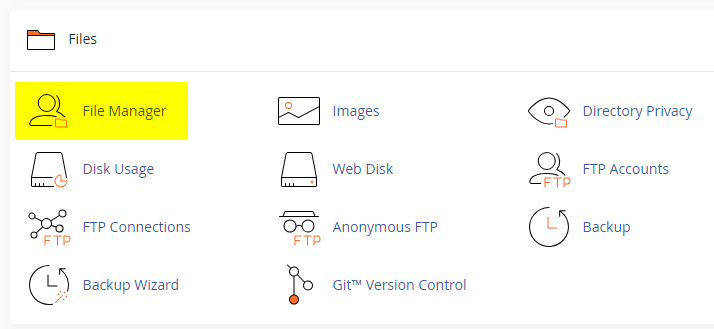
  2. Click on the "File Manager" icon. It's usually under the "Files" section.
  3. You are now in the "File Manager". Open the public_html folder, which is your website's root directory.
  4. Locate the wp-content folder inside "public_html," then open the themes folder inside of it.
  5. In the File Manager interface, click the "Upload" button and choose the theme's .zip file from your local drive.
  6. After it has been uploaded, right-click the .zip file and choose "Extract" or "Unzip".
  7. You can now delete the uploaded .zip file, but it's optional.
  8. Log in to your WordPress dashboard through your web browser.
  9. Go to Appearance → Themes. Now you will see the newly extracted theme.
  10. Make it your active theme by clicking the "Activate" button next to it.

Note: If your hosting provider doesn't offer cPanel, look for a File Manager option in your hosting dashboard (like DirectAdmin, Plesk, or CyberPanel). The process is usually very similar—just find the wp-content/themes folder and upload/extract the theme ZIP file there.

Method 3: Install using FTP

Installing a WordPress theme via FTP is straightforward, though it involves a few more steps compared to using the built-in theme uploader. Here's how to install a WordPress theme using FTP:

  1. Unzip the theme's .zip file you have downloaded.
  2. Connect to your hosting account using an FTP client such as "FileZilla" or "Core FTP".
  3. Navigate to the /wp-content/themes folder in the "Remote site" section.
  4. In the "Local site" section, locate the unzipped theme folder.
  5. Drag and drop the unzipped theme folder from the "Local site" section to the "Remote site" section.
  6. Be patient and let the transfer finish.
  7. Once the transfer is complete, log in to your WordPress dashboard and navigate to Appearance > Themes.
  8. Find the theme you just uploaded and click Activate.

Troubleshooting Tips

  • Didn't receive the download email? Wait 5–10 minutes or check your spam/junk folder. But if you still can not find this email or download link is broken, please inform us. we will send it ASAP.
  • "The uploaded file exceeds the upload_max_filesize directive in php.ini." - If you get this error when following the "Method 1", follow this tutorial: https://themesdna.com/blog/increase-maximum-file-upload-size-wordpress/
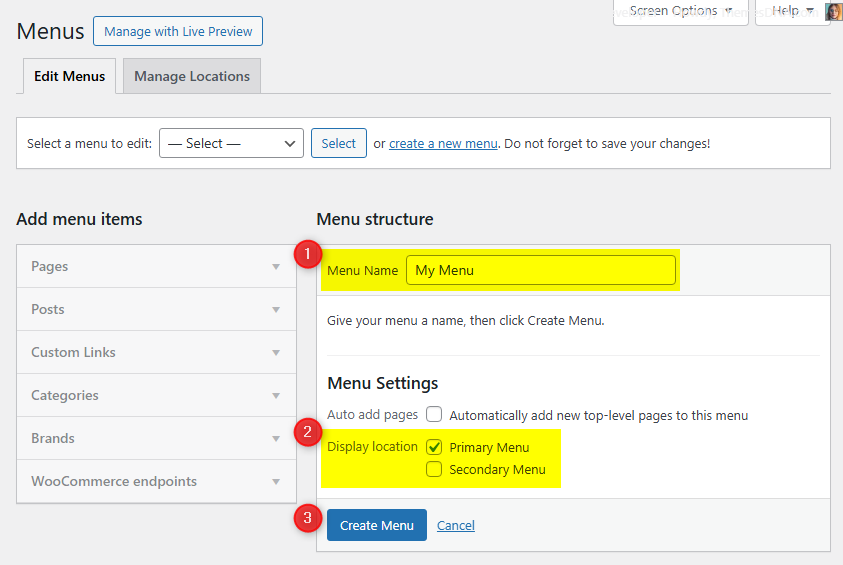
  • My menus disappeared or look different. Go to Appearance → Menus → Manage Locations and reassign your menus to the correct locations.
  • My header text or background color looks different after activating PRO. Reapply your colors in Appearance → Customize → Theme Options → Colors for Header Text Color and Background Color. Then publish.
  • Still can't install the theme? Contact us for help.

Import Demo Content

You can import the demo content, widgets, and Customizer settings shown in the CuteWP PRO theme demo.

Manual Demo Import

Step 1: Import Main Site Content

This includes: Posts, pages, menus, media, categories, tags, comments, and custom fields.

  1. Download: XML File
  2. Go to Tools → Import.
  3. Under "WordPress", click Install Now if not installed.
  4. Click Run Importer.
  5. Select the XML file and click Upload file and import.
  6. Check "Download and import file attachments", click Submit.

Step 2: Import Widgets

  1. Install the Widget Importer & Exporter plugin.
  2. Go to Tools → Widget Importer & Exporter.
  3. Copy content from: Widgets .wie File and paste into the box.
  4. Click Import Widgets.

Step 3: Import Customizer Settings

  1. Download: Customizer File
  2. Install the Customizer Export/Import plugin.
  3. Go to Appearance → Customize → Export/Import.
  4. Select the .dat file, check "Download and import image files?", click Import.

Regenerate Thumbnails

If your website already has existing posts with featured images, it's highly recommended to regenerate thumbnails after activating the CuteWP PRO theme. This ensures that all images match the new theme's layout and display sizes.

Regenerating thumbnails is optional if your site is completely new and doesn't have any uploaded images yet.

However, if you imported the demo content, regenerating thumbnails is essential to display images correctly across the site.

  1. Install and activate the Regenerate Thumbnails plugin.
  2. Go to Tools → Regenerate Thumbnails.
  3. Click the "Regenerate Thumbnails for All x Attachments" button to start the process.
  4. Wait until all images are regenerated. This may take a few minutes depending on your media library size.
  5. If you want, you can deactivate and delete the plugin once the process is complete.

This step ensures clean image alignment and sharp visuals throughout your website using the CuteWP PRO theme.

News Ticker

The News Ticker displays posts in a scrolling format at the top of your site, perfect for breaking news or featured content.

How to Configure

  1. Go to Appearance → Customize → Theme Options → News Ticker.
  2. Check Enable News Ticker.
  3. Set the heading text (default: "Breaking News").
  4. Choose the number of posts and post source type.
  5. Click Publish.

See all News Ticker options

Custom Widgets

Quick Start Guide

Navigate to Appearance → Widgets to see all available widgets and widget areas. There are 5 custom widgets bundled with CuteWP PRO:

  1. CuteWP Featured Posts - Style 1 (List Layout)
  2. CuteWP Featured Posts - Style 2 (Grid Layout)
  3. CuteWP Tabbed Widget
  4. CuteWP About Widget
  5. CuteWP Social Buttons

CuteWP Tabbed Widget

Displays posts in a tabbed format with three tabs: Popular, Recent, and Random. Each tab can be toggled and renamed.

Option IDOption NameDescriptionControl TypeAccepted ValueDefault
titleTitleWidget title.TextPlain textTabbed Widget
show_popular_postsDisplay Popular TabEnable Popular tab.Checkboxtrue/falsetrue
show_recent_postsDisplay Recent TabEnable Recent tab.Checkboxtrue/falsetrue
show_random_postsDisplay Random TabEnable Random tab.Checkboxtrue/falsetrue
tab_one_nameTab 1 NamePopular tab label.TextPlain textPopular
tab_two_nameTab 2 NameRecent tab label.TextPlain textRecent
tab_three_nameTab 3 NameRandom tab label.TextPlain textRandom
numberNumber of PostsPosts per tab.TextPositive integer3
snippet_lengthSnippet LengthWords in snippet.TextPositive integer20
show_thumbnailDisplay Thumbnail?Show thumbnails.Checkboxtrue/falsetrue
show_authorDisplay Author?Show author.Checkboxtrue/falsefalse
show_dateDisplay Date?Show date.Checkboxtrue/falsetrue
show_commentsDisplay Comments?Show comments.Checkboxtrue/falsetrue
show_snippetDisplay Snippet?Show snippet.Checkboxtrue/falsetrue

CuteWP About Widget

Displays an About Me section with profile image, description, and social media icons. Supports 30+ social networks with round or normal icon styles.

Key fields: Title, Profile Image URL, Description (HTML allowed), Round Buttons toggle, and URLs for Facebook, Twitter, Google Plus, Pinterest, LinkedIn, Instagram, Flickr, YouTube, Vimeo, SoundCloud, Last.fm, GitHub, Bitbucket, Tumblr, Digg, Delicious, StumbleUpon, Reddit, Dribbble, Behance, VK, CodePen, JSFiddle, Stack Overflow, Stack Exchange, BuySellAds, SlideShare, Skype, Email, RSS.

CuteWP Social Buttons

Displays social media buttons linking to your profiles. Supports the same 30+ networks as the About Widget with round or normal icon styles.

Key fields: Title, Round Buttons toggle, and the same social URLs as the About Widget.

Widget Areas

CuteWP PRO provides 23 widget areas for flexible content placement:

  1. Header Banner

    Located in the header. Ideal for banner ads or announcements.

  2. Main Sidebar

    Primary sidebar displayed alongside content on pages with sidebar layouts.

  3. Home Top Full Width Widgets

    Full-width area at the top of the homepage, above content.

  4. Home Bottom Full Width Widgets

    Full-width area at the bottom of the homepage, below content.

  5. Single Top Full Width Widgets

    Full-width area at the top of single post pages.

  6. Single Bottom Full Width Widgets

    Full-width area at the bottom of single post pages.

  7. Singular Top Full Width Widgets

    Full-width area at the top of singular pages (posts and pages).

  8. Singular Bottom Full Width Widgets

    Full-width area at the bottom of singular pages (posts and pages).

  9. Top Full Width Widgets (Everywhere)

    Full-width area at the top of every page.

  10. Bottom Full Width Widgets (Everywhere)

    Full-width area at the bottom of every page.

  11. Home Top Widgets

    Within the content column at the top of the homepage.

  12. Home Bottom Widgets

    Within the content column at the bottom of the homepage.

  13. Single Top Widgets

    Within the content column at the top of single posts.

  14. Single Bottom Widgets

    Within the content column at the bottom of single posts.

  15. Singular Top Widgets

    Within content column at the top of singular pages.

  16. Singular Bottom Widgets

    Within content column at the bottom of singular pages.

  17. Top Widgets (Everywhere)

    Within content column at the top of every page.

  18. Bottom Widgets (Everywhere)

    Within content column at the bottom of every page.

  19. Single Post Bottom Widgets

    At the bottom of single posts, before the comments section.

  20. Footer 1

    First column of the footer widget area.

  21. Footer 2

    Second column of the footer widget area.

  22. Footer 3

    Third column of the footer widget area.

  23. Footer 4

    Fourth column of the footer widget area.

Custom Page Templates

CuteWP PRO includes custom page and post templates:

Layout Templates

  • "Full Width, no sidebar" (Page) — Page content in full width without sidebars.
  • "Full Width, no sidebar" (Post) — Post content in full width without sidebars.
  • "Full Width, bottom sidebar" (Page) — Page content full width with sidebar below.
  • "Full Width, bottom sidebar" (Post) — Post content full width with sidebar below.
  • "Content + Sidebar" (Page) — Content on left, sidebar on right.
  • "Sidebar + Content" (Page) — Sidebar on left, content on right.
  • "Content + Sidebar" (Post) — Content on left, sidebar on right.
  • "Sidebar + Content" (Post) — Sidebar on left, content on right.

Special Function Templates

  • "Contact Form" (Page) — Built-in contact form with math captcha.
  • "Sitemap" (Page) — Structured list of your site's content.
  • "Authors" (Page) — List of all authors on your site.

How to Assign a Custom Template:

  1. Go to Pages or PostsAdd New or edit an existing item.
  2. In Gutenberg: Click the Page/Post tab in the right sidebar and find the Template dropdown. In Classic Editor: Use the Template dropdown in Page/Post Attributes.
  3. Select the desired template and click Publish or Update.

How to Create a Contact Page

CuteWP PRO includes a built-in Contact Form template with math captcha spam protection.

Step 1: Create the Contact Page

  1. Go to Pages → Add New.
  2. Title it Contact Us.
  3. Select the Contact Form template.
  4. Click Publish.

Step 2: Set the Email Address

  1. Go to Appearance → Customize → Theme Options → Contact Page.
  2. Enter your email in the Contact Form Email Address field.
  3. Click Publish.

Note: If no email is set, the form will not send messages.

Form Fields

  • Name, Email, Math Captcha, Subject, and Message.

How to Create a Sitemap Page

  1. Go to Pages → Add New.
  2. Title it Sitemap.
  3. Select the Sitemap template and Publish.

Includes

  • Recent Posts and Comments
  • All Pages
  • Categories and Tags
  • Monthly Archives
  • All Authors

How to Create a Site Authors Page

  1. Go to Pages → Add New.
  2. Title it Our Authors.
  3. Select the Authors template and Publish.

Customize (Optional)

Go to Appearance → Customize → Theme Options → Authors Page to hide administrators or authors with zero posts.

Customizer Theme Options

Go to WordPress Dashboard → Appearance → Customize → Theme Options.

Site Identity Options

Option IDOption NameDescriptionControl TypeAccepted ValueDefault
custom_logoLogoUpload a custom site logo.Media UploaderInteger (attachment ID)0 (none)
blognameSite TitleMain title of the website.TextA stringSet during installation
blogdescriptionTaglineShort descriptive tagline.TextA string"Just another WordPress site"
display_header_textDisplay Site Title & TaglineToggle site title and tagline display.Toggletrue / falsetrue
site_iconSite IconUpload a site icon (favicon), at least 512x512px.Media UploaderInteger (attachment ID)0 (none)

Colors Options

CuteWP PRO provides extensive color customization with 30+ color options. All use Color Picker controls accepting hex color codes.

Option IDOption NameDescriptionControl TypeAccepted ValueDefault
body_text_colorMain Text ColorBody text color.Color PickerHex color#555555
link_colorMain Link ColorLink color.Color PickerHex color#666666
link_hover_colorMain Link Hover ColorLink hover color.Color PickerHex color#000000
headings_colorGeneral Headings ColorHeadings color.Color PickerHex color#111111
secondary_menu_bg_colorSecondary Menu BackgroundSecondary menu background.Color PickerHex color#f8f8f8
secondary_menu_bd_colorSecondary Menu BorderSecondary menu border.Color PickerHex color#e5e5e5
secondary_menu_colorSecondary Menu Link ColorSecondary menu links.Color PickerHex color#666666
secondary_menu_hover_colorSecondary Menu Link HoverSecondary menu link hover.Color PickerHex color#000000
secondary_menu_hover_bg_colorSecondary Menu Hover BackgroundSecondary menu hover background.Color PickerHex color#eeeeee
secondary_submenu_one_bg_colorSecondary Submenu BackgroundSecondary submenu background.Color PickerHex color#f5f5f5
secondary_submenu_one_bd_colorSecondary Submenu BorderSecondary submenu border.Color PickerHex color#e5e5e5
secondary_menu_icon_colorSecondary Responsive Menu IconMobile menu icon color.Color PickerHex color#000000
header_bg_colorHeader BackgroundHeader background.Color PickerHex color#ffffff
primary_menu_bg_colorPrimary Menu BackgroundPrimary menu background.Color PickerHex color#f8f8f8
primary_menu_bd_one_colorPrimary Menu Border 1Primary menu border 1.Color PickerHex color#e5e5e5
primary_menu_bd_two_colorPrimary Menu Border 2Primary menu border 2.Color PickerHex color#dddddd
primary_menu_colorPrimary Menu Link ColorPrimary menu links.Color PickerHex color#555555
primary_menu_shadow_colorPrimary Menu Link ShadowPrimary menu link shadow.Color PickerHex color#ffffff
primary_menu_hover_colorPrimary Menu Link HoverPrimary menu link hover.Color PickerHex color#000000
primary_menu_hover_bg_colorPrimary Menu Hover BackgroundPrimary menu hover background.Color PickerHex color#f8f8f8
primary_submenu_one_bg_colorPrimary Submenu BackgroundPrimary submenu background.Color PickerHex color#f5f5f5
primary_submenu_one_bd_colorPrimary Submenu BorderPrimary submenu border.Color PickerHex color#e5e5e5
primary_submenu_two_bd_colorPrimary Submenu Border 2Primary submenu border 2.Color PickerHex color#ffffff
primary_menu_icon_colorPrimary Responsive Menu IconMobile menu icon color.Color PickerHex color#000000
header_social_bg_colorHeader Social Bar BackgroundHeader social bar background.Color PickerHex color#222222
news_ticker_bg_colorNews Ticker BackgroundNews ticker background.Color PickerHex color#9d9d9d
news_ticker_heading_colorNews Ticker Heading ColorTicker heading text color.Color PickerHex color#ffffff
news_ticker_heading_bg_colorNews Ticker Heading BackgroundTicker heading background.Color PickerHex color#333333
news_ticker_text_colorNews Ticker Text ColorTicker post link color.Color PickerHex color#ffffff
news_ticker_hover_text_colorNews Ticker Hover TextTicker post link hover color.Color PickerHex color#dddddd
sidebar_widget_bg_colorSidebar Widgets BackgroundSidebar widgets background.Color PickerHex color#ffffff
sidebar_widget_bd_colorSidebar Widgets BorderSidebar widgets border.Color PickerHex color#dddddd
grid_post_bg_colorGrid Post BackgroundGrid post item background.Color PickerHex color#ffffff
grid_post_bd_colorGrid Post Border ColorGrid post border color.Color PickerHex color#dddddd
post_title_colorSingle Post Title ColorTitle color on single posts.Color PickerHex color#000000
post_title_hover_colorSingle Post Title Hover ColorHover color for single post titles.Color PickerHex color#333333
list_post_title_colorList Post Title ColorTitle color for list posts.Color PickerHex color#000000
list_post_title_hover_colorList Post Title Hover ColorHover color for list post titles.Color PickerHex color#333333
grid_post_title_colorGrid Post Title ColorTitle color for grid posts.Color PickerHex color#000000
grid_post_title_hover_colorGrid Post Title Hover ColorHover color for grid post titles.Color PickerHex color#b52e31
post_body_link_colorPost Content Link ColorLink color inside post content.Color PickerHex color#409BD4
post_body_link_hover_colorPost Content Link Hover ColorHover color for post content links.Color PickerHex color#08ACD5
postcats_colorPost Categories ColorCategory text color.Color PickerHex color#ffffff
postcats_bg_colorPost Categories Background ColorCategory background color.Color PickerHex color#7f181b
postcats_hover_colorPost Categories Hover ColorCategory hover text color.Color PickerHex color#ffffff
postcats_bg_hover_colorPost Categories Hover BackgroundCategory hover background color.Color PickerHex color#000000
post_meta_colorSingle Post Meta ColorMeta text color on single posts.Color PickerHex color#666666
post_meta_hover_colorSingle Post Meta Hover ColorMeta hover color on single posts.Color PickerHex color#000000
list_post_meta_colorList Post Meta ColorMeta text color on lists.Color PickerHex color#666666
list_post_meta_hover_colorList Post Meta Hover ColorMeta hover color on lists.Color PickerHex color#000000
grid_post_meta_bg_colorGrid Post Meta BackgroundMeta background for grid posts.Color PickerHex color#eeeeee
grid_post_meta_bd_one_colorGrid Post Meta Border 1 ColorFirst meta border color for grid posts.Color PickerHex color#e8e8e8
grid_post_meta_bd_two_colorGrid Post Meta Border 2 ColorSecond meta border color for grid posts.Color PickerHex color#ffffff
grid_post_meta_colorGrid Post Meta ColorMeta text color for grid posts.Color PickerHex color#555555
grid_post_meta_hover_colorGrid Post Meta Hover ColorMeta hover color for grid posts.Color PickerHex color#000000
sidebar_title_colorSidebar Title ColorSidebar widget title color.Color PickerHex color#000000
sidebar_title_bg_colorSidebar Title Background ColorSidebar widget title background.Color PickerHex color#eeeeee
sidebar_title_bd_one_colorSidebar Title Border 1 ColorFirst sidebar title border color.Color PickerHex color#dddddd
sidebar_title_bd_two_colorSidebar Title Border 2 ColorSecond sidebar title border color.Color PickerHex color#f6f6f6
sidebar_link_colorSidebar Link ColorSidebar link color.Color PickerHex color#444444
sidebar_link_hover_colorSidebar Link Hover ColorSidebar link hover color.Color PickerHex color#666666
sidebar_list_bd_colorSidebar List Border ColorSidebar list border color.Color PickerHex color#f6f6f6
tag_cloud_colorTag Cloud Link ColorTag cloud link color.Color PickerHex color#ffffff
tag_cloud_bg_colorTag Cloud Link BackgroundTag cloud background.Color PickerHex color#888888
tag_cloud_hover_colorTag Cloud Hover ColorTag cloud hover text color.Color PickerHex color#ffffff
tag_cloud_hover_bg_colorTag Cloud Hover BackgroundTag cloud hover background.Color PickerHex color#000000
footer_bg_colorFooter Background ColorFooter background.Color PickerHex color#333333
footer_bd_colorFooter Border ColorFooter border color.Color PickerHex color#555555
footer_title_colorFooter Title ColorFooter widget title color.Color PickerHex color#ffffff
footer_title_bd_one_colorFooter Title Border One ColorFirst footer title border color.Color PickerHex color#444444
footer_title_bd_two_colorFooter Title Border Two ColorSecond footer title border color.Color PickerHex color#222222
footer_text_colorFooter Text ColorFooter text color.Color PickerHex color#cecece
footer_link_colorFooter Link ColorFooter link color.Color PickerHex color#dbdbdb
footer_link_hover_colorFooter Link Hover ColorFooter link hover color.Color PickerHex color#ffffff

Font Options

Option IDOption NameDescriptionControl TypeAccepted ValueDefault
font_subsetsFont SubsetsSelect subsets to load.Multiple SelectCyrillic, Cyrillic Ext, Greek, Greek Ext, Latin, Latin Ext, Vietnameselatin
body_fontsBody Font-FamilyFont for body text.SelectGoogle/system fontsDomine
body_font_sizeBody Font-SizeSize for body text.Select8px-72px13px
body_font_weightBody Font-WeightWeight for body text.Select400,700400
body_font_styleBody Font-StyleStyle for body text.Selectnormal, italicnormal
body_line_heightBody Line-HeightLine height for body.TextNumeric1.6
site_title_fontsSite Title Font-FamilyFont for site title.SelectGoogle/system fontsPlayfair Display
site_title_font_sizeSite Title Font-SizeSize for site title.Select8px-72px24px
site_title_font_weightSite Title Font-WeightWeight for site title.Select400,700700
site_title_font_styleSite Title Font-StyleStyle for site title.Selectnormal, italicnormal
site_title_line_heightSite Title Line-HeightLine height for site title.TextNumeric1
site_desc_fontsSite Description Font-FamilyFont for site tagline.SelectGoogle/system fontsDomine
site_desc_font_sizeSite Description Font-SizeSize for site tagline.Select8px-72px13px
site_desc_font_weightSite Description Font-WeightWeight for site tagline.Select400,700400
site_desc_font_styleSite Description Font-StyleStyle for site tagline.Selectnormal, italicnormal
site_desc_line_heightSite Description Line-HeightLine height for tagline.TextNumeric1
primary_menu_fontsPrimary Menu Font-FamilyFont for primary menu.SelectGoogle/system fontsPatua One
primary_menu_font_sizePrimary Menu Font-SizeSize for primary menu.Select8px-72px13px
primary_menu_font_weightPrimary Menu Font-WeightWeight for primary menu.Select400,700400
primary_menu_font_stylePrimary Menu Font-StyleStyle for primary menu.Selectnormal, italicnormal
secondary_menu_fontsSecondary Menu Font-FamilyFont for secondary menu.SelectGoogle/system fontsPatua One
secondary_menu_font_sizeSecondary Menu Font-SizeSize for secondary menu.Select8px-72px13px
secondary_menu_font_weightSecondary Menu Font-WeightWeight for secondary menu.Select400,700400
secondary_menu_font_styleSecondary Menu Font-StyleStyle for secondary menu.Selectnormal, italicnormal
news_ticker_fontsNews Ticker Font-FamilyFont for news ticker.SelectGoogle/system fontsOswald
news_ticker_font_sizeNews Ticker Font-SizeSize for news ticker.Select8px-72px13px
news_ticker_font_weightNews Ticker Font-WeightWeight for news ticker.Select400,700400
news_ticker_font_styleNews Ticker Font-StyleStyle for news ticker.Selectnormal, italicnormal
hpost_title_fontsGrid Post Title Font-FamilyFont for grid post titles.SelectGoogle/system fontsPatua One
hpost_title_font_sizeGrid Post Title Font-SizeSize for grid post titles.Select8px-72px18px
hpost_title_font_weightGrid Post Title Font-WeightWeight for grid post titles.Select400,700400
hpost_title_font_styleGrid Post Title Font-StyleStyle for grid post titles.Selectnormal, italicnormal
hpost_title_line_heightGrid Post Title Line-HeightLine height for grid post titles.TextNumeric1.2
hpost_title_sm_fontsList Post Title Font-FamilyFont for list post titles.SelectGoogle/system fontsPatua One
hpost_title_sm_font_sizeList Post Title Font-SizeSize for list post titles.Select8px-72px16px
hpost_title_sm_font_weightList Post Title Font-WeightWeight for list post titles.Select400,700400
hpost_title_sm_font_styleList Post Title Font-StyleStyle for list post titles.Selectnormal, italicnormal
hpost_title_sm_line_heightList Post Title Line-HeightLine height for list post titles.TextNumeric1.2
hpost_cats_fontsGrid Post Categories Font-FamilyFont for grid post categories.SelectGoogle/system fontsOswald
hpost_cats_font_sizeGrid Post Categories Font-SizeSize for grid post categories.Select8px-72px12px
hpost_cats_font_weightGrid Post Categories Font-WeightWeight for grid post categories.Select400,700400
hpost_cats_font_styleGrid Post Categories Font-StyleStyle for grid post categories.Selectnormal, italicnormal
hpost_meta_fontsPost Meta Font-FamilyFont for post meta.SelectGoogle/system fontsOswald
hpost_meta_font_sizePost Meta Font-SizeSize for post meta.Select8px-72px12px
hpost_meta_font_weightPost Meta Font-WeightWeight for post meta.Select400,700400
hpost_meta_font_stylePost Meta Font-StyleStyle for post meta.Selectnormal, italicnormal
post_title_fontsPost Title Font-FamilyFont for single post titles.SelectGoogle/system fontsPlayfair Display
post_title_font_sizePost Title Font-SizeSize for single post titles.Select8px-72px26px
post_title_font_weightPost Title Font-WeightWeight for single post titles.Select400,700700
post_title_font_stylePost Title Font-StyleStyle for single post titles.Selectnormal, italicnormal
post_title_line_heightPost Title Line-HeightLine height for single post titles.TextNumeric1.2
widget_title_fontsMain/Sidebars Widget Title Font-FamilyFont for sidebar widget titles.SelectGoogle/system fontsOswald
widget_title_font_sizeMain/Sidebars Title Font-SizeSize for sidebar widget titles.Select8px-72px15px
widget_title_font_weightMain/Sidebars Title Font-WeightWeight for sidebar widget titles.Select400,700400
widget_title_font_styleMain/Sidebars Title Font-StyleStyle for sidebar widget titles.Selectnormal, italicnormal
sidebar_title_line_heightMain/Sidebars Title Line-HeightLine height for sidebar titles.TextNumeric1
footer_title_fontsFooter Widget Title Font-FamilyFont for footer widget titles.SelectGoogle/system fontsOswald
footer_title_font_sizeFooter Title Font-SizeSize for footer titles.Select8px-72px14px
footer_title_font_weightFooter Title Font-WeightWeight for footer titles.Select400,700400
footer_title_font_styleFooter Title Font-StyleStyle for footer titles.Selectnormal, italicnormal
footer_title_line_heightFooter Title Line-HeightLine height for footer titles.TextNumeric1
headings_fontsGeneral Headings Font-FamilyFont for all headings.SelectGoogle/system fontsPlayfair Display
headings_line_heightGeneral Headings Line-HeightLine height for headings.TextNumeric1
h1_font_sizeH1 Font-SizeFont size for H1.Select8px-72px32px
h1_font_weightH1 Font-WeightFont weight for H1.Select400,700700
h1_font_styleH1 Font-StyleFont style for H1.Selectnormal, italicnormal
h2_font_sizeH2 Font-SizeFont size for H2.Select8px-72px28px
h2_font_weightH2 Font-WeightFont weight for H2.Select400,700700
h2_font_styleH2 Font-StyleFont style for H2.Selectnormal, italicnormal
h3_font_sizeH3 Font-SizeFont size for H3.Select8px-72px24px
h3_font_weightH3 Font-WeightFont weight for H3.Select400,700700
h3_font_styleH3 Font-StyleFont style for H3.Selectnormal, italicnormal
h4_font_sizeH4 Font-SizeFont size for H4.Select8px-72px20px
h4_font_weightH4 Font-WeightFont weight for H4.Select400,700700
h4_font_styleH4 Font-StyleFont style for H4.Selectnormal, italicnormal
h5_font_sizeH5 Font-SizeFont size for H5.Select8px-72px18px
h5_font_weightH5 Font-WeightFont weight for H5.Select400,700700
h5_font_styleH5 Font-StyleFont style for H5.Selectnormal, italicnormal
h6_font_sizeH6 Font-SizeFont size for H6.Select8px-72px16px
h6_font_weightH6 Font-WeightFont weight for H6.Select400,700700
h6_font_styleH6 Font-StyleFont style for H6.Selectnormal, italicnormal

Header Options

Option IDOption NameDescriptionControl TypeAccepted ValueDefault
site_header_styleSite Header StyleHeader layout style.Radio Buttons
  • Logo (left) + Banner (right)
  • Logo (full-width) + Banner (full-width)
  • Logo (full-width)
Logo (left) + Banner (right)
hide_header_contentHide Header Bar ContentHide all header bar content.Checkboxtrue / falsefalse

Layout Options

Option IDOption NameDescriptionControl TypeAccepted ValueDefault
non_singular_layoutNon-Singular Pages LayoutLayout for archive, home, search pages.Radio Buttons
  • Sidebar + Content
  • Content + Sidebar
  • One Column
Content + Sidebar
singular_layoutSingular Posts/Pages LayoutLayout for single posts and pages.Radio Buttons
  • Sidebar + Content
  • Content + Sidebar
  • One Column
Content + Sidebar
show_sidebar_one_columnShow Sidebar in One ColumnShow sidebar even with One Column layout.Checkboxtrue / falsefalse

News Ticker Options

Option IDOption NameDescriptionControl TypeAccepted ValueDefault
enable_news_tickerEnable News TickerEnable/disable the news ticker.Checkboxtrue / falsefalse
news_ticker_headingNews Ticker HeadingHeading text.TextPlain textBreaking News
news_ticker_lengthNumber of PostsPosts to show.TextPositive integer5
news_ticker_post_typePost TypePost source type.Dropdown
  • Recent Posts
  • Popular Posts
  • Random Posts
  • Category Posts
  • Tag Posts
Recent Posts
news_ticker_catCategoryCategory (if Category Posts).Category DropdownA category(empty)
news_ticker_tagTagTag (if Tag Posts).Tag DropdownA tag(empty)

Post Options

Option IDOption NameDescriptionControl TypeAccepted ValueDefault
hide_posts_headingHide Homepage Posts HeadingHide heading above homepage posts.Checkboxtrue / falsefalse
posts_headingHomepage Posts HeadingHeading text.TextPlain textRecent Posts
thumbnail_linkThumbnail LinkSingle post thumbnails link to post.Dropdownyes / noyes
grid_thumb_styleGrid Thumbnail StyleThumbnail style for post grids.Dropdown
  • Horizontal
  • Square
  • Vertical
  • Auto Height
Horizontal
post_grid_colsPost Grid ColumnsGrid column count.Dropdown2, 3, 4, or 5 Columns3 Columns
read_more_lengthAuto Post Summary LengthWords for auto summaries.TextPositive integer20
hide_post_snippetHide Post SnippetHide snippet from summaries.Checkboxtrue / falsefalse
hide_posted_date_homeHide Date from SummariesHide date from summaries.Checkboxtrue / falsefalse
hide_posted_dateHide Date from Single PostsHide date on single posts.Checkboxtrue / falsefalse
hide_post_author_homeHide Author from SummariesHide author from summaries.Checkboxtrue / falsefalse
hide_post_authorHide Author from Single PostsHide author on single posts.Checkboxtrue / falsefalse
hide_post_categories_homeHide Categories from SummariesHide categories from summaries.Checkboxtrue / falsefalse
hide_post_categoriesHide Categories from Single PostsHide categories on single posts.Checkboxtrue / falsefalse
hide_post_tags_homeHide Tags from SummariesHide tags from summaries.Checkboxtrue / falsefalse
hide_post_tagsHide Tags from Single PostsHide tags on single posts.Checkboxtrue / falsefalse
hide_comments_link_homeHide Comment Link from SummariesHide comments link from summaries.Checkboxtrue / falsefalse
hide_comments_linkHide Comment Link from Single PostsHide comments link on singles.Checkboxtrue / falsefalse
hide_post_editHide Post Edit LinkHide edit link.Checkboxtrue / falsefalse
hide_thumbnailHide Thumbnails EverywhereHide thumbnails site-wide.Checkboxtrue / falsefalse
hide_thumbnail_singleHide Thumbnails from Posts/PagesHide thumbnails on singles.Checkboxtrue / falsefalse
hide_share_buttons_homeHide Share Buttons from SummariesHide share from summaries.Checkboxtrue / falsefalse
hide_share_buttonsHide Share Buttons from Single PostsHide share on singles.Checkboxtrue / falsefalse
hide_author_bio_boxHide Author Bio BoxHide author bio on singles.Checkboxtrue / falsefalse
hide_related_postsHide Related PostsHide related posts.Checkboxtrue / falsefalse
related_posts_headingRelated Posts HeadingRelated posts heading text.TextPlain textRelated Articles
related_posts_numberNumber of Related PostsRelated posts count.Dropdown1 to 166
related_grid_colsRelated Posts ColumnsRelated posts grid columns.Dropdown2, 3, 4, or 5 Columns3 Columns
show_rpost_snippetShow Related Post SnippetShow snippet in related posts.Checkboxtrue / falsefalse

Social Links Options

CuteWP PRO supports 30+ social networks. Key options:

Option IDOption NameDescriptionControl TypeAccepted ValueDefault
hide_header_social_buttonsHide Header Social ButtonsHide social buttons in header.Checkboxtrue / falsefalse
hide_footer_social_buttonsHide Footer Social ButtonsHide social buttons in footer.Checkboxtrue / falsefalse
twitterlinkTwitter URLTwitter profile URL.TextValid URL(empty)
faborlinkFacebook URLFacebook profile URL.TextValid URL(empty)
paborlinkPinterest URLPinterest profile URL.TextValid URL(empty)
linkedinlinkLinkedIn URLLinkedIn profile URL.TextValid URL(empty)
instagramlinkInstagram URLInstagram profile URL.TextValid URL(empty)
youtubelinkYouTube URLYouTube channel URL.TextValid URL(empty)
vklinkVK URLVK profile URL.TextValid URL(empty)
githublinkGitHub URLGitHub profile URL.TextValid URL(empty)
skypeusernameSkype UsernameSkype username.TextPlain text(empty)
emailaddressEmail AddressContact email.TextValid email(empty)
telephonenumberTelephone NumberPhone number.TextPlain text(empty)
rsslinkRSS Feed URLRSS feed URL.TextValid URL(empty)

Additional networks: Google Plus, Flickr, Vimeo, SoundCloud, Last.fm, Bitbucket, Tumblr, Digg, Delicious, StumbleUpon, Reddit, Dribbble, Behance, CodePen, JSFiddle, Stack Overflow, Stack Exchange, BuySellAds, SlideShare.

404 Page Options

Option IDOption NameDescriptionControl TypeAccepted ValueDefault
error_404_heading404 HeadingCustom 404 heading.TextareaText (HTML allowed)Oops! That page can not be found.
error_404_message404 MessageCustom 404 message.TextareaText (HTML allowed)It looks like nothing was found at this location.

Contact Page Options

Option IDOption NameDescriptionControl TypeAccepted ValueDefault
contact_form_emailContact Form Email AddressEmail for receiving contact form messages.TextValid email address(empty)

Authors Page Options

Option IDOption NameDescriptionControl TypeAccepted ValueDefault
hide_admin_authors_pageHide AdministratorsHide admins from authors page.Checkboxtrue / falsefalse
hide_noposts_authors_pageHide Authors with Zero PostsHide authors with no posts.Checkboxtrue / falsefalse

Other Options

Option IDOption NameDescriptionControl TypeAccepted ValueDefault
enable_widgets_block_editorEnable Gutenberg Widget EditorEnable block-based widget editor.Checkboxtrue / falsefalse
disable_sticky_menuDisable Sticky Primary MenuDisable sticky menu on scroll.Checkboxtrue / falsefalse
enable_sticky_mobile_menuEnable Sticky Menu on MobileEnable sticky menu on small screens.Checkboxtrue / falsefalse
disable_primary_menuDisable Primary MenuDisable primary menu entirely.Checkboxtrue / falsefalse
disable_secondary_menuDisable Secondary MenuDisable secondary menu entirely.Checkboxtrue / falsefalse
disable_sticky_sidebarDisable Sticky SidebarDisable sticky sidebar.Checkboxtrue / falsefalse
disable_backtotopDisable Back to Top ButtonDisable floating back-to-top button.Checkboxtrue / falsefalse

Performance & SEO Tips

  • Use a caching pluginW3 Total Cache or WP Super Cache.
  • Optimize images — Use Imagify or EWWW Image Optimizer.
  • Use an SEO pluginYoast SEO or All in One SEO.
  • Enable GZIP compression — Reduces file transfer sizes.
  • Use a CDN — Cloudflare or similar for global speed.
  • Keep WordPress updated — Latest versions for security and performance.
  • Minimize plugins — Use only necessary plugins to reduce overhead.

Translation & RTL

CuteWP PRO is fully translation-ready and supports Right-to-Left (RTL) languages like Arabic, Hebrew, and Persian out of the box.

🌐 Translating the Theme

The theme includes a cutewp-pro.pot file located in the /languages folder inside the theme directory. You can use this file to create translations in your own language using any of the following tools:

After translating, save your files as:

  • cutewp-pro-[language_code].po
  • cutewp-pro-[language_code].mo

Place them inside the /languages folder in the theme.

↔️ RTL Language Support

CuteWP PRO includes built-in RTL support. If your WordPress site language is set to an RTL language, the theme will automatically adjust layout direction, alignment, and spacing accordingly. No extra setup required.

If you're customizing your site with RTL content, make sure your text widgets, menus, and custom styles are also RTL-compatible for best results.

FAQ

How do I add numbered posts navigation?

Install the WP-PageNavi plugin. The theme detects it automatically.

Does the theme support WooCommerce?

Yes, CuteWP PRO includes built-in WooCommerce support.

How do I disable the Gutenberg widget editor?

Go to Customize → Theme Options → Other Options and leave "Enable Gutenberg Widget Block Editor" unchecked.

How do I change the number of footer columns?

CuteWP PRO provides 4 footer widget areas. Add widgets only to the areas you want to use.

How do I hide the sidebar on all pages?

Select "One Column" for both layout options in Customize → Theme Options → Layout Options.

Troubleshooting

Images look blurry or stretched

Regenerate thumbnails. See Section 3.

Menus not showing

Go to Appearance → Menus → Manage Locations and reassign menus.

News ticker not visible

Enable it in Customize → Theme Options → News Ticker.

Contact form not sending emails

Set the email in Customize → Theme Options → Contact Page. Consider using WP Mail SMTP for reliability.

Theme options not saving

Clear browser cache. Deactivate plugins temporarily to check for conflicts.

Support & Licensing

Support

For questions or help configuring your theme:

Contact Support

Licensing

CuteWP PRO is licensed under the GNU General Public License v2.0 (or later).

Resources Used

  • Underscores — Theme starter framework
  • Eric Meyer's CSS Reset — CSS reset
  • Normalize.css — CSS normalization
  • Font Awesome — Icon library
  • HTML5 Shiv — HTML5 support for older browsers
  • Masonry — Cascading grid layout library
  • Respond.js — Media query support
  • Theia Sticky Sidebar — Sticky sidebar
  • ResizeSensor.js — Element resize detection
  • FitVids.js — Responsive video embedding

Changelog

Version 1.0.5

  • Latest version release.

Version 1.0.4

  • Bug fixes and improvements.

Version 1.0.3

  • Bug fixes and improvements.

Version 1.0.2

  • Bug fixes and improvements.

Version 1.0.1

  • Bug fixes and improvements.

Version 1.0.0

  • Initial release.