CoolWP PRO Documentation

Introduction

CoolWP PRO is a clean, highly customizable, 3-column, 100% responsive WordPress blogging theme developed by ThemesDNA. It features 10 post styles, 11 layout options, a featured posts slider, news ticker, 17 featured posts widget styles with AJAX navigation, 60+ social buttons, RTL support, customizable colors and fonts, WooCommerce support, sticky sidebars/menus, related posts, author bio boxes, a built-in contact form, and 20 widget areas.

Current Theme Version: 1.0.5

Theme Installation

After purchasing the CoolWP PRO WordPress Theme, you'll receive a download link via email. Check your email inbox (or spam folder) for the product delivery email. Click the provided download link to download the theme's .zip file to your computer. Follow one of a method given below to install the theme on your website.

Upgrading from the Free CoolWP Theme?

CoolWP PRO is a separate theme. Whether or not you're currently using the free CoolWP theme, you need to install CoolWP PRO using one of the methods below.

If you're upgrading from the free version, most of your existing WordPress Customizer settings will remain in place. So you don't need to reconfigure everything from scratch. However, you will need to reupload a few images and reapply specific color settings.

After activating CoolWP PRO, go to Appearance → Customize and reupload the following:

  • Site Logo
  • Site Icon (favicon)
  • Header Image
  • Background Image

If you changed below color options in the free version, reapply them in Appearance → Customize → Theme Options → Colors:

  • Header Text Color
  • Background Color

Tip: You can install PRO without deleting the free theme. Use Live Preview to confirm your layout, then click Activate & Publish.

Method 1: Install Using the WordPress Dashboard (Easiest and Fastest)

This is the easiest and fastest method to install this WordPress theme.

  1. Go to "WordPress Dashboard" → "Appearance" → "Themes" and click on "Add New" button.
  2. Click on "Upload Theme" button and choose the zip file you have downloaded.
  3. Click on "Install Now" button.
  4. Activate the theme.
  5. Now go to "Appearance" → "Customize" to configure theme options.

Method 2: Install using cPanel File Manager

In some cases, you may not be able to install a WordPress theme through the WordPress dashboard—especially if the theme's ZIP file exceeds the maximum upload size limit. When this happens, you can install the theme using cPanel's File Manager, which is often simpler than using FTP. Follow the steps below to install your theme via the File Manager in cPanel.

  1. Log in to your cPanel account. Your cPanel URL will be https://yourdomain.com/cpanel or a similar URL.
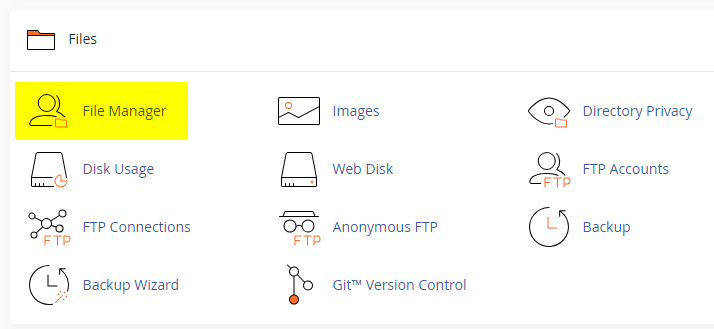
  2. Click on the "File Manager" icon. It's usually under the "Files" section.
  3. You are now in the "File Manager". Open the public_html folder, which is your website's root directory.
  4. Locate the wp-content folder inside "public_html," then open the themes folder inside of it.
  5. In the File Manager interface, click the "Upload" button and choose the theme's .zip file from your local drive.
  6. After it has been uploaded, right-click the .zip file and choose "Extract" or "Unzip".
  7. You can now delete the uploaded .zip file, but it's optional.
  8. Log in to your WordPress dashboard through your web browser.
  9. Go to Appearance → Themes. Now you will see the newly extracted theme.
  10. Make it your active theme by clicking the "Activate" button next to it.

Note: If your hosting provider doesn't offer cPanel, look for a File Manager option in your hosting dashboard (like DirectAdmin, Plesk, or CyberPanel). The process is usually very similar—just find the wp-content/themes folder and upload/extract the theme ZIP file there.

Method 3: Install using FTP

Installing a WordPress theme via FTP is straightforward, though it involves a few more steps compared to using the built-in theme uploader. Here's how to install a WordPress theme using FTP:

  1. Unzip the theme's .zip file you have downloaded.
  2. Connect to your hosting account using an FTP client such as "FileZilla" or "Core FTP".
  3. Navigate to the /wp-content/themes folder in the "Remote site" section.
  4. In the "Local site" section, locate the unzipped theme folder.
  5. Drag and drop the unzipped theme folder from the "Local site" section to the "Remote site" section.
  6. Be patient and let the transfer finish.
  7. Once the transfer is complete, log in to your WordPress dashboard and navigate to Appearance > Themes.
  8. Find the theme you just uploaded and click Activate.

Troubleshooting Tips

  • Didn't receive the download email? Wait 5–10 minutes or check your spam/junk folder. But if you still can not find this email or download link is broken, please inform us. we will send it ASAP.
  • "The uploaded file exceeds the upload_max_filesize directive in php.ini." - If you get this error when following the "Method 1", follow this tutorial: https://themesdna.com/blog/increase-maximum-file-upload-size-wordpress/
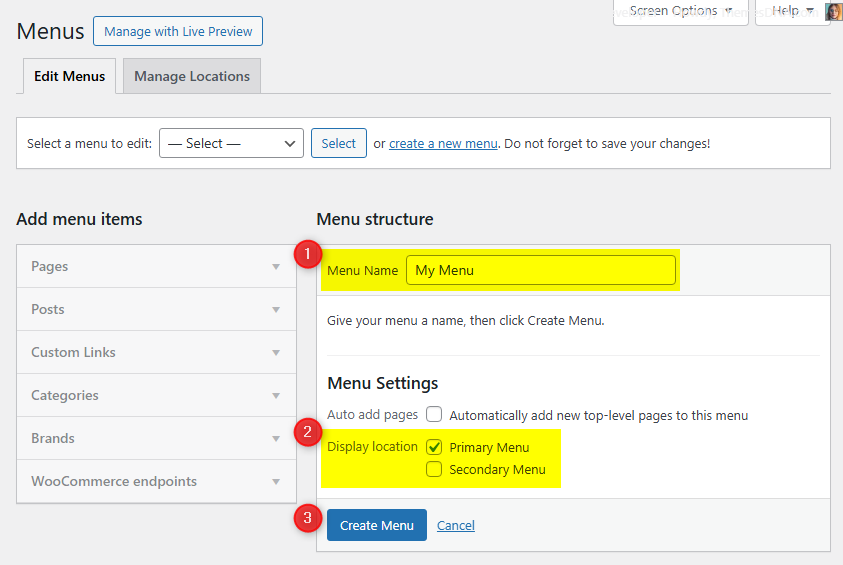
  • My menus disappeared or look different. Go to Appearance → Menus → Manage Locations and reassign your menus to the correct locations.
  • My header text or background color looks different after activating PRO. Reapply your colors in Appearance → Customize → Theme Options → Colors for Header Text Color and Background Color. Then publish.
  • Still can't install the theme? Contact us for help.

Import Demo Content

You can import the demo content, widgets, and Customizer settings shown in the CoolWP PRO theme demo.

Manual Demo Import

Step 1: Import Main Site Content

This includes: Posts, pages, menus, media, categories, tags, comments, and custom fields.

  1. Download: XML File
  2. Go to Tools → Import.
  3. Under "WordPress", click Install Now if not installed.
  4. Click Run Importer.
  5. Select the XML file and click Upload file and import.
  6. Check "Download and import file attachments", click Submit.

Step 2: Import Widgets

  1. Install the Widget Importer & Exporter plugin.
  2. Go to Tools → Widget Importer & Exporter.
  3. Copy content from: Widgets .wie File and paste into the box.
  4. Click Import Widgets.

Step 3: Import Customizer Settings

  1. Download: Customizer File
  2. Install the Customizer Export/Import plugin.
  3. Go to Appearance → Customize → Export/Import.
  4. Select the .dat file, check "Download and import image files?", click Import.

Regenerate Thumbnails

If your website already has existing posts with featured images, it's highly recommended to regenerate thumbnails after activating the CoolWP PRO theme. This ensures that all images match the new theme's layout and display sizes.

Regenerating thumbnails is optional if your site is completely new and doesn't have any uploaded images yet.

However, if you imported the demo content, regenerating thumbnails is essential to display images correctly across the site.

  1. Install and activate the Regenerate Thumbnails plugin.
  2. Go to Tools → Regenerate Thumbnails.
  3. Click the "Regenerate Thumbnails for All x Attachments" button to start the process.
  4. Wait until all images are regenerated. This may take a few minutes depending on your media library size.
  5. If you want, you can deactivate and delete the plugin once the process is complete.

This step ensures clean image alignment and sharp visuals throughout your website using the CoolWP PRO theme.

Header Image

Quick Start Guide

CoolWP PRO supports WordPress' built-in Custom Header. You can set a single site-wide header image; the theme does not add per-post or per-page header image settings.

Header image options are available in the Customizer under Appearance → Customize → Header Image.

How to Add a Header Image?

CoolWP PRO offers a single site-wide header image using WordPress core Custom Header. There are no per-post or per-page header image overrides.

How to Add a Site-wide Header Image?

  1. Go to AppearanceCustomizeHeader Image.
  2. Upload your header image using the Add new image button.
  3. Publish to save.

News Ticker

The News Ticker displays your posts in a smooth, horizontal scrolling format at the top of your site. Perfect for highlighting breaking news or trending updates.

How to Configure

  1. Go to Appearance → Customize → Theme Options → News Ticker.
  2. Check Enable News Ticker.
  3. Configure the options (heading text, number of posts, post type, category/tag filter).
  4. Click Publish.

See the complete list of News Ticker Options

Tips

  • Use Category Posts or Tag Posts for automated topic-based updates.
  • Use Popular Posts to show your most commented posts.
  • Customize the heading text to match your site's tone (default: "Breaking News").

Slider

The Slider is a dynamic carousel that showcases your posts with featured images in an auto-rotating display using the Owl Carousel library.

How to Configure

  1. Go to Appearance → Customize → Theme Options → Slider.
  2. Check Enable Slider.
  3. Configure the options (number of posts, post type, category/tag filter).
  4. Click Publish.

See the complete list of Slider Options

Tips

  • Make sure your posts have featured images for best visual impact.
  • Adjust the Number of Slider Posts (default is 5).
  • Posts without featured images will display a placeholder.

Custom Widgets

Quick Start Guide

Navigate to AppearanceWidgets to see available widgets and widget areas. CoolWP PRO includes 20 custom widgets:

  1. CoolWP Featured Posts Widget Style 1 through Style 17 (17 widgets)
  2. CoolWP Tabbed Widget
  3. CoolWP About Me Widget
  4. CoolWP Social Widget

CoolWP Tabbed Widget

Displays three tabs of posts: Popular (by comments), Recent, and Random. Each tab can be enabled/disabled and configured with post count and display toggles.

Key Features

  • Enable/disable Popular, Recent, and Random tabs
  • Control number of posts per tab
  • Toggle thumbnail, author, date, comments, and snippet visibility
Option ID Option Name Description Control Type Accepted Value Default
titleTitleWidget title displayed above the tabs.TextPlain textTabbed Widget
show_popular_postsShow Popular TabEnable/disable the Popular (by comments) tab.Checkboxtrue / falsetrue
show_recent_postsShow Recent TabEnable/disable the Recent tab.Checkboxtrue / falsetrue
show_random_postsShow Random TabEnable/disable the Random tab.Checkboxtrue / falsetrue
tab_one_nameTab 1 NameLabel for the Popular tab.TextPlain textPopular
tab_two_nameTab 2 NameLabel for the Recent tab.TextPlain textRecent
tab_three_nameTab 3 NameLabel for the Random tab.TextPlain textRandom
numberNumber of PostsPosts to show in each tab.TextPositive integer3
show_thumbnailDisplay Thumbnails?Show or hide post thumbnails.Checkboxtrue / falsetrue
show_authorDisplay Authors?Show author name.Checkboxtrue / falsefalse
show_dateDisplay Dates?Show post date.Checkboxtrue / falsetrue
show_commentsDisplay Comments Count?Show comment count.Checkboxtrue / falsetrue
show_snippetDisplay Snippets?Show post snippets.Checkboxtrue / falsetrue
snippet_lengthSnippet LengthWords shown in each snippet.TextPositive integer20

CoolWP About and Social Widget

Displays a profile section with image, description, and extensive social media links. Supports many platforms with customizable button styles (round or normal).

Usage Notes

  • Provide a direct URL for the profile image
  • Description field supports HTML
  • Leave social fields empty to hide them
  • All social links open in new tabs with nofollow
Option ID Option Name Description Control Type Accepted Value Default
titleTitleWidget title displayed above the profile.TextPlain textAbout Me
imageProfile Image URLURL of the profile image.Text (URL)Valid image URL(empty)
descriptionDescriptionProfile description (supports HTML).TextareaPlain text / HTML(empty)
round_buttonsDisplay round social buttons?Use round button style for socials.Checkboxtrue / falsefalse
facebookFacebook URLLink to Facebook profile/page.Text (URL)Valid URL(empty)
twitterTwitter URLLink to Twitter profile.Text (URL)Valid URL(empty)
googleplusGoogle Plus URLLink to Google Plus profile.Text (URL)Valid URL(empty)
pinterestPinterest URLLink to Pinterest profile.Text (URL)Valid URL(empty)
linkedinLinkedIn URLLink to LinkedIn profile.Text (URL)Valid URL(empty)
instagramInstagram URLLink to Instagram profile.Text (URL)Valid URL(empty)
flickrFlickr URLLink to Flickr profile.Text (URL)Valid URL(empty)
youtubeYouTube URLLink to YouTube channel.Text (URL)Valid URL(empty)
vimeoVimeo URLLink to Vimeo profile.Text (URL)Valid URL(empty)
soundcloudSoundCloud URLLink to SoundCloud profile.Text (URL)Valid URL(empty)
lastfmLastfm URLLink to Lastfm profile.Text (URL)Valid URL(empty)
githubGitHub URLLink to GitHub profile.Text (URL)Valid URL(empty)
bitbucketBitbucket URLLink to Bitbucket profile.Text (URL)Valid URL(empty)
tumblrTumblr URLLink to Tumblr profile.Text (URL)Valid URL(empty)
diggDigg URLLink to Digg profile.Text (URL)Valid URL(empty)
deliciousDelicious URLLink to Delicious profile.Text (URL)Valid URL(empty)
stumbleuponStumbleupon URLLink to Stumbleupon profile.Text (URL)Valid URL(empty)
redditReddit URLLink to Reddit profile.Text (URL)Valid URL(empty)
dribbbleDribbble URLLink to Dribbble profile.Text (URL)Valid URL(empty)
behanceBehance URLLink to Behance profile.Text (URL)Valid URL(empty)
vkVK URLLink to VK profile.Text (URL)Valid URL(empty)
codepenCodePen URLLink to CodePen profile.Text (URL)Valid URL(empty)
jsfiddleJSFiddle URLLink to JSFiddle profile.Text (URL)Valid URL(empty)
stackoverflowStack Overflow URLLink to Stack Overflow profile.Text (URL)Valid URL(empty)
stackexchangeStack Exchange URLLink to Stack Exchange profile.Text (URL)Valid URL(empty)
buyselladsBuySellAds URLLink to BuySellAds profile.Text (URL)Valid URL(empty)
slideshareSlideShare URLLink to SlideShare profile.Text (URL)Valid URL(empty)
skypeSkype UsernameSkype username (opens Skype link).TextUsername(empty)
envelopeEmail AddressEmail used for mailto link.Text (Email)Valid email(empty)
rssRSS Feed URLLink to RSS feed.Text (URL)Valid URL(empty)

CoolWP Social Widget

A dedicated social media links widget supporting many platforms with round or normal button styles. Enter full URLs for each platform; leave fields empty to hide unused ones.

Option ID Option Name Description Control Type Accepted Value Default
titleTitleWidget title displayed above the social icons.TextPlain textSocial Buttons
round_buttonsDisplay round buttons?Use round button style.Checkboxtrue / falsefalse
facebookFacebook URLLink to Facebook profile/page.Text (URL)Valid URL(empty)
twitterTwitter URLLink to Twitter profile.Text (URL)Valid URL(empty)
googleplusGoogle Plus URLLink to Google Plus profile.Text (URL)Valid URL(empty)
pinterestPinterest URLLink to Pinterest profile.Text (URL)Valid URL(empty)
linkedinLinkedIn URLLink to LinkedIn profile.Text (URL)Valid URL(empty)
instagramInstagram URLLink to Instagram profile.Text (URL)Valid URL(empty)
flickrFlickr URLLink to Flickr profile.Text (URL)Valid URL(empty)
youtubeYouTube URLLink to YouTube channel.Text (URL)Valid URL(empty)
vimeoVimeo URLLink to Vimeo profile.Text (URL)Valid URL(empty)
soundcloudSoundCloud URLLink to SoundCloud profile.Text (URL)Valid URL(empty)
lastfmLastfm URLLink to Lastfm profile.Text (URL)Valid URL(empty)
githubGitHub URLLink to GitHub profile.Text (URL)Valid URL(empty)
bitbucketBitbucket URLLink to Bitbucket profile.Text (URL)Valid URL(empty)
tumblrTumblr URLLink to Tumblr profile.Text (URL)Valid URL(empty)
diggDigg URLLink to Digg profile.Text (URL)Valid URL(empty)
deliciousDelicious URLLink to Delicious profile.Text (URL)Valid URL(empty)
stumbleuponStumbleupon URLLink to Stumbleupon profile.Text (URL)Valid URL(empty)
redditReddit URLLink to Reddit profile.Text (URL)Valid URL(empty)
dribbbleDribbble URLLink to Dribbble profile.Text (URL)Valid URL(empty)
behanceBehance URLLink to Behance profile.Text (URL)Valid URL(empty)
vkVK URLLink to VK profile.Text (URL)Valid URL(empty)
codepenCodePen URLLink to CodePen profile.Text (URL)Valid URL(empty)
jsfiddleJSFiddle URLLink to JSFiddle profile.Text (URL)Valid URL(empty)
stackoverflowStack Overflow URLLink to Stack Overflow profile.Text (URL)Valid URL(empty)
stackexchangeStack Exchange URLLink to Stack Exchange profile.Text (URL)Valid URL(empty)
buyselladsBuySellAds URLLink to BuySellAds profile.Text (URL)Valid URL(empty)
slideshareSlideShare URLLink to SlideShare profile.Text (URL)Valid URL(empty)
skypeSkype UsernameSkype username (opens Skype link).TextUsername(empty)
envelopeEmail AddressEmail used for mailto link.Text (Email)Valid email(empty)
rssRSS Feed URLLink to RSS feed.Text (URL)Valid URL(empty)

Custom Page Templates

CoolWP PRO includes 27 custom page and post templates for unique layouts. Assign templates when editing any page or post.

Special Function Templates

  • Contact Form: Built-in contact form for visitors.
  • Sitemap: Structured list of pages, categories, and archives.
  • Authors: Lists site authors.

Layout Templates

Various sidebar-content arrangements available for both pages and posts:

  • Full Width, no sidebar
  • Full Width, bottom sidebar
  • Content + Sidebar 1
  • Sidebar 1 + Content
  • Content + Sidebar 2
  • Sidebar 2 + Content
  • Content + Sidebar 1 + Sidebar 2
  • Sidebar 1 + Content + Sidebar 2
  • Sidebar 1 + Sidebar 2 + Content
  • Content + Sidebar 2 + Sidebar 1
  • Sidebar 2 + Content + Sidebar 1
  • Sidebar 2 + Sidebar 1 + Content

Page templates: All layout templates above plus Contact Form, Sitemap, and Authors.

Post templates: All layout templates above.

How to Assign a Template:

  1. Edit a page or post.
  2. Find the Template option in the sidebar (Gutenberg) or Page/Post Attributes box (Classic Editor).
  3. Select the desired template.
  4. Click Publish or Update.

How to Create a Contact Page

Step 1: Create the Page

  1. Go to Pages → Add New, title it "Contact Us".
  2. Select the Contact Form template and publish.

Step 2: Configure Email

  1. Go to Appearance → Customize → Theme Options → Contact Page Options.
  2. Enter your email in Contact Form Email Address.
  3. Click Publish.

Note: The form will not send emails if you don't set the Contact Form Email Address.

How to Create a Sitemap Page

  1. Go to Pages → Add New, title it "Sitemap".
  2. Select the Sitemap template and publish.

The page automatically displays all pages, categories, tags, monthly archives, and authors.

How to Create a Site Authors Page

  1. Go to Pages → Add New, title it "Our Authors".
  2. Select the Authors template and publish.

Optionally, go to Appearance → Customize → Theme Options → Authors Page Options to hide admins or authors with zero posts.

Customizer Theme Options

To access all WordPress Customizer theme options, go to WordPress DashboardAppearance → CustomizeTheme Options.

Site Identity Options

Path: Appearance → Customize → Site Identity

Option ID Option Name Description Control Type Accepted Value Default
custom_logoLogoUpload a custom logo image.Media UploaderImage(none)
blognameSite TitleMain title of the website.TextPlain textMy WordPress Site
blogdescriptionTaglineShort descriptive sentence below the title.TextPlain textJust another WordPress site
header_textcolorHeader Text ColorColor for the site title/tagline when shown.Color PickerHex color#222222
display_header_textDisplay Site Title and TaglineShow or hide the site title and tagline over the header area.Checkboxtrue / falsetrue
site_iconSite IconFavicon used in browser tabs and device icons.Media UploaderImage (512×512+)(none)

Colors Options

Path: Appearance → Customize → Colors

CoolWP PRO provides extensive color customization. Below are the key color options available:

Option ID Option Name Description Control Type Accepted Value Default
body_text_colorMain Text ColorPrimary text color for body content.Color PickerHex color#555555
link_colorMain Link ColorColor for links in the content area.Color PickerHex color#666666
link_hover_colorMain Link Hover ColorLink color on hover.Color PickerHex color#000000
headings_colorGeneral Headings ColorColor for all headings.Color PickerHex color#111111
secondary_menu_bg_colorSecondary Menu Background ColorBackground color of the secondary menu.Color PickerHex color#333333
secondary_menu_colorSecondary Menu Link ColorLink color in the secondary menu.Color PickerHex color#ffffff
secondary_menu_shadow_colorSecondary Menu Link Shadow ColorText shadow color for secondary menu links.Color PickerHex color#000000
secondary_menu_hover_colorSecondary Menu Link Hover ColorHover color for secondary menu links.Color PickerHex color#dddddd
secondary_menu_hover_bg_colorSecondary Menu Link Hover BackgroundHover background for secondary menu links.Color PickerHex color#000000
secondary_submenu_one_bg_colorSecondary Sub Menu Background ColorBackground color for secondary submenus.Color PickerHex color#444444
secondary_submenu_one_bd_colorSecondary Sub Menu Border ColorBorder color for secondary submenus.Color PickerHex color#666666
secondary_menu_icon_colorSecondary Responsive Menu Icon ColorIcon color for mobile secondary menu.Color PickerHex color#ffffff
header_bg_colorHeader Background ColorBackground color for the header area.Color PickerHex color#ffffff
primary_menu_bg_colorPrimary Menu Background ColorBackground color of the primary menu.Color PickerHex color#333333
primary_menu_bd_colorPrimary Menu Border ColorBorder color for the primary menu.Color PickerHex color#205081
primary_menu_colorPrimary Menu Link ColorLink color in the primary menu.Color PickerHex color#ffffff
primary_menu_shadow_colorPrimary Menu Link Shadow ColorText shadow for primary menu links.Color PickerHex color#000000
primary_menu_hover_colorPrimary Menu Link Hover ColorHover color for primary menu links.Color PickerHex color#ffffff
primary_menu_hover_bg_colorPrimary Menu Link Hover BackgroundHover background for primary menu.Color PickerHex color#205081
primary_submenu_one_bg_colorPrimary Sub Menu Background ColorBackground for primary submenus.Color PickerHex color#444444
primary_submenu_one_bd_colorPrimary Sub Menu Border ColorBorder color for primary submenus.Color PickerHex color#222222
primary_submenu_two_bd_colorPrimary Sub Menu Border 2 ColorSecondary border for primary submenus.Color PickerHex color#383838
primary_menu_icon_colorPrimary Responsive Menu Icon ColorIcon color for mobile primary menu.Color PickerHex color#ffffff
header_social_colorHeader Social Icons ColorColor of social icons in the header.Color PickerHex color#ffffff
header_social_hover_colorHeader Social Icons Hover ColorHover color for header social icons.Color PickerHex color#dddddd
news_ticker_bg_colorNews Ticker Background ColorBackground color of the news ticker.Color PickerHex color#f3f3f3
news_ticker_heading_colorNews Ticker Heading ColorText color of the news ticker heading.Color PickerHex color#ffffff
news_ticker_heading_bg_colorNews Ticker Heading Background ColorBackground of the news ticker heading.Color PickerHex color#333333
news_ticker_text_colorNews Ticker Text ColorText color of news ticker items.Color PickerHex color#000000
news_ticker_hover_text_colorNews Ticker Hover Text ColorHover text color for ticker items.Color PickerHex color#55B2F3
content_bg_colorMain Content Background ColorBackground color of the main content area.Color PickerHex color#ffffff
widget_post_bg_colorWidgets/Posts Background ColorBackground for widgets and posts.Color PickerHex color#ffffff
widget_post_bd_colorWidgets/Posts Border ColorBorder color for widgets and posts.Color PickerHex color#ececec
mini_post_title_colorHome/Featured Post Title ColorTitle color for home/featured posts.Color PickerHex color#000000
post_title_colorSingle Post Title ColorTitle color on single posts.Color PickerHex color#000000
mini_post_title_hover_colorHome/Featured Post Title Hover ColorHover color for home/featured post titles.Color PickerHex color#333333
post_title_hover_colorSingle Post Title Hover ColorHover color for single post titles.Color PickerHex color#333333
mini_post_title_two_colorHome/Featured Post Title Color 2Alternate title color for home/featured posts.Color PickerHex color#ffffff
mini_post_title_two_hover_colorHome/Featured Post Title Hover Color 2Alternate hover color for home/featured post titles.Color PickerHex color#ffffff
post_body_link_colorPost Content Link ColorLink color inside post content.Color PickerHex color#409BD4
post_body_link_hover_colorPost Content Link Hover ColorHover color for links inside post content.Color PickerHex color#08ACD5
postcats_colorPost Categories ColorText color for category badges.Color PickerHex color#ffffff
postcats_bg_colorPost Categories Background ColorBackground color for category badges.Color PickerHex color#55acee
postcats_hover_colorPost Categories Hover ColorHover text color for category badges.Color PickerHex color#ffffff
postcats_bg_hover_colorPost Categories Hover Background ColorHover background for category badges.Color PickerHex color#000000
mini_post_meta_colorHome/Featured Post Meta ColorMeta text color for home/featured posts.Color PickerHex color#666666
post_meta_colorSingle Post Meta ColorMeta text color on single posts.Color PickerHex color#666666
mini_post_meta_hover_colorHome/Featured Post Meta Hover ColorHover color for home/featured post meta.Color PickerHex color#000000
post_meta_hover_colorSingle Post Meta Hover ColorHover color for single post meta.Color PickerHex color#000000
mini_post_meta_two_colorHome/Featured Post Meta Color 2Alternate meta color for home/featured posts.Color PickerHex color#ffffff
mini_post_meta_two_hover_colorHome/Featured Post Meta Hover Color 2Alternate hover meta color for home/featured posts.Color PickerHex color#ffffff
rmore_colorRead More Button ColorText color for the Read More button.Color PickerHex color#ffffff
rmore_bg_colorRead More Button Background ColorBackground color for the Read More button.Color PickerHex color#333333
rmore_hover_colorRead More Button Hover ColorHover text color for the Read More button.Color PickerHex color#ffffff
rmore_bg_hover_colorRead More Button Hover Background ColorHover background for the Read More button.Color PickerHex color#000000
sidebar_title_colorSidebar Title ColorText color for sidebar titles.Color PickerHex color#ffffff
sidebar_title_bg_one_colorSidebar Title Background Color 1First gradient/background color for sidebar titles.Color PickerHex color#2c2c2c
sidebar_title_bg_two_colorSidebar Title Background Color 2Second gradient/background color for sidebar titles.Color PickerHex color#205081
sidebar_link_colorSidebar Link ColorLink color in sidebars.Color PickerHex color#444444
sidebar_link_hover_colorSidebar Link Hover ColorHover color for sidebar links.Color PickerHex color#666666
sidebar_list_bd_colorSidebar List Border ColorBorder color for sidebar lists.Color PickerHex color#f1f1f1
tag_cloud_colorTag Cloud Link ColorText color for tag cloud links.Color PickerHex color#ffffff
tag_cloud_bg_colorTag Cloud Link BackgroundBackground color for tag cloud links.Color PickerHex color#888888
tag_cloud_hover_colorTag Cloud Link Hover ColorHover text color for tag cloud links.Color PickerHex color#ffffff
tag_cloud_hover_bg_colorTag Cloud Link Hover BackgroundHover background for tag cloud links.Color PickerHex color#000000
footer_bg_colorFooter Background ColorBackground color of the footer area.Color PickerHex color#1d1e20
footer_title_colorFooter Title ColorText color for footer widget titles.Color PickerHex color#ffffff
footer_title_bd_one_colorFooter Title Border One ColorFirst border color for footer titles.Color PickerHex color#333333
footer_title_bd_two_colorFooter Title Border Two ColorSecond border color for footer titles.Color PickerHex color#000000
footer_text_colorFooter Text ColorText color in the footer area.Color PickerHex color#cecece
footer_link_colorFooter Link ColorLink color in the footer.Color PickerHex color#dbdbdb
footer_link_hover_colorFooter Link Hover ColorHover link color in the footer.Color PickerHex color#ffffff
footer_list_bd_colorFooter List Border ColorBorder color for footer lists.Color PickerHex color#2d2d2d
cp_bg_colorCopyrights Background ColorBackground color for the copyright bar.Color PickerHex color#303436
cp_bd_colorCopyrights Border ColorBorder color for the copyright bar.Color PickerHex color#3D3D3D
cp_colorCopyrights Text ColorText color for copyright text.Color PickerHex color#ECFFF1
button_text_colorButton Text ColorDefault button text color.Color PickerHex color#ffffff
button_text_shadow_colorButton Text Shadow ColorText shadow color for buttons.Color PickerHex color#000000
button_bg_colorButton Background ColorDefault button background color.Color PickerHex color#333333
button_bd_colorButton Border ColorBorder color for buttons.Color PickerHex color#000000
button_hover_bg_colorButton Hover Background ColorHover background color for buttons.Color PickerHex color#000000
selected_text_colorSelected Text ColorText color for selected text.Color PickerHex color#ffffff
selected_text_bg_colorSelected Text Background ColorBackground color for selected text.Color PickerHex color#333333
disable_shadow_colorDisable Shadow ColorTurn off preset shadow colors.Checkboxtrue / falsefalse

Font Options

Path: Appearance → Customize → Theme Options → Font Options

Option ID Option Name Description Control Type Accepted Value Default
font_subsetsFont SubsetsSelect which font subsets are loaded.Multiple SelectLatin, Latin Extended, Cyrillic, Cyrillic Extended, Greek, Greek Extended, Vietnameselatin
body_fontsBody Font-FamilyGoogle Font for body text.SelectFont listDomine
body_font_sizeBody Font-SizeFont size for body text.Select8px – 72px13px
body_font_weightBody Font-WeightFont weight for body text.Select400, 700400
body_font_styleBody Font-StyleFont style for body text.Selectnormal, italicnormal
body_line_heightBody Line-HeightLine height for body text.TextNumber1.6
site_title_fontsSite Title Font-FamilyGoogle Font for the site title.SelectFont listPlayfair Display
site_title_font_sizeSite Title Font-SizeFont size for the site title.Select8px – 72px24px
site_title_font_weightSite Title Font-WeightFont weight for the site title.Select400, 700700
site_title_font_styleSite Title Font-StyleFont style for the site title.Selectnormal, italicnormal
site_title_line_heightSite Title Line-HeightLine height for the site title.TextNumber1
site_desc_fontsSite Description Font-FamilyGoogle Font for the site description.SelectFont listDomine
site_desc_font_sizeSite Description Font-SizeFont size for the site description.Select8px – 72px13px
site_desc_font_weightSite Description Font-WeightFont weight for the site description.Select400, 700400
site_desc_font_styleSite Description Font-StyleFont style for the site description.Selectnormal, italicnormal
site_desc_line_heightSite Description Line-HeightLine height for the site description.TextNumber1
primary_menu_fontsPrimary Menu Font-FamilyGoogle Font for the primary menu.SelectFont listOswald
primary_menu_font_sizePrimary Menu Font-SizeFont size for the primary menu.Select8px – 72px13px
primary_menu_font_weightPrimary Menu Font-WeightFont weight for the primary menu.Select400, 700400
primary_menu_font_stylePrimary Menu Font-StyleFont style for the primary menu.Selectnormal, italicnormal
secondary_menu_fontsSecondary Menu Font-FamilyGoogle Font for the secondary menu.SelectFont listOswald
secondary_menu_font_sizeSecondary Menu Font-SizeFont size for the secondary menu.Select8px – 72px13px
secondary_menu_font_weightSecondary Menu Font-WeightFont weight for the secondary menu.Select400, 700400
secondary_menu_font_styleSecondary Menu Font-StyleFont style for the secondary menu.Selectnormal, italicnormal
news_ticker_fontsNews Ticker Font-FamilyGoogle Font for the news ticker.SelectFont listOswald
news_ticker_font_sizeNews Ticker Font-SizeFont size for the news ticker.Select8px – 72px13px
news_ticker_font_weightNews Ticker Font-WeightFont weight for the news ticker.Select400, 700400
news_ticker_font_styleNews Ticker Font-StyleFont style for the news ticker.Selectnormal, italicnormal
hpost_title_fontsHome/Featured Post Title Font-FamilyGoogle Font for featured post titles.SelectFont listPoppins
hpost_title_font_sizeHome/Featured Post Title Font-SizeFont size for featured post titles.Select8px – 72px20px
hpost_title_font_weightHome/Featured Post Title Font-WeightFont weight for featured post titles.Select400, 700700
hpost_title_font_styleHome/Featured Post Title Font-StyleFont style for featured post titles.Selectnormal, italicnormal
hpost_title_line_heightHome/Featured Post Title Line-HeightLine height for featured post titles.TextNumber1.2
hpost_title_sm_fontsHome/Featured Small Post Title Font-FamilyGoogle Font for small featured post titles.SelectFont listPoppins
hpost_title_sm_font_sizeHome/Featured Small Post Title Font-SizeFont size for small featured post titles.Select8px – 72px16px
hpost_title_sm_font_weightHome/Featured Small Post Title Font-WeightFont weight for small featured post titles.Select400, 700700
hpost_title_sm_font_styleHome/Featured Small Post Title Font-StyleFont style for small featured post titles.Selectnormal, italicnormal
hpost_title_sm_line_heightHome/Featured Small Post Title Line-HeightLine height for small featured post titles.TextNumber1.2
hpost_cats_fontsHome/Featured Post Categories Font-FamilyGoogle Font for featured post categories.SelectFont listOswald
hpost_cats_font_sizeHome/Featured Post Categories Font-SizeFont size for featured post categories.Select8px – 72px12px
hpost_cats_font_weightHome/Featured Post Categories Font-WeightFont weight for featured post categories.Select400, 700400
hpost_cats_font_styleHome/Featured Post Categories Font-StyleFont style for featured post categories.Selectnormal, italicnormal
hpost_meta_fontsHome/Featured Post Meta Font-FamilyGoogle Font for featured post meta.SelectFont listOswald
hpost_meta_font_sizeHome/Featured Post Meta Font-SizeFont size for featured post meta.Select8px – 72px12px
hpost_meta_font_weightHome/Featured Post Meta Font-WeightFont weight for featured post meta.Select400, 700400
hpost_meta_font_styleHome/Featured Post Meta Font-StyleFont style for featured post meta.Selectnormal, italicnormal
read_more_fontsRead More Button Font-FamilyGoogle Font for Read More buttons.SelectFont listOswald
read_more_font_sizeRead More Button Font-SizeFont size for Read More buttons.Select8px – 72px13px
read_more_font_weightRead More Button Font-WeightFont weight for Read More buttons.Select400, 700400
read_more_font_styleRead More Button Font-StyleFont style for Read More buttons.Selectnormal, italicnormal
post_title_fontsPost Title Font-FamilyGoogle Font for single post titles.SelectFont listPlayfair Display
post_title_font_sizePost Title Font-SizeFont size for single post titles.Select8px – 72px26px
post_title_font_weightPost Title Font-WeightFont weight for single post titles.Select400, 700700
post_title_font_stylePost Title Font-StyleFont style for single post titles.Selectnormal, italicnormal
post_title_line_heightPost Title Line-HeightLine height for single post titles.TextNumber1.2
widget_title_fontsMain/Sidebars Widget Title Font-FamilyGoogle Font for main/sidebar widget titles.SelectFont listOswald
widget_title_font_sizeMain/Sidebars Title Font-SizeFont size for main/sidebar widget titles.Select8px – 72px15px
widget_title_font_weightMain/Sidebars Title Font-WeightFont weight for main/sidebar widget titles.Select400, 700400
widget_title_font_styleMain/Sidebars Title Font-StyleFont style for main/sidebar widget titles.Selectnormal, italicnormal
sidebar_title_line_heightMain/Sidebars Title Line-HeightLine height for main/sidebar widget titles.TextNumber1
footer_title_fontsFooter Widget Title Font-FamilyGoogle Font for footer widget titles.SelectFont listOswald
footer_title_font_sizeFooter Title Font-SizeFont size for footer widget titles.Select8px – 72px14px
footer_title_font_weightFooter Title Font-WeightFont weight for footer widget titles.Select400, 700400
footer_title_font_styleFooter Title Font-StyleFont style for footer widget titles.Selectnormal, italicnormal
footer_title_line_heightFooter Title Line-HeightLine height for footer widget titles.TextNumber1
headings_fontsGeneral Headings Font-FamilyGoogle Font for general headings.SelectFont listPlayfair Display
headings_line_heightGeneral Headings Line-HeightLine height for general headings.TextNumber1
h1_font_sizeH1 Font-SizeFont size for H1 headings.Select8px – 72px32px
h1_font_weightH1 Font-WeightFont weight for H1 headings.Select400, 700700
h1_font_styleH1 Font-StyleFont style for H1 headings.Selectnormal, italicnormal
h2_font_sizeH2 Font-SizeFont size for H2 headings.Select8px – 72px28px
h2_font_weightH2 Font-WeightFont weight for H2 headings.Select400, 700700
h2_font_styleH2 Font-StyleFont style for H2 headings.Selectnormal, italicnormal
h3_font_sizeH3 Font-SizeFont size for H3 headings.Select8px – 72px24px
h3_font_weightH3 Font-WeightFont weight for H3 headings.Select400, 700700
h3_font_styleH3 Font-StyleFont style for H3 headings.Selectnormal, italicnormal
h4_font_sizeH4 Font-SizeFont size for H4 headings.Select8px – 72px20px
h4_font_weightH4 Font-WeightFont weight for H4 headings.Select400, 700700
h4_font_styleH4 Font-StyleFont style for H4 headings.Selectnormal, italicnormal
h5_font_sizeH5 Font-SizeFont size for H5 headings.Select8px – 72px18px
h5_font_weightH5 Font-WeightFont weight for H5 headings.Select400, 700700
h5_font_styleH5 Font-StyleFont style for H5 headings.Selectnormal, italicnormal
h6_font_sizeH6 Font-SizeFont size for H6 headings.Select8px – 72px16px
h6_font_weightH6 Font-WeightFont weight for H6 headings.Select400, 700700
h6_font_styleH6 Font-StyleFont style for H6 headings.Selectnormal, italicnormal

Header Image Options

Path: Appearance → Customize → Theme Options → Header Image

Option ID Option Name Description Control Type Accepted Value Default
header_imageHeader ImageUpload a site-wide header image.Media UploaderImage(none)
header_textcolorHeader Text ColorColor applied to header text when shown over the header image.Color PickerHex color#333333
display_header_textDisplay Header TextShow or hide the site title/tagline over the header image.Checkboxtrue / falsetrue

Header Options

Path: Appearance → Customize → Theme Options → Header Options

Option ID Option Name Description Control Type Accepted Value Default
enable_fullwidth_headerEnable Full Width HeaderMake the header stretch to full browser width.Checkboxtrue / falsefalse
hide_header_contentHide Header ContentHide the entire header content area.Checkboxtrue / falsefalse

Layout Options

Path: Appearance → Customize → Theme Options → Layout Options

Option ID Option Name Description Control Type Accepted Value Default
layout_styleLayout StyleSelect the sidebar-content arrangement for your site.Radios1-c-s2 | s2-c-s1 | c-s1-s2 | c-s2-s1 | s1-s2-c | s2-s1-c | s1-c | c-s1 | c-s2 | s2-c | one-columns1-c-s2
hide_sidebar_one_columnHide Sidebar from One Column LayoutHide the sidebar when using one-column layout.Checkboxtrue / falsefalse

Slider Options

Path: Appearance → Customize → Theme Options → Slider

Option ID Option Name Description Control Type Accepted Value Default
enable_sliderEnable SliderActivate the featured posts slider.Checkboxtrue / falsefalse
slider_lengthNumber of Slider PostsNumber of posts to display in the slider.TextPositive integer5
slider_post_typeSlider Posts TypeSelect which posts feed the slider.Selectrecent-posts | popular-posts | random-posts | category-posts | tag-postsrecent-posts
slider_catSlider Posts CategoryCategory to use when Posts Type is Category Posts.Select (Category)Category ID0
slider_tagSlider Posts TagTag to use when Posts Type is Tag Posts.Select (Tag)Tag ID0

News Ticker Options

Path: Appearance → Customize → Theme Options → News Ticker

Option ID Option Name Description Control Type Accepted Value Default
enable_news_tickerEnable News TickerActivate the news ticker on your site.Checkboxtrue / falsefalse
news_ticker_headingNews Ticker HeadingHeading text displayed before the scrolling news.TextPlain textBreaking News
news_ticker_lengthNumber of News Ticker PostsNumber of posts displayed in the ticker.TextPositive integer5
news_ticker_post_typeNews Ticker Posts TypeSource of posts for the news ticker.Selectrecent-posts | popular-posts | random-posts | category-posts | tag-postsrecent-posts
news_ticker_catNews Ticker Posts CategoryCategory to use when Posts Type is Category Posts.Select (Category)Category ID0
news_ticker_tagNews Ticker Posts TagTag to use when Posts Type is Tag Posts.Select (Tag)Tag ID0

Post Options

Path: Appearance → Customize → Theme Options → Post Options

Option ID Option Name Description Control Type Accepted Value Default
hide_posts_headingHide HomePage Posts HeadingHide the heading above posts on the homepage.Checkboxtrue / falsefalse
posts_headingHomePage Posts HeadingHeading text shown above posts on the homepage.TextPlain textRecent Posts
thumbnail_linkThumbnail LinkWhether single post thumbnails link to their post.Selectyes | noyes
post_styleNon-Singular Posts StyleLayout style for home/category/tag/archive/search posts.Selectstyle-1 | style-2 | style-3 | style-4 | style-5 | style-6 | style-8 | style-9 | style-12 | style-13style-4
read_more_lengthAuto Post Summary LengthNumber of words in auto-generated summaries.TextPositive integer25
read_more_textRead More TextLabel for the Read More link/button.TextPlain textContinue Reading...
hide_posted_date_homeHide Posted Date from Posts SummariesHide the date on post summaries.Checkboxtrue / falsefalse
hide_posted_dateHide Posted Date from Single PostsHide the date on single posts.Checkboxtrue / falsefalse
hide_post_author_homeHide Post Author from Posts SummariesHide author name on post summaries.Checkboxtrue / falsefalse
hide_post_authorHide Post Author from Single PostsHide author name on single posts.Checkboxtrue / falsefalse
hide_post_categories_homeHide Post Categories from Posts SummariesHide categories on post summaries.Checkboxtrue / falsefalse
hide_post_categoriesHide Post Categories from Single PostsHide categories on single posts.Checkboxtrue / falsefalse
hide_post_tags_homeHide Post Tags from Posts SummariesHide tags on post summaries.Checkboxtrue / falsefalse
hide_post_tagsHide Post Tags from Single PostsHide tags on single posts.Checkboxtrue / falsefalse
hide_comments_link_homeHide Comment Link from Posts SummariesHide comment link on post summaries.Checkboxtrue / falsefalse
hide_comments_linkHide Comment Link from Single PostsHide comment link on single posts.Checkboxtrue / falsefalse
hide_post_editHide Post Edit LinkHide the edit link for logged-in users.Checkboxtrue / falsefalse
hide_thumbnailHide Thumbnails from Every PageHide featured images globally.Checkboxtrue / falsefalse
hide_thumbnail_singleHide Thumbnails from Posts/PagesHide featured images on single posts/pages.Checkboxtrue / falsefalse
hide_post_snippetHide Post SnippetHide the post excerpt/snippet.Checkboxtrue / falsefalse
hide_read_more_buttonHide Read More ButtonHide the Read More button.Checkboxtrue / falsefalse
hide_share_buttons_homeHide Share Buttons from Posts SummariesHide social share buttons on summaries.Checkboxtrue / falsefalse
hide_share_buttonsHide Share Buttons from Single PostsHide social share buttons on single posts.Checkboxtrue / falsefalse
hide_author_bio_boxHide Author Bio BoxHide the author biography box on single posts.Checkboxtrue / falsefalse
hide_related_posts_homeHide Related Posts from Posts SummariesHide related posts on summaries.Checkboxtrue / falsefalse
hide_related_postsHide Related Posts from Single PostsHide related posts on single posts.Checkboxtrue / falsefalse
related_posts_headingRelated Posts HeadingHeading text for related posts section.TextPlain textRelated Articles
related_posts_numberNumber of Related PostsHow many related posts to show.Select4 | 8 | 12 | 164

Social Links Options

Path: Appearance → Customize → Theme Options → Social Links

Enter the full URL for each social platform you want to display in the header. Leave fields empty to hide platforms you don't use. All fields accept URLs except Skype (username) and Email (email address).

Option ID Option Name Description Control Type Accepted Value Default
hide_header_social_buttonsHide Header Social ButtonsHide all social buttons in the header.Checkboxtrue / falsefalse
twitterlinkTwitter URLLink to Twitter profile.Text (URL)Valid URL(empty)
facebooklinkFacebook URLLink to Facebook profile/page.Text (URL)Valid URL(empty)
googlelinkGoogle Plus URLLink to Google Plus profile.Text (URL)Valid URL(empty)
pinterestlinkPinterest URLLink to Pinterest profile.Text (URL)Valid URL(empty)
linkedinlinkLinkedIn LinkLink to LinkedIn profile.Text (URL)Valid URL(empty)
instagramlinkInstagram LinkLink to Instagram profile.Text (URL)Valid URL(empty)
vklinkVK LinkLink to VK profile.Text (URL)Valid URL(empty)
flickrlinkFlickr LinkLink to Flickr profile.Text (URL)Valid URL(empty)
youtubelinkYoutube URLLink to YouTube channel.Text (URL)Valid URL(empty)
vimeolinkVimeo URLLink to Vimeo profile.Text (URL)Valid URL(empty)
soundcloudlinkSoundcloud URLLink to Soundcloud profile.Text (URL)Valid URL(empty)
lastfmlinkLastfm URLLink to Lastfm profile.Text (URL)Valid URL(empty)
githublinkGithub URLLink to GitHub profile.Text (URL)Valid URL(empty)
bitbucketlinkBitbucket URLLink to Bitbucket profile.Text (URL)Valid URL(empty)
tumblrlinkTumblr URLLink to Tumblr profile.Text (URL)Valid URL(empty)
digglinkDigg URLLink to Digg profile.Text (URL)Valid URL(empty)
deliciouslinkDelicious URLLink to Delicious profile.Text (URL)Valid URL(empty)
stumblelinkStumbleupon LinkLink to Stumbleupon profile.Text (URL)Valid URL(empty)
redditlinkReddit LinkLink to Reddit profile.Text (URL)Valid URL(empty)
dribbblelinkDribbble LinkLink to Dribbble profile.Text (URL)Valid URL(empty)
behancelinkBehance LinkLink to Behance profile.Text (URL)Valid URL(empty)
codepenlinkCodepen LinkLink to CodePen profile.Text (URL)Valid URL(empty)
jsfiddlelinkJSFiddle LinkLink to JSFiddle profile.Text (URL)Valid URL(empty)
stackoverflowlinkStack Overflow LinkLink to Stack Overflow profile.Text (URL)Valid URL(empty)
stackexchangelinkStack Exchange LinkLink to Stack Exchange profile.Text (URL)Valid URL(empty)
bsalinkBuySellAds LinkLink to BuySellAds profile.Text (URL)Valid URL(empty)
slidesharelinkSlideShare LinkLink to SlideShare profile.Text (URL)Valid URL(empty)
skypeusernameSkype UsernameSkype username.TextUsername(empty)
emailaddressEmail AddressEmail used for mailto link.Text (Email)Valid email(empty)
rsslinkRSS Feed URLLink to RSS feed.Text (URL)Valid URL(empty)

404 Page Options

404 Page Options in Theme Options → 404 Page:

Option IDOption NameDescriptionControl TypeAccepted ValueDefault
error_404_heading404 Page HeadingHeading displayed on the 404 page.TextHTML textOops! That page can’t be found.
error_404_message404 Page MessageMessage displayed on the 404 page.TextareaHTML textIt looks like nothing was found...

Page Templates Options

Path: Appearance → Customize → Theme Options

These sections contain options for the special page templates:

  • Contact Page Options: Set the email address for the built-in contact form.
  • Authors Page Options: Control which users appear on the Authors template (hide admins, hide zero-post authors).
Option ID Option Name Description Control Type Accepted Value Default
contact_form_emailContact Form Email AddressEmail address to receive messages from the built-in Contact Form template.Text (Email)Valid email(empty)
hide_admin_authors_pageHide Administrators from Authors PageExclude site administrators on the Authors template.Checkboxtrue / falsefalse
hide_noposts_authors_pageHide Zero-Post Authors from Authors PageExclude authors with no posts on the Authors template.Checkboxtrue / falsefalse

Other Options

Path: Appearance → Customize → Theme Options → Other Options

Option ID Option Name Description Control Type Accepted Value Default
enable_widgets_block_editorEnable Gutenberg Widget Block EditorUse the block-based widget editor instead of the classic editor.Checkboxtrue / falsefalse
disable_sticky_menuDisable Sticky MenuPrevent the menu from sticking to the top on scroll.Checkboxtrue / falsefalse
enable_sticky_mobile_menuEnable Sticky Menu on Small ScreenEnable sticky menu behavior on mobile devices.Checkboxtrue / falsefalse
disable_primary_menuDisable Primary MenuHide the primary navigation menu.Checkboxtrue / falsefalse
disable_secondary_menuDisable Secondary MenuHide the secondary navigation menu.Checkboxtrue / falsefalse
disable_sticky_sidebarDisable Sticky SidebarPrevent the sidebar from sticking on scroll.Checkboxtrue / falsefalse
disable_backtotopDisable Back to Top ButtonHide the “Back to Top” button.Checkboxtrue / falsefalse

Reset Options

Reset Options in Theme Options → Reset Settings:

Option IDOption NameDescriptionControl TypeDefault
reset_settingsReset Theme OptionsRestores all CoolWP PRO Customizer settings to their default values.Reset Button(no action until clicked)

Performance & SEO Tips

Follow these tips to get the most out of your CoolWP PRO theme in terms of speed and search engine visibility:

  • Use a caching plugin such as W3 Total Cache, WP Super Cache, or LiteSpeed Cache to speed up your site by serving cached pages.
  • Optimize images using plugins like Imagify, Smush, or EWWW Image Optimizer.
  • Use a CDN (Content Delivery Network) like Cloudflare or StackPath to serve your content faster worldwide.
  • Install an SEO plugin like Yoast SEO or Rank Math and enable Open Graph tags for social media sharing.
  • Always set featured images for your posts to ensure they appear correctly in search results and social media shares.
  • Use a quality web host with good server response times (TTFB). Managed WordPress hosting typically performs better.
  • Minimize plugins — only install plugins you actually need. Too many plugins can slow down your site.
  • Keep WordPress, themes, and plugins updated for the best performance and security.

Translation & RTL

CoolWP PRO is fully translation-ready and supports Right-to-Left (RTL) languages like Arabic, Hebrew, and Persian out of the box.

🌐 Translating the Theme

The theme includes a coolwp-pro.pot file located in the /languages folder inside the theme directory. You can use this file to create translations in your own language using any of the following tools:

After translating, save your files as:

  • coolwp-pro-[language_code].po
  • coolwp-pro-[language_code].mo

Place them inside the /languages folder in the theme.

↔️ RTL Language Support

CoolWP PRO includes built-in RTL support. If your WordPress site language is set to an RTL language, the theme will automatically adjust layout direction, alignment, and spacing accordingly. No extra setup required.

If you're customizing your site with RTL content, make sure your text widgets, menus, and custom styles are also RTL-compatible for best results.

FAQ

Quick answers to the most frequently asked questions about the CoolWP PRO theme. If you can't find your answer here, contact support.

Why is my logo/site icon/header image/background image missing after upgrading to PRO?

When switching from the free to PRO version, you need to manually reupload your Site Logo, Header Image, Site Icon, and Background Image via Appearance → Customize.

My menus disappeared after theme activation. What should I do?

Go to Appearance → Menus → Manage Locations and reassign your existing menus to the correct theme locations.

How do I change the post layout style?

Go to Appearance → Customize → Theme Options → Post Options and change the Non-Singular Posts Style setting. There are 10 different styles to choose from.

How do I change the layout (sidebar arrangement)?

Go to Appearance → Customize → Theme Options → Layout Options and select your preferred layout from 11 available options.

How do I reset Customizer settings to default?

Go to Appearance → Customize → Theme Options → Other Options, then click the Reset Theme Options button. Confirm the action to reset your settings.

How do I hide the sidebar completely?

Go to Layout Options and select One Column, then check Hide Sidebar from One Column Layout.

Troubleshooting

Common technical problems and their solutions. If your issue isn't listed, contact support.

Post thumbnails are missing when sharing on social media

Install an SEO plugin like Yoast SEO or Rank Math and enable Open Graph tags. Always set a featured image for each post.

I get "The uploaded file exceeds the upload_max_filesize directive" error

Your hosting has a small file upload limit. Follow this guide to increase it, or use cPanel/File Manager to upload the theme.

The slider or news ticker is not showing

Make sure you've enabled them in Appearance → Customize → Theme Options → Slider (or News Ticker). Also ensure your posts have featured images for the slider.

Widgets are not showing on the page

Ensure you've added widgets to the correct widget area via Appearance → Widgets. If using a display conditions plugin, check that the conditions are set correctly.

Support & Licensing

All our WordPress themes, including CoolWP PRO, are released under the 100% GPL (General Public License). You can use the theme on unlimited websites and modify the code to suit your needs.

What’s included in free support:

  • Help with theme installation and setup
  • Bug fixes and troubleshooting related to the theme
  • Guidance on using built-in theme features

What’s not included in free support (but available as paid tasks):

  • Theme customization or resolving third-party plugin conflicts
  • Custom coding or feature implementation requests
  • Performance tuning, SEO setup, or server configuration assistance

If you need help or would like to request a paid customization, please contact us. We typically respond within 24–48 hours on working days.

Contact Support

Changelog & Versioning

The following is a log of all updates and changes made to CoolWP PRO. We recommend always using the latest version.

= Version 1.0.5 =

  • Fixed coding issues.

= Version 1.0.4 =

  • Fixed coding issues.
  • Many improvements.

= Version 1.0.3 =

  • Fixed coding issues.
  • Customizer updated.

= Version 1.0 =

  • Initial Release.

Date Formats

You can use the following date format values to control how dates appear in various places such as custom widgets, post metadata, news tickers, and more. These formats follow the standard PHP date formatting rules used by WordPress. Refer to the table below to choose a format that best fits your design and content style.

Format KeyExample Output
H:i00:50
g:i a12:50 am
g:i A12:50 AM
g:i:s a12:50:48 am
g:i:s A12:50:48 AM
d.m.y27.11.10
Y.m.d2010.11.27
Y-m-d2010-11-27
Y/m/d2010/11/27
m.d.Y11.27.2010
m-d-Y11-27-2010
m/d/Y11/27/2010
d.m.Y27.11.2010
d-m-Y27-11-2010
d/m/Y27/11/2010
m/d/Y g:i:s a11/27/2010 12:50:48 am
m/d/Y g:i:s A11/27/2010 12:50:48 AM
Y/m/d \a\t g:i a2010/11/27 at 12:50 am
Y/m/d \a\t g:i A2010/11/27 at 12:50 AM
d F27 November
F, YNovember, 2010
F j, YNovember 27, 2010
d M Y27 Nov 2010
M j, YNov 27, 2010
M j, Y @ H:iNov 27, 2010 @ 0:50
l, F j, YSaturday, November 27, 2010
l, F jS, YSaturday, November 27th, 2010