CleanWP PRO Documentation

Introduction

CleanWP PRO is a clean, easy to use, fully responsive, 2-column blogging theme for WordPress developed by ThemesDNA. It features options to change colors and customize various aspects of the theme, multiple page templates, header image support, custom logo support, 3-column footer widgets area, and 60+ social icons.

The PRO version adds font options, extensive color options, custom widgets (Featured Posts, About, Social Buttons), layout options (content-sidebar, sidebar-content, full-width), custom page/post templates, share buttons, related posts, WooCommerce support, and more features.

Current Theme Version: 1.2.9
Theme Installation

After purchasing the CleanWP PRO WordPress Theme, you'll receive a download link via email. Check your email inbox (or spam folder) for the product delivery email. Click the provided download link to download the theme's .zip file to your computer. Follow one of a method given below to install the theme on your website.

Upgrading from the Free CleanWP Theme?

CleanWP PRO is a separate theme. Whether or not you're currently using the free CleanWP theme, you need to install CleanWP PRO using one of the methods below.

If you're upgrading from the free version, most of your existing WordPress Customizer settings will remain in place. So you don't need to reconfigure everything from scratch. However, you will need to reupload a few images and reapply specific color settings.

After activating CleanWP PRO, go to Appearance → Customize and reupload the following:

  • Site Logo
  • Site Icon (favicon)
  • Header Image
  • Background Image

If you changed below color options in the free version, reapply them in Appearance → Customize → Theme Options → Colors:

  • Header Text Color
  • Background Color

Tip: You can install PRO without deleting the free theme. Use Live Preview to confirm your layout, then click Activate & Publish.

Method 1: Install Using the WordPress Dashboard (Easiest and Fastest)

This is the easiest and fastest method to install this WordPress theme.

  1. Go to "WordPress Dashboard" → "Appearance" → "Themes" and click on "Add New" button.
  2. Click on "Upload Theme" button and choose the zip file you have downloaded.
  3. Click on "Install Now" button.
  4. Activate the theme.
  5. Now go to "Appearance" → "Customize" to configure theme options.

Method 2: Install using cPanel File Manager

In some cases, you may not be able to install a WordPress theme through the WordPress dashboard—especially if the theme's ZIP file exceeds the maximum upload size limit. When this happens, you can install the theme using cPanel's File Manager, which is often simpler than using FTP. Follow the steps below to install your theme via the File Manager in cPanel.

  1. Log in to your cPanel account. Your cPanel URL will be https://yourdomain.com/cpanel or a similar URL.
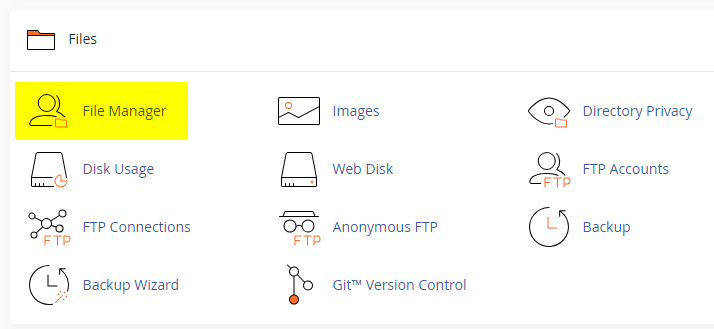
  2. Click on the "File Manager" icon. It's usually under the "Files" section.
  3. You are now in the "File Manager". Open the public_html folder, which is your website's root directory.
  4. Locate the wp-content folder inside "public_html," then open the themes folder inside of it.
  5. In the File Manager interface, click the "Upload" button and choose the theme's .zip file from your local drive.
  6. After it has been uploaded, right-click the .zip file and choose "Extract" or "Unzip".
  7. You can now delete the uploaded .zip file, but it's optional.
  8. Log in to your WordPress dashboard through your web browser.
  9. Go to Appearance → Themes. Now you will see the newly extracted theme.
  10. Make it your active theme by clicking the "Activate" button next to it.

Note: If your hosting provider doesn't offer cPanel, look for a File Manager option in your hosting dashboard (like DirectAdmin, Plesk, or CyberPanel). The process is usually very similar—just find the wp-content/themes folder and upload/extract the theme ZIP file there.

Method 3: Install using FTP

Installing a WordPress theme via FTP is straightforward, though it involves a few more steps compared to using the built-in theme uploader. Here's how to install a WordPress theme using FTP:

  1. Unzip the theme's .zip file you have downloaded.
  2. Connect to your hosting account using an FTP client such as "FileZilla" or "Core FTP".
  3. Navigate to the /wp-content/themes folder in the "Remote site" section.
  4. In the "Local site" section, locate the unzipped theme folder.
  5. Drag and drop the unzipped theme folder from the "Local site" section to the "Remote site" section.
  6. Be patient and let the transfer finish.
  7. Once the transfer is complete, log in to your WordPress dashboard and navigate to Appearance > Themes.
  8. Find the theme you just uploaded and click Activate.

Troubleshooting Tips

  • Didn't receive the download email? Wait 5–10 minutes or check your spam/junk folder. But if you still can not find this email or download link is broken, please inform us. we will send it ASAP.
  • "The uploaded file exceeds the upload_max_filesize directive in php.ini." - If you get this error when following the "Method 1", follow this tutorial: https://themesdna.com/blog/increase-maximum-file-upload-size-wordpress/
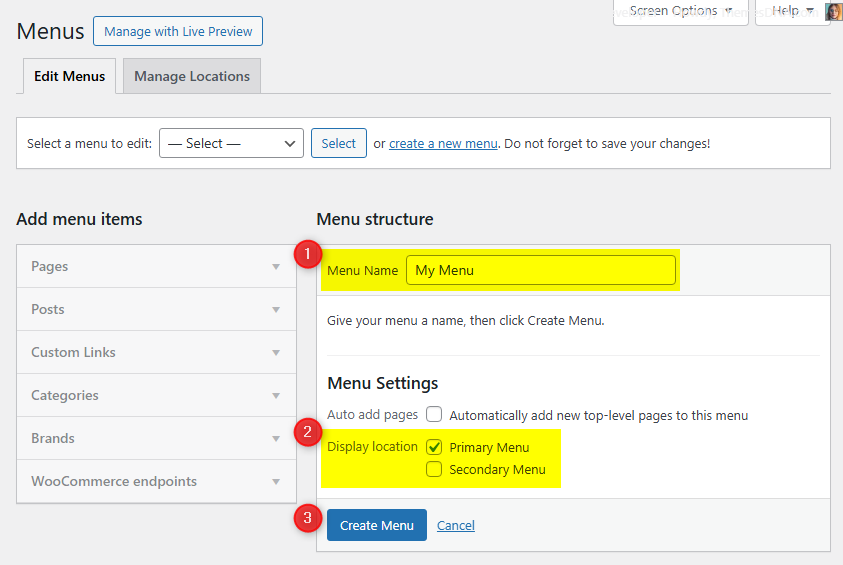
  • My menus disappeared or look different. Go to Appearance → Menus → Manage Locations and reassign your menus to the correct locations.
  • My header text or background color looks different after activating PRO. Reapply your colors in Appearance → Customize → Theme Options → Colors for Header Text Color and Background Color. Then publish.
  • Still can't install the theme? Contact us for help.

Import Demo Content

You can import the demo content, widgets, and Customizer settings shown in the CleanWP PRO theme demo.

Manual Demo Import

Step 1: Import Main Site Content

This includes: Posts, pages, menus, media, categories, tags, comments, and custom fields.

  1. Download: XML File
  2. Go to Tools → Import.
  3. Under "WordPress", click Install Now if not installed.
  4. Click Run Importer.
  5. Select the XML file and click Upload file and import.
  6. Check "Download and import file attachments", click Submit.

Step 2: Import Widgets

  1. Install the Widget Importer & Exporter plugin.
  2. Go to Tools → Widget Importer & Exporter.
  3. Copy content from: Widgets .wie File and paste into the box.
  4. Click Import Widgets.

Step 3: Import Customizer Settings

  1. Download: Customizer File
  2. Install the Customizer Export/Import plugin.
  3. Go to Appearance → Customize → Export/Import.
  4. Select the .dat file, check "Download and import image files?", click Import.

Regenerate Thumbnails

If your website already has existing posts with featured images, it's highly recommended to regenerate thumbnails after activating the CleanWP PRO theme. This ensures that all images match the new theme's layout and display sizes.

Regenerating thumbnails is optional if your site is completely new and doesn't have any uploaded images yet.

However, if you imported the demo content, regenerating thumbnails is essential to display images correctly across the site.

  1. Install and activate the Regenerate Thumbnails plugin.
  2. Go to Tools → Regenerate Thumbnails.
  3. Click the "Regenerate Thumbnails for All x Attachments" button to start the process.
  4. Wait until all images are regenerated. This may take a few minutes depending on your media library size.
  5. If you want, you can deactivate and delete the plugin once the process is complete.

This step ensures clean image alignment and sharp visuals throughout your website using the CleanWP PRO theme.

Header Image

CleanWP PRO supports a site-wide custom header image. Recommended size: 1100×275px (flexible height).

  1. Go to Appearance → Customize → Header Image.
  2. Click Add new image and upload your header image.
  3. Crop if needed and save.

Custom Widgets

CleanWP PRO includes 3 custom widgets. Add them via Appearance → Widgets.

CleanWP About Widget

Displays a profile image, description, and social media buttons.

Option ID Option Name Description Control Type Accepted Value Default
title Title Heading shown above the profile block. Text Any text About Me
image Profile Image URL URL of the profile image. Text Valid image URL Empty
description Description Short bio or description text. Textarea Any text/HTML Empty
round_buttons Round Social Buttons Display circular style for social icons. Checkbox true / false false
facebook Facebook URL Link to Facebook profile/page. Text Valid URL Empty
twitter Twitter URL Link to Twitter profile. Text Valid URL Empty
googleplus Google Plus URL Link to Google Plus profile. Text Valid URL Empty
pinterest Pinterest URL Link to Pinterest profile. Text Valid URL Empty
linkedin LinkedIn URL Link to LinkedIn profile. Text Valid URL Empty
instagram Instagram URL Link to Instagram profile. Text Valid URL Empty
flickr Flickr URL Link to Flickr profile. Text Valid URL Empty
youtube YouTube URL Link to YouTube channel. Text Valid URL Empty
vimeo Vimeo URL Link to Vimeo profile. Text Valid URL Empty
soundcloud SoundCloud URL Link to SoundCloud profile. Text Valid URL Empty
messenger Messenger URL Link to Messenger contact. Text Valid URL Empty
whatsapp WhatsApp URL Link to WhatsApp contact. Text Valid URL Empty
tiktok TikTok URL Link to TikTok profile. Text Valid URL Empty
lastfm Last.fm URL Link to Last.fm profile. Text Valid URL Empty
medium Medium URL Link to Medium profile. Text Valid URL Empty
github GitHub URL Link to GitHub profile. Text Valid URL Empty
bitbucket Bitbucket URL Link to Bitbucket profile. Text Valid URL Empty
tumblr Tumblr URL Link to Tumblr blog. Text Valid URL Empty
digg Digg URL Link to Digg profile. Text Valid URL Empty
delicious Delicious URL Link to Delicious profile. Text Valid URL Empty
stumbleupon StumbleUpon URL Link to StumbleUpon profile. Text Valid URL Empty
mix Mix URL Link to Mix profile. Text Valid URL Empty
reddit Reddit URL Link to Reddit profile. Text Valid URL Empty
dribbble Dribbble URL Link to Dribbble profile. Text Valid URL Empty
flipboard Flipboard URL Link to Flipboard profile. Text Valid URL Empty
blogger Blogger URL Link to Blogger site. Text Valid URL Empty
etsy Etsy URL Link to Etsy shop/profile. Text Valid URL Empty
behance Behance URL Link to Behance portfolio. Text Valid URL Empty
amazon Amazon URL Link to Amazon profile/shop. Text Valid URL Empty
meetup Meetup URL Link to Meetup group/profile. Text Valid URL Empty
mixcloud Mixcloud URL Link to Mixcloud profile. Text Valid URL Empty
slack Slack URL Link to Slack workspace/invite. Text Valid URL Empty
snapchat Snapchat URL Link to Snapchat profile. Text Valid URL Empty
spotify Spotify URL Link to Spotify profile/playlist. Text Valid URL Empty
vk VK URL Link to VK profile. Text Valid URL Empty
yelp Yelp URL Link to Yelp profile/page. Text Valid URL Empty
wp WordPress URL Link to WordPress.com profile/site. Text Valid URL Empty
twitch Twitch URL Link to Twitch channel. Text Valid URL Empty
telegram Telegram URL Link to Telegram channel/contact. Text Valid URL Empty
bandcamp Bandcamp URL Link to Bandcamp profile. Text Valid URL Empty
quora Quora URL Link to Quora profile. Text Valid URL Empty
foursquare Foursquare URL Link to Foursquare profile. Text Valid URL Empty
deviantart DeviantArt URL Link to DeviantArt profile. Text Valid URL Empty
imdb IMDb URL Link to IMDb profile/page. Text Valid URL Empty
codepen CodePen URL Link to CodePen profile. Text Valid URL Empty
jsfiddle JSFiddle URL Link to JSFiddle profile. Text Valid URL Empty
stackoverflow Stack Overflow URL Link to Stack Overflow profile. Text Valid URL Empty
stackexchange Stack Exchange URL Link to Stack Exchange profile. Text Valid URL Empty
buysellads BuySellAds URL Link to BuySellAds profile. Text Valid URL Empty
web500px 500px URL Link to 500px profile. Text Valid URL Empty
ello Ello URL Link to Ello profile. Text Valid URL Empty
goodreads Goodreads URL Link to Goodreads profile. Text Valid URL Empty
odnoklassniki Odnoklassniki URL Link to Odnoklassniki profile. Text Valid URL Empty
houzz Houzz URL Link to Houzz profile. Text Valid URL Empty
pocket Pocket URL Link to Pocket profile. Text Valid URL Empty
xing XING URL Link to XING profile. Text Valid URL Empty
googleplay Google Play URL Link to Google Play developer/profile page. Text Valid URL Empty
slideshare SlideShare URL Link to SlideShare profile. Text Valid URL Empty
dropbox Dropbox URL Link to Dropbox file/folder/profile. Text Valid URL Empty
paypal PayPal URL Link to PayPal.me/donation page. Text Valid URL Empty
viadeo Viadeo URL Link to Viadeo profile. Text Valid URL Empty
wikipedia Wikipedia URL Link to Wikipedia page. Text Valid URL Empty
skype Skype Username Skype handle for contact. Text Username Empty
envelope Email Address Email used for contact link. Text Valid email Empty
rss RSS Feed URL Link to RSS feed. Text Valid URL Empty

CleanWP Social Buttons Widget

Displays social media buttons in any widget area.

Option ID Option Name Description Control Type Accepted Value Default
title Title Heading shown above the social buttons. Text Any text Social Buttons
round_buttons Round Buttons Display circular style for icons. Checkbox true / false false
facebook Facebook URL Link to Facebook profile/page. Text Valid URL Empty
twitter Twitter URL Link to Twitter profile. Text Valid URL Empty
threads Threads URL Link to Threads profile. Text Valid URL Empty
googleplus Google Plus URL Link to Google Plus profile. Text Valid URL Empty
pinterest Pinterest URL Link to Pinterest profile. Text Valid URL Empty
linkedin LinkedIn URL Link to LinkedIn profile. Text Valid URL Empty
instagram Instagram URL Link to Instagram profile. Text Valid URL Empty
flickr Flickr URL Link to Flickr profile. Text Valid URL Empty
youtube YouTube URL Link to YouTube channel. Text Valid URL Empty
vimeo Vimeo URL Link to Vimeo profile. Text Valid URL Empty
soundcloud SoundCloud URL Link to SoundCloud profile. Text Valid URL Empty
messenger Messenger URL Link to Messenger contact. Text Valid URL Empty
whatsapp WhatsApp URL Link to WhatsApp contact. Text Valid URL Empty
tiktok TikTok URL Link to TikTok profile. Text Valid URL Empty
lastfm Last.fm URL Link to Last.fm profile. Text Valid URL Empty
medium Medium URL Link to Medium profile. Text Valid URL Empty
github GitHub URL Link to GitHub profile. Text Valid URL Empty
bitbucket Bitbucket URL Link to Bitbucket profile. Text Valid URL Empty
tumblr Tumblr URL Link to Tumblr blog. Text Valid URL Empty
digg Digg URL Link to Digg profile. Text Valid URL Empty
delicious Delicious URL Link to Delicious profile. Text Valid URL Empty
stumbleupon StumbleUpon URL Link to StumbleUpon profile. Text Valid URL Empty
mix Mix URL Link to Mix profile. Text Valid URL Empty
reddit Reddit URL Link to Reddit profile. Text Valid URL Empty
dribbble Dribbble URL Link to Dribbble profile. Text Valid URL Empty
flipboard Flipboard URL Link to Flipboard profile. Text Valid URL Empty
blogger Blogger URL Link to Blogger site. Text Valid URL Empty
etsy Etsy URL Link to Etsy shop/profile. Text Valid URL Empty
behance Behance URL Link to Behance portfolio. Text Valid URL Empty
amazon Amazon URL Link to Amazon profile/shop. Text Valid URL Empty
meetup Meetup URL Link to Meetup group/profile. Text Valid URL Empty
mixcloud Mixcloud URL Link to Mixcloud profile. Text Valid URL Empty
slack Slack URL Link to Slack workspace/invite. Text Valid URL Empty
snapchat Snapchat URL Link to Snapchat profile. Text Valid URL Empty
spotify Spotify URL Link to Spotify profile/playlist. Text Valid URL Empty
vk VK URL Link to VK profile. Text Valid URL Empty
yelp Yelp URL Link to Yelp profile/page. Text Valid URL Empty
wp WordPress URL Link to WordPress.com profile/site. Text Valid URL Empty
twitch Twitch URL Link to Twitch channel. Text Valid URL Empty
telegram Telegram URL Link to Telegram channel/contact. Text Valid URL Empty
bandcamp Bandcamp URL Link to Bandcamp profile. Text Valid URL Empty
quora Quora URL Link to Quora profile. Text Valid URL Empty
foursquare Foursquare URL Link to Foursquare profile. Text Valid URL Empty
deviantart DeviantArt URL Link to DeviantArt profile. Text Valid URL Empty
imdb IMDb URL Link to IMDb profile/page. Text Valid URL Empty
codepen CodePen URL Link to CodePen profile. Text Valid URL Empty
jsfiddle JSFiddle URL Link to JSFiddle profile. Text Valid URL Empty
stackoverflow Stack Overflow URL Link to Stack Overflow profile. Text Valid URL Empty
stackexchange Stack Exchange URL Link to Stack Exchange profile. Text Valid URL Empty
buysellads BuySellAds URL Link to BuySellAds profile. Text Valid URL Empty
web500px 500px URL Link to 500px profile. Text Valid URL Empty
ello Ello URL Link to Ello profile. Text Valid URL Empty
discord Discord URL Link to Discord server/invite. Text Valid URL Empty
goodreads Goodreads URL Link to Goodreads profile. Text Valid URL Empty
odnoklassniki Odnoklassniki URL Link to Odnoklassniki profile. Text Valid URL Empty
houzz Houzz URL Link to Houzz profile. Text Valid URL Empty
pocket Pocket URL Link to Pocket profile. Text Valid URL Empty
xing XING URL Link to XING profile. Text Valid URL Empty
mastodon Mastodon URL Link to Mastodon profile. Text Valid URL Empty
googleplay Google Play URL Link to Google Play developer/profile page. Text Valid URL Empty
slideshare SlideShare URL Link to SlideShare profile. Text Valid URL Empty
dropbox Dropbox URL Link to Dropbox file/folder/profile. Text Valid URL Empty
paypal PayPal URL Link to PayPal.me/donation page. Text Valid URL Empty
viadeo Viadeo URL Link to Viadeo profile. Text Valid URL Empty
wikipedia Wikipedia URL Link to Wikipedia page. Text Valid URL Empty
skype Skype Username Skype handle for contact. Text Username Empty
envelope Email Address Email used for contact link. Text Valid email Empty
rss RSS Feed URL Link to RSS feed. Text Valid URL Empty

Widget Areas

CleanWP PRO provides 4 widget areas. Manage via Appearance → Widgets.

Widget AreaLocationDescription
Main SidebarRight sidePrimary sidebar. Not shown on full-width templates or 404 page.
Footer 1Footer leftLeft column of the 3-column footer.
Footer 2Footer middleMiddle column of the 3-column footer.
Footer 3Footer rightRight column of the 3-column footer.

Note: The footer widget area only displays when at least one footer widget area has widgets.

Custom Page Templates

CleanWP PRO includes 9 custom templates:

Special Function Templates

  • Contact Form – Built-in contact form (Template Name: Contact Form). Email is configurable in Customizer.
  • Sitemap – HTML sitemap of your site (Template Name: Sitemap).
  • Authors – List of all site authors (Template Name: Authors).

Layout Templates for Pages

  • Full Width Page (No Sidebar) (Template Name: Full Width, no sidebar(s)).
  • Full Width Page (Below Sidebar) – Sidebar displays below content (Template Name: Full Width, bottom sidebar).
  • Left Sidebar Page (Template Name: Sidebar + Content).

Layout Templates for Posts

  • Full Width Post (No Sidebar) (Template Name: Full Width, no sidebar(s)).
  • Full Width Post (Below Sidebar) (Template Name: Full Width, bottom sidebar).
  • Left Sidebar Post (Template Name: Sidebar + Content).

How to Assign a Template

  1. Open the page/post in the editor.
  2. In the sidebar, find Template or Page Attributes.
  3. Select the desired template and publish/update.

How to Create a Contact Page

  1. Go to Pages → Add New, title it "Contact Us".
  2. Select the "Contact Form" template.
  3. Publish the page.
  4. Set the email in Appearance → Customize → Theme Options → Contact Page.

How to Create a Sitemap Page

  1. Go to Pages → Add New, title it "Sitemap".
  2. Select the "Sitemap" template.
  3. Publish the page.

How to Create a Site Authors Page

  1. Go to Pages → Add New, title it "Authors".
  2. Select the "Authors" template.
  3. Publish the page.

Configure in Appearance → Customize → Theme Options → Authors Page (option to hide administrators).

Customizer Theme Options

All CleanWP PRO options are in Appearance → Customize under the "Theme Options" panel.

Site Identity Options

Located under Appearance → Customize → Site Identity.

Option ID Option Name Description Control Type Accepted Value Default
custom_logo Logo Upload site logo (flexible size, recommended max 400×90px). Image Upload Image file Empty
blogname Site Title Your site's name. Text Any text Site Title
blogdescription Tagline Short site description. Text Any text Just another WordPress site
display_header_text Display Site Title and Tagline Show or hide the title/tagline text. Checkbox true / false true
site_icon Site Icon Favicon (recommended 512×512px). Image Upload Image file Empty

Colors Options

Located under Appearance → Customize → Theme Options → Colors.

Option ID Option Name Description Control Type Accepted Value Default
header_text_hover_colorHeader Hover Text ColorHover color for site title text.Color PickerHex color#c90000
body_text_colorMain Text ColorBody text color.Color PickerHex color#161514
link_colorMain Link ColorHyperlink color.Color PickerHex color#c90000
link_hover_colorMain Link Hover ColorHyperlink hover color.Color PickerHex color#111111
header_content_bg_colorHeader Background ColorHeader area background.Color PickerHex color#faf9f5
menu_bg_colorMenu Background ColorNavigation background.Color PickerHex color#777777
menu_colorMenu Link ColorMenu link text.Color PickerHex color#ffffff
menu_hover_colorMenu Link Hover ColorMenu link hover.Color PickerHex color#cccccc
menu_current_colorMenu Current Link ColorActive menu item color.Color PickerHex color#afafaf
submenu_one_bg_colorSub Menu Level 1 BackgroundFirst-level dropdown background.Color PickerHex color#888888
submenu_two_bg_colorSub Menu Level 2 BackgroundSecond-level dropdown background.Color PickerHex color#999999
main_content_bg_colorMain Content BackgroundContent area background.Color PickerHex color#faf9f5
post_bg_colorPost Background ColorPost box background.Color PickerHex color#ffffff
post_headings_bg_colorPost Title Background ColorBackground behind post titles.Color PickerHex color#ffffff
post_headings_colorPost Title ColorPost title text.Color PickerHex color#1e1e1e
post_headings_hover_colorPost Title Hover ColorPost title hover.Color PickerHex color#444444
post_meta_bg_colorPost Meta Background ColorMeta info background.Color PickerHex color#f5f5f5
rmore_colorRead More Button ColorRead More text color.Color PickerHex color#ffffff
rmore_bg_colorRead More Button BackgroundRead More background.Color PickerHex color#888888
rmore_hover_colorRead More Button Hover ColorRead More hover text.Color PickerHex color#ffffff
rmore_bg_hover_colorRead More Button Hover BackgroundRead More hover background.Color PickerHex color#666666
sticky_bg_colorSticky Post Background ColorSticky post background.Color PickerHex color#f1f1f1
sticky_bd_colorSticky Post Border ColorSticky post border.Color PickerHex color#ebebeb
caption_bg_colorWordPress Captions Background ColorCaption background.Color PickerHex color#eeeeee
caption_colorWordPress Captions Text ColorCaption text color.Color PickerHex color#444444
sidebar_widget_bg_colorSidebar Widget Background ColorSidebar widget background.Color PickerHex color#f5f5f5
sidebar_headings_bg_colorSidebar Widget Title BackgroundSidebar title background.Color PickerHex color#ffffff
sidebar_headings_colorSidebar Widget Title ColorSidebar title text.Color PickerHex color#000000
sidebar_text_colorSidebar Text ColorSidebar body text.Color PickerHex color#555555
sidebar_link_colorSidebar Link ColorSidebar link text.Color PickerHex color#333333
sidebar_link_hover_colorSidebar Link Hover ColorSidebar link hover.Color PickerHex color#777777
footer_widgets_bg_colorFooter Widgets Background ColorFooter widget area background.Color PickerHex color#eae7e7
footer_widgets_bd_colorFooter Widgets Border ColorFooter widget area border.Color PickerHex color#ffffff
footer_headings_bg_colorFooter Widget Title BackgroundFooter title background.Color PickerHex color#666666
footer_headings_colorFooter Widget Title ColorFooter title text.Color PickerHex color#ffffff
footer_text_colorFooter Text ColorFooter text color.Color PickerHex color#666666
footer_link_colorFooter Link ColorFooter link color.Color PickerHex color#666666
footer_link_hover_colorFooter Link Hover ColorFooter link hover.Color PickerHex color#222222
copyrights_bg_colorCopyrights Background ColorCopyright bar background.Color PickerHex color#dddddd
main_border_colorMain Border ColorOverall border color.Color PickerHex color#dddddd
blockquote_text_colorBlockquote Text ColorBlockquote text.Color PickerHex color#666666
blockquote_bd_colorBlockquote Border ColorBlockquote border.Color PickerHex color#cccccc
pagination_colorPosts Pagination Links ColorPagination text color.Color PickerHex color#c90000
pagination_bg_colorPosts Pagination Background ColorPagination background.Color PickerHex color#eeeeee
pagination_bd_colorPosts Pagination Border ColorPagination border.Color PickerHex color#bfbfbf
pagination_hover_colorPosts Pagination Hover ColorPagination hover text.Color PickerHex color#000000
pagination_bg_hover_colorPosts Pagination Hover BackgroundPagination hover background.Color PickerHex color#dddddd
pagination_bd_hover_colorPosts Pagination Hover BorderPagination hover border.Color PickerHex color#aaaaaa
pre_bg_color<pre> Background ColorPreformatted text background.Color PickerHex color#eeeeee
mark_ins_bg_color<mark>/<ins> Background ColorMark and ins tag background.Color PickerHex color#fff9c0
hr_bg_color<hr> Background ColorHorizontal rule color.Color PickerHex color#cccccc

Font Options

Located under Appearance → Customize → Theme Options → Font Options.

Option ID Option Name Description Control Type Accepted Value Default
font_subsetsFont SubsetsSelect font subsets to load (multiple).Multi-selectlatin, latin-ext, cyrillic, cyrillic-ext, greek, greek-ext, vietnameselatin
body_fontsBody FontGoogle Font URL for body text.Select (fonts list)Google font URL//fonts.googleapis.com/css?family=Domine:400,700
headings_fontsHeadings FontGoogle Font URL for headings.Select (fonts list)Google font URL//fonts.googleapis.com/css?family=Frank+Ruhl+Libre:400,700
menu_fontsMenu FontGoogle Font URL for navigation menu.Select (fonts list)Google font URL//fonts.googleapis.com/css?family=Oswald:400,700
body_font_sizeBody Font SizeSize of body text.Slider / Numberpx14
h1_font_sizeH1 Font SizeHeading 1 size.Slider / Numberpx36
h2_font_sizeH2 Font SizeHeading 2 size.Slider / Numberpx24
h3_font_sizeH3 Font SizeHeading 3 size.Slider / Numberpx20
h4_font_sizeH4 Font SizeHeading 4 size.Slider / Numberpx16
h5_font_sizeH5 Font SizeHeading 5 size.Slider / Numberpx14
h6_font_sizeH6 Font SizeHeading 6 size.Slider / Numberpx12
site_title_sizeSite Title Font SizeSize of logo text when no image.Slider / Numberpx32
site_description_sizeSite Description Font SizeTagline font size.Slider / Numberpx14
post_title_sizePost Title Font SizeArchive/single post title size.Slider / Numberpx24
sidebar_title_sizeSidebar Widget Title SizeSidebar widget heading size.Slider / Numberpx16
footer_title_sizeFooter Widget Title SizeFooter widget heading size.Slider / Numberpx16
menu_font_sizeMenu Font SizeNavigation menu font size.Slider / Numberpx13

Header Image Options

Located under Appearance → Customize → Header Image. Upload a site-wide header image (recommended: 1100×275px, flexible height).

Option ID Option Name Description Control Type Accepted Value Default
header_imageHeader ImageUpload a header image.Image UploadImage fileEmpty

Layout Options

Located under Appearance → Customize → Theme Options → Layout.

Option ID Option Name Description Control Type Accepted Value Default
layout_styleLayout StyleDefault layout for the site.Radiocontent-sidebar | sidebar-content | full-widthcontent-sidebar

Individual pages/posts can override this using their own template.

Menu Options

Located under Appearance → Customize → Theme Options → Menu Options.

Option ID Option Name Description Control Type Accepted Value Default
primary_menu_textMenu Mobile TextText for the mobile menu toggle.TextAny textMenu
disable_primary_menuDisable Primary MenuCompletely disable the navigation menu.Checkboxtrue / falsefalse

Post Options

Located under Appearance → Customize → Theme Options → Post Options.

Option ID Option Name Description Control Type Accepted Value Default
hide_posted_dateHide Posted DateHide publication date.Checkboxtrue / falsefalse
hide_post_authorHide Post AuthorHide author name.Checkboxtrue / falsefalse
hide_post_categoriesHide Post CategoriesHide category links.Checkboxtrue / falsefalse
hide_post_tagsHide Post TagsHide tag links.Checkboxtrue / falsefalse
hide_comments_linkHide Comment LinkHide comments count.Checkboxtrue / falsefalse
hide_thumbnailHide Thumbnails (Every Page)Hide thumbnails from listing pages.Checkboxtrue / falsefalse
hide_thumbnail_singleHide Thumbnails (Single Posts/Pages)Hide featured image on single views.Checkboxtrue / falsefalse
hide_read_more_buttonHide Read More ButtonHide the Read More button.Checkboxtrue / falsefalse
hide_author_bio_boxHide Author Bio BoxHide author bio on single posts.Checkboxtrue / falsefalse
thumbnail_linkThumbnail LinkLink thumbnails to post.Selectyes | noyes
blogpoststylePost ContentChoose excerpt or full content on listings.Selectexcerpt | contentexcerpt
grid_thumb_stylePosts Grid Thumbnails StyleThumbnail aspect style.Selectcleanwp-horizontal-image | cleanwp-square-image | cleanwp-vertical-image | cleanwp-autoh-imagecleanwp-autoh-image
read_more_textRead More TextCustom read more text.TextAny textRead More
read_more_lengthAuto Post Summary LengthExcerpt word count.NumberWords40
hide_related_postsHide Related PostsHide related posts section.Checkboxtrue / falsefalse
related_posts_numberNumber of Related PostsHow many related posts to show.Select4 | 8 | 12 | 164
hide_post_navigationHide Post Navigation (Single)Hide prev/next on single posts.Checkboxtrue / falsefalse
hide_posts_navigationHide Posts Navigation (Archives)Hide navigation on archive pages.Checkboxtrue / falsefalse
posts_navigation_typePosts Navigation TypeChoose normal or numbered pagination.Selectnormalnavi | numberednavinormalnavi

Social Links Options

Located under Appearance → Customize → Theme Options → Social Links. Add social media URLs to display social buttons.

Option ID Option Name Description Control Type Accepted Value Default
hide_social_buttonsHide Social ButtonsHide all social buttons.Checkboxtrue / falsefalse
facebooklinkFacebook URLFacebook profile/page URL.TextValid URLEmpty
twitterlinkTwitter URLTwitter/X profile URL.TextValid URLEmpty
threadslinkThreads URLThreads profile URL.TextValid URLEmpty
googlelinkGoogle Plus URLGoogle+ profile URL.TextValid URLEmpty
pinterestlinkPinterest URLPinterest profile URL.TextValid URLEmpty
linkedinlinkLinkedIn URLLinkedIn profile URL.TextValid URLEmpty
instagramlinkInstagram URLInstagram profile URL.TextValid URLEmpty
vklinkVK LinkVK profile URL.TextValid URLEmpty
flickrlinkFlickr URLFlickr profile URL.TextValid URLEmpty
youtubelinkYoutube URLYouTube channel URL.TextValid URLEmpty
vimeolinkVimeo URLVimeo profile URL.TextValid URLEmpty
soundcloudlinkSoundcloud URLSoundCloud profile URL.TextValid URLEmpty
messengerlinkMessenger URLMessenger contact URL.TextValid URLEmpty
whatsapp_buttonWhatsApp URLWhatsApp contact URL.TextValid URLEmpty
tiktok_buttonTikTok URLTikTok profile URL.TextValid URLEmpty
lastfmlinkLastfm URLLast.fm profile URL.TextValid URLEmpty
mediumlinkMedium URLMedium profile URL.TextValid URLEmpty
githublinkGithub URLGitHub profile URL.TextValid URLEmpty
bitbucketlinkBitbucket URLBitbucket profile URL.TextValid URLEmpty
tumblrlinkTumblr URLTumblr profile URL.TextValid URLEmpty
digglinkDigg URLDigg profile URL.TextValid URLEmpty
deliciouslinkDelicious URLDelicious profile URL.TextValid URLEmpty
stumblelinkStumbleupon LinkStumbleUpon profile URL.TextValid URLEmpty
mixlinkMix URLMix profile URL.TextValid URLEmpty
dribbblelinkDribbble URLDribbble profile URL.TextValid URLEmpty
flipboardlinkFlipboard URLFlipboard profile URL.TextValid URLEmpty
bloggerlinkBlogger URLBlogger profile URL.TextValid URLEmpty
etsylinkEtsy URLEtsy profile URL.TextValid URLEmpty
behancelinkBehance LinkBehance profile URL.TextValid URLEmpty
amazonlinkAmazon URLAmazon profile URL.TextValid URLEmpty
meetuplinkMeetup URLMeetup profile URL.TextValid URLEmpty
mixcloudlinkMixcloud URLMixcloud profile URL.TextValid URLEmpty
slacklinkSlack URLSlack workspace URL.TextValid URLEmpty
snapchatlinkSnapchat URLSnapchat profile URL.TextValid URLEmpty
spotifylinkSpotify URLSpotify profile URL.TextValid URLEmpty
yelplinkYelp URLYelp profile URL.TextValid URLEmpty
wplinkWordPress URLWordPress.com profile URL.TextValid URLEmpty
twitchlinkTwitch URLTwitch channel URL.TextValid URLEmpty
telegramlinkTelegram URLTelegram profile/channel URL.TextValid URLEmpty
bandcamplinkBandcamp URLBandcamp profile URL.TextValid URLEmpty
quoralinkQuora URLQuora profile URL.TextValid URLEmpty
foursquarelinkFoursquare URLFoursquare profile URL.TextValid URLEmpty
deviantartlinkDeviantArt URLDeviantArt profile URL.TextValid URLEmpty
imdblinkIMDb URLIMDb profile URL.TextValid URLEmpty
codepenlinkCodePen URLCodePen profile URL.TextValid URLEmpty
jsfiddlelinkJSFiddle URLJSFiddle profile URL.TextValid URLEmpty
solinkStack Overflow URLStack Overflow profile URL.TextValid URLEmpty
sexchangelinkStack Exchange URLStack Exchange profile URL.TextValid URLEmpty
bsalinkBuySellAds URLBuySellAds profile URL.TextValid URLEmpty
web500pxlink500px URL500px profile URL.TextValid URLEmpty
ellolinkEllo URLEllo profile URL.TextValid URLEmpty
goodreadslinkGoodreads URLGoodreads profile URL.TextValid URLEmpty
odnoklassnikilinkOdnoklassniki URLOK.RU profile URL.TextValid URLEmpty
houzzlinkHouzz URLHouzz profile URL.TextValid URLEmpty
pocketlinkPocket URLPocket profile URL.TextValid URLEmpty
xinglinkXING URLXING profile URL.TextValid URLEmpty
mastodonlinkMastodon URLMastodon profile URL.TextValid URLEmpty
googleplaylinkGoogle Play URLGoogle Play developer/profile URL.TextValid URLEmpty
slidesharelinkSlideShare URLSlideShare profile URL.TextValid URLEmpty
dropboxlinkDropbox URLDropbox link.TextValid URLEmpty
paypallinkPayPal URLPayPal.me/donation URL.TextValid URLEmpty
viadeolinkViadeo URLViadeo profile URL.TextValid URLEmpty
wikipedialinkWikipedia URLWikipedia page URL.TextValid URLEmpty
skypeusernameSkype UsernameSkype handle.TextUsernameEmpty
envelopeEmail AddressEmail for mailto link.TextValid emailEmpty
rsslinkRSS Feed URLRSS feed URL.TextValid URLEmpty

Share Buttons Options

Located under Appearance → Customize → Theme Options → Share Buttons.

Option ID Option Name Description Control Type Accepted Value Default
hide_share_buttonsHide Share ButtonsHide all share buttons on single posts.Checkboxtrue / falsefalse
hide_share_textHide Share TextHide the "Share:" label.Checkboxtrue / falsefalse
share_textShare TextCustom share label.TextAny textShare:

Default share buttons (can be individually hidden): Twitter, Facebook, Pinterest, LinkedIn, Mix, Reddit, Digg, VK.

Additional share buttons (can be individually shown): LINE, Flipboard, Telegram, Pocket, OK.RU, WhatsApp, Tumblr, Evernote, WordPress, Blogger, XING, Skype, Gmail, Yahoo! Mail, Email, Buffer, Google Bookmark.

Contact Page Options

Located under Appearance → Customize → Theme Options → Contact Page.

Option ID Option Name Description Control Type Accepted Value Default
contact_form_emailContact Form Email AddressEmail where contact form submissions are sent.TextValid emailEmpty

Authors Page Options

Located under Appearance → Customize → Theme Options → Authors Page.

Option ID Option Name Description Control Type Accepted Value Default
hide_admin_authors_pageHide AdministratorsHide admins from the Authors page.Checkboxtrue / falsefalse
hide_noposts_authors_pageHide Authors with Zero PostsHide authors with no published posts.Checkboxtrue / falsefalse

404 Page Options

Located under Appearance → Customize → Theme Options → 404 Page.

Option ID Option Name Description Control Type Accepted Value Default
error_404_heading404 Error Page HeadingHeading text for 404 page.TextareaAny textOops! That page can not be found.
error_404_messageError 404 MessageMessage text for 404 page.TextareaAny textIt looks like nothing was found at this location. Maybe try one of the links below or a search?

Custom CSS

Located under Appearance → Customize → Theme Options → Custom CSS.

Option ID Option Name Description Control Type Accepted Value Default
customcssCustom CSS CodesAdd custom CSS overrides.TextareaCSSEmpty

Other Options

Located under Appearance → Customize → Theme Options → Other Options.

Option ID Option Name Description Control Type Accepted Value Default
enable_widgets_block_editorEnable Gutenberg Widget Block EditorUse block-based widget editor instead of classic.Checkboxtrue / falsefalse
disable_responsive_embedsDisable Responsive Embedded ContentTurn off responsive embeds.Checkboxtrue / falsefalse

Reset Settings

Located under Appearance → Customize → Theme Options → Reset Settings.

Click the reset button to restore all theme options to defaults. This cannot be undone.

Option ID Option Name Description Control Type Accepted Value Default
reset_settingsReset SettingsReset all theme options to defaults.Reset ButtonTrigger

Warning: Resetting reverts all customizer options to factory defaults. Back up your settings first.

Performance & SEO Tips

Translation & RTL

CleanWP PRO is fully translation-ready and supports Right-to-Left (RTL) languages like Arabic, Hebrew, and Persian out of the box.

🌐 Translating the Theme

The theme includes a cleanwp-pro.pot file located in the /languages folder inside the theme directory. You can use this file to create translations in your own language using any of the following tools:

After translating, save your files as:

  • cleanwp-pro-[language_code].po
  • cleanwp-pro-[language_code].mo

Place them inside the /languages folder in the theme.

↔️ RTL Language Support

CleanWP PRO includes built-in RTL support. If your WordPress site language is set to an RTL language, the theme will automatically adjust layout direction, alignment, and spacing accordingly. No extra setup required.

If you're customizing your site with RTL content, make sure your text widgets, menus, and custom styles are also RTL-compatible for best results.

FAQ

How do I set up the homepage?

By default, latest posts are shown. For a static homepage: Settings → Reading → A static page.

How do I change the sidebar position?

Appearance → Customize → Theme Options → Layout – choose Content on Left, Content on Right, or Full Width. Also use page/post templates for individual overrides.

How do I add social media icons?

Appearance → Customize → Theme Options → Social Links – enter profile URLs. Or use the CleanWP Social Buttons widget.

How do I change fonts?

Appearance → Customize → Theme Options → Font Options – choose Google Fonts and sizes.

Is it compatible with WooCommerce?

Yes. Built-in WooCommerce support with product gallery zoom, lightbox, and slider.

How do I change excerpt length?

Appearance → Customize → Theme Options → Post Options → Auto Post Summary Length. Default: 40 words.

How do I change related posts count?

Appearance → Customize → Theme Options → Post Options → Number of Related Posts. Options: 4, 8, 12, 16.

Troubleshooting

Images look blurry or incorrectly cropped

Regenerate thumbnails using the Regenerate Thumbnails plugin.

Menu not showing

Assign your menu to the Primary Menu location in Appearance → Menus → Manage Locations. Check it's not disabled in Menu Options.

Footer widgets not displaying

Add widgets to at least one footer area (Footer 1, 2, or 3) in Appearance → Widgets.

Contact form not sending emails

Set the email in Customize → Theme Options → Contact Page. Consider using WP Mail SMTP for reliable delivery.

Custom CSS not working

Clear browser cache and server cache. Verify CSS syntax and selectors.

Theme looks different after update

Re-save settings in Appearance → Customize → Publish. Clear all caches.

Support & Licensing

All our WordPress themes, including CleanWP PRO, are released under the 100% GPL (General Public License). You can use the theme on unlimited websites and modify the code to suit your needs.

What’s included in free support:

  • Help with theme installation and setup
  • Bug fixes and troubleshooting related to the theme
  • Guidance on using built-in theme features

What’s not included in free support (but available as paid tasks):

  • Theme customization or resolving third-party plugin conflicts
  • Custom coding or feature implementation requests
  • Performance tuning, SEO setup, or server configuration assistance

If you need help or would like to request a paid customization, please contact us. We typically respond within 24–48 hours on working days.

Contact Support

Changelog

Version 1.2.9

  • Fixed coding issues

Version 1.2.8

  • Fixed coding issues.
  • Theme Customizer updated.
  • Many improvements.

Version 1.2.7

  • Fixed site title SEO issues.

Version 1.2.6

  • Font Awesome icons are updated from v5 to v6.
  • WooCommerce Product gallery features (zoom, swipe, lightbox) added.
  • Fixed coding issues.

Version 1.2.5

  • Fixed coding issues.
  • Theme customizer updated.
  • New features added.

Version 1.2.4

  • Fixed coding issues.
  • Theme customizer updated.

Version 1.2.3

  • Fixed coding issues.
  • Many code improvements.
  • Theme customizer updated.
  • FontAwesome updated.
  • Social buttons updated.
  • RTL language support added.
  • Screenshot updated.
  • Accessibility improved.
  • Webfonts Loader added.

Version 1.2.2

  • Fixed more minor coding issues.
  • Added custom hooks.
  • Added 'wp_body_open' hook.
  • Screenshot updated.

Version 1.2.1

  • Fixed more minor coding issues.
  • New page templates was added.

Version 1.2

  • CSS codes are minified.
  • Theme customizer updated.
  • Theme description updated.
  • Fixed minor coding issues.

Version 1.1.6

  • Removed/Replaced old functions.
  • Fixed minor coding issues.
  • Theme is now supporting to the WordPress built-in "Custom Logo" feature. Please reupload your logo using Theme customizer.

Version 1.1.2

  • Added More Color Options to Theme customizer.
  • Fixed minor coding issues.

Version 1.1.0

  • Theme customizer updated.
  • Fixed minor coding issues.

Version 1.0

  • Initial Release.