GridMag PRO Documentation

Introduction

Thank you for choosing GridMag PRO! This documentation will guide you through the installation, setup, and customization of the theme. GridMag PRO is an elegant and responsive masonry grid WordPress theme perfect for gallery websites, magazines, blogs, and more.

Quick Start Guide

  1. Install the theme via WordPress Dashboard or FTP (see Installation).
  2. Import demo content to match the live demo (see Demo Import).
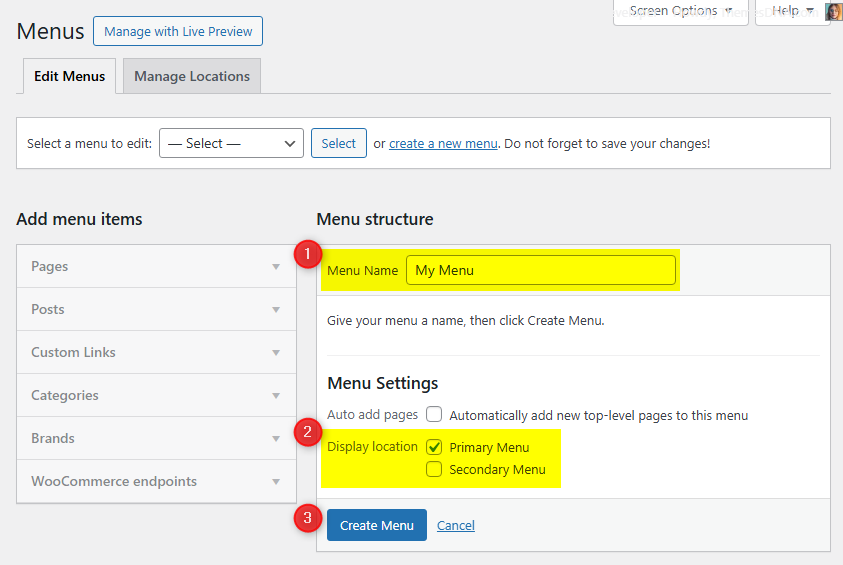
  3. Set up menus by going to Appearance → Menus (see Menus).
  4. Add widgets to the available widget areas (see Widget Areas).
  5. Customize the theme via Appearance → Customize (see Customizer).

Key Features

  • Masonry Grid Layout – Beautiful responsive masonry grid for post summaries
  • Multiple Grid Columns – Choose from 1 to 5 columns for post grids
  • Multiple Thumbnail Styles – 2:1, 4:3, 1:1, 3:4, and Auto Height thumbnails
  • AJAX Pagination – Load More button and Infinite Scroll support
  • News Ticker – Breaking news ticker with multiple post source options
  • 5 Custom Widgets – Grid Posts, List Posts, Tabbed, About Me, Social
  • 31 Widget Areas – Extensive widget placement options
  • 12 Page/Post Templates – Various layout combinations
  • Post Likes & Views – Built-in like and view counting system
  • Share Buttons – Social sharing for posts with 20+ services
  • Related Posts – Configurable related posts section
  • Sticky Sidebar – Sidebar stays visible while scrolling
  • Custom Header Image – Full header image with title/description overlay
  • WooCommerce Compatible – Full support for WooCommerce plugin
  • RTL Support – Right-to-left language support
  • 100+ Color Options – Comprehensive color customization
  • Google Fonts – Extensive font customization options
  • Responsive Design – Looks great on all devices
  • SEO Friendly – Yoast SEO breadcrumbs support

Current Version: 1.0.8

Theme Installation

After purchasing the GridMag PRO WordPress Theme, you'll receive a download link via email. Check your email inbox (or spam folder) for the product delivery email. Click the provided download link to download the theme's .zip file to your computer. Follow one of a method given below to install the theme on your website.

Upgrading from the Free GridMag Theme?

GridMag PRO is a separate theme. Whether or not you're currently using the free GridMag theme, you need to install GridMag PRO using one of the methods below.

If you're upgrading from the free version, most of your existing WordPress Customizer settings will remain in place. So you don't need to reconfigure everything from scratch. However, you will need to reupload a few images and reapply specific color settings.

After activating GridMag PRO, go to Appearance → Customize and reupload the following:

  • Site Logo
  • Site Icon (favicon)
  • Header Image
  • Background Image

If you changed below color options in the free version, reapply them in Appearance → Customize → Theme Options → Colors:

  • Header Text Color
  • Background Color

Tip: You can install PRO without deleting the free theme. Use Live Preview to confirm your layout, then click Activate & Publish.

Method 1: Install Using the WordPress Dashboard (Easiest and Fastest)

This is the easiest and fastest method to install this WordPress theme.

  1. Go to "WordPress Dashboard" → "Appearance" → "Themes" and click on "Add New" button.
  2. Click on "Upload Theme" button and choose the zip file you have downloaded.
  3. Click on "Install Now" button.
  4. Activate the theme.
  5. Now go to "Appearance" → "Customize" to configure theme options.

Method 2: Install using cPanel File Manager

In some cases, you may not be able to install a WordPress theme through the WordPress dashboard—especially if the theme's ZIP file exceeds the maximum upload size limit. When this happens, you can install the theme using cPanel's File Manager, which is often simpler than using FTP. Follow the steps below to install your theme via the File Manager in cPanel.

  1. Log in to your cPanel account. Your cPanel URL will be https://yourdomain.com/cpanel or a similar URL.
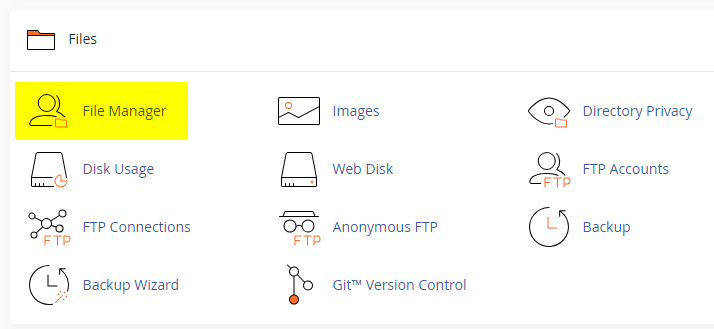
  2. Click on the "File Manager" icon. It's usually under the "Files" section.
  3. You are now in the "File Manager". Open the public_html folder, which is your website's root directory.
  4. Locate the wp-content folder inside "public_html," then open the themes folder inside of it.
  5. In the File Manager interface, click the "Upload" button and choose the theme's .zip file from your local drive.
  6. After it has been uploaded, right-click the .zip file and choose "Extract" or "Unzip".
  7. You can now delete the uploaded .zip file, but it's optional.
  8. Log in to your WordPress dashboard through your web browser.
  9. Go to Appearance → Themes. Now you will see the newly extracted theme.
  10. Make it your active theme by clicking the "Activate" button next to it.

Note: If your hosting provider doesn't offer cPanel, look for a File Manager option in your hosting dashboard (like DirectAdmin, Plesk, or CyberPanel). The process is usually very similar—just find the wp-content/themes folder and upload/extract the theme ZIP file there.

Method 3: Install using FTP

Installing a WordPress theme via FTP is straightforward, though it involves a few more steps compared to using the built-in theme uploader. Here's how to install a WordPress theme using FTP:

  1. Unzip the theme's .zip file you have downloaded.
  2. Connect to your hosting account using an FTP client such as "FileZilla" or "Core FTP".
  3. Navigate to the /wp-content/themes folder in the "Remote site" section.
  4. In the "Local site" section, locate the unzipped theme folder.
  5. Drag and drop the unzipped theme folder from the "Local site" section to the "Remote site" section.
  6. Be patient and let the transfer finish.
  7. Once the transfer is complete, log in to your WordPress dashboard and navigate to Appearance > Themes.
  8. Find the theme you just uploaded and click Activate.

Troubleshooting Tips

  • Didn't receive the download email? Wait 5–10 minutes or check your spam/junk folder. But if you still can not find this email or download link is broken, please inform us. we will send it ASAP.
  • "The uploaded file exceeds the upload_max_filesize directive in php.ini." - If you get this error when following the "Method 1", follow this tutorial: https://themesdna.com/blog/increase-maximum-file-upload-size-wordpress/
  • My menus disappeared or look different. Go to Appearance → Menus → Manage Locations and reassign your menus to the correct locations.
  • My header text or background color looks different after activating PRO. Reapply your colors in Appearance → Customize → Theme Options → Colors for Header Text Color and Background Color. Then publish.
  • Still can't install the theme? Contact us for help.

Import Demo Content

You can import the demo content, widgets, and Customizer settings shown in the GridMag PRO theme demo.

Manual Demo Import

Step 1: Import Main Site Content

This includes: Posts, pages, menus, media, categories, tags, comments, and custom fields.

  1. Download: XML File
  2. Go to Tools → Import.
  3. Under "WordPress", click Install Now if not installed.
  4. Click Run Importer.
  5. Select the XML file and click Upload file and import.
  6. Check "Download and import file attachments", click Submit.

Step 2: Import Widgets

  1. Install the Widget Importer & Exporter plugin.
  2. Go to Tools → Widget Importer & Exporter.
  3. Copy content from: Widgets .wie File and paste into the box.
  4. Click Import Widgets.

Step 3: Import Customizer Settings

  1. Download: Customizer File
  2. Install the Customizer Export/Import plugin.
  3. Go to Appearance → Customize → Export/Import.
  4. Select the .dat file, check "Download and import image files?", click Import.

Regenerate Thumbnails

If your website already has existing posts with featured images, it's highly recommended to regenerate thumbnails after activating the GridMag PRO theme. This ensures that all images match the new theme's layout and display sizes.

Regenerating thumbnails is optional if your site is completely new and doesn't have any uploaded images yet.

However, if you imported the demo content, regenerating thumbnails is essential to display images correctly across the site.

  1. Install and activate the Regenerate Thumbnails plugin.
  2. Go to Tools → Regenerate Thumbnails.
  3. Click the "Regenerate Thumbnails for All x Attachments" button to start the process.
  4. Wait until all images are regenerated. This may take a few minutes depending on your media library size.
  5. If you want, you can deactivate and delete the plugin once the process is complete.

This step ensures clean image alignment and sharp visuals throughout your website using the GridMag PRO theme.

Header Image

GridMag PRO supports a custom header image that appears below the site header area. The header image can display a title and description overlay, and can link to any URL.

How to Set a Header Image

  1. Go to Appearance → Customize → Theme Options → Header Image.
  2. Click Add new image to upload or select an image.
  3. The recommended width is 1250 pixels (theme default) for best results.

Header Image Options

The following options are available under Appearance → Customize → Theme Options → Header Image:

  • Hide Header Image from Everywhere – Completely hide the header image.
  • Remove Link from Header Image – Remove the clickable link.
  • Hide both Title and Description from Header Image – Remove the text overlay.
  • Show Header Title on Smaller Screens – Display the title on mobile.
  • Hide Description from Header Image – Hide only the description.
  • Add Custom Title/Custom Description to Header Image – Use custom text instead of site title/description.
  • Header Image Custom Title – Enter custom title text.
  • Header Image Custom Description – Enter custom description text.
  • Header Image Destination URL – Set where the header image links to.

Per-Post/Per-Page Header Image

  • You can also set a custom header image per post/page using the Post/Page Settings metabox when editing a post.
  • Each post/page can have its own header image, destination URL, title, and description.

News Ticker

GridMag PRO includes a built-in news ticker that displays scrolling post headlines below the primary menu. The news ticker is disabled by default.

How to Enable the News Ticker

  1. Go to Appearance → Customize → Theme Options → News Ticker Options.
  2. Check the Enable News Ticker option.
  3. Configure the ticker options as desired.
  4. Click Publish to save changes.

Custom Widgets

GridMag PRO includes 5 custom widgets designed to enhance your website. These widgets can be added via Appearance → Widgets in your WordPress Dashboard.

GridMag Tabbed Widget

Displays posts in a 3-tab layout. Each tab can load posts from a chosen source (recent, category, tag, or IDs) with ordering and meta toggles.

Key Features

  • Up to 3 tabs; each tab can be shown/hidden and renamed (defaults: Popular, Recent, Random).
  • Per-tab sources: recent posts, category posts, tag posts, or posts by IDs.
  • Per-tab ordering: date, modified date, comment count, random, post likes, or post views (ASC/DESC).
  • Include or exclude specific post IDs per tab; category/tag selectors for category/tag modes.
  • Show/hide thumbnail, author, date, comments, likes, views, and snippet; choose snippet type (content or excerpt) and length; custom date format.
  • Global posts-per-tab setting (default: 3).

Usage Notes

  • Place in sidebars or content areas where a compact tabbed list fits your design.
  • Mix different sources per tab (e.g., Popular, Recent, Random) for variety.

Below is the complete list of options available:

Option IDOption NameDescriptionControl TypeAccepted ValueDefault
titleTitleWidget heading text.TextAny text stringTabbed Widget
show_taboneDisplay Tab 1Show/hide tab 1.Checkboxtrue / falsetrue
show_tabtwoDisplay Tab 2Show/hide tab 2.Checkboxtrue / falsetrue
show_tabthreeDisplay Tab 3Show/hide tab 3.Checkboxtrue / falsetrue
tabone_nameTab 1 NameLabel for tab 1.TextAny text stringPopular
tabtwo_nameTab 2 NameLabel for tab 2.TextAny text stringRecent
tabthree_nameTab 3 NameLabel for tab 3.TextAny text stringRandom
tabone_post_typeTab 1 Post TypeSource for tab 1.SelectRecent Posts, Category Posts, Tag Posts, Posts by IDsRecent Posts
tabtwo_post_typeTab 2 Post TypeSource for tab 2.SelectRecent Posts, Category Posts, Tag Posts, Posts by IDsRecent Posts
tabthree_post_typeTab 3 Post TypeSource for tab 3.SelectRecent Posts, Category Posts, Tag Posts, Posts by IDsRecent Posts
tabone_featured_catTab 1 CategoryCategory for tab 1 when using Category Posts.Category DropdownA valid category(none)
tabtwo_featured_catTab 2 CategoryCategory for tab 2 when using Category Posts.Category DropdownA valid category(none)
tabthree_featured_catTab 3 CategoryCategory for tab 3 when using Category Posts.Category DropdownA valid category(none)
tabone_featured_tagTab 1 TagTag for tab 1 when using Tag Posts.Tag DropdownA valid tag(none)
tabtwo_featured_tagTab 2 TagTag for tab 2 when using Tag Posts.Tag DropdownA valid tag(none)
tabthree_featured_tagTab 3 TagTag for tab 3 when using Tag Posts.Tag DropdownA valid tag(none)
tabone_include_postsTab 1 Post IDsIDs for tab 1 when using Posts by IDs.TextComma-separated IDs(empty)
tabtwo_include_postsTab 2 Post IDsIDs for tab 2 when using Posts by IDs.TextComma-separated IDs(empty)
tabthree_include_postsTab 3 Post IDsIDs for tab 3 when using Posts by IDs.TextComma-separated IDs(empty)
tabone_exclude_postsTab 1 Exclude PostsIDs to exclude on tab 1.TextComma-separated IDs(empty)
tabtwo_exclude_postsTab 2 Exclude PostsIDs to exclude on tab 2.TextComma-separated IDs(empty)
tabthree_exclude_postsTab 3 Exclude PostsIDs to exclude on tab 3.TextComma-separated IDs(empty)
tabone_orderbyTab 1 OrderbyOrdering for tab 1.SelectPublished Date, Modified Date, Number of Comments, Random, Post Likes, Post ViewsNumber of Comments
tabtwo_orderbyTab 2 OrderbyOrdering for tab 2.SelectPublished Date, Modified Date, Number of Comments, Random, Post Likes, Post ViewsPublished Date
tabthree_orderbyTab 3 OrderbyOrdering for tab 3.SelectPublished Date, Modified Date, Number of Comments, Random, Post Likes, Post ViewsRandom
tabone_orderTab 1 OrderSort direction for tab 1.SelectAscending, DescendingDescending
tabtwo_orderTab 2 OrderSort direction for tab 2.SelectAscending, DescendingDescending
tabthree_orderTab 3 OrderSort direction for tab 3.SelectAscending, DescendingDescending
numberNumber of PostsPosts per tab.NumberPositive integer3
show_thumbnailDisplay Post ThumbnailShow/hide featured image.Checkboxtrue / falsetrue
show_authorDisplay Post AuthorShow/hide author.Checkboxtrue / falsefalse
show_dateDisplay Post DateShow/hide date.Checkboxtrue / falsetrue
show_commentsDisplay Comment CountShow/hide comment count.Checkboxtrue / falsetrue
show_likesDisplay Post LikesShow/hide likes.Checkboxtrue / falsetrue
show_viewsDisplay Post ViewsShow/hide views.Checkboxtrue / falsetrue
show_snippetDisplay Post SnippetShow/hide snippet.Checkboxtrue / falsetrue
snippet_typePost Snippet TypeUse post content or excerpt.SelectPost Content, Post ExcerptPost Content
snippet_lengthSnippet LengthNumber of words for snippet.NumberPositive integer20
dateformatDate FormatPHP date format string.TextA valid date formatY-m-d

GridMag About Me Widget

Displays an author bio block with a profile image (via URL), widget title, description, and social links. Optional round-style social buttons.

Key Features

  • Widget title and bio description text
  • Profile image set by URL field
  • Round social buttons toggle
  • Social links for 50+ networks (e.g., Facebook, Twitter, Instagram, LinkedIn, Pinterest, YouTube, Vimeo, SoundCloud, WhatsApp, Telegram, GitHub, Dribbble, Reddit, and more)
Option ID Option Name Description Control Type Accepted Value Default
titleTitleWidget heading text.TextAny text stringAbout Me
imageProfile Image URLURL to the profile image.TextValid image URL(empty)
descriptionDescriptionBio or about text.TextareaAny text(empty)
round_buttonsRound Social ButtonsUse round style for social icons.Checkboxtrue / falsefalse
facebookFacebook URLProfile URL.TextValid URL(empty)
twitterTwitter URLProfile URL.TextValid URL(empty)
googleplusGoogle Plus URLProfile URL.TextValid URL(empty)
pinterestPinterest URLProfile URL.TextValid URL(empty)
linkedinLinkedIn URLProfile URL.TextValid URL(empty)
instagramInstagram URLProfile URL.TextValid URL(empty)
flickrFlickr URLProfile URL.TextValid URL(empty)
youtubeYouTube URLChannel/profile URL.TextValid URL(empty)
vimeoVimeo URLProfile URL.TextValid URL(empty)
soundcloudSoundCloud URLProfile URL.TextValid URL(empty)
messengerMessenger URLProfile/contact URL.TextValid URL(empty)
whatsappWhatsApp URLContact URL.TextValid URL(empty)
lastfmLast.fm URLProfile URL.TextValid URL(empty)
mediumMedium URLProfile URL.TextValid URL(empty)
githubGitHub URLProfile URL.TextValid URL(empty)
bitbucketBitbucket URLProfile URL.TextValid URL(empty)
tumblrTumblr URLProfile URL.TextValid URL(empty)
diggDigg URLProfile URL.TextValid URL(empty)
deliciousDelicious URLProfile URL.TextValid URL(empty)
stumbleuponStumbleUpon URLProfile URL.TextValid URL(empty)
mixMix URLProfile URL.TextValid URL(empty)
redditReddit URLProfile URL.TextValid URL(empty)
dribbbleDribbble URLProfile URL.TextValid URL(empty)
flipboardFlipboard URLProfile URL.TextValid URL(empty)
bloggerBlogger URLBlog URL.TextValid URL(empty)
etsyEtsy URLShop/profile URL.TextValid URL(empty)
behanceBehance URLProfile URL.TextValid URL(empty)
amazonAmazon URLProfile/store URL.TextValid URL(empty)
meetupMeetup URLProfile/group URL.TextValid URL(empty)
mixcloudMixcloud URLProfile URL.TextValid URL(empty)
slackSlack URLWorkspace/share URL.TextValid URL(empty)
snapchatSnapchat URLProfile URL.TextValid URL(empty)
spotifySpotify URLProfile URL.TextValid URL(empty)
vkVK URLProfile URL.TextValid URL(empty)
yelpYelp URLProfile URL.TextValid URL(empty)
wpWordPress URLProfile URL.TextValid URL(empty)
twitchTwitch URLChannel URL.TextValid URL(empty)
telegramTelegram URLProfile/channel URL.TextValid URL(empty)
bandcampBandcamp URLProfile URL.TextValid URL(empty)
quoraQuora URLProfile URL.TextValid URL(empty)
foursquareFoursquare URLProfile URL.TextValid URL(empty)
deviantartDeviantArt URLProfile URL.TextValid URL(empty)
imdbIMDB URLProfile URL.TextValid URL(empty)
codepenCodePen URLProfile URL.TextValid URL(empty)
jsfiddleJSFiddle URLProfile URL.TextValid URL(empty)
stackoverflowStack Overflow URLProfile URL.TextValid URL(empty)
stackexchangeStack Exchange URLProfile URL.TextValid URL(empty)
buyselladsBuySellAds URLProfile URL.TextValid URL(empty)
web500px500px URLProfile URL.TextValid URL(empty)
elloEllo URLProfile URL.TextValid URL(empty)
goodreadsGoodreads URLProfile URL.TextValid URL(empty)
odnoklassnikiOdnoklassniki URLProfile URL.TextValid URL(empty)
houzzHouzz URLProfile URL.TextValid URL(empty)
pocketPocket URLProfile URL.TextValid URL(empty)
xingXING URLProfile URL.TextValid URL(empty)
googleplayGoogle Play URLProfile/app URL.TextValid URL(empty)
slideshareSlideShare URLProfile URL.TextValid URL(empty)
dropboxDropbox URLProfile/share URL.TextValid URL(empty)
paypalPayPal URLProfile/donate link.TextValid URL(empty)
viadeoViadeo URLProfile URL.TextValid URL(empty)
wikipediaWikipedia URLUser page URL.TextValid URL(empty)
skypeSkype URLSkype link (call/chat).TextValid URL(empty)
envelopeEmail Linkmailto: link.TextValid mailto URL(empty)
rssRSS Feed URLRSS feed link.TextValid URL(empty)

GridMag Social Widget

Displays social profile buttons with an optional round style. Set a widget title, choose round buttons, and provide URLs for the networks you use.

Option ID Option Name Description Control Type Accepted Value Default
titleTitleWidget heading text.TextAny text stringSocial Buttons
round_buttonsRound ButtonsUse round style for social icons.Checkboxtrue / falsefalse
facebookFacebook URLProfile URL.TextValid URL(empty)
twitterTwitter URLProfile URL.TextValid URL(empty)
googleplusGoogle Plus URLProfile URL.TextValid URL(empty)
pinterestPinterest URLProfile URL.TextValid URL(empty)
linkedinLinkedIn URLProfile URL.TextValid URL(empty)
instagramInstagram URLProfile URL.TextValid URL(empty)
flickrFlickr URLProfile URL.TextValid URL(empty)
youtubeYouTube URLChannel/profile URL.TextValid URL(empty)
vimeoVimeo URLProfile URL.TextValid URL(empty)
soundcloudSoundCloud URLProfile URL.TextValid URL(empty)
messengerMessenger URLProfile/contact URL.TextValid URL(empty)
whatsappWhatsApp URLContact URL.TextValid URL(empty)
lastfmLast.fm URLProfile URL.TextValid URL(empty)
mediumMedium URLProfile URL.TextValid URL(empty)
githubGitHub URLProfile URL.TextValid URL(empty)
bitbucketBitbucket URLProfile URL.TextValid URL(empty)
tumblrTumblr URLProfile URL.TextValid URL(empty)
diggDigg URLProfile URL.TextValid URL(empty)
deliciousDelicious URLProfile URL.TextValid URL(empty)
stumbleuponStumbleUpon URLProfile URL.TextValid URL(empty)
mixMix URLProfile URL.TextValid URL(empty)
redditReddit URLProfile URL.TextValid URL(empty)
dribbbleDribbble URLProfile URL.TextValid URL(empty)
flipboardFlipboard URLProfile URL.TextValid URL(empty)
bloggerBlogger URLBlog URL.TextValid URL(empty)
etsyEtsy URLShop/profile URL.TextValid URL(empty)
behanceBehance URLProfile URL.TextValid URL(empty)
amazonAmazon URLProfile/store URL.TextValid URL(empty)
meetupMeetup URLProfile/group URL.TextValid URL(empty)
mixcloudMixcloud URLProfile URL.TextValid URL(empty)
slackSlack URLWorkspace/share URL.TextValid URL(empty)
snapchatSnapchat URLProfile URL.TextValid URL(empty)
spotifySpotify URLProfile URL.TextValid URL(empty)
vkVK URLProfile URL.TextValid URL(empty)
yelpYelp URLProfile URL.TextValid URL(empty)
wpWordPress URLProfile URL.TextValid URL(empty)
twitchTwitch URLChannel URL.TextValid URL(empty)
telegramTelegram URLProfile/channel URL.TextValid URL(empty)
bandcampBandcamp URLProfile URL.TextValid URL(empty)
quoraQuora URLProfile URL.TextValid URL(empty)
foursquareFoursquare URLProfile URL.TextValid URL(empty)
deviantartDeviantArt URLProfile URL.TextValid URL(empty)
imdbIMDB URLProfile URL.TextValid URL(empty)
codepenCodePen URLProfile URL.TextValid URL(empty)
jsfiddleJSFiddle URLProfile URL.TextValid URL(empty)
stackoverflowStack Overflow URLProfile URL.TextValid URL(empty)
stackexchangeStack Exchange URLProfile URL.TextValid URL(empty)
buyselladsBuySellAds URLProfile URL.TextValid URL(empty)
web500px500px URLProfile URL.TextValid URL(empty)
elloEllo URLProfile URL.TextValid URL(empty)
goodreadsGoodreads URLProfile URL.TextValid URL(empty)
odnoklassnikiOdnoklassniki URLProfile URL.TextValid URL(empty)
houzzHouzz URLProfile URL.TextValid URL(empty)
pocketPocket URLProfile URL.TextValid URL(empty)
xingXING URLProfile URL.TextValid URL(empty)
googleplayGoogle Play URLProfile/app URL.TextValid URL(empty)
slideshareSlideShare URLProfile URL.TextValid URL(empty)
dropboxDropbox URLProfile/share URL.TextValid URL(empty)
paypalPayPal URLProfile/donate link.TextValid URL(empty)
viadeoViadeo URLProfile URL.TextValid URL(empty)
wikipediaWikipedia URLUser page URL.TextValid URL(empty)
skypeSkype URLSkype link (call/chat).TextValid URL(empty)
envelopeEmail Linkmailto: link.TextValid mailto URL(empty)
rssRSS Feed URLRSS feed link.TextValid URL(empty)

Widget Areas

There are 31 widget areas in the GridMag PRO theme.


  1. Header Banner Widgets

    Located on the right side of the header. Add a "Custom HTML" widget with your 728×90 banner ad code. Requires "Logo (left) + Banner (right)" header style.

  2. Main Sidebar Widgets

    The main sidebar widget area located on the side of your web page content.

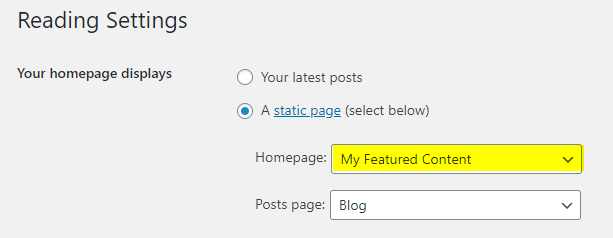
  3. Top Full Width Widgets (Default HomePage)

    Full-width widget area after the header. Displayed on the default homepage (latest posts).

  4. Top Full Width Widgets (Static HomePage)

    Full-width after header. Displayed on the static homepage.

  5. Top Full Width Widgets (Single Pages)

    Displayed on single posts (except attachments and pages).

  6. Top Full Width Widgets (Singular Pages)

    Displayed on single post of any post type (including attachments and pages).

  7. Top Full Width Widgets (Everywhere)

    Displayed on every page of your website.

  8. Bottom Full Width Widgets (Default HomePage)

    Full-width before the footer. Displayed on the default homepage.

  9. Bottom Full Width Widgets (Static HomePage)

    Before footer. Displayed on the static homepage.

  10. Bottom Full Width Widgets (Single Pages)

    Before footer. Displayed on single posts.

  11. Bottom Full Width Widgets (Singular Pages)

    Before footer. Displayed on singular pages.

  12. Bottom Full Width Widgets (Everywhere)

    Before footer. Displayed on every page.

  13. Top Widgets (Default HomePage)

    Top of the main content area. Displayed on the default homepage.

  14. Top Widgets (Static HomePage)

    Top of main content. Displayed on the static homepage.

  15. Top Widgets (Single Pages)

    Top of main content. Displayed on single posts.

  16. Top Widgets (Singular Pages)

    Top of main content. Displayed on singular pages.

  17. Top Widgets (Everywhere)

    Top of main content. Displayed on every page.

  18. Bottom Widgets (Default HomePage)

    Bottom of the main content area. Displayed on the default homepage.

  19. Bottom Widgets (Static HomePage)

    Bottom of main content. Displayed on the static homepage.

  20. Bottom Widgets (Single Pages)

    Bottom of main content. Displayed on single posts.

  21. Bottom Widgets (Singular Pages)

    Bottom of main content. Displayed on singular pages.

  22. Bottom Widgets (Everywhere)

    Bottom of main content. Displayed on every page.

  23. Single Post Bottom Widgets

    Located at the bottom of single post of any post type (except attachments and pages).

  24. Footer Top Widgets

    Located on the top of the footer.

  25. Footer 1 Widgets

    Column 1 of the footer.

  26. Footer 2 Widgets

    Column 2 of the footer.

  27. Footer 3 Widgets

    Column 3 of the footer.

  28. Footer 4 Widgets

    Column 4 of the footer.

  29. Footer 5 Widgets

    Column 5 of the footer.

  30. Footer Bottom Widgets

    Located at the bottom of the footer.

  31. 404 Page Widgets

    Located on the 404 (not found) page.

How to Control Widget Visibility by Location

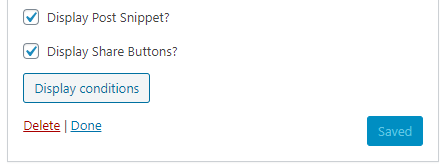
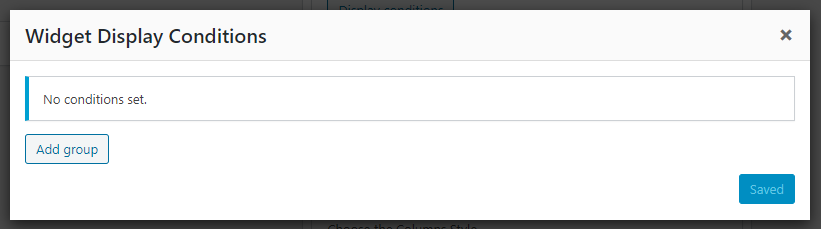
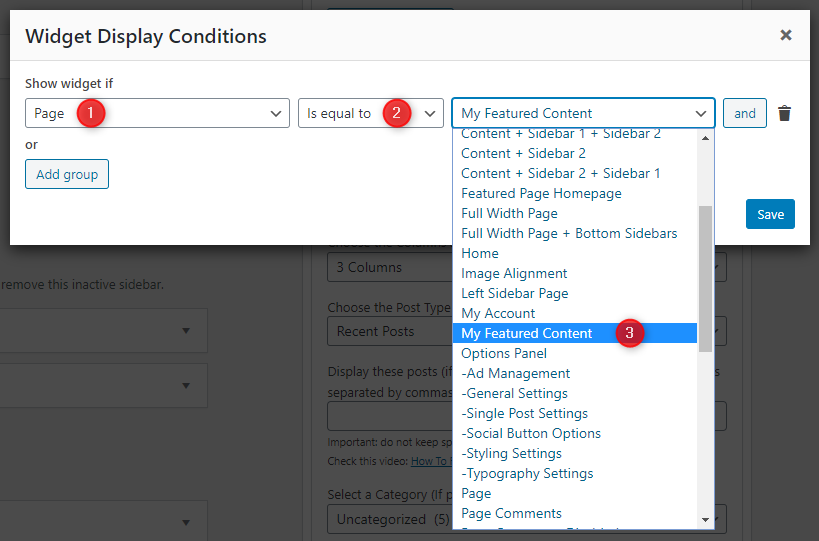
If you'd like to display a widget in specific locations only, install and activate the Widget Display Conditions or Widget Context plugin.

Then drag and drop your widget into any of the "(Everywhere)" widget areas and use the plugin's conditions to control where it appears.

Custom Page Templates

GridMag PRO includes 12 custom page and post templates:

Special Function Templates

  • Featured Content: Displays featured post widgets instead of regular content.
  • Contact Form: Creates a contact page with a built-in contact form.
  • Sitemap: Displays a structured list of your site's pages, categories, and archives.
  • Authors: Shows a list of all authors with profiles and post counts.

Layout Templates

  • "Full Width, no sidebar" (Page/Post): Content in full width without any sidebars.
  • "Full Width, bottom sidebar" (Page/Post): Content in full width with a sidebar below.
  • "Content + Sidebar" (Page/Post): Content on the left, sidebar on the right.
  • "Sidebar + Content" (Page/Post): Sidebar on the left, content on the right.

How to Assign a Custom Template

  1. Go to Pages or PostsAdd New or edit an existing one.
  2. Look for the Template option:
    • In Gutenberg: Click the Page/Post tab in the right sidebar → Template.
    • In Classic Editor: Enable Page/Post Attributes via Screen Options, then use the Template dropdown.
  3. Select the desired template and click Publish or Update.

How to Create a Contact Page

Step 1: Create the Page

  1. Go to Pages → Add New.
  2. Title the page (e.g., Contact Us).
  3. Select the Contact Form template.
  4. Click Publish.

Step 2: Configure Email Address

  1. Go to Appearance → Customize → Theme Options → Page Templates Options.
  2. Enter your email in the Contact Form Email Address field.
  3. Click Publish.

Note: If you do not set the Contact Form Email Address, the form will not send emails.

How to Create a Sitemap Page

  1. Go to Pages → Add New.
  2. Title the page Sitemap.
  3. Select the Sitemap template.
  4. Click Publish.

How to Create a Site Authors Page

  1. Go to Pages → Add New.
  2. Title the page (e.g., Our Authors).
  3. Select the Authors template.
  4. Click Publish.

Optional: Go to Appearance → Customize → Theme Options → Page Templates Options to hide administrators or authors with zero posts.

Customizer Theme Options

To access all theme options:

  1. Go to your WordPress Dashboard.
  2. Navigate to Appearance → Customize.
  3. Click on Theme Options.

Site Identity Options

Below is the complete list of Site Identity Options available:

Option IDOption NameDescriptionControl TypeAccepted ValueDefault
custom_logoLogoImage ID of the custom logo.Media UploaderInteger (attachment ID)0 (none)
blognameSite TitleMain title of the website.TextAny text“My WordPress Site”
blogdescriptionTaglineShort descriptive sentence.TextAny text“Just another WordPress site”
display_header_textDisplay Site Title & TaglineShow or hide the title/tagline text.Checkboxtrue / falsetrue
site_iconSite Icon (Favicon)512×512 px recommended.Media UploaderInteger (attachment ID)0 (none)

Colors Options

GridMag PRO provides 100+ color options to fully customize the appearance. All color options are available under Appearance → Customize → Colors.

Option ID Option Name Description Control Type Accepted Value Default
body_text_colorMain Text ColorBody text color.Color PickerHex color#555555
link_colorMain Link ColorDefault link color.Color PickerHex color#666666
link_hover_colorMain Link Hover ColorHover color for links.Color PickerHex color#000000
headings_colorGeneral Headings ColorHeading text color.Color PickerHex color#111111
secondary_menu_bg_colorSecondary Menu Background ColorSecondary menu background.Color PickerHex color#333333
secondary_menu_colorSecondary Menu Link ColorSecondary menu link color.Color PickerHex color#ffffff
secondary_menu_shadow_colorSecondary Menu Link Shadow ColorShadow color for secondary menu links.Color PickerHex color#000000
secondary_menu_hover_colorSecondary Menu Link Hover ColorHover color for secondary menu links.Color PickerHex color#dddddd
secondary_menu_hover_bg_colorSecondary Menu Link Hover Background ColorHover background for secondary menu links.Color PickerHex color#000000
secondary_submenu_one_bg_colorSecondary Sub Menu Background ColorBackground for secondary submenu.Color PickerHex color#444444
secondary_submenu_one_bd_colorSecondary Sub Menu Border ColorBorder for secondary submenu.Color PickerHex color#666666
secondary_menu_icon_colorSecondary Responsive Menu Icon ColorIcon color for secondary responsive menu.Color PickerHex color#ffffff
header_bg_colorHeader Background ColorSite header background.Color PickerHex color#ffffff
header_image_title_colorHeader Image Area Title ColorTitle color on header image.Color PickerHex color#ffffff
header_image_title_hover_colorHeader Image Area Title Hover ColorHover color for header image title.Color PickerHex color#ffffff
header_image_desc_colorHeader Image Area Description ColorDescription color on header image.Color PickerHex color#ffffff
primary_menu_bg_colorPrimary Menu Background ColorPrimary menu background.Color PickerHex color#333333
primary_menu_bd_colorPrimary Menu Border ColorPrimary menu border.Color PickerHex color#7f181b
primary_menu_colorPrimary Menu Link ColorPrimary menu link color.Color PickerHex color#ffffff
primary_menu_shadow_colorPrimary Menu Link Shadow ColorShadow color for primary menu links.Color PickerHex color#000000
primary_menu_hover_colorPrimary Menu Link Hover ColorHover color for primary menu links.Color PickerHex color#ffffff
primary_menu_hover_bg_colorPrimary Menu Link Hover Background ColorHover background for primary menu links.Color PickerHex color#7f181b
primary_submenu_one_bg_colorPrimary Sub Menu Background ColorBackground for primary submenu.Color PickerHex color#444444
primary_submenu_one_bd_colorPrimary Sub Menu Border 1 ColorBorder 1 for primary submenu.Color PickerHex color#222222
primary_submenu_two_bd_colorPrimary Sub Menu Border 2 ColorBorder 2 for primary submenu.Color PickerHex color#383838
primary_submenu_three_bd_colorPrimary Sub Menu Border 3 ColorBorder 3 for primary submenu.Color PickerHex color#666666
primary_menu_icon_colorPrimary Responsive Menu Icon ColorIcon color for primary responsive menu.Color PickerHex color#ffffff
header_social_bg_colorHeader Social Bar Background ColorBackground for header social bar.Color PickerHex color#222222
news_ticker_bg_colorNews Ticker Background ColorBackground for news ticker.Color PickerHex color#cccccc
news_ticker_heading_colorNews Ticker Heading ColorHeading text color.Color PickerHex color#ffffff
news_ticker_heading_bg_colorNews Ticker Heading Background ColorHeading background color.Color PickerHex color#7f181b
news_ticker_date_bg_colorNews Ticker Dates Background ColorBackground for ticker dates.Color PickerHex color#333333
news_ticker_text_colorNews Ticker Text ColorTicker text color.Color PickerHex color#000000
news_ticker_hover_text_colorNews Ticker Hover Text ColorHover color for ticker text.Color PickerHex color#555555
sidebar_widget_bg_colorSidebar Widgets Background ColorSidebar widget background.Color PickerHex color#ffffff
sidebar_widget_bd_colorSidebar Widgets Border 1 ColorPrimary border for sidebar widgets.Color PickerHex color#dddddd
sidebar_widget_bd_two_colorSidebar Widgets Border 2 ColorSecondary border for sidebar widgets.Color PickerHex color#ffffff
grid_post_bg_colorGrid Post Background ColorBackground for grid posts.Color PickerHex color#ffffff
grid_post_bd_colorGrid Post Border 1 ColorPrimary border for grid posts.Color PickerHex color#dddddd
grid_post_bd_two_colorGrid Post Border 2 ColorSecondary border for grid posts.Color PickerHex color#ffffff
post_title_colorSingle Post Title ColorTitle color in single posts.Color PickerHex color#000000
post_title_hover_colorSingle Post Title Hover ColorHover color for single post titles.Color PickerHex color#333333
post_title_shadow_colorSingle Post Title Shadow ColorShadow color for single post titles.Color PickerHex color#ffffff
post_title_bg_colorSingle Post Title Background ColorBackground for single post titles.Color PickerHex color#e4e4e4
post_title_bd_one_colorSingle Post Title Border Color 1Border 1 for single post titles.Color PickerHex color#dddddd
post_title_bd_two_colorSingle Post Title Border Color 2Border 2 for single post titles.Color PickerHex color#ffffff
list_post_title_colorList Post Title ColorTitle color for list posts.Color PickerHex color#000000
list_post_title_hover_colorList Post Title Hover ColorHover color for list post titles.Color PickerHex color#333333
grid_post_title_bg_colorGrid Post Title Background ColorBackground for grid post titles.Color PickerHex color#eeeeee
grid_post_title_colorGrid Post Title ColorTitle color for grid posts.Color PickerHex color#000000
grid_post_title_hover_colorGrid Post Title Hover ColorHover color for grid post titles.Color PickerHex color#b52e31
grid_post_title_shadow_colorGrid Post Title Shadow ColorShadow color for grid post titles.Color PickerHex color#ffffff
post_body_link_colorPost Content Link ColorLinks inside post content.Color PickerHex color#409BD4
post_body_link_hover_colorPost Content Link Hover ColorHover color for post content links.Color PickerHex color#08ACD5
postcats_colorPost Categories ColorPost category text color.Color PickerHex color#ffffff
postcats_bg_colorPost Categories Background ColorBackground for post categories.Color PickerHex color#7f181b
postcats_hover_colorPost Categories Hover ColorHover text color for categories.Color PickerHex color#ffffff
postcats_bg_hover_colorPost Categories Hover Background ColorHover background for categories.Color PickerHex color#000000
post_meta_colorSingle Post Meta ColorMeta text color in single posts.Color PickerHex color#666666
post_meta_hover_colorSingle Post Meta Hover ColorHover color for single post meta.Color PickerHex color#000000
list_post_meta_colorList Post Meta ColorMeta text color in list posts.Color PickerHex color#666666
list_post_meta_hover_colorList Post Meta Hover ColorHover color for list post meta.Color PickerHex color#000000
grid_post_meta_bg_colorGrid Post Meta Background ColorBackground for grid post meta.Color PickerHex color#eeeeee
grid_post_meta_bd_one_colorGrid Post Meta Border 1 ColorPrimary border for grid post meta.Color PickerHex color#dddddd
grid_post_meta_bd_two_colorGrid Post Meta Border 2 ColorSecondary border for grid post meta.Color PickerHex color#ffffff
grid_post_meta_colorGrid Post Meta ColorMeta text color in grid posts.Color PickerHex color#555555
grid_post_meta_hover_colorGrid Post Meta Hover ColorHover color for grid post meta.Color PickerHex color#000000
sidebar_title_colorSidebar Title ColorSidebar widget title color.Color PickerHex color#000000
sidebar_title_shadow_colorSidebar Title Shadow ColorShadow color for sidebar titles.Color PickerHex color#ffffff
sidebar_title_bg_colorSidebar Title Background ColorBackground for sidebar titles.Color PickerHex color#e4e4e4
sidebar_title_bd_one_colorSidebar Title Border 1 ColorPrimary border for sidebar titles.Color PickerHex color#dddddd
sidebar_title_bd_two_colorSidebar Title Border 2 ColorSecondary border for sidebar titles.Color PickerHex color#ffffff
sidebar_link_colorSidebar Link ColorLink color in sidebar.Color PickerHex color#444444
sidebar_link_hover_colorSidebar Link Hover ColorHover color for sidebar links.Color PickerHex color#666666
sidebar_list_bd_colorSidebar List Border ColorBorder for sidebar lists.Color PickerHex color#f6f6f6
tag_cloud_colorTag Cloud Link ColorTag cloud link color.Color PickerHex color#ffffff
tag_cloud_bg_colorTag Cloud Link BackgroundTag cloud link background.Color PickerHex color#888888
tag_cloud_hover_colorTag Cloud Link Hover ColorHover color for tag cloud links.Color PickerHex color#ffffff
tag_cloud_hover_bg_colorTag Cloud Link Hover BackgroundHover background for tag cloud links.Color PickerHex color#000000
footer_bg_colorFooter Background ColorFooter background.Color PickerHex color#333333
footer_bd_colorFooter Border ColorFooter border color.Color PickerHex color#555555
footer_title_colorFooter Title ColorFooter widget title color.Color PickerHex color#ffffff
footer_title_bd_one_colorFooter Title Border One ColorPrimary border for footer titles.Color PickerHex color#444444
footer_title_bd_two_colorFooter Title Border Two ColorSecondary border for footer titles.Color PickerHex color#222222
footer_text_colorFooter Text ColorGeneral footer text color.Color PickerHex color#cecece
footer_link_colorFooter Link ColorFooter link color.Color PickerHex color#dbdbdb
footer_link_hover_colorFooter Link Hover ColorHover color for footer links.Color PickerHex color#ffffff
footer_list_bd_colorFooter List Border ColorBorder color for footer lists.Color PickerHex color#3a3a3a
cp_bg_colorCopyrights Background ColorBackground for copyrights bar.Color PickerHex color#222222
cp_bd_colorCopyrights Border ColorBorder for copyrights bar.Color PickerHex color#3D3D3D
cp_colorCopyrights Text ColorText color for copyrights.Color PickerHex color#ECFFF1
button_text_colorButton Text ColorButton text color.Color PickerHex color#ffffff
button_text_shadow_colorButton Text Shadow ColorShadow color for button text.Color PickerHex color#000000
button_bg_colorButton Background ColorButton background.Color PickerHex color#333333
button_bd_colorButton Border ColorButton border.Color PickerHex color#000000
button_hover_bg_colorButton Hover Background ColorHover background for buttons.Color PickerHex color#7f181b
selected_text_colorSelected Text ColorText color for selections.Color PickerHex color#ffffff
selected_text_bg_colorSelected Text Background ColorBackground color for selections.Color PickerHex color#333333
disable_shadow_colorDisable Shadow ColorRemove box shadows from header, footer, grid posts, and boxes.Checkboxtrue / falsefalse
disable_color_optionsDisable All Color OptionsIgnore all color settings and use theme defaults (may improve speed).Checkboxtrue / falsefalse

Font Options

Below is the complete list of Font Options available:

Option ID Option Name Description Control Type Accepted Value Default
font_subsetsFont SubsetsSelect language subsets to load.Multi-SelectCyrillic, Cyrillic Extended, Greek, Greek Extended, Latin, Latin Extended, VietnameseLatin
body_fontsBody Font-FamilyFont family for body text.SelectGoogle/system fontsDomine
body_font_sizeBody Font-SizeFont size for body text.Select8px–72px13px
body_font_weightBody Font-WeightWeight for body text.Select400, 700400
body_font_styleBody Font-StyleStyle for body text.SelectNormal, ItalicNormal
body_line_heightBody Line-HeightLine height for body text.TextNumeric (e.g., 1.6)1.6
site_title_fontsSite Title Font-FamilyFont family for site title.SelectGoogle/system fontsPlayfair Display
site_title_font_sizeSite Title Font-SizeFont size for site title.Select8px–72px24px
site_title_font_weightSite Title Font-WeightWeight for site title.Select400, 700700
site_title_font_styleSite Title Font-StyleStyle for site title.SelectNormal, ItalicNormal
site_title_line_heightSite Title Line-HeightLine height for site title.TextNumeric1
site_title_text_transformSite Title Text TransformText transform for site title.SelectNone, Capitalize, Uppercase, Lowercase, Initial, InheritNone
site_desc_fontsSite Description Font-FamilyFont family for site description.SelectGoogle/system fontsDomine
site_desc_font_sizeSite Description Font-SizeFont size for site description.Select8px–72px13px
site_desc_font_weightSite Description Font-WeightWeight for site description.Select400, 700400
site_desc_font_styleSite Description Font-StyleStyle for site description.SelectNormal, ItalicNormal
site_desc_line_heightSite Description Line-HeightLine height for site description.TextNumeric1
site_desc_text_transformSite Description Text TransformText transform for site description.SelectNone, Capitalize, Uppercase, Lowercase, Initial, InheritNone
header_image_title_fontsHeader Image Title Font-FamilyFont for header image title.SelectGoogle/system fontsPlayfair Display
header_image_title_font_sizeHeader Image Title Font-SizeFont size for header image title.Select8px–72px24px
header_image_title_font_weightHeader Image Title Font-WeightWeight for header image title.Select400, 700400
header_image_title_font_styleHeader Image Title Font-StyleStyle for header image title.SelectNormal, ItalicNormal
header_image_title_line_heightHeader Image Title Line-HeightLine height for header image title.TextNumeric1
header_image_title_text_transformHeader Image Title Text TransformText transform for header image title.SelectNone, Capitalize, Uppercase, Lowercase, Initial, InheritNone
header_image_desc_fontsHeader Image Description Font-FamilyFont for header image description.SelectGoogle/system fontsDomine
header_image_desc_font_sizeHeader Image Description Font-SizeFont size for header image description.Select8px–72px13px
header_image_desc_font_weightHeader Image Description Font-WeightWeight for header image description.Select400, 700400
header_image_desc_font_styleHeader Image Description Font-StyleStyle for header image description.SelectNormal, ItalicNormal
header_image_desc_line_heightHeader Image Description Line-HeightLine height for header image description.TextNumeric1
header_image_desc_text_transformHeader Image Description Text TransformText transform for header image description.SelectNone, Capitalize, Uppercase, Lowercase, Initial, InheritNone
primary_menu_fontsPrimary Menu Font-FamilyFont for primary menu.SelectGoogle/system fontsOswald
primary_menu_font_sizePrimary Menu Font-SizeFont size for primary menu.Select8px–72px13px
primary_menu_font_weightPrimary Menu Font-WeightWeight for primary menu.Select400, 700400
primary_menu_font_stylePrimary Menu Font-StyleStyle for primary menu.SelectNormal, ItalicNormal
primary_menu_text_transformPrimary Menu Text TransformText transform for primary menu.SelectNone, Capitalize, Uppercase, Lowercase, Initial, InheritUppercase
secondary_menu_fontsSecondary Menu Font-FamilyFont for secondary menu.SelectGoogle/system fontsOswald
secondary_menu_font_sizeSecondary Menu Font-SizeFont size for secondary menu.Select8px–72px13px
secondary_menu_font_weightSecondary Menu Font-WeightWeight for secondary menu.Select400, 700400
secondary_menu_font_styleSecondary Menu Font-StyleStyle for secondary menu.SelectNormal, ItalicNormal
secondary_menu_text_transformSecondary Menu Text TransformText transform for secondary menu.SelectNone, Capitalize, Uppercase, Lowercase, Initial, InheritUppercase
news_ticker_fontsNews Ticker Font-FamilyFont for news ticker.SelectGoogle/system fontsOswald
news_ticker_font_sizeNews Ticker Font-SizeFont size for news ticker.Select8px–72px13px
news_ticker_font_weightNews Ticker Font-WeightWeight for news ticker.Select400, 700400
news_ticker_font_styleNews Ticker Font-StyleStyle for news ticker.SelectNormal, ItalicNormal
news_ticker_text_transformNews Ticker Text TransformText transform for news ticker.SelectNone, Capitalize, Uppercase, Lowercase, Initial, InheritUppercase
hpost_title_fontsGrid Post Title Font-FamilyFont for grid post titles.SelectGoogle/system fontsPlayfair Display
hpost_title_font_sizeGrid Post Title Font-SizeFont size for grid post titles.Select8px–72px17px
hpost_title_font_weightGrid Post Title Font-WeightWeight for grid post titles.Select400, 700700
hpost_title_font_styleGrid Post Title Font-StyleStyle for grid post titles.SelectNormal, ItalicNormal
hpost_title_line_heightGrid Post Title Line-HeightLine height for grid post titles.TextNumeric1.2
hpost_title_text_transformGrid Post Titles Text TransformText transform for grid post titles.SelectNone, Capitalize, Uppercase, Lowercase, Initial, InheritNone
hpost_title_sm_fontsList Post Title Font-FamilyFont for list post titles.SelectGoogle/system fontsPlayfair Display
hpost_title_sm_font_sizeList Post Title Font-SizeFont size for list post titles.Select8px–72px15px
hpost_title_sm_font_weightList Post Title Font-WeightWeight for list post titles.Select400, 700700
hpost_title_sm_font_styleList Post Title Font-StyleStyle for list post titles.SelectNormal, ItalicNormal
hpost_title_sm_line_heightList Post Title Line-HeightLine height for list post titles.TextNumeric1.2
hpost_title_sm_text_transformList Post Titles Text TransformText transform for list post titles.SelectNone, Capitalize, Uppercase, Lowercase, Initial, InheritNone
hpost_cats_fontsGrid Post Categories Font-FamilyFont for grid post categories.SelectGoogle/system fontsOswald
hpost_cats_font_sizeGrid Post Categories Font-SizeFont size for grid post categories.Select8px–72px12px
hpost_cats_font_weightGrid Post Categories Font-WeightWeight for grid post categories.Select400, 700400
hpost_cats_font_styleGrid Post Categories Font-StyleStyle for grid post categories.SelectNormal, ItalicNormal
hpost_cats_text_transformGrid Post Categories Text TransformText transform for grid post categories.SelectNone, Capitalize, Uppercase, Lowercase, Initial, InheritUppercase
hpost_meta_fontsPost Meta Font-FamilyFont for post meta.SelectGoogle/system fontsOswald
hpost_meta_font_sizePost Meta Font-SizeFont size for post meta.Select8px–72px12px
hpost_meta_font_weightPost Meta Font-WeightWeight for post meta.Select400, 700400
hpost_meta_font_stylePost Meta Font-StyleStyle for post meta.SelectNormal, ItalicNormal
hpost_meta_text_transformPost Meta Text TransformText transform for post meta.SelectNone, Capitalize, Uppercase, Lowercase, Initial, InheritUppercase
post_title_fontsPost Title Font-FamilyFont for single post titles.SelectGoogle/system fontsPlayfair Display
post_title_font_sizePost Title Font-SizeFont size for single post titles.Select8px–72px26px
post_title_font_weightPost Title Font-WeightWeight for single post titles.Select400, 700700
post_title_font_stylePost Title Font-StyleStyle for single post titles.SelectNormal, ItalicNormal
post_title_line_heightPost Title Line-HeightLine height for single post titles.TextNumeric1.2
post_title_text_transformPost Titles Text TransformText transform for single post titles.SelectNone, Capitalize, Uppercase, Lowercase, Initial, InheritNone
widget_title_fontsMain/Sidebars Widget Title Font-FamilyFont for widget titles.SelectGoogle/system fontsOswald
widget_title_font_sizeMain/Sidebars Title Font-SizeFont size for widget titles.Select8px–72px15px
widget_title_font_weightMain/Sidebars Title Font-WeightWeight for widget titles.Select400, 700400
disable_google_fontsDisable Google FontsStop loading Google Fonts; use only non-Google font choices.Checkboxtrue / falsefalse
disable_font_optionsDisable All Font OptionsIgnore all font settings and use theme defaults (may improve speed).Checkboxtrue / falsefalse

Menu Options

Available under Theme Options → Menu Options:

Option IDOption NameDescriptionControl TypeAccepted ValueDefault
disable_sticky_menuDisable Sticky Feature from Primary MenuDisable the sticky behavior of the primary menu.Checkboxtrue / falsefalse
enable_sticky_mobile_menuEnable Sticky Feature for Primary Menu on Small ScreenMake the primary menu sticky on mobile devices.Checkboxtrue / falsefalse
disable_primary_menuDisable Primary MenuCompletely disable the primary navigation menu.Checkboxtrue / falsefalse
disable_responsive_primary_menuDisable Responsiveness from Primary MenuDisable the mobile/responsive view of the primary menu.Checkboxtrue / falsefalse
disable_secondary_menuDisable Secondary MenuCompletely disable the secondary navigation menu.Checkboxtrue / falsefalse
hide_header_dateHide Date from Secondary MenuHide the date display in the secondary menu bar.Checkboxtrue / falsefalse
disable_responsive_secondary_menuDisable Responsiveness from Secondary MenuDisable the mobile/responsive view of the secondary menu.Checkboxtrue / falsefalse

Layout Options

Available under Theme Options → Layout Options:

Option IDOption NameDescriptionControl TypeAccepted ValueDefault
main_container_widthWebsite Width (non-singular)Width on screens larger than 1277px for non-single pages.TextCSS width value1250px
main_container_singular_widthWebsite Width (singular)Width on screens larger than 1277px for single posts/pages.TextCSS width value1250px
non_singular_layoutNon-Singular Layout StyleLayout for non-singular pages.RadioSidebar + Content, Content + Sidebar, One Column, One Column + Bottom SidebarContent + Sidebar
singular_layoutSingular Layout StyleLayout for singular posts/pages.RadioSidebar + Content, Content + Sidebar, One Column, One Column + Bottom SidebarContent + Sidebar
main_content_widthMain Content WidthWidth percentage of main content in 2-column layout. Combined with sidebar should be less than 100%.TextPositive number (%)77
sidebar_widthSidebar WidthWidth percentage of sidebar in 2-column layout. Combined with content should be less than 100%.TextPositive number (%)22.5

Header Image Options

Below is the complete list of Header Image Options available:

Option ID Option Name Description Control Type Accepted Value Default
hide_header_imageHide Header Image from EverywhereCompletely hide the header image.Checkboxtrue / falsefalse
remove_header_image_linkRemove Link from Header ImageRemove the clickable link from the header image.Checkboxtrue / falsefalse
hide_header_image_detailsHide Title and Description from Header ImageHide both the title and description overlay.Checkboxtrue / falsefalse
header_image_details_mobileShow Header Title on Smaller ScreensForce header title to display on small screens.Checkboxtrue / falsefalse
hide_header_image_descriptionHide Description from Header ImageHide the description overlay only.Checkboxtrue / falsefalse
header_image_custom_textAdd Custom Title/Description to Header ImageUse custom text instead of site title/description.Checkboxtrue / falsefalse
header_image_custom_titleHeader Image Custom TitleCustom title text for the header image.TextAny text(empty)
header_image_custom_descriptionHeader Image Custom DescriptionCustom description text for the header image.TextAny text(empty)
header_image_destinationHeader Image Destination URLCustom link for the header image.TextValid URL(empty)

Header Options

Available under Theme Options → Header Options:

Option IDOption NameDescriptionControl TypeAccepted ValueDefault
site_header_styleHeader StyleSelect the site header layout style.RadioLogo (left) + Banner (right), Logo (full-width) + Banner (full-width), Logo (full-width)Logo + Banner
hide_taglineHide TaglineHide the site tagline/description.Checkboxtrue / falsefalse
hide_header_contentHide Header ContentHide the entire header content area.Checkboxtrue / falsefalse
header_left_widthHeader Left WidthWidth % of header left side (2-column header).TextPositive number40
header_right_widthHeader Right WidthWidth % of header right side (2-column header).TextPositive number59.2

News Ticker Options

Available under Theme Options → News Ticker Options.

Option ID Option Name Description Control Type Accepted Value Default
enable_news_tickerEnable News TickerTurn the news ticker on/off.Checkboxtrue / falsefalse
news_ticker_headingNews Ticker HeadingHeading label shown before ticker items.TextAny textBreaking News
news_ticker_lengthNumber of News Ticker PostsHow many posts to display.TextPositive integer5
news_ticker_post_typeNews Ticker Posts TypeSource of posts for ticker.Selectrecentposts, catposts, tagposts, postsbyidsrecentposts
news_ticker_include_postsInclude Posts (IDs)Comma-separated post IDs to include when using postsbyids.TextComma-separated IDs(empty)
news_ticker_catNews Ticker Posts CategoryCategory used when type is catposts.Category DropdownCategory ID0
news_ticker_tagNews Ticker Posts TagTag used when type is tagposts.Tag DropdownTag ID0
news_ticker_orderbyNews Ticker Posts OrderbySort field for ticker posts.Selectdate, modified, comment_count, rand, post_likes, post_viewsdate
news_ticker_orderNews Ticker Posts OrderAscending or descending order.SelectASC / DESCDESC
news_ticker_exclude_postsExclude PostsComma-separated IDs to exclude from ticker.TextComma-separated IDs(empty)
news_ticker_durationNews Ticker DurationMarquee duration in milliseconds.TextPositive integer60000
hide_date_news_tickerHide Dates from News TickerHide the date shown with ticker items.Checkboxtrue / falsefalse

Post Options

Available under Theme Options → Post Options:

Option IDOption NameDescriptionControl TypeAccepted ValueDefault
hide_posts_homeHide Blog Posts from Home PageHide the main blog posts from homepage.Checkboxtrue / falsefalse
hide_posts_headingHide HomePage Posts HeadingHide the heading above homepage posts.Checkboxtrue / falsefalse
posts_headingHomePage Posts HeadingCustom heading text for homepage posts.TextAny textRecent Posts
thumbnail_linkFeatured Image LinkLink featured images to their posts.SelectYes / NoYes
grid_thumb_stylePosts Grid Thumbnails StyleThumbnail aspect ratio for post grid.Select2:1, 4:3, 1:1, 3:4, Auto Height4:3
post_grid_colsPosts Grid ColumnsNumber of columns in the post grid.Select1–5 Columns3 Columns
read_more_lengthAuto Post Summary LengthNumber of words in post summary.TextPositive integer20
show_post_snippetShow Post Snippets on SummariesShow text excerpts on post summaries.Checkboxtrue / falsefalse
hide_post_title_homeHide Post Titles from SummariesHide titles in post grid summaries.Checkboxtrue / falsefalse
hide_post_titleHide Post Headers from Single PostsHide headers in single post view.Checkboxtrue / falsefalse
remove_post_title_linkRemove Links from Single Post TitlesRemove clickable links from titles.Checkboxtrue / falsefalse
hide_posted_date_homeHide Dates from SummariesHide dates in post grid.Checkboxtrue / falsefalse
hide_posted_dateHide Dates from Single PostsHide dates in single post view.Checkboxtrue / falsefalse
hide_post_author_homeHide Authors from SummariesHide author names in post grid.Checkboxtrue / falsefalse
hide_post_authorHide Authors from Single PostsHide author in single view.Checkboxtrue / falsefalse
hide_post_categories_homeHide Categories from SummariesHide categories in post grid.Checkboxtrue / falsefalse
hide_post_categoriesHide Categories from Single PostsHide categories in single view.Checkboxtrue / falsefalse
hide_post_tagsHide Tags from Single PostsHide tags in single view.Checkboxtrue / falsefalse
hide_comments_link_homeHide Comment Links from SummariesHide comment links in post grid.Checkboxtrue / falsefalse
hide_comments_linkHide Comment Links from Single PostsHide comment links in single view.Checkboxtrue / falsefalse
hide_comment_formHide Comments/Form from Single PostsHide comments section entirely.Checkboxtrue / falsefalse
hide_post_editHide Edit Links from Single PostsHide edit links for logged-in users.Checkboxtrue / falsefalse
hide_thumbnailHide Featured Images from SummariesHide thumbnails in post grid.Checkboxtrue / falsefalse
hide_thumbnail_singleHide Featured Images from Single PostsHide featured image in single view.Checkboxtrue / falsefalse
hide_post_breadcrumbsHide Breadcrumbs from Full PostHide Yoast SEO breadcrumbs. Note: You need to install and activate Yoast SEO plugin to display breadcrumbs.Checkboxtrue / falsefalse
hide_author_bio_boxHide Author Bio BoxHide the author bio section.Checkboxtrue / falsefalse
post_ad_one_codePost Ad 1 CodeAd code placed under post title.TextareaHTML/JS code(empty)
hide_post_ad_oneHide Post Ad 1Hide the first post ad.Checkboxtrue / falsefalse
post_ad_two_codePost Ad 2 CodeAd code placed under post content.TextareaHTML/JS code(empty)
hide_post_ad_twoHide Post Ad 2Hide the second post ad.Checkboxtrue / falsefalse

Post/Posts Navigation Options

Available under Theme Options → Post/Posts Navigation Options:

Option IDOption NameDescriptionControl TypeAccepted ValueDefault
hide_post_navigationHide Post NavigationHide prev/next navigation on single posts.Checkboxtrue / falsefalse
post_navigation_typePost Navigation TypeStyle of single post navigation.SelectWith Thumbnails / Without ThumbnailsWithout Thumbnails
hide_posts_navigationHide Posts NavigationHide navigation on homepage/archive/search pages.Checkboxtrue / falsefalse
posts_navigation_typePosts Navigation TypePagination style for post listings. If WP-PageNavi plugin is activated, this navigation will be replaced by WP-PageNavi navigation.SelectNormal Navigation, Numbered Navigation, Load More Button, Infinite ScrollNumbered Navigation
loadmore_textLoad More Button TextText for the load more button.TextAny textLoad More
loading_textLoading TextText shown while loading posts.TextAny textLoading...
loadfailed_textLoad Failed TextText shown when loading fails.TextAny textFailed to load posts.

Page Options

Available under Theme Options → Page Options:

Option IDOption NameDescriptionControl TypeAccepted ValueDefault
thumbnail_link_pageFeatured Image LinkLink page featured images to their pages.SelectYes / NoYes
hide_thumbnail_pageHide Featured ImagesHide featured images from single pages.Checkboxtrue / falsefalse
hide_page_titleHide Page HeadersHide page title headers.Checkboxtrue / falsefalse
remove_page_title_linkRemove Links from Page TitlesRemove clickable links from titles.Checkboxtrue / falsefalse
hide_page_dateHide Posted DatesHide dates from single pages.Checkboxtrue / falsefalse
hide_page_authorHide Page AuthorsHide author names from pages.Checkboxtrue / falsefalse
hide_page_commentsHide Comment LinksHide comment links from pages.Checkboxtrue / falsefalse
hide_page_comment_formHide Comments/FormHide comments section from pages.Checkboxtrue / falsefalse
hide_page_editHide Edit LinksHide edit links from pages.Checkboxtrue / falsefalse

Header Social Buttons Options

Available under Theme Options → Header Social Buttons.

Option ID Option Name Description Control Type Accepted Value Default
hide_header_social_buttonsHide Header Social + Search + Login/Logout + Random Article ButtonsHide all header social/search/login/random buttons at once.Checkboxtrue / falsefalse
hide_search_button_headerHide Search Button from HeaderHide the search button (unless all header buttons are hidden).Checkboxtrue / falsefalse
hide_login_button_headerHide Login/Logout Button from HeaderHide the login/logout button (unless all header buttons are hidden).Checkboxtrue / falsefalse
hide_rp_button_headerHide Random Article Button from HeaderHide the random article button (unless all header buttons are hidden).Checkboxtrue / falsefalse
twitterbuttonTwitter URLLink used for Twitter header button.TextValid URL(empty)
facebookbuttonFacebook URLLink used for Facebook header button.TextValid URL(empty)
googlebuttonGoogle Plus URLLink used for Google Plus header button.TextValid URL(empty)
pinterestbuttonPinterest URLLink used for Pinterest header button.TextValid URL(empty)
linkedinbuttonLinkedIn URLLink used for LinkedIn header button.TextValid URL(empty)
instagrambuttonInstagram URLLink used for Instagram header button.TextValid URL(empty)
vkbuttonVK URLLink used for VK header button.TextValid URL(empty)
flickrbuttonFlickr URLLink used for Flickr header button.TextValid URL(empty)
youtubebuttonYouTube URLLink used for YouTube header button.TextValid URL(empty)
vimeobuttonVimeo URLLink used for Vimeo header button.TextValid URL(empty)
soundcloudbuttonSoundCloud URLLink used for SoundCloud header button.TextValid URL(empty)
messengerbuttonMessenger URLLink used for Messenger header button.TextValid URL(empty)
whatsappbuttonWhatsApp URLLink used for WhatsApp header button.TextValid URL(empty)
lastfmbuttonLast.fm URLLink used for Last.fm header button.TextValid URL(empty)
mediumbuttonMedium URLLink used for Medium header button.TextValid URL(empty)
githubbuttonGitHub URLLink used for GitHub header button.TextValid URL(empty)
bitbucketbuttonBitbucket URLLink used for Bitbucket header button.TextValid URL(empty)
tumblrbuttonTumblr URLLink used for Tumblr header button.TextValid URL(empty)
diggbuttonDigg URLLink used for Digg header button.TextValid URL(empty)
deliciousbuttonDelicious URLLink used for Delicious header button.TextValid URL(empty)
stumblebuttonStumbleUpon URLLink used for StumbleUpon header button.TextValid URL(empty)
mixbuttonMix URLLink used for Mix header button.TextValid URL(empty)
redditbuttonReddit URLLink used for Reddit header button.TextValid URL(empty)
dribbblebuttonDribbble URLLink used for Dribbble header button.TextValid URL(empty)
flipboardbuttonFlipboard URLLink used for Flipboard header button.TextValid URL(empty)
bloggerbuttonBlogger URLLink used for Blogger header button.TextValid URL(empty)
etsybuttonEtsy URLLink used for Etsy header button.TextValid URL(empty)
behancebuttonBehance URLLink used for Behance header button.TextValid URL(empty)
amazonbuttonAmazon URLLink used for Amazon header button.TextValid URL(empty)
meetupbuttonMeetup URLLink used for Meetup header button.TextValid URL(empty)
mixcloudbuttonMixcloud URLLink used for Mixcloud header button.TextValid URL(empty)
slackbuttonSlack URLLink used for Slack header button.TextValid URL(empty)
snapchatbuttonSnapchat URLLink used for Snapchat header button.TextValid URL(empty)
spotifybuttonSpotify URLLink used for Spotify header button.TextValid URL(empty)
yelpbuttonYelp URLLink used for Yelp header button.TextValid URL(empty)
wordpressbuttonWordPress URLLink used for WordPress header button.TextValid URL(empty)
twitchbuttonTwitch URLLink used for Twitch header button.TextValid URL(empty)
telegrambuttonTelegram URLLink used for Telegram header button.TextValid URL(empty)
bandcampbuttonBandcamp URLLink used for Bandcamp header button.TextValid URL(empty)
quorabuttonQuora URLLink used for Quora header button.TextValid URL(empty)
foursquarebuttonFoursquare URLLink used for Foursquare header button.TextValid URL(empty)
deviantartbuttonDeviantArt URLLink used for DeviantArt header button.TextValid URL(empty)
imdbbuttonIMDB URLLink used for IMDB header button.TextValid URL(empty)
codepenbuttonCodePen URLLink used for CodePen header button.TextValid URL(empty)
jsfiddlebuttonJSFiddle URLLink used for JSFiddle header button.TextValid URL(empty)
stackoverflowbuttonStack Overflow URLLink used for Stack Overflow header button.TextValid URL(empty)
stackexchangebuttonStack Exchange URLLink used for Stack Exchange header button.TextValid URL(empty)
bsabuttonBuySellAds URLLink used for BuySellAds header button.TextValid URL(empty)
web500pxbutton500px URLLink used for 500px header button.TextValid URL(empty)
ellobuttonEllo URLLink used for Ello header button.TextValid URL(empty)
goodreadsbuttonGoodreads URLLink used for Goodreads header button.TextValid URL(empty)
odnoklassnikibuttonOdnoklassniki URLLink used for Odnoklassniki header button.TextValid URL(empty)
houzzbuttonHouzz URLLink used for Houzz header button.TextValid URL(empty)
pocketbuttonPocket URLLink used for Pocket header button.TextValid URL(empty)
xingbuttonXING URLLink used for XING header button.TextValid URL(empty)
googleplaybuttonGoogle Play URLLink used for Google Play header button.TextValid URL(empty)
slidesharebuttonSlideShare URLLink used for SlideShare header button.TextValid URL(empty)
dropboxbuttonDropbox URLLink used for Dropbox header button.TextValid URL(empty)
paypalbuttonPayPal URLLink used for PayPal header button.TextValid URL(empty)
viadeobuttonViadeo URLLink used for Viadeo header button.TextValid URL(empty)
wikipediabuttonWikipedia URLLink used for Wikipedia header button.TextValid URL(empty)
skypeusernamebuttonSkype UsernameSkype username for header button.TextUsername(empty)
emailaddressbuttonEmail AddressEmail address for header button.TextValid email(empty)
rssbuttonRSS Feed URLRSS link for header button.TextValid URL(empty)

Share Buttons Options

Available under Theme Options → Share Buttons Options. Control which share buttons appear on posts:

Share Buttons on Post Summaries

  • Hide all share buttons from post summaries
  • Hide individual buttons: Twitter, Facebook, Pinterest, LinkedIn

Share Buttons on Single Posts

  • Hide all share buttons from single posts
  • Hide Share Text label / Custom Share Text (default: "Share:")
  • Hide individual buttons: Twitter, Facebook, Pinterest, LinkedIn, Mix, Reddit, Digg, VK
  • Show additional buttons: LINE, Flipboard, Telegram, Pocket, OK.RU, WhatsApp, Tumblr, Evernote, WordPress, Blogger, XING, Skype, Gmail, Yahoo! Mail, Email, Buffer, Google Bookmark
Option ID Option Name Description Control Type Accepted Value Default
hide_share_buttons_homeHide Share Buttons from Posts SummariesDisable share buttons on post summaries/listings.Checkboxtrue / falsefalse
hide_share_twitter_homeHide Twitter Share Button (Summaries)Hide Twitter button on post summaries.Checkboxtrue / falsefalse
hide_share_facebook_homeHide Facebook Share Button (Summaries)Hide Facebook button on post summaries.Checkboxtrue / falsefalse
hide_share_pinterest_homeHide Pinterest Share Button (Summaries)Hide Pinterest button on post summaries.Checkboxtrue / falsefalse
hide_share_linkedin_homeHide LinkedIn Share Button (Summaries)Hide LinkedIn button on post summaries.Checkboxtrue / falsefalse
hide_share_buttonsHide Share Buttons from Single PostsDisable share buttons on single posts.Checkboxtrue / falsefalse
hide_share_textHide Share Text from Single PostsHide the “Share:” label on single posts.Checkboxtrue / falsefalse
share_textShare TextLabel preceding share buttons on single posts.TextAny textShare:
hide_share_twitterHide Twitter Share Button (Single)Hide Twitter button on single posts.Checkboxtrue / falsefalse
hide_share_facebookHide Facebook Share Button (Single)Hide Facebook button on single posts.Checkboxtrue / falsefalse
hide_share_pinterestHide Pinterest Share Button (Single)Hide Pinterest button on single posts.Checkboxtrue / falsefalse
hide_share_linkedinHide LinkedIn Share Button (Single)Hide LinkedIn button on single posts.Checkboxtrue / falsefalse
hide_share_mixHide Mix Share Button (Single)Hide Mix button on single posts.Checkboxtrue / falsefalse
hide_share_redditHide Reddit Share Button (Single)Hide Reddit button on single posts.Checkboxtrue / falsefalse
hide_share_diggHide Digg Share Button (Single)Hide Digg button on single posts.Checkboxtrue / falsefalse
hide_share_vkHide VK Share Button (Single)Hide VK button on single posts.Checkboxtrue / falsefalse
show_share_lineShow LINE Share Button in Single PostsEnable LINE share button on single posts.Checkboxtrue / falsefalse
show_share_flipboardShow Flipboard Share Button in Single PostsEnable Flipboard share button on single posts.Checkboxtrue / falsefalse
show_share_telegramShow Telegram Share Button in Single PostsEnable Telegram share button on single posts.Checkboxtrue / falsefalse
show_share_pocketShow Pocket Share Button in Single PostsEnable Pocket share button on single posts.Checkboxtrue / falsefalse
show_share_odnoklassnikiShow OK.RU Share Button in Single PostsEnable Odnoklassniki share button on single posts.Checkboxtrue / falsefalse
show_share_whatsappShow WhatsApp Share Button in Single PostsEnable WhatsApp share button on single posts.Checkboxtrue / falsefalse
show_share_tumblrShow Tumblr Share Button in Single PostsEnable Tumblr share button on single posts.Checkboxtrue / falsefalse
show_share_evernoteShow Evernote Share Button in Single PostsEnable Evernote share button on single posts.Checkboxtrue / falsefalse
show_share_wordpressShow WordPress Share Button in Single PostsEnable WordPress share button on single posts.Checkboxtrue / falsefalse
show_share_bloggerShow Blogger Share Button in Single PostsEnable Blogger share button on single posts.Checkboxtrue / falsefalse
show_share_xingShow XING Share Button in Single PostsEnable XING share button on single posts.Checkboxtrue / falsefalse
show_share_skypeShow Skype Share Button in Single PostsEnable Skype share button on single posts.Checkboxtrue / falsefalse
show_share_gmailShow Gmail This Button in Single PostsEnable Gmail share button on single posts.Checkboxtrue / falsefalse
show_share_yahoomailShow Yahoo! Mail This Button in Single PostsEnable Yahoo! Mail share button on single posts.Checkboxtrue / falsefalse
show_share_emailShow Email This Button in Single PostsEnable Email share button on single posts.Checkboxtrue / falsefalse
show_share_bufferShow Add to Buffer Button in Single PostsEnable Buffer share button on single posts.Checkboxtrue / falsefalse
show_share_googlebookmarkShow Google Bookmark Button in Single PostsEnable Google Bookmark share button on single posts.Checkboxtrue / falsefalse

Likes and Views Options

Below is the complete list of Likes and Views Options available:

Option ID Option Name Description Control Type Accepted Value Default
hide_post_likes_homeHide Post Likes from Posts SummariesHide like counts on post summaries/listings.Checkboxtrue / falsefalse
hide_post_likesHide Post Likes from Single PostsHide like counts on single posts.Checkboxtrue / falsefalse
post_likes_cookie_lengthPost Likes Cookie LengthSeconds before the same user can like the same post again.TextPositive integer (seconds)86400
reset_post_likesReset Post LikesButton to delete all recorded post likes.Submit ButtonButton(n/a)
hide_post_views_homeHide Post Views from Posts SummariesHide view counts on post summaries/listings.Checkboxtrue / falsefalse
hide_post_viewsHide Post Views from Single PostsHide view counts on single posts.Checkboxtrue / falsefalse
post_views_cookie_lengthPost Views Cookie LengthSeconds before a repeat visit counts as a new view.TextPositive integer (seconds)3600
reset_post_viewsReset Post ViewsButton to delete all recorded post views.Submit ButtonButton(n/a)

Search and 404 Pages Options

Below is the complete list of Search and 404 Pages Options available:

Option ID Option Name Description Control Type Accepted Value Default
hide_search_results_headingHide Search Results HeadingHide the heading shown before search results.Checkboxtrue / falsefalse
search_results_headingSearch Results HeadingHeading text displayed before the search query.TextareaAny text/HTMLSearch Results for:
no_search_headingNo Search Results HeadingHeading shown when no search results are found.TextareaAny text/HTMLNothing Found
no_search_resultsNo Search Results MessageMessage displayed when no search results are found.TextareaAny text/HTMLSorry, but nothing matched your search terms. Please try again with some different keywords.
error_404_heading404 Error Page HeadingHeading text for the 404 page.TextareaAny text/HTMLOops! That page can not be found.
error_404_messageError 404 MessageMessage displayed on the 404 error page.TextareaAny text/HTMLIt looks like nothing was found at this location. Maybe try one of the links below or a search?
hide_404_searchHide Search Box from 404 PageHide the search form on the 404 page.Checkboxtrue / falsefalse

Page Templates Options

Below is the complete list of Page Templates Options available:

Option ID Option Name Description Control Type Accepted Value Default
contact_form_emailContact Form Email AddressEmail address to receive messages from the built-in contact form.TextValid email(empty)
hide_admin_authors_pageHide Site Administrators from Authors PageExclude admins from the authors page output.Checkboxtrue / falsefalse
hide_noposts_authors_pageHide Authors with Zero Posts from Authors PageHide authors who have no published posts.Checkboxtrue / falsefalse

Archive Pages Options

Below is the complete list of Archive Pages Options available:

Option ID Option Name Description Control Type Accepted Value Default
hide_cats_titleHide Category Title + DescriptionHide category title and description on category archives.Checkboxtrue / falsefalse
hide_cats_descriptionHide Category DescriptionHide only the category description on category archives.Checkboxtrue / falsefalse
hide_category_wordRemove “Category:” from TitlesRemove the word “Category:” from category archive titles.Checkboxtrue / falsefalse
hide_tags_titleHide Tag Title + DescriptionHide tag title and description on tag archives.Checkboxtrue / falsefalse
hide_tags_descriptionHide Tag DescriptionHide only the tag description on tag archives.Checkboxtrue / falsefalse
hide_tag_wordRemove “Tag:” from TitlesRemove the word “Tag:” from tag archive titles.Checkboxtrue / falsefalse
hide_author_titleHide Author Title + DescriptionHide author title and description on author archives.Checkboxtrue / falsefalse
hide_author_descriptionHide Author DescriptionHide only the author description on author archives.Checkboxtrue / falsefalse
hide_author_wordRemove “Author:” from TitlesRemove the word “Author:” from author archive titles.Checkboxtrue / falsefalse
hide_date_titleHide Title from Date ArchivesHide titles on year/month/day archive pages.Checkboxtrue / falsefalse
hide_date_wordRemove “Year:”/“Month:”/“Day:” from TitlesRemove date prefixes from year/month/day archive titles.Checkboxtrue / falsefalse

Other Options

Available under Theme Options → Other Options:

Option IDOption NameDescriptionControl TypeAccepted ValueDefault
enable_widgets_block_editorEnable Gutenberg Widget Block EditorRe-enable the block-based widget editor.Checkboxtrue / falsefalse
disable_sticky_sidebarDisable Sticky Feature from SidebarDisable the sticky sidebar behavior.Checkboxtrue / falsefalse
disable_fitvidsDisable FitVids.JSDisable fluid width videos. You can disable this if you are not using videos or do not want fluid width videos in your post content.Checkboxtrue / falsefalse
disable_backtotopDisable Back to Top ButtonDisable the back-to-top floating button.Checkboxtrue / falsefalse
reset_settingsReset Theme OptionsReset all theme options to defaults. A confirmation dialog will appear.ButtonClick to reset

Post Settings (Metabox)

When editing a post, you'll see a "Post Settings - GridMag PRO" metabox below the content editor (powered by CMB2). This allows per-post customization that overrides the global Customizer settings.

Option IDOption NameDescriptionControl TypeAccepted ValueDefault
_tdna_options_main_container_singular_widthWebsite WidthCustom width for this post (screens >1277px).TextCSS width value (e.g., 1250px)(empty)
_tdna_options_singular_layoutLayout StyleLayout override.SelectSidebar + Content, Content + Sidebar, One Column, One Column + Bottom Sidebar, No selectionNo selection
_tdna_options_single_site_header_styleHeader StyleSite header layout override.SelectLogo (left) + Banner (right), Logo (full-width) + Banner (full-width), Logo (full-width), No selectionNo selection
_tdna_options_single_footer_grid_colsFooter ColumnsFooter column count override.Select1–5 Columns, No selectionNo selection
_tdna_options_single_hide_footer_widgetsHide Footer WidgetsHide footer widgets on this post.Checkboxtrue / falsefalse
_tdna_options_single_hide_header_imageHide Header ImageHide header image on this post.Checkboxtrue / falsefalse
_tdna_options_single_header_imageSite Header ImageCustom header image file/URL.File UploadImage (gif, jpg, png)(empty)
_tdna_options_single_header_image_destinationHeader Image Destination URLLink for header image.Text (URL)Valid URL(empty)
_tdna_options_remove_single_header_image_destinationRemove Destination URLRemove link from header image.Checkboxtrue / falsefalse
_tdna_options_single_header_image_destination_targetOpen Header Image URL in New TabOpen header image link in new window/tab.Checkboxtrue / falsefalse
_tdna_options_single_header_image_destination_relAdd rel="nofollow" to Header Image URLAdd nofollow to header image link.Checkboxtrue / falsefalse
_tdna_options_single_header_image_titleHeader Image TitleCustom title overlay text.TextareaAny text(empty)
_tdna_options_single_header_image_descriptionHeader Image DescriptionCustom description overlay text.TextareaAny text(empty)
_tdna_options_hide_thumbnail_singleHide Featured Image (Full Post)Hide featured image in single view.Checkboxtrue / falsefalse
_tdna_options_hide_post_likesHide Post Likes (Full Post)Hide likes button in single view.Checkboxtrue / falsefalse
_tdna_options_hide_post_likes_homeHide Post Likes (Summary)Hide likes in summaries.Checkboxtrue / falsefalse
_tdna_options_hide_post_viewsHide Post Views (Full Post)Hide views counter in single view.Checkboxtrue / falsefalse
_tdna_options_hide_post_views_homeHide Post Views (Summary)Hide views in summaries.Checkboxtrue / falsefalse
_tdna_options_hide_post_breadcrumbsHide BreadcrumbsHide Yoast breadcrumbs in single view.Checkboxtrue / falsefalse
_tdna_options_hide_post_categoriesHide Categories (Full Post)Hide categories in single view.Checkboxtrue / falsefalse
_tdna_options_hide_post_categories_homeHide Categories (Summary)Hide categories in summaries.Checkboxtrue / falsefalse
_tdna_options_hide_post_titleHide Post Header (Full Post)Hide post header/title in single view.Checkboxtrue / falsefalse
_tdna_options_hide_post_title_homeHide Post Title (Summary)Hide title in summaries.Checkboxtrue / falsefalse
_tdna_options_remove_post_title_linkRemove Link from Post TitleRemove clickable link from title.Checkboxtrue / falsefalse
_tdna_options_hide_post_authorHide Author (Full Post)Hide author name in single view.Checkboxtrue / falsefalse
_tdna_options_hide_post_author_homeHide Author (Summary)Hide author in summaries.Checkboxtrue / falsefalse
_tdna_options_hide_posted_dateHide Date (Full Post)Hide posted date in single view.Checkboxtrue / falsefalse
_tdna_options_hide_posted_date_homeHide Date (Summary)Hide posted date in summaries.Checkboxtrue / falsefalse
_tdna_options_hide_comments_linkHide Comment Link (Full Post)Hide comment link in single view.Checkboxtrue / falsefalse
_tdna_options_hide_comments_link_homeHide Comment Link (Summary)Hide comment link in summaries.Checkboxtrue / falsefalse
_tdna_options_hide_comment_formHide Comments/Comment FormHide comments section entirely.Checkboxtrue / falsefalse
_tdna_options_hide_post_tagsHide Tags (Full Post)Hide tags in single view.Checkboxtrue / falsefalse
_tdna_options_hide_share_buttonsHide Share Buttons (Full Post)Hide share buttons in single view.Checkboxtrue / falsefalse
_tdna_options_hide_share_buttons_homeHide Share Buttons (Summary)Hide share buttons in summaries.Checkboxtrue / falsefalse
_tdna_options_hide_post_snippetHide Post Snippet (Summary)Hide excerpt/snippet in summaries.Checkboxtrue / falsefalse
_tdna_options_hide_author_bio_boxHide Author Bio BoxHide author bio section.Checkboxtrue / falsefalse
_tdna_options_hide_post_editHide Post Edit LinkHide edit link.Checkboxtrue / falsefalse
_tdna_options_hide_post_navigationHide Post NavigationHide prev/next navigation.Checkboxtrue / falsefalse
_tdna_options_post_ad_one_codePost Ad 1 CodeAd code under post title.TextareaHTML/JS code(empty)
_tdna_options_hide_post_ad_oneHide Post Ad 1Hide first ad on this post.Checkboxtrue / falsefalse
_tdna_options_post_ad_two_codePost Ad 2 CodeAd code under post content.TextareaHTML/JS code(empty)
_tdna_options_hide_post_ad_twoHide Post Ad 2Hide second ad on this post.Checkboxtrue / falsefalse
_tdna_options_hide_post_bottom_widgetsHide Post Bottom WidgetsHide bottom widgets on this post.Checkboxtrue / falsefalse
_tdna_options_single_disable_news_tickerDisable News TickerDisable ticker on this post.Checkboxtrue / falsefalse
_tdna_options_single_disable_primary_menuDisable Primary MenuDisable primary menu on this post.Checkboxtrue / falsefalse
_tdna_options_single_disable_secondary_menuDisable Secondary MenuDisable secondary menu on this post.Checkboxtrue / falsefalse
_tdna_options_single_hide_header_contentHide Header ContentHide header content on this post.Checkboxtrue / falsefalse
_tdna_options_single_disable_sticky_sidebarDisable Sticky SidebarDisable sticky sidebar.Checkboxtrue / falsefalse
_tdna_options_single_disable_sticky_menuDisable Sticky Primary MenuDisable sticky behavior for primary menu.Checkboxtrue / falsefalse
_tdna_options_single_disable_sticky_mobile_menuDisable Sticky Primary Menu on Small ScreenDisable sticky primary menu on small screens.Checkboxtrue / falsefalse
_tdna_options_single_disable_responsive_primary_menuDisable Responsive Primary MenuDisable mobile view for primary menu.Checkboxtrue / falsefalse
_tdna_options_single_disable_responsive_secondary_menuDisable Responsive Secondary MenuDisable mobile view for secondary menu.Checkboxtrue / falsefalse
_tdna_options_single_hide_header_dateHide Date from Secondary MenuHide date display on this post.Checkboxtrue / falsefalse
_tdna_options_single_hide_header_social_buttonsHide Header Social/Search/Login ButtonsHide header social/search/login buttons.Checkboxtrue / falsefalse
_tdna_options_single_hide_footer_social_buttonsHide Footer Social/Search/Login ButtonsHide footer social/search/login buttons.Checkboxtrue / falsefalse
_tdna_options_hide_related_postsHide Related PostsHide related posts section.Checkboxtrue / falsefalse
_tdna_options_related_posts_headingRelated Posts HeadingCustom related posts heading.TextAny text(empty)
_tdna_options_related_posts_idsRelated Posts IDsComma-separated post IDs for related posts.TextComma-separated IDs(empty)
_tdna_options_related_posts_numberNumber of Related PostsNumber of posts to show.Select1–28 Posts, No selectionNo selection
_tdna_options_related_grid_colsRelated Posts ColumnsGrid columns for related posts.Select1–5 Columns, No selectionNo selection
_tdna_options_related_posts_thumb_styleRelated Posts Thumbnails SizeThumbnail aspect for related posts.Select2:1, 4:3, 1:1, 3:4, Auto Height, No selectionNo selection
_tdna_options_related_posts_taxonomyTaxonomy for Related PostsTaxonomy basis for related posts.SelectCategories, Tags, Tags and Categories, Same Author, No selectionNo selection
_tdna_options_related_posts_orderbyOrderby Value for Related PostsSort field for related posts.SelectDate, Modified, Number of Comments, Random, Post Likes, Post Views, No selectionNo selection
_tdna_options_related_posts_orderOrder Value for Related PostsSort direction for related posts.SelectAscending, Descending, No selectionNo selection
_tdna_options_hide_thumbnail_relatedHide Featured Images from Related PostsHide thumbnails in related posts.Checkboxtrue / falsefalse
_tdna_options_hide_rpost_titleHide Related Post TitlesHide titles in related posts.Checkboxtrue / falsefalse
_tdna_options_hide_rpost_snippetHide Related Post SnippetsHide excerpts in related posts.Checkboxtrue / falsefalse
_tdna_options_hide_post_categories_relatedHide Post Categories from Related PostsHide categories in related posts.Checkboxtrue / falsefalse
_tdna_options_hide_posted_date_relatedHide Posted Dates from Related PostsHide dates in related posts.Checkboxtrue / falsefalse
_tdna_options_hide_post_author_relatedHide Post Authors from Related PostsHide authors in related posts.Checkboxtrue / falsefalse
_tdna_options_hide_comments_link_relatedHide Comments Links from Related PostsHide comments links in related posts.Checkboxtrue / falsefalse
_tdna_options_hide_post_likes_relatedHide Post Likes from Related PostsHide likes in related posts.Checkboxtrue / falsefalse
_tdna_options_hide_post_views_relatedHide Post Views from Related PostsHide views in related posts.Checkboxtrue / falsefalse
_tdna_options_hide_share_buttons_relatedHide Share Buttons from Related PostsHide share buttons in related posts.Checkboxtrue / falsefalse

Page Settings (Metabox)

When editing a page, you'll see a "Page Settings - GridMag PRO" metabox. Available options:

Option IDOption NameDescriptionControl TypeAccepted ValueDefault
_tdna_options_main_container_singular_widthWebsite WidthCustom width for this page (screens >1277px).TextCSS width value (e.g., 1250px)(empty)
_tdna_options_singular_layoutLayout StyleLayout override for this page.SelectSidebar + Content, Content + Sidebar, One Column, One Column + Bottom Sidebar, No selectionNo selection
_tdna_options_page_site_header_styleHeader StyleSite header layout override.SelectLogo (left) + Banner (right), Logo (full-width) + Banner (full-width), Logo (full-width), No selectionNo selection
_tdna_options_page_footer_grid_colsFooter ColumnsFooter column count override.Select1–5 Columns, No selectionNo selection
_tdna_options_page_hide_footer_widgetsHide Footer WidgetsHide footer widgets on this page.Checkboxtrue / falsefalse
_tdna_options_page_hide_header_imageHide Header ImageHide header image on this page.Checkboxtrue / falsefalse
_tdna_options_page_header_imageSite Header ImageCustom header image file/URL.File UploadImage (gif, jpg, png)(empty)
_tdna_options_page_header_image_destinationHeader Image Destination URLLink for header image.Text (URL)Valid URL(empty)
_tdna_options_remove_page_header_image_destinationRemove Destination URLRemove link from header image.Checkboxtrue / falsefalse
_tdna_options_page_header_image_destination_targetOpen Header Image URL in New TabOpen header image link in new window/tab.Checkboxtrue / falsefalse
_tdna_options_page_header_image_destination_relAdd rel="nofollow" to Header Image URLAdd nofollow to header image link.Checkboxtrue / falsefalse
_tdna_options_page_header_image_titleHeader Image TitleCustom title overlay text.TextareaAny text(empty)
_tdna_options_page_header_image_descriptionHeader Image DescriptionCustom description overlay text.TextareaAny text(empty)
_tdna_options_hide_thumbnail_pageHide Featured ImageHide featured image on this page.Checkboxtrue / falsefalse
_tdna_options_hide_page_titleHide Page HeaderHide page header/title.Checkboxtrue / falsefalse
_tdna_options_remove_page_title_linkRemove Link from Page TitleRemove clickable link from title.Checkboxtrue / falsefalse
_tdna_options_hide_page_dateHide Posted DateHide date on this page.Checkboxtrue / falsefalse
_tdna_options_hide_page_authorHide Page AuthorHide author name.Checkboxtrue / falsefalse
_tdna_options_hide_page_commentsHide Comment LinkHide comment link.Checkboxtrue / falsefalse
_tdna_options_hide_page_comment_formHide Comments/Comment FormHide comments section.Checkboxtrue / falsefalse
_tdna_options_hide_page_editHide Edit LinkHide edit link.Checkboxtrue / falsefalse
_tdna_options_page_disable_news_tickerDisable News TickerDisable ticker on this page.Checkboxtrue / falsefalse
_tdna_options_page_disable_primary_menuDisable Primary MenuDisable primary menu on this page.Checkboxtrue / falsefalse
_tdna_options_page_disable_secondary_menuDisable Secondary MenuDisable secondary menu on this page.Checkboxtrue / falsefalse
_tdna_options_page_hide_header_contentHide Header ContentHide header content on this page.Checkboxtrue / falsefalse
_tdna_options_page_disable_sticky_sidebarDisable Sticky SidebarDisable sticky sidebar behavior.Checkboxtrue / falsefalse
_tdna_options_page_disable_sticky_menuDisable Sticky Primary MenuDisable sticky behavior for primary menu.Checkboxtrue / falsefalse
_tdna_options_page_disable_sticky_mobile_menuDisable Sticky Primary Menu on Small ScreenDisable sticky primary menu on small screens.Checkboxtrue / falsefalse
_tdna_options_page_disable_responsive_primary_menuDisable Responsive Primary MenuDisable mobile view for primary menu.Checkboxtrue / falsefalse
_tdna_options_page_disable_responsive_secondary_menuDisable Responsive Secondary MenuDisable mobile view for secondary menu.Checkboxtrue / falsefalse
_tdna_options_page_hide_header_dateHide Date from Secondary MenuHide date display on this page.Checkboxtrue / falsefalse
_tdna_options_page_hide_header_social_buttonsHide Header Social/Search/Login ButtonsHide header social/search/login buttons.Checkboxtrue / falsefalse
_tdna_options_page_hide_footer_social_buttonsHide Footer Social/Search/Login ButtonsHide footer social/search/login buttons.Checkboxtrue / falsefalse

Performance & SEO Tips

  • Use a caching plugin – Install a caching plugin like W3 Total Cache, WP Super Cache, or LiteSpeed Cache to significantly improve page load speeds.
  • Optimize images – Compress images before uploading using tools like Imagify, EWWW Image Optimizer, or Smush.
  • Use a CDN – A Content Delivery Network like Cloudflare can speed up content delivery globally.
  • Install an SEO plugin – Use Yoast SEO or Rank Math for on-page SEO, meta tags, sitemaps, and breadcrumbs.
  • Disable unused color options – If you're not using the 100+ color options, disable them via Theme Options → Colors → Disable All Color Options to improve performance.
  • Select only needed font subsets – In Font Options, load only the language subsets you need to reduce font file sizes.
  • Disable FitVids.JS – If you're not using videos, disable FitVids.JS in Other Options to reduce JavaScript overhead.
  • Use quality hosting – A good hosting provider with PHP 7.4+ and SSD storage can dramatically improve your site's speed.
  • Keep WordPress updated – Always use the latest version of WordPress, theme, and plugins for security and performance.
  • Minimize plugins – Only use necessary plugins. Each plugin adds overhead to your site.

Translation & RTL

GridMag PRO is fully translation-ready and supports Right-to-Left (RTL) languages like Arabic, Hebrew, and Persian out of the box.

🌐 Translating the Theme

The theme includes a gridmag-pro.pot file located in the /languages folder inside the theme directory. You can use this file to create translations in your own language using any of the following tools:

After translating, save your files as:

  • gridmag-pro-[language_code].po
  • gridmag-pro-[language_code].mo

Place them inside the /languages folder in the theme.

↔️ RTL Language Support

GridMag PRO includes built-in RTL support. If your WordPress site language is set to an RTL language, the theme will automatically adjust layout direction, alignment, and spacing accordingly. No extra setup required.

If you're customizing your site with RTL content, make sure your text widgets, menus, and custom styles are also RTL-compatible for best results.

FAQ

Quick answers to the most frequently asked questions about using the GridMag PRO theme. If you can't find your answer here, contact our support team.

Why is my logo/site icon/header image/background image missing after upgrading to PRO?

When switching from the free to PRO version, you need to manually reupload your Site Logo, Header Image, Site Icon, and Background Image via Appearance → Customize.

My menus disappeared after theme activation. What should I do?

Go to Appearance → Menus → Manage Locations and reassign your existing menus to the correct theme locations.

How to activate the "Load More" navigation for posts?

  1. Go to Appearance → Customize → Theme Options → Post/Posts Navigation Options.
  2. Under Posts Navigation Type, select Load More Button.
  3. Save your changes.

Note: You also need to deactivate the "WP-PageNavi plugin" if you are using it.

How to activate the "Infinite Scroll" navigation for posts?

  1. Go to Appearance → Customize → Theme Options → Post/Posts Navigation Options.
  2. Under Posts Navigation Type, select Infinite Scroll.
  3. Save your changes.

Note: You also need to deactivate the "WP-PageNavi plugin" if you are using it.

How do I reset Customizer settings to default?

Go to Appearance → Customize → Theme Options → Other Options, then click the Reset Theme Options button. A confirmation dialog will appear.

How do I display breadcrumbs on single posts?

Install and activate the Yoast SEO plugin. Breadcrumbs will appear automatically. You can hide them per-post using the Post Settings metabox.

How do I change the number of grid columns?

Go to Appearance → Customize → Theme Options → Post Options and change the Posts Grid Columns setting. Options: 1 to 5 columns.

Troubleshooting

Common technical problems and how to resolve them. If your specific issue isn't listed, reach out to our support team.

Post thumbnails are missing when sharing on social media

Install an SEO plugin like Yoast SEO or Rank Math and enable Open Graph tags. Always set a featured image for each post to ensure proper thumbnails appear when sharing.

I get "The uploaded file exceeds the upload_max_filesize directive" error.

This means your hosting has a small file upload limit. Follow this guide to increase it or use cPanel/File Manager to upload the theme.

The masonry grid layout looks broken or uneven

Try regenerating your thumbnails using the reGenerate Thumbnails Advanced plugin. Also ensure that the images you upload are large enough for the selected thumbnail style.

The sidebar overlaps content on mobile

Clear your browser cache and any WordPress caching plugins. If the issue persists, try disabling plugins one by one to identify conflicts.

Custom colors are not applying

Make sure the "Disable All Color Options" checkbox is unchecked in Appearance → Customize → Colors. After making changes, click Publish and clear any cache.

Support & Licensing

All our WordPress themes, including GridMag PRO, are released under the 100% GPL (General Public License). You can use the theme on unlimited websites and modify the code to suit your needs.

What’s included in free support:

  • Help with theme installation and setup
  • Bug fixes and troubleshooting related to the theme
  • Guidance on using built-in theme features

What’s not included in free support (but available as paid tasks):

  • Theme customization or resolving third-party plugin conflicts
  • Custom coding or feature implementation requests
  • Performance tuning, SEO setup, or server configuration assistance

If you need help or would like to request a paid customization, please contact us. We typically respond within 24–48 hours on working days.

Contact Support

Changelog & Versioning

The following is a log of all updates and changes made to GridMag. We recommend always using the latest version.

= Version 1.0.8 =

  • Fixed coding issues.

= Version 1.0.7 =

  • Many improvements.
  • Fixed coding issues.

= Version 1.0.6 =

  • Fixed coding issues.
  • Customizer updated.

= Version 1.0.5 =

  • New options added.
  • Many improvements.
  • Fixed coding issues.

= Version 1.0.4 =

  • New options added.
  • Many improvements.
  • Fixed coding issues.

= Version 1.0.3 =

  • Infinite Scroll added.
  • New options added.
  • Fixed coding issues.

= Version 1.0.2 =

  • New options added.
  • Fixed coding issues.

= Version 1.0.1 =

  • Added RTL support.
  • Fixed coding issues.

= Version 1.0.0 =

  • Initial Release.

Date Formats

You can use the following date format values to control how dates appear in various places such as custom widgets, post metadata, news tickers, and more. These formats follow the standard PHP date formatting rules used by WordPress. Refer to the table below to choose a format that best fits your design and content style.

Format KeyExample Output
H:i00:50
g:i a12:50 am
g:i A12:50 AM
g:i:s a12:50:48 am
g:i:s A12:50:48 AM
d.m.y27.11.10
Y.m.d2010.11.27
Y-m-d2010-11-27
Y/m/d2010/11/27
m.d.Y11.27.2010
m-d-Y11-27-2010
m/d/Y11/27/2010
d.m.Y27.11.2010
d-m-Y27-11-2010
d/m/Y27/11/2010
m/d/Y g:i:s a11/27/2010 12:50:48 am
m/d/Y g:i:s A11/27/2010 12:50:48 AM
Y/m/d \a\t g:i a2010/11/27 at 12:50 am
Y/m/d \a\t g:i A2010/11/27 at 12:50 AM
d F27 November
F, YNovember, 2010
F j, YNovember 27, 2010
d M Y27 Nov 2010
M j, YNov 27, 2010
M j, Y @ H:iNov 27, 2010 @ 0:50
l, F j, YSaturday, November 27, 2010
l, F jS, YSaturday, November 27th, 2010