CuteMag PRO - Documentation

Introduction

Thank you for purchasing CuteMag PRO, a simple, modern, fully responsive magazine/news WordPress theme by ThemesDNA. This documentation will guide you through the theme's features, installation, and customization options.

CuteMag PRO builds on the free CuteMag theme with flexible sidebar/content layouts, sticky menu and sidebar support, multiple header styles, full-width or boxed layout choices, and extensive Customizer controls for colors, fonts, and spacing.

The PRO version adds professional features including:

  • 1–4 column post summaries with multiple thumbnail sizes and compact/full listing styles
  • Per-post/page layout, width, header, and footer style settings plus unique header images
  • Ajax-powered featured posts widgets (styles 1 & 2) and tabbed widget, plus About & Social widget
  • News ticker / breaking news bar
  • Post likes, post views, related posts, and 25+ share buttons with 60+ social icons
  • Infinite scroll and Load More pagination options
  • Footer layout options (1–6 columns) and additional widget areas
  • RTL and translation-ready support

Quick Start Guide

  1. Install the theme via WordPress Dashboard → Appearance → Themes → Add New → Upload Theme.
  2. Import demo content (optional).
  3. Regenerate thumbnails using the reGenerate Thumbnails Advanced plugin.
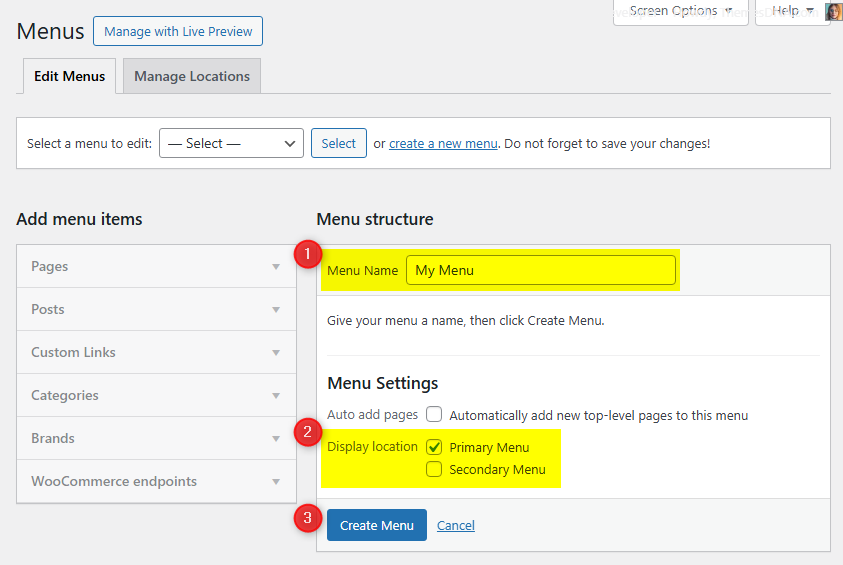
  4. Set up menus via Appearance → Menus.
  5. Add widgets via Appearance → Widgets.
  6. Customize your site via Appearance → Customize → Theme Options.

Current Theme Version: 1.0.4

Theme Installation

After purchasing the CuteMag PRO WordPress Theme, you'll receive a download link via email. Check your email inbox (or spam folder) for the product delivery email. Click the provided download link to download the theme's .zip file to your computer. Follow one of a method given below to install the theme on your website.

Upgrading from the Free CuteMag Theme?

CuteMag PRO is a separate theme. Whether or not you're currently using the free CuteMag theme, you need to install CuteMag PRO using one of the methods below.

If you're upgrading from the free version, most of your existing WordPress Customizer settings will remain in place. So you don't need to reconfigure everything from scratch. However, you will need to reupload a few images and reapply specific color settings.

After activating CuteMag PRO, go to Appearance → Customize and reupload the following:

  • Site Logo
  • Site Icon (favicon)
  • Header Image
  • Background Image

If you changed below color options in the free version, reapply them in Appearance → Customize → Theme Options → Colors:

  • Header Text Color
  • Background Color

Tip: You can install PRO without deleting the free theme. Use Live Preview to confirm your layout, then click Activate & Publish.

Method 1: Install Using the WordPress Dashboard (Easiest and Fastest)

This is the easiest and fastest method to install this WordPress theme.

  1. Go to "WordPress Dashboard" → "Appearance" → "Themes" and click on "Add New" button.
  2. Click on "Upload Theme" button and choose the zip file you have downloaded.
  3. Click on "Install Now" button.
  4. Activate the theme.
  5. Now go to "Appearance" → "Customize" to configure theme options.

Method 2: Install using cPanel File Manager

In some cases, you may not be able to install a WordPress theme through the WordPress dashboard—especially if the theme's ZIP file exceeds the maximum upload size limit. When this happens, you can install the theme using cPanel's File Manager, which is often simpler than using FTP. Follow the steps below to install your theme via the File Manager in cPanel.

  1. Log in to your cPanel account. Your cPanel URL will be https://yourdomain.com/cpanel or a similar URL.
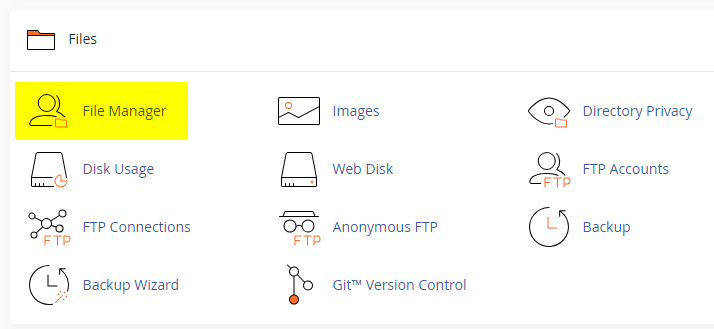
  2. Click on the "File Manager" icon. It's usually under the "Files" section.
  3. You are now in the "File Manager". Open the public_html folder, which is your website's root directory.
  4. Locate the wp-content folder inside "public_html," then open the themes folder inside of it.
  5. In the File Manager interface, click the "Upload" button and choose the theme's .zip file from your local drive.
  6. After it has been uploaded, right-click the .zip file and choose "Extract" or "Unzip".
  7. You can now delete the uploaded .zip file, but it's optional.
  8. Log in to your WordPress dashboard through your web browser.
  9. Go to Appearance → Themes. Now you will see the newly extracted theme.
  10. Make it your active theme by clicking the "Activate" button next to it.

Note: If your hosting provider doesn't offer cPanel, look for a File Manager option in your hosting dashboard (like DirectAdmin, Plesk, or CyberPanel). The process is usually very similar—just find the wp-content/themes folder and upload/extract the theme ZIP file there.

Method 3: Install using FTP

Installing a WordPress theme via FTP is straightforward, though it involves a few more steps compared to using the built-in theme uploader. Here's how to install a WordPress theme using FTP:

  1. Unzip the theme's .zip file you have downloaded.
  2. Connect to your hosting account using an FTP client such as "FileZilla" or "Core FTP".
  3. Navigate to the /wp-content/themes folder in the "Remote site" section.
  4. In the "Local site" section, locate the unzipped theme folder.
  5. Drag and drop the unzipped theme folder from the "Local site" section to the "Remote site" section.
  6. Be patient and let the transfer finish.
  7. Once the transfer is complete, log in to your WordPress dashboard and navigate to Appearance > Themes.
  8. Find the theme you just uploaded and click Activate.

Troubleshooting Tips

  • Didn't receive the download email? Wait 5–10 minutes or check your spam/junk folder. But if you still can not find this email or download link is broken, please inform us. we will send it ASAP.
  • "The uploaded file exceeds the upload_max_filesize directive in php.ini." - If you get this error when following the "Method 1", follow this tutorial: https://themesdna.com/blog/increase-maximum-file-upload-size-wordpress/
  • My menus disappeared or look different. Go to Appearance → Menus → Manage Locations and reassign your menus to the correct locations.
  • My header text or background color looks different after activating PRO. Reapply your colors in Appearance → Customize → Theme Options → Colors for Header Text Color and Background Color. Then publish.
  • Still can't install the theme? Contact us for help.

Import Demo Content

You can import the demo content, widgets, and Customizer settings shown in the CuteMag PRO theme demo.

Manual Demo Import

Step 1: Import Main Site Content

This includes: Posts, pages, menus, media, categories, tags, comments, and custom fields.

  1. Download: XML File
  2. Go to Tools → Import.
  3. Under "WordPress", click Install Now if not installed.
  4. Click Run Importer.
  5. Select the XML file and click Upload file and import.
  6. Check "Download and import file attachments", click Submit.

Step 2: Import Widgets

  1. Install the Widget Importer & Exporter plugin.
  2. Go to Tools → Widget Importer & Exporter.
  3. Copy content from: Widgets .wie File and paste into the box.
  4. Click Import Widgets.

Step 3: Import Customizer Settings

  1. Download: Customizer File
  2. Install the Customizer Export/Import plugin.
  3. Go to Appearance → Customize → Export/Import.
  4. Select the .dat file, check "Download and import image files?", click Import.

Regenerate Thumbnails

If your website already has existing posts with featured images, it's highly recommended to regenerate thumbnails after activating the CuteMag PRO theme. This ensures that all images match the new theme's layout and display sizes.

Regenerating thumbnails is optional if your site is completely new and doesn't have any uploaded images yet.

However, if you imported the demo content, regenerating thumbnails is essential to display images correctly across the site.

  1. Install and activate the Regenerate Thumbnails plugin.
  2. Go to Tools → Regenerate Thumbnails.
  3. Click the "Regenerate Thumbnails for All x Attachments" button to start the process.
  4. Wait until all images are regenerated. This may take a few minutes depending on your media library size.
  5. If you want, you can deactivate and delete the plugin once the process is complete.

This step ensures clean image alignment and sharp visuals throughout your website using the CuteMag PRO theme.

Header Image

CuteMag PRO supports a customizable header image that can be displayed across your site. You can configure the header image globally or per-post/page.

Global Header Image

  1. Go to Appearance → Customize → Header Image.
  2. Click Add new image to upload or select a header image.
  3. Use the Header Image Options in the Customizer to control visibility, link destination, title/description text, and mobile display.

Per-Post/Page Header Image

  1. Edit any post or page.
  2. In the Post Settings – CuteMag PRO or Page Settings – CuteMag PRO meta box, find the Header Image section.
  3. Upload a custom header image, set a destination URL, title, and description specific to that post/page.
  4. You can also choose to hide the header image on individual posts/pages.

News Ticker

CuteMag PRO includes a built-in news ticker (breaking news bar) that scrolls post titles horizontally. It's ideal for highlighting breaking news, trending posts, or featured content.

How to Enable the News Ticker

  1. Go to Appearance → Customize → Theme Options → News Ticker Options.
  2. Check Enable News Ticker.
  3. Configure the options:
    • Location: Before Header, After Header, Before Footer, or After Footer.
    • Heading: Custom text (default: "Breaking News").
    • Post Type: Recent Posts, Category Posts, Tag Posts, or Posts by IDs.
    • Number of Posts: How many posts to display (default: 5).
    • Orderby: Published Date, Modified Date, Comments, Random, Post Likes, or Post Views.
    • Duration: Scrolling speed in milliseconds (default: 60000).
  4. Click Publish to save changes.

Note: The news ticker can also be disabled on individual posts/pages via the post/page settings meta box.

Custom Widgets

CuteMag PRO includes 4 custom widgets designed specifically for magazine and news websites. These widgets provide powerful content display options with extensive customization.

How to Add Widgets

Go to Appearance → Widgets, then drag and drop any of the CuteMag widgets into your desired widget area.

CuteMag Tabbed Widget

This widget displays up to 3 tabbed post lists in a single widget. Each tab can be independently configured with its own post type, category/tag, ordering, and post IDs. Perfect for showing Popular, Recent, and Random posts side-by-side.

Key Features

  • 3 independent tabs with customizable names
  • Each tab has its own post source (Recent, Category, Tag, or Posts by IDs)
  • Each tab has its own ordering and sorting options
  • 1 to 4 column layout per tab
  • Shared thumbnail size and display options across all tabs
  • AJAX pagination support

Usage Notes

  • You can show or hide individual tabs using the checkboxes.
  • Tab names are customizable (defaults: "Popular", "Recent", "Random").
  • This widget works best in sidebar widget areas.

Below is a summary of key options available in the "CuteMag Tabbed Widget":

Option ID Option Name Description Control Type Accepted Value Default
titleTitleWidget title.TextA stringTabbed Widget
post_columnColumns StyleNumber of columns for posts.Select
  • 1 Column
  • 2 Columns
  • 3 Columns
  • 4 Columns
1 Column
thumb_styleThumbnail SizeShared thumbnail size for all tabs.Select
  • 100:100
  • 100:120
  • 100:Auto
  • 480:240
  • 480:288
  • 480:360
  • 480:480
  • 480:640
  • 480:Auto
  • 900:520
  • 1200:600
100:100
show_taboneDisplay Tab 1Show or hide Tab 1.Checkboxtrue / falsetrue
show_tabtwoDisplay Tab 2Show or hide Tab 2.Checkboxtrue / falsetrue
show_tabthreeDisplay Tab 3Show or hide Tab 3.Checkboxtrue / falsetrue
tabone_nameTab 1 NameDisplay name for Tab 1.TextA stringPopular
tabtwo_nameTab 2 NameDisplay name for Tab 2.TextA stringRecent
tabthree_nameTab 3 NameDisplay name for Tab 3.TextA stringRandom
tabone_post_typeTab 1 Post TypePost source for Tab 1.Select
  • Recent Posts
  • Category Posts
  • Tag Posts
  • Posts by IDs
Recent Posts
tabone_orderbyTab 1 OrderbySort order for Tab 1.Select
  • Published Date
  • Modified Date
  • Number of Comments
  • Random
  • Post Likes
  • Post Views
Number of Comments
tabtwo_post_typeTab 2 Post TypePost source for Tab 2.Select(same as Tab 1)Recent Posts
tabtwo_orderbyTab 2 OrderbySort order for Tab 2.Select(same as Tab 1)Published Date
tabthree_post_typeTab 3 Post TypePost source for Tab 3.Select(same as Tab 1)Recent Posts
tabthree_orderbyTab 3 OrderbySort order for Tab 3.Select(same as Tab 1)Random
posts_per_pageNumber of postsPosts per page per tab.TextA positive integer3
show_thumbnailDisplay Post ThumbnailShow/hide thumbnail.Checkboxtrue / falsetrue
show_titleDisplay Post TitleShow/hide title.Checkboxtrue / falsetrue
show_dateDisplay Post DateShow/hide date.Checkboxtrue / falsetrue
show_commentsDisplay CommentsShow/hide comment count.Checkboxtrue / falsetrue
show_likesDisplay Post LikesShow/hide likes.Checkboxtrue / falsetrue
show_viewsDisplay Post ViewsShow/hide views.Checkboxtrue / falsetrue
show_snippetDisplay Post SnippetShow/hide snippet.Checkboxtrue / falsetrue
center_tabsCenter TabsCenter-align the tab names.Checkboxtrue / falsefalse
ajax_navigationAJAX NavigationEnable AJAX pagination.Checkboxtrue / falsetrue
page_numbersPage NumbersShow page numbers.Checkboxtrue / falsetrue

CuteMag About and Social Widget

This widget displays an "About Me" or "About Us" section with a profile image, description, and social media buttons linking to over 70 social platforms. It's perfect for sidebars and footer areas.

Key Features

  • Profile image with custom URL
  • Custom description text
  • Over 70 social media platform icons
  • Option for round or square social buttons

Usage Notes

  • Enter the full URL for each social profile you want to display. Leave blank to hide that icon.
  • For Skype, enter the username (not a URL).
  • For Email, enter a valid email address.

Below is the complete list of options available in the "CuteMag About and Social Widget":

Option ID Option Name Description Control Type Accepted Value Default
titleTitleWidget title.TextA stringAbout and Social Widget
imageProfile Image URLURL of the profile image to display.TextA valid image URL.(empty)
descriptionDescriptionAbout/bio description text.TextareaAny text content(empty)
round_buttonsDisplay Round Social ButtonsUse round social icon buttons instead of square.Checkboxtrue / falsefalse
facebookFacebook URLFacebook profile URL.TextA valid URL.(empty)
twitterX URLX (formerly Twitter) profile URL.TextA valid URL.(empty)
threadsThreads URLThreads profile URL.TextA valid URL.(empty)
pinterestPinterest URLPinterest profile URL.TextA valid URL.(empty)
linkedinLinkedIn URLLinkedIn profile URL.TextA valid URL.(empty)
instagramInstagram URLInstagram profile URL.TextA valid URL.(empty)
flickrFlickr URLFlickr profile URL.TextA valid URL.(empty)
youtubeYouTube URLYouTube channel URL.TextA valid URL.(empty)
vimeoVimeo URLVimeo profile URL.TextA valid URL.(empty)
soundcloudSoundCloud URLSoundCloud profile URL.TextA valid URL.(empty)
messengerMessenger URLFacebook Messenger URL.TextA valid URL.(empty)
whatsappWhatsApp URLWhatsApp link.TextA valid URL.(empty)
tiktokTikTok URLTikTok profile URL.TextA valid URL.(empty)
lastfmLast.fm URLLast.fm profile URL.TextA valid URL.(empty)
mediumMedium URLMedium profile URL.TextA valid URL.(empty)
githubGitHub URLGitHub profile URL.TextA valid URL.(empty)
tumblrTumblr URLTumblr profile URL.TextA valid URL.(empty)
redditReddit URLReddit profile URL.TextA valid URL.(empty)
dribbbleDribbble URLDribbble profile URL.TextA valid URL.(empty)
flipboardFlipboard URLFlipboard profile URL.TextA valid URL.(empty)
etsyEtsy URLEtsy shop URL.TextA valid URL.(empty)
behanceBehance URLBehance profile URL.TextA valid URL.(empty)
amazonAmazon URLAmazon store URL.TextA valid URL.(empty)
snapchatSnapchat URLSnapchat profile URL.TextA valid URL.(empty)
spotifySpotify URLSpotify profile URL.TextA valid URL.(empty)
vkVK URLVKontakte profile URL.TextA valid URL.(empty)
telegramTelegram URLTelegram profile URL.TextA valid URL.(empty)
twitchTwitch URLTwitch profile URL.TextA valid URL.(empty)
discordDiscord URLDiscord server URL.TextA valid URL.(empty)
mastodonMastodon URLMastodon profile URL.TextA valid URL.(empty)
quoraQuora URLQuora profile URL.TextA valid URL.(empty)
goodreadsGoodreads URLGoodreads profile URL.TextA valid URL.(empty)
skypeSkype UsernameSkype username (not URL).TextA plain text username.(empty)
envelopeEmail AddressEmail address for contact.TextA valid email address.(empty)
rssRSS Feed URLRSS feed URL.TextA valid RSS feed URL.(empty)

Note: Additional social platforms available include: Digg, Delicious, StumbleUpon, Mix, Meetup, Mixcloud, Slack, WordPress, Bandcamp, Foursquare, DeviantArt, IMDB, CodePen, JSFiddle, Stack Overflow, Stack Exchange, BuySellAds, 500px, Ello, Odnoklassniki, Houzz, Pocket, XING, Google Play, SlideShare, Dropbox, PayPal, Viadeo, Wikipedia, and Blogger.

Widgets Areas

There are over 40 widget areas in the CuteMag PRO theme.


  1. Header Right Widgets

    This widget area is located on the right side of the header. You can add a "Custom HTML" widget with your 728×90 banner ad code. You need to select "Header Layout" as "Logo + Header Banner" from theme options.

  2. Sidebar Widgets (Everywhere)

    The sidebar widget area displayed on every page of your website.

  3. Sidebar Widgets (Default HomePage)

    Sidebar widgets displayed on the default homepage (when showing latest posts).

  4. Sidebar Widgets (Static HomePage)

    Sidebar widgets displayed on the static homepage (when using a static page).

  5. Sidebar Widgets (not Static HomePage)

    Sidebar widgets displayed on every page except the static homepage.

  6. Sidebar Widgets (Single Pages)

    Sidebar widgets displayed on single posts (except attachments and pages).

  7. Sidebar Widgets (Singular Pages)

    Sidebar widgets displayed on single posts of any post type (including attachments and pages).

  8. Top Full Width Widgets (Default HomePage)

    Full-width area after the header, displayed on the default homepage.

  9. Top Full Width Widgets (Static HomePage)

    Full-width area after the header, displayed on the static homepage.

  10. Top Full Width Widgets (not Static HomePage)

    Full-width area after the header, displayed on every page except static homepage.

  11. Top Full Width Widgets (Single Pages)

    Full-width area after the header, displayed on single posts (except attachments and pages).

  12. Top Full Width Widgets (Singular Pages)

    Full-width area after the header, displayed on single posts of any type (including attachments and pages).

  13. Top Full Width Widgets (Everywhere)

    Full-width area after the header, displayed on every page.

  14. Above Content Widgets (Default HomePage)

    Above the main content area, displayed on the default homepage.

  15. Above Content Widgets (Static HomePage)

    Above the main content area, displayed on the static homepage.

  16. Above Content Widgets (not Static HomePage)

    Above the main content area, displayed on every page except static homepage.

  17. Above Content Widgets (Single Pages)

    Above the main content area, displayed on single posts (except attachments and pages).

  18. Above Content Widgets (Singular Pages)

    Above the main content area, displayed on single posts of any type (including attachments and pages).

  19. Above Content Widgets (Everywhere)

    Above the main content area, displayed on every page.

  20. Below Content Widgets (Default HomePage)

    Below the main content area, displayed on the default homepage.

  21. Below Content Widgets (Static HomePage)

    Below the main content area, displayed on the static homepage.

  22. Below Content Widgets (not Static HomePage)

    Below the main content area, displayed on every page except static homepage.

  23. Below Content Widgets (Single Pages)

    Below the main content area, displayed on single posts (except attachments and pages).

  24. Below Content Widgets (Singular Pages)

    Below the main content area, displayed on single posts of any type (including attachments and pages).

  25. Below Content Widgets (Everywhere)

    Below the main content area, displayed on every page.

  26. Bottom Full Width Widgets (Default HomePage)

    Full-width area before the footer, displayed on the default homepage.

  27. Bottom Full Width Widgets (Static HomePage)

    Full-width area before the footer, displayed on the static homepage.

  28. Bottom Full Width Widgets (not Static HomePage)

    Full-width area before the footer, displayed on every page except static homepage.

  29. Bottom Full Width Widgets (Single Pages)

    Full-width area before the footer, displayed on single posts (except attachments and pages).

  30. Bottom Full Width Widgets (Singular Pages)

    Full-width area before the footer, displayed on single posts of any type (including attachments and pages).

  31. Bottom Full Width Widgets (Everywhere)

    Full-width area before the footer, displayed on every page.

  32. Single Post Bottom Widgets

    Located at the bottom of single posts (except attachments and pages).

  33. Footer Top Widgets

    Located on the top of the footer.

  34. Footer 1 Widgets

    Column 1 of the footer.

  35. Footer 2 Widgets

    Column 2 of the footer.

  36. Footer 3 Widgets

    Column 3 of the footer.

  37. Footer 4 Widgets

    Column 4 of the footer.

  38. Footer 5 Widgets

    Column 5 of the footer.

  39. Footer 6 Widgets

    Column 6 of the footer.

  40. Footer Bottom Widgets

    Located on the bottom of the footer.

  41. 404 Page Widgets

    Located on the 404 (not found) page.

How to Control Widget Visibility by Location

1. Install and activate the Widget Display Conditions or Widget Context plugin.

2. Drag and drop your widget into any of the "Everywhere" widget areas.

3. Click the Display conditions button at the bottom of your widget settings.

4. Click Add group, set your conditions, and click save.

Custom Page Templates

CuteMag PRO includes custom page and post templates that let you create pages and posts with unique layouts beyond the default design.

Special Function Templates

  • Featured Content: Displays featured post widgets instead of regular content.
  • Contact Form: Creates a contact page with a built-in contact form.
  • Sitemap: Displays a structured list of your site's pages, categories, and archives.
  • Authors: Shows a list of all authors on your site with their profiles.

Layout Templates

  • "Full Width, no sidebar" (Page/Post): Full width without any sidebars.
  • "Full Width, bottom sidebar" (Page/Post): Full width with a sidebar below.
  • "Content + Sidebar" (Page/Post): Content on the left, sidebar on the right.
  • "Sidebar + Content" (Page/Post): Sidebar on the left, content on the right.

How to Assign a Custom Template:

  1. Go to Pages or PostsAdd New or edit an existing page/post.
  2. Look for the Template option:
    • In Gutenberg: Click the Page/Post tab in the right sidebar and find the Template dropdown.
    • In Classic Editor: Enable Page Attributes via Screen Options, then use the Template dropdown.
  3. Select the desired template and click Publish or Update.

How to Create a Contact Page

CuteMag PRO includes a built-in Contact Form template.

Step 1: Create the Page

  1. Go to Pages → Add New, title it "Contact Us", select Contact Form template, click Publish.

Step 2: Configure Email

  1. Go to Appearance → Customize → Theme Options → Page Templates Options.
  2. Enter your email in the Contact Form Email Address field, click Publish.

Note: If you do not set the Contact Form Email Address, the form will not send emails.

How to Create a Sitemap Page

Go to Pages → Add New, title it "Sitemap", select the Sitemap template, click Publish.

Includes: Pages, Categories, Tags, Monthly Archives, and Authors.

How to Create a Site Authors Page

Go to Pages → Add New, title it "Our Authors", select the Authors template, click Publish.

Optionally configure via Customize → Theme Options → Page Templates Options to hide administrators or authors with zero posts.

Customizer Theme Options

To see available WordPress Customizer theme options:

  1. Go to your WordPress Dashboard.
  2. Navigate to Appearance → Customize.
  3. Click on Theme Options.

Below is a summary of all available customizer option sections in CuteMag PRO. Each section contains multiple options for fine-grained control over your site's appearance and behavior.

Site Identity Options

Below is the complete list of Site Identity Options available:

Option IDOption NameDescriptionControl TypeAccepted ValueDefault
custom_logoLogoImage ID of the custom logo uploaded through the Customizer.Media UploaderInteger (attachment ID)0 (none)
logo_locationLogo LocationChoose where to display the site logo relative to the site title/tagline.Dropdown
  • Before Site Title and Tagline
  • Above Site Title and Tagline
Above Site Title and Tagline
blognameSite TitleMain title of the website.TextA string"My WordPress Site"
blogdescriptionTaglineShort descriptive sentence.TextA string"Just another WordPress site"
display_header_textDisplay Site Title & TaglineToggles whether the title/tagline are printed on the front-end.Toggle Switchtrue / falsetrue
site_iconSite Icon (Favicon)Image ID for the favicon/app-icon (512×512 px recommended).Media UploaderInteger (attachment ID)0 (none)

Colors Options

Below is the complete list of Colors Options available:

Option ID Option Name Description Control Type Accepted Value Default
site_bg_colorMain Content Background ColorBackground color of the main content area.Color PickerHex color#2b2b2b
site_bd_colorMain Content Border ColorBorder color for the main content container.Color PickerHex color#4a4e53
site_bs_colorMain Content Box-Shadow ColorBox shadow value for the main content container.TextCSS shadow string0px 0px 4px 0px rgba(0,0,0,0.35)
header_text_hover_colorHeader Hover Text ColorHover text color for header elements.Color PickerHex color#dddddd
body_text_colorMain Text ColorDefault body text color.Color PickerHex color#dddddd
link_colorMain Link ColorDefault hyperlink color.Color PickerHex color#dddddd
link_hover_colorMain Link Hover ColorHover color for hyperlinks.Color PickerHex color#ffffff
headings_colorGeneral Headings ColorColor for general headings.Color PickerHex color#ffffff
header_bg_colorHeader Background ColorBackground color of the header area.Color PickerHex color#262626
header_bd_colorHeader Border ColorBorder color of the header area.Color PickerHex color#4a4e53
header_img_bd_colorHeader Image Border ColorBorder color around the header image.Color PickerHex color#4a4e53
header_image_title_colorHeader Image Title ColorText color for header image title.Color PickerHex color#ffffff
header_image_title_hover_colorHeader Image Title Hover ColorHover color for header image title.Color PickerHex color#dddddd
header_image_desc_colorHeader Image Description ColorDescription text color in header image area.Color PickerHex color#ffffff
primary_menu_bg_colorPrimary Menu Background ColorBackground color of the primary menu bar.Color PickerHex color#2b2b2b
primary_menu_bd_colorPrimary Menu Border ColorBorder color for the primary menu.Color PickerHex color#4a4e53
primary_menu_bsh_colorPrimary Menu Box-ShadowBox shadow value applied to primary menu.TextCSS shadow string0 2px 2px rgba(0,0,0,0.1)
primary_menu_colorPrimary Menu Link ColorLink text color in primary menu.Color PickerHex color#ffffff
disable_primary_menu_shadowDisable Primary Menu Link Text-ShadowToggle text-shadow on primary menu links.Checkboxtrue / falsefalse
primary_menu_shadow_colorPrimary Menu Link Text-Shadow ColorText-shadow color for primary menu links.Color PickerHex color#000000
primary_menu_hover_colorPrimary Menu Link Hover ColorHover text color for primary menu links.Color PickerHex color#ffffff
primary_menu_hover_bg_colorPrimary Menu Link Hover BackgroundHover background for primary menu items.Color PickerHex color#67080b
primary_submenu_one_bg_colorPrimary Sub Menu BackgroundBackground for first-level submenus in primary menu.Color PickerHex color#333333
primary_submenu_one_bd_colorPrimary Sub Menu Border 1First border color for primary submenus.Color PickerHex color#090909
primary_submenu_two_bd_colorPrimary Sub Menu Border 2Second border color for primary submenus.Color PickerHex color#444444
primary_submenu_three_bd_colorPrimary Sub Menu Border 3Third border color for primary submenus.Color PickerHex color#555555
primary_menu_icon_colorPrimary Responsive Menu Icon ColorColor of the hamburger icon for the primary menu.Color PickerHex color#ffffff
post_title_colorSingle Post Title ColorTitle color on single posts.Color PickerHex color#ffffff
post_title_hover_colorSingle Post Title Hover ColorHover color for single post titles.Color PickerHex color#eeeeee
disable_post_title_shadowDisable Single Post Title Text-ShadowToggle text-shadow on single post titles.Checkboxtrue / falsefalse
post_title_shadow_colorSingle Post Title Text-Shadow ColorText-shadow color for single post titles.Color PickerHex color#000000
post_body_link_colorPost Content Link ColorLink color inside post content.Color PickerHex color#409BD4
post_body_link_hover_colorPost Content Link Hover ColorHover link color inside post content.Color PickerHex color#08ACD5
compact_post_meta_colorHome Compact Post Meta ColorMeta text color for compact/style 1 posts.Color PickerHex color#ada8a8
compact_post_meta_hover_colorHome Compact Post Meta Hover ColorHover color for compact/style 1 meta.Color PickerHex color#dddddd
post_meta_colorSingle Post Meta ColorMeta text color on single posts.Color PickerHex color#ada8a8
post_meta_hover_colorSingle Post Meta Hover ColorHover color for single post meta.Color PickerHex color#dddddd
rmore_colorRead More Button ColorText color for read more buttons.Color PickerHex color#ffffff
rmore_bg_colorRead More Button BackgroundBackground color for read more buttons.Color PickerHex color#333333
rmore_bd_colorRead More Button BorderBorder color for read more buttons.Color PickerHex color#555555
rmore_hover_colorRead More Button Hover ColorHover text color for read more buttons.Color PickerHex color#ffffff
rmore_bg_hover_colorRead More Button Hover BackgroundHover background for read more buttons.Color PickerHex color#000000
rmore_bd_hover_colorRead More Button Hover BorderHover border color for read more buttons.Color PickerHex color#555555
author_bio_bg_colorAuthor Bio Box BackgroundBackground color for author bio box.Color PickerHex color#101010
author_bio_bd_colorAuthor Bio Box Border 1Primary border color for author bio box.Color PickerHex color#090909
author_bio_bd_two_colorAuthor Bio Box Border 2Secondary border color for author bio box.Color PickerHex color#444444
author_bio_colorAuthor Bio Text ColorText color inside author bio box.Color PickerHex color#ffffff
author_bio_link_colorAuthor Bio Link ColorLink color inside author bio box.Color PickerHex color#64caff
author_bio_link_hover_colorAuthor Bio Link Hover ColorHover color for links in author bio box.Color PickerHex color#91d9ff
pagination_colorPosts Pagination Links ColorText color for pagination links.Color PickerHex color#ffffff
pagination_bg_colorPosts Pagination BackgroundBackground for pagination links.Color PickerHex color#212121
pagination_bd_colorPosts Pagination BorderBorder color for pagination links.Color PickerHex color#444444
pagination_hover_colorPosts Pagination Hover ColorHover text color for pagination links.Color PickerHex color#ffffff
pagination_bg_hover_colorPosts Pagination Hover BackgroundHover background for pagination links.Color PickerHex color#000000
pagination_bd_hover_colorPosts Pagination Hover BorderHover border color for pagination links.Color PickerHex color#444444
loadmore_colorAJAX Load More Button ColorText color for load more button/navigation links.Color PickerHex color#ffffff
loadmore_bg_colorAJAX Load More BackgroundBackground for load more button/navigation links.Color PickerHex color#000000
loadmore_bd_colorAJAX Load More BorderBorder color for load more button/navigation links.Color PickerHex color#555555
loadmore_hover_colorAJAX Load More Hover ColorHover text color for load more button/navigation links.Color PickerHex color#ffffff
loadmore_bg_hover_colorAJAX Load More Hover BackgroundHover background for load more button/navigation links.Color PickerHex color#67080b
loadmore_bd_hover_colorAJAX Load More Hover BorderHover border color for load more button/navigation links.Color PickerHex color#000000
loading_bg_colorAJAX Loading Animation BackgroundBackground color of loading animation.Color PickerHex color#67080b
likes_views_bg_colorPost Likes/Views Data BackgroundBackground for likes/views badges.TextCSS color stringrgba(0, 0, 0, 0.4)
likes_colorPost Likes/Views ColorIcon/text color for likes and views.Color PickerHex color#ffffff
likes_hover_colorPost Likes Hover ColorHover color for likes icon/text.Color PickerHex color#ff0000
sidebar_title_colorSidebar Title ColorTitle color for sidebar widgets.Color PickerHex color#ffffff
disable_sidebar_title_shadowDisable Sidebar Title Text-ShadowToggle text-shadow on sidebar titles.Checkboxtrue / falsefalse
sidebar_title_shadow_colorSidebar Title Text-Shadow ColorText-shadow color for sidebar titles.Color PickerHex color#000000
sidebar_link_colorSidebar Link ColorLink color in sidebar widgets.Color PickerHex color#dddddd
sidebar_link_hover_colorSidebar Link Hover ColorHover link color in sidebar widgets.Color PickerHex color#ffffff
tag_cloud_colorTag Cloud Link ColorTag cloud link text color.Color PickerHex color#ffffff
tag_cloud_bg_colorTag Cloud Link BackgroundBackground for tag cloud links.Color PickerHex color#888888
tag_cloud_hover_colorTag Cloud Hover ColorHover text color for tag cloud links.Color PickerHex color#ffffff
tag_cloud_hover_bg_colorTag Cloud Hover BackgroundHover background for tag cloud links.Color PickerHex color#000000
tabnames_colorTabbed Widget Names ColorTab label color in tabbed widget.Color PickerHex color#ffffff
tabnames_bg_colorTabbed Widget Names BackgroundBackground for tab labels.Color PickerHex color#000000
tabnames_bd_colorTabbed Widget Names BorderBorder color for tab labels.Color PickerHex color#555555
tabnames_hover_colorTabbed Widget Names Hover ColorHover color for tab labels.Color PickerHex color#ffffff
tabnames_bg_hover_colorTabbed Widget Names Hover BackgroundHover background for tab labels.Color PickerHex color#67080b
tabnames_bd_hover_colorTabbed Widget Names Hover BorderHover border color for tab labels.Color PickerHex color#555555
footer_bg_colorFooter Background ColorBackground color of the footer area.Color PickerHex color#2b2b2b
footer_bd_colorFooter Border ColorBorder color for footer.Color PickerHex color#4a4e53
footer_title_colorFooter Title ColorColor of footer widget titles.Color PickerHex color#ffffff
footer_title_bd_one_colorFooter Title Border 1First border color for footer titles.Color PickerHex color#3b3b3b
footer_title_bd_two_colorFooter Title Border 2Second border color for footer titles.Color PickerHex color#1b1b1b
footer_text_colorFooter Text ColorBody text color in footer.Color PickerHex color#dddddd
footer_link_colorFooter Link ColorLink color in footer.Color PickerHex color#cccccc
footer_link_hover_colorFooter Link Hover ColorHover color for footer links.Color PickerHex color#ffffff
footer_list_bd_one_colorFooter List Border 1First border color for footer list items.Color PickerHex color#3b3b3b
footer_list_bd_two_colorFooter List Border 2Second border color for footer list items.Color PickerHex color#1b1b1b
cp_bg_colorCopyrights Background ColorBackground color of copyright area.Color PickerHex color#2e2e2e
cp_bd_colorCopyrights Border ColorBorder color of copyright area.Color PickerHex color#4a4e53
cp_colorCopyrights Text ColorText color for copyright text.Color PickerHex color#ecfff1
comment_bd_color_oneComments Border ColorBorder color for comments area.Color PickerHex color#4e4949
comment_bg_color_oneComments Background Color 1Primary background color for comments.Color PickerHex color#111111
comment_bg_color_twoComments Background Color 2Secondary background color for comments.Color PickerHex color#212121
comment_meta_colorComments Meta ColorMeta text color in comments.Color PickerHex color#888888
table_caption_bg_colorTable Caption Background ColorBackground for table captions.Color PickerHex color#555555
table_header_bg_colorTable Header Background ColorBackground for table header row.Color PickerHex color#000000
table_header_bd_colorTable Header Border ColorBorder color for table header row.Color PickerHex color#444444
table_header_text_colorTable Header Text ColorText color in table header row.Color PickerHex color#ffffff
table_header_link_colorTable Header Link ColorLink color in table headers.Color PickerHex color#ffffff
table_header_link_hover_colorTable Header Link Hover ColorHover color for links in table headers.Color PickerHex color#409BD4
table_border_colorTable Border ColorBorder color for HTML tables.Color PickerHex color#444444
table_odd_bg_colorTable Odd Rows BackgroundBackground for odd table rows.Color PickerHex color#333333
table_even_bg_colorTable Even Rows BackgroundBackground for even table rows.Color PickerHex color#222222
table_raw_hover_bg_colorTable Rows Hover BackgroundHover background for table rows.Color PickerHex color#111111
table_text_colorTable Text ColorBody text color inside tables.Color PickerHex color#ffffff
table_link_colorTable Link ColorLink color inside tables.Color PickerHex color#409BD4
table_link_hover_colorTable Link Hover ColorHover link color inside tables.Color PickerHex color#08ACD5
disable_table_colorsDisable Color Styles from HTML TablesTurn off theme table color styles.Checkboxtrue / falsefalse
button_text_colorButton Text ColorDefault text color for buttons.Color PickerHex color#ffffff
button_bg_colorButton Background ColorDefault background for buttons.Color PickerHex color#333333
button_bd_colorButton Border ColorDefault border for buttons.Color PickerHex color#6f6f6f
button_hover_bg_colorButton Hover Background ColorHover background for buttons.Color PickerHex color#7f181b
input_text_colorInput Text ColorDefault input text color.Color PickerHex color#666666
input_bd_colorInput Border ColorBorder color for inputs.Color PickerHex color#dddddd
input_hover_text_colorInput Hover Text ColorText color on input hover.Color PickerHex color#111111
fieldset_bd_colorFieldset Border ColorBorder color for fieldsets.Color PickerHex color#444444
select_text_colorDrop-Down List Text ColorText color for select elements.Color PickerHex color#666666
placeholder_text_colorPlaceholder Text ColorPlaceholder color for inputs.Color PickerHex color#888888
selected_text_colorSelected Text ColorText color for highlighted selection.Color PickerHex color#ffffff
selected_text_bg_colorSelected Text Background ColorBackground for highlighted selection.Color PickerHex color#05689a
hr_bg_colorhr Tag Background ColorBackground color for hr elements.Color PickerHex color#333333
hr_bd_top_colorhr Tag Top Border ColorTop border color for hr.Color PickerHex color#090909
hr_bd_bottom_colorhr Tag Bottom Border ColorBottom border color for hr.Color PickerHex color#252525
pre_bg_colorpre Tag Background ColorBackground color for preformatted text blocks.Color PickerHex color#1d1f21
pre_colorpre Tag Text ColorText color for preformatted text blocks.Color PickerHex color#ffffff
code_bg_colorcode Tag Background ColorBackground color for code elements.Color PickerHex color#ffff6c
code_colorcode Tag Text ColorText color for code elements.Color PickerHex color#222222
mark_bg_colorMarked/Inserted Tag BackgroundBackground for mark/ins elements.Color PickerHex color#efef00
mark_colorMarked/Inserted Tag Text ColorText color for mark/ins elements.Color PickerHex color#222222
captions_bg_colorImage Captions Background ColorBackground color for image captions.Color PickerHex color#000000
disable_color_optionsDisable All Color OptionsTurn off all theme color options (use defaults).Checkboxtrue / falsefalse

Font Options

Below is the complete list of Font Options available:

Option ID Option Name Description Control Type Accepted Value Default
font_subsetsFont SubsetsSelect font subsets to load.Multi SelectCyrillic, Cyrillic Extended, Greek, Greek Extended, Latin, Latin Extended, VietnameseLatin
body_fontsBody Font-FamilyFont for body text.SelectTheme font list / Google FontsDomine
body_font_sizeBody Font-SizeSize for body text.Select8px–72px13px
body_font_weightBody Font-WeightWeight for body text.Select400 / 700400
body_font_styleBody Font-StyleStyle for body text.SelectNormal / Italicnormal
body_line_heightBody Line-HeightLine height for body text.TextNumeric (e.g., 1.6)1.6
site_title_fontsSite Title Font-FamilyFont for site title.SelectTheme font listFrank Ruhl Libre
site_title_font_sizeSite Title Font-SizeSize for site title.Select8px–72px22px
site_title_font_weightSite Title Font-WeightWeight for site title.Select400 / 700700
site_title_font_styleSite Title Font-StyleStyle for site title.SelectNormal / Italicnormal
site_title_line_heightSite Title Line-HeightLine height for site title.TextNumeric1
site_title_text_transformSite Title Text TransformText transform for site title.SelectNone / Capitalize / Uppercase / Lowercase / Initial / Inheritnone
site_desc_fontsSite Description Font-FamilyFont for site tagline.SelectTheme font listDomine
site_desc_font_sizeSite Description Font-SizeSize for site tagline.Select8px–72px13px
site_desc_font_weightSite Description Font-WeightWeight for site tagline.Select400 / 700400
site_desc_font_styleSite Description Font-StyleStyle for site tagline.SelectNormal / Italicnormal
site_desc_line_heightSite Description Line-HeightLine height for site tagline.TextNumeric1
site_desc_text_transformSite Description Text TransformText transform for site tagline.SelectNone / Capitalize / Uppercase / Lowercase / Initial / Inheritnone
header_image_title_fontsHeader Image Title Font-FamilyFont for header image title.SelectTheme font listFrank Ruhl Libre
header_image_title_font_sizeHeader Image Title Font-SizeSize for header image title.Select8px–72px24px
header_image_title_font_weightHeader Image Title Font-WeightWeight for header image title.Select400 / 700400
header_image_title_font_styleHeader Image Title Font-StyleStyle for header image title.SelectNormal / Italicnormal
header_image_title_line_heightHeader Image Title Line-HeightLine height for header image title.TextNumeric1
header_image_title_text_transformHeader Image Title Text TransformText transform for header image title.SelectNone / Capitalize / Uppercase / Lowercase / Initial / Inheritnone
header_image_desc_fontsHeader Image Description Font-FamilyFont for header image description.SelectTheme font listDomine
header_image_desc_font_sizeHeader Image Description Font-SizeSize for header image description.Select8px–72px13px
header_image_desc_font_weightHeader Image Description Font-WeightWeight for header image description.Select400 / 700400
header_image_desc_font_styleHeader Image Description Font-StyleStyle for header image description.SelectNormal / Italicnormal
header_image_desc_line_heightHeader Image Description Line-HeightLine height for header image description.TextNumeric1
header_image_desc_text_transformHeader Image Description Text TransformText transform for header image description.SelectNone / Capitalize / Uppercase / Lowercase / Initial / Inheritnone
primary_menu_fontsPrimary Menu Font-FamilyFont for primary menu.SelectTheme font listOswald
primary_menu_font_sizePrimary Menu Font-SizeSize for primary menu.Select8px–72px13px
primary_menu_font_weightPrimary Menu Font-WeightWeight for primary menu.Select400 / 700400
primary_menu_font_stylePrimary Menu Font-StyleStyle for primary menu.SelectNormal / Italicnormal
primary_menu_text_transformPrimary Menu Text TransformText transform for primary menu.SelectNone / Capitalize / Uppercase / Lowercase / Initial / Inherituppercase
secondary_menu_fontsSecondary Menu Font-FamilyFont for secondary menu.SelectTheme font listOswald
secondary_menu_font_sizeSecondary Menu Font-SizeSize for secondary menu.Select8px–72px13px
secondary_menu_font_weightSecondary Menu Font-WeightWeight for secondary menu.Select400 / 700400
secondary_menu_font_styleSecondary Menu Font-StyleStyle for secondary menu.SelectNormal / Italicnormal
secondary_menu_text_transformSecondary Menu Text TransformText transform for secondary menu.SelectNone / Capitalize / Uppercase / Lowercase / Initial / Inherituppercase
news_ticker_fontsNews Ticker Font-FamilyFont for news ticker.SelectTheme font listOswald
news_ticker_font_sizeNews Ticker Font-SizeSize for news ticker text.Select8px–72px12px
news_ticker_font_weightNews Ticker Font-WeightWeight for news ticker.Select400 / 700400
news_ticker_font_styleNews Ticker Font-StyleStyle for news ticker.SelectNormal / Italicnormal
news_ticker_text_transformNews Ticker Text TransformText transform for news ticker.SelectNone / Capitalize / Uppercase / Lowercase / Initial / Inherituppercase
compact_post_title_fontsHome Compact Post Title Font-FamilyFont for compact/style 1 post titles.SelectTheme font listFrank Ruhl Libre
compact_post_title_font_sizeHome Compact Post Title Font-SizeSize for compact/style 1 titles.Select8px–72px17px
compact_post_title_mobile_font_sizeHome Compact Post Title Font-Size (Small Screen)Mobile size for compact/style 1 titles.Select8px–72px16px
compact_post_title_font_weightHome Compact Post Title Font-WeightWeight for compact/style 1 titles.Select400 / 700700
compact_post_title_font_styleHome Compact Post Title Font-StyleStyle for compact/style 1 titles.SelectNormal / Italicnormal
compact_post_title_line_heightHome Compact Post Title Line-HeightLine height for compact/style 1 titles.TextNumeric1.2
compact_post_title_text_transformHome Compact Post Title Text TransformText transform for compact/style 1 titles.SelectNone / Capitalize / Uppercase / Lowercase / Initial / Inheritnone
compact_post_meta_fontsHome Compact Post Meta Font-FamilyFont for compact/style 1 meta.SelectTheme font listOswald
compact_post_meta_font_sizeHome Compact Post Meta Font-SizeSize for compact/style 1 meta.Select8px–72px12px
compact_post_meta_font_weightHome Compact Post Meta Font-WeightWeight for compact/style 1 meta.Select400 / 700400
compact_post_meta_font_styleHome Compact Post Meta Font-StyleStyle for compact/style 1 meta.SelectNormal / Italicnormal
compact_post_meta_text_transformHome Compact Post Meta Text TransformText transform for compact/style 1 meta.SelectNone / Capitalize / Uppercase / Lowercase / Initial / Inherituppercase
post_meta_fontsSingle Post Meta Font-FamilyFont for single post meta.SelectTheme font listOswald
post_meta_font_sizeSingle Post Meta Font-SizeSize for single post meta.Select8px–72px12px
post_meta_font_weightSingle Post Meta Font-WeightWeight for single post meta.Select400 / 700400
post_meta_font_styleSingle Post Meta Font-StyleStyle for single post meta.SelectNormal / Italicnormal
post_meta_text_transformSingle Post Meta Text TransformText transform for single post meta.SelectNone / Capitalize / Uppercase / Lowercase / Initial / Inherituppercase
read_more_fontsRead More Button Font-FamilyFont for read more buttons.SelectTheme font listOswald
read_more_font_sizeRead More Button Font-SizeSize for read more buttons.Select8px–72px12px
read_more_font_weightRead More Button Font-WeightWeight for read more buttons.Select400 / 700400
read_more_font_styleRead More Button Font-StyleStyle for read more buttons.SelectNormal / Italicnormal
read_more_text_transformRead More Button Text TransformText transform for read more buttons.SelectNone / Capitalize / Uppercase / Lowercase / Initial / Inherituppercase
post_title_fontsSingle Post Title Font-FamilyFont for single post titles.SelectTheme font listFrank Ruhl Libre
post_title_font_sizeSingle Post Title Font-SizeSize for single post titles.Select8px–72px24px
post_title_font_weightSingle Post Title Font-WeightWeight for single post titles.Select400 / 700700
post_title_font_styleSingle Post Title Font-StyleStyle for single post titles.SelectNormal / Italicnormal
post_title_line_heightSingle Post Title Line-HeightLine height for single post titles.TextNumeric1.1
post_title_text_transformSingle Post Titles Text TransformText transform for single post titles.SelectNone / Capitalize / Uppercase / Lowercase / Initial / Inheritnone
widget_title_fontsMain/Sidebar Widget Title Font-FamilyFont for sidebar widget titles.SelectTheme font listFrank Ruhl Libre
widget_title_font_sizeMain/Sidebars Title Font-SizeSize for sidebar widget titles.Select8px–72px18px
widget_title_font_weightMain/Sidebars Title Font-WeightWeight for sidebar widget titles.Select400 / 700700
widget_title_font_styleMain/Sidebars Title Font-StyleStyle for sidebar widget titles.SelectNormal / Italicnormal
widget_title_line_heightMain/Sidebars Title Line-HeightLine height for sidebar widget titles.TextNumeric1
widget_title_text_transformMain/Sidebars Titles Text TransformText transform for sidebar widget titles.SelectNone / Capitalize / Uppercase / Lowercase / Initial / Inheritnone
footer_title_fontsFooter Widget Title Font-FamilyFont for footer widget titles.SelectTheme font listFrank Ruhl Libre
footer_title_font_sizeFooter Title Font-SizeSize for footer widget titles.Select8px–72px18px
footer_title_font_weightFooter Title Font-WeightWeight for footer widget titles.Select400 / 700700
footer_title_font_styleFooter Title Font-StyleStyle for footer widget titles.SelectNormal / Italicnormal
footer_title_line_heightFooter Title Line-HeightLine height for footer widget titles.TextNumeric1
footer_title_text_transformFooter Title Text TransformText transform for footer widget titles.SelectNone / Capitalize / Uppercase / Lowercase / Initial / Inheritnone
tag_cloud_fontsTag Cloud Widget Font-FamilyFont for tag cloud widget.SelectTheme font listOswald
tag_cloud_font_sizeTag Cloud Widget Font-SizeSize for tag cloud widget.Select8px–72px13px
tag_cloud_font_weightTag Cloud Widget Font-WeightWeight for tag cloud widget.Select400 / 700400
tag_cloud_font_styleTag Cloud Widget Font-StyleStyle for tag cloud widget.SelectNormal / Italicnormal
tag_cloud_text_transformTag Cloud Widget Text TransformText transform for tag cloud widget.SelectNone / Capitalize / Uppercase / Lowercase / Initial / Inherituppercase
rpost_title_fontsRelated Posts Heading Font-FamilyFont for related posts heading.SelectTheme font listFrank Ruhl Libre
hpost_title_font_sizeRelated Posts Heading Font-SizeSize for related posts heading.Select8px–72px20px
hpost_title_font_weightRelated Posts Heading Font-WeightWeight for related posts heading.Select400 / 700700
hpost_title_font_styleRelated Posts Heading Font-StyleStyle for related posts heading.SelectNormal / Italicnormal
hpost_title_line_heightRelated Posts Heading Line-HeightLine height for related posts heading.TextNumeric1.2
hpost_title_text_transformRelated Posts Heading Text TransformText transform for related posts heading.SelectNone / Capitalize / Uppercase / Lowercase / Initial / Inheritnone
navigation_fontsPosts Navigation Font-FamilyFont for posts navigation.SelectTheme font listOswald
navigation_font_sizePosts Navigation Font-SizeSize for posts navigation.Select8px–72px14px
navigation_font_weightPosts Navigation Font-WeightWeight for posts navigation.Select400 / 700400
navigation_font_stylePosts Navigation Font-StyleStyle for posts navigation.SelectNormal / Italicnormal
navigation_text_transformPosts Navigation Text TransformText transform for posts navigation.SelectNone / Capitalize / Uppercase / Lowercase / Initial / Inherituppercase
tabbed_widget_title_fontsTabbed Widget Titles Font-FamilyFont for tabbed widget titles.SelectTheme font listOswald
tabbed_widget_title_font_sizeTabbed Widget Titles Font-SizeSize for tabbed widget titles.Select8px–72px15px
tabbed_widget_title_font_weightTabbed Widget Titles Font-WeightWeight for tabbed widget titles.Select400 / 700400
tabbed_widget_title_font_styleTabbed Widget Titles Font-StyleStyle for tabbed widget titles.SelectNormal / Italicnormal
tabbed_widget_title_text_transformTabbed Widget Titles Text TransformText transform for tabbed widget titles.SelectNone / Capitalize / Uppercase / Lowercase / Initial / Inherituppercase
headings_fontsGeneral Headings Font-FamilyFont for general headings.SelectTheme font listFrank Ruhl Libre
headings_line_heightGeneral Headings Line-HeightLine height for general headings.TextNumeric1
h1_font_sizeH1 Font-SizeSize for H1 headings.Select8px–72px32px
h1_font_weightH1 Font-WeightWeight for H1 headings.Select400 / 700700
h1_font_styleH1 Font-StyleStyle for H1 headings.SelectNormal / Italicnormal
h2_font_sizeH2 Font-SizeSize for H2 headings.Select8px–72px28px
h2_font_weightH2 Font-WeightWeight for H2 headings.Select400 / 700700
h2_font_styleH2 Font-StyleStyle for H2 headings.SelectNormal / Italicnormal
h3_font_sizeH3 Font-SizeSize for H3 headings.Select8px–72px24px
h3_font_weightH3 Font-WeightWeight for H3 headings.Select400 / 700700
h3_font_styleH3 Font-StyleStyle for H3 headings.SelectNormal / Italicnormal
h4_font_sizeH4 Font-SizeSize for H4 headings.Select8px–72px20px
h4_font_weightH4 Font-WeightWeight for H4 headings.Select400 / 700700
h4_font_styleH4 Font-StyleStyle for H4 headings.SelectNormal / Italicnormal
h5_font_sizeH5 Font-SizeSize for H5 headings.Select8px–72px18px
h5_font_weightH5 Font-WeightWeight for H5 headings.Select400 / 700700
h5_font_styleH5 Font-StyleStyle for H5 headings.SelectNormal / Italicnormal
h6_font_sizeH6 Font-SizeSize for H6 headings.Select8px–72px16px
h6_font_weightH6 Font-WeightWeight for H6 headings.Select400 / 700700
h6_font_styleH6 Font-StyleStyle for H6 headings.SelectNormal / Italicnormal
button_fontsButtons Font-FamilyFont for general buttons.SelectTheme font listOswald
button_font_sizeButtons Font-SizeSize for general buttons.Select8px–72px13px
button_font_weightButtons Font-WeightWeight for general buttons.Select400 / 700400
button_font_styleButtons Font-StyleStyle for general buttons.SelectNormal / Italicnormal
button_text_transformButtons Text TransformText transform for general buttons.SelectNone / Capitalize / Uppercase / Lowercase / Initial / Inherituppercase
pre_fontspre/code Tags Font-FamilyFont for pre/code blocks.SelectTheme font listConsolas
pre_font_sizepre/code Tags Font-SizeSize for pre/code blocks.Select8px–72px15px
pre_font_weightpre/code Tags Font-WeightWeight for pre/code blocks.Select400 / 700400
pre_font_stylepre/code Tags Font-StyleStyle for pre/code blocks.SelectNormal / Italicnormal
disable_google_fontsDisable Google FontsStop loading Google Fonts; use system fonts.Checkboxtrue / falsefalse
disable_font_optionsDisable All Font OptionsUse default theme fonts, ignore settings.Checkboxtrue / falsefalse

Header Image Options

Below is the complete list of Header Image Options available:

Option IDOption NameDescriptionControl TypeAccepted ValueDefault
hide_header_imageHide Header Image from EverywhereHide the header image on all pages.Checkboxtrue / falsefalse
remove_header_image_linkRemove Link from Header ImageRemove the clickable link from header image.Checkboxtrue / falsefalse
hide_header_image_detailsHide both Title and Description from Header ImageHide both title and description overlays.Checkboxtrue / falsefalse
header_image_details_mobileShow Header Title on Smaller ScreensDisplay header image title on mobile devices.Checkboxtrue / falsefalse
hide_header_image_descriptionHide Description from Header ImageHide the description overlay.Checkboxtrue / falsefalse
header_image_custom_textAdd Custom Title/Description to Header ImageEnable custom text overlays.Checkboxtrue / falsefalse
header_image_custom_titleHeader Image Custom TitleCustom title text for the header image.Text InputText string(empty)
header_image_custom_descriptionHeader Image Custom DescriptionCustom description text for the header image.Text InputText string(empty)
header_image_destinationHeader Image Destination URLURL when clicking the header image. Defaults to homepage.URL InputValid URL(empty)

Header Options

Below is the complete list of Header Options available:

Option IDOption NameDescriptionControl TypeAccepted ValueDefault
hide_taglineHide TaglineHide the site tagline.Checkboxtrue / falsefalse
hide_header_contentHide Header ContentHide the entire header content area.Checkboxtrue / falsefalse
header_paddingHeader PaddingPadding for header content. Default: 10pxText InputCSS padding value10px
header_layoutHeader LayoutSelect the header layout style.Dropdown
  • Logo + Header Banner
  • Full Width Header
Logo + Header Banner
logo_widthLogo WidthWidth of the logo area in percentage (for Logo + Header Banner layout). Default: 40Text InputNumber (percentage)40
banner_widthHeader Banner WidthWidth of the banner area in percentage. Default: 59.4Text InputNumber (percentage)59.4

Layout Options

Below is the complete list of Layout Options available:

Option IDOption NameDescriptionControl TypeAccepted ValueDefault
layout_typeLayout TypeSelect the layout type.Dropdown
  • Boxed
  • Full
Boxed
main_container_widthWebsite Width (non-singular)Width for non-singular pages on screens larger than 1277px. Default: 1250pxText InputCSS width value1250px
main_container_singular_widthWebsite Width (singular)Width for singular pages on screens larger than 1277px. Default: 1250pxText InputCSS width value1250px
singular_layoutSingular Layout StyleLayout for single posts/pages.Radio Buttons
  • Sidebar + Content
  • Content + Sidebar
  • One Column
  • One Column + Bottom Sidebar
Content + Sidebar
plural_layoutNon-Singular Layout StyleLayout for archive/index pages.Radio Buttons
  • Sidebar + Content
  • Content + Sidebar
  • One Column
  • One Column + Bottom Sidebar
Content + Sidebar
main_content_widthMain Content Width (2 Columns)Content width in percentage. Default: 75Text InputNumber (percentage)75
sidebar_one_widthSidebar Width (2 Columns)Sidebar width in percentage. Default: 24.5Text InputNumber (percentage)24.5
woocommerce_full_widthForce One Column for WooCommerceForce one-column layout for all WooCommerce pages.Checkboxtrue / falsefalse

Menu Options

Below is the complete list of Menu Options available:

Option ID Option Name Description Control Type Accepted Value Default
primary_menu_textPrimary Menu Mobile TextLabel text shown for the primary menu on mobile.Text InputStringMenu
disable_primary_menuDisable Primary MenuHide the primary menu.Checkboxtrue / falsefalse
disable_sticky_menuDisable Sticky Feature from Primary MenuTurn off sticky behavior for the primary menu.Checkboxtrue / falsefalse
enable_sticky_mobile_menuEnable Sticky Feature for Primary Menu on Small ScreenEnable sticky behavior on mobile for the primary menu.Checkboxtrue / falsefalse
disable_responsive_primary_menuDisable Responsiveness (Mobile View) from Primary MenuDisable mobile responsive behavior for primary menu.Checkboxtrue / falsefalse
center_primary_menuCenter Primary MenuCenter-align primary menu items.Checkboxtrue / falsefalse
secondary_menu_textSecondary Menu Mobile TextLabel text shown for the secondary menu on mobile.Text InputStringMenu
disable_secondary_menuDisable Secondary MenuHide the secondary menu.Checkboxtrue / falsefalse
disable_responsive_secondary_menuDisable Responsiveness (Mobile View) from Secondary MenuDisable mobile responsive behavior for secondary menu.Checkboxtrue / falsefalse
secondary_menu_locationSelect Secondary Menu LocationChoose where the secondary menu appears.Select
  • Before Header
  • After Header
  • Before Footer
  • After Footer
Before Header
center_secondary_menuCenter Secondary MenuCenter-align secondary menu items.Checkboxtrue / falsefalse

News Ticker Options

Below is the complete list of News Ticker Options available:

Option ID Option Name Description Control Type Accepted Value Default
enable_news_tickerEnable News TickerTurn the news ticker on or off.Checkboxtrue / falsefalse
news_ticker_locationSelect News Ticker LocationChoose where the ticker appears.Select
  • Before Header
  • After Header
  • Before Footer
  • After Footer
Before Header
news_ticker_headingNews Ticker HeadingHeading text label for the ticker.Text InputStringBreaking News
news_ticker_lengthNumber of News Ticker PostsHow many posts to show.Text InputPositive integer5
news_ticker_post_typeNews Ticker Posts TypeSource of posts for ticker.Select
  • Recent Posts
  • Category Posts
  • Tag Posts
  • Posts by IDs
Recent Posts
news_ticker_include_postsDisplay these Posts on News TickerComma-separated IDs (used when Posts by IDs selected).Text InputComma-separated integers(empty)
news_ticker_post_orderbyNews Ticker Posts OrderbyOrder basis for posts.Select
  • Published Date
  • Modified Date
  • Number of Comments
  • Random
  • Post Likes
  • Post Views
Published Date
news_ticker_post_orderNews Ticker Posts OrderSort direction.Select
  • Ascending order
  • Descending order
Descending order
news_ticker_catNews Ticker Posts CategoryCategory to pull posts (when Category Posts selected).Category DropdownCategory ID0 (none)
news_ticker_tagNews Ticker Posts TagTag to pull posts (when Tag Posts selected).Tag DropdownTag ID0 (none)
news_ticker_durationNews Ticker DurationScrolling duration in milliseconds.Text InputPositive integer60000
news_ticker_exclude_postsExclude these posts from News TickerComma-separated IDs to exclude.Text InputComma-separated integers(empty)
news_ticker_dateformatNews Ticker Date FormatPHP date format string for dates.Text InputPHP date formatY-m-d
hide_date_news_tickerHide Dates from News TickerShow or hide dates in ticker.Checkboxtrue / falsefalse

Non-Singular Post Options

Below is the complete list of Non-Singular Post Options available:

Option ID Option Name Description Control Type Accepted Value Default
hide_posts_homeHide Recent Blog Posts from Home PageRemove recent posts list from homepage.Checkboxtrue / falsefalse
hide_posts_headingHide HomePage Posts HeadingHide the heading above homepage posts.Checkboxtrue / falsefalse
posts_headingHomePage Posts HeadingHeading text displayed above posts.Text InputStringRecent Posts
posts_per_pageNumber of Posts per PageMaximum posts shown on each blog page.Text InputPositive integerWordPress setting (default 10)
post_stylePosts StyleSelect compact or full style for archives/search.Select
  • Compact
  • Full
Compact
read_more_lengthAuto Post Summary LengthWord count for automatic summaries.Text InputPositive integer20
show_read_more_buttonShow Read More Buttons on Posts SummariesDisplay “Read More” button in summaries.Checkboxtrue / falsefalse
read_more_textRead More TextLabel for the Read More button.Text InputStringContinue Reading
hide_thumbnail_homeHide Featured Images from Posts SummariesHide featured images in summaries.Checkboxtrue / falsefalse
hide_default_thumbnail_homeHide Default Images from Posts SummariesHide fallback thumbnails in summaries.Checkboxtrue / falsefalse
hide_post_title_homeHide Post Titles from Posts SummariesHide titles in summaries.Checkboxtrue / falsefalse
hide_post_author_homeHide Post Authors from Posts SummariesHide author meta in summaries.Checkboxtrue / falsefalse
hide_posted_date_homeHide Posted Dates from Posts SummariesHide publish dates in summaries.Checkboxtrue / falsefalse
hide_comments_link_homeHide Comment Links from Posts SummariesHide comments link/meta in summaries.Checkboxtrue / falsefalse
hide_post_categories_homeHide Post Categories from Posts SummariesHide categories (Full style only).Checkboxtrue / falsefalse
hide_post_tags_homeHide Post Tags from Posts SummariesHide tags (Full style only).Checkboxtrue / falsefalse
hide_post_snippetHide Post Snippets from Posts SummariesHide excerpt/snippet text.Checkboxtrue / falsefalse
compact_post_columnCompact Posts Style Columns NumberColumns layout for compact style.Select
  • 1 Column
  • 2 Columns
  • 3 Columns
  • 4 Columns
2 Columns
compact_thumb_styleCompact Posts Style Thumbnail SizeThumbnail size for compact posts.Select
  • 100:100
  • 100:120
  • 100:Auto
  • 480:240
  • 480:288
  • 480:360
  • 480:480
  • 480:640
  • 480:Auto Thumbnails
  • 900:520
  • 1200:600
100:100
fullview_thumb_styleFullview Posts Style Thumbnail SizeThumbnail size for fullview posts.Select
  • 480:240
  • 480:288
  • 480:360
  • 480:480
  • 480:640
  • 480:Auto Thumbnails
  • 900:520
  • 900:auto
  • 1200:600
  • 1200:auto
900:auto
display_full_post_contentDisplay Full Post Content with Fullview Posts StyleShow full content instead of summary in fullview.Checkboxtrue / falsefalse

Singular Post Options

Below is the complete list of Singular Post Options available:

Option ID Option Name Description Control Type Accepted Value Default
thumbnail_linkFeatured Image LinkLink single post featured image to the post.Select
  • Yes
  • No
Yes
hide_thumbnail_singleHide Featured Image from Single PostsHide featured image on single posts.Checkboxtrue / falsefalse
full_thumbnail_singleActivate Full Width Featured Image for Single PostsForce featured image to full width.Checkboxtrue / falsefalse
hide_post_breadcrumbsHide Breadcrumbs from Single PostsHide breadcrumbs trail.Checkboxtrue / falsefalse
hide_post_titleHide Post Header from Single PostsHide post title/header.Checkboxtrue / falsefalse
remove_post_title_linkRemove Link from Single Post TitlesDisable link on post titles.Checkboxtrue / falsefalse
hide_posted_dateHide Posted Date from Single PostsHide publish date.Checkboxtrue / falsefalse
hide_post_authorHide Post Author from Single PostsHide author name.Checkboxtrue / falsefalse
hide_post_categoriesHide Post Categories from Single PostsHide category list.Checkboxtrue / falsefalse
hide_post_tagsHide Post Tags from Single PostsHide tag list.Checkboxtrue / falsefalse
hide_comments_linkHide Comment Link from Single PostsHide comments link/meta.Checkboxtrue / falsefalse
hide_comment_formHide Comments/Comment Form from Single PostsHide comments section.Checkboxtrue / falsefalse
hide_post_editHide Post Edit Link from Single PostsHide edit link for logged-in users.Checkboxtrue / falsefalse
hide_author_bio_boxHide Author Bio Box from Single PostsHide author bio box.Checkboxtrue / falsefalse
post_ad_one_codePost Ad 1 CodeAd code displayed under post title.TextareaHTML/JS snippet(empty)
hide_post_ad_oneHide Post Ad 1Toggle visibility of Ad 1.Checkboxtrue / falsefalse
post_ad_two_codePost Ad 2 CodeAd code displayed under post content.TextareaHTML/JS snippet(empty)
hide_post_ad_twoHide Post Ad 2Toggle visibility of Ad 2.Checkboxtrue / falsefalse

Singular Page Options

Below is the complete list of Singular Page Options available:

Option ID Option Name Description Control Type Accepted Value Default
thumbnail_link_pageFeatured Image LinkLink page featured image to the page.Select
  • Yes
  • No
Yes
hide_thumbnail_pageHide Featured Image from Single PagesHide featured image on pages.Checkboxtrue / falsefalse
hide_page_titleHide Page Header from Single PagesHide page title/header.Checkboxtrue / falsefalse
remove_page_title_linkRemove Link from Single Page TitlesDisable link on page titles.Checkboxtrue / falsefalse
hide_page_dateHide Posted Date from Single PagesHide publish date on pages.Checkboxtrue / falsefalse
hide_page_authorHide Page Author from Single PagesHide author name on pages.Checkboxtrue / falsefalse
hide_page_commentsHide Comment Link from Single PagesHide comment link/meta on pages.Checkboxtrue / falsefalse
hide_page_comment_formHide Comments/Comment Form from Single PagesHide comments section on pages.Checkboxtrue / falsefalse
hide_page_editHide Edit Link from Single PagesHide edit link for logged-in users.Checkboxtrue / falsefalse
hide_static_page_titleHide Page Header from Static HomepageHide page header when a static page is the homepage.Checkboxtrue / falsefalse
hide_static_page_metaHide Page Meta Data from Static HomepageHide date/author/comments meta on static homepage.Checkboxtrue / falsefalse

Archive Pages Options

Below is the complete list of Archive Pages Options available:

Option ID Option Name Description Control Type Accepted Value Default
hide_cats_titleHide Category Title + DescriptionHide category title and description on category archives.Checkboxtrue / falsefalse
hide_cats_descriptionHide Category DescriptionHide only the category description on category archives.Checkboxtrue / falsefalse
hide_category_wordRemove Word "Category:" from TitlesRemove the "Category:" prefix in category archive titles.Checkboxtrue / falsefalse
hide_tags_titleHide Tag Title + DescriptionHide tag title and description on tag archives.Checkboxtrue / falsefalse
hide_tags_descriptionHide Tag DescriptionHide only the tag description on tag archives.Checkboxtrue / falsefalse
hide_tag_wordRemove Word "Tag:" from TitlesRemove the "Tag:" prefix in tag archive titles.Checkboxtrue / falsefalse
hide_author_titleHide Author Title + DescriptionHide author title and description on author archives.Checkboxtrue / falsefalse
hide_author_descriptionHide Author DescriptionHide only the author description on author archives.Checkboxtrue / falsefalse
hide_author_wordRemove Word "Author:" from TitlesRemove the "Author:" prefix in author archive titles.Checkboxtrue / falsefalse
hide_date_titleHide Title from Year/Month/Day ArchivesHide titles on date archives.Checkboxtrue / falsefalse
hide_date_wordRemove Words "Year:"/"Month:"/"Day:" from TitlesRemove prefixes in date archive titles.Checkboxtrue / falsefalse

Share Buttons Options

Below is the complete list of Share Buttons Options available:

Option ID Option Name Description Control Type Accepted Value Default
hide_share_buttons_homeHide Share Buttons from Posts SummariesRemove share buttons on post summaries.Checkboxtrue / falsefalse
hide_share_text_homeHide Share Text from Posts SummariesHide share label text on summaries.Checkboxtrue / falsefalse
share_text_homeShare Text for Posts SummariesLabel shown before share buttons on summaries.Text InputStringShare:
share_buttons_style_homeShare Buttons Style on Compact Posts SummariesSelect style for summary share buttons.Select
  • Style 1
  • Style 2
Style 1
hide_share_twitter_homeHide X Share Button from Posts SummariesHide the X (Twitter) button on summaries.Checkboxtrue / falsefalse
hide_share_facebook_homeHide Facebook Share Button from Posts SummariesHide Facebook button on summaries.Checkboxtrue / falsefalse
hide_share_pinterest_homeHide Pinterest Share Button from Posts SummariesHide Pinterest button on summaries.Checkboxtrue / falsefalse
hide_share_linkedin_homeHide LinkedIn Share Button from Posts SummariesHide LinkedIn button on summaries.Checkboxtrue / falsefalse
show_share_reddit_homeShow Reddit Share Button in Posts SummariesEnable Reddit button on summaries.Checkboxtrue / falsefalse
show_share_vk_homeShow VK Share Button in Posts SummariesEnable VK button on summaries.Checkboxtrue / falsefalse
show_share_digg_homeShow Digg Share Button in Posts SummariesEnable Digg button on summaries.Checkboxtrue / falsefalse
show_share_mix_homeShow Mix Share Button in Posts SummariesEnable Mix button on summaries.Checkboxtrue / falsefalse
show_share_line_homeShow LINE Share Button in Posts SummariesEnable LINE button on summaries.Checkboxtrue / falsefalse
show_share_flipboard_homeShow Flipboard Share Button in Posts SummariesEnable Flipboard button on summaries.Checkboxtrue / falsefalse
show_share_telegram_homeShow Telegram Share Button in Posts SummariesEnable Telegram button on summaries.Checkboxtrue / falsefalse
show_share_pocket_homeShow Pocket Share Button in Posts SummariesEnable Pocket button on summaries.Checkboxtrue / falsefalse
show_share_odnoklassniki_homeShow OK.RU Share Button in Posts SummariesEnable OK.RU button on summaries.Checkboxtrue / falsefalse
show_share_whatsapp_homeShow WhatsApp Share Button in Posts SummariesEnable WhatsApp button on summaries.Checkboxtrue / falsefalse
show_share_tumblr_homeShow Tumblr Share Button in Posts SummariesEnable Tumblr button on summaries.Checkboxtrue / falsefalse
show_share_evernote_homeShow Evernote Share Button in Posts SummariesEnable Evernote button on summaries.Checkboxtrue / falsefalse
show_share_wordpress_homeShow WordPress Share Button in Posts SummariesEnable WordPress button on summaries.Checkboxtrue / falsefalse
show_share_blogger_homeShow Blogger Share Button in Posts SummariesEnable Blogger button on summaries.Checkboxtrue / falsefalse
show_share_xing_homeShow XING Share Button in Posts SummariesEnable XING button on summaries.Checkboxtrue / falsefalse
show_share_skype_homeShow Skype Share Button in Posts SummariesEnable Skype button on summaries.Checkboxtrue / falsefalse
show_share_gmail_homeShow Gmail This Button in Posts SummariesEnable Gmail button on summaries.Checkboxtrue / falsefalse
show_share_yahoomail_homeShow Yahoo! Mail This Button in Posts SummariesEnable Yahoo! Mail button on summaries.Checkboxtrue / falsefalse
show_share_email_homeShow Email This Button in Posts SummariesEnable email share button on summaries.Checkboxtrue / falsefalse
show_share_buffer_homeShow Add to Buffer Button in Posts SummariesEnable Buffer button on summaries.Checkboxtrue / falsefalse
show_share_googlebookmark_homeShow Google Bookmark Button in Posts SummariesEnable Google Bookmark button on summaries.Checkboxtrue / falsefalse
hide_share_buttonsHide Share Buttons from Single PostsRemove share buttons on single posts.Checkboxtrue / falsefalse
hide_share_textHide Share Text from Single PostsHide share label on single posts.Checkboxtrue / falsefalse
share_textShare Text for Single PostsLabel shown before share buttons on single posts.Text InputStringShare:
hide_share_twitterHide X Share Button from Single PostsHide the X (Twitter) button on single posts.Checkboxtrue / falsefalse
hide_share_facebookHide Facebook Share Button from Single PostsHide Facebook button on single posts.Checkboxtrue / falsefalse
hide_share_pinterestHide Pinterest Share Button from Single PostsHide Pinterest button on single posts.Checkboxtrue / falsefalse
hide_share_linkedinHide LinkedIn Share Button from Single PostsHide LinkedIn button on single posts.Checkboxtrue / falsefalse
hide_share_mixHide Mix Share Button from Single PostsHide Mix button on single posts.Checkboxtrue / falsefalse
hide_share_redditHide Reddit Share Button from Single PostsHide Reddit button on single posts.Checkboxtrue / falsefalse
hide_share_diggHide Digg Share Button from Single PostsHide Digg button on single posts.Checkboxtrue / falsefalse
hide_share_vkHide VK Share Button from Single PostsHide VK button on single posts.Checkboxtrue / falsefalse
show_share_lineShow LINE Share Button in Single PostsEnable LINE button on single posts.Checkboxtrue / falsefalse
show_share_flipboardShow Flipboard Share Button in Single PostsEnable Flipboard button on single posts.Checkboxtrue / falsefalse
show_share_telegramShow Telegram Share Button in Single PostsEnable Telegram button on single posts.Checkboxtrue / falsefalse
show_share_pocketShow Pocket Share Button in Single PostsEnable Pocket button on single posts.Checkboxtrue / falsefalse
show_share_odnoklassnikiShow OK.RU Share Button in Single PostsEnable OK.RU button on single posts.Checkboxtrue / falsefalse
show_share_whatsappShow WhatsApp Share Button in Single PostsEnable WhatsApp button on single posts.Checkboxtrue / falsefalse
show_share_tumblrShow Tumblr Share Button in Single PostsEnable Tumblr button on single posts.Checkboxtrue / falsefalse
show_share_evernoteShow Evernote Share Button in Single PostsEnable Evernote button on single posts.Checkboxtrue / falsefalse
show_share_wordpressShow WordPress Share Button in Single PostsEnable WordPress button on single posts.Checkboxtrue / falsefalse
show_share_bloggerShow Blogger Share Button in Single PostsEnable Blogger button on single posts.Checkboxtrue / falsefalse
show_share_xingShow XING Share Button in Single PostsEnable XING button on single posts.Checkboxtrue / falsefalse
show_share_skypeShow Skype Share Button in Single PostsEnable Skype button on single posts.Checkboxtrue / falsefalse
show_share_gmailShow Gmail This Button in Single PostsEnable Gmail button on single posts.Checkboxtrue / falsefalse
show_share_yahoomailShow Yahoo! Mail This Button in Single PostsEnable Yahoo! Mail button on single posts.Checkboxtrue / falsefalse
show_share_emailShow Email This Button in Single PostsEnable email share button on single posts.Checkboxtrue / falsefalse
show_share_bufferShow Add to Buffer Button in Single PostsEnable Buffer button on single posts.Checkboxtrue / falsefalse
show_share_googlebookmarkShow Google Bookmark Button in Single PostsEnable Google Bookmark button on single posts.Checkboxtrue / falsefalse

Likes & Views Options

Below is the complete list of Likes & Views Options available:

Option ID Option Name Description Control Type Accepted Value Default
hide_post_likes_homeHide Post Likes from Posts SummariesHide likes on post summaries.Checkboxtrue / falsefalse
hide_post_likesHide Post Likes from Single PostsHide likes on single posts.Checkboxtrue / falsefalse
likes_textLikes TextLabel displayed with likes count.Text InputStringLikes
post_likes_cookie_lengthPost Likes Cookie LengthSeconds before same user can like again.Text InputPositive integer (seconds)86400
reset_post_likesReset Post LikesButton to delete all stored post likes.Submit Buttonn/a(action)
hide_post_views_homeHide Post Views from Posts SummariesHide view counts on post summaries.Checkboxtrue / falsefalse
hide_post_viewsHide Post Views from Single PostsHide view counts on single posts.Checkboxtrue / falsefalse
views_textViews TextLabel displayed with views count.Text InputStringViews
post_views_cookie_lengthPost Views Cookie LengthSeconds before repeat visit counts as new view.Text InputPositive integer (seconds)3600
reset_post_viewsReset Post ViewsButton to delete all stored post views.Submit Buttonn/a(action)

Post/Posts Navigation Options

Below is the complete list of Post/Posts Navigation Options available:

Option ID Option Name Description Control Type Accepted Value Default
hide_post_navigationHide Post Navigation from Single PostsHide previous/next navigation on single posts.Checkboxtrue / falsefalse
hide_post_navigation_thumbnailHide Thumbnails from Advanced Post NavigationHide thumbnails in advanced navigation.Checkboxtrue / falsefalse
post_navigation_typePost Navigation TypeSelect navigation style for single posts.Select
  • Navigation with Thumbnails
  • Navigation without Thumbnails
Navigation without Thumbnails
hide_posts_navigationHide Posts Navigation from Home/Archive/Search PagesHide pagination/navigation on listing pages.Checkboxtrue / falsefalse
posts_navigation_typePosts Navigation TypeSelect navigation style for listings.Select
  • Link Navigation
  • Numbered Navigation
  • Load More Button
  • Infinite Scroll
Numbered Navigation
loadmore_textLoadMore Button Normal TextLabel on load more button (idle).Text InputStringLoad More
loading_textLoadMore Button Loading TextLabel while posts are loading.Text InputStringLoading...
loadfailed_textLoadMore Button Load Failed TextLabel when loading fails.Text InputStringFailed to load posts.

Search & 404 Page Options

Below is the complete list of Search & 404 Page Options available:

Option ID Option Name Description Control Type Accepted Value Default
hide_search_results_headingHide Search Results HeadingHide the heading on search results pages.Checkboxtrue / falsefalse
search_results_headingSearch Results HeadingText shown before the search query.Text InputStringSearch Results for:
no_search_headingNo Search Results HeadingHeading when no search results are found.Text InputStringNothing Found
no_search_resultsNo Search Results MessageMessage displayed when no results are found.TextareaHTML/TextSorry, but nothing matched your search terms. Please try again with some different keywords.
error_404_heading404 Error Page HeadingHeading text on the 404 page.Text InputStringOops! That page can not be found.
error_404_messageError 404 MessageMessage shown on the 404 page.TextareaHTML/TextIt looks like nothing was found at this location. Maybe try one of the links below or a search?
hide_404_searchHide Search Box from 404 PageRemove the search box on the 404 page.Checkboxtrue / falsefalse

Page Templates Options

Below is the complete list of Page Templates Options available:

Option ID Option Name Description Control Type Accepted Value Default
contact_form_emailContact Form Email AddressEmail address to receive contact form submissions.Text InputValid email(empty)
hide_admin_authors_pageHide site administrators from Authors pageExclude administrator accounts on Authors template.Checkboxtrue / falsefalse
hide_noposts_authors_pageHide authors with zero posts from Authors pageExclude authors who have no posts.Checkboxtrue / falsefalse

Social Profiles Options

Below is the complete list of Social Profiles Options available:

Option ID Option Name Description Control Type Accepted Value Default
social_buttons_locationSocial + Search + Random + Login/Logout Buttons LocationChoose where header buttons appear.Select
  • Primary Menu
  • Secondary Menu
Secondary Menu
hide_social_buttonsHide Social + Search + Random + Login/Logout ButtonsHide all social and utility buttons.Checkboxtrue / falsefalse
hide_search_buttonHide Search ButtonHide search button (ignored if all buttons hidden).Checkboxtrue / falsefalse
show_login_buttonShow Login/Logout ButtonShow login/logout button (ignored if all buttons hidden).Checkboxtrue / falsefalse
show_rp_buttonShow Random Post ButtonShow random post button (ignored if all buttons hidden).Checkboxtrue / falsefalse
twitterlinkX URLX (Twitter) profile link.Text InputURL(empty)
facebooklinkFacebook URLFacebook profile/page link.Text InputURL(empty)
threadslinkThreads URLThreads profile link.Text InputURL(empty)
pinterestlinkPinterest URLPinterest profile link.Text InputURL(empty)
linkedinlinkLinkedIn LinkLinkedIn profile/company link.Text InputURL(empty)
instagramlinkInstagram LinkInstagram profile link.Text InputURL(empty)
vklinkVK LinkVK profile/group link.Text InputURL(empty)
flickrlinkFlickr LinkFlickr profile link.Text InputURL(empty)
youtubelinkYouTube URLYouTube channel link.Text InputURL(empty)
vimeolinkVimeo URLVimeo profile link.Text InputURL(empty)
soundcloudlinkSoundCloud URLSoundCloud profile link.Text InputURL(empty)
messengerlinkMessenger URLFacebook Messenger link.Text InputURL(empty)
whatsapplinkWhatsApp URLWhatsApp chat link.Text InputURL(empty)
tiktoklinkTikTok URLTikTok profile link.Text InputURL(empty)
lastfmlinkLastfm URLLast.fm profile link.Text InputURL(empty)
mediumlinkMedium URLMedium profile link.Text InputURL(empty)
githublinkGithub URLGitHub profile/org link.Text InputURL(empty)
bitbucketlinkBitbucket URLBitbucket profile/team link.Text InputURL(empty)
tumblrlinkTumblr URLTumblr blog link.Text InputURL(empty)
digglinkDigg URLDigg profile link.Text InputURL(empty)
deliciouslinkDelicious URLDelicious profile link.Text InputURL(empty)
stumblelinkStumbleupon URLStumbleUpon profile link.Text InputURL(empty)
mixlinkMix URLMix profile link.Text InputURL(empty)
redditlinkReddit URLReddit profile/subreddit link.Text InputURL(empty)
dribbblelinkDribbble URLDribbble profile link.Text InputURL(empty)
flipboardlinkFlipboard URLFlipboard profile link.Text InputURL(empty)
bloggerlinkBlogger URLBlogger blog link.Text InputURL(empty)
etsylinkEtsy URLEtsy shop/profile link.Text InputURL(empty)
behancelinkBehance URLBehance profile link.Text InputURL(empty)
amazonlinkAmazon URLAmazon author/shop link.Text InputURL(empty)
meetuplinkMeetup URLMeetup group/profile link.Text InputURL(empty)
mixcloudlinkMixcloud URLMixcloud profile link.Text InputURL(empty)
slacklinkSlack URLSlack workspace invite/link.Text InputURL(empty)
snapchatlinkSnapchat URLSnapchat profile link.Text InputURL(empty)
spotifylinkSpotify URLSpotify profile/artist link.Text InputURL(empty)
yelplinkYelp URLYelp business/profile link.Text InputURL(empty)
wordpresslinkWordPress URLWordPress.com profile/site link.Text InputURL(empty)
twitchlinkTwitch URLTwitch channel link.Text InputURL(empty)
telegramlinkTelegram URLTelegram channel/group link.Text InputURL(empty)
bandcamplinkBandcamp URLBandcamp profile/link.Text InputURL(empty)
quoralinkQuora URLQuora profile link.Text InputURL(empty)
foursquarelinkFoursquare URLFoursquare profile link.Text InputURL(empty)
deviantartlinkDeviantArt URLDeviantArt profile link.Text InputURL(empty)
imdblinkIMDB URLIMDB profile/title list link.Text InputURL(empty)
codepenlinkCodepen URLCodePen profile link.Text InputURL(empty)
jsfiddlelinkJSFiddle URLJSFiddle profile link.Text InputURL(empty)
stackoverflowlinkStack Overflow URLStack Overflow profile link.Text InputURL(empty)
stackexchangelinkStack Exchange URLStack Exchange profile link.Text InputURL(empty)
bsalinkBuySellAds URLBuySellAds profile link.Text InputURL(empty)
web500pxlink500px URL500px profile link.Text InputURL(empty)
ellolinkEllo URLEllo profile link.Text InputURL(empty)
discordlinkDiscord URLDiscord invite/server link.Text InputURL(empty)
goodreadslinkGoodreads URLGoodreads profile/author link.Text InputURL(empty)
odnoklassnikilinkOdnoklassniki URLOK.ru profile link.Text InputURL(empty)
houzzlinkHouzz URLHouzz profile link.Text InputURL(empty)
pocketlinkPocket URLPocket profile/link.Text InputURL(empty)
xinglinkXING URLXING profile link.Text InputURL(empty)
mastodonlinkMastodon URLMastodon profile link.Text InputURL(empty)
googleplaylinkGoogle Play URLGoogle Play listing link.Text InputURL(empty)
slidesharelinkSlideShare URLSlideShare profile link.Text InputURL(empty)
dropboxlinkDropbox URLDropbox shared link.Text InputURL(empty)
paypallinkPayPal URLPayPal.me or profile link.Text InputURL(empty)
viadeolinkViadeo URLViadeo profile link.Text InputURL(empty)
wikipedialinkWikipedia URLWikipedia profile/page link.Text InputURL(empty)
skypeusernameSkype UsernameSkype username for contact.Text InputUsername(empty)
emailaddressEmail AddressEmail address for contact.Text InputValid email(empty)
rsslinkRSS Feed URLCustom RSS feed URL.Text InputURL(empty)

Other Options

Below is the complete list of Other Options available:

Option ID Option Name Description Control Type Accepted Value Default
enable_widgets_block_editorEnable Gutenberg Widget Block EditorUse the block-based widgets editor.Checkboxtrue / falsefalse
disable_lazy_loadDisable WP Lazy Load FeatureTurn off WordPress image lazy loading.Checkboxtrue / falsefalse
disable_loading_animationDisable Site Loading AnimationDisable the page loading animation.Checkboxtrue / falsefalse
disable_sticky_sidebarDisable Sticky Feature from SidebarTurn off sticky sidebar behavior.Checkboxtrue / falsefalse
disable_fitvidsDisable FitVids.JSDisable fluid video resizing script.Checkboxtrue / falsefalse
disable_backtotopDisable Back to Top ButtonHide the back-to-top button.Checkboxtrue / falsefalse
reset_settingsReset Theme OptionsReset all theme options to defaults.Submit Buttonn/a(action)
disable_1200w_600h_imageDisable 1200:600 ThumbnailStop generating 1200x600 thumbnail size.Checkboxtrue / falsefalse
disable_900w_520h_imageDisable 900:520 ThumbnailStop generating 900x520 thumbnail size.Checkboxtrue / falsefalse
disable_480w_640h_imageDisable 480:640 ThumbnailStop generating 480x640 thumbnail size.Checkboxtrue / falsefalse
disable_480w_480h_imageDisable 480:480 ThumbnailStop generating 480x480 thumbnail size.Checkboxtrue / falsefalse
disable_480w_288h_imageDisable 480:288 ThumbnailStop generating 480x288 thumbnail size.Checkboxtrue / falsefalse
disable_480w_240h_imageDisable 480:240 ThumbnailStop generating 480x240 thumbnail size.Checkboxtrue / falsefalse
disable_480w_autoh_imageDisable 480:Auto ThumbnailStop generating 480:auto thumbnail size.Checkboxtrue / falsefalse
disable_100w_120h_imageDisable 100:120 ThumbnailStop generating 100x120 thumbnail size.Checkboxtrue / falsefalse
disable_100w_autoh_imageDisable 100:Auto ThumbnailStop generating 100:auto thumbnail size.Checkboxtrue / falsefalse

Post Settings (Per-Post Meta Box)

The Post Settings - CuteMag PRO meta box appears below the editor whenever you add or edit a post. It lets you override many global CuteMag PRO options on a per-post basis, making it perfect for custom landing pages, sponsored stories, or any content that needs a special layout.

Note: Leave a control in its default state (unchecked, empty, or set to "No selection") to inherit the value configured in the WordPress Customizer. Any changes made here will apply to the current post only.

Available settings

Option ID Option Name Description Control Type Accepted Value Default
_themesdna_options_site_width_singularWebsite WidthCustom width for this post on screens wider than 1277px.Text InputNumber (px)(empty)
_themesdna_options_layout_typeLayout TypeChoose boxed or full layout for this post.Select
  • Boxed
  • Full
  • No selection
No selection
_themesdna_options_singular_layoutLayout StyleSelect sidebar/content arrangement.Select
  • Sidebar + Content
  • Content + Sidebar
  • One Column
  • One Column + Bottom Sidebar
  • No selection
No selection
_themesdna_options_header_layoutHeader StylePick header layout for this post.Select
  • Logo + Header Banner
  • Full Width Header
  • No selection
No selection
_themesdna_options_hide_header_contentHide Header ContentHide header content area.Checkboxtrue / falsefalse
_themesdna_options_disable_news_tickerDisable News TickerTurn off the news ticker.Checkboxtrue / falsefalse
_themesdna_options_disable_primary_menuDisable Primary MenuHide primary menu on this post.Checkboxtrue / falsefalse
_themesdna_options_disable_sticky_menuDisable Sticky Feature from Primary MenuDisable sticky behavior of primary menu.Checkboxtrue / falsefalse
_themesdna_options_disable_sticky_mobile_menuDisable Sticky Feature for Primary Menu on Small ScreenDisable sticky primary menu on small screens.Checkboxtrue / falsefalse
_themesdna_options_disable_responsive_primary_menuDisable Responsiveness from Primary MenuDisable responsive/mobile view for primary menu.Checkboxtrue / falsefalse
_themesdna_options_disable_sticky_sidebarDisable Sticky Feature from SidebarTurn off sticky sidebar.Checkboxtrue / falsefalse
_themesdna_options_footer_grid_colsFooter ColumnsSelect footer column count for this post.Select
  • 1 Column
  • 2 Columns
  • 3 Columns
  • 4 Columns
  • 5 Columns
  • 6 Columns
  • No selection
No selection
_themesdna_options_hide_footer_widgetsHide Footer WidgetsHide footer widget areas.Checkboxtrue / falsefalse
_themesdna_options_social_buttons_locationSocial + Search + Random + Login/Logout Buttons LocationSelect where to display header utility buttons.Select
  • Primary Menu
  • Secondary Menu
  • No selection
No selection
_themesdna_options_hide_social_buttonsHide Social + Search + Random + Login/Logout ButtonsHide all header utility buttons.Checkboxtrue / falsefalse
_themesdna_options_hide_copyright_creditHide Copyright + Theme Designer CreditsHide copyright line and theme credit.Checkboxtrue / falsefalse
_themesdna_options_disable_fitvidsDisable FitVids.JSDisable fluid-width video script.Checkboxtrue / falsefalse
_themesdna_options_disable_backtotopDisable Back to Top ButtonHide back-to-top button.Checkboxtrue / falsefalse
_themesdna_options_hide_header_imageHide Header ImageHide header image for this post.Checkboxtrue / falsefalse
_themesdna_options_header_imageSite Header ImageUpload/select a header image for this post.File UploadImage URL(empty)
_themesdna_options_header_image_destinationSite Header Image Destination URLLink for header image click.Text InputURL(empty)
_themesdna_options_remove_header_image_destinationRemove Destination URL from Site Header ImageMake header image non-clickable.Checkboxtrue / falsefalse
_themesdna_options_header_image_destination_targetOpen Header Image Destination URL in New Window/TabOpen header image link in new tab.Checkboxtrue / falsefalse
_themesdna_options_header_image_destination_relAdd rel="nofollow" attribute to Header Image Destination URLAdd nofollow to header image link.Checkboxtrue / falsefalse
_themesdna_options_header_image_titleSite Header Image TitleOptional title displayed with header image.TextareaHTML/Text(empty)
_themesdna_options_header_image_descriptionSite Header Image DescriptionOptional description for header image.TextareaHTML/Text(empty)
_themesdna_options_hide_thumbnail_singleHide Featured Image from Single Post ViewHide featured image on single view.Checkboxtrue / falsefalse
_themesdna_options_hide_post_breadcrumbsHide Breadcrumbs from Single Post ViewHide breadcrumbs (Yoast required for breadcrumbs display).Checkboxtrue / falsefalse
_themesdna_options_hide_post_likesHide Post Likes from Single Post ViewHide likes on single post.Checkboxtrue / falsefalse
_themesdna_options_hide_post_viewsHide Post Views from Single Post ViewHide views on single post.Checkboxtrue / falsefalse
_themesdna_options_hide_post_categoriesHide Post Categories from Single Post ViewHide categories on single post.Checkboxtrue / falsefalse
_themesdna_options_hide_post_titleHide Post Header from Single Post ViewHide post title/header.Checkboxtrue / falsefalse
_themesdna_options_remove_post_title_linkRemove Link from Post Title in Single Post ViewDisable link on post title.Checkboxtrue / falsefalse
_themesdna_options_hide_post_authorHide Post Author from Single Post ViewHide author name on single post.Checkboxtrue / falsefalse
_themesdna_options_hide_posted_dateHide Posted Date from Single Post ViewHide post date on single post.Checkboxtrue / falsefalse
_themesdna_options_hide_comments_linkHide Comment Link from Single Post ViewHide comments link/meta on single post.Checkboxtrue / falsefalse
_themesdna_options_hide_comment_formHide Comments/Comment Form from Single Post ViewHide comments section on single post.Checkboxtrue / falsefalse
_themesdna_options_hide_post_tagsHide Post Tags from Single Post ViewHide tags on single post.Checkboxtrue / falsefalse
_themesdna_options_hide_share_buttonsHide Share Buttons from Single Post ViewHide share buttons on single post.Checkboxtrue / falsefalse
_themesdna_options_hide_author_bio_boxHide Author Bio Box from Single Post ViewHide author bio box.Checkboxtrue / falsefalse
_themesdna_options_hide_post_editHide Post Edit Link from Single Post ViewHide edit link for logged-in users.Checkboxtrue / falsefalse
_themesdna_options_hide_post_navigationHide Post Navigation from Single Post ViewHide previous/next navigation.Checkboxtrue / falsefalse
_themesdna_options_hide_related_postsHide Related Posts from Single Post ViewHide related posts section.Checkboxtrue / falsefalse
_themesdna_options_related_posts_headingRelated Posts HeadingCustom heading text for related posts.Text InputString(empty)
_themesdna_options_related_posts_idsPosts Ids of Related PostsComma-separated post IDs to force as related posts (no spaces).Text InputComma-separated integers(empty)
_themesdna_options_related_posts_numberNumber of Related PostsSelect how many related posts to show.Select
  • 1–28 Posts
  • No selection
No selection
_themesdna_options_related_posts_taxonomyTaxonomy for Related PostsChoose relation basis (ignored if IDs set).Select
  • Categories
  • Tags
  • Tags and Categories
  • Same Author
  • No selection
No selection
_themesdna_options_related_posts_orderbyOrderby Value for Related PostsSorting basis for related posts.Select
  • Published Date
  • Modified Date
  • Number of Comments
  • Random
  • Post Likes
  • Post Views
  • No selection
No selection
_themesdna_options_related_posts_orderOrder Value for Related PostsAscending or descending order.Select
  • Ascending order
  • Descending order
  • No selection
No selection
_themesdna_options_hide_post_likes_relatedHide Post Likes from Related PostsHide like counts in related posts.Checkboxtrue / falsefalse
_themesdna_options_hide_post_views_relatedHide Post Views from Related PostsHide view counts in related posts.Checkboxtrue / falsefalse
_themesdna_options_hide_share_buttons_relatedHide Share Buttons from Related PostsHide share buttons in related posts.Checkboxtrue / falsefalse
_themesdna_options_post_ad_one_codePost Ad 1 CodeAd code displayed under post title.TextareaHTML/JS(empty)
_themesdna_options_hide_post_ad_oneHide Post Ad 1Hide first ad placement.Checkboxtrue / falsefalse
_themesdna_options_post_ad_two_codePost Ad 2 CodeAd code displayed under post content.TextareaHTML/JS(empty)
_themesdna_options_hide_post_ad_twoHide Post Ad 2Hide second ad placement.Checkboxtrue / falsefalse
_themesdna_options_hide_post_bottom_widgetsHide Post Bottom WidgetsHide widgets shown below posts.Checkboxtrue / falsefalse
_themesdna_options_hide_post_likes_homeHide Post Likes from Post Summary ViewHide likes in post summaries.Checkboxtrue / falsefalse
_themesdna_options_hide_post_views_homeHide Post Views from Post Summary ViewHide views in post summaries.Checkboxtrue / falsefalse
_themesdna_options_hide_post_categories_homeHide Post Categories from Post Summary ViewHide categories in post summaries.Checkboxtrue / falsefalse
_themesdna_options_hide_post_snippetHide Post Snippet from Post Summary ViewHide excerpt/snippet in summaries.Checkboxtrue / falsefalse
_themesdna_options_hide_post_author_homeHide Post Author from Post Summary ViewHide author name in summaries.Checkboxtrue / falsefalse
_themesdna_options_hide_posted_date_homeHide Posted Date from Post Summary ViewHide date in summaries.Checkboxtrue / falsefalse
_themesdna_options_hide_comments_link_homeHide Comment Link from Post Summary ViewHide comment link/meta in summaries.Checkboxtrue / falsefalse
_themesdna_options_hide_post_tags_homeHide Post Tags from Post Summary ViewHide tags in summaries.Checkboxtrue / falsefalse
_themesdna_options_hide_share_buttons_homeHide Share Buttons from Post Summary ViewHide share buttons in summaries.Checkboxtrue / falsefalse
_themesdna_options_hide_related_posts_homeHide Related Posts from Post Summary ViewHide related posts on summaries.Checkboxtrue / falsefalse

Page Settings (Per-Page Meta Box)

The Page Settings - CuteMag PRO meta box appears below the editor whenever you add or edit a page. It lets you override many global CuteMag PRO options on a per-page basis, making it perfect for custom landing pages, sponsored stories, or any content that needs a special layout.

Note: Leave a control in its default state (unchecked, empty, or set to "No selection") to inherit the value configured in the WordPress Customizer. Any changes made here will apply to the current page only.

Available settings

Option ID Option Name Description Control Type Accepted Value Default
_themesdna_options_site_width_singularWebsite WidthCustom width for this page on screens wider than 1277px.Text InputNumber (px)(empty)
_themesdna_options_layout_typeLayout TypeChoose boxed or full layout for this page.Select
  • Boxed
  • Full
  • No selection
No selection
_themesdna_options_singular_layoutLayout StyleSelect sidebar/content arrangement.Select
  • Sidebar + Content
  • Content + Sidebar
  • One Column
  • One Column + Bottom Sidebar
  • No selection
No selection
_themesdna_options_header_layoutHeader StylePick header layout for this page.Select
  • Logo + Header Banner
  • Full Width Header
  • No selection
No selection
_themesdna_options_hide_header_contentHide Header ContentHide header content area.Checkboxtrue / falsefalse
_themesdna_options_disable_news_tickerDisable News TickerTurn off the news ticker.Checkboxtrue / falsefalse
_themesdna_options_disable_primary_menuDisable Primary MenuHide primary menu on this page.Checkboxtrue / falsefalse
_themesdna_options_disable_sticky_menuDisable Sticky Feature from Primary MenuDisable sticky behavior of primary menu.Checkboxtrue / falsefalse
_themesdna_options_disable_sticky_mobile_menuDisable Sticky Feature for Primary Menu on Small ScreenDisable sticky primary menu on small screens.Checkboxtrue / falsefalse
_themesdna_options_disable_responsive_primary_menuDisable Responsiveness from Primary MenuDisable responsive/mobile view for primary menu.Checkboxtrue / falsefalse
_themesdna_options_disable_sticky_sidebarDisable Sticky Feature from SidebarTurn off sticky sidebar.Checkboxtrue / falsefalse
_themesdna_options_footer_grid_colsFooter ColumnsSelect footer column count for this page.Select
  • 1 Column
  • 2 Columns
  • 3 Columns
  • 4 Columns
  • 5 Columns
  • 6 Columns
  • No selection
No selection
_themesdna_options_hide_footer_widgetsHide Footer WidgetsHide footer widget areas.Checkboxtrue / falsefalse
_themesdna_options_social_buttons_locationSocial + Search + Random + Login/Logout Buttons LocationSelect where to display header utility buttons.Select
  • Primary Menu
  • Secondary Menu
  • No selection
No selection
_themesdna_options_hide_social_buttonsHide Social + Search + Random + Login/Logout ButtonsHide all header utility buttons.Checkboxtrue / falsefalse
_themesdna_options_hide_copyright_creditHide Copyright + Theme Designer CreditsHide copyright line and theme credit.Checkboxtrue / falsefalse
_themesdna_options_disable_fitvidsDisable FitVids.JSDisable fluid-width video script.Checkboxtrue / falsefalse
_themesdna_options_disable_backtotopDisable Back to Top ButtonHide the back-to-top button.Checkboxtrue / falsefalse
_themesdna_options_hide_header_imageHide Header ImageHide header image for this page.Checkboxtrue / falsefalse
_themesdna_options_header_imageSite Header ImageUpload/select a header image for this page.File UploadImage URL(empty)
_themesdna_options_header_image_destinationSite Header Image Destination URLLink for header image click.Text InputURL(empty)
_themesdna_options_remove_header_image_destinationRemove Destination URL from Site Header ImageMake header image non-clickable.Checkboxtrue / falsefalse
_themesdna_options_header_image_destination_targetOpen Header Image Destination URL in New Window/TabOpen header image link in new tab.Checkboxtrue / falsefalse
_themesdna_options_header_image_destination_relAdd rel="nofollow" attribute to Header Image Destination URLAdd nofollow to header image link.Checkboxtrue / falsefalse
_themesdna_options_header_image_titleSite Header Image TitleOptional title displayed with header image.TextareaHTML/Text(empty)
_themesdna_options_header_image_descriptionSite Header Image DescriptionOptional description for header image.TextareaHTML/Text(empty)
_themesdna_options_hide_thumbnail_pageHide Featured ImageHide featured image on this page.Checkboxtrue / falsefalse
_themesdna_options_hide_page_titleHide Page HeaderHide page title/header.Checkboxtrue / falsefalse
_themesdna_options_remove_page_title_linkRemove Link from Page TitleDisable link on page title.Checkboxtrue / falsefalse
_themesdna_options_hide_page_dateHide Posted DateHide publish date on this page.Checkboxtrue / falsefalse
_themesdna_options_hide_page_authorHide Page AuthorHide author name on this page.Checkboxtrue / falsefalse
_themesdna_options_hide_page_commentsHide Comment LinkHide comment link/meta on this page.Checkboxtrue / falsefalse
_themesdna_options_hide_page_comment_formHide Comments/Comment FormHide comments section on this page.Checkboxtrue / falsefalse
_themesdna_options_hide_page_editHide Edit LinkHide edit link for logged-in users.Checkboxtrue / falsefalse

Performance & SEO Tips

  • Use a caching plugin like W3 Total Cache or WP Super Cache to improve page load times.
  • Optimize images with plugins like Imagify or ShortPixel.
  • Use a CDN (Content Delivery Network) like Cloudflare to serve static assets faster globally.
  • Install an SEO plugin like Yoast SEO or Rank Math for on-page optimization.
  • Disable unused features: If you don't need Google Fonts, disable them via Theme Options → Font Options. If you don't need color customization, disable color options for faster CSS rendering.
  • Use lazy loading for images – WordPress 5.5+ enables this by default.
  • Keep WordPress, themes, and plugins updated for security and performance improvements.
  • Choose quality hosting – a good host with PHP 7.4+ and MySQL 5.7+ makes a significant difference.

Translation & RTL

CuteMag PRO is fully translation-ready and supports Right-to-Left (RTL) languages like Arabic, Hebrew, and Persian out of the box.

🌐 Translating the Theme

The theme includes a cutemag-pro.pot file located in the /languages folder inside the theme directory. You can use this file to create translations in your own language using any of the following tools:

After translating, save your files as:

  • cutemag-pro-[language_code].po
  • cutemag-pro-[language_code].mo

Place them inside the /languages folder in the theme.

↔️ RTL Language Support

CuteMag PRO includes built-in RTL support. If your WordPress site language is set to an RTL language, the theme will automatically adjust layout direction, alignment, and spacing accordingly. No extra setup required.

If you're customizing your site with RTL content, make sure your text widgets, menus, and custom styles are also RTL-compatible for best results.

FAQ

Quick answers to the most frequently asked questions about using the CuteMag PRO theme.

Why is my logo/site icon/header image/background image missing after upgrading to PRO?

When switching from the free to PRO version, you need to manually reupload your Site Logo, Header Image, Site Icon, and Background Image via Appearance → Customize.

My menus disappeared after theme activation. What should I do?

Go to Appearance → Menus → Manage Locations and reassign your existing menus to the correct theme locations.

How to activate the "Load More" navigation for posts?

  1. Go to Appearance → Customize → Theme Options → Post/Posts Navigation Options.
  2. Under Posts Navigation Type, select Load More Button.
  3. Save your changes.

Note: Deactivate the WP-PageNavi plugin if you are using it.

How to activate "Infinite Scroll" navigation for posts?

  1. Go to Appearance → Customize → Theme Options → Post/Posts Navigation Options.
  2. Under Posts Navigation Type, select Infinite Scroll.
  3. Save your changes.

Note: Deactivate the WP-PageNavi plugin if you are using it.

How do I reset Customizer settings to default?

Go to Appearance → Customize → Theme Options → Other Options, then click the Reset Theme Options button.

Troubleshooting

Common technical problems and solutions.

Post thumbnails are missing when sharing on social media

Install an SEO plugin like Yoast SEO or Rank Math and enable Open Graph tags. Always set a featured image for each post.

I get "The uploaded file exceeds the upload_max_filesize directive" error.

Your hosting has a small file upload limit. Follow this guide to increase it or use cPanel/File Manager to upload the theme.

Support & Licensing

All our WordPress themes, including CuteMag PRO, are released under the 100% GPL (General Public License). You can use the theme on unlimited websites and modify the code to suit your needs.

What’s included in free support:

  • Help with theme installation and setup
  • Bug fixes and troubleshooting related to the theme
  • Guidance on using built-in theme features

What’s not included in free support (but available as paid tasks):

  • Theme customization or resolving third-party plugin conflicts
  • Custom coding or feature implementation requests
  • Performance tuning, SEO setup, or server configuration assistance

If you need help or would like to request a paid customization, please contact us. We typically respond within 24–48 hours on working days.

Contact Support

Changelog & Versioning

The following is a log of all updates and changes made to CuteMag. We recommend always using the latest version.

= Version 1.0.4 =

  • Fixed coding issues.

= Version 1.0.3 =

  • Fixed coding issues.
  • Theme Customizer updated.
  • Many improvements.

= Version 1.0.2 =

  • Fixed coding issues.
  • Theme Customizer updated.

= Version 1.0.1 =

  • Fixed coding issues.
  • Many improvements.

= Version 1.0.0 =

  • Initial Release.

Date Formats

You can use the following date format values to control how dates appear in various places such as custom widgets, post metadata, news tickers, and more. These formats follow the standard PHP date formatting rules used by WordPress. Refer to the table below to choose a format that best fits your design and content style.

Format KeyExample Output
H:i00:50
g:i a12:50 am
g:i A12:50 AM
g:i:s a12:50:48 am
g:i:s A12:50:48 AM
d.m.y27.11.10
Y.m.d2010.11.27
Y-m-d2010-11-27
Y/m/d2010/11/27
m.d.Y11.27.2010
m-d-Y11-27-2010
m/d/Y11/27/2010
d.m.Y27.11.2010
d-m-Y27-11-2010
d/m/Y27/11/2010
m/d/Y g:i:s a11/27/2010 12:50:48 am
m/d/Y g:i:s A11/27/2010 12:50:48 AM
Y/m/d \a\t g:i a2010/11/27 at 12:50 am
Y/m/d \a\t g:i A2010/11/27 at 12:50 AM
d F27 November
F, YNovember, 2010
F j, YNovember 27, 2010
d M Y27 Nov 2010
M j, YNov 27, 2010
M j, Y @ H:iNov 27, 2010 @ 0:50
l, F j, YSaturday, November 27, 2010
l, F jS, YSaturday, November 27th, 2010